此文本使用 Salesforce 的自动翻译系统翻译。参加我们的调查,提供有关此内容的反馈,并告诉我们您接下来想要查看的内容。
Note
概览
现代 Salesforce 架构越来越多地由异步处理提供支持;异步处理不是为了方便,而是规模的战略要求。近年来,我们看到越来越多的公司面临着数据量激增、涉及多个接触点的复杂集成以及全天候运行的自主系统的兴起等问题。所有这些因素都推动架构师设计异步优先的系统。
Salesforce 上的异步处理通常意味着围绕调控器限制和复杂性进行设计。这些限制充当防护栏和架构约束,有助于生产批量安全的、可扩展的系统。虽然没有平台限制直接用于管理复杂性,但设计模式可以帮助降低这方面的风险。在内部,Salesforce 通常会推动平台向前发展,以测试新功能并自动化复杂的业务流程。我们构建了一个基于步骤的异步处理框架,用于运行具有任意数量步骤的异步作业。通过集中日志记录,每个步骤都可以独立运行、重试和重新启动,并具有共享治理控制和完全操作可见性。本文档概述了其主要架构组件:可排队 Apex 和最终确定器、计划流、Apex 光标、可调用操作以及与 Slack 的集成。这些组件共同提供了一个适合不断发展的业务需求的模块化、可扩展和可观察的架构。
重要外卖
- 现代 Salesforce 架构应采用异步优先的方法,以实现规模、弹性和运营透明度。
- 将复杂工作分解为独立可执行的步骤可实现可预测的性能、更安全的重试、检查点、回滚和模块化演进,而无需重新设计核心工作流。
- 该框架提供了对整体式和老化批处理作业、链式异步调用和深度嵌套流的可扩展替代方案,并专为必须在 Salesforce 中水平扩展而没有平台外编排的高用量工作负载构建。
- 确定性和可观察的执行通过集中的日志记录和治理来确保进度跟踪、SLA 监控、故障诊断和审计级透明度。
- 设计用于企业级严格性,包括跨长时间运行的业务流程的统一治理、合规性和分布式状态控制。
平台最佳实践
在查看要求之前,以下是何时使用类似框架的一些注意事项。首先,请考虑哪个系统是真理的唯一来源。如果您的 Salesforce 组织对外部数据的依赖最少,但需要从数百条记录扩展到数百万条记录,请考虑基于步骤的异步框架。
如果满足以下条件**,请**使用此框���:
- 大部分(或所有)要处理的信息已经存在于您的 CRM 中。
- 维护提取转换加载 (ETL) 作业以协调外部数据的前期或持续成本太高。
- 您需要推迟按既定计划处理大量 Salesforce 记录。
- 您可以将处理分解为离散的步骤。例如,您可以创建一组层次结构或基于树的记录,特别是如果数据量向下扇出层次结构或树。
如果出现以下情况**,请勿**使用此框架:
- 创建或更新记录需要立即重新计算。
- 集成具有挑战性,因为外部系统托管记录更新的主要数据。(考虑使用批量 API 将更新的数据推送到 Salesforce。)
请记住这些实践,让我们回顾一下我们的要求并开始构建。
细分要求
考虑问题陈述:
给定需要每天运行的作业,请检查某些记录是否满足预先建立的标准,以便进一步处理。如果是,则启动这些处理作业。处理记录可能意味着从多个外部系统提取数据以执行计算。作业中的步骤应通过 Slack 通知人员已处理记录已准备好进行审核。步骤还应根据第一轮通知后的可配置延迟,将通知上报到角色层次结构中的经理和上级。
此问题涉及几个不同的步骤,其中一些步骤可以相互独立发生。拆分工作有很多方法。以下是一组:
- 计划程序。
- 处理记录的步骤界面和具体实施(无论处理类型如何)。
- 组织步骤的处理器。
- 计划程序调用的 Apex 可调用。
- 通知部分。我们使用 Apex Slack SDK。
- “可配置的延迟”短语隐藏着一些复杂性。我们将在本文后面回顾这种复杂性。
以下是构建框架的意见图:
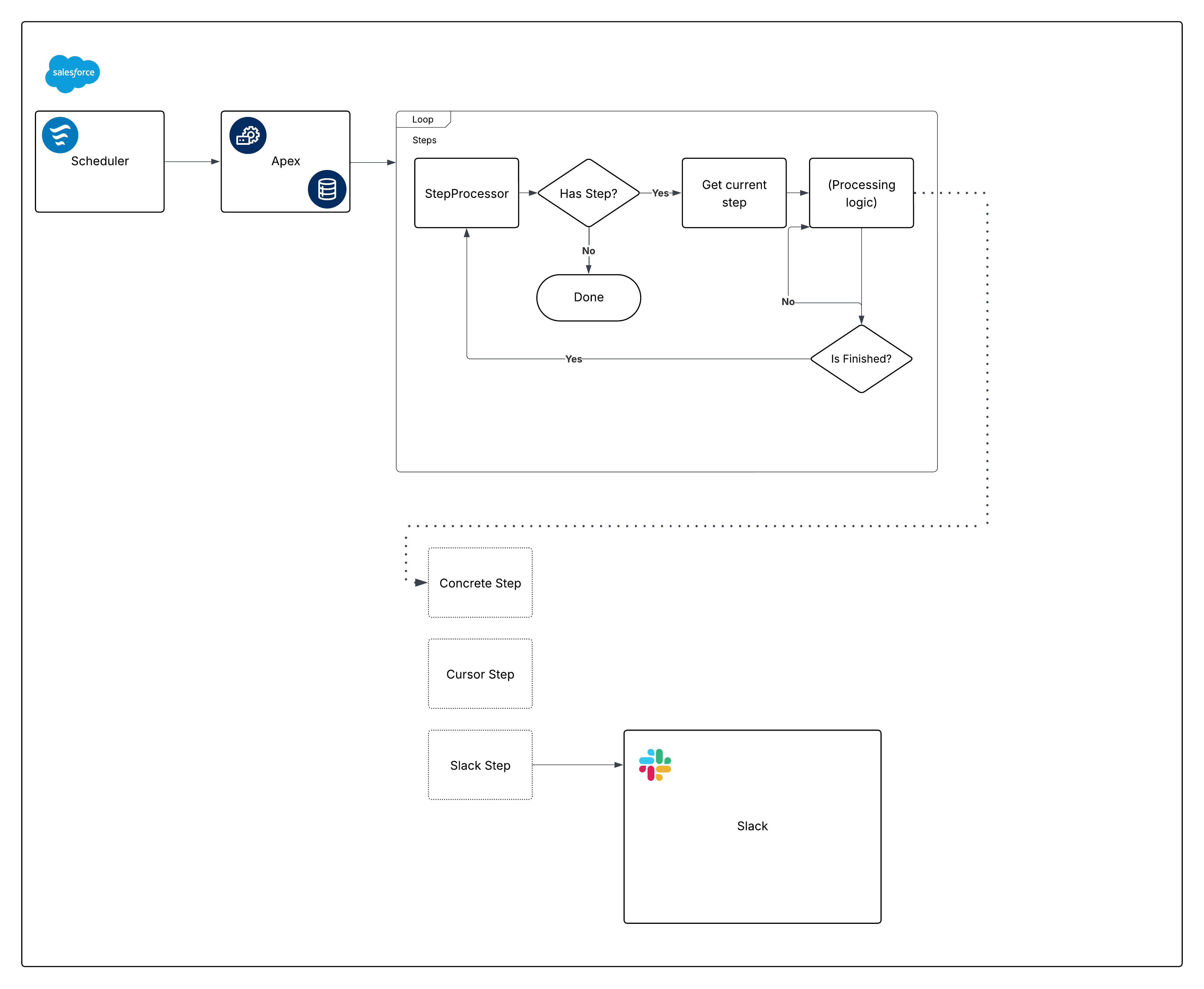
现在,分解该图表,并开始构建各个部分。
使用计划流计划
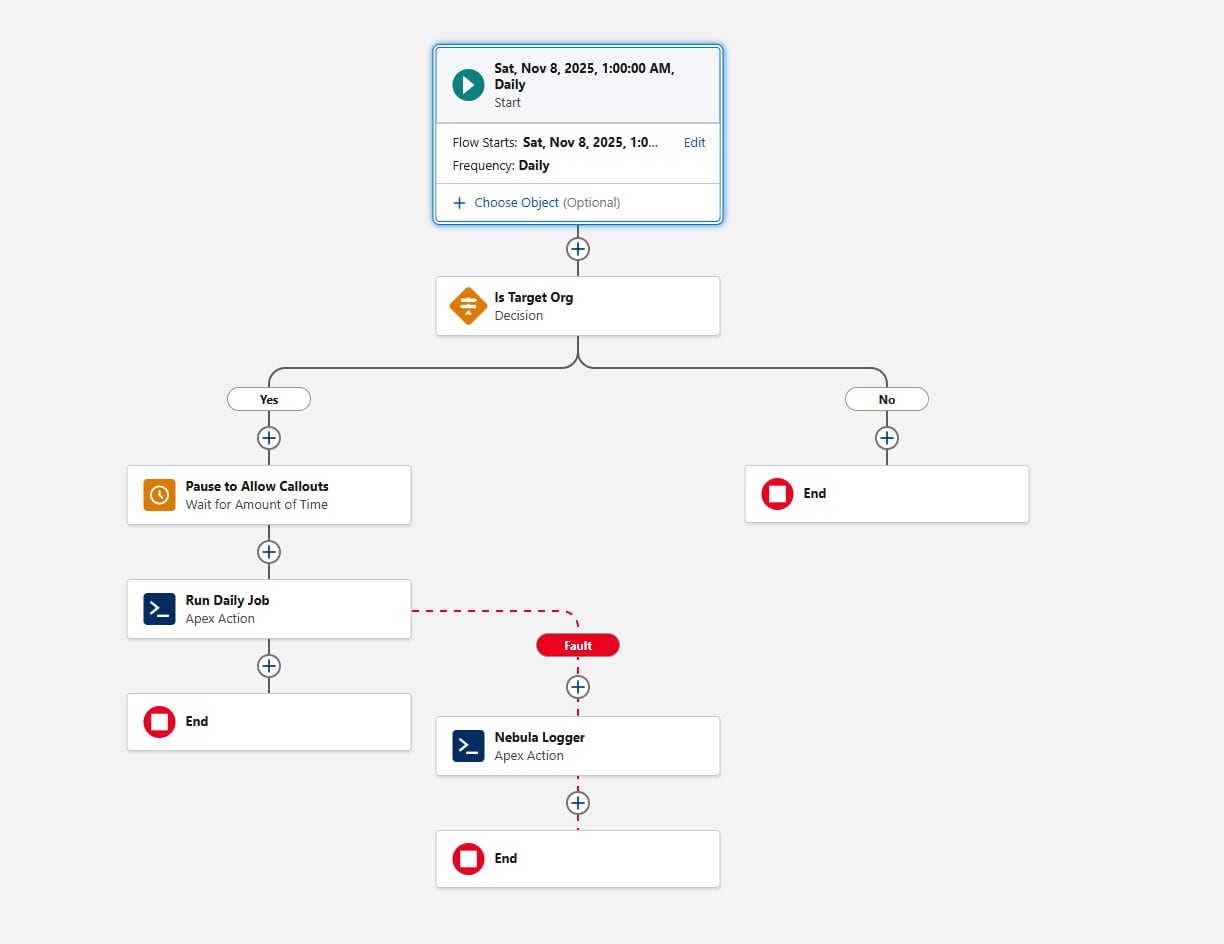
计划流作为计划机制提供了几个优势:
- 计划流可以打包并部署为元数据。对于通过 Apex(或通过计划作业页面)计划的作业,情况并非如此。
- “等待”元素对于需要标注的框架至关重要。通过在流中使用它,在框架的可调用部分中不需要标注。
- 计划粒度满足要求:计划流的最小间隔是每天。如果您需要更高的频率(例如每小时),请重新考虑此要求的计划流。
配置计划流时的另一个注意事项是环境门控。在调用 Apex 操作前,添加评估{!$Api.Enterprise_Server_URL_100}变量的决策元素。这确保了作业仅在预期的环境中运行,例如 UAT 和生产。这种模式很重要,因为 Sandbox 在 SDLC 期间经常刷新或新创建,如果没有明确的环境检查,计划流可能会无意中在框架不打算运行的环境中执行。在决策元素中使用 contains 运算符会使设置适应未来的 Sandbox 创建或 URL 更改。
最后,考虑框架应如何捕获失败。在流调用任何操作时,请始终添加错误路径;例如,您可以将错误连接到 Nebula Logger 的“添加日志条目”操作。星云日志记录器将日志写入自定义对象,因此客户应了解日志数据会消耗组织存储 — 默认情况下,日志会在组织中存储 14 天,然后进行清理;此保留期可配置。星云日志记录器还使用平台事件发布日志,因此日志条目独立于主要数据处理事务保存 — 这将确保捕获失败,即使主要流或 Apex 操作回滚。在考虑添加日志记录框架时,客户应评估预期的日志量和保留要求。
以下是流的外观:
现在,让我们继续讨论 Apex 代码的第一部分,满足计划要求。
创建步骤界面
定义Step界面:
1public interface Step {
2 void execute();
3 void finalize();
4 String getName();
5 Boolean shouldRestart();
6}对于本文,为清楚起见,step界面显示为外部类。框架本身是灵活的 — 只要所有步骤类引用相同的界面,团队就可以使用他们喜欢的任何 Apex 打包模式来组织界面及其实施。
关于在我们的界面中定义的方法,有一些需要注意的事项:
execute目前虽然没有参数,但在我们传递State类(或接口)以在顺序重要时在步骤之间编排数据时有所改进。getName可以返回System.Type值,而不是String。目标是为编排层提供一种在不公开其他属性的情况下记录步骤名称的方法。
以下是第一个具体实施,显示了这些组件如何相互配合。除了稍后的一个例外,我们建议使用可排队 Apex 在 Apex 中实施异步处理;批量 Apex 通常是不必要的(不鼓励使用@future方法)。Queueable Apex 启动迅速,通过 Apex 光标,与批处理 Apex 相比有许多优势。
Apex 类似光标的实施
Apex 光标为传统的批量 Apex 模型提供了现代替代方案。与批处理相似,光标实施可以分块获取记录(每批最多 2,000 条)。但是,光标允许在单个事务中进行多次提取,从而为大批量操作提供了更高的吞吐量。
当将光标作为此框架的一部分时,团队应该了解当前的测试和可模拟性限制。测试中的光标行为可能与生产行为不同,因此重要的是设计测试策略,避免依赖光标内部,而是在边界处验证编排逻辑。随着平台的发展,这些领域将继续改进,但核心指导仍然是:与批处理 Apex 相比,光标在许多用例中提供了更高的性能和更低的编排开销。
要定义系统提供的光标和您自己的代码之间的明确边界,我们建议在实施Step界面时创建类似光标的表示。考虑以下代码:
1public inherited sharing abstract class CursorStep implements Step {
2 private static final Integer MAX_CHUNK_SIZE = 2000;
3
4 protected Cursor cursor;
5
6 private Integer chunkSize = System.Limits.getLimitDMLRows();
7 private Integer position = 0;
8
9 protected abstract Cursor getCursor();
10 protected abstract void innerExecute(List<SObject> records);
11
12 public abstract String getName();
13
14 public virtual CursorStep withChunkSize(Integer chunkSize) {
15 this.chunkSize = chunkSize;
16 return this;
17 }
18
19 public void execute() {
20 this.cursor = this.cursor ?? this.getCursor();
21 this.cursor.setFetchesPerTransaction(this.getFetchesPerTransaction());
22 List<SObject> records = new List<SObject>();
23 if (this.shouldAdvance()) {
24 records = this.cursor.fetch(this.position, this.chunkSize);
25 this.position += this.chunkSize;
26 }
27 this.innerExecute(records);
28 }
29
30 public virtual void finalize() {
31 Logger.info('finished cursor step for ' + this.getName());
32 }
33
34 public virtual Boolean shouldRestart() {
35 return this.position < this.cursor.getNumRecords();
36 }
37
38 protected virtual Integer getFetchesPerTransaction() {
39 Integer maxRecordsPerFetchCall = 2000;
40 if (this.chunkSize < maxRecordsPerFetchCall) {
41 return this.chunkSize;
42 }
43 // Integer division rounds down
44 // which is perfect for our use-case
45 return this.chunkSize / maxRecordsPerFetchCall;
46 }
47
48 protected virtual Boolean shouldAdvance() {
49 return true;
50 }
51}请注意Cursor类。Apex 光标是Database.Cursor的实例,但���们的Cursor实施使我们对光标的缺点具有灵活性。以下是实施:
1public virtual without sharing class Cursor {
2 private static final Integer MAX_FETCHES_PER_TRANSACTION = Limits.getLimitFetchCallsOnApexCursor();
3
4 @TestVisible
5 private static Integer maxRecordsPerFetchCall = 2000;
6
7 private Integer cursorNumRecords;
8 private Integer fetchesPerTransaction = MAX_FETCHES_PER_TRANSACTION;
9 private final Database.Cursor cursor;
10
11 public Cursor(
12 String finalQuery,
13 Map<String, Object> bindVars,
14 System.AccessLevel accessLevel
15 ) {
16 try {
17 this.cursor = Database.getCursorWithBinds(finalQuery, bindVars, accessLevel);
18 } catch (FatalCursorException e) {
19 Logger.newEntry(
20 System.LoggingLevel.WARN,
21 'Error creating cursor. This can happen if there' +
22 ' are no records returned by the query: ' + e.getMessage()
23 );
24 }
25 }
26
27 public Cursor setFetchesPerTransaction(Integer possibleFetchesPerTransaction) {
28 // Handle accidental round downs from Integer division
29 if (possibleFetchesPerTransaction == 0) {
30 return this;
31 }
32 if (possibleFetchesPerTransaction > MAX_FETCHES_PER_TRANSACTION) {
33 Logger.newEntry(
34 System.LoggingLevel.DEBUG,
35 'Fetches per transaction: ' +
36 possibleFetchesPerTransaction +
37 ' exceeded platform max fetches per transaction: ' +
38 MAX_FETCHES_PER_TRANSACTION +
39 ', defaulting to platform max'
40 );
41 possibleFetchesPerTransaction = MAX_FETCHES_PER_TRANSACTION;
42 }
43 this.fetchesPerTransaction = possibleFetchesPerTransaction;
44 return this;
45 }
46
47 @SuppressWarnings('PMD.EmptyStatementBlock')
48 protected Cursor() {
49 }
50
51 public virtual List<SObject> fetch(Integer start, Integer advanceBy) {
52 if (this.getNumRecords() == 0) {
53 Logger.newEntry(
54 System.LoggingLevel.DEBUG,
55 'Bypassing fetch call, no records to fetch'
56 );
57 return new List<SObject>();
58 }
59 Integer localStart = start;
60 List<SObject> results = new List<SObject>();
61 while (
62 Limits.getFetchCallsOnApexCursor() < this.fetchesPerTransaction &&
63 results.size() < this.getNumRecords() &&
64 localStart < start + advanceBy
65 ) {
66 Integer actualAdvanceBy = this.getAdvanceBy(localStart, advanceBy);
67 results.addAll(this.cursor?.fetch(localStart, actualAdvanceBy) ?? new List<SObject>());
68 localStart += actualAdvanceBy;
69 }
70 return results;
71 }
72
73 public virtual Integer getNumRecords() {
74 this.cursorNumRecords = this.cursorNumRecords ?? this.cursor?.getNumRecords() ?? 0;
75 return this.cursorNumRecords;
76 }
77
78 protected Integer getAdvanceBy(Integer start, Integer advanceBy) {
79 Integer possibleFetchSize = Math.min(advanceBy, this.getNumRecords() - start);
80 if (possibleFetchSize > maxRecordsPerFetchCall) {
81 Logger.newEntry(
82 System.LoggingLevel.DEBUG,
83 'Fetch size: ' +
84 possibleFetchSize +
85 ' exceeded platform max fetch size of ' +
86 maxRecordsPerFetchCall +
87 ', defaulting to max fetch size'
88 );
89 possibleFetchSize = maxRecordsPerFetchCall;
90 } else if (possibleFetchSize < 0) {
91 possibleFetchSize = 0;
92 }
93 return possibleFetchSize;
94 }
95}对于本文的其余部分,我们在引用 Apex 类时省略了 sharing 声明。在实践中,请确保顶级类明确使用,无论是否共享,以符合您的对象模型和权限。
另请注意,我们的Cursor实施委派到平台Database.Cursor,下面将讨论其他好处。
首先,以下是相应的测试:
1@IsTest
2private class CursorTest {
3 @IsTest
4 static void itCapsAdvanceByArgument() {
5 String accountName = 'helloWorld!';
6 insert new Account(Name = accountName);
7 String query = 'SELECT Name FROM Account WHERE Name = :bindVar0';
8 Map<String, Object> bindVars = new Map<String, Object>{ 'bindVar0' => accountName };
9
10 Cursor instance = new Cursor(query, bindVars, System.AccessLevel.SYSTEM_MODE);
11
12 Assert.areEqual(1, instance.getNumRecords());
13 Assert.areEqual(accountName, instance.fetch(0, 1000).get(0).get('Name'));
14 Assert.areEqual(1, System.Limits.getApexCursorRows());
15 }
16
17 @IsTest
18 static void itCapsMaxRecordsPerFetchCall() {
19 Cursor.maxRecordsPerFetchCall = 20;
20 Integer oneMoreThanMaxFetch = Cursor.maxRecordsPerFetchCall + 1;
21
22 List<Account> accounts = new List<Account>();
23 for (Integer i = 0; i < oneMoreThanMaxFetch; i++) {
24 accounts.add(new Account(Name = 'Fetch ' + i));
25 }
26 insert accounts;
27
28 Exception ex;
29 List<SObject> results;
30 Cursor instance = new Cursor(
31 'SELECT Id FROM Account',
32 new Map<String, Object>(),
33 System.AccessLevel.SYSTEM_MODE
34 );
35 try {
36 results = instance.fetch(0, oneMoreThanMaxFetch);
37 } catch (System.InvalidParameterValueException e) {
38 ex = e;
39 }
40
41 Assert.areEqual(null, ex?.getMessage());
42 Assert.areEqual(2, Limits.getFetchCallsOnApexCursor());
43 Assert.areEqual(oneMoreThanMaxFetch, results.size());
44 }
45
46 @IsTest
47 static void itFetchesMultipleTimesPerTransactionWhenMoreThanMaxFetch() {
48 Cursor.maxRecordsPerFetchCall = 20;
49 List<Account> accounts = new List<Account>();
50 Set<String> expectedFetchNames = new Set<String>();
51 for (Integer i = 0; i < Cursor.maxRecordsPerFetchCall + 1; i++) {
52 String accountName = 'Fetch' + i;
53 expectedFetchNames.add(accountName);
54 accounts.add(new Account(Name = accountName));
55 }
56 insert accounts;
57
58 Integer oneMoreThanMaxFetch = Cursor.maxRecordsPerFetchCall + 1;
59 Cursor instance = new Cursor(
60 'SELECT Name FROM Account',
61 new Map<String, Object>(),
62 System.AccessLevel.SYSTEM_MODE
63 );
64 List<SObject> results = instance.setFetchesPerTransaction(2).fetch(0, oneMoreThanMaxFetch);
65
66 Assert.areEqual(Cursor.maxRecordsPerFetchCall + 1, results.size());
67 Assert.areEqual(2, Limits.getFetchCallsOnApexCursor());
68 Set<String> actuallyFetchedNames = new Set<String>();
69 for (Account account : (List<Account>) results) {
70 actuallyFetchedNames.add(account.Name);
71 }
72 Assert.areEqual(expectedFetchNames, actuallyFetchedNames);
73 }
74
75 @IsTest
76 static void itFetchesMultipleTimesPerTransaction() {
77 Cursor.maxRecordsPerFetchCall = 1;
78 insert new List<Account>{ new Account(Name = 'One'), new Account(Name = 'Two') };
79
80 Cursor instance = new Cursor(
81 'SELECT Id FROM Account',
82 new Map<String, Object>(),
83 System.AccessLevel.SYSTEM_MODE
84 )
85 .setFetchesPerTransaction(2);
86 List<SObject> results = instance.fetch(0, 2);
87
88 Assert.areEqual(2, instance.getNumRecords());
89 Assert.areEqual(2, results.size());
90 results = instance.fetch(2, 1);
91 Assert.areEqual(0, results.size());
92 }
93
94 @IsTest
95 static void fetchesCorrectAmountOfRecords() {
96 List<Account> accounts = new List<Account>();
97 for (Integer i = 0; i < 10; i++) {
98 accounts.add(new Account(Name = 'Fetch ' + i));
99 }
100 insert accounts;
101
102 Cursor instance = new Cursor(
103 'SELECT Id FROM Account',
104 new Map<String, Object>(),
105 System.AccessLevel.SYSTEM_MODE
106 )
107 .setFetchesPerTransaction(10);
108 List<SObject> results = instance.fetch(0, 2);
109
110 Assert.areEqual(2, results.size(), '' + results);
111 Assert.areEqual(1, Limits.getFetchCallsOnApexCursor());
112 }
113
114 @IsTest
115 static void doesNotExceedPlatformMaxFetch() {
116 List<Account> accounts = new List<Account>();
117 for (Integer i = 0; i < 101; i++) {
118 accounts.add(new Account(Name = 'Fetch ' + i));
119 }
120 insert accounts;
121
122 Test.startTest();
123 Cursor instance = new Cursor(
124 'SELECT Id FROM Account',
125 new Map<String, Object>(),
126 System.AccessLevel.SYSTEM_MODE
127 )
128 .setFetchesPerTransaction(100);
129 Integer counter = 0;
130 List<SObject> results;
131 while (counter <= 100) {
132 results = instance.fetch(counter, counter + 1);
133 counter++;
134 }
135 Test.stopTest();
136
137 Assert.areEqual(101, counter);
138 Assert.areEqual(0, results.size());
139 }
140}通过将Cursor虚拟化,当具体的CursorStep实施不需要迭代大型记录集时,它们可以在没有Database.Cursor的情况下运行,类似于在批处理 Apex 中返回System.Iterable<T>而不是Database.QueryLocator。以下是示例:
1public abstract class CursorLikeImplementation extends CursorStep {
2 private final Cursor cursorLike;
3
4 public CursorLikeImplementation(List<SObject> previouslyRetrievedRecords) {
5 this.cursorLike = new CursorLike(previouslyRetrievedRecords);
6 }
7
8 public override String getName() {
9 return CursorLikeImplementation.class.getName();
10 }
11
12 public override Cursor getCursor() {
13 return this.cursorLike;
14 }
15
16 private class CursorLike extends Cursor {
17 private final List<SObject> records;
18
19 public CursorLike(List<SObject> records) {
20 super();
21 this.records = records;
22 }
23
24 public override List<SObject> fetch(Integer position, Integer chunkSize) {
25 // clone, to keep the underlying list type
26 List<SObject> clonedRecords = this.records.clone();
27 clonedRecords.clear();
28 for (Integer i = position; i < this.getAdvanceBy(position, chunkSize); i++) {
29 clonedRecords.add(this.records[i]);
30 }
31 return clonedRecords;
32 }
33
34 public override Integer getNumRecords() {
35 return this.records.size();
36 }
37 }
38}请注意,由于该类也是抽象的,因此它将innerExecute的具体实施留给子类。
CursorLike 内部子类也有另一种选择。如果您知道像这样的步骤的具体版本不会通过其他调控器限制,您可以从 CursorLike.fetch 返回 this.records 并覆盖父CursorStep.shouldRestart()以返回 false。这允许您迭代仅受每个异步事务 12 MB 的 Apex 堆限制限制的列表。
其他可能的基于步骤的实施
在分页大量数据时,我们基于光标的实施为我们提供了很大的灵活性。同时 , Step 界面让我们可以灵活地描述和封装各种步骤。
考虑基于流的步骤:
1public virtual class FlowStep implements Step {
2 private final Invocable.Action specificFlow;
3
4 private Boolean shouldRestart = false;
5
6 public FlowStep(String specificFlowName, Map<String, Object> inputs) {
7 this.specificFlow = Invocable.Action.createCustomAction('flow', specificFlowName);
8 this.specificFlow.setInvocations(new List<Map<String,Object>>{ inputs });
9 }
10
11 public void execute() {
12 List<Invocable.Action.Result> results = this.specificFlow.invoke();
13 for (Invocable.Action.Result result : results) {
14 if (result.isSuccess()) {
15 Map<String, Object> outputParams = result.getOutputParameters();
16 Object potentialShouldRestartValue = outputParams.get('shouldRestart');
17 // Flow does not enforce Booleans being initialized
18 // so a null check is sadly necessary here
19 if (potentialShouldRestartValue != null) {
20 this.shouldRestart = this.shouldRestart ||
21 Boolean.valueOf(potentialShouldRestartValue);
22 }
23 } else {
24 List<String> errorMessages = new List<String>();
25 for (Invocable.Action.Error error : result.getErrors()) {
26 errorMessages.add(
27 'Error code: ' + error.getCode() +
28 ', error message: ' + error.getMessage()
29 );
30 }
31 Logger.error(
32 'An error occurred within your auto-launched flow:\n' +
33 String.join(errorMessages, '\n\t')
34 );
35 }
36 }
37 }
38
39 public virtual void finalize() {
40 Logger.info(this.getName() + ' finished processing');
41 }
42
43 public String getName() {
44 return FlowStep.class.getName() + ':' + this.specificFlow.getName();
45 }
46
47 public Boolean shouldRestart() {
48 return this.shouldRestart;
49 }
50}因为流不能返回符合 Apex 定义类型的输出参数,所以我们在使用前要检查shouldRestart输出参数。
一些步骤可能会带有标记。您可以实施逻辑来决定要包含哪些步骤,或者对禁用的功能使用禁止步骤。空对象模式是降低编排层复杂性的常见方法:
1@SuppressWarnings('PMD.EmptyStatementBlock')
2public class NoOpStep implements Step {
3 // The null object pattern is commonly implemented
4 // as a singleton to reduce memory consumption
5 public static final NoOpStep SELF {
6 get {
7 SELF = SELF ?? new NoOpStep();
8 }
9 private set;
10 }
11
12 public void execute() {
13 }
14
15 public void finalize() {
16 }
17
18 String getName() {
19 return NoOpStep.class.getName();
20 }
21
22 Boolean shouldRestart() {
23 return false;
24 }
25}我们现在有很多构件可以使用。让我们看看负责迭代步骤的编排层。
创建步骤处理器
处理器是架构中的转折点。我们必须决定由谁定义初始化哪些步骤,以及在哪里初始化。选项包括:
- 让处理器定义哪些步骤映射到业务逻辑。此选项简单,但在可读性方面扩展性较差。
- 使用自定义元数据 (CMDT) 定义映射。元数据关系字段不支持
ApexClass,这会将类名称拼写松散地耦合到业务流程设置中。通过将字段设置为选项列表并验证类型是否存在(Type.forName()或查询ApexClass),您可以降低管理员风险,但由于 CMDT 记录不支持触发器,验证将在运行时进行。此路线可测试,但管理员仍只能在生产中创建 CMDT 记录,请谨慎操作。 - 使用记录定义映射。非管理员可以配置步骤,但部署会变得更加困难,环境也会发生变化。小心行事。
Clean Code 中有句名言介绍了如何处理这一特殊的复杂性:
这个问题的解决方案是埋在抽象工厂的地下室中[用于制作对象的]
switch语句,永远不要让任何人看到它。
请谨记这一点,因为我们当前的步骤数量定义明确,并且不太可能增长得太大,所以步骤处理器也可以成为步骤的工厂。这可以使用枚举来驱动 switch 语句:
1public enum StepType {
2 TYPE_ONE,
3 TYPE_TWO,
4 TYPE_THREE,
5 TYPE_FOUR
6 // etc ...
7}然后为了我们的StepProcessor:
1public StepProcessor implements System.Queueable, System.Finalizer,
2 Database.AllowsCallouts {
3 private final List<Step> steps = new List<Step>();
4
5 private Step currentStep;
6
7 public StepProcessor setSteps(List<StepType> stepTypes) {
8 for (StepType type : stepTypes) {
9 switch on type {
10 WHEN TYPE_ONE {
11 this.addTypeOneSteps();
12 }
13 WHEN TYPE_TWO {
14 this.addTypeTwoSteps();
15 }
16 // ... etc
17 }
18 }
19 this.cleanSteps();
20 return this;
21 }
22
23 public void execute(System.QueueableContext context) {
24 this.currentStep = this.currentStep ?? this.steps.remove(0);
25 if (context != null) {
26 System.attachFinalizer(this);
27 Logger.setAsyncContext(context);
28 }
29 Logger.info('Executing step ' + this.currentStep.getName());
30 try {
31 this.currentStep.execute();
32 } catch (Exception e) {
33 Logger.exception('Unexpected exception', e);
34 }
35 Logger.info('Finished executing step ' + this.currentStep.getName());
36 Logger.saveLog();
37 }
38
39 public void execute(System.FinalizerContext context) {
40 Logger.info('Executing finalizer for step ' + this.currentStep.getName());
41 Logger.setAsyncContext(context);
42 switch on context?.getResult() {
43 when UNHANDLED_EXCEPTION {
44 // see the note below about this logging paradigm
45 Logger.warn(
46 'Failed to run on step' + this.currentStep,
47 context?.getException()
48 );
49 }
50 when else {
51 this.currentStep.finalize();
52 if (this.currentStep.shouldRestart()) {
53 this.kickoff();
54 } else if (this.steps.isEmpty() == false) {
55 this.currentStep = this.steps.remove(0);
56 this.kickoff();
57 } else {
58 Logger.info('Finished executing steps');
59 }
60 }
61 }
62 Logger.info(
63 'Finished executing finalizer for step ' +
64 this.currentStep.getName()
65 );
66 Logger.saveLog();
67 }
68
69 public String kickoff() {
70 return this.steps.isEmpty() ? null : System.enqueueJob(this);
71 }
72
73 private void cleanSteps() {
74 for (Integer reverseIndex = this.steps.size() - 1;
75 reverseIndex >= 0; reverseIndex--) {
76 if (this.steps[reverseIndex] instanceof NoOpStep) {
77 this.steps.remove(reverseIndex);
78 }
79 }
80 }
81
82 private void addTypeOneSteps() {
83 this.steps.addAll(
84 new List<Step> {
85 new ExampleCursorStepOne(),
86 new ExampleCursorStepTwo()
87 }
88 );
89 }
90
91 private void addTypeTwoSteps() {
92 this.steps.addAll(
93 new List<Step> {
94 new FlowStep('
95 ExampleInvocableName',
96 new Map<String, Object>( 'exampleParameter' => true)
97 ),
98 new ExampleCursorStepThree()
99 }
100 );
101 }
102}显示的工厂方法,例如 addTypeOneSteps(),可以委派功能标记等关注;cleanSteps() 对收集的步骤执行一次性检查,以确保在真正异步之前没有任何“空”步骤。这可能看起来像这样:
1private Step getStepOrDefault(String customPermissionName, Step defaultStep) {
2 if (System.FeatureManagement.checkPermission(customPermissionName)) {
3 return defaultStep;
4 }
5
6 return NoOpStep.SELF;
7}自从在“计划流”部分提到星云记录器以来,我们没有讨论过错误处理。这是因为 System.Finalizer 允许我们全面记录所有错误条件,而无需在每个步骤中添加特定的错误处理。每个Step侧重于运行,而我们记录并重新抛出任何不愉快的路径,以便它们在单元测试中出现。这支持安全迭代和生产级警报(对所有 WARN 和 ERROR 日志使用 Slack Logger 星云插件 ) 。
有关错误日志记录的一个注意事项:将步骤实例传递到日志消息中,假设对日志中可见的内容有一定程度的 Trust。Apex 类的默认toString()包括消息中的所有静态和实例级属性。这可能是可取的 — 也可能泄露敏感信息。虽然日志记录和安全性不是这里的重点,但是请注意对于一些系统,遵守像 Step 这样的界面也可能涉及强制覆盖toString()。
1public interface Step {
2 void execute();
3 void finalize();
4 String getName();
5 Boolean shouldRestart();
6 String toString();
7}这种方法让每个对象创建者负责决定允许打印的内容,这可能是可取的。
在日志记录级别:在StepProcessor级别,我们使用 INFO,即最高的非错误级别。随着您在应用程序中变得越来越细,日志级别应该相应地降低。单个步骤可能会将DEBUG用于高级信息,并将FINE、FINER和FINEST保留给越来越详细的输出。记录既是一门艺术,也是一门科学,但遵循这些原则有助于保持日志的一致性和有用性。
在步骤处理器中处理其他复杂性
在继续之前,让我们简要地考虑一下让我们的步骤处理器托管使用步骤的逻辑的决定。在大型代码库中,考虑使StepProcessor成为虚拟或抽象的,并让子类确定具体步骤来建立适当的关注点分离。
Apex 可调用图层
计划程序最终会调用 Apex。在其余设置完成后,可调用 Apex 部分可以决定哪些步骤应运行并将List<StepType>传递给处理器:
1public class DailyJobExecutor {
2 @InvocableMethod(label='Execute Daily Job')
3 public static void executeJob() {
4 Logger.info('Executing daily Job');
5
6 List<StepType> correspondingTypes = new List<StepType>();
7 // based on [business logic], determine which step types
8 // should be included for any daily invocation
9
10 if (correspondingTypes.isEmpty() == false) {
11 try {
12 new StepProcessor().setSteps(correspondingTypes).kickoff();
13 } catch (Exception ex) {
14 Logger.exception('Error starting job', ex);
15 }
16 }
17 }
18
19 Logger.saveLog();
20}这是等式的简单部分 — 使用记录、数据或逻辑来确定要运行哪个步骤类型。可调用操作很简单,因为我们在其他地方封装了复杂性。我们还防止了意外异常,并使每个部分易于单独测试。
在调用 Slack 之前处理延迟
Apex Slack SDK超出了本文的范围,但需求中的一个潜在障碍值得重新审视:根据可配置的延迟通知角色层次结构中的上级人员。从纸面上讲,这很简单,您可能(正确地)考虑在StepProcessor中System.enqueueJob(this)。对于 System.AsyncOptions,我们最初倾向于使用enqueueJob过载来满足这一要求。
但目前通过System.AsyncOptions.MinimumQueueableDelayInMinutes的最大延迟为 10 分钟。因为要求是 120 分钟,所以还有一些选项。一种幼稚的方法可能看起来像这样:
1public class ExampleDelayedNotifier implements Step {
2 private final List<Slack.ChatPostMessageRequest> notifications = new List<Slack.ChatPostMessageRequest>();
3 private final Slack.BotClient botClient = Slack.App
4 .getAppByKey('some-slack-app-key')
5 .getBotClientForTeam('slack team id');
6
7 // account for the initial delay,
8 // so 120 - 10 = 110
9 private Integer delayMinutes = 110;
10
11 public void execute() {
12 if ( this.delayInMinutes > 0) {
13 return;
14 }
15
16 Integer maximumAllowedCallouts = 100;
17 while (this.notifications.isEmpty() == false && maximumAllowedCallouts > 0) {
18 this.botClient.chatPostMessage(this.notifications.remove(0));
19 maximumAllowedCallouts--;
20 }
21 }
22
23 public void finalize() {
24 this.delayInMinutes -= 10;
25 }
26
27 public String getName() {
28 return ExampleDelayedNotifier.class.getName();
29 }
30
31 public Boolean shouldRestart() {
32 return this.delayInMinutes > 0 || this.notifications.isEmpty() == false;
33 }
34}实际上,延迟会传递到该类,因为延迟是配置驱动的。
除非您确定只有一个延迟通知类型,否则我们不建议使用这种方法。在开始之前,它会烧掉 11 个额外的异步作业(或者更多,如果延迟增加)。对于一个工作来说,这个成本可能还不错 — 对许多人来说不是。您还需要向Step界面添加方法,以便每个步骤可以告诉处理器在重新启动之前需要等待多长时间,这会增加噪音。
这给我们留下了两个有趣的可能性:
- 如果您已经以适当的时间间隔计划了轮询作业,您可以将延迟的步骤插入到现有作业框架中。指定的延迟在 15 分钟后到达(15 分钟是 Apex 计划 CRON 表达式的最小刷新间隔),您也应该可以。这大致匹配可调用 Apex 示例;计划改为通过 Apex 执行。换句话说,您可以重复使用相同的基于
Step的架构来根据“开始于”时间戳处理记录,并根据选项列表或映射到之前显示的StepType枚举值的多选选项列表决定使用哪些步骤。 - 或者,如果您愿意定义额外的外部 Apex 类,请回到使用
System.scheduleBatch()的批处理 Apex(与支持内部类的 Queueable Apex 不同,批处理 Apex 类必须是外部类)。
考虑批处理 Apex 示例。虽然我们通常建议使用 Queueable Apex 来实现灵活性和控制性,但这是 Batch Apex 仍然占主导地位的一个情况:
1public class DelayedNotifier implements Database.Batchable<Object> {
2 private final StepProcessor processor = new StepProcessor();
3
4 public Iterable<Object> start(Database.BatchableContext bc) {
5 return new List<Object>();
6 }
7
8 @SuppressWarnings('PMD.EmptyStatementBlock')
9 public void execute(Database.BatchableContext bc, Object scope) {
10 // we don't need to actually do anything in execute,
11 // we just need to start up the processor in finish
12 }
13
14 public void finish(Database.BatchableContext bc) {
15 try {
16 // you can imagine Notifier as an elided,
17 // simpler version of the naive implementation
18 // we showed above, now only focused on sending messages
19 this.processor.setSteps(new List<Step>{ new Notifier() }).kickoff();
20 } catch (Exception ex) {
21 Logger.exception('Unexpected error', ex);
22 } finally {
23 Logger.saveLog();
24 }
25 }
26}然后,在StepProcessor中,假设之前显示的addTypeOneSteps()方法使用此延迟步骤进行更新:
1public StepProcessor implements System.Queueable, System.Finalizer,
2 Database.AllowsCallouts {
3 // .... unchanged top of class elided
4
5 private void addTypeOneSteps() {
6 this.steps.addAll(
7 new List<Step> {
8 new ExampleCursorStepOne(),
9 new ExampleCursorStepTwo(),
10 new DelayedNotifierStep()
11 }
12 );
13 }
14
15 // ...
16
17 private class DelayedNotifierStep implements Step {
18 private final DelayedNotifier delayedNotifier = new DelayedNotifier();
19 // again — in practice this value would also be passed in
20 private final Integer delayInMinutes = 120;
21
22 public void execute() {
23 System.scheduleBatch(
24 this.delayedNotifier,
25 'Delayed notifier: ' + System.now().getTime(),
26 this.delayInMinutes
27 );
28 }
29
30 public void finalize() {
31 Logger.debug('Nothing to finalize, batch scheduled');
32 }
33
34 public String getName() {
35 return DelayedNotifierStep.class.getName();
36 }
37
38 public Boolean shouldRestart() {
39 return false;
40 }
41 }
42}虽然我们通常不会建议这么多的跳转,但这个步骤延迟会成为另一个可重用的构建块。在 Queueable Apex 中允许更长的延迟之前,这也是产生这种效果的最简单方法(如讨论的那样,没有轮询机制)。
结论
我们使用面向对象的设计来满足要求,并创建了一个系统来扩展,同时平衡长期的建筑和维护成本。虽然步骤声明和实例化最终可能会超出其在StepProcessor中的地位,但几乎没有额外的技术债务。通过FlowStep,管理员和开发人员可以共同决定何时无代码或专业代码解决方案最有意义。
通过在 Apex 可排队框架中使用System.Finalizer界面以及星云日志记录器,我们构建了一个强大的可测试系统,即使未来的步骤缺乏明确的日志记录,也能提醒我们意外的失败。对于我们来说,这个系统很高兴地压缩了数字,降低了成本和复杂性。它还为我们提供了有关 Apex 光标在实际工作负载下的行为的宝贵见解,帮助我们在改进功能的同时完善了我们的方法。
通过将复杂的高用量工作负载分解为模块化执行步骤,基于步骤的异步处理框架框架将平台约束转化为工程优势,实现了企业级的可预测性能、可观察性和治理。管理员和开发人员都可以设置步骤,无论哪种情况,步骤作者都可以安全地专注于遵守基本平台调控器限制(例如 DML 行和检索的查询行),而不必担心如何扩展每个步骤。
前进路径
为了在企业实施中操作和采用这种模式,架构师应该:
- 评估现有自动化,确定异步编排可帮助改善性能和增强可观察性的领域。
- 将大型进程细分为离散的、独立可执行的步骤,具有明确的处理目标和离散的作者点(例如 Flow 或 Apex)。
- 定义和分组步骤类型,以加速步骤重用和跨业务部门的标准化。
- 通过新流程或现有自动化试用该方法。您可能会惊讶地发现,在步骤中免费找到多少边缘个案,关心您的内置日志记录和可观察性!
关于作者
James Simone 是 Salesforce 的首席软件工程师,拥有十多年的平台工作经验。在进入开发阶段之前,他是 Salesforce 的客户和产品所有者,自 2019 年以来一直在 The Joys Of Apex 中撰写有关 Salesforce 的技术文章。他之前在 Salesforce 开发人员博客和 Salesforce 工程博客上发表了文章。
8 minute read
