Data 360 Interoperability
Enterprises often store data in Salesforce and other external data lakes (for example, Snowflake, Google BigQuery, Databricks, Redshift, or object storage like Amazon S3). Siloing data across multiple systems creates a challenge for companies that want to harness the full value of their data to power AI-driven experiences. Salesforce Data 360 is the foundational intelligence layer that every Agentforce AI Agent uses to access the correct context at the correct moment.
Architects who work to bring data together across multiple data lakes face key architectural decisions regarding how best to integrate that data. Data 360 provides multiple options for data integration, each offering various pros and cons.
This guide provides a framework to evaluate which pattern best fits your requirements for latency, cost, scalability, governance, and complexity when integrating data, helping you choose when to use data ingestion, Zero Copy data federation, or a hybrid approach. The guide will also help you select between different methods of data ingestion and data federation, each of which fills a different need.
Integrating external data-lake houses with Data 360 requires carefully considering the trade-offs between data freshness, governance, and pipeline efficiency. For example, using Zero Copy data federation live queries maximizes the freshness of the data but may reduce pipeline efficiency as more data moves over the network. For most real-world implementations, combining ingestion and federation in a multi-cloud lake house ecosystem is the optimal path. This hybrid approach ensures a scalable, governed, interoperable architecture that supports low-latency operational workloads (for example, real-time personalization and fraud detection) and analytical workloads (for example, regulatory reporting and historical trend analysis). This guide helps you determine how to navigate these trade-offs using an appropriate strategy.
- Data Ingestion copies data into Salesforce Data 360 and creates governed, canonical Data Models. This is ideal for when you need to:
- Build a comprehensive Customer 360. This allows you to unify and transform disparate sources into a single, trusted profile.
- Meet strict regulatory compliance. This allows you to create an auditable, centralized copy so that data access and lineage can be closely controlled.
- Zero Copy Federation queries external sources in real time without duplication, enabling real-time personalization, live dashboards, and rapid source onboarding. This approach provides two primary options, but there are trade-offs that need to be balanced:
- Live Query: Use this for interactive analysis and real-time data dashboards that live in external data platforms (for example, Snowflake, BigQuery, Redshift, or Databricks). This helps to avoid slow, costly data duplication by pushing query processing to the source system and returning only necessary results. This approach is optimized for infrequent or ad-hoc queries where freshness is critical. It’s suitable for low query-per-second (QPS) workloads (query costs may spike significantly at high QPS).
- Caching (Accelerated Query): Use this for frequent data queries that don’t change often. Accelerated queries maintain a local cache that’s updated at configurable intervals (15 minutes to 7 days), which reduces repeated source hits. This approach balances dashboard performance and cost, segmentation, and BI workloads where slightly stale results are acceptable. This isn’t suitable for sub-second decision making.
- File Federation: Use this for large-scale batch processing and AI model training for data in your cloud’s data lake (for example, S3 or ADLS). This approach avoids slow, costly ingestion by directly querying files in open table formats, which unlocks massive ETL datasets and data science workloads.
- Hybrid Models blend ingestion for Unified Profiles with federation for freshness, which supports omni-channel engagement, Agentforce-driven actions, and AI/ML training.
- Employ a Hybrid Architecture. Mixing data ingestion and federation is often necessary.
- Use Data Ingest on critical data for canonical data models and core governance.
- Use Zero Copy for all other data federation to maintain freshness and minimize the operational overhead of building and maintaining data ingestion pipelines.
- Data Ingestion Frequency Matters. Choose the frequency based on business value, latency needs, and operational complexity.
- Use real-time for time-sensitive workflows (for example, personalization, live dashboards, and Agentforce actions).
- Use Near real-time for moderately urgent processes (for example, campaigns and operational reports).
- Use batching for historical or low-velocity datasets.
- Match Federation Patterns to Latency and Performance. Choose the option that best matches your access patterns and requirements for freshness, performance, and cost.
- Use Live Query for operational dashboards and real-time personalization where low latency is critical.
- Use Caching (Accelerated Query) when queries are frequent and slightly-stale results are acceptable, which helps balance performance and cost.
- Use File Federation for large-scale, throughput-heavy analytics or batch workloads, which are ideal for historical or less time-sensitive datasets.
- Align Governance with Data Residency Requirements.
- Use ingestion when centralized governance is critical.
- Use federation when decentralized governance is acceptable, while also enforcing strict governance at the external source.
- Use Zero Copy with respect to source-level policies (for example, row-level security (RLS) and data masking).
- Prioritize Ingestion for High-Value Workflows. Apply ingestion selectively to critical processes (for example, identity resolution, regulatory reporting, and operational activation).
- Cost and Complexity Drive Decisions. Real-time ingestion can be expensive and complex. That’s why it’s important for architects to weigh the cost of onboarding, storing, and transforming data against the cost of querying it directly via Zero Copy.
Choosing the correct integration pattern—Data Ingestion, Zero Copy, or a Hybrid approach—directly impacts latency, governance, operational efficiency, and cost across multi-cloud platforms. This decision shapes how real-time insights, AI-driven activation, and personalized engagement are delivered reliably and at scale.
This table compares the Data Ingestion and Zero Copy patterns in Salesforce Data 360, focusing on capabilities, trade-offs, and benefits, as well as enterprise use cases and outcomes. Use this as a reference for designing hybrid, multi-cloud data platforms that balance performance, cost, and compliance.
| Pattern Type | Mode/Tool | Benefits | Considerations | Outcomes |
|---|---|---|---|---|
| Data Ingestion |
Real-Time:
|
|
|
Agentforce:
|
Streaming:
|
|
|
Agentforce:
|
|
Batch:
|
|
|
Agentforce:
|
|
| Zero Copy |
Live Query:
|
|
|
Agentforce:
|
Accelerated Query (Caching):
|
|
|
Agentforce:
|
|
File Federation:
|
|
|
Agentforce:
|
There are three primary integration patterns for Data 360 - data ingestion, zero copy data federation, and a hybrid approach.
With Data Ingestion, data is physically copied into Data 360 and fully governed, unlike Zero Copy where data remains at the source. In other words, the computing for transformations occurs within Data 360, which provides centralized governance and auditing.
Use Data Ingestion to store canonical, governed datasets in Salesforce Data 360 for compliance and operational control. Use ingestion when full control, auditing, and traceability are required. Data Ingestion is ideal for regulated or high-value workflows where centralized compute and governance are critical.
Ingestion is suitable for building a trusted foundation for identity resolution, regulatory reporting, and mission-critical AI-driven workflows and customer engagement.

Data Ingestion methods may vary, depending upon which connector you use to ingest your data. Some connectors offer a variety of ingestion methods, while others operate only in batch or streaming mode. For a complete list of Data 360 connectors and available methods, check out Data 360: Integrations and Connectors.
- Real-Time:
- Provides sub-second ingestion using Change Data Capture (CDC)
- Suitable for time-sensitive workflows (for example, fraud detection, personalization, and operational dashboards)
- Features push transformations and aggregations within Data 360, which helps to reduce downstream I/O and optimize compute usage
- Supports using incremental CDC to minimize data shuffling
- Streaming:
- Provides ingestion every 1–3 minutes in small increments
- Balances freshness and cost
- Suitable for campaign orchestration, near-live engagement, and operational reporting
- Supports using micro-batches to control I/O spikes
- Aggregates data at the source (if possible) to reduce transfer volumes and optimize storage
- Batch (Scheduled Loads):
- Provides periodic ingestion of large datasets (for example, hourly, daily, and weekly)
- Provides cost-efficiency and reliability for historical datasets, regulatory reporting, and compliance use cases
- Ensures that compute locality is in the same region as the source storage to enhance performance and optimize costs
- Data Ingestion Use Cases:
- Generate Customer 360 Unified Profiles. Build a single source of truth for customer identities and attributes.
- Maintain regulatory compliance datasets. Enforce governance, lineage, and auditability for sensitive data.
- Centralize campaign orchestration. Ensure that marketing, sales, and service all operate from consistent, trusted datasets.
- Design Practices:
- Accommodate batch ingestion for historical or low-latency-tolerant needs (for example, archival reporting or periodic snapshots).
- Use CDC or streaming APIs to maintain freshness for operational and personalization workflows to ensure near real-time updates.
- Control storage and compute growth by applying incremental loads to optimize cost and efficiency (rather than reloading entire datasets).
- Align ingestion pipelines with compute locality and incremental processing to reduce network I/O.
- Apply transformations inside Data 360 to avoid moving raw data unnecessarily.
- Cost Considerations:
- Real-Time Ingestion has the highest compute and pipeline costs, which may be justified for high-value, time-sensitive workflows (for example, personalization, operational dashboards, or Agentforce-driven actions).
- Streaming Ingestion has moderate compute and storage costs, which may be suitable for frequent updates that can tolerate slight delays (for example, campaign orchestration or operational reporting).
- Batch Ingestion has lower compute costs and predictable storage, which is suitable for historical datasets or low-frequency updates. Ingesting batch data from Salesforce orgs using certain connectors is free.
- Refresh Mode Allows you to select Incremental Refresh mode, which reduces total ingestion and compute costs. At Salesforce, we recommend using incremental refresh wherever possible to optimize efficiency across all ingestion types.
- Cost is also impacted by I/O volume from the source to Data 360. Optimizing batch sizes, partitions, and regional alignment reduces transfer costs and improves performance.
- Industry Scenarios:
- Finance: Ingestion datasets are required for knowing your customer (KYC), Anti Money Laundering (AML), and fraud detection where auditability and compliance are non-negotiable.
- Healthcare: Use ingestion for patient identity resolution and HIPAA-compliant records, which enables secure, unified views.
- Retail: Consolidate point of sale (POS), eCommerce, and loyalty program data into unified profiles for segmentation and personalization.
- Telecom: Support churn prevention and usage analytics with canonical, governed subscriber data.
| Feature | Real-Time Ingestion | Streaming Ingestion | Batch Ingestion |
|---|---|---|---|
| Latency and Freshness | Features sub-second latency ingestion via Ingestion APIs with Change Data Capture (CDC) support. Provides continuous streaming pipelines. Suitable for low-latency operational use cases. | Features micro-batch ingestion every 1–3 minutes via native connectors. Supports incremental updates. Slight latency is expected. | Data latency is expected. Allows scheduled large-volume loads. Features periodic ingestion (hourly, daily, and weekly). Not suitable for time-sensitive operations. |
| Primary Use Cases | Ideal for low-latency operational and personalization use cases. Use for time-sensitive workflows. Supports event-driven workflows. Use for real-time fraud alerts and operational alerts. | Suitable for moderately urgent processes. Use for campaign orchestration, near-live engagement, and operational reporting. Use for timely campaign triggers. | Cost-efficient for massive datasets. Reliable for historical analytics. Use for historical aggregation or regulated reporting workflows. Suitable for historical or low-velocity datasets. |
| Architectural Complexity and I/O | Includes high cost and complex architecture. Requires low-latency source systems. I/O intensive. High-volume sources can cause saturated pipelines. | Features simpler architecture than real-time. I/O is moderate. Suitable for predictable, repeated update patterns. Batch size impacts memory and computation. | Easy to implement. I/O intensive during load windows. Network throughput may become a bottleneck for large batches. |
| Cost Considerations | Includes the highest compute and pipeline costs. Justifiable for high-value, time-sensitive workflows only. | Includes moderate compute and storage costs. Provides a balanced cost vs freshness approach. Suitable for frequent updates that can tolerate slight delays. | Features lower compute costs and predictable storage. Recommended for historical datasets or low-frequency updates. Ingestion via Salesforce internal pipelines is free. |
| Design Practices | Use incremental CDC to minimize data shuffling. Filter and use selective fields to reduce overhead. | Use micro-batches to control I/O spikes. Consider windowed aggregation to reduce processing load. | Use for archival reporting or periodic snapshots. Ensure that compute locality is in the same region as source storage for cost optimization. |
Use Zero Copy for real-time querying of external systems without data duplication to enable agility, freshness, and scalable access to large or transient datasets. It’s suitable for live dashboards, exploratory analytics, AI/ML model training, and real-time customer engagement directly through Salesforce Data 360.
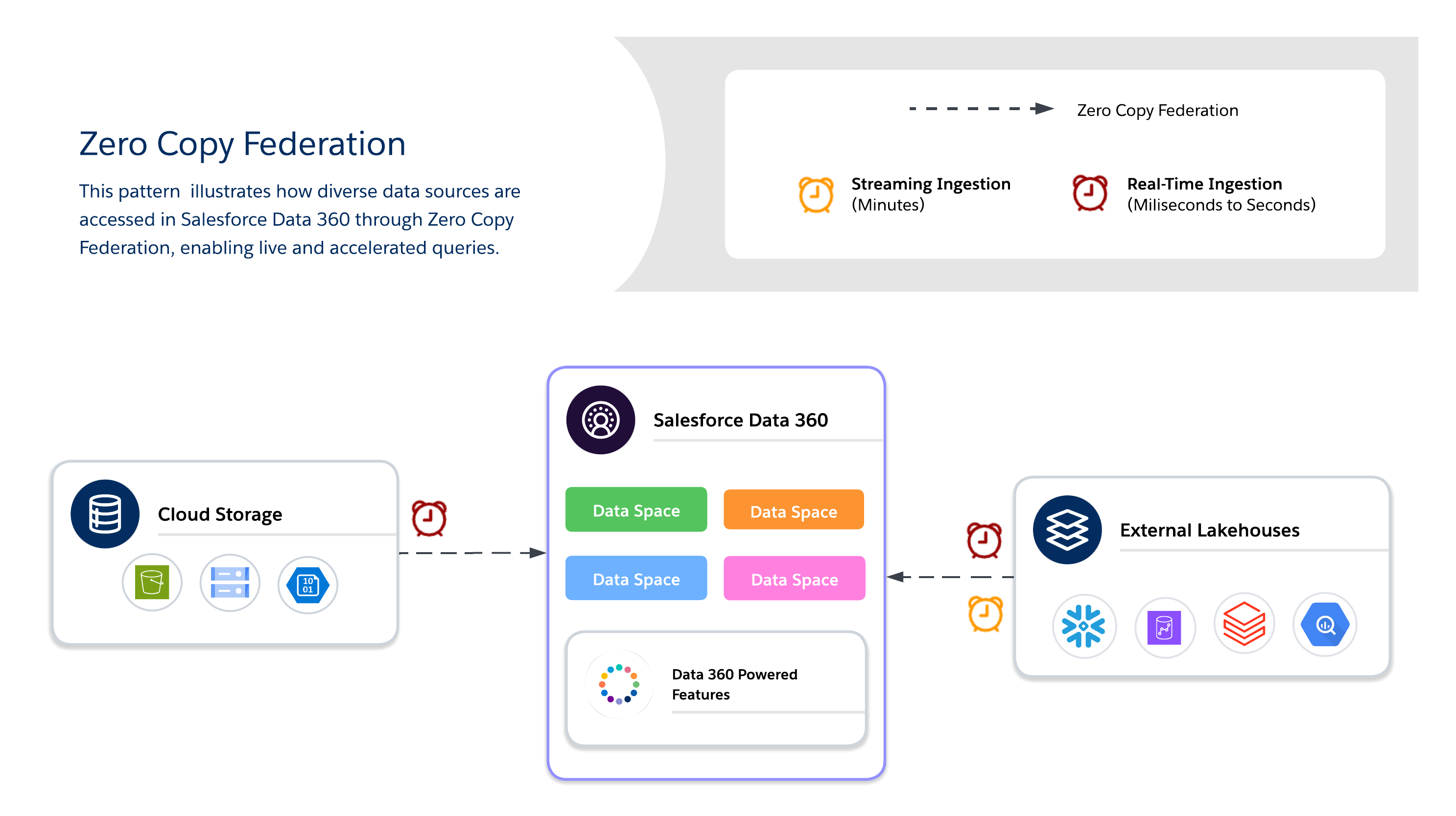
When using Zero Copy, architects must choose between three available data federation methods, each of which offers its own tradeoffs between freshness, performance, and cost.
- Live Query
- Runs queries directly against external systems (for example, Snowflake, Google BigQuery, Redshift, Databricks, and so on) with no data duplication.
- Minimizes data movement over the network and reduces I/O on the Salesforce Data 360 computation, which is optimal when predicates and aggregations can be pushed down.
- Suitable for real-time insights and low-latency operational dashboards.
- Dependent upon external system performance.
- Caching (Accelerated Query)
- Temporarily stores cached copies of federated data in Salesforce Data 360.
- Reduces repeated query costs and latency for frequently accessed datasets with configurable duration (minutes to days).
- Data isn’t permanently copied or fully governed, so freshness is managed via scheduled refreshes from the source.
- Incremental refresh supports upserts only. Deleted records aren’t removed from the cache.
- Perform a full refresh periodically to ensure that the cache remains in sync with the source.
- Note: The Snowflake connector supports the Unload function, which enhances acceleration rates by using a Snowflake-initiated staging bucket. This is enabled by default, but it can be disabled by editing the connection.
- File Federation
- Provides direct, read-only access to large-scale datasets in object stores (for example, S3 and GCS with Iceberg).
- Suitable for AI/ML workloads, historical analytics, and petabyte-scale reporting without moving data.
- Query performance depends heavily on object format, partitioning, and network I/O. Large scans may generate substantial I/O if they aren’t optimized.
- Use Cases
- Real-time personalization and adaptive workflows deliver dynamic offers, recommendations, and next-best actions as customer behaviors change.
- Live dashboards and operational analytics power business-critical dashboards and KPIs directly from external warehouses.
- AI/ML model training with large external datasets leverage petabyte-scale data from data lakes and warehouses without moving it via file federation.
- Industry Scenarios
- Retail/Media: Enable personalized recommendations and real-time customer engagement by federating clickstream or content interaction data.
- Finance: Run fraud detection and risk scoring in near-real time by querying external warehouses without duplicating sensitive data.
- Tech/Enterprise: Support cross-cloud reporting, IT service dashboards, and operational analytics when datasets reside in multiple systems.
- Design Practices
- Live Query
- Use for high-QPS, low-latency queries when freshness is critical.
- Push predicates and aggregations to the external system to reduce data shuffling over the network.
- Avoid queries that unnecessarily scan massive data volumes.
- Consider partition pruning and filters instead.
- File Federation
- Access petabyte-scale datasets in object stores without ingestion.
- Minimize latency and egress costs by keeping object storage in the same Cloud region as Salesforce computation.
- Use partitioned, columnar formats (Parquet/ORC) and pushdown filters to reduce I/O and network transfer.
- Leverage query and predicate pushdown to filter and aggregate data at the source, which reduces data movement.
- Avoid cross-region data access—unless it’s absolutely necessary—because it increases I/O, latency, and costs.
- Caching (Accelerated Query)
- Cache frequently accessed datasets to balance cost and performance.
- Configure refresh intervals to balance freshness vs. query cost.
- Compliance: Enforce governance at the source by leveraging row-level security (RLS) and masking policies directly within federated systems.
- Here are a few best practices for uniform RLS and masking across platforms:
- Use a Centralized Enterprise ID. Map users and entities in Salesforce Data 360 to a unique, centralized enterprise identifier that corresponds to identities in external systems.
- Align Security Policies. Ensure that RLS and masking policies in federated systems are applied based on the mapped identity. This preserves compliance when querying external data.
- Standardize Identity Schemas. Maintain consistent identity attributes (email, user ID, customer ID, and so on) across all data sources to avoid mismatches and access violations.
- Here are a few best practices for uniform RLS and masking across platforms:
- Live Query
- Cost Considerations
- Live Query: In the pay-per-query model, costs accrue on external lake house computation, which may cause spikes with high QPS. This is suitable for freshness-critical use cases where the value is greater than the cost variability.
- Accelerated Query (Caching): This method lowers query cost (as compared to Live Query) by reducing hits to the source system; however, it adds to batch data ingestion costs for filling and refreshing the cache. This is suitable for frequently-accessed datasets.
- File Federation: This is the cheapest storage option as data in Object Store; however, query costs depend on the file size, partitioning, and pruning. This is suitable for historical or bulk data at petabyte scale.
| Decision Point | Live Query | Caching (Accelerated Query) | File Federation |
|---|---|---|---|
| Data Source Location | External data lake houses (for example, Snowflake, Google BigQuery, Redshift, and Databricks) | External data lake houses (for example, Snowflake, Google BigQuery, Redshift, and Databricks) | Object Stores or Cloud data lakes (for example, S3, ADLS, and GCS), which often use open-table formats like Iceberg. |
| Purpose/Use Case | Suitable for interactive analysis and real-time dashboards. Suitable for real-time personalization and dynamic workflows. | Suitable for when queries are frequent, but slightly stale results are acceptable. Suitable for BI dashboards and segmentation. | Suitable for large-scale batch processing and AI/ML model training. Suitable for historical analytics and petabyte-scale reporting. |
| Freshness/Latency | Provides maximum freshness Runs queries directly in real time. Supports sub-second decisioning when the source system is optimized for low-latency queries with effective predicate pushdown. | Use when slightly stale results are acceptable. Freshness depends on the cache interval, which is configurable from 15 minutes to 7 days. | Suitable for batch-heavy, throughput-intensive jobs. Not suitable for real-time dashboarding. |
| Access Pattern | Suitable for infrequent or ad-hoc queries where freshness is critical and query volume is low. Costs spike significantly at high QPS, so it’s important to evaluate caching (Accelerated Query) when query frequency is high. | Suitable for high-frequency read scenarios. Improves performance for frequent access patterns. | Provides read-only access. Suitable for petabyte-scale datasets without ingestion. |
| Performance Drivers | Highly dependent upon external source system performance. Suitable for when predicates and aggregations can be pushed down to the source. | Reduces latency when compared to repeated live queries. Performance depends on cache management and intervals. | Performance depends heavily on object format, partitioning, and external system throughput. Use partitioned, columnar formats (Parquet/ORC). |
| Cost Implications | This is a pay-per-query model, so costs accrue on external lake house computations. It’s cost-effective for infrequent queries, but expenses may spike with high QPS volume. | The cost is lower than repeated live queries. It reduces the need to repeatedly query the external source, but it adds cache storage and refresh overhead. | This is the cheapest storage option. For same-region, same-cloud AWS setups (for example, S3 in US-East-1 with a Data Cloud tenant that’s also in US-East-1), credits aren’t consumed for the rows that are accessed. Cross-region or cross-Cloud configurations (for example, Azure, GCS, or different AWS regions) incur credit consumption for the rows that are accessed. Query costs also depend on file size, partitioning, and predicate pushdown optimization. |
| Key Consideration | Avoid unfiltered queries that scan massive data volumes unnecessarily. | This approach requires cache management. Not suitable for sub-second decisioning. | Query performance relies heavily on optimization via partitioning and predicate pushdown. |
Hybrid architectures enable architects to anchor critical datasets in Data 360 for centralized governance while also leveraging federated queries for freshness, reduced duplication, and scalable access to large, external datasets. This approach balances I/O, compute locality, cost, and compliance requirements.
Use a hybrid approach for balanced governance, freshness, and operational efficiency by combining data ingestion and zero copy to deliver real-time, actionable insights. Use ingestion for high-value, regulated datasets where traceability, RLS, and masking are required, and federation for ephemeral or high-volume datasets where freshness and performance are key.
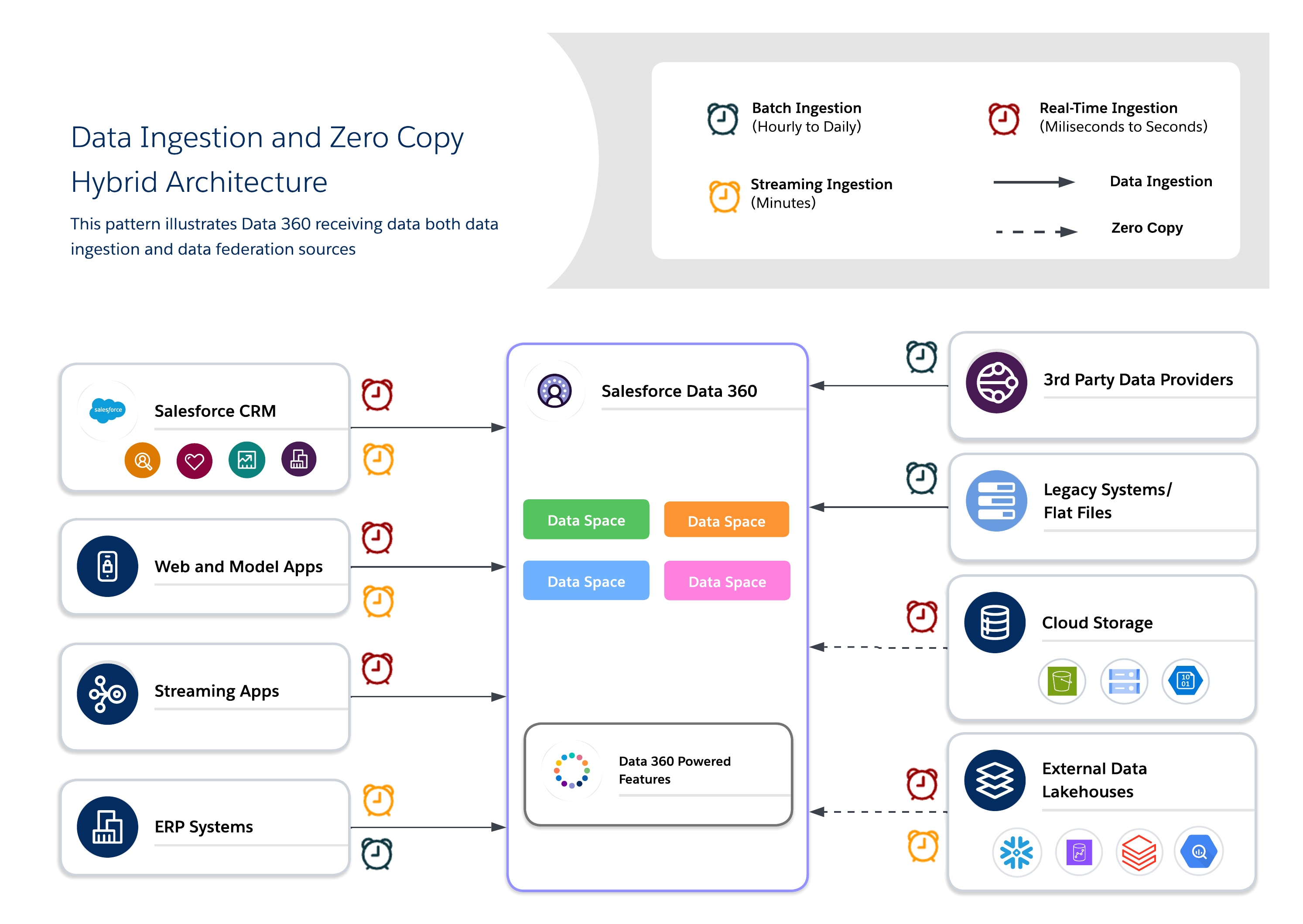
- Use Cases
- Omni-channel engagement: Blend historical customer data with real-time behavior to deliver consistent, context-aware experiences.
- AI/ML pipelines: Train models on curated, canonical datasets while enriching them with raw or real-time signals from external sources.
- Mixed compliance and agility needs: Apply strict governance for sensitive data, and federation for operational agility.
- Industry Scenarios
- Retail: Use ingestion for identity resolution and profile unification, and federation for real-time offers and personalization.
- Healthcare: Maintain golden patient records via ingestion while using federation on IoT device streams and sensor data for immediate context.
- Financial Services: Ingest regulated data into a compliance-governed lake while using federation for external fraud-detection and risk-monitoring queries.
- Design Practices
- Anchor Governance with Ingestion: Ingest high-value or regulated data into canonical models to ensure trust and compliance.
- Use Federation for Freshness: Allows external lake houses to provide real-time or large-scale data access without duplication.
- Balance Cost vs. Performance: Profile workloads to determine when to use ingestion vs. federation, which minimizes unnecessary storage and query costs.
- Apply Layered Governance: Enforce centralized governance for ingested data while leveraging the federated systems security controls (for example, RLS and masking).
- Note: When you’re designing hybrid pipelines, it’s important to ensure incremental ingestion for historical datasets and push aggregations or filters to federated sources to optimize I/O and compute usage.
- Cost Considerations
- Weigh the total cost vs. performance by combining ingestion for compliance or critical data with federation when freshness is necessary.
- Account for I/O and compute distribution when mixing ingestion and federation. To reduce the compute cost of repeated queries against source systems, use caching (Accelerated Query) for high-read, frequently-accessed federated datasets.
- Use this rule to guide the ingestion vs. federation decision: when data is accessed frequently but changes infrequently, Accelerated Query is typically more cost-effective. However, when data changes frequently (relative to access frequency), Live Query or ingestion is more appropriate. Here are a few cost examples:
- Acceleration wins: A dashboard that’s built from 1M records and updated daily with ~10K changes is viewed 20 times per day. Acceleration costs equate to roughly ~600 credits/month vs. ~4,200 credits/month for Live Queries.
- Live Query wins: Segments that are published 20 times per day using data that changes every 30 minutes. Live Queries cost roughly ~4,200 credits/month vs. ~28,800 credits/month for acceleration at this refresh frequency.
Let’s take a closer look at a few common archetypes that illustrate how to apply this logic.
- The “Single Source of Truth” Archetype: Centralize and Govern
- Scenario: You need to build compliant, unified Customer 360 profiles for your entire global enterprise. The data comes from a dozen different systems, it must adhere to strict GDPR and CCPA regulations, and it will serve as the source of truth for all marketing and service interactions.
- Recommended Pattern: Data Ingestion. The priority here is governance, trust, and control. Ingesting the data into Data 360 is the only way to create a fully auditable, canonical profile that’s insulated from the source systems.
- The “Real-Time Insights” Archetype: Analyze Without Moving
- Scenario: Your data science team needs to run exploratory queries on a massive, constantly updating transaction table in Snowflake. At the same time, your executive team wants a live BI dashboard that’s powered by that same data. Moving petabytes of data daily is slow and expensive.
- Recommended Pattern: Zero Copy Federation. The priority here is speed, agility, and cost-efficiency at scale. Zero Copy allows you to leverage the power of your existing data warehouse for real-time queries without the overhead and latency of data duplication.
- The “Hybrid Intelligence” Archetype: Govern the Core, Federate the Edge
- Scenario: You want to enrich your governed, ingested customer profiles with real-time behavioral signals (for example, website clicks) from a data lake. You need the stability of the core profile but the immediacy of the live data to power in-the-moment personalization.
- Recommended Pattern: A Hybrid Approach. Use Data Ingestion to create a stable, governed core for your customer data. Use Zero Copy to federate the volatile, real-time “edge” data, and then join them together at query time for a complete, up-to-the-second view.
Enterprise data strategy is no longer focused on choosing a single integration pattern—it’s about architecting controlled flexibility within an interoperable data ecosystem. The correct approach maps each source system to the pattern that best suits its freshness, governance, cost, and access requirements:
- Ingest mission-critical, regulated datasets into Salesforce Data Cloud for compliance, identity resolution, and operational workflows.
- Federate data via Zero Copy for live, exploratory, and AI-driven analytics without duplicating storage.
- Apply Caching (Accelerated Query) to reduce source system load and credit consumption when query frequency is high and data change frequency is low
Salesforce Data 360 on Hyperforce delivers multi-region resilience and scalability. Its open lake house with Iceberg tables enables computation separation and interoperability with platforms like Snowflake, Databricks, and S3 Iceberg, which forms the backbone of a truly interoperable, multi-cloud data ecosystem.
As data ecosystems evolve, we must continuously balance freshness, cost, performance, and compliance to maintain architectural agility. That’s why it’s important to future-proof your platform by unifying ingested, governed data with federated access. This enables real-time intelligence, AI activation, and enterprise-scale personalization across Clouds, regions, and business domains.
Keep in mind that one-size-fits-all solutions don’t suit most businesses. The optimal strategy maps the correct pattern to the correct business driver.
Yugandhar Bora is a Software Engineering Architect at Salesforce who specializes in data architecture within the Data and Intelligence Applications platform. He leads enterprise architecture review board (EARB) initiatives that focus on data governance and unified data models while also contributing to automated platform provisioning solutions.
Jan Fernando is a Principal Architect in the Office of the Chief Architect (OCA) at Salesforce who joined Salesforce in 2012. He brings a wealth of experience from his time in the startup ecosystem. Prior to joining the OCA, he spent over a decade in the Platform organization, where he led several key technology transformations.