Data 360 Provisioning
Salesforce Data 360 is a data platform built on Hyperforce that unifies Salesforce and external data into a clear, complete, and trusted 360-degree view of every customer or account.
Enterprises often operate multiple Salesforce orgs due to mergers and acquisitions, regional operations, functional separation, or for historical reasons. Architects have several decisions about Data 360 to make, all of which impact governance, compliance, cost, latency, and the organization’s ability to scale AI and cross-org platform features.
This guide provides a framework for making provisioning decisions with Data 360. These decisions include:
-
Selecting a single home org versus a multi-org configuration
-
Provisioning multiple independent Data 360 instances
-
Use Data Cloud One to unify orgs under a single instance
-
Collaborate between independent Data 360 instances that use data sharing between Data 360 orgs
-
Data 360 is provisioned automatically on any production org that receives a Data 360 license. Data Cloud One is Salesforce’s multi-org connectivity architecture that allows a single home org to host the Data 360 instance, while other Salesforce orgs connect as companion orgs. The choice of which org holds the Data 360 license, and thus becomes a Data 360 home org, is a critical architectural decision with long-term consequences.
How you provision Salesforce Data 360 is a foundational architectural decision. It determines how the enterprise unifies customer data, enforces governance, and enables critical platform features, especially AI, Agentforce, and analytics across the organization. Anchoring a cluster of orgs to a single Data 360 provides a unified data model, centralized governance, and enables enterprise-wide AI readiness. Companion orgs can access shared metadata and features as if the data were local. By contrast, multiple independent Data 360 instances are appropriate when regulatory, compliance, or autonomy requirements prevent centralization. Data sharing between Data 360 orgs enables selective, zero-copy collaboration between these instances.
This decision influences who controls data governance, where data resides, how platform features are enabled, and how smoothly future integrations and AI initiatives can scale. Even for orgs that don’t currently have Data 360, it can be important to future-proof their architectures by developing a strategy for adding Data 360 access going forward. Increasingly, Salesforce features across Sales, Service, Marketing, Commerce, Industries, and Agentforce are built on Data 360. Orgs that want to use these platform features must provision their own Data 360 or connect to a shared Data 360 as companion orgs.
This guide helps architects design a provisioning strategy that balances simplicity, enterprise-wide consistency, compliance, and scalability, ensuring the organization can confidently leverage Data 360 for Customer 360, AI, and cross-platform innovation. Use this guide to determine which orgs require Data 360, and whether to use Data Cloud One or data sharing between Data 360 orgs. This strategy establishes a firm groundwork for a Data 360-centric future.
-
Every org should plan for access to a Data 360 instance. Each org must either host a Data 360 home org or be a companion org connected via Data Cloud One.
-
Think enterprise-wide, not org-by-org. Avoid unilateral, line-of-business decisions made in isolation. Ideally an enterprise architecture or data governance council should collectively decide on the provisioning strategy. Always anticipate future AI and analytics needs, which depend on broad, unified datasets.
-
Plan governance and ownership early. Decide whether to manage Data 360 centrally (Center of Excellence model) or delegated to lines of business. Define roles for admins, security teams, and compliance leads. Avoid ambiguity, as unclear ownership can be problematic.
-
Remember, provisioning is tied to licensing. The org where the Data 360 license is purchased, determines where Data 360 is provisioned and that org’s location determines the region.
-
Understand data source support considerations. Pay close attention to what regions are supported for various public clouds and zero-copy data sources. Also, determine if Private Connect is required for your security posture to connect to those data sources and if in-region or cross-region connections are supported.
-
Provision based on whether you have a single-org or multi-org. For single-org customers, provision Data 360 in your existing production org for the fastest time-to-value. For multi-org customers, minimize complexity by creating the least number of Data 360 instances as possible, ideally by using Data Cloud One configuration.
-
Use multiple Data 360 instances only when necessary. Multiple instances should only be used when required by compliance, residency, or organizational autonomy. In these cases, use data sharing between Data 360 orgs to enable secure collaboration.
-
Set up data sharing between Data 360 orgs for collaboration, not for custom ETL pipelines. Share specific objects (DMOs, calculated insights, segments) via data shares. Remember, tags aren’t shared, and consumption is billed to the source org.
-
Avoid short-term shortcuts. Don’t spin up multiple Data 360 orgs for proof of concepts (POCs) without a long-term plan. Align pilots and early deployments to your enterprise-wide provisioning strategy.
Evaluate every provisioning choice (choosing between Data Cloud One, data sharing between Data 360 orgs, or home org designation) against these cross-cutting considerations.
| Consideration | Why It Matters | Example Scenarios |
|---|---|---|
| Data Residency and Compliance | Determines where data is stored and processed. Regulatory rules may require specific regions or multiple instances. | A global bank provisions a Data 360 tenant on a Salesforce org geolocated in Frankfurt for GDPR compliance. They provision another tenant on an org in Virginia for its US division. |
| Governance and Security | Identify an admin and ownership of Data 360, including policy management and delegation strategies. | A multinational with strong central IT creates a dedicated home org managed by a Center of Excellence. |
| Autonomy vs. Centralization | Different leaders may want separate ownership of data. Autonomy favors multiple Data 360 orgs. Centralization favors Data Cloud One. | A holding company with independent subsidiaries allows each BU to run its own Data 360. |
| Latency and Performance | Impacts query speed and experience, especially for companion orgs connected to a Data 360 tenant across regions. | A sales team in London querying data from a Data 360 tenant in the US may see higher latency. |
| Integration Complexity | More Data 360 tenants = more pipelines, APIs, and middleware. Consolidation simplifies integration. | A retailer avoids building 10 ETL pipelines by consolidating into a Data Cloud One configuration. |
| Zero Copy Data Source Region | The cross-region access requirements for some connectors can limit the region or location of your Data 360 org. | A company has a Snowflake instance in the AWS eu-west-1 region. They can use Zero Copy to federate data to a Data 360 in their region, but can't use Zero Copy to federate to a Data 360 in the US region. |
| Private Connect Cross-Region Compatibility | Sometimes, Private Connect support depends on whether the data source is in the same region as the Data 360 tenant. | A company has a Snowflake instance in the aws-east-1 region that they want to connect to Data 360 via zero-copy. They can only establish a Private Connect network connection if the Data 360 home org is in the same region. |
| Cost and Licensing | Each Data 360 tenant adds cost. Consolidating into fewer instances optimizes spend. | A healthcare provider reduces licensing costs by adopting Data Cloud One instead of multiple independent Data 360 instances. |
| Future Scalability | Provisioning choices today set the foundation for growth. | A SaaS company starts with a single Data 360 instance but plans to expand to Data Cloud One as it acquires subsidiaries with Salesforce orgs. |
| Enterprise-Wide AI Readiness | AI features and Agentforce require a connected Data 360 tenant in every org. Provisioning decisions affect how AI models train and activate across the enterprise. | A financial services company unifies data in Data Cloud One so its Einstein AI models have access to enterprise-wide customer data. |
There are three major use cases that require decisions for Data 360 provisiong:
- Choosing the Home Org
- Applying a Multi-Org Strategy
- Sharing Data Between Data 360 Orgs
When you purchase a Data 360 license, the Data 360 instance is provisioned in the Salesforce org associated with that license. This org is referred to as the Data 360 home org. The home org is the anchor for your Data 360 instance. This includes the:
-
Management of Data 360 storage and compute (in the region selected at provisioning).
-
Application of administration, governance, and security policies
-
Performance of data ingestion, harmonization, identity resolution, segmentation, and activation
In multi-org scenarios, the home org manages the central Data 360 instance for other Salesforce “companion” orgs.
The Home Org:
-
Determines the geographical location of your Data 360 instance.
-
Determines who owns and administers your Data 360 instance. Admins in your Data 360 home org can access all data ingested into Data 360.
-
Controls companion org connections in a Data Cloud One configuration.
-
Sets the foundation for your enterprise data strategy—changing it later is difficult and disruptive.
For more information on Data 360 home orgs, see Data 360 Integration Patterns and Practices.
The first major decision is whether to provision Data 360 in an existing production org or to create a new, dedicated org to act as the home org.
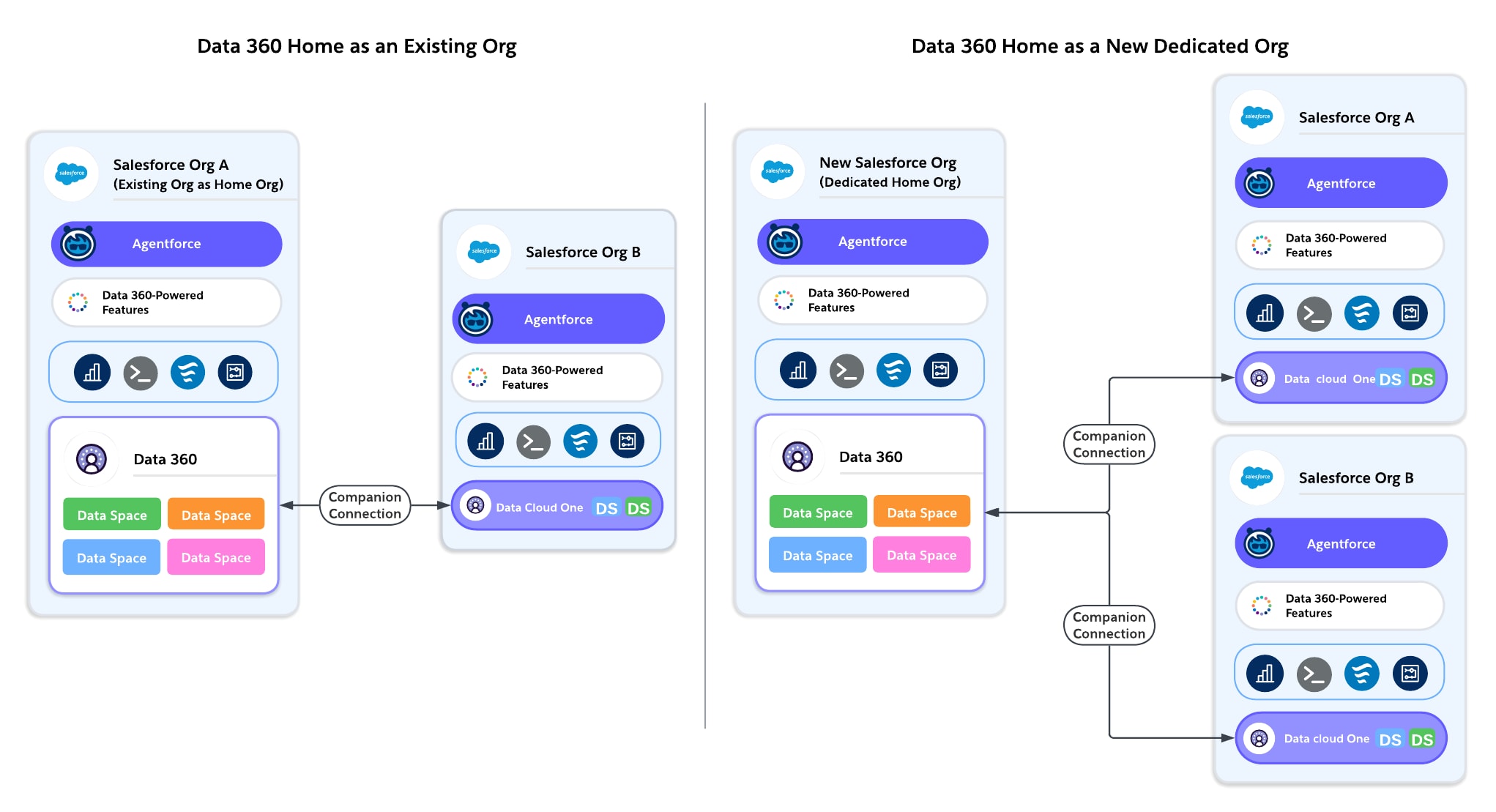
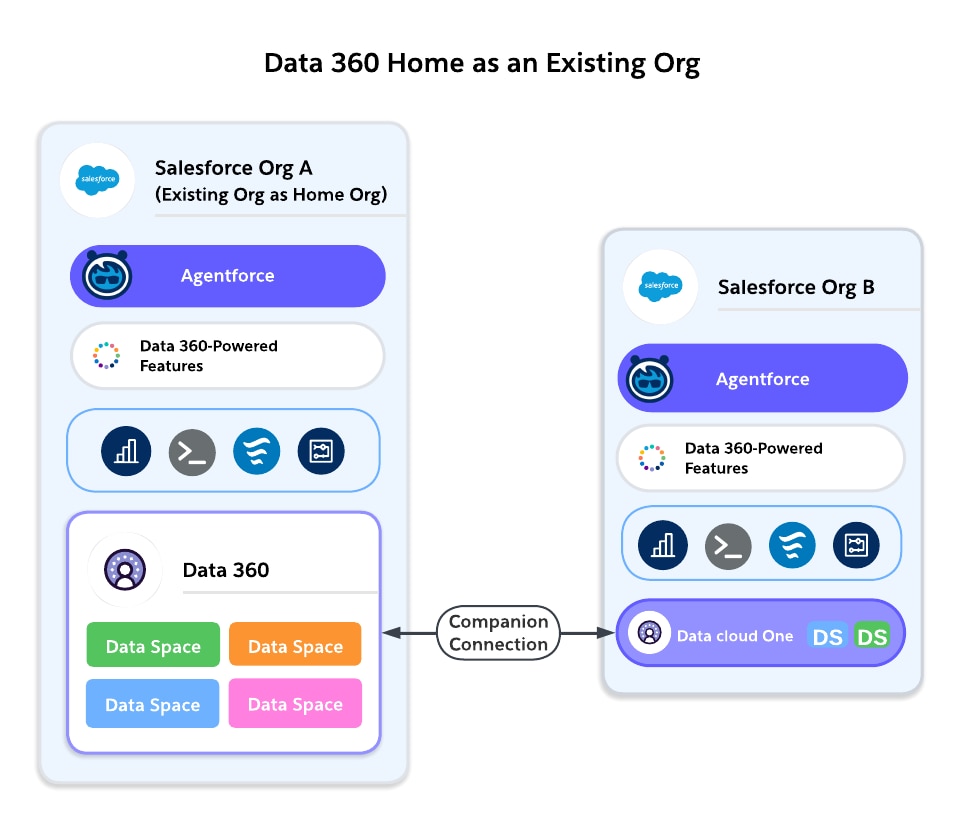
Option A: Provision Data 360 in an Existing Org
Works Best For: Customers with a single Salesforce org, or multi-org customers who already have a major centralized org where most business processes run.
-
Pros:
-
Simplest path: Data 360 is provisioned where your CRM data lives.
-
Immediate access to local Sales, Service, and Marketing data.
-
No additional integration is required.
-
Fewer licenses and environments to manage.
-
Accelerates early adoption, pilots, and production use cases.
-
-
Cons:
-
Can inherit an existing org’s governance or technical debt.
-
If no single “main org” exists, selecting one can create ownership debates.
-
Performance tied to the org’s location; may not align with enterprise-wide residency needs.
-
If multiple business units use different orgs, local provisioning can lead to fragmentation if not paired with Data Cloud One.
-
Example:
A SaaS company with one Salesforce org provisions Data 360 in that org to unify customer subscription and support data.
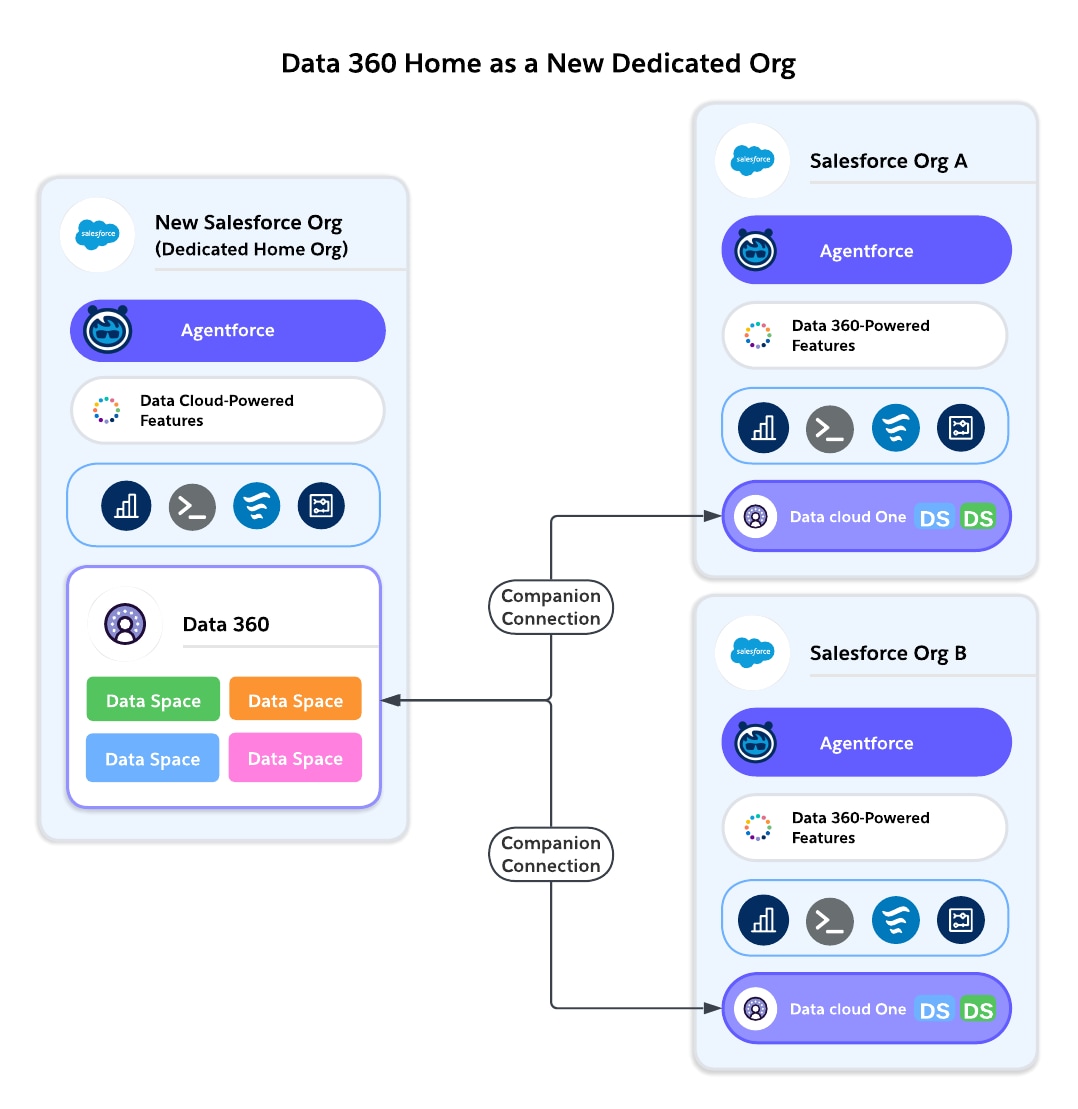
Option B: Provision Data 360 in a New, Dedicated Org
Works Best For: Customers with multiple Salesforce orgs who can’t align on a single major org, or enterprises with a strong Center of Excellence (CoE) model.
-
Pros:
-
Clean slate for governance, with no inherited org complexities.
-
Centralized control across multiple lines of business.
-
Flexibility to choose a region based on compliance needs.
-
Acts as a neutral “shared service” org, not tied to one business unit.
-
Set up for future Data Cloud One architecture (home org with multiple companion orgs).
-
-
Cons:
-
Customers must license a new Salesforce org on which to provision Data 360.
-
Additional integration required to connect the org to a Data 360 via a Data Cloud One companion connection.
-
May add administrative overhead (user management, security, identity).
-
Slower time-to-value compared to provisioning in an existing production org.
-
Example:
A multinational financial services company creates a dedicated home org to provision Data 360. All business unit orgs (Retail, Wealth, Commercial Banking) connect as companion orgs through Data Cloud One.
Decision Criteria
| Consideration | Existing Org as Home Org (Preferred Default) | New Org as Home Org (Alternative) |
|---|---|---|
| Simplicity | Builds on existing user and data structure for faster setup. Data 360 is integrated by default with the home org . |
Requires licensing and setup of a new Salesforce org, and additional administrative overhead to manage it |
| Time-to-Value | Immediate use of local CRM data | Slower ramp and integration is required. |
| Governance | Inherits existing org's basic governance model—existing users and permission sets (can be acceptable if the org is already central ). | Clean slate for governance. Ideal for COE-led models. |
| Compliance | Residency tied to existing org's region | Flexibility to select a region independent of existing orgs |
| Performance | Best performance for local CRM queries | Dependent on companion org connectivity, whether it’s same region or cross-region to the other orgs |
| Future Scalability | Works well if paired with Data Cloud One. Harder to shift later if the wrong org is chosen | Scales easily with Data Cloud One. Designed for neutrality. |
| Cost | Lower incremental cost | Higher overhead from additional environments |
As a general principle, use an existing major org as your home org to minimize initial effort and accelerate adoption. Only create a new, dedicated home org if your long-term governance or compliance strategy requires it. Creating a new, dedicated home org is a common choice for larger enterprises with a Center of Excellence (COE).
Single Org Environment
Provision Data 360 in your existing production org. This maximizes simplicity and immediate value. It avoids unnecessary integration overhead.
Multiple Org Environment
Prefer to select one of your major orgs—typically the one where most of your business runs, or the org that serves as your centralized CRM—to act as the home org. This reduces complexity, minimizes setup work, and allows you to realize the value of Data 360 quickly. Using an existing major org also avoids the cost and integration effort of managing a new environment.
When to Consider a New, Dedicated Home Org
Creating a home org provides flexibility and neutrality, but with slower time-to-value in these cases.
- If your organization has a strong Center of Excellence (CoE) and wants governance separate from business unit orgs.
- If no single existing org is suitable due to compliance or organizational constraints.
Enterprises often operate multiple Salesforce orgs—and this isn’t an edge case, but the norm. As of February 2024, approximately 19,000 Salesforce customers already ran more than one Salesforce org.
Why does this happen?
- Acquisitions and mergers: Newly acquired companies bring their own Salesforce instances.
- Regional operations: Separate orgs for EU, North America, Asia-Pacific, and so on, often to satisfy data residency laws.
- Functional separation: Different business units (for example, Retail Banking, Wealth Management, Insurance) maintain their own orgs for autonomy.
- Regulatory or security isolation: Certain industries mandate logically distinct orgs for compliance reasons.
- Historical or technical reasons: Over time, customers organically accumulate multiple orgs.
Each reason makes sense individually, but together they create fragmentation of data. Without a unifying layer, each org only has a partial view of the customer.
The architectural challenge: How do you unify data across orgs into a single source of truth while respecting compliance, governance, and autonomy requirements?
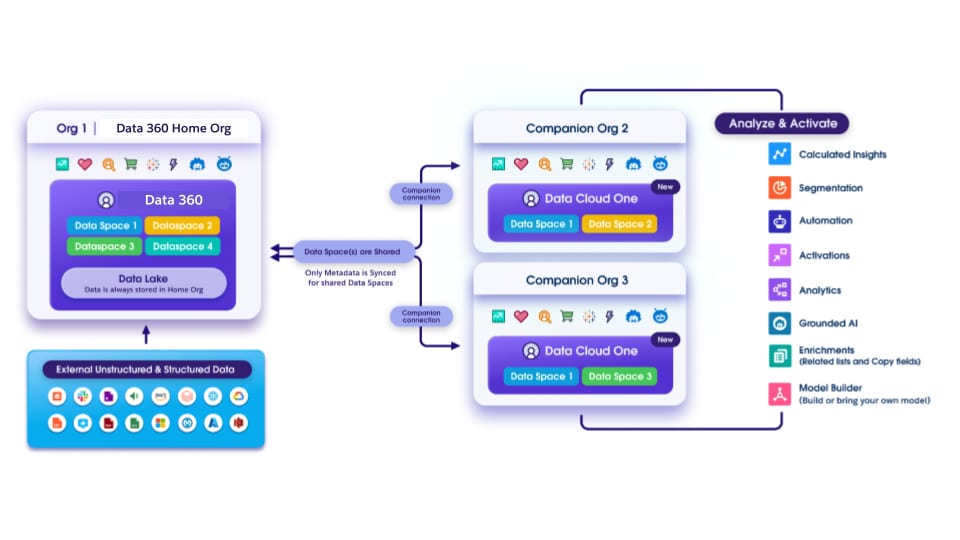
Data Cloud One is Salesforce’s multi-org connectivity architecture that allows multiple Salesforce orgs to share a single Data 360 instance. It’s the recommended pattern for enterprises with multiple Salesforce orgs.
In any Data Cloud One cluster, one Salesforce org is designated as the home org, which hosts the Data 360 instance. Other Salesforce orgs connect as companion orgs, consuming the unified data and metadata from the home org’s Data 360.
How Data Cloud One Works
-
Data Ingestion and Unification (Home Org)
-
All data ingestion configuration (Salesforce CRM, external sources, streaming, batch) happens from the home org only.
-
The Data 360 tenant tied to the home org performs identity resolution, harmonization, modeling, and unification into trusted customer profiles.
-
Data 360 administration, governance policies, tagging, and masking are applied centrally from the home org.
-
-
Data Space Architecture
-
From the home org, data is organized into data spaces, which act as logical containers for data, metadata, and processes.
-
Enterprises can create data spaces for brands, regions, or lines of business.
-
Data Space Sharing: From the home org, specific data spaces are selectively shared with companion orgs. This makes sure that only the relevant data (and associated metadata) flows to the right orgs.
-
-
Metadata Sharing
Companion orgs receive metadata definitions from the home org, including data model objects (DMOs), unified profile schema, calculated insights, segments, and more. These appear natively inside the companion org as if they were local assets, but they’re linked to the home org.
-
Capabilities in Home Org vs. Companion orgs Feature access differs between home and companion orgs. Companion orgs can’t ingest or unify data, and rely on the home org for ingestion, modeling, and unification. Companion orgs can access Data 360 data to power Data 360-powered platform features, and they can create local insights, segments, and flows on top of the shared, trusted data. In the future vision, they can also access activation features.
| Capability | Home Org | Companion Org |
|---|---|---|
| Connect Configure connectors, create data streams, ingest, or federate data | ✅ | ❌ |
| Harmonize and Unify Build and run data transforms and identity resolution | ✅ | ❌ |
| Govern Secure data with data space and permissions | ✅ | ✅ |
| Segment and Predict Build segments, insights, and create Einstein Studio models | ✅ | ✅ |
| Activate Everywhere activations, data actions | ✅ | ✅ |
| Platform Features: Prompt Builder, Flows, Reports, Enrichment, [and more](https://help.salesforce.com/s/articleView?id=data.c360_a_companion_org_data_cloud_features.htm&type=5) | ✅ | ✅ |
| Data 360-Powered Features: Prospecting Center, Sales and Service Cloud features, Agentforce, and more | ✅ | ✅ |
-
Platform Feature Parity From the perspective of users and builders, once the metadata is shared, there are some functional differences between home and companion orgs in terms of using Salesforce platform features. List of supported features can be found in Data 360 Features on Companion orgs.
-
Salesforce platform features—such as Flows, Reports, Prompt Builder, dashboards, and other platform-native tools—work in both home and companion orgs once metadata is available.
-
Data 360-powered features—such as Agentforce, Prospecting Center, Sales Cloud Einstein features, and Service Cloud AI features—also work seamlessly in both home and companion orgs. Some features may be on their path to reach complete compatibility but the overall goal is to have feature parity between home and companion orgs for all cross-cloud features that depend on Data 360.
-
-
Consumption Model All companion org activity (queries, segment runs, Data 360-triggered flows, AI usage, Einstein Trust Layer logging, and so on) consumes Data 360 credits from the home org. Consumption flows one way: credits are centralized, billed, and tracked against the home org’s credit allocation. However, you can drill down to see how many credits each individual org used in Digital Wallet.
-
Design Principle: Horizontal Construct The horizontal construct in Data 360 is a foundational design principle, primarily implemented through Data Cloud One, that allows a single Data Cloud instance to span across multiple, distinct Salesforce CRM orgs. The goal is that every new released feature works in both home and companion orgs without additional setup. This functionality ensures Data Cloud One isn’t just a data architecture choice, but a foundational element of the Salesforce platform going forward.
Enterprises with multiple orgs must choose how and where to locate Data 360 within their ecosystem. Do they want to provision independent Data 360 orgs in each org, or use Data Cloud One to unify orgs under a single home org?
Option A: Multiple Independent Data 360 Orgs
Each Salesforce org provisions its own Data 360 instance.
Pros:
-
Autonomy: Each business unit or region controls its own Data 360.
-
Simplicity within each org: Governance, security, and customizations are localized.
-
Regulatory compliance: Useful when strict regulatory separation is required (for example, data must not cross borders).
Cons:
-
Data silos: Unified profiles can’t be achieved across orgs.
-
Higher cost: Each instance requires licensing, administration, and integration. Customers end up ingesting the same source data multiple times across multiple different orgs.
-
Duplicate work: Identity resolution, segmentation, and enrichment must be repeated in each Data 360 instance.
Option B: One Shared Data 360 (Data Cloud One Cluster)
A single Data 360 is provisioned in a home org, with other Salesforce orgs connected as companion orgs.
Pros:
-
Single Source of Truth (SSOT): All orgs share a unified data model.
-
Cost efficiency: Manage only one Data 360 license and infrastructure.
-
Unified governance: Centrally applied policies, security, and compliance controls.
-
Cross-org enrichment: Access harmonized profiles, insights, and segments across companion orgs.
-
AI readiness: An enterprise-wide dataset enables better training and activation of AI models.
-
Future proof: Adding new companion orgs is simple, as there’s no need for new Data 360 orgs.
Cons:
-
Additional preparation: One Data 360 requires planning for org-to-home org connectivity.
-
Latency considerations: Companion orgs in different regions may see slower queries.
-
Complex governance: If each org has different customization needs, fine-grained governance can be complex.
Option C: Multiple Data Cloud One Clusters
Sometimes, governance, compliance, or other business requirements may make it impractical to cluster every org together. This may lead to a need to implement a hybrid solution in which the enterprise operates several Data 360 orgs, each of which is the home org for a different cluster of companion orgs.
Example:
A multinational corporation has Salesforce orgs in various regions, including Europe, the US, and Asia. To comply with regional data residency regulations, they provision one Data 360 for each separate region.
Decision Criteria
| Consideration | Multiple Independent Data 360 Orgs | One Shared Data 360 (Data Cloud One) |
|---|---|---|
| Autonomy | High autonomy for each org or business unit | Centralized governance, less autonomy per org |
| Compliance | Useful when strict separation is required (for example, regional laws) | Works best when residency allows centralization |
| Cost | Higher licensing and admin costs | More cost-efficient; one license for many orgs |
| Governance | Fragmented; policies differ per org | Centralized, consistent policies across orgs |
| Data Silos | Each org with its own view No enterprise 360 | Unified dataset, no duplication |
| AI/Analytics | Limited to each org's data | Enterprise-wide models with better accuracy |
| Complexity | More instances to manage, more integrations | Simpler architecture, fewer moving parts |
| Performance | Best for intra-org use cases | Potential increase in latency with companion org access |
Preferred Pattern: Data Cloud One
To simplify governance and optimize cost across multi-org enterprises, use a single home org with connected companion orgs.
When to Use Multiple Data 360 orgs: Only use multiple Data 360 orgs if compliance, residency, or organizational autonomy strictly require it (for example, if European operations must remain fully separate from US operations due to regulation).
How to Choose the Home Org in Data Cloud One: Start by considering one of your major orgs, typically where most of the business runs. Provisioning Data 360 there can minimize complexity and maximize early value.
Consider creating a dedicated home org managed by a COE team, only if no existing org is suitable.
General Principle:
In multi-org environments, minimize the number of Data 360 orgs. Favor Data Cloud One as the default pattern to reduce duplication, enable AI readiness, and simplify governance.
While Data Cloud One is the recommended approach for most enterprises, there are scenarios where customers must provision multiple Data 360 instances, including:
- Regional compliance. A multinational retailer provisions one Data 360 in the EU and another in the US. Data 360-to-Data 360 data sharing allows the company to create insights from local data and still share the insight with US headquarters.
- Business unit collaboration. A conglomerate runs separate Data 360 orgs for Retail and Insurance. Data sharing between Data 360 orgs allows users to access a single, authoritative source of data without moving or copying. With data sharing between Data 360 orgs, the Insurance org receives Retail’s “High-Value Customer” segment for targeted cross-sell campaigns.
- Mergers and acquisitions. A parent company acquires a subsidiary with its own Data 360. With two instances to manage, retaining short-term data silos preserves data security and SSOT integrity. Simultaneously, sharing data between two Data 360 instances allows necessary collaboration during the transition.
- Federated executive dashboards. A multinational spread across continents provisions individual Data 360 orgs per region. Executives want a federated quarterly performance view. Each regional Data 360 shares aggregated calculated insights with an “Executive Org,” enabling enterprise-wide reporting.
When multiple Data 360 orgs exist, unification across them isn’t automatic. Data 360 to Data 360 data sharing enables customers to share specific objects between Data 360 instances without duplication or custom pipelines. It’s a zero-copy metadata sharing mechanism designed for collaboration across Data 360 orgs.
-
Each Data 360 is provisioned in its own home org.
-
Administrators can create a data share—a grouping of specific objects they want to share.
-
Access to the selected data is shared with a target org’s Data 360, where the objects appear as if defined locally. Only access is shared, the underlying data remains in the source Data 360.
-
Tags aren’t shared. Only the raw objects are made available; the target org must reapply any governance, operational, or AI tags as needed.
-
In Data Cloud One, multiple companion orgs share a single Data 360 instance. To ensure consistency, Platform features like Agentforce, Prospecting Center, and Tableau Next, run on the same underlying data.
-
When using data sharing between Data 360 orgs, each org has its own Data 360. Features like Agentforce in Org A and Org B each operate independently on their local instance. No sharing occurs automatically—deliberate data shares must be created to collaborate on specific objects only.
| Factor | Pros | Cons |
|---|---|---|
| Data Residency | Supports regional separation while enabling collaboration. | Does not remove the need to manage multiple Data 360 orgs. |
| Data Duplication | Zero-copy; no duplication of objects. | Requires deliberate selection of objects for inclusion in each data share. |
| Governance | Sharing is explicit and deliberate (object-level). | No tags or policies flow; target org must reapply governance. |
| Complexity | Enables selective collaboration without centralization. | Requires management of multiple Data 360 orgs and data shares. |
| **AI/Analytics** | Regional AI/analytics possible; insights can be shared across orgs. | No enterprise-wide AI unless data is deliberately shared. |
| **Platform Features** | Each org's Data 360–powered features run independently. | No automatic sharing. Duplication risk if not carefully designed. |
| Cost | May reduce the need for ETL pipelines. | Still incurs the cost of multiple Data 360 orgs. Consumes credits for data queries and data sharing. |
| Consideration | Data Cloud One (Preferred for multi-org) | Data Sharing between Data 360 Orgs |
|---|---|---|
| Single Source of Truth | Yes—all orgs share a data model. | No—each Data 360 has its own data model. |
| Compliance | Works only when residency allows centralization. | Needed when residency laws prevent centralization. |
| Governance | Centralized, consistent. | Federated; deliberate object-level shares. |
| Complexity | Fewer moving parts, simpler. | More complex—requires configuration data shares and multiple Data orgs. |
| AI/Analytics | Enterprise-wide AI models. | Regional AI. Selectively share insights. |
| Platform Features | Shared Data 360 means all features work consistently across home + companions. | Features run independently in each Data 360; sharing must be explicit. |
If your enterprise has multiple Data 360 orgs
-
Use data sharing between Data 360 orgs to collaborate across them rather than building custom pipelines or duplicating data.
-
Share specific objects (DMOs, calculated insights, segments) by creating data shares and granting them to target orgs.
-
Tags aren’t shared—the receiving org must reapply tags, for governance, classification, or AI enrichment.
Use data sharing between Data 360 orgs
-
To meet regulatory requirements that prevent centralization.
-
To maintain business unit autonomy while enabling selective collaboration.
-
To provide federated executive dashboards across multiple regions.
-
To bridge M&A scenarios where consolidation isn’t immediately possible.
Design carefully
Treat Data 360-to-Data 360 data sharing as a federation strategy, not as a replacement for Data Cloud One.
- Use object-specific sharing.
- Avoid over-sharing.
- Align data shares with business and compliance needs.
Planning your data strategy for Data 360 provisioning is a critical, long-term architectural decision that must be approached enterprise-wide, not org-by-org. This early strategic choice dictates how customer data is unified, how governance is enforced, and how essential platform features—especially AI and analytics—scale across the organization. Plan governance and ownership models up front and avoid short-term shortcuts that lead to fragmentation and increased complexity later.
Data 360 Integration Patterns and Practices
Data 360 Security Architecture
About the Authors
Kunal Goyal is a Director of Product Management at Salesforce, focused on advancing multi-org architecture and scalability within Data 360. Since 2017, he’s led multiple initiatives and products centered on cross-org collaboration and multi-tenant system design. Kunal is one of the Data 360 Best Practices Architecture Leads and the product owner for Data Cloud One, setup, provisioning, and admin experiences.
Erin Wagner Tidwell is a principal technical writer and content designer for Data 360. She’s been at Salesforce since 2013. She’s dedicated to making Data 360 easier to understand and use through clear, consistent, and accurate technical documentation and in-app communication.
Yugandhar Bora is a Software Engineering Architect at Salesforce, specializing in data architecture within the Data and Intelligence Applications platform. He leads enterprise architecture review board (EARB) initiatives focused on data governance and unified data models, while contributing to automated platform provisioning solutions.
Samarpan Jain is a Principal Architect at Salesforce specializing in Commerce Cloud, platform integration, and cross-org architecture. One of Salesforce’s longest-tenured employees, he leads key initiatives including data residency compliance for government customers and Data 360 usage attribution systems.