Record-Triggered Automation
The Salesforce Platform has continuously advanced its automation architecture to meet the demands of complex business processes. Earlier generations — Workflow Rules and Process Builder — provided the initial steps in event-driven logic, expanding automation capabilities for event-driven logic and broadening the reach to a wider range of builders.
This evolution has culminated in a high-performance, consolidated architecture centered on two complementary pillars: Record-Triggered Flow and Apex Triggers.
This document provides the framework and guidelines to make informed decisions when designing trigger automations. It balances use case requirements against three major decision points that will guide you to choosing the right approach for automation triggered by changes to Salesforce records.
| Flow | Salesforce Flow is a powerful, point-and-click automation tool that lets users build complex business processes, screens, and logic visually using Flow Builder, without writing code. It automates tasks like data updates, sending emails, and guiding users, offering flexibility through types like Screen Flows (user interaction) and Triggered Flows (record/scheduled events). |
| Apex | Salesforce Apex is a proprietary, object-oriented programming language for the Salesforce platform, similar to Java, used to build custom business logic, automate processes, and extend core CRM functionalities beyond declarative tools. |
Building scalable, maintainable, and performant record-triggered automation on the Salesforce Platform requires a disciplined, architecture-led approach. The choice between Flow and Apex, and the implementation of each, is guided by a clear set of principles. These points summarize these principles and serve as the foundational rules for modern automation design.
-
Choose the right tool for the job based on Salesforce Object automation density.
-
Use Record-Triggered Flow for Salesforce Objects for low density automations.
-
Augment Record-Triggered Flow logic with Invocable Apex for medium density automations.
-
Use Apex triggers for Salesforce Objects for high density automations.
-
-
Exercise caution when triggering asynchronous processes.
This rule applies whether you’re invoking asynchronous processes in a record-triggered flow or enqueuing a queueable job from Apex. While this pattern can be tempting for offloading work, it can introduce complex error-handling scenarios and increase the risk of hitting governor limits. -
Use one entry point per Salesforce Object.
For a given Salesforce Object, use one mechanism as your entry point into automation. Try to avoid mixing Flow and Apex triggers as entry points for the same Object.
There are three main decision points for consideration:
- Declarative Versus Programmatic Implementation
- Automation Density
- The Density Selection Matrix
Flow and Apex share a common set of fundamental capabilities. Each tool can query records, execute conditional logic, assign variables, and perform DML operations like creating, updating, and deleting records — sequenced to run in a specified order.
However, this functional overlap does not imply that the tools are interchangeable. The architectural choice is not about if a task can be accomplished, but how it is accomplished and what the long-term implications are for performance, scalability, and maintainability. Flow excels in declarative clarity and speed of implementation for straightforward processes, while Apex provides the granular control and raw power necessary for complex solutions.
Automation density is the load placed on a specific Salesforce Object. It serves as a heuristic to determine the object’s optimal implementation. As automation density grows, the likelihood of breaching transactional limits increases.
Calculate automation density by inspecting three specific dimensions of volume and complexity:
-
Automation quantity: The raw number of unique automation metadata entries (flows, trigger actions, and so on) that execute during a single Data Manipulation Language (DML) event.
-
Record volume: The records per transaction processed via API loads or heavy batch processing, where performance becomes critical.
-
Dependency sprawl: A measure of the downstream DML operations triggered by the initial CRUD operation. It quantifies the depth of the graph where one update cascades into updates on related objects (for example, case → account → contact → custom rollup).
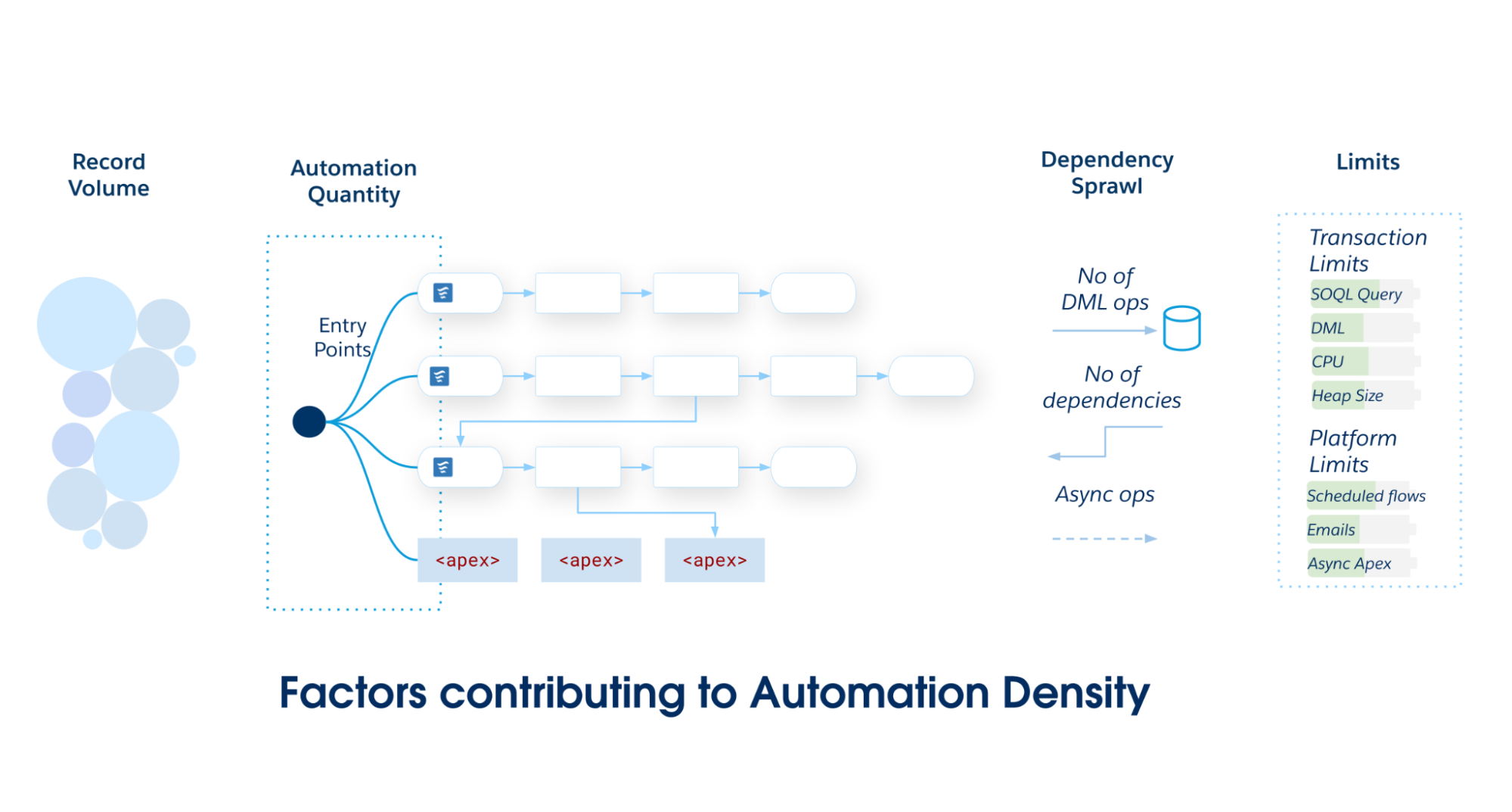
As the scope and complexity of your Salesforce application grows, commit to a single primary entry point—either Record-Triggered Flow or Apex Triggers. Avoid partitioning automations across multiple mechanisms on a single Salesforce Object, as it leads to poor maintainability and fragmented governance.
Use this matrix to determine the required architectural standard for your Salesforce Object.
-
Record-Triggered Flow is the preferred solution for low automation density. It offers a balance of power and accessibility that is ideal for automations that are straightforward and independent of each other.
-
The hybrid pattern (Record-Triggered Flow with Invocable Apex) is a powerful and maintainable choice for medium-density automations with rising complexity. This pattern empowers teams to maintain ordered choreography in declarative Flow while delegating compute-heavy operations to Apex, balancing accessibility with performance.
-
Apex triggers provide the necessary building blocks for a solid architectural foundation to support high-density automations. The performance, granular control, and object-oriented abstraction and polymorphism of Apex are better suited for managing the complexity and scale of these scenarios.
| Density Level | Automation Quantity | Data Volume (Batch Size) | Dependency Sprawl | Architectural Standard |
|---|---|---|---|---|
| Low | < 15 Automations |
Standard User-driven UI interactions or small API loads (1–200 records) |
Discrete Self-contained logic. 0–1 downstream DML operations on the same object or a related object. |
Record-Triggered Flow |
| Medium | 15–30 Automations |
Moderate Standard batch processing (with logic requiring careful bulkification) |
Coupled Parent/Child updates 2–4 downstream DML operations. Risk of recursion |
Hybrid Pattern Flow + invocable Apex |
| High | > 30 Automations |
High Large data volumes with bulk API loads (2,000 – 10,000+ records) |
Complex and Recursive Deep dependency graph (5+ downstream DML operations). Risk of triangular recursion loops |
Apex Trigger Metadata Framework |
Also, consider the total daily number of DML operations because Salesforce enforces shared resource management in a multitenant environment and governor limits to prevent runaway automations from monopolizing shared resources. Salesforce objects with high daily DML volume require careful automation selection. For example, asynchronous limits for CPU time (60,000 ms) and heap size (12 MB) are higher than synchronous limits. Furthermore, the org-wide 24-hour limit on asynchronous executions—calculated as 250,000, or 200 times your user licenses—necessitates factoring total daily DML into your architectural design to avoid runtime exceptions.
Record-Triggered Flow is the platform’s premier declarative tool for record-triggered automation. Flow’s ease of use and built-in platform safeguards enable teams to easily build scalable and reliable solutions. It’s the ideal choice for most teams building solutions on the Salesforce platform.
Apex is the platform’s proprietary, strongly typed, object-oriented programming language. Use Apex for Salesforce objects with high automation density, and for use cases that require high performance, sophisticated logic, or granular control over transactions.
To assist in the decision-making process, this matrix provides a direct comparison of Flow and Apex across key architectural capabilities.
| Capability | Record-Triggered Flow | Apex Trigger |
|---|---|---|
| Speed of delivery and maintenance | Recommended The visual user interface of Flow Builder allows administrators and other declarative builders to create and modify automation faster than writing, testing, and deploying Apex code. This interface empowers a broader range of team members to deliver business value and reduces the dependency on specialized developer resources for simple tasks. |
Requires expertise Apex requires properly skilled software developers to implement, test, and maintain the code. |
| Modularity | Available Record-triggered flows are modular by default. Instead of monolithic logic, teams build discrete flows for specific requirements and choreograph them together using Flow Trigger Explorer. This modularity enables isolated modification and simple extension, vastly reducing the long-term cost of ownership. |
Available Apex is divided into functional modules by design. Each Apex class is intended to implement a single module of functionality. |
| Visibility and governance | Recommended The visual nature of Flow provides an intuitive representation of business logic. Flow Trigger Explorer provides a consolidated view of all flows on an object, making it easier for architects and administrators to understand, govern, and troubleshoot without reading code. |
Requires expertise Using a metadata framework to organize triggers is advantageous, but Apex requires a disciplined development team to keep the code organized and maintainable. |
| High-performance bulk data processing | Not recommended There is an elevated risk of hitting governor limits when dealing with complex logic or large data volumes. |
Recommended Apex code executes closer to the platform's core services and offers developers enhanced control over query optimization, data handling, and algorithmic efficiency. This results in better performance and scale, especially in complex scenarios involving large data volumes. |
| Robust logic and data structures | Available The Flow Transform Element can help with some complex processing tasks. However, Flow lacks native Map and Set data structures, making complex data processing cumbersome and computationally inefficient. |
Recommended Apex provides full access to Map, Set, and programmatic loops for highly efficient, bulk-safe data manipulation. As a full-featured programming language, Apex also provides access to complex logical constructs, data structures, and design patterns that can help solve complex business problems in a maintainable and efficient manner. Apex includes a rich standard library of advanced functions (for example, BusinessHours, Crypto) not currently available in declarative tools. |
| Transaction control | Not Available Flow provides no access to `Database.savepoint`, `Database.rollback`, or partially successful DML operations for partial transaction commits or rollbacks. |
Available Apex provides full, granular control over transaction integrity and complex error recovery scenarios. |
| Email distribution | Recommended Sending preconfigured email alerts from a record-triggered flow is easy and scalable. Custom email alerts can be crafted and distributed at runtime. Custom emails are subject to daily email send limits. |
Available Apex can generate and send custom email messages. All emails sent from Apex are subject to the daily email send limits. |
| Applying platform safeguards | Recommended Flow includes built-in protections, such as auto-bulkification and automatic retries. These safeguards increase the speed to value and prevent performance pitfalls that otherwise require complex, manual coding. |
Manual implementation required Safeguards like bulkification must be explicitly coded (for example, managing collections and avoiding SOQL inside loops). Automatic retries are not native to triggers and require complex custom logic to implement. |
| Asynchronous processing | Available Flow offers easy mechanisms for automations which require a separate transaction in an asynchronous path. These automations are subject to daily limits. |
Available Apex enables full control via Change Data Capture and queueable events that are handled by a decoupled trigger subscriber. |
| Scheduled processing | Recommended Flow's scheduled paths provide a unique and powerful scheduling capability (for example, "fire 3 days before close date"). This capability includes automatic cancellation and rescheduling if the record's data changes. These automations are subject to daily limits. |
Not Available An Apex trigger cannot natively schedule a temporal, record-specific event with automatic cancellation. While scheduled Apex exists, it is a fundamentally different mechanism that runs at a specific time and is not scheduled during an individual record's processing as part of a trigger. |
| Ordering and choreography | Available The Flow Trigger Explorer allows administrators to define a relative execution order for multiple flows on the same object. |
Available A trigger framework provides granular control over the exact order of automations. |
| Same-record field updates | Available (before save) Record-Triggered Flow is the most performant declarative option for updating the triggering record before the initial DML commit. |
Available (before save) Apex provides the highest performance offering with minimal overhead. |
| Cross-object CRUD | Available (after-save) Flow is suitable for simple, low-complexity, cross-object DML operations. |
Available (after-save) Apex provides superior control over deduplication, error handling, and performance for cross-object DML operations. |
| Deduplication of expensive computation | Available Flow excels at eliminating redundant queries and DML statements via automatic bulkification. However, state cannot be cached or shared between different flow triggers or across multiple invocations of the same flow within one transaction. This limitation may become important in extreme performance scenarios. |
Recommended Apex provides mechanisms for deduplicating expensive operations. Developers can leverage transactional caching using static properties and variables, and platform-level caching using Platform Cache, to store and reuse data. These techniques are important for reducing the consumption of transactional governor limits, such as SOQL queries, and ensuring high performance and scalability. |
| Custom error handling | Available The CustomError element can block a save operation and display a message to the user. |
Recommended The addError() method provides flexible field-level and conditional error messaging. |
To best emphasize how to use the decision points to guide your decisions, consider the following use cases and associated points of analysis.
This table provides general “best-fit” recommendations for general use cases, based on the capabilities presented. Ultimately, you’ll factor in additional considerations to arrive at a best fit for your particular scenarios, such as those included in the Related Best Practices section of this document. There, you’ll learn more about when a particular combination of Flow and Apex provides the best approach.
| Use Case | Description | Best-Fit | Rationale |
|---|---|---|---|
| High-performance batch processing | Any automation that must process thousands of records efficiently | Apex | Apex provides rich APIs for interfacing with the platform and for raw speed. |
| Complex data processing | Scenarios that require advanced data manipulation | Apex | Apex provides data structures, such as Map and Set, that are not natively available in Flow, and can be critical for writing performant, bulk-safe code. |
| Transactional control | Control mechanisms such as savepoints, rollbacks, and partial commits | Apex | Apex provides access to mechanisms such as Database.savepoint and Database.rollback, and has the ability to process partially successful DML operations. |
| Sophisticated custom validation | Data validation across multiple fields in a record | Apex | While Flow can prevent a save with the `CustomError` element, it is not available in all flow types—including subflows. The Apex addError() method provides multiple field-specific error messages that can be added to a record at any time during trigger processing. |
| Moderately complex logic within a simple process | Logic and data manipulation of moderate complexity, simplified by a standard library of advanced functions, occurring as part of an uncomplicated process | Flow + Apex | Record-Triggered Flow acts as the orchestration layer, while high-complexity operations are encapsulated within Invocable Apex. |
| Simple to moderately complex logic | Data manipulation of low to moderate complexity, with trigger updates to both the primary and related data objects | Flow | Flow is typically the go-to option, as it is based on a declarative model that makes it approachable to both admins and developers. |
| Notifications and outbound messages | Sending outbound emails and messages | Flow | Flow makes sending email alerts and outbound messages on record changes easy and highly scalable. |
| Scheduled processing | Automation at a future, dynamic date (for example, 3 days before a close date) | Flow | Scheduled paths provide a unique strength to Flow, as the platform automatically handles the scheduling, cancellation, and rescheduling of these paths if the record's data changes. |
Scalability is a critical consideration when designing your implementation. When a record-triggered automation’s business logic becomes complex, long-running, or involves high data volumes, the Salesforce platform’s core governor limits become an architectural constraint. Operations like mass data updates, complex API callouts, or heavy computations increase the risk of breaching limits, such as total CPU time or the number of DML statements within a single database transaction. A failure in a synchronous trigger due to a limit exception will cause the user’s entire save transaction to roll back, resulting in poor user experience and potential data loss. This inherent risk mandates an architectural pattern to offload complex work.
Asynchronous automation becomes essential in this case. Using asynchronous mechanisms, architects can effectively decouple the long-running or high-volume work from the primary, synchronous record-save transaction. Saves complete quickly and reliably, while the heavy processing is delegated to a separate, platform-managed transaction that executes later. Decoupling improves stability, prevents transaction failures, and is critical for building scalable enterprise applications. The platform offers several specialized tools for this, each with distinct benefits and trade-offs regarding reliability, volume, and complexity.
The Run Asynchronously path in a record-triggered flow provides the simplest mechanism for “fire and forget” asynchronous logic. This path executes in a separate transaction after the original record-saving transaction has been successfully committed to the database.
-
Ideal Use Case: This is well-suited for tasks that do not require immediate execution or custom error handling. Examples include sending an email notification, creating a follow-up task, or making a simple callout to an external system.
-
Limitations: This mechanism shares the same daily governor limits as other asynchronous flow interviews. It is not designed for extremely high-volume processing.
Change Data Capture (CDC) is a high‑throughput, scalable, and resilient pattern for handling asynchronous logic triggered by a record change in high‑volume scenarios. In this model, the trigger’s only responsibility is to save the record synchronously. The platform then publishes a detailed event message that contains the record’s changes to a high‑volume event bus. A separate, dedicated Apex trigger subscribes to this change event. It performs complex, long‑running, or asynchronous work.
-
Benefit: This pattern decouples the asynchronous process from the initial user transaction. A failure in the asynchronous processing won’t cause the user’s record save to roll back. The pattern also provides a durable event stream that multiple internal subscribers or external systems can consume, and events can be replayed for up to 72 hours, providing strong resilience.
-
Limitations: CDC event messages don’t contain the record’s prior state — the equivalent of an Apex
Trigger.oldMap. The event payload includes the new field values, but not the values they changed from. This makes it challenging to implement logic based on a specific state transition (for example, run only ifStatus__cchanged from “Pending” to “Approved”). You can mitigate this by querying the object’s field history in the event subscriber, but this adds complexity to the process, and field history tracking may not be available for the specific field of interest. This may limit the types of automation you can offload to CDC.
By default, CDC can be enabled on a maximum of five Salesforce Objects. Organizations requiring more can purchase an add-on license that removes this limit and increases event delivery allocations.
Enqueuing a Queueable Apex job directly from a trigger should be considered a risky pattern, used only when Apex-provided control is needed (for example, for complex logic or custom retry mechanisms), and CDC is not a viable option.
If Queueable Apex is required, the implementation must include proper safeguards:
-
Limit Checks: The code must check the number of jobs already enqueued in the transaction before attempting to add another.
-
Context Awareness: The code must detect if it is running within an asynchronous context, such as a batch job (
System.isBatch()), and modify its behavior to adhere to the stricter one-job-per-transaction limit in that context.
Invoking asynchronous Apex from a synchronous trigger introduces stability risks. To prevent org-level impact (for example, exceeding limits), this pattern requires rigorous design and testing.
-
The daily limit for asynchronous Apex executions (
Batch,Queueable,@Future) is shared across the org (typically 250,000 or a calculation based on user licenses). A bulk data load of 20,000 records will cause a trigger to execute in chunks of 200, resulting in 100 separate trigger invocations — even more if the bulk batch size is fewer than 200 records. If each invocation enqueues an asynchronous job, a significant portion of the daily limit from a single data load may be consumed. This consumption can potentially starve other critical business processes of async resources. -
The governor limits for enqueuing jobs are drastically different depending on the context. From a trigger fired by a user action in the UI — a synchronous transaction — up to 50 queueable jobs can be enqueued. However, from a trigger fired within the
executemethod of a Batch Apex class — an asynchronous transaction — only one queueable job can be enqueued. Failing to account for this difference is a common and critical failure point, leading toLimitExceptionerrors during large data operations. -
Calling Schedulable Apex (
System.schedule) or Batch Apex (Database.executeBatch) directly from a trigger context constitutes an anti-pattern. These methods are not designed to be invoked from trigger context. Doing so will lead to rapid consumption of your asynchronous Apex allocation, resulting in limit exceptions.
Each asynchronous mechanism has specific trade-offs regarding performance, governor limits, and reliability. Use this decision tree as a guide to help you navigate these options and choose the right mechanism for your use case.
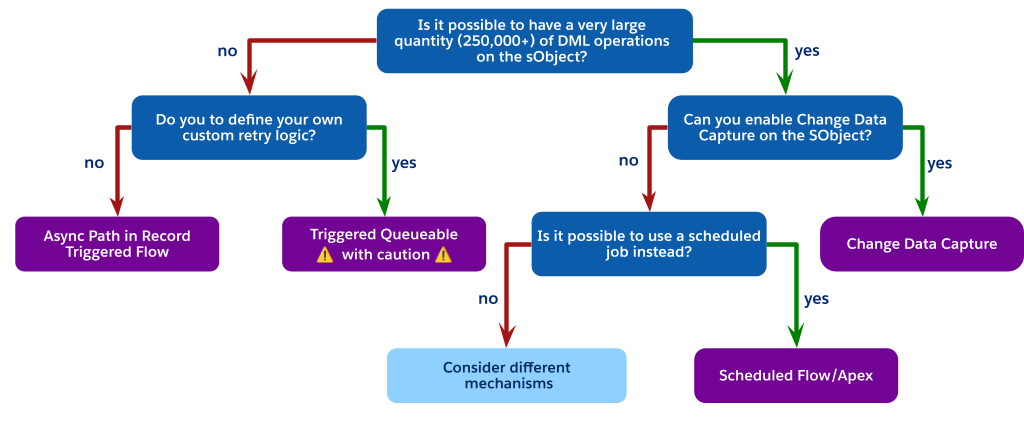
As the flowchart indicates, when you are faced with high-volume DML operations but cannot use Change Data Capture (perhaps due to object limits), the best architectural choice is often to avoid a trigger-invoked process entirely.
Instead, consider using a scheduled process. This can be either a Scheduled Flow or Scheduled Apex. Required steps are:
-
Perform a simple, low‑cost update in the synchronous trigger. For example, set a
Status__cfield to “pending processing” or insert a low‑cost related record, such as a Chatter post, to indicate that the record needs processing. -
Create a scheduled job, either a scheduled flow or scheduled Apex, that runs periodically, such as every 15 minutes or every hour.
-
Have the scheduled job query for all records in the pending state, execute the complex logic in a controlled, high-volume context, and then update the records as processed.
This pattern fully decouples the heavy processing from the user’s synchronous save, is not subject to the one-job-per-transaction limit of a trigger-fired batch, and provides a highly scalable and governable solution for non-real-time requirements.
If the latency of a scheduled job is not acceptable for the business requirements, and you are still constrained from using CDC or a trigger-fired queueable, this indicates a significant architectural mismatch. At this point, different mechanisms must be considered. Reevaluating the core application design may lead to certain conclusions, such as:
-
Purchasing the add-on to remove CDC object limits.
-
Fundamentally challenging the business requirement to determine if near real-time processing is truly a “must-have” or if the latency of a scheduled job is an acceptable trade-off for platform stability.
In addition to the decision points, you will need to factor in non-functional considerations such as complexity and standards.
The level of complexity in an implementation is part of a solution’s total cost of ownership, as well as its ability to adapt to changing business requirements. Complexity can impact any implementation if best practices aren’t followed. In the Related Best Practices section of this document, there are recommendations to reduce the amount of complexity in your solution, including these patterns:
-
Hybrid Pattern: Invocable Apex for Complex Logic in Flow
-
Using a Metadata Framework for Apex Triggers
-
Mega-Flows vs. Multiple Flows
Documentation is as important as the automation itself. It not only ensures maintainability, it is also critical for AI and agent-based tools. Documentation helps you understand and manage your business processes.
In Flow
-
Establish a consistent naming convention for all elements and variables.
-
Use the Description field for the flow to explain its overall purpose, trigger criteria, and intended outcome.
-
Use the Description field on each individual element (for example,
Get Records,Action,Transform). This practice is the best way to convey intent. It’s especially important for invocable actions and subflows, where the description is the primary place to explain the complex logic performed by the action.
In Apex
-
Comment your code clearly to explain the why behind your logic, not just the what.
-
If using a metadata-driven framework, ensure your metadata records include and populate a human-readable Description field to explain what each handler class does and when it should run.
DevOps and source control is part of a mature development lifecycle. Always use a source control tool like Git for Salesforce projects. Both Apex classes and Salesforce Flows are metadata that define your business logic, and they must be versioned and managed.
Within the context of management of record-triggered automations, a modern DevOps pipeline provides essential benefits.
-
Automated Quality Checks: Tools like Salesforce Code Analyzer can be configured to run automatically in your pipeline. Static analysis can detect problematic patterns in both automation tools before they are promoted, flagging issues like inefficient
Get Recordselements inside a Flow loop orSOQLqueries inside an Apex for loop, which are common causes of performance degradation. -
Regression Prevention: As your automation density grows, a change to one Flow or Apex class can have unintended consequences for other automations on the same object. A robust DevOps testing strategy, where automated Apex tests are run against any proposed change, is the most reliable way to ensure a new Flow version doesn’t break existing Apex logic (and vice versa).
-
Collaboration and Visibility: Source control is the “single source of truth.” It allows admins and developers to work on automation for the same object in parallel. It also provides an invaluable audit trail: when a production process breaks, you can instantly see who changed the automation, when they changed it, and — via commit messages — why they changed it.
For teams with a mix of admins and developers, DevOps Center provides a unified interface to help choreograph all of these steps, making a scalable, source-control-based development process accessible to everyone on the team.
This combined discipline of documentation and DevOps ensures the long-term health and maintainability of your org, which will benefit every architect and admin who follows you.
The decision guide above is best used before planning your implementation. It is targeted at helping you choose the best product for your use cases. After product selection, it is important to understand existing best practices for your implementation.
The One Tool Per Object principle is critical for managing high-density automation, but don’t interpret it as a binary choice between a purely declarative or a purely programmatic stack. A more effective and maintainable architectural pattern leverages a Hybrid model: position Record-Triggered Flow as the orchestration layer, while encapsulating high-complexity operations within Invocable Apex.
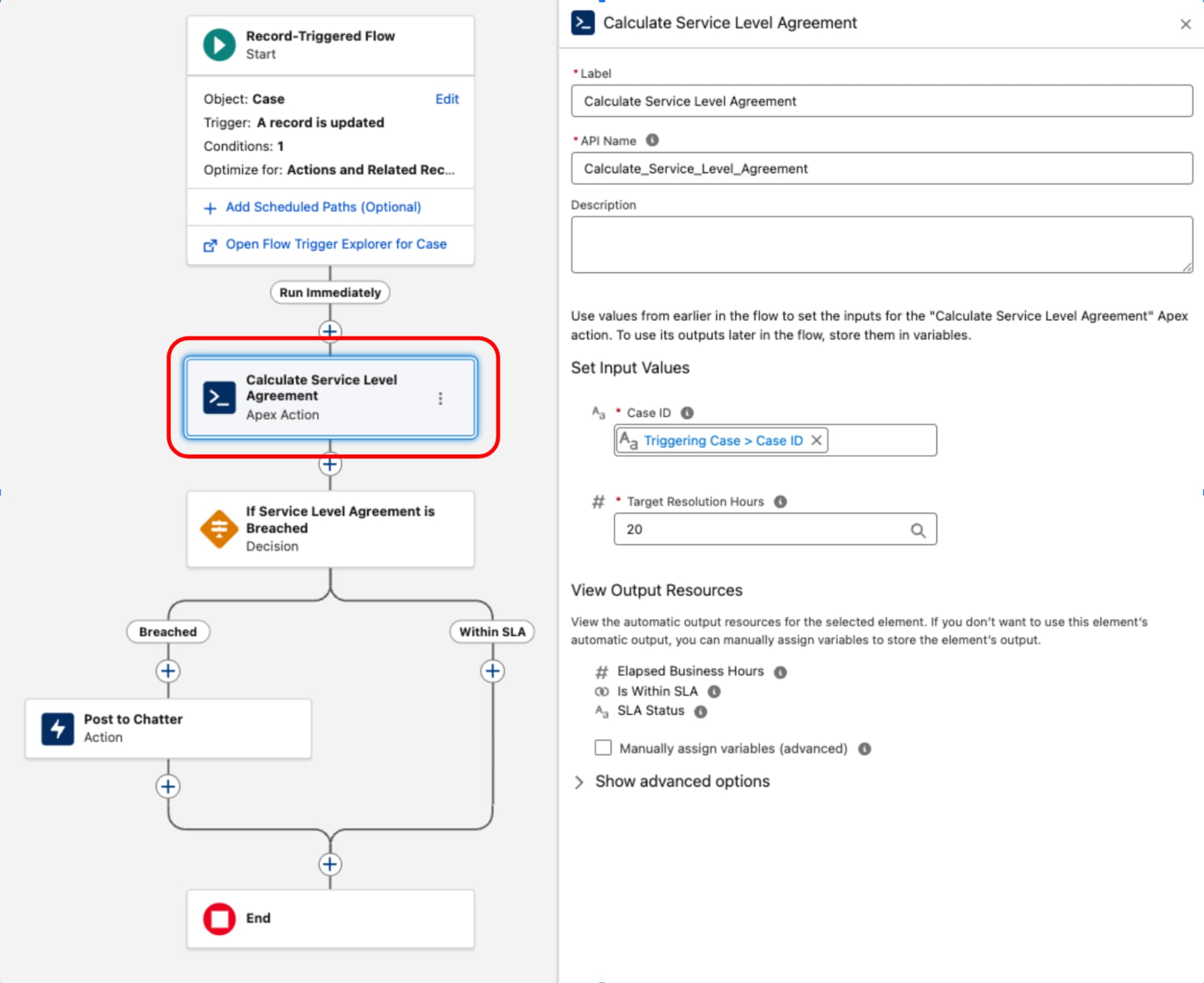
Record-Triggered Flow serves as the orchestrating layer for the business process. It owns the entry criteria and execution context (the what and when). By retaining decision logic and routing within this layer, the architecture’s process topology remains transparent and manageable via the Flow Trigger Explorer, preventing critical business logic from being obscured within code.
One common example of a complex component is the implementation of Service Level Agreement (SLA) calculations for Case records. Since the BusinessHours object and its related logic — critical for accurate calculations that exclude non-working hours and holidays — is not natively accessible in Flow, a dedicated Apex class is used. This class, often named something like ServiceLevelAgreementCalculator, is designed with a single static method, annotated with @InvocableMethod, to calculate the elapsed business hours, determine if the SLA is “Within Target” or “Breached,” and return a structured output. This approach encapsulates the complex, high-performance logic in Apex while allowing it to be seamlessly executed and integrated into the declarative orchestration layer of a record-triggered flow.
Once the Apex ServiceLevelAgreementCalculator class is defined, it’s available for use within a record-triggered flow:
This pattern demonstrates a strict separation of concerns. The declarative layer is used to manage the transaction lifecycle and orchestration while code is used for high-complexity execution. By treating code as a functional utility rather than the foundation, we balance performance and maintainability.
Modularity: The decision pivots away from the singularity of using Apex or Flow for the entire process. Instead, the architecture encapsulates complex logic into discrete, bulk-safe, and independently testable units. These units function as reusable components consumed by the declarative layer, ensuring the automation scales without complicating the architectural design.
Reusability: Logic is decoupled from the trigger event. A well‑designed code unit (such as an InvocableMethod) is written one time but leveraged across multiple entry points: Record-triggered flows, screen flows, or external integrations. This code reuse eliminates redundant development.
Maintainability: The process flow logic remains visible and manageable within the declarative Flow. This centralization drastically reduces debugging overhead and ensures that the system’s execution order is deterministic and transparent.
While the hybrid model of using invocable Apex from Flow is powerful, it is not a one-size-fits-all approach. Architects must be aware of the specific limitations and trade-offs before committing to a hybrid solution.
-
No before-save support: This is the most critical limitation. Invocable Actions are only available in the after-save context (flows for actions and related records). They cannot be used in the high-performance before-save context (flows for fast-field updates). Therefore, this pattern cannot be used to delegate same-record field updates. Do that high‑performance work using native Flow elements in a before-save flow or within a before‑context Apex trigger.
-
No after-undelete support: Record-Triggered Flow currently does not support the after-undelete context. If a Salesforce Object has a business requirement to run automation when a record is restored from the recycle bin, an Apex trigger is the only solution.
-
Performance overhead in high-volume scenarios: The transition from the Flow runtime to the Apex runtime is not a zero-cost operation. While generally fast, the act of dropping into an Invocable Action from Flow’s runtime is not as computationally fast as native execution that stays entirely within an Apex trigger. For most medium-density automations, this micro-overhead is a negligible and worthwhile trade-off for the increased accessibility. However, for extreme high-performance, high-volume scenarios, a pure Apex-only framework will have a raw compute speed advantage.
While the automation density heuristic provides definitive guidance for newer greenfield architecture, the reality of enterprise Salesforce environments is often more nuanced. In mature orgs, it is common to find record-triggered flows and Apex triggers operating on the same Salesforce Object. This scenario is distinct from the hybrid pattern explained earlier: here, the flows and Apex triggers are not coupled nor designed to work together.
This coexistence is often a result of evolving platform capabilities or legacy technical debt. While this is a tolerated operational state, architects must treat it as a calculated trade-off rather than an end state.
The fragmented orchestration causes significant governance and maintenance overhead, making development, testing, and incident handling activities disjointed and cumbersome. This leads to increased Time to Resolution (TTR) and operational complexity.
-
For new Salesforce Objects, adhere to the automation density principle as the primary guide.
-
For existing Salesforce Objects with a hybrid footprint and dual apex trigger and record-triggered flow entry points, assess the density and then architect to refactor to a maintainable hybrid state.
-
For low density, refactor Apex triggers to record-triggered flows, and specify order of execution, bringing them to a single automation entry point.
-
For medium density, refactor complex mega-flows into a subset of flows, with the right order of execution. Introduce Apex triggers only when absolutely necessary, for example to support after undelete context.
-
For high density, favor implementing Apex triggers.
-
As an organization’s business processes on the Salesforce platform mature, the volume and complexity of record-triggered automation inevitably increase. A foundational best practice is to maintain one Apex trigger per Salesforce Object. This rule is critical because the platform does not guarantee the execution order of multiple triggers on the same object for the same event. This limitation can lead to non-deterministic behavior, race conditions, and difficult-to-debug issues.
However, adhering to the one trigger principle introduces an architectural challenge: how to manage and orchestrate all the business logic invoked from that single entry point in a maintainable, scalable way.
The first evolution of this architecture was the Classic Trigger Handler pattern. In this approach, the single Apex trigger delegates all its logic to a corresponding handler class (for example, OpportunityTriggerHandler). This method separates the logic from the trigger file and provides developers with deterministic control over the order of execution within the handler class’s methods (for example, afterInsert()).
While an improvement, this pattern often leads to monolithic handler classes. Over time, as more business requirements are added, the class becomes large, difficult to manage, and hard to test in isolation. The execution order of all individual processes is hard-coded within a single method, making the class prone to merge conflicts, dramatically increasing the governance and maintenance overhead in a large enterprise environment.
To resolve the core issues of modularity and orchestration, architects shift to a Metadata-Driven Trigger Framework. This is a significant architectural leap that decouples the automation logic itself from the configuration of how and when it runs.
This framework is built on three key advantages:
-
Partitioning: Instead of a single handler class, the core business logic is broken down into small, atomic Apex classes (for example, a
RecalculateAccountValuesclass or aNotifySalesLeadsclass), with each class adhering to the Single Responsibility Principle. This modularity makes logic easier to test, debug, and understand in isolation. -
Order and choreography: The execution order is no longer hard-coded in Apex. Instead, it is declaratively defined by configuration records, typically stored in a custom metadata type (for example,
TriggerAction__mdt). This allows administrators to re-order, add, or remove automation actions simply by modifying a metadata record, which does not require a deployment or code change. -
Bypass functionality: The framework provides standardized, granular bypass functionality. Each automation action can be configured via its metadata record to be turned off globally, or bypassed for specific administrative users by referencing a custom permission.
The single Apex trigger for the object then serves only as a dynamic dispatcher. It contains no business logic, but instead instantiates a central MetadataTriggerHandler class. This handler queries the custom metadata records to dynamically determine the execution sequence and invoke the correct atomic Apex classes in the prescribed order. Automation is unified under a single, transparent, and governable layer.
An important benefit of using Apex in a robust framework is the ability to manage transactional state and optimize performance by eliminating redundant work. As logic accumulates, it’s common for different automations within the save order to independently execute the same expensive operations, consuming valuable governor limits and increasing the DML operation time.
The framework is architected to address this with two primary strategies:
-
Shared state management: Within the scope of a single Apex transaction, static properties and variables are leveraged to cache data. This ensures that an expensive operation, like a
SOQLquery for a configuration setting, only executes once, even if the automation logic is invoked multiple times across different records or phases of the trigger. Consumption of transactional limits is significantly reduced. -
Platform cache utilization: To go beyond simple intra-transaction caching, use the platform cache to avoid querying the entire database for certain data. This managed, in-memory cache is ideal for retrieving data that is non-primitive, read frequently across the codebase, and immutable throughout the course of a transaction (for example, profiles, roles, business hours). Using the
Cache.CacheBuilderinterface, the system checks the cache first and only performs the database query if the data is not present, maximizing performance and scalability.
Always use a before-save update when your automation only needs to change field values on the record that starts the transaction. This applies to both fast-field updates in Flow (which run before save) and before-context logic in Apex Triggers (before insert, before update).
This pattern is performant, regardless of which tool is used, because it avoids a second DML operation and a recursive save cycle. The changes are made to the record in memory before it is committed to the database, and are saved as part of the original transaction. The overhead of a second save, which would otherwise re-execute the entire save order and fire all automation again, is eliminated.
Uncontrolled recursion is a common pitfall in after-update triggers, where a trigger’s logic performs a DML update that in turn causes the same trigger to fire again. This creates an infinite loop that eventually terminates with a governor limit exception. While static boolean flags or collections of processed record Ids have historically been used to prevent such recursion, a more precise and robust pattern is to gate the logic by comparing field values between the new and old versions of the record itself.
Execute the logic only if a specific field of interest has actually changed. This prevents the trigger from running its logic on subsequent DML operations within the same transaction where the critical data remains unchanged.
In a record-triggered flow, prevent uncontrolled recursion by setting the flow to run only when the record is updated to meet the condition requirements:

If you choose to use an entry criteria formula in your flow, you can prevent runaway recursion by comparing the $Record global variable (representing the new values) with the $RecordPrior global variable (representing the original values before the save). For example, to ensure that a flow only runs if the Amount field on an Opportunity has changed, use this in the entry criteria:
Compare field values from the new version of the record, Trigger.new, with the field values from the old version of the record, Trigger.oldMap, to see if the specific change you’re looking for has occurred. This approach makes sure that the automation is idempotent and only runs when necessary, making the system more efficient and preventing catastrophic recursive loops.
A well-architected Salesforce organization requires a consistent and reliable mechanism to bypass automation. This is not an optional feature, but a core operational requirement for maintaining data integrity and enabling administrative tasks.
A bypass framework is essential for some scenarios:
-
When loading large volumes of data, firing triggers for every record can drastically slow down the process, cause limit exceptions, and create erroneous related records and notifications. A bypass allows the data to be inserted cleanly and efficiently.
-
An integration user may need to synchronize data from an external system of record. The automation that normally fires for a user-initiated change (for example, sending an email, creating a task) may be undesirable or redundant when the change originates from another system.
-
Administrators or support staff may need to perform corrective updates on records. A bypass mechanism allows them to make these changes without triggering the standard business automation, which could have unintended consequences.
Custom permissions: The modern, scalable standard for implementing bypass logic is custom permissions. These are superior to older methods for several reasons:
-
Flexibility: Custom permissions can be assigned to users via permission sets. This practice aligns with the modern Salesforce security and access model, allowing for granular and flexible assignment. A bypass can be granted to a specific user, or even temporarily with a specific expiration date/time.
-
Maintainability: Using custom permissions avoids hard coding profiles or users into automation logic. If a user’s role changes or a new profile needs bypass access, the change is a simple Permission Set assignment, not a code or flow modification that requires a deployment.
-
Scalability: Custom permissions provide a scalable framework for managing exceptions across a complex user base. They can be assigned to users via permission set, permission set groups, or profiles. Their association to a permission set or profile is also representable in source metadata.
Implementation patterns: Apply a consistent bypass pattern to all record-triggered automation in the organization.
Bypassing a record-triggered flow: The most efficient way to bypass a flow is to prevent it from running at all. This is achieved by adding a condition to the flow’s entry criteria.
-
In the Start element of the record-triggered flow, set the Condition Requirements to Formula Evaluates to True.
-
In the formula builder, incorporate a check for the custom permission using the
$Permissionglobal variable. Combine the check with your existing entry criteria.- Formula pattern:
-
This pattern ensures that the flow only runs if the user does not have the specified custom permission assigned. This check is performed before the flow interview is even created, making it the most performant approach.
-
Bypassing an Apex Trigger Framework: In Apex, integrate the bypass logic directly into the metadata-driven trigger framework, allowing for granular control.
-
The
TriggerAction__mdtcustom metadata type should include a text field, for example,BypassPermission__c.-
In the
MetadataTriggerHandlerclass, before dynamically executing an action, the code should read the value from this field. -
If the field is populated, the handler uses the
FeatureManagement.checkPermission()method to determine if the current running user has the specified custom permission. -
If
checkPermission()returns true, the handler skips that specific action and proceeds to the next one in the sequence. -
This pattern is powerful because it allows for both a global bypass (if all
TriggerAction__mdtrecords reference the same permission) and a granular per-action bypass (if different records reference different permissions, or some have no bypass permission at all).
-
It is an anti-pattern to consolidate all of an object’s automation into a single, massive mega-flow. Consolidating into one flow versus splitting logic into multiple, well-conditioned flows does not have a major impact on performance. The most significant performance gains come from:
-
Using before-save flows for same-record field updates.
-
Writing precise entry conditions to ensure flows are excluded from running on changes that do not impact their specific use case.
Flow Trigger Explorer allows you to assign an order value to each flow on an object, guaranteeing a sequential execution order.
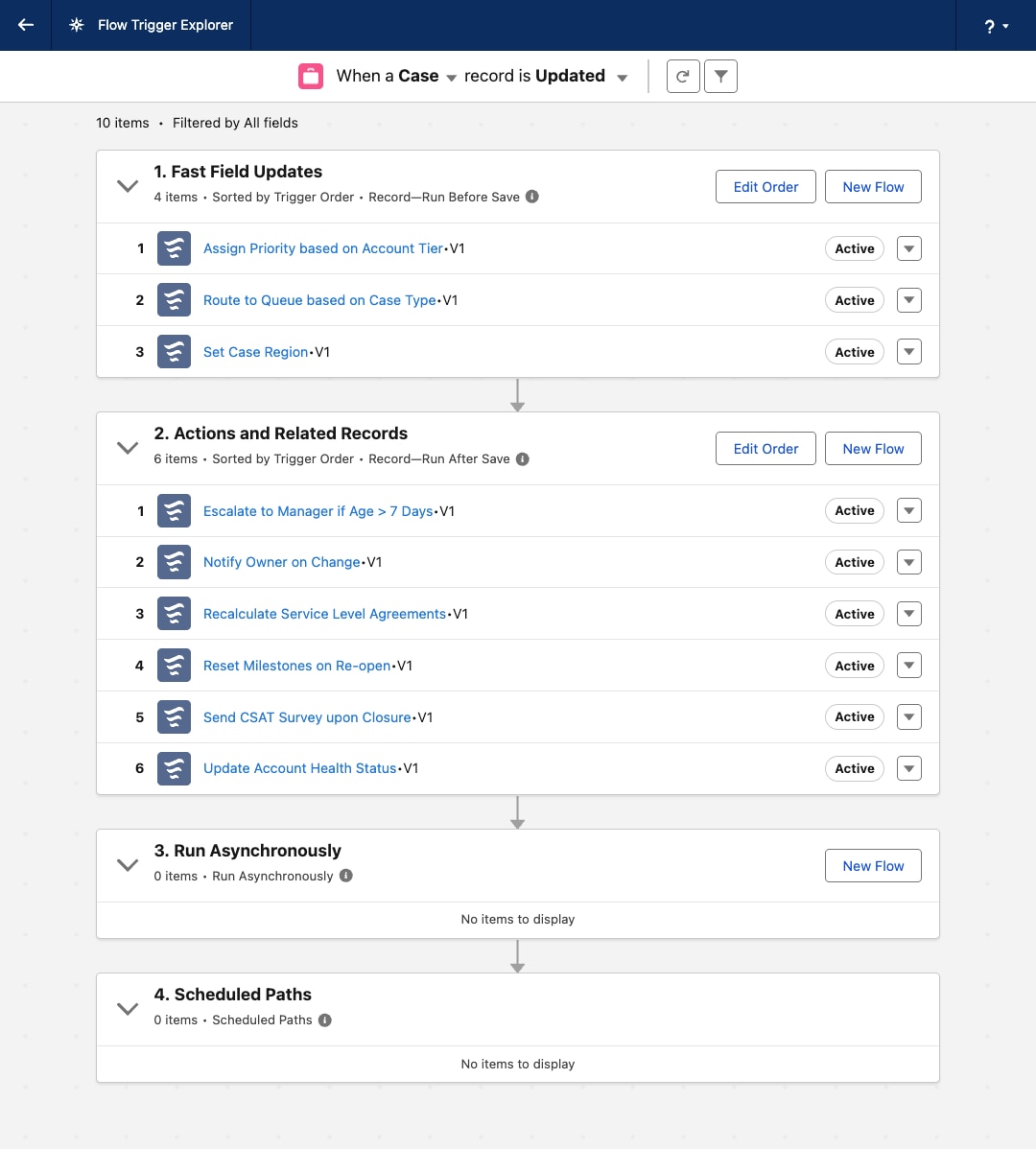
| Apex | Flow | Operations |
|---|---|---|