Enterprises handle a wide range of document types, including invoices, purchase orders, legal contracts, and technical manuals. Manual processing is slow, error-prone, and consumes an estimated 15–25% of employee time. Earlier automation approaches (for example, Robotic Process Automation (RPA), Optical Character Recognition (OCR), and workflow tools) reduced some of the burden, but produced rigid pipelines, high maintenance overhead, and siloed adoption across individual business teams.
Documents carry rich structural context (for example, table hierarchies, spatial field relationships, and cross-referenced sections) that flat-text processing can’t preserve. Stripping a document to plain text discards the business context that makes extraction accurate and useful, which degrades the quality of downstream analytics, Artificial Intelligence (AI) inference, and process automation.
To be effective, Intelligent Document Processing (IDP) systems must classify documents by type, extract structured data accurately from variable layouts, and deliver that data in a governed, queryable form to downstream systems. IDPs must also handle document variability at scale without requiring per-template configuration for every new document format, and they must be centralized and accessible across business units. This challenge is compounded by the sheer volume of the key issue: unstructured data accounts for approximately 80% of all enterprise data, and the majority accumulates in document form across file systems, Cloud storage, and content repositories that are outside the reach of Customer Relationship Management (CRM) systems, AI agents, and analytics platforms.
Data 360 Document AI is the Salesforce document processing capability within Data 360, which is designed to address this gap. It extracts, classifies, and analyzes unstructured and semi-structured document content using Large Language Models (LLMs), Optical Character Recognition (OCR), Natural Language Processing (NLP), and Machine Learning (ML). The output is structured, governed, and queryable data that integrates into the Data 360 pipeline where Agentforce agents, analytics tools, and automation workflows can access it via standard interfaces without requiring custom extraction or transformation layers.
Enterprise data platforms process structured, tabular data. However, the majority of enterprise data arrives as documents and remains inaccessible to CRM, ERP, AI agents, and analytics pipelines until someone manually extracts it. This is an architectural gap, not a workflow problem.
Earlier approaches combined manual re-keying, rules-based OCR, and RPA scripts. These methods worked on a small scale, but they couldn’t handle the volume, variety, and velocity of the types of documents that modern enterprises generate. Rules-based tools require explicit templates per layout variant. Any format change breaks extraction and requires a developer, a new template, and a deployment cycle.
At scale, this produces fragile point solutions with no centralized governance, shared schema, and path to AI-readiness. Inconsistent extraction pipelines propagate downstream. In other words, analytics inherit data inconsistencies, AI models produce unreliable outputs, and regulated content like Personal Health Information (PHI) and Personally Identifiable Information (PII) lack systematic governance.
LLMs extract fields without explicit templates. A single schema configuration governs extraction across layout variants, languages, and formats, which adapts to the document rather than requiring the document to conform to a fixed structure. This shifts document processing from a maintenance-heavy, siloed operation to a governed, centralized capability.
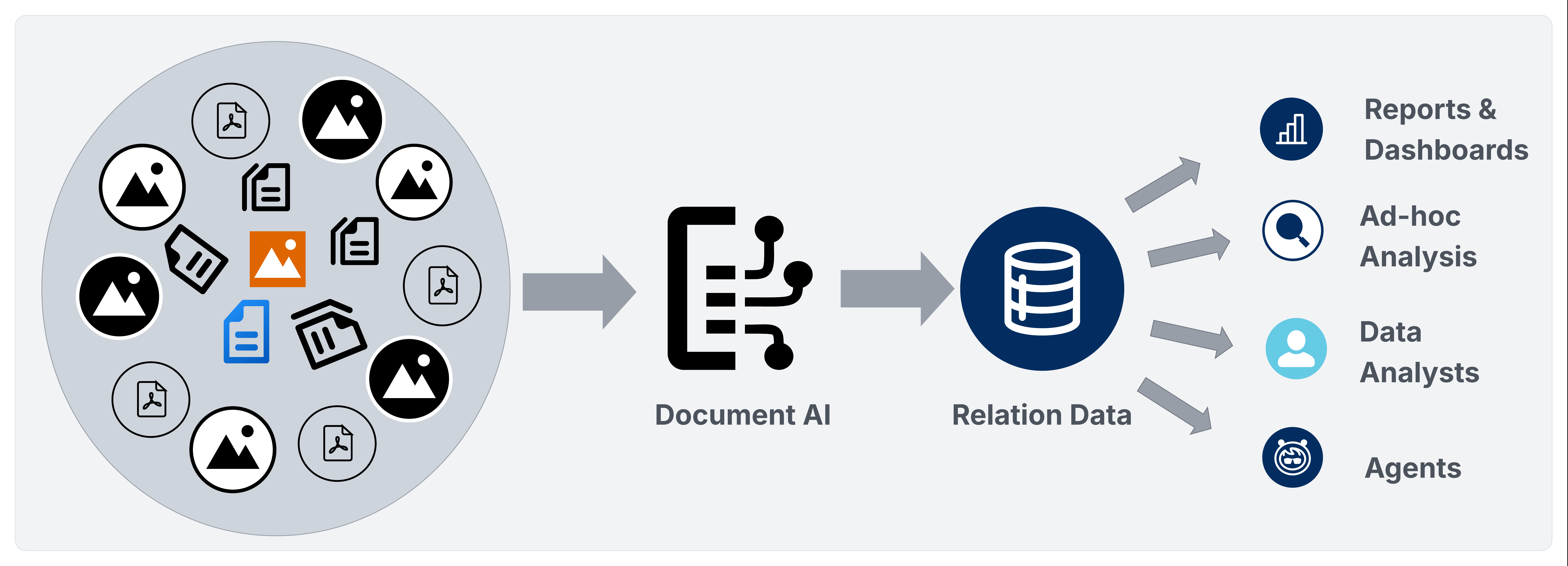
Data 360 Document AI operationalizes document processing within the Data 360 platform via two pipelines.
- The Batch Pipeline routes extracted data through ingestion, identity resolution, calculated insights, activations, analytics, and Agentforce activation.
- The Transactional Processing Pipeline exposes a REST API that returns structured JSON synchronously, which allows architects to route document-derived data to Salesforce SObjects, the Data 360 Data Lake Object/Data Model Object (DLO/DMO) pipeline or external databases and warehouses without batch setup overhead.
In both cases, extracted data enters a governed, schema-driven model rather than a fragmented set of point tools.
Data 360 Document AI is the Salesforce native Intelligent Document Processing (IDP) capability within the Data 360 platform. It converts unstructured and semi-structured document content into governed, queryable data that fully participates throughout the entire Data 360 lifecycle.
Data 360 Document AI is the Salesforce native Intelligent Document Processing (IDP) capability within Data 360. It ingests unstructured and semi-structured documents, extracts structured data using a declarative schema configuration, and delivers that data to the Data 360 pipeline for harmonization, identity resolution, analytics, and Agentforce activation.
Data 360 Document AI supports two processing modalities:
- Bulk batch Processing: Processes large document sets that are defined in Unstructured Data Model Objects (UDMOs) on an event-driven basis.
- Transactional Processing: Processes a single document via REST API and returns a structured JSON payload synchronously. Architects can then route that payload to the Data 360 DLO/DMO pipeline, Salesforce SObjects, or external databases and warehouses via MuleSoft, Apex callouts, or Einstein Trust Layer (ETL) pipelines. The target tier is an architectural decision driven by latency, governance, and data residency requirements.
Document AI currently supports PDF files, image files (JPEG, PNG), and handwritten documents.
Data 360 Document AI assembles four processing technologies into a single governed pipeline. Each component handles a distinct stage of the document-to-data lifecycle:
- Optical Character Recognition (OCR): Converts scanned images, handwritten content, and image-based PDFs into machine-readable text before LLM processing. A minimum of 150 DPI is recommended for reliable extraction.
- Large Language Models (LLMs): Route extraction through the Einstein LLM gateway using the user-chosen model. The LLM receives OCR output alongside the JSON schema configuration and returns a structured extraction payload. Gemini and additional models are being planned for future implementation.
- Natural Language Processing (NLP): Performs contextual understanding, entity recognition, date parsing, and semantic field extraction directly within the LLM via structured prompt engineering—the schema-defined prompt and OCR output serve as the sole inputs. All LLM interactions are routed through the ETL, which enforces zero data retention with model providers and masks PII in text-based inputs before they reach the model. No separate NLP engine is employed.
- Multi-Modal Processing: Processes embedded images within PDFs as separate extraction inputs, which allows the LLM to extract data from diagrams, image-rendered tables, and mixed-content pages that OCR alone can’t parse.
In addition to the four processing technologies, Document AI also handles:
- Einstein Trust Layer: Routes all LLM interactions through the ETL, which enforces zero data retention with model providers and masks PII before inputs reach the LLM with the exception of multimodal data (for example, attached documents that are processed via Document AI) where PII masking isn’t currently supported and data is sent as-is to external models. The ETL only governs the LLM interaction path. Extracted data that’s written to Data Lake Objects (DLOs) is stored as-is; field-level masking at rest must be addressed through downstream data governance controls.
- File Size Limits: Document AI processes files up to 10MB per request. LLM context length limits may further constrain processing for dense, multi-page documents within this boundary.
Enterprise architects that are deploying Data 360 Document AI should apply these principles before committing to an implementation design.
- Select the pipeline before designing the schema. The batch and transactional processing pipelines differ in ingestion model, schema binding, target flexibility, and latency. It’s important to confirm which pipeline each use case requires before defining the schema as retrofitting adds avoidable rework.
- Design schemas at the document-type level. Using a single, well-crafted schema per document type is more maintainable than using per-use-case configurations, and it’s also the largest lever for extraction quality. Doing this correctly requires using a diverse set of documents—including edge cases—rather than designing from a single example. Use prompts iteratively at the field, table, and schema levels to find gaps, and then test and refine them against multiple document samples before finalizing. Keep in mind that a schema that works well on one document may fall short on others, so breadth and iteration are essential. Schema flexibility—including removing columns that don’t reliably extract across document types—is equally important. Holding on to fields that introduce noise or inconsistency undermines the overall extraction quality, so it’s important to treat column removal as a first-class design decision.
- Choose the correct target tier per field group. Fields that are driving CRM workflows or approvals write to SObjects. Fields that are enriching the unified profile or feeding analytics belong in the DLO/DMO pipeline. Fields that are serving external systems belong in the RDBMS tier. Keep in mind that a single schema may fan out to multiple tiers simultaneously.
- Enforce governance before processing regulated content. Regulated data needs protection at every layer. That’s why it’s important to configure PII masking, data classification tags, and Attribute-Based Access Control (ABAC) after extracted data is stored in the output Data Lake Objects (DLOs). This provides fine-tuned enforcement and context-aware access that’s based on data classification, user role, and organizational context. Governance is split across two paths: the ELT governs the LLM interaction, while the extracted data that’s stored in DLOs must be governed separately—directly at the DLO and database levels—through Data Space configurations, Permission Sets, and ABAC policies. These controls must maintain consistency at the storage tier—not only the application layer—so access restrictions remain intact regardless of how data is accessed after ingestion. Keep in mind that gaps in any layer may expose regulated data downstream even when others are correctly configured.
- Design for failure modes before production. Address null field handling, OCR quality thresholds, file size pre-validation, LLM context overflow, RDBMS write idempotency, and credit budget limits before the first production batch run. These aren’t edge cases—they’re predictable failure surfaces that must be explicitly handled in pipeline design, not discovered during runtime.
- Treat confidence scores as a first-class routing signal, not a diagnostic afterthought. Extraction results carry field-level confidence values that are derived from the log probabilities (logprobs) of the underlying model output. For every extracted field, table, or column, the score reflects the model’s token-level certainty of the extracted value. This makes confidence scores a statistically grounded signal that’s reliable enough to serve as the primary gate for Human-in-the-Loop (HITL) escalation thresholds. Use confidence scores to systematically identify low-quality extractions and initiate HITL checkpoints for low-confidence field values, ambiguous schema matches, or repeated pipeline failures instead of relying on heuristics or manual spot-checks. When automated recovery isn’t possible, HITL-backed confidence scoring ensures that human judgment is applied exactly where it’s needed.
- Design activation paths in parallel with schema design. The value of Document AI comes from being able to activate extracted data within Salesforce workflows and agents. It allows you to design Agentforce Actions, Flows, and Calculated Insights alongside extraction schema design, not after.
Document AI operates within two pipelines:
- A batch pipeline for high-volume, UDMO-backed processing
- A transactional processing pipeline for real-time, API-driven extraction
Both pipelines share the same schema configuration contract and ETL governance, but they differ in how documents enter the system and where extracted data lands.
Let’s take a closer look at each pipeline.
The batch pipeline processes recurring document sets that are defined by a UDMO. It suits scheduled or event-driven use cases where documents are ingested from enterprise storage, then pass through document extraction, and are delivered to the Data 360 DLO/DMO pipeline for harmonization, identity resolution, and activation.
Real-World Scenario
Each day, an insurance carrier receives thousands of medical claim documents from provider portals that are uploaded as PDFs into Amazon S3. The UDMO defines the in-scope document set and sends all claim PDFs to the /claims/incoming/ bucket within a 24-hour window.
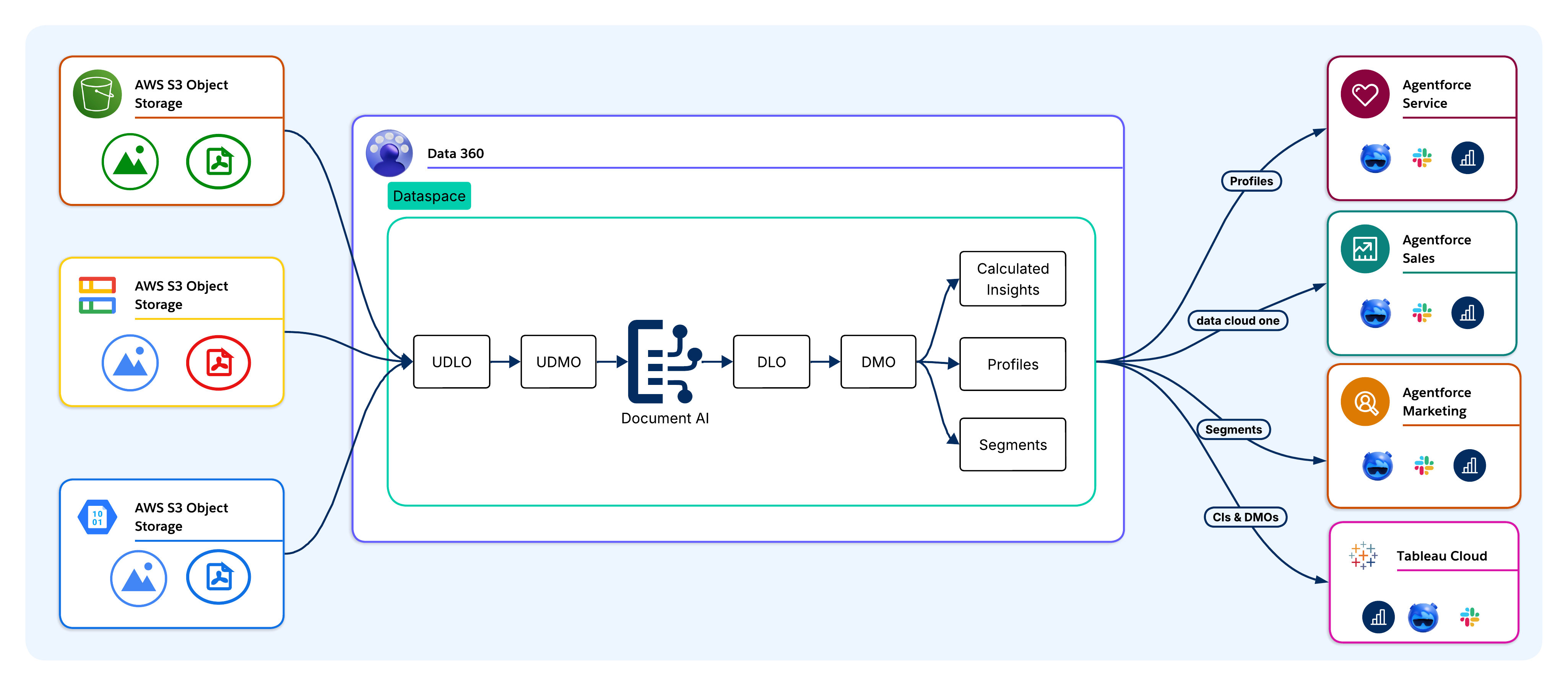
Documents are ingested into Data 360 from enterprise source systems without physical duplication. Supported sources include Amazon S3, Google Cloud Storage, Salesforce CRM file objects, MuleSoft-orchestrated pipelines, and direct API uploads. In AIforce deployments, documents are ingested via cloud storage connectors or the Ingestion API, which bypasses the CRM layer. The Model Context Protocol (MCP) server exposes ingestion as a callable tool for external AI agents and LLM clients.
Upon ingestion, raw documents are stored as Unstructured Data Lake Objects (UDLOs), which map to the physical location and metadata of each document without moving or transforming the source file.
Example:
Claims PDFs are ingested from S3 into Data 360 via the cloud storage connector. Each document is stored as a UDLO that points to the S3 object. No physical duplication occurs.
Document AI processes each UDLO against a schema configuration that defines which fields to extract along with their target data types. The UDMO defines which documents are in scope. The LLM (GPT-4o, Gemini, or Claude) reads each document and returns a structured extraction payload.
Example:
Document AI processes each UDLO against a claims schema that defines fields like: ClaimID, PatientName, DiagnosisCode, BillingAmount, and ServiceDate. LLMs then read each PDF and return a structured extraction payload.
Once the data is extracted, it persists into DLOs, which are the raw storage layer of Data 360. DLOs retain extracted fields without imposing business logic, which preserves an accurate physical representation for downstream transformation and traceability. The UDLO retains a reference to the source document to enable field-level lineage at any point in the pipeline.
Example:
All extracted fields land in a Claims DLO, which preserves a raw, accurate representation of each claim with full lineage that can be traced back to the source PDF.
DLO fields map to DMOs that align with the standard Customer 360 Data Model. This is the boundary where document-derived data transitions from raw, extracted fields to business-meaningful entities. The Invoice DLO maps to an Invoice DMO, and fields like CustomerID and BillingAmount become join keys and match attributes within the unified data model. Harmonized document data participates in segmentation, Calculated Insights, and activation via the same interfaces that are used by CRM and transactional data.
Example:
The Claims DLO maps to a Claims DMO. The PatientID and PolicyNumber fields become join keys that link claim records to unified patient profiles.
Harmonized DMO data participates in identity resolution. Extracted fields (for example, customer names, email addresses, or account numbers) serve as match keys for linking document records to Unified Individuals (Golden Records), which closes the document-to-profile gap.
Example:
Extraction fields (for example, PatientName, DateOfBirth, and PolicyNumber) serve as match keys for identity resolution, which links claim records to the correct Unified Individual. This occurs even if the same patient appears under slightly different name spellings across documents.
Architects define Calculated Insights, which are aggregated metrics that are computed across harmonized document data (for example, the total spend from various invoice line items, contract renewal risk scores, and claim severity indices).
Example:
Calculated Insights compute TotalClaimsPerPatient, AverageClaimAmount, and HighRiskClaimScore across harmonized claim data for Agentforce queries.
Harmonized, identity-resolved data is accessible to Agentforce Agents, Tableau, marketing platforms, and Salesforce SObjects. The target tier is an architectural decision that’s driven by latency, governance, and data residency requirements.
Example:
A Claims Adjudication Agentforce Agent queries the Data 360 DMOs and CIs to find high-risk claims for priority review. Tableau dashboards show claim volume and anomaly trends. Approved claim records circle back to the Claims SObject to initiate payment workflows.
In AIforce architectures, activation routes directly to external systems via the Query API, Pub/Sub API, or Cloud data warehouse activation targets. Then, the MCP server finds harmonized document data and Calculated Insights as callable tools for external AI agents.
The transactional processing pipeline handles single-document extraction at runtime without a UDMO or pre-ingested UDLO, which suits event-driven use cases (for example, a customer uploading a form, an agent receiving a PDF, or an external system initiating extraction within a transactional processing workflow). ETL governance applies to both pipelines identically.
Real-World Scenario
While applying for a loan, a bank customer uploads a PDF of their utility bill via the bank’s mobile app. The event initiates extraction in real time, which means that no pre-ingested UDLO or UDMO is involved.
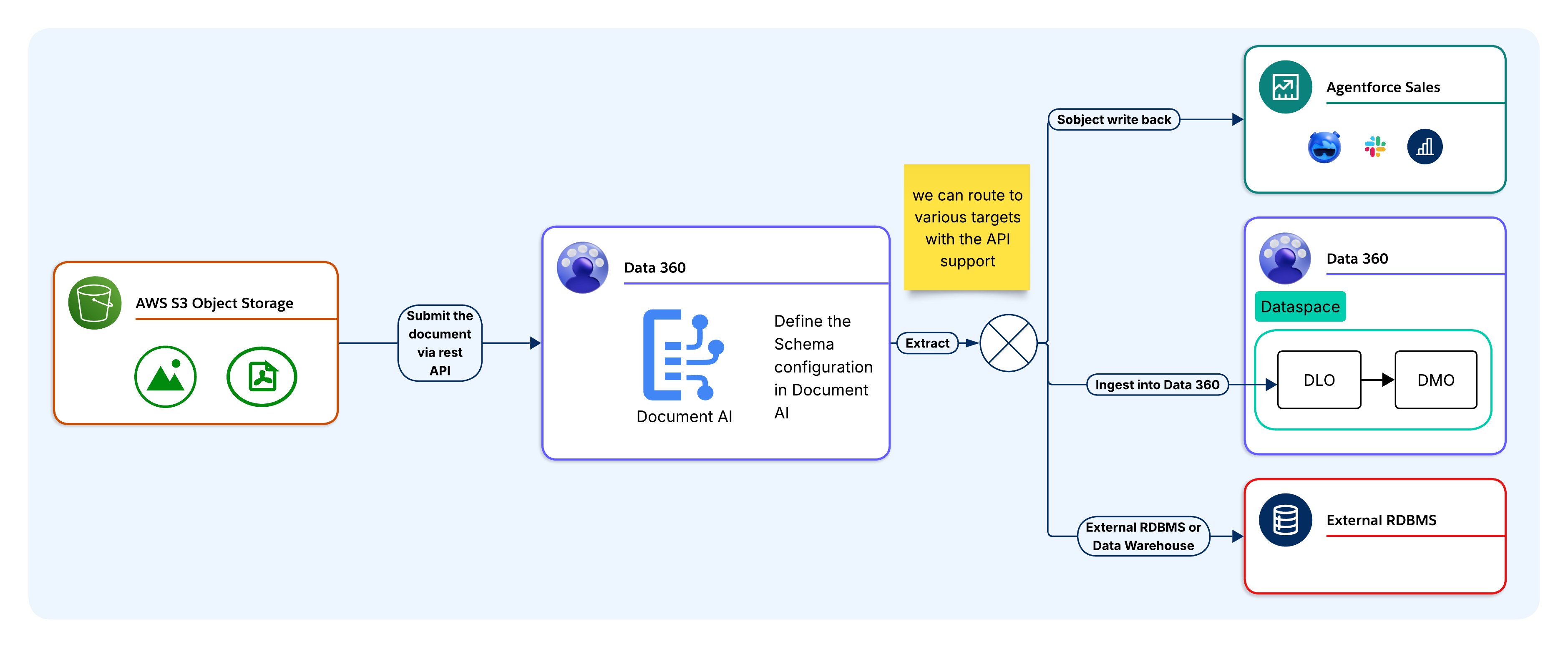
Before invoking the API, architects must define and store a schema in Data 360 that specifies the fields, data types, and extraction instructions in JSON Schema format. Each schema is assigned a unique schema ID. At runtime, the calling application references the schema ID to keep the extraction logic centralized in Data 360 rather than embedding it in application code.
Example:
The bank’s team has a pre-defined ProofOfAddress schema in Data 360, which specifies fields like CustomerName, AddressLine1, City, PostCode, and DocumentDate. This information is stored as a versioned configuration that can be referenced by a schema ID.
The calling application submits the document and schema ID in a single REST API request as a base64-encoded payload or file reference. No UDLO ingestion is required. Document AI applies the document extraction and returns the structured output based on the provided schema.
Example:
The mobile app submits the utility bill as a base64-encoded payload alongside the ProofOfAddress schema ID in a single REST API call. This process doesn’t require a UDLO ingestion step.
The LLM processes the OCR output against the schema and returns a structured JSON payload synchronously. Fields that aren’t found in the document are returned as null. The caller owns the full JSON response and proceeds to routing.
Example:
Document AI applies OCR to the PDF and the LLM returns a structured JSON payload with extracted address fields. Fields that aren’t found (for example, if the PostCode is missing from the bill) are returned as null.
Once extracted, the JSON payload can be routed to one or more target tiers depending on the use case:
- Salesforce SObject: Maps directly to SObject fields via Apex or Flow for CRM workflows and approvals.
- Data 360 DLO/DMO Pipeline: Routes into a DLO for harmonization, identity resolution, Calculated Insights, and Agentforce grounding.
- External RDBMS or Data Warehouse: Routes via MuleSoft, Apex callout, Platform Events, or ETL for systems that are outside of Salesforce.
- Custom Integration: Returns structured JSON payloads to the calling application for storage in any external system or data store.
- Downstream Flow or Agent: Passes the structured JSON output directly to a downstream flow or agent without any persistence into a SObject. This is a common pattern for customers who use Document AI as a real-time extraction step within a larger automation or agentic workflow.
Keep in mind that a single schema may fan out to multiple tiers simultaneously, with different field groups routing to different targets from the same extraction point.
Example:
A ProofOfAddress payload may fan out to three tiers at once (for example, CustomerName and AddressLine1 write to the Contact SObject), which initiates an address verification Flow. Then, the full payload routes into a DLO for harmonization and risk scoring, and a copy routes to the bank’s KYC system via MuleSoft for regulatory compliance logging.
Once it’s written, extracted data activates within the target system immediately. For SObject targets, the triggers, flows, and approval processes are activated in the upserted record. For DLO/DMO targets, data enters the harmonization and identity resolution pipeline and Agentforce context. For external RDBMS targets, data is available to downstream queries as soon as the write completes.
Example:
The address verification Flow immediately activates in the upserted Contact record, which advances the loan application to the next stage. The Agentforce loan officer Agent finds the verified address from the Data 360, and the KYC system records the document submission for audit purposes.
Document AI is best suited for specific architectural conditions. Applying it outside of those conditions introduces unnecessary complexity and additional costs.
As architects, it’s important to evaluate this criteria before committing to Document AI as the extraction mechanism.
Use Document AI when:
- Documents are the primary data source. The required information exists only in document form and is unavailable from a structured API or database (for example, scanned contracts, lab reports, intake forms, or insurance claims).
- Document layouts vary across sources. The same document type arrives from multiple vendors, partners, or regions with different field positions and formats. Schema-driven LLM extraction adapts without per-layout maintenance.
- Extracted data must feed Data 360 or Agentforce. Extraction must participate in identity resolution, Calculated Insights, or Agentforce grounding. Document AI is delivered directly into the DLO/DMO pipeline without a separate ETL layer.
- Volume justifies governed automation. Document volume exceeds what manual processing can handle without measurable labor costs or data quality risks.
- Documents contain regulated content. PHI, PII, or financial data must route through a zero-data-retention, PII-masking layer before reaching an LLM. The ETL satisfies this natively. Customers who require no extracted content to be persisted at any point should also consider the transactional API flow, which returns structured output directly to the calling application without writing to any SObject or data store.
- The use case is event-driven. A document arrives at runtime (for example, a customer upload, an agent PDF attachment, or an external system trigger). The transactional processing pipeline handles synchronous, single-document extraction without batch setup.
Don’t Use Document AI when:
- Source data is already structured. If the upstream system exposes a REST API, database table, or structured file (for example, CSV, JSON, or XML), use a standard Data 360 connector. Running structured data through an LLM extraction pipeline adds latency and credit costs without additional benefits.
- Documents are machine-generated with a fixed schema. System-generated PDFs from a known ERP or billing platform with a stable layout are better suited for a deterministic parser. LLM extraction is designed for variability, and applying it to fixed-schema documents wastes context and credits.
- Accuracy requirements exceed LLM confidence thresholds. Document AI doesn’t guarantee 100% extraction accuracy. Use cases where a missed or incorrect field value carries significant financial, legal, or clinical risk requires an HITL validation step. Don’t use Document AI as the sole extraction layer for high-stakes decisions without a validation workflow.
- Documents exceed platform constraints. The current 10MB file size limit and LLM context length constraints make Document AI unsuitable for large or dense documents without pre-processing to split and reassemble them outside of the platform.
- Note: At Salesforce, we’re actively improving these acceptance guardrails to expand supported file sizes, page counts, and file extensions. Constraints will continue to evolve moving forward.
Let’s take a closer look at several scenarios that use the Document AI batch pipeline backed by a UDMO source object. In these instances, extracted data routes through the Data 360 DLO/DMO pipeline for harmonization, identity resolution, Calculated Insights, and Agentforce activation. Each use case is best suited for scheduled or event-driven, high-volume document processing.
Agentforce Sales: Contract and Invoice Intelligence
Contract PDFs are ingested from Cloud storage via the batch pipeline. The schema extracts ContractValue, RenewalDate, PaymentTerms, and CounterpartyName, and then maps them to the Account and Contract DMOs. Calculated Insights derive renewal-risk scores. Agentforce alerts account executives before renewal windows close, which eliminates manual contract review and missed renewals.
Agentforce Service: Case Deflection and Knowledge Grounding
Survey PDFs and case attachments are ingested via the batch pipeline. The schema extracts sentiment indicators, issue categories, and resolution notes, and then maps them to the Case and Knowledge Article DMOs. Agentforce queries the harmonized knowledge base when the case opens and locates relevant troubleshooting steps, which reduces Agent search overhead.
Agentforce Health: Clinical Document Processing
Lab reports, intake PDFs, and handwritten clinical forms are ingested via the batch pipeline. The schema extracts fields—including PatientID, DiagnosisCode, MedicationName, and TestResult—and then maps them to the Health Cloud DMOs, which supports HIPAA-aligned care coordination and clinical research workflows.
Financial Services: Loan and Tax Document Automation
Loan applications, tax returns, and income statements ingest via the batch pipeline. The schema extracts fields—including AnnualIncome, TaxYear, and EmployerName—and then maps them to the Financial Account DMOs. Calculated Insights join document-derived income data and CRM data to facilitate automated credit-risk scoring. Agentforce locates the extracted loan details inline during customer service interactions. This pattern directly supports the Loan Prequalification Agent use case that’s published on the Salesforce Agentic Enterprise Solutions developer center.
HR: Workforce Document Processing
Onboarding documents, tax forms, and certification PDFs are ingested via the batch pipeline. The extracted fields are mapped to the Employee Record DMOs, and then linked to the Unified Employee profile. Specific Flows initiate onboarding tasks and compliance checks based on the extracted data. This pattern directly supports the Automate Resume Processing Agentic use case. Document AI extracts skills, employment history, and qualifications from resume PDFs, which Agentforce then uses to match candidates against open-role criteria and route them to hiring workflows.
Professional Services: Proposal and Research Intelligence
Proposal decks and research reports are ingested via the batch pipeline. Extracted frameworks, benchmarks, and engagement summaries are mapped to custom DMOs, and then indexed for vector search. Agentforce retrieves contextually relevant recommendations at query time, which are grounded in extracted document content. This pattern extends the Ground Agentforce on Website Content pattern. Documents are indexed via Document AI and serve the same grounding function for Agent responses as website content that’s indexed via Data 360 connectors.
HIPAA Compliance Status:
The Health Cloud patterns described in this paper apply ETL controls (for example, zero data retention and PHI masking) for text inputs. These controls alone don’t constitute HIPAA certification. Architects that are designing for regulated clinical environments must confirm current HIPAA certification status with the Salesforce compliance team before committing to a Document AI-based architecture within those contexts.
Let’s take a closer look at several scenarios that invoke the Document AI REST API with a schema that isn’t bound to a UDMO. Extracted JSON payloads route directly to external systems synchronously at runtime.
Supply Chain: Vendor Invoice Processing to ERP
When a vendor invoice PDF arrives in a monitored storage bucket or email gateway, an event trigger calls the Document AI REST API with the invoice and a pre-defined schema ID. The schema extracts the VendorID, InvoiceNumber, LineItems, TotalAmount, TaxAmount, and DueDate. The JSON payload routes via MuleSoft to the ERP Accounts Payable module with null field validation and idempotent upsert logic, which eliminates template maintenance for supplier format variability.
Legal Operations: Contract Review to CLM
When a contract PDF is uploaded to the legal portal, the backend calls the Document AI REST API synchronously. The schema extracts the GoverningLaw, IndemnityCapAmount, TerminationNoticePeriod, AutoRenewalClause, and CounterpartySignatory. The JSON payload routes via Apex callout to the Contract Lifecycle Management (CLM) system. Any fields that aren’t found are returned as null, and the CLM applies the default obligation rules to the missing values.
Insurance Claims: First Notice of Loss Processing
When a policyholder submits a First Notice of Loss (FNOL) form, the backend portal calls the Document AI REST API synchronously. The schema extracts the PolicyNumber, IncidentDate, IncidentLocation, DamageDescription, ClaimantName, and ContactPhone. The JSON payload routes to the claims management database via Apex callout or ETL, which creates a pre-populated claim record for adjusters to review before the formal claim is opened.
Before you move to production, you must create designs for these failure scenarios.
- Null Field Handling: The LLM returns null for fields it can’t locate or confidently extract. Validate null-handling logic at schema design and implement default value or rejection logic in the integration layer before writing to any targets with NOT NULL constraints or required match keys.
- OCR Quality Degradation: OCR accuracy degrades below 150 DPI, on irregular handwriting, or on noisy scans. Misreads propagate into LLM extraction as corrupted input without error signals. Enforce minimum scan quality at ingestion and implement confidence threshold checks on numeric and date fields.
- Schema Version Mismatch: Updating a schema configuration after a batch job is scheduled causes in-flight documents to process against the previous version, which produces missing or renamed fields that break downstream mapping. Version schemas explicitly and coordinate updates with batch job schedules.
- File Size Limits: Documents that exceed 10MB are rejected. Batch pipeline failures are silent without monitoring configured, and transactional callers receive a 4xx error. Pre-validate file sizes at ingestion and implement pre-processing to split or compress documents that regularly approach the limit.
- LLM Context Overflow: Dense or multi-page documents may exceed the LLM context window within the 10MB limit. The LLM silently drops content that exceeds context. Implement a chunking strategy that splits documents by page range and reassembles the extracted fields before transferring them to the target.
- Trust Layer Masking Affecting Extraction: The ETL operates at the prompt level—not the document level—so masking doesn’t apply to document content that passes through Document AI. Schema fields that depend on PII values in the document aren’t affected by ETL-masking policies.
- External RDBMS Write Idempotency: The transactional processing pipeline doesn’t have any built-in idempotency for external RDBMS targets. Integration layer retries create duplicate rows unless the write logic handles de-duplication explicitly. Implement idempotent upserts using a document fingerprint or external ID on all external write paths.
- Credit Exhaustion Mid-Run: Large batch runs may exhaust Digital Wallet credits before all documents are processed, which produces incomplete DLO datasets that downstream steps view as complete. Set consumption alerts to 75% and 90% of available credits and limit batch sizes to stay within the credit budget for each cycle.
- Schema Field Limit — Architectural Constraint: Document AI enforces a 50-field limit for root-level fields in a schema configuration. This is a design-time constraint—not a runtime error—and architects must account for it during data model and schema design.
- For use cases that require broader extraction:
- Prioritize ruthlessly. Narrow the schema to fields that drive automation value, not exhaustive document coverage.
- Leverage nested objects (up to 3 levels; batch mode with source object only) to reduce the root-level field count without sacrificing extraction depth.
- Decompose complex documents across multiple Document AI configurations that target distinct document sections, write results to separate DLOs that join downstream in Data 360.
- For use cases that require broader extraction:
- API Rate Limits: Document AI enforces a limit of 50 extraction API calls per minute per tenant. The theoretical ceiling is 300 calls per minute, which is governed by the Einstein LLM Gateway. High-volume transactional integrations must be designed with exponential backoff, request queuing, and tenant-level throughput budgeting. Don’t assume that burst capacity is available in multi-tenant production environments.
- API Latency Profile: Document AI extraction APIs are fully synchronous. Typical response times range from 5–15 seconds, and they vary by file size and schema complexity.
- This has direct implications for integration architecture:
- Set caller timeouts to a 30-second minimum.
- Don’t invoke Document AI in flows with sub-second SLA requirements.
- Factor latency into throughput calculations against the rate limit ceiling for batch processing pipelines.
- Set caller timeouts to a 30-second minimum.
- This has direct implications for integration architecture:
- Encrypted and Password-Protected Documents: Document AI doesn’t process password-protected files (user passwords are required to open files) or PDFs that are encrypted with an owner/permissions password, including files that open normally but restrict copying, printing, or editing at the PDF permissions layer.
- This constraint sits at the ingestion boundary:
- Design document intake pipelines to detect and route encrypted files to a rejection or manual processing path before they reach Document AI.
- Don’t rely on runtime error handling as the primary gate.
- This constraint sits at the ingestion boundary:
Data 360 Document AI aligns with several pillars of the Salesforce Well-Architected Framework.
- Trust: The ETL enforces zero data retention with LLM providers, masks PII inputs before they reach the model, and scans outputs for sensitive content. Architects must extend this posture to extracted data at rest. Field-level masking in DLOs isn’t applied by the ETL, and it requires downstream Data Space policies and Permission Sets.
- Reliability: Each failure mode in the Design Considerations section—null field extraction, OCR misread, schema version mismatch, file size breach, LLM context overflow, ETL masking interference, RDBMS write idempotency and credit exhaustion—represents a distinct failure class with a documented detection signal and resolution path.
- Operational Excellence (change management): The schema-driven extraction model decouples the extraction logic from the document layout. When a vendor changes an invoice format or a regulatory form is updated, architects only need to update one schema configuration rather than modifying integration code.
- Operational Excellence (maintainability): Centralizing schema configurations in Data 360 rather than embedding extraction logic in application code makes extraction intent explicit, versioned, and auditable. All downstream targets consume the same schema contract regardless of their target tier.
- Operational Excellence (integration reuse): Document AI exposes extraction across multiple integration surfaces: REST API, Apex, Flow, MuleSoft, Agentforce Actions, and the MCP server. A single schema configuration fans out to multiple target tiers simultaneously without rebuilding the extraction capability per consumer.
- Resource and Cost Optimization: The pipeline selection guidance, 10MB file size boundary, and pre-assembly LLM context length constraints represent performance-aware design decisions. The When to Use section formalizes the conditions for when Document AI isn’t the right tool (for example, sub-second latency requirements, fully-structured source data, and fixed-schema machine-generated documents).
This is a structured starting point for configuring Data 360 Document AI in a sandbox environment. Complete all phases in the sandbox before moving to production.
Before beginning configuration, you must confirm:
- File Size: Validate that the representative document sizes are under 10MB.
- Pipeline: Confirm whether the use case requires the batch pipeline (UDMO-backed, high-volume) or the transactional processing pipeline (API-driven, single-document). This drives all subsequent configuration.
- Target Tier: Confirm where the extracted data lands—Salesforce SObject, Data 360 DLO/DMO, external RDBMS, or a combination.
- Agentforce Dependency: Before deploying any Agentforce-powered document processing, confirm that a supported LLM (for example, GPT-4o) is enabled in your org via the ETL settings. Agentforce is a hard platform prerequisite for Document AI. The entire Document AI feature surface—including all extraction APIs—is unavailable until Agentforce is active in the target org. Factor this into org readiness assessments and provisioning sequencing. Allow a few minutes for API availability to stabilize post-enablement.
- Agentforce Disablement Impact: If Agentforce is disabled after Document AI is configured and deployed, then all extraction processing (UI and API) will be blocked immediately. The same applies to model disablement. Disabling the underlying model has an equivalent effect on Document AI availability. In both cases, the existing schema configurations are preserved and will remain visible—no configuration or data loss will occur—but the capability is fully inoperable until Agentforce and the model are re-enabled. Design operational runbooks to treat Agentforce availability and model enablement as Document AI health dependencies.
- Credit Consumption/Pricing: Use Data 360 credits or Flex Credits for TCO estimates that are derived from representative sample documents.
- Create the schema configuration. Define extraction fields, data types, and instructions in JSON Schema format in the Data 360 Document AI setup. For the batch pipeline, bind it to a UDMO. For the transactional processing pipeline, create it without a source object. Record the schema ID.
- Align field names to the target tier. Match field names to DLO column definitions, SObject API names, or RDBMS column names. Misaligned names create mapping overhead in the integration layer.
- Configure the UDMO source object (batch only). Define documents in scope and configure ingestion source connectivity (for example, S3, Google Cloud Storage, Salesforce Files, or MuleSoft). Confirm that the ingestion service account has the required IAM or OAuth credential scope.
- Apply PII masking policies. Configure Data Masking policies in the ETL settings before processing any regulated content. Define which field types (PHI, PII, and financial identifiers) are masked before inputs reach the LLM. Don’t defer this step.
- Assign Data Space scope and Permission Sets. Scope processing to the appropriate Data Space and configure Permission Sets to control schema creation, batch job execution, REST API invocation, and downstream activation.
- Configure API authentication (transactional processing pipeline only). Create a Connected App with OAuth scopes cdp_ingest_api and api. For org-internal callers, use a Named Credential that links to an External Credential. For external callers, configure OAuth 2.0 client credentials or a JWT-bearer flow. Test and validate extraction before proceeding.
- SObject write-back: Implement an Apex (@InvocableMethod) or Flow element that maps JSON response fields to SObject fields. Use Database.upsert() with an external ID to prevent duplicates. Apply Field-Level Security on target SObject fields.
- Data 360 DLO/DMO pipeline: Map extracted DLO fields to DMOs that align with the Customer 360 Data Model. Configure identity resolution rules to link document records to Unified Individuals. Define Calculated Insights and add DMOs for Agentforce. For the transactional processing pipeline, route the JSON payload to a DLO via the Ingestion API first.
- External RDBMS or data warehouse: Select the integration pattern: MuleSoft (existing integration fabric), Apex HTTP callout (lightweight, org-native), Platform Events with the Pub/Sub subscriber (event-driven), or ETL (high-volume batch). Implement idempotent upserts using a document fingerprint or external ID on all external write paths.
- Activation paths: Connect Agentforce actions to schema configurations for interactive extraction. Configure Flow or Apex triggers for automated processing workflows and establish the activation targets for each field group.
- Error handling (transactional processing pipeline only). Configure the full HTTP response surface: 200 (successful, including partial null responses), 400 (malformed request or schema ID not found), 413 (file exceeds 10MB), 5xx (service error). Implement exponential backoff for 5xx retries with a maximum of 3 attempts. Log the raw JSON response and schema ID on every call.
- Test schemas against sample documents. Submit representative samples via the Document AI interface or REST API. Confirm extraction accuracy, field coverage, and null handling across layout variations.
- Validate null field handling. Confirm that all downstream targets can handle null values for fields not found in a document. Keep in mind that NOT NULL constraints fail silently without explicit null handling.
- Pre-validate file sizes. Confirm that production documents stay under 10MB. Implement pre-processing to split or compress documents that regularly approach the limit.
- Validate end-to-end extraction. For the batch pipeline, initiate a full run and confirm that the extracted fields land correctly in each target tier. For the transactional processing pipeline, trace the JSON response through the integration layer to the target. Verify the trigger and flow execution for the SObject targets, the identity resolution linkage for the DLO/DMO targets, and the idempotency for the RDBMS targets.
- Confirm Trust Layer behavior. The ETL doesn’t apply PII masking to document content, so the LLM will return PII data in extracted fields as-is. Confirm that your schema fields, data routing, and downstream storage are designed to handle PII-bearing output appropriately, and ensure that any compliance or retention requirements are addressed outside of the platform.
- Set Digital Wallet alerts. Configure consumption alerts at 75% and 90% of available credits. Establish batch size limits and ad-hoc rate estimates within the credit budget for each cycle.
- Validate batch monitoring (batch pipeline only). Review extraction success rates, null field rates, and job completion in the Data 360 monitoring console. Confirm the tag propagation from the UDLO through the DLO to the DMO in data lineage.
- Validate API error handling (transactional processing pipeline only). Test all error conditions: 413 (documents over 10MB), 400 (invalid Schema IDs), 200 (valid extractions with partial nulls). Confirm that the retry logic fires on simulated 5xx responses without creating duplicate writes.
This document highlights the architectural foundations of Data 360 Document AI:
- Two processing pipelines and when to use them
- The schema configuration model
- The target tier decision framework
- Core technology constraints
- Failure modes
- Well-Architected Framework alignment
The Quick-Start Guide for Architects provides the configuration sequence for a sandbox proof of concept.
The core architectural posture supports document-derived data that’s governed at the Schema layer, processed via an ETL-enforced LLM pipeline, and delivered to the same Data 360 data lifecycle that governs all of our other enterprise data.
Architects who apply these principles—selecting the correct pipeline, designing schemas at the document-type level, and designing for failure modes before production—build extraction capabilities that scale and endure under regulated industry governance requirements.
Yugandhar Bora is a Software Engineering Architect at Salesforce who specializes in data architecture within the Data and Intelligence Applications platform. He leads Enterprise Architecture Review Board (EARB) initiatives that focus on data governance and unified data models, while also contributing to automated platform provisioning solutions.
Ananth Anto is a Director of Product Management at Salesforce Data 360 who leads Document AI and Data Graph initiatives. Based in Bangalore, he works with enterprise customers to solve real-world document-processing and data-intelligence challenges. He enjoys exploring Enterprise use cases for Generative AI (Gen AI).
Nishan Naseer is a Software Engineering Architect at Salesforce who works on Unstructured Data Processing, RAG pipelines, and Document Intelligence. He’s passionate about harnessing the power of AI to tackle real-world challenges and find creative solutions to complex customer issues.