Using the Right Tools and Patterns for Event-Driven Architectures
Event-driven architectures support the efficient production and consumption of events, which communicate system or application state changes. These architectures enable flexible connections between systems, and support processes and near real-time updates that work across systems. While the advantages of event-driven architectures are easy to see, implementation details are not always as clear. What capabilities do you need to consider in event-driven architectural patterns? What specific problems do these patterns solve? What special considerations apply to your solutions, and what are the optimal patterns for addressing them?
This guide presents patterns used to build optimal event-driven architectures when working with Salesforce technologies. It also discusses eventing tools available from Salesforce, and provides tool recommendations for a selection of use cases. For information about data-level integrations involving Salesforce, see our Data Integration Decision Guide.
-
Use event-driven architectures for processes that do not require synchronous responses to requests. The patterns outlined in this guide are designed for data consistency, scalability, and reuse, which help to keep technical debt to a minimum as your organization’s application landscape evolves. (See Well-Architected - Reliability for more information.)
-
If MuleSoft or another Enterprise Service Bus (ESB) solution is part of your existing landscape, use it where possible. These solutions are purpose-built to support event-driven architecture patterns and have powerful capabilities that enable you to reuse integrations across your enterprise.
-
Use the Pub/Sub API for any future publish/subscribe patterns instead of building your own event handlers using other APIs, including the Streaming API. Now that the Pub/Sub API is generally available, use it for any new publish/subscribe patterns. Plan to migrate existing event communications using other platform APIs, such as the Streaming API or custom Apex services, to the Pub/Sub API when it’s feasible to do so.
-
Platform events and Change Data Capture (CDC) are the preferred mechanisms for publishing record and field changes that need to be consumed by other systems. We don’t recommend using PushTopic and generic events for new implementations. Salesforce will continue to support PushTopic and generic events within current functional capabilities, but doesn’t plan to make further investments in this technology.
Event-Driven Architectures (EDAs) are recommended for scenarios requiring near real-time notifications, distributing processing load for high-volume or complex messages, and integrating systems like IoT and mobile devices that require connectivity resilience through queuing. However, EDAs should not be implemented for processes that demand immediate, synchronous human responses, as they are designed for asynchronous execution. Nor are they a good fit if source data changes so infrequently that a simpler pattern like batch processing would suffice.
Here are several common scenarios that are often a good fit for an event-driven architecture:
| Decision Point | Guidance |
|---|---|
| Near real-time notifications | Event-driven architecture patterns like publish/subscribe, fanout, and streaming tend to work well in scenarios where multiple applications need to be notified of status changes or record updates in near real-time. |
| Parallel processing | Patterns such as publish/subscribe tend to work well in scenarios where large volumes of data or highly complex messages necessitate distributing the processing load among multiple systems. |
| High-volume reads | The Passed Messages and Queuing patterns are commonly used in scenarios where organizations experience surges, and the volume of messages being produced can exceed subscribers' ability to immediately process them. |
| High-volume writes | The Streaming and Queuing patterns work well in many scenarios where organizations experience surges in the number of messages produced. |
| Sending the same data to different systems | While publish/subscribe tends to be a fairly common solution for organizations that need to send the same data to multiple systems, it can be addressed by most patterns covered here. Be sure to review them in detail to find the best fit. |
| Frequent introduction of new systems or devices | The publish/subscribe, Streaming, and Queuing patterns tend to work well for scenarios where the overall landscape tends to be in flux, with new systems and devices being added regularly. In this scenario, a new system or device simply needs to become a subscriber to the event bus or associated with a queue, to begin receiving messages rather than requiring a custom point-to-point integration. |
| IoT devices | Because IoT devices typically deliver frequent updates and can also generate a surge of messages in some scenarios, the Streaming and Queuing patterns tend to work well when integrating them into an IT landscape. |
| Offline mobile devices and systems | Mobile devices that need to work in areas with low quality or nonexistent internet access or systems that may be offline at the time messages are delivered will benefit from the Queuing pattern, which enables them to connect to their queues and retrieve any relevant messages once they're back online. |
Most large organizations have complex IT landscapes that have a combination of systems with different capabilities. It’s possible, or perhaps likely, that your organization has legacy systems that don’t support event-driven integrations. You might also have use cases where event-driven integrations don’t make sense, even if the systems will support them (for example, SFTP file transfers from third-parties). If you take a step back and look at your organization’s IT landscape as a whole, chances are — just as with other architectural solutions — you’ll employ a mixture of patterns to support different scenarios. When you decide to make event-driven your preferred approach to integrations, think of it as another tool in your toolbox. It can and should be used in the right scenarios, but it isn’t an approach to be imposed on every system. Developing a comprehensive integration strategy will help you determine when the patterns described in this guide may or may not be appropriate.
Many scenarios call for event-driven architectures, and in some scenarios, event-driven architectures will work even if they aren’t the best fit. But in some scenarios, event-driven architectures simply shouldn’t be used. Here are some decision-point questions to help you identify these scenarios:
| Decision Point | Guidance/Questions to Ask |
|---|---|
| Business requirements | Is there a genuine business need for any of the functionality described in the [When to Use an Event-Driven Architecture](#when-to-use-an-event-driven-architecture) section? |
| Technical requirements | Is the integration you're designing an obvious fit for a different pattern, such as data virtualization, batch or request/reply? In other words, are you trying to fit a square peg into a round hole? |
| Processes requiring humans to wait for responses | Any integration that involves a human waiting for a response from the target system is not a good fit for event-driven architectures, as they are designed for asynchronous execution and can't guarantee a response time. Consider whether processes like this are optimal for your organization prior to implementing technical solutions. See [Well-Architected - Operational Excellence](/docs/architect/well-architected/guide/operational-excellence.html) for more information. |
| Infrequently changing source data | If the data in your source system changes so infrequently that periodic updates are sufficient, you can likely simplify your architecture by using [batch patterns](https://developer.salesforce.com/docs/atlas.en-us.integration_patterns_and_practices.meta/integration_patterns_and_practices/integ_pat_batch_data_sync.htm) instead of event-driven patterns. |
| Implementation requirements | Do the majority of systems involved in your solution support event-driven architectures? What would be required to use event-driven architectures with the systems that don't support them (for example, upgrades, customizations, or middleware)? What level of effort would be needed to meet these requirements? |
| Message structure stability | How often will your message structures need to change? Which systems will be affected by such a change and what will the remediation process be? |
| Organizational Governance | Do you have a governance structure in place to ensure that all stakeholders are informed of and able to weigh in on changes to message structures, triggers, and other architecture- and process-related decisions? |
| Required skill sets | Does your staff have experience with event-driven architectures and will they know how to support them? |
There are a variety of event-driven architecture patterns. Some are general purpose patterns that can be applied in use cases that don’t have any special requirements outside of being event-driven; for example, see Well-Architected - Reliability. Other patterns are applicable to the specific use cases discussed here, such as integrations involving large data volumes, or scenarios that call for longer message retention.
The table below compares attributes of the patterns outlined in this document. Use it as a quick reference when you need to identify potential patterns for a given use case.
| Pattern | Near Real-Time | Unique Message Copy | Guarantee Delivery | Reduce Message Size | Transform Data |
|---|---|---|---|---|---|
| Publish / Subscribe | ✓ | ✓ | ✓ | ||
| Fanout | ✓ | ✓ | ✓ | ||
| Passed Messages | ✓ | ✓ | ✓ | ✓ | |
| Streaming | ✓ | ✓ | ✓ | ||
| Queueing | ✓ | ✓ | ✓ |
Salesforce offers multiple tools to help you address your event-driven use cases. This table contains a high-level overview of available tools.
| Tool | Description | Required Skills | |
|---|---|---|---|
| MuleSoft | Anypoint Platform | Platform that enables data integration using layers of APIs. | Pro-code |
| Salesforce Pub/Sub Connector | Connector for Pub/Sub API, which provides a single interface for publishing and subscribing to platform events, real-time event monitoring events, and change data capture events. | Pro-code | |
| MuleSoft Anypoint JMS Connector | Connector that enables sending and receiving messages to queues and topics for any message service that implements the Java Message Service (JMS) specification. | Pro-code | |
| MuleSoft Anypoint Apache Kafka Connector | Connector to move data between Apache Kafka and enterprise applications and services. | Pro-code | |
| MuleSoft Anypoint Solace Connector | A connector for Solace PubSub+ event brokers with native API integration using the JCSMP Java SDK | Pro-code | |
| MuleSoft Anypoint MQ Connector | A multi-tenant, cloud messaging service that enables customers to perform advanced asynchronous messaging among their applications. | Pro-code | |
| MuleSoft Anypoint MQTT Connector | An MQTT (Message Queuing Telemetry Transport) v3.x protocol-compliant MuleSoft extension. | Pro-code | |
| MuleSoft Anypoint AMQP Connector | A connector that enables your application to publish and consume messages using an AMQP 0.9.1-compliant broker. | Pro-code | |
| MuleSoft Anypoint Event-Driven (ASync) API | Industry-agnostic language that supports the publication of event-driven APIs by separating them into event, channel, and transport layers. | Pro-code | |
| MuleSoft Anypoint MQ | Multitenant cloud messaging service that enables customers to perform advanced asynchronous messaging between their applications. | Pro-code | |
| MuleSoft Anypoint Data Streams | Framework available within MuleSoft Anypoint for publishing and subscribing to streaming data. | Pro-code | |
| Salesforce Platform | Apache Kafka on Heroku | Heroku add-on that provides Apache Kafka as a service with full platform integration into the Heroku platform. | Pro-code |
| Change Data Capture | Change events log, which publishes changes to Salesforce records. Changes include creation of a new record, updates to an existing record, deletion of a record, and undeletion of a record. | Low-code to Pro-code | |
| Outbound Messages | Actions that send XML messages to external endpoints when field values are updated within Salesforce. | Low-code | |
| Platform Events | Secure and scalable messages that contain custom event data. | Low-code to Pro-code | |
| Pub/Sub API | API that enables subscriptions to platform events, Change Data Capture events, and/or Real-Time Event Monitoring events. | Pro-code | |
| Event Relays | Enables platform events and change data capture events to be sent from Salesforce to Amazon EventBridge. Note that Event Relays only connect to AWS Eventbridge. | Low-code | |
When a critical record changes state within a core application—for instance, an order’s status moves from “Processing” to “Shipped”—multiple other systems likely require a near real-time notification to perform their respective tasks. A specific business need arises when the volume of these changes is high and the messages are complex, making traditional point-to-point integrations burdensome and difficult to maintain. Establishing fragile, custom connections for every single dependent application leads to technical debt and inhibits the organization’s ability to scale quickly. A robust integration approach is needed to manage these frequent data synchronizations without coupling the source system directly to every consuming system.
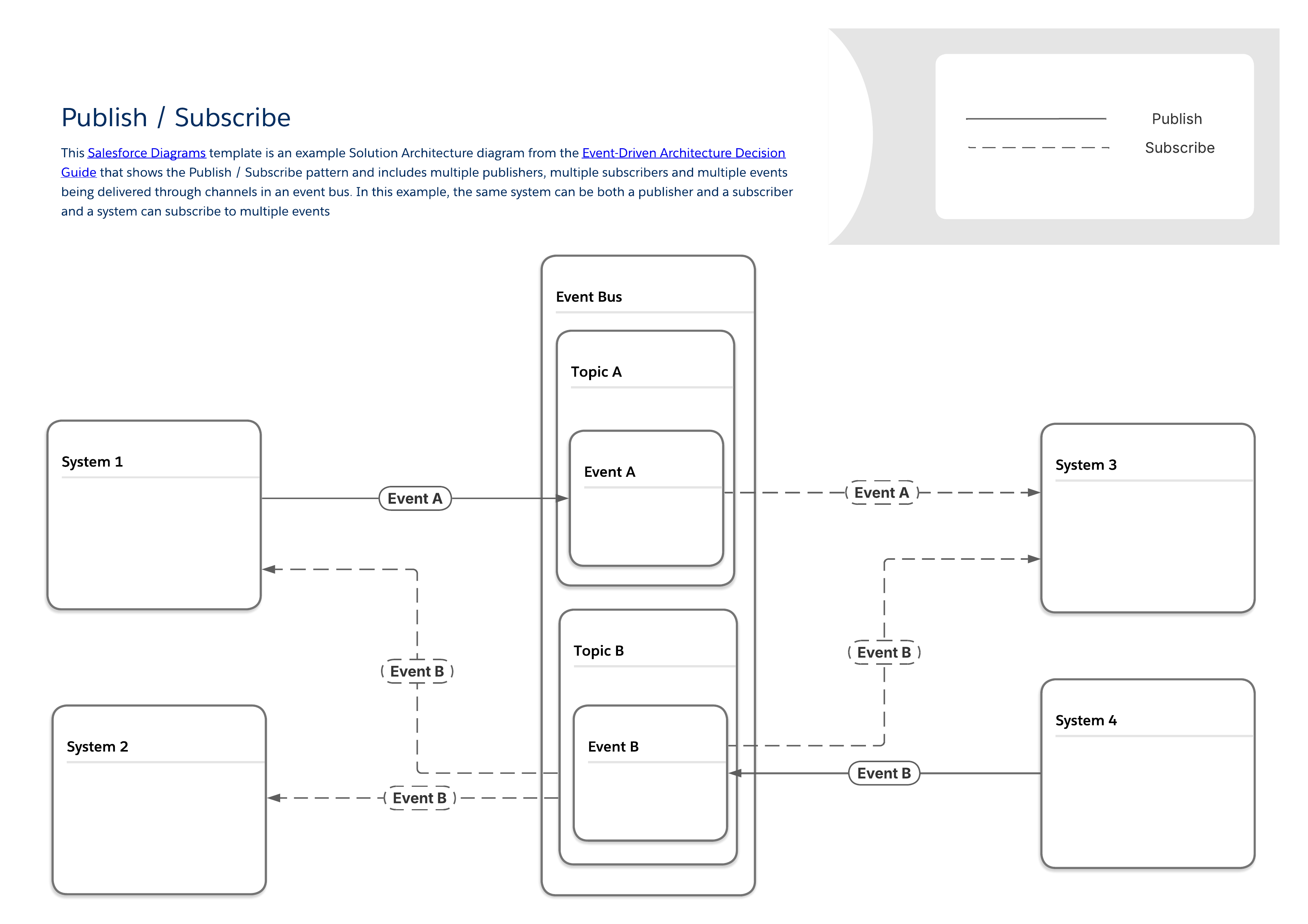
The diagram below depicts a typical publish/subscribe pattern with multiple publishers and subscribers sharing data through an event bus. This foundational pattern forms the basis for the more specific patterns that can be found throughout the rest of this guide. Some key characteristics of this pattern are:
-
There is no direct connection between publishers and subscribers. Publishers simply send messages to an event bus, which broadcasts them to any other system that wants to listen for them.
-
The same system can be both a publisher and a subscriber.
-
Systems may publish or subscribe to multiple types of events.
-
As with all of the patterns in this guide, the publish / subscribe pattern falls into a general integration pattern category known as remote procedure invocation (RPI) or simply “fire and forget.”
| Event Flow and Behavior | Payload Considerations | ||||||
|---|---|---|---|---|---|---|---|
| Available Tools | Required Skills | Publish Via | Subscribe Via | Replay Period | Payload Structure | Payload Limits | |
| MuleSoft | Anypoint Platform | Pro-code | APIs | APIs | As Configured | User Defined | None |
| Salesforce Pub/Sub Connector | Pro-code | APIs | APIs | As Configured | User Defined | None | |
| MuleSoft Anypoint JMS Connector | Pro-code | APIs | APIs | As Configured | User Defined | None | |
| MuleSoft Anypoint Apache Kafka Connector | Pro-code | APIs | APIs | As Configured | User Defined | None | |
| MuleSoft Anypoint Solace Connector | Pro-code | APIs | APIs | As Configured | User Defined | None | |
| MuleSoft Anypoint MQ Connector | Pro-code | APIs | APIs | As Configured | User Defined | None | |
| MuleSoft Anypoint MQTT Connector | Pro-code | APIs | APIs | As Configured | User Defined | None | |
| MuleSoft Anypoint AMQP Connector | Pro-code | APIs | APIs | As Configured | User Defined | None | |
| MuleSoft Anypoint Event-Driven (ASync) API | Pro-code | APIs | APIs | As Configured | User Defined | None | |
| MuleSoft Anypoint MQ | Pro-code | APIs | APIs | As Configured | User Defined | None | |
| Salesforce Platform | Apache Kafka on Heroku | Pro-code | APIs, record changes in Heroku Postgres | N/A | 1-6 weeks | User Defined | User Defined |
| Change Data Capture | Low-code to Pro-code | Record Changes | Apex, APIs, Lightning Web Components (LWC) | 3 days | Predefined | 1 MB | |
| Outbound Messages* | Low-code | Flow and Workflow Rules | N/A | 24 hours | User Defined | 100 notifications per message | |
| Platform Events | Low-code to Pro-code | APIs, Apex, Flow | Apex, APIs, Flow, LWC | 3 days | User Defined | 1 MB | |
| Pub/Sub API | Pro-code | Pub/Sub API or APIs, Apex, Flow | Pub/Sub API | 3 days | User Defined | 1 MB | |
| Event Relays** | Low-code | Platform Events, Change Data Capture | API | 3 days | User Defined | 1 MB | |
| *Salesforce will continue to support outbound messages within current functional capabilities, but does not plan to make further investments in this technology. **Event Relays only connect to AWS Eventbridge | |||||||
When an organization needs to send instantaneous updates to a large number of client applications, such as push notifications or SMS messages to mobile devices, the traditional process of creating unique transmissions for every single recipient quickly becomes a scalability bottleneck. The core business need, in this case, is the rapid, high-performance distribution of a single piece of information—like an account alert or a critical service change notice—to numerous endpoint applications simultaneously. A streamlined approach to meet this requirement involves routing all messages through a single queue, which acts as the central point of event information for all consuming systems. This approach improves performance by eliminating the need to manage many separate message copies.
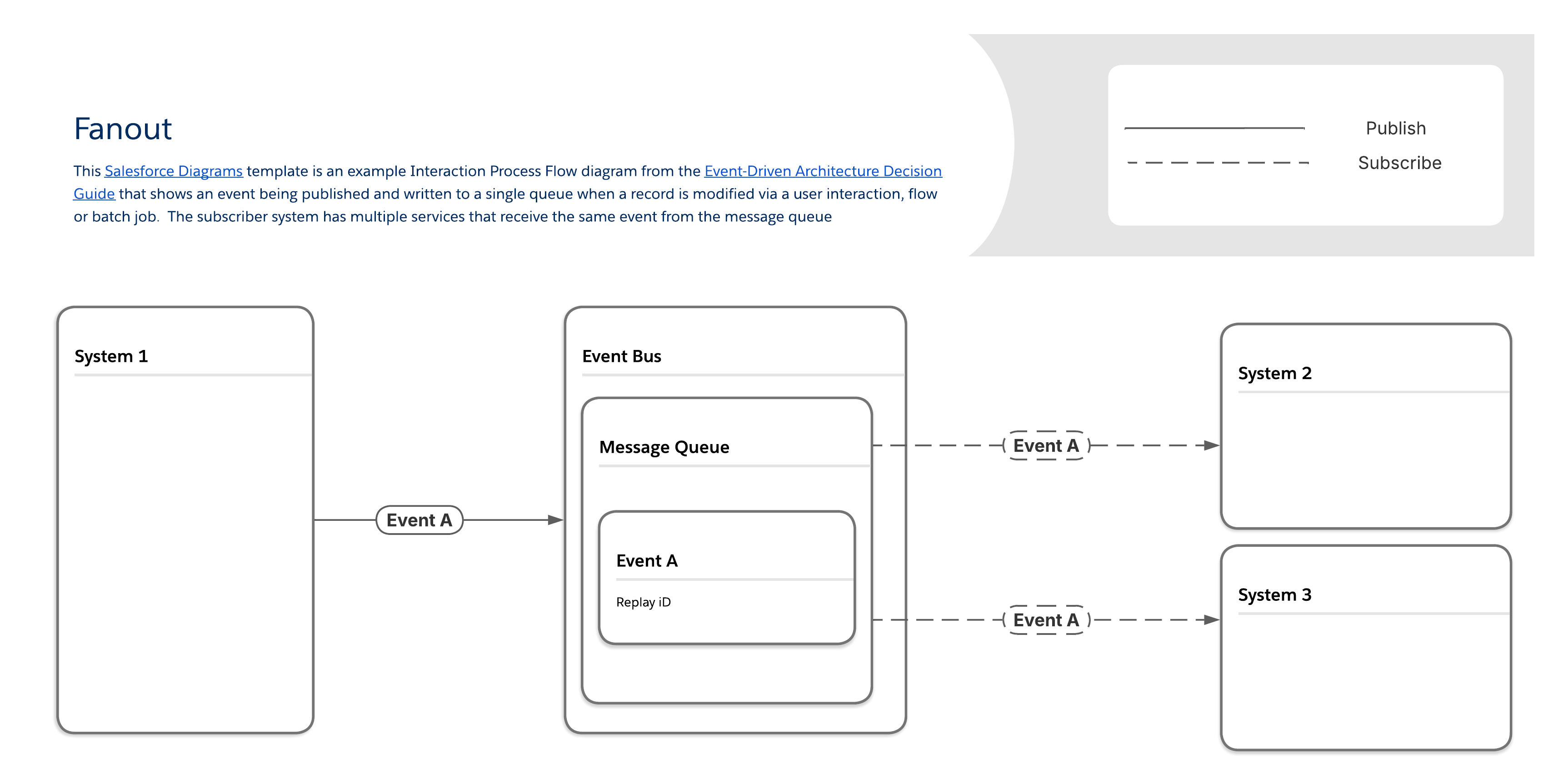
With the fanout pattern, messages are delivered to one or multiple destinations (that is, listening clients or subscribers) through a single message queue. Subscribers retrieve the same message from the queue, rather than their own unique copy. (Note that while this improves performance, it can also make it more difficult to verify whether or not a particular subscriber received the message.)
| Event Flow and Behavior | Payload Considerations | ||||||
|---|---|---|---|---|---|---|---|
| Available Tools | Required Skills | Publish Via | Subscribe Via | Replay Period | Payload Structure | Payload Limits | |
| MuleSoft | MuleSoft Anypoint JMS Connector | Pro-code | APIs | APIs | As Configured | User Defined | None |
| Salesforce Pub/Sub Connector | Pro-code | APIs | APIs | As Configured | User Defined | None | |
| MuleSoft Anypoint Apache Kafka Connector | Pro-code | APIs | APIs | As Configured | User Defined | None | |
| MuleSoft Anypoint Solace Connector | Pro-code | APIs | APIs | As Configured | User Defined | None | |
| MuleSoft Anypoint MQ Connector | Pro-code | APIs | APIs | As Configured | User Defined | None | |
| MuleSoft Anypoint MQTT Connector | Pro-code | APIs | APIs | As Configured | User Defined | None | |
| MuleSoft Anypoint AMQP Connector | Pro-code | APIs | APIs | As Configured | User Defined | None | |
| MuleSoft Anypoint MQ | Pro-code | APIs | APIs | As Configured | User Defined | None | |
| Salesforce Platform | Apache Kafka on Heroku | Pro-code | APIs, record changes in Heroku Postgres | N/A | 1-6 weeks | User Defined | User Defined |
| Change Data Capture | Low-code to Pro-code | Record Changes | Apex, APIs, Lightning Web Components (LWC) | 3 days | Predefined | 1 MB | |
| Platform Events | Low-code to Pro-code | APIs, Apex, Flow | Apex, APIs, Flow, LWC | 3 days | User Defined | 1 MB | |
| Pub/Sub API | Pro-code | Pub/Sub API or Apex, APIs, Flow | Pub/Sub API | 3 days | User Defined | 1 MB | |
| Event Relays* | Low-code | Platform Events, Change Data Capture | API | 3 days | User Defined | 1 MB | |
| *Event Relays only send data to AWS Eventbridge | |||||||
Some event scenarios are characterized by a significant influx of message volume that threatens to overwhelm the capacity of synchronization and transformation processes, or by complex, multi-step logic required to process and transform event data.
Some examples include:
-
Seasonal volume spikes: There can be spikes in volume that online retailers experience when a selection of their products are “in season.” When large numbers of customers are making purchases at the same time, the number of events generated can temporarily exceed the capacity of synchronization and transformation processes. See Well-Architected - Reliability for more information.
-
Case or claims management: Service-based companies can experience surges in the number of cases or claims during outages.
-
Complex data transformations: Organizations that require complex logic to transform messages are often concerned about events being generated faster than they can be transformed.
This pattern addresses the challenge of messages being generated faster than they can be transformed. It ensures that large volumes of messages and required data manipulations can be handled reliably, incorporating a streaming message platform and segmenting message handling logic into dedicated components.
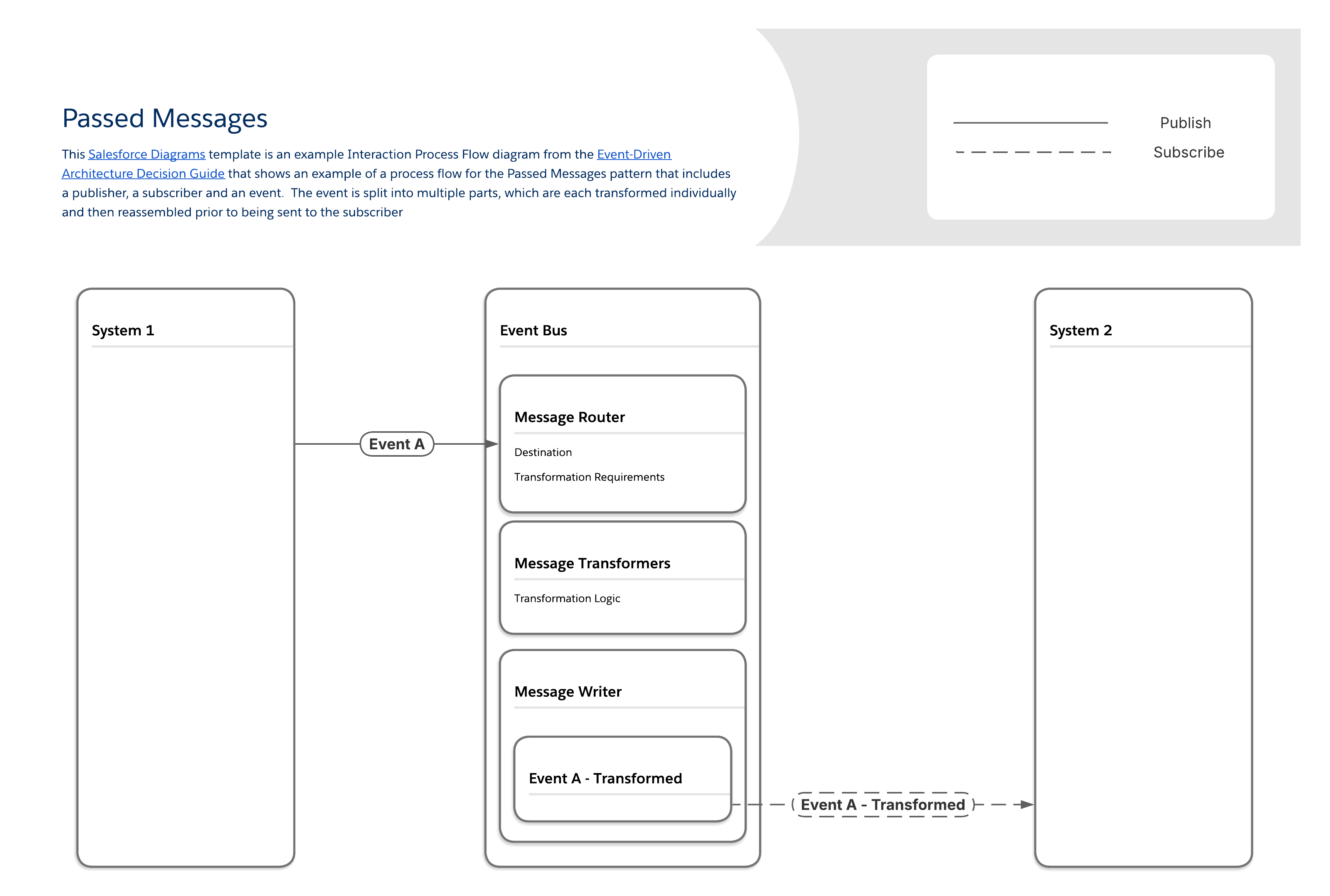
The Passed Messages pattern works by segmenting message handling logic into multiple components:
-
One component handles message routing, determining required transformations and the final destination.
-
A separate set of components handle different layers of message transformation (for example, field mappings, object relationships, and so on).
-
The last component writes out the final, modified message.
| Event Flow and Behavior | Payload Considerations | ||||||
|---|---|---|---|---|---|---|---|
| Available Tools | Required Skills | Publish Via | Subscribe Via | Replay Period | Payload Structure | Payload Limits | |
| MuleSoft | MuleSoft Anypoint Apache Kafka Connector | Pro-code | APIs | APIs | As Configured | User Defined | None |
| Salesforce Pub/Sub Connector | Pro-code | APIs | APIs | As Configured | User Defined | None | |
| Salesforce Platform | Apache Kafka on Heroku | Pro-code | APIs, record changes in Heroku Postgres | N/A | 1-6 weeks | User Defined | User Defined |
| Change Data Capture | Low-code to Pro-code | Record Changes | Apex, APIs, Lightning Web Components (LWC) | 3 days | Predefined | 1 MB | |
| Platform Events | Low-code to Pro-code | APIs, Apex, Flow | Apex, APIs, Flow, LWC | 3 days | User Defined | 1 MB | |
| Pub/Sub API | Pro-code | Pub/Sub API or APIs, Apex Flow | Pub/Sub API | 3 days | User Defined | 1 MB | |
| Event Relays* | Low-code | Platform Events, Change Data Capture | API | 3 days | User Defined | 1 MB | |
| *Event Relays only send data to AWS Eventbridge | |||||||
Some producers generate a continuous stream of events. A common example is media streaming, which involves user interactions that naturally occur as discrete events. Multiple systems must react to the same user behavior simultaneously without blocking the core streaming experience.
Consider the events for a music streaming platform. These might include:
-
Track started/paused/skipped events
-
Listening session events with timestamps
-
Playlist creation/modification events
-
Social sharing events
-
Download for offline listening
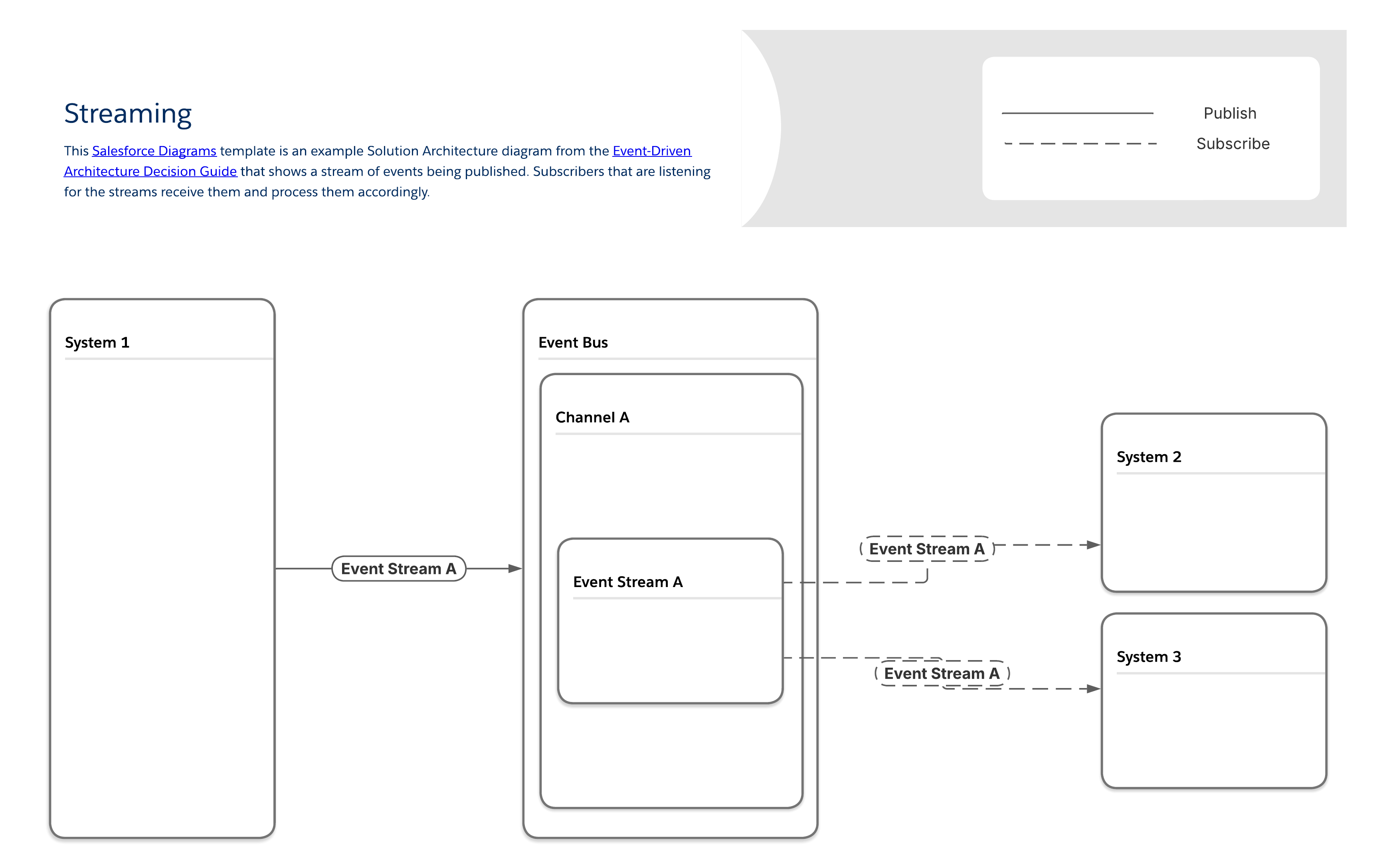
In the Streaming pattern, subscribers access each event stream, and process the events in the exact order in which they are received. Unique copies of each message stream are sent to each subscriber, making it possible to deliver subscriber-specific content, and to identify which subscribers receive which streams.
| Event Flow and Behavior | Payload Considerations | ||||||
|---|---|---|---|---|---|---|---|
| Available Tools | Required Skills | Publish Via | Subscribe Via | Replay Period | Payload Structure | Payload Limits | |
| MuleSoft | MuleSoft Anypoint Data Streams | Pro-code | APIs | APIs | As Configured | User Defined | None |
| Salesforce Pub/Sub Connector | Pro-code | APIs | APIs | As Configured | User Defined | None | |
| MuleSoft Anypoint Apache Kafka Connector | Pro-code | APIs | APIs | As Configured | User Defined | None | |
| Salesforce Platform | Apache Kafka on Heroku | Pro-code | APIs, record changes in Heroku Postgres | N/A | 1-6 weeks | User Defined | User Defined |
| Pub/Sub API | Pro-code | Pub/Sub API or APIs, Apex Flow | Pub/Sub API | 3 days | User Defined | 1 MB | |
For a stream to make sense, all of its events and their associated messages need to be in the correct order. If you source the data in a stream from different systems, you’ll need to incorporate additional ordering logic as part of the design process.
Queuing use cases are ubiquitous. Examples include:
-
Low quality internet connections: Field service organizations or other organizations where teams with mobile devices need to work in areas with low quality or intermittent internet access benefit from queuing because the applications on these devices can connect to their queues and retrieve any relevant messages when connectivity is restored.
-
Message buffering: When message volume occasionally exceeds a subscriber’s processing capacity and increased latency will not create additional issues, queues can be a buffer to store excess messages and prevent data loss.
-
Transportation management: Logistics organizations that need to monitor their fleets can use this pattern to view the routes that each vehicle is taking in near real-time and ensure that drivers are being as efficient as possible.
-
IoT devices: Manufacturers often use systems that generate rapid streams of data, and these streams can have downstream effects on additional systems. This pattern can be used to identify sequences of events that require human intervention before catastrophic failures spanning multiple systems occur.
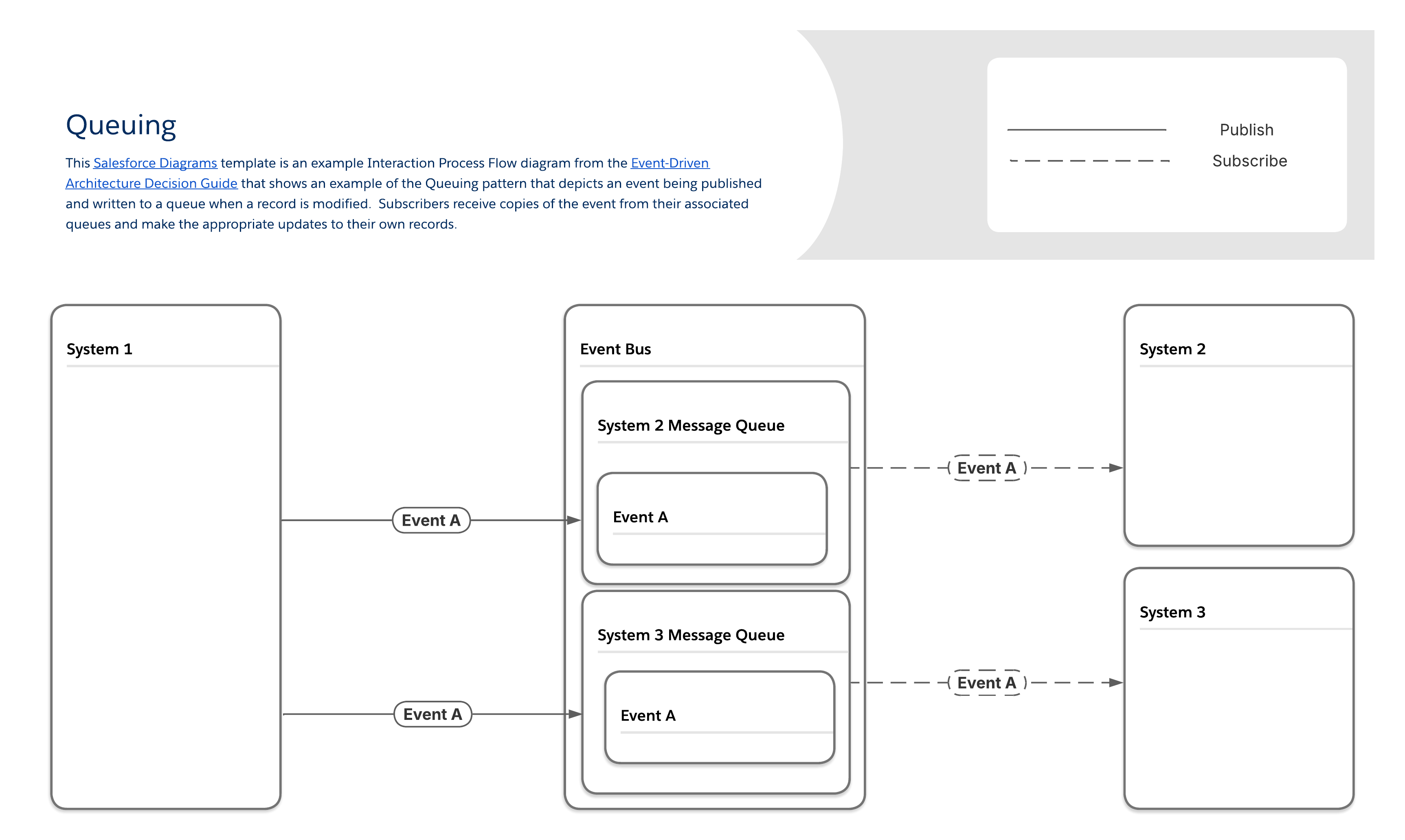
In the Queuing pattern, producers send messages to queues, which hold the messages until subscribers retrieve them. Most message queues follow first-in, first-out (FIFO) ordering and delete every message after it is retrieved. Each subscriber has a unique queue, which requires additional set up steps but makes it possible to guarantee delivery and identify which subscribers received which messages.
| Event Flow and Behavior | Payload Considerations | ||||||
|---|---|---|---|---|---|---|---|
| Available Tools | Required Skills | Publish Via | Subscribe Via | Replay Period | Payload Structure | Payload Limits | |
| MuleSoft | MuleSoft Anypoint MQ | Pro-code | APIs | APIs | As Configured | User Defined | None |
| Salesforce Pub/Sub Connector | Pro-code | APIs | APIs | As Configured | User Defined | None | |
| MuleSoft Anypoint Apache Kafka Connector | Pro-code | APIs | APIs | As Configured | User Defined | None | |
| MuleSoft Anypoint MQ Connector | Pro-code | APIs | APIs | As Configured | User Defined | None | |
| MuleSoft Anypoint MQTT Connector | Pro-code | APIs | APIs | As Configured | User Defined | None | |
| MuleSoft Anypoint AMQP Connector | Pro-code | APIs | APIs | As Configured | User Defined | None | |
| Salesforce Platform | Apache Kafka on Heroku | Pro-code | APIs, record changes in Heroku Postgres | N/A | 1-6 weeks | User Defined | User Defined |
| Change Data Capture | Low-code to Pro-code | Record Changes | Apex, APIs, Lightning Web Components (LWC) | 3 days | Predefined | 1 MB | |
| Platform Events | Low-code to Pro-code | APIs, Apex, Flow | Apex, APIs, Flow, LWC | 3 days | User Defined | 1 MB | |
| Pub/Sub API | Pro-code | Pub/Sub API or APIs, Apex, Flow | Pub/Sub API | 3 days | User Defined | 1 MB | |
| Event Relays* | Low-code | Platform Events, Change Data Capture | API | 3 days | User Defined | 1 MB | |
| *Event Relays only send data to AWS Eventbridge | |||||||
Because of the asynchronous nature of the Queuing pattern, there can be a lengthy delay between a message being added to a queue and that message being retrieved. Queues require memory or storage space to hold their messages, so they can’t grow indefinitely, which means that a subscriber that is offline indefinitely can cause a failure if enough messages build up in the queue. Message buffering can have the same effect if subscriber processing times become too long, causing high volumes of messages to build up in their queues. To mitigate these risks, perform a thorough analysis of storage requirements for all message queues and, if necessary, design processes that will purge and disable queues if messages aren’t retrieved within a set amount of time or when they reach a predetermined volume.
In addition to the functional considerations listed in the previous sections, there are also non-functional considerations to factor into your decision.
Even if you’re fully convinced that an event-driven architecture is right for your organization, you may be starting with a landscape that already has a large number of point-to-point integrations. Getting funding for a project to replace all your integrations at once can be difficult, and it might not even be possible to use an event-driven architecture directly with some legacy systems. In these scenarios, you can take an incremental approach to migrating to a more loosely coupled architecture by converting the most business-critical applications first, then converting other systems as they get updated or replaced in future projects. This approach makes it easy to add new applications to the event bus, and enables your overall IT landscape to stay scalable and resilient as systems continue to get added over time.
As architects, we know that every architecture comes with tradeoffs. An event-driven architecture is no exception. While a landscape full of loosely coupled systems is highly scalable and resilient, there are some tradeoffs to consider as well:
-
Overall integration strategy: Regardless of the tools and patterns you decide to use, it’s important to start by creating a strategy for how data will be shared across the various systems in your organization’s landscape. This strategy should include your organization’s goals for its data, how data can be shared and patterns used, as well as data sources, targets, structures, and ownership and access requirements.
-
Support for legacy systems: Your organization may have legacy systems that simply don’t support event-driven architecture patterns. While it may be possible to build workarounds (for example, with a process that acts as a pass-through by subscribing to events and then sending the output to the target system via a different means of data transfer), you may want to consider other integration methods in this case.
-
Structural changes to messages: Once the initial message structure is defined and agreed to between publishers and subscribers, it can be difficult to change, particularly if the subscribers are external. There are several ways to address this issue. You can use versioned endpoints, but make sure to define and communicate a clear lifecycle for each version so that your developers won’t have to maintain too many versions simultaneously. If Apache Kafka on Heroku is part of your landscape, you can also consider a schema registry or similar tool, but make sure the other systems in your landscape support it (and use it) as well.
-
Lack of visibility between publishers and subscribers: In most event-driven architecture patterns, the publishers aren’t aware of the status of their subscribers. So, if a publisher sends a critical message while all subscribers are offline, the message may never get delivered. You can address this issue by making use of replay functionality or adding redundant subscribers that run on separate servers for all critical messages.
-
Performance bottlenecks: As an event-driven architecture scales, the event bus can become a bottleneck for message delivery if it gets overwhelmed with too many publishers trying to message too many subscribers simultaneously. You can address this by increasing the memory and processing resources allocated to the event bus or by using multiple event buses to process different types of messages in parallel.
In addition to the guidance already provided, also consider the following best practices.
Before implementing an event-driven architecture, consider if you truly need to be using one in the first place. The previous section describes common business scenarios that are good fits for each event-driven architecture pattern. You can also read more in Well-Architected - Reliability. Review Challenges to Consider when Implementing Event Driven Architectures to determine if the patterns you have in mind are the best fit for your specific use cases.
Note that while the majority of the scenarios covered in this guide involve integrations, event-driven architectures can also be used to send messages within a single Salesforce org through the use of platform events, for example. Make sure to keep any applicable event allocation limits in mind when designing processes that use platform events as an internal messaging system.
Frequently, anti-patterns around event-driven architectures come from using events as a workaround for internal communications within a Salesforce org. Common anti-patterns include:
-
Publishing events from Apex triggers associated with the same event object: This will result in an infinite trigger loop.
-
Publishing events from Apex before a DML transaction completes: If a transaction fails and rolls back, any published events that have the Publish Immediately publish behavior won’t be included in the rollback behavior.
-
Publishing events in Flow to orchestrate subsequent automation: The best way to coordinate logic across multiple automations is to use subflows or Flow Orchestrator.
-
Creating runtime dependencies: Don’t publish events to facilitate communication between packages without taking the proper steps to eliminate runtime dependencies.
-
Unnecessarily large payloads: When making requests, it’s best to send and receive the smallest amount of data possible in the payload. Every action by a user could potentially spawn multiple requests, and it is important that these are processed efficiently. Sending more data than necessary can contribute to slow transport and increased processing time.
-
Unselective handling of application events: When there are multiple components listening for an application event, developers should ensure the event handler will only execute when it is actually desired and useful. For example, in the Lightning Console, components contained in tabs that are not focused can still be listening even though they are not visible. A developer can use various techniques such as using a background utility item as the only listener, or calling getEnclosingTabId() to determine whether this instance of the component is enclosed within the focused tab to ensure each event is handled only when it is intended.
-
Using Platform Events publish behavior incorrectly: Platform Events have two publishing behaviors — Publish Immediately and Publish After Commit. It can be useful to use real-time platform events for use cases such as Logging, where you want to publish the logging event regardless of whether the transaction succeeds and commits. However, use Publish Immediately very carefully with real-time platform events. Events can be consumed by subscribers within the same transaction and cause row locks or other race conditions.
When implementing an event-driven architecture, one of the keys to success is to set standards for how the events themselves are designed. Specifics will vary depending on your organization’s use cases, but here are some general guidelines:
-
Determine the optimal structure for your event payloads. While smaller message sizes reduce processing times, bombarding subscribers with massive volumes of messages can cause performance bottlenecks. You may need to iterate on your payload sizes and structures to find the right balance. MuleSoft and similar ESB tools provide the ability to design custom payloads in the messages associated with your events, which can help you visualize data structures to improve performance on the subscriber side. (See Well-Architected - Reliability for more information.)
-
Think about your processes end-to-end. Make sure you’re not creating any “endless loop” scenarios, which can be difficult to track down once the integrations have been rolled out. An example of this would be two systems that publish events when records are updated, while also listening for each other’s events, which trigger additional published events when they’re processed.
You can fix this type of anti-pattern by adding logic to both systems that ensures that changes made as the result of an event being consumed do not result in publishing a new event. You should also make sure to document all of your events, their associated triggers, and the downstream systems that may be affected. Use this documentation as a reference during design sessions to help catch endless loops and similar scenarios as early as possible. (See Well-Architected - Operational Excellence for more information.)
-
Use common naming conventions across systems. Consistent naming conventions are a best practice for all software development, including event-driven architectures. Take time to document a set of standards for event names, structures, associated objects, and error handling processes to ensure consistency across systems. (See Well-Architected - Operational Excellence for more information.)