Introduction
In the evolving multi-agent landscape, agents are most effective when assigned specific, granular tasks. This necessitates a diverse network of reusable, specialized agents. The core challenge, however, is coordinating these numerous, heterogeneous agents, which can originate from various sources, to collaborate effectively toward common business objectives. Without a unified platform, this complexity leads to agent sprawl and a critical lack of governance.
These AI Agents are multiplying rapidly, embedded in SaaS platforms, developed in-house, or packaged with popular LLMs. This multiplication results in disconnected organizational silos. While an agent optimizes tasks within its native applications, it often lacks a holistic enterprise-view. This lack of visibility prevents agents from effectively orchestrating, securing, and governing actions across different domains and systems.
MuleSoft Agent Fabric addresses the challenge of managing “agent sprawl” and enabling the seamless orchestration of diverse agents, regardless of their origin. It establishes architectural best practices and provides the necessary tooling to create the Agent Network. An Agent Network refers to a coordinated collection of AI agents, tools, and resources that work together to execute complex, multi-step business processes.
MuleSoft Agent Fabric is a unified platform that gives every enterprise an easy way to discover, orchestrate, govern, and observe any agent regardless of where it’s built.
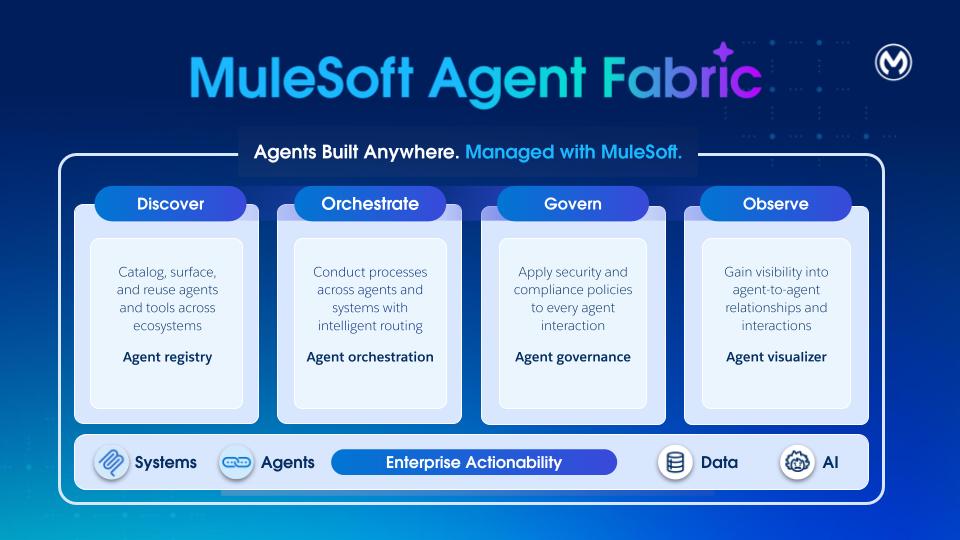
Discover: Agent Registry provides a centralized catalog of all AI agents and tools across the organization. It enables discovery and reuse of internally built, SaaS-embedded, and external assets. By providing a single source of truth for all agentic assets, Agent Registry eliminates redundancy and ensures developers can leverage existing capabilities at scale.
Orchestrate: MuleSoft Agent Broker is an intelligent routing solution that dynamically matches tasks to the best fit agent or tool. Powered by an LLM of your choice, it coordinates across agents and tools to ensure that complex multi-step requests and business processes are executed with high reliability and traceable outcomes.
Govern: MuleSoft Agent Governance utilizes Flex Gateway and its support for Model Context Protocol (MCP) and Agent2Agent (A2A) protocol. With Flex Gateway, enterprises can enforce security and compliance policies to every agent-agent and agent-tool interaction.
Observe: Agent Visualizer provides real-time observability through a dynamic, interactive map of agent interactions. It traces decisions, monitors system health, thus enabling continuous optimization and reliable oversight of the entire agent ecosystem.
Agent Fabric champions a specification-first (YAML) approach where users define agent networks through a metadata descriptor (the “YAML file”). This YAML file is agnostic to MuleSoft and it decouples the definition of the agent network from its execution.
Each agent network (YAML) defines a specific functional area with its agentic assets, including their operational rules and policies. The YAML is used to enable the four Agent Fabric pillars:
- Discover: Populate the Agent Registry with existing Agentic Assets such as:
- Agents deployed across various platforms (MuleSoft or others)
- MCP servers
- LLM providers
- Orchestrate: Create Agent Brokers for orchestration
- Govern: Apply policies on the assets for security and governance
- Observe: Define and reuse connections to the defined assets. Also, observability and monitoring capabilities are available for agent networks.
The user journey starts in Anypoint Code Builder. Use the new command available via command palette called “MuleSoft: Create an Agent Network Project” to create a new project. This command creates a new project (the ‘Agent Network’) containing two files.
-
agent-network.yaml: This file defines configuration for the multi-agent system, enabling orchestration of AI agents with external tools (via MCP) and agents (via A2A protocol). This format provides a declarative way to define agent capabilities, dependencies, and integrations.
-
exchange.json: All agent network projects also have an exchange.json file. This file contains asset metadata available in Anypoint Exchange after your agent network assets are published.
The development of your Agent Network follows a standard Software Development Lifecycle (SDLC) involving four main stages:
- Environment setup: Setup runtime environment and gateways
- Project creation and design: Create Agent Network project specification
- Building and publication: Build and publish assets to the Agent Registry
- Deployment: Deploy or promote the agent network to a given environment
After you build the project and generate the required MuleSoft application and assets, make them available in Exchange. Within Anypoint Code Builder, trigger the build and publish process by using the “MuleSoft: Publish Agent Broker Project to Exchange” command available via command palette.
The publish step transforms each agentic asset in the YAML file into an A2A, MCP or LLM specification and publishes it to Exchange.
Additionally, the system publishes the YAML to Exchange by using a new agent-network asset type. You can view this asset in the Agent Registry UI and search for it via the Exchange API.
Refer to an Agent Network file that defines an agent network for an enterprise. This agent network activates the network for order fulfillment across Salesforce, Stripe, another order fulfillment agent and inventory MCP server with a single, policy-governed experience.
- Discover
Publish existing agents and tools (such as Salesforce, Stripe, Order Fulfillment, and Inventory) as Exchange assets for reuse. Also the order fulfillment definition (YAML) which is versioned and shareable, enabling rapid adaptation for roles, regions, or subsidiaries without rebuilding flows. - Orchestrate
An agent broker uses an LLM to decompose the order fulfillment process into a sequence of tasks, such as verifying customer details, allocating inventory, and calculating shipping costs. It then executes this workflow by calling MCP and A2A agents, ensuring human-in-the-loop approvals are requested whenever required. - Govern
Anypoint Flex Gateway enforces authentication, least‑privilege access, and guardrails. API Manager policies ensure consistent controls across all calls and data exchanges. - Observe
Monitoring and traces give end‑to‑end visibility into progress, failures, and latency. Visualization shows which agents interacted and where bottlenecks occurred. - Trust and Compliance
Centralized credentials, audit trails, and policy inheritance support security, privacy, and regulatory requirements (PII handling, approvals, and separation of duties).
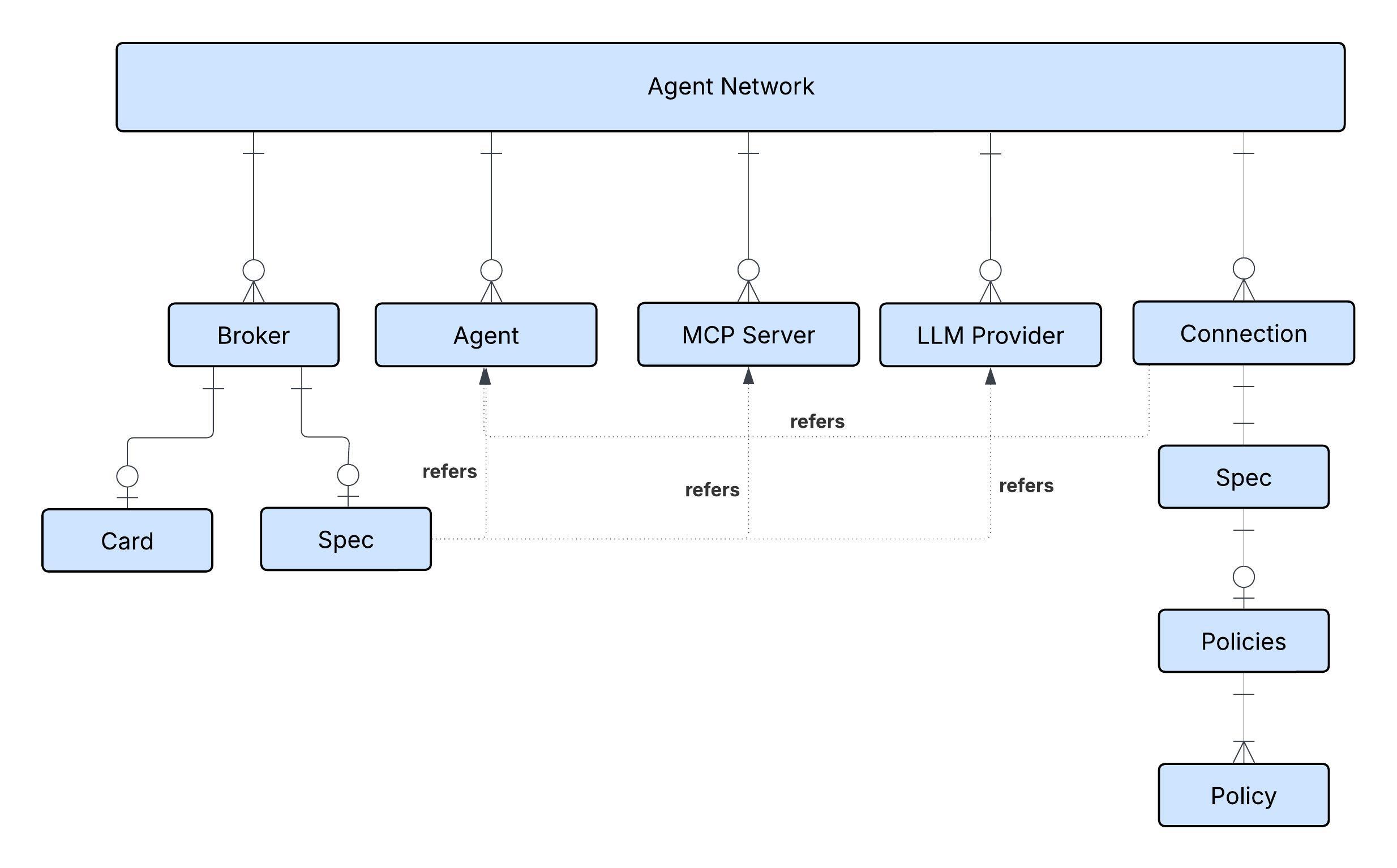
The diagram shows the different nodes of the Agent Network (Metadata) defined in the YAML.
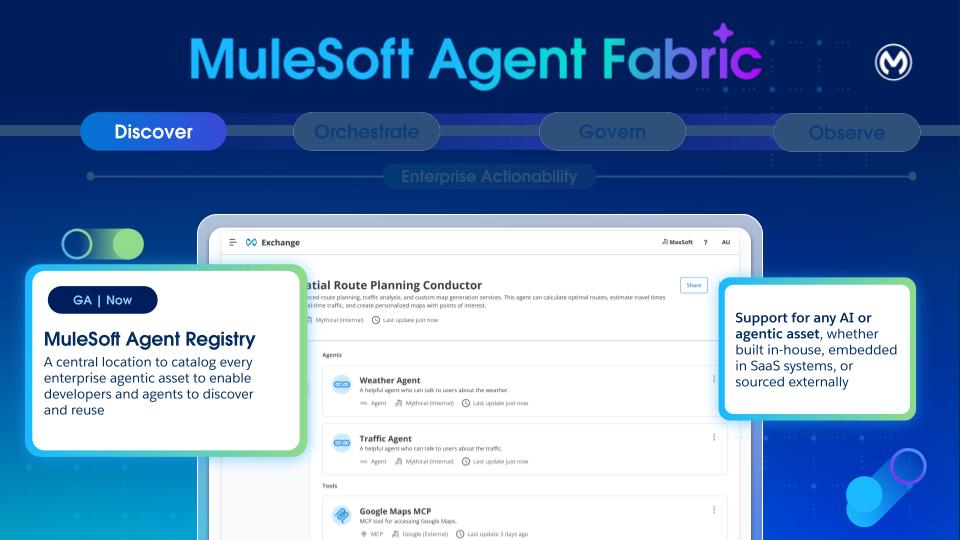
- Purpose: Exchange is the catalog for agents, tools, and other assets. Its primary goal is to solve “agent sprawl” by providing a single, governed catalog for the discovery, curation, and lifecycle management of heterogeneous agents. It enables developers to find and reuse agents, platform owners to maintain visibility, and orchestrators to discover capabilities.
- Heterogeneous by Design: Anypoint Exchange now supports three new assets - Agents, MCPs, and LLMs. Exchange is designed to be a universal catalog, to register and manage any type of agent. It supports A2A-compliant Agents, MCP Servers, and LLM providers from any source, including third-party, Agentforce, and custom MuleSoft agents.
- Core Metadata: Every registered asset has a baseline set of immutable metadata, including a Unique Name and Version, Ownership and Publisher. Lifecycle states (development, staging, production, deprecated) are also tracked.
- Discovery:
- Design-Time: Developers can discover registered agents either through the existing Exchange UI or via natural language search with Vibes within the Anypoint Code Builder.
- Tagging and Classification: Assets can be classified by type (agent, MCP, LLM, broker) and domain (for example,HR, weather) by using a basic key-value tagging system, enabling dynamic linking, search, and selection policies.
- Catalog: The repository supports both private and internal catalog models for sharing agents within an organization.
- Visualization: Provides a visual tool to support network views, showing connections for single assets or the entire map of nodes and links across the organization, with filtering capabilities.
Brokers within an agent network can reference registered agents, MCP servers, and LLM providers stored in Anypoint Exchange. But if they’re not already registered, they can be declared in the metadata of Agent Network (YAML) and they get registered automatically. In the example, multiple agents, MCP servers, and LLM providers are declared and registered in Anypoint Exchange.
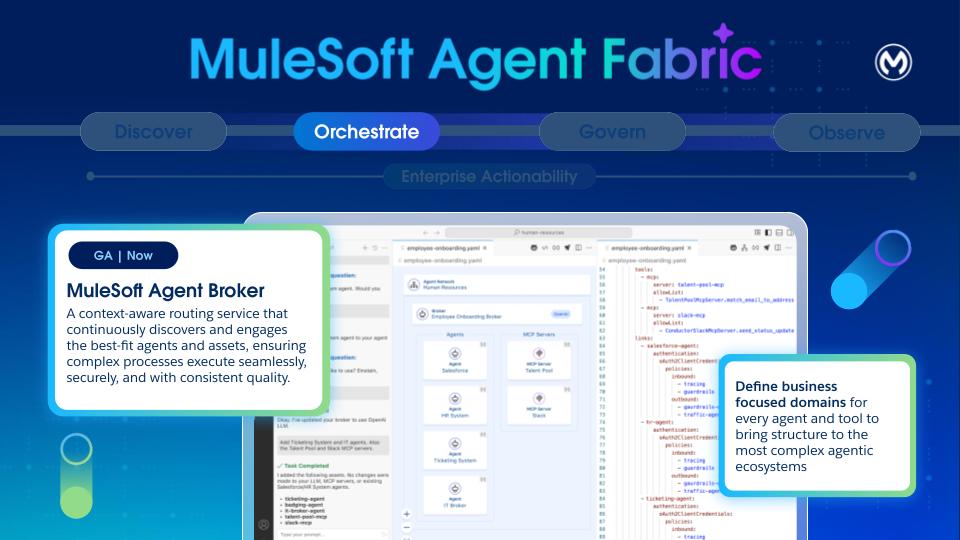
An agent broker is an intelligent routing agent that coordinates task delegation across specialized agents in an enterprise. It’s defined by the agents and MCP servers that it uses to accomplish tasks.
A broker is a specialized agent that appears in Anypoint Exchange after publishing an agent network asset and reuse by other brokers.
Brokers are defined in the brokers section of the YAML. The defined brokers are transparently “compiled” into an application, without requiring any prior knowledge about Mule. This generated application gets deployed to CloudHub 2.0 (CH2), and leverages the robust CH2 infrastructure.
This means the Agent Brokers benefit from CloudHub 2.0’s established performance characteristics, including its logging and metrics capabilities. Operational aspects, such as “Cost to Operate” and “Monitoring/Alerting/Tooling,” are the same as any other workload.
For scenarios requiring human intervention (Human-in-the-Loop), the state of each interaction is maintained by using MuleSoft Object Store, a distributed solution designed for effective state management in highly concurrent environments.
A broker definition is made of two sections: card and spec.
The card section follows the Agent-to-Agent (A2A) specification. Among other things, it describes the broker agent’s contract, skills, and capabilities. The card url is automatically populated with the value ${ingressgw.url}/broker-name. Upon deployment, the ${ingressgw.url} placeholder is automatically replaced with the url of the Anypoint Flex Gateway that’s fronting the agent ingress requests.
The specification section configures the “source code” of the broker. Here, the developer can specify the LLM to use, instructions, available tools, error handling, and most importantly, the various agents and MCP tools that are available to this broker.
LLM Providers
This section is part of the specification in each broker. This is a reference to one of the LLMs defined in the services section. We can choose whether to share one LLM across all the brokers, or if needed have different brokers use the LLM that better suits its tasks.
Brokers can point to LLM providers. We can choose models of these providers depending on our needs.
Instructions
This section is optional, and you can use it to specify instructions particular to this broker agent. These instructions often focus on specific business-oriented concerns. For example, imagine a customer service agent that coordinates management for customer reported incidents:
Notice that there’s no need to provide explicit instructions—such as ‘split the prompt into tasks’ or ‘select the best tool’—as the broker handles that on its own. These instructions are only necessary when describing specific business processes.
Tools Configuration
Tools provide agents with external capabilities. Whenever a broker needs to access an external system (that is not another agent, for example, an existing API or a SaaS service) it reaches out to an MCP (Model Context Protocol) server:
The MCP server is referenced by the name of the exchange asset. The connectivity details for it are specified in the services section.
By default, the broker has access to all the tools available in the MCP server. Per our observation, the most modern LLMs can only handle around 20 - 25 tools per context before starting to generate inaccuracies (or lose context). For this reason, it’s generally a good practice to limit the available tools to the bare minimum needed. You can apply that filtering through the allowed lists.
Agent Links
This section is the most important part of the entire definition. The links section enables inter-agent communication and orchestration. That means that this broker relies on the agents linked here to execute the appropriate actions to complete the user’s goal.
In effect, this section defines an agent-network for collaboration.
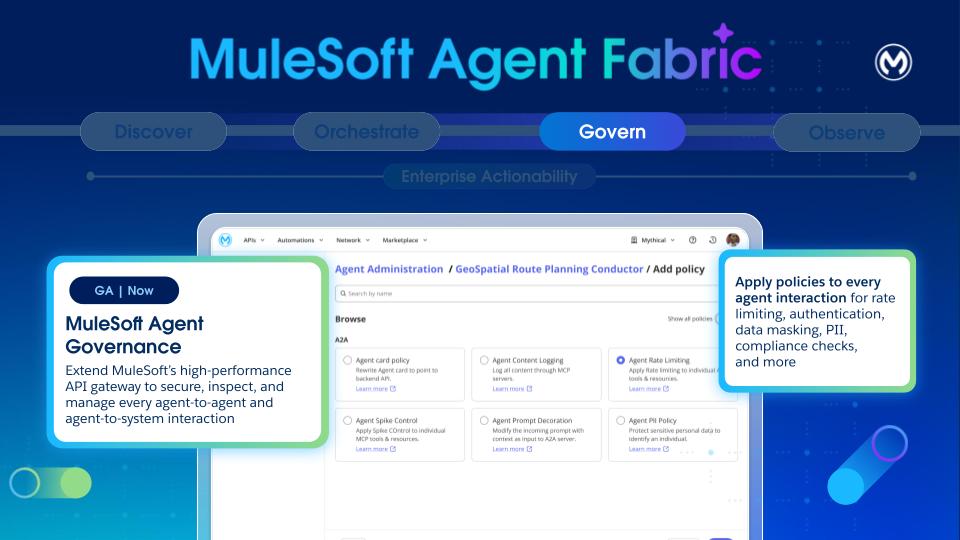
Agent Governance is a critical pillar for the Agent Fabric, foundational to building a trusted agent network and ensuring security and compliance.
For governance, a total of two Flex Gateways (1 ingress and 1 egress) are required within your private space.
Governance establishes the necessary structures, controls, and evidence to safely scale the entire Agentic Development Lifecycle (ADLC). Specifically, governance implements key processes such as agent certification, cataloging, lifecycle decisions, and the enforcement of runtime policies.
- Cataloging:
- Exchange: Supports recording of agent purposes, owners, environments, and data and classification boundaries. It also registers capabilities, tools, resources, prompts, and external dependencies with versions.
- Versioning and Lifecycle:
- Document and manage semantic versioning of agents, tools, and assets during the complete Agent Development Lifecycle.
- Versioning helps manage agent deprecation timelines and supports dual-run (where possible) ensuring smooth migrations.
- Policy Enforcement:
- Agentic AI architecture expands the attack surface (conversations interface, prompts, and new protocols like MCP). Any compromise to any components can lead to cascading effects to multiple systems providing components like protocol, prompt, API, or tool.
- Securing enterprise agentic AI deployments demands a specialized approach, as these autonomous and unpredictable environments inherently broaden the attack surface through agent-to-agent interactions. While existing security tools for static systems are essential, they’re no longer sufficient on their own. Enterprises must proactively plan and implement four specific security solutions, each directly addressing a critical business risk associated with agentic AI.
- Flex Gateway: All A2A and MCP traffic is routed through Flex Gateway, even if the target system is unsecured, to ensure that policies are applied on every endpoint. This routing is crucial for securing agent communications and integrating with Authorization Servers.
- Policy Bundles: Users can define and apply bundles of predefined policies to workflows before execution, enforcing a consistent set of security and operational policies.
- Types of policies: The platform supports various inbound and outbound policies, including:
- A2A Policies: Agent Card, PII Detector, Prompt Decorator, Schema Validation.
- MCP Policies: Attribute-Based Access Control, Schema Validation, MCP Support.
- LLM/AI Policies: AI Prompt Decorator, AI Prompt Guard (filtering harmful content), AI Prompt Template (applying predefined templates), AI Basic Token Rate Limiting.
- Telemetry Policies: A2A and MCP Telemetry to extend Open Telemetry solutions for log data collection and export.
- Logging: Thanks to auto-tracing, logs across the Agent Network are available to track every agent interaction, explaining behaviors and building trust.
The example depicts a policy for message logging, which is configured by using the agent network metadata. Orderfullfillment broker refers to an existing agent called Salesforce agent and the policy for the messaging is configured by using the metadata. Note that Agent Fabric automatically configures all the policies mentioned under the “spec” section on Flex Gateway. You don’t require extra steps.
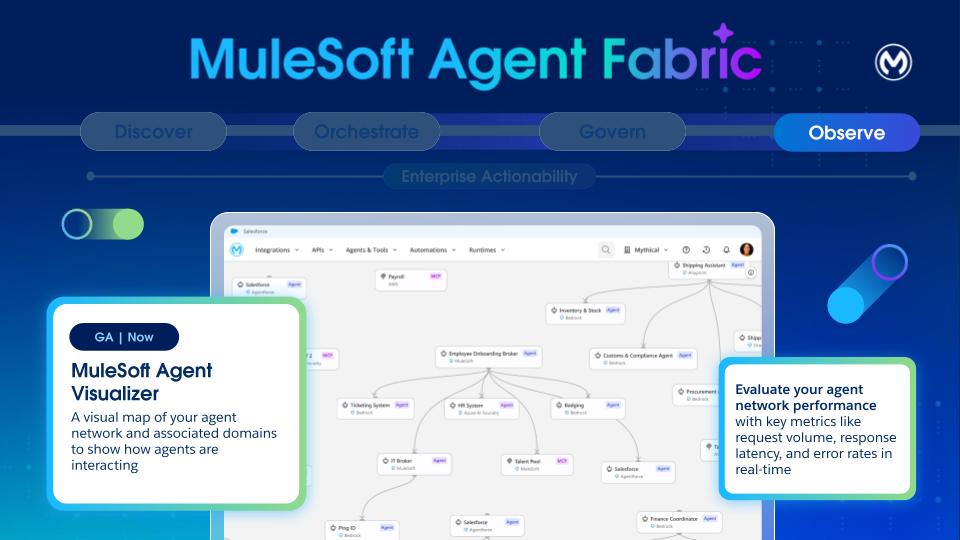
Given the non-deterministic nature and complexity of LLM agents and multi-agent deployments, observability, and monitoring are critical.
- Basic Logs and Traces: Reasoning and tool execution tracing are provided through logs. Logs and traces from workflow executions are viewable post-execution in Runtime Manager.
- Metrics: In the initial phase, the platform publishes a2a_total_calls and mcp_total_calls as counters with labels (such as, path, status, method, tool) to determine total, successful, and failed calls. These metrics are published from policy code by using Envoy’s (Flex Gateway) native stats interface, preferably via existing policies like mcp_support_policy and a2a_agent_card_policy.
- Enhanced Observability (Future): Plans include using Open Telemetry for distributed tracing in future versions. More advanced observability includes:
- Detailed Request Tracing: Gaining end-to-end visibility into requests, encompassing prompts, planner processes, invoked actions, and interactions with sub-agents.
- Agent Health Monitoring: Monitoring agent uptime, response latency, throughput, error rates, and underlying resource utilization (CPU, memory, network, GPU).
- Multi-agent Coordination Monitoring: Capturing success and failure rates of agent-to-agent interactions, detecting circular invocation patterns (loops), and tracking per-agent metrics like task completion and invocation count.
- Cost Tracking: Tracking token usage and associated costs for each LLM call, ideally per agent, with dashboards and alerts.
- Cognitive Tracing: Capturing and displaying a detailed trace of an agent’s session, including internal thought processes and all tool calls, serving as an immutable audit trail.
- Agent Session Playback: A UI that allows visually “replaying” an agent’s cognitive trace step-by-step for deep debugging.
- DAG Visualization: Providing a Directed Acyclic Graph (DAG) visualization of the agent workflow execution for complex multi-agent interactions.
Agent Visualizer is used to identify the parts of your agent network and see how they work together.
- Distinguish node types (agents and MCP servers).
- View the edges to see declared and runtime interactions.
- Use layers to focus views on specific environments
- Open details cards to inspect metadata and metrics for nodes and access logs and traces
- Review governance indicators such as Flex Gateway protection and applied policies.
Find details about the components of Agent Visualizer here.
With these four pillars together, MuleSoft Agent Fabric extends the security and control to any agent with built-in governance. It empowers agents to act anywhere by leveraging new protocols like A2A (Agent to Agent) and MCP (Model Context Protocol) to build and extend the business processes. We connect everything - applications, data, and systems - to empower and govern agents as they act across the entire business. Intelligent tooling supports the creation and extension of business processes or APIs by using AI natively, or by bringing third party AI tools.
Using all four pillars together isn’t required, but recommended. You can choose pillars independently as needed. For instance, you can leverage Agent Fabric for registry and governance, without using the orchestration layer. Similarly, you can use the broker to orchestrate agents that are governed through another platform.
The diagram shows how all the four components interact with each other:
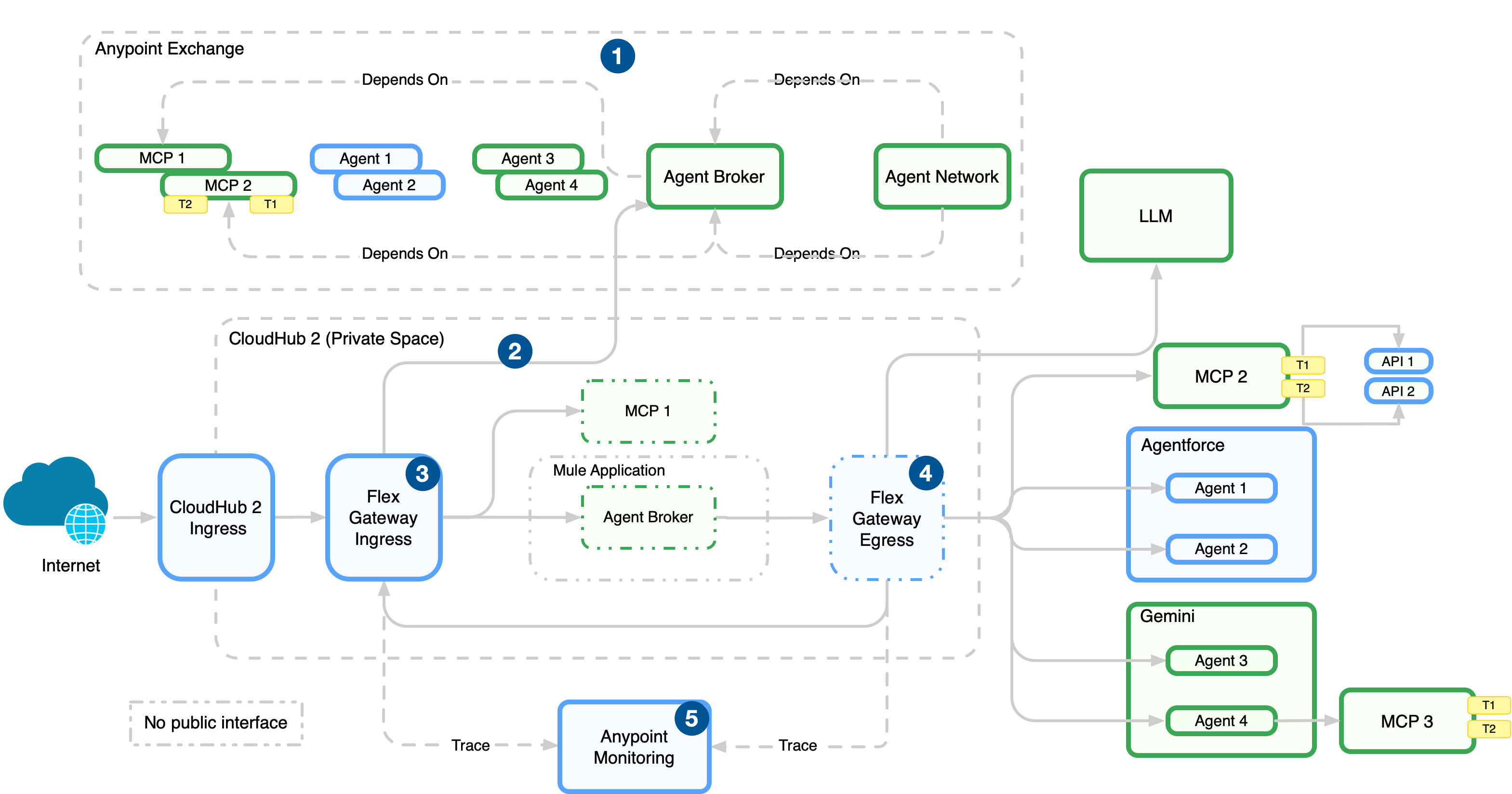
- Publish the agentic assets to Anypoint Exchange for discovery and reuse after you define the agent network (brokers, agents, MCP servers) in the agent network YAML in Anypoint Code Builder.
- Deploy the agentic assets to CloudHub 2.0 (managed in Runtime Manager).
- Enforce policies on incoming traffic to the network with an ingress Flex Gateway, which sits in front of broker and API endpoints.
- Enforce policies, manage connections, and emit telemetry data with an egress Flex Gateway. This gateway sits on outbound paths from brokers and agents to external services.
- Collect logs, metrics, and traces from Flex Gateway and runtimes in Anypoint Monitoring.
It’s tempting to make every specialized agent immediately accessible in a flat, unrestricted architecture, with a single orchestrator capable of tackling any task by having access to every AI asset available. However, this approach quickly proves detrimental to the overall system’s efficiency and reliability. Much like the principle applied to an excess of individual tools, many agent options introduce significant noise and complexity for the central broker agent (or orchestrator). This increased complexity directly leads to a noticeable drop in both the accuracy of the broker’s decision-making ( selecting the right agent for the job) and the determinism of the system’s response (predictable, consistent outcomes for similar queries). The broker agent effectively suffers from option paralysis, leading to slower, and less reliable routing.
Instead of a flat structure, we strongly advocate for a multi-level hierarchical approach to structuring the Agent Network. This organizational principle offers numerous critical advantages. First, it inherently favors traceability and management. A hierarchical structure mirrors established organizational best practices, making it easier to audit the flow of a request, debug issues by pinpointing the layer of failure, and manage the deployment and retirement of specific agents or sub-networks.
Secondly, and crucially in the context of large language models (LLMs) which power these agents, a hierarchy helps dramatically with keeping context sizes in check. By segmenting the agent landscape, the broker agent at any given layer only considers the limited set of agents or sub-brokers directly beneath it. This structure prevents the primary orchestrator from loading the description, capabilities, and historical context of every agent into its working memory, avoiding the risk of quickly exceeding the LLM’s context window limits, and incurring prohibitive costs and latency.
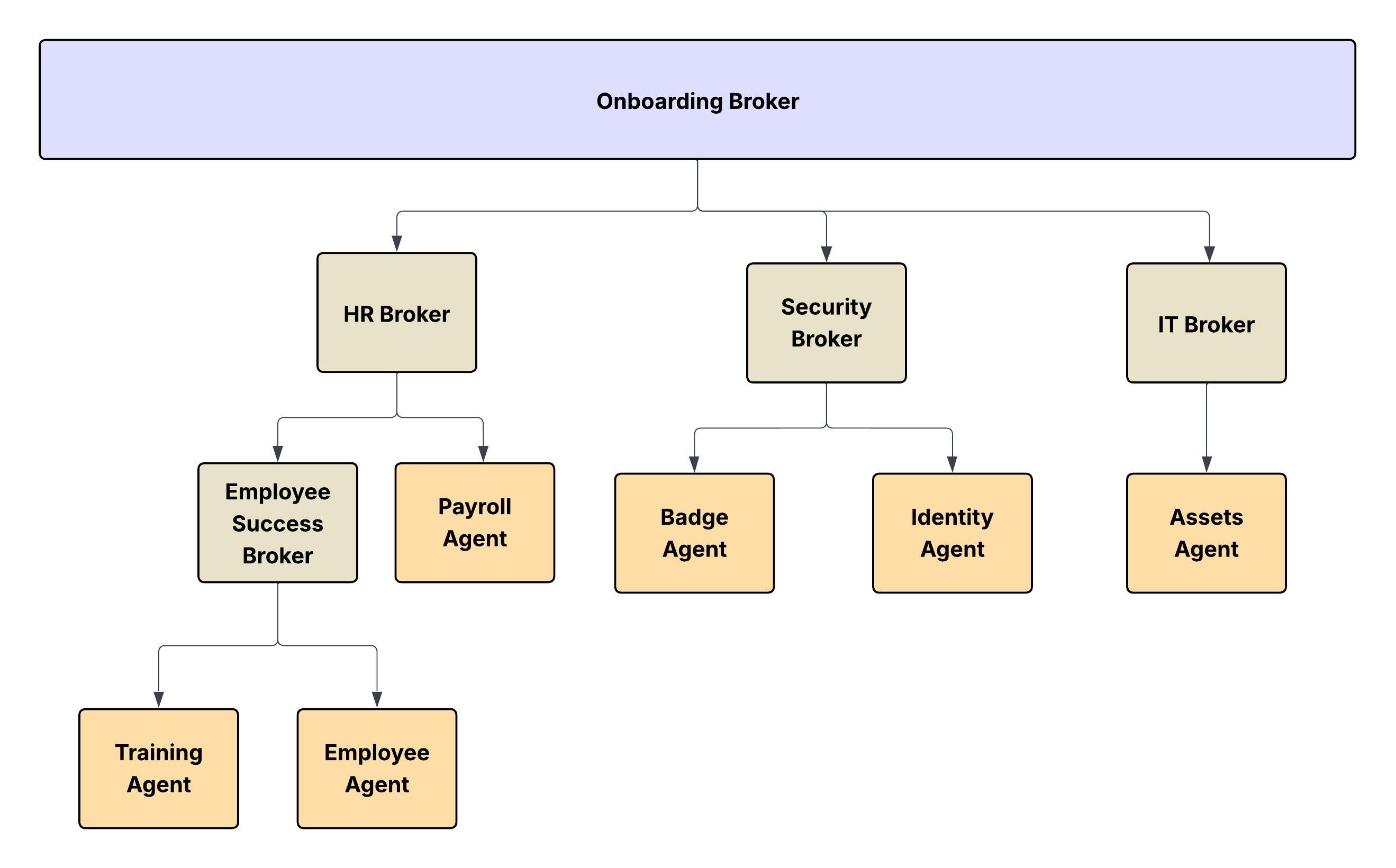
The agent network can be implemented in multiple ways. Two of them are:
- Conway’s Law - Intuitive way to map it to the real-world hierarchical structure.
- Domain Driven Design - More focused on business domains
In a hierarchical organization, communication flows vertically - from managers to subordinates - and decisions are often centralized. According to Conway’s Law:
- The systems or software architectures built by such organizations tend to be layered and hierarchical as well.
- Each team tends to design subsystems that reflect its own boundaries and authorities.
- The interfaces between systems mirror the communication channels between the departments.
The Agent Network can also be intuitively mapped to the real-world hierarchical structure of a large enterprise following Conway’s Law.
- The Conceptual Model: Just as a corporation has distinct divisions, departments, and layers of management (for example, C-suite, VPs, Directors, Managers), an agent network operating within a specific domain can be modeled as a parallel organizational chart.
- The Nodes and Leaves: In this hierarchy:
- The Leaves of the tree structure are the Specialist Agents or MCPs. They’re the functional units that perform the actual work (for example, a “Database Query Agent,” a “Customer Authentication Agent,” a “Sentiment Analysis Agent”). They represent the individual contributors or working units of the organization.
- All Other Nodes in the hierarchy, including the root and intermediate layers, are Broker Agents (or Sub-Orchestrators). These agents don’t perform the final task but are responsible for routing, delegation, aggregation, and conflict resolution within their specific domain or layer. A high-level broker delegates a task to a “Sales Domain Broker,” which in turn delegates to an “Opportunity Management Broker,” which performs the task via an “Opportunity Status Update Agent” (the leaf).
This structure makes sure that complexity is managed locally, context is contained, and the system scales predictably and reliably. You can introduce new specialist agents into specific, appropriate branches of the organizational tree.
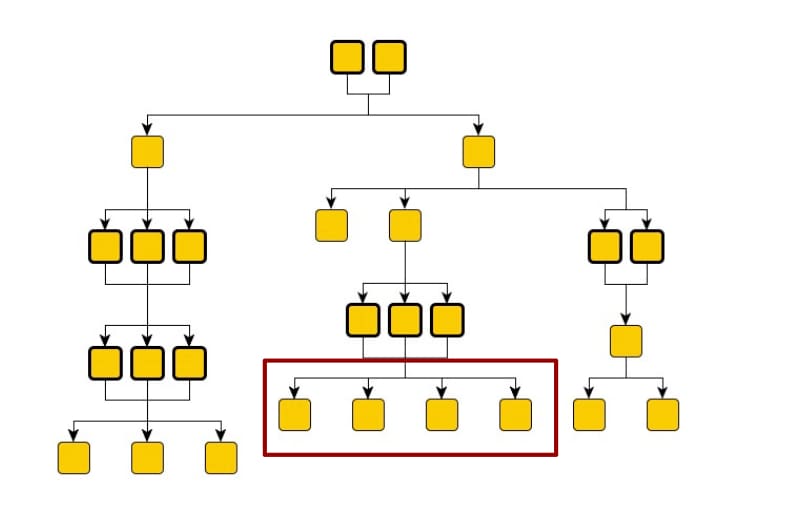
Consider the analogy of an org-chart for digital labor. Each YAML file represents each of the internal organizations (Employee Success, Security, Finance, and so on). Within each organization (agent-network) you may have a hierarchical structure through which actors collaborate, jobs are split into tasks and assigned. In the preceding diagram, communication flows from top to bottom. And the leaves aren’t restricted for consumption only by a set of broker agents.
Modeling agent networks based on the human organizational chart carries the risk of requiring frequent re-architecting, particularly in companies that undergo frequent re-organizations. An alternative approach is to organize agents by functional domain. This grouping may require crossing traditional human organizational boundaries. For example, new employee onboarding involves IT operations for hardware and user provisioning, while a sales motion requires both operations and marketing.
Nikhil Aggarwal is a Principal Architect at Salesforce, where he leads architecture for MuleSoft and Salesforce Automation Clouds. Nikhil brings over 18 years of experience delivering large-scale products and is passionate about scalable architecture, intuitive developer experiences, and building high-performing teams. Prior to Salesforce, he led multiple initiatives in Microsoft Power Platform, Dataverse, and Office 365 from concept to launch. His work continues to shape how modern enterprises connect systems, automate workflows, and unlock business value in the AI-first era.
Mariano Gonzalez joined MuleSoft in its early days back in 2011, specializing in mission-critical distributed systems, integration, PaaS, and cloud computing. Today, Mariano’s focus is on advancing AI platforms, with particular attention to governance, orchestration, discovery, and observability. With over 20 years in the IT industry, Mariano has served as a software architect and team leader, designing and delivering BPM, ERP, and integration solutions across the agriculture, energy, government, IT, telecom, and content management sectors.
Pedro Colunga is a Software Engineer Architect at Salesforce, specializing in API and Metadata Architecture. With a focus on the full platform lifecycle, Pedro plays a key role in shaping how organizations interact with system intelligence, semantics, and metadata-driven solutions. Pedro’s 20-year career, which includes entrepreneurial experience, spans companies such as Fuego, BEA Systems, Oracle, and TekGenesis, a company later acquired by MuleSoft, where he has consistently driven platform-wise architecture, providing deep expertise in areas like BPM, RAD, and Integrations.
Gulal Kumar is a Software Engineering Architect at Salesforce, with a focus on data and integration architecture. With over 20 years of experience in integration and APIs, modernization programs, security, and AIML initiatives, he brings a wealth of expertise. Gulal has been committed to advancing business transformation initiatives, enhancing security and resiliency, promoting architecture excellence, and leading AIML initiatives across various domains.