Integration Patterns Overview
Typically, when you implement Salesforce, you need to integrate it with other applications. Although each integration scenario is unique, there are common requirements and issues that developers and architects must resolve.
This document describes strategies (in the form of patterns) for these common integration scenarios. Each pattern describes the design and approach for a particular scenario rather than detailing a specific implementation. In this document you’ll find:
- A number of patterns that address key “archetype” integration scenarios
- A selection matrix to help determine which pattern best fits your scenario
- Integration tips and best practices
Purpose and Scope
This document is for designers and architects who need to integrate the Salesforce Platform with other applications in their enterprise. We have distilled this content from many successful implementations.
To become familiar with integration capabilities and options available for large-scale adoption of Salesforce-based applications, read the Pattern Summary and Pattern Selection Guide. Architects and developers should apply these pattern details and best practices during the design and implementation phase of a Salesforce integration project.
If implemented properly, these patterns enable you to get to production as fast as possible and have the most stable, scalable, and maintenance-free set of applications possible. Salesforce’s own consulting architects use these patterns as reference points during architectural reviews and actively maintain and improve them.
As with all patterns, this content covers most integration scenarios, but not all. While Salesforce allows for user interface (UI) integration, mashups, for example, such integration is outside the scope of this document.
Pattern Template
Each integration pattern follows a consistent structure. This structure makes it easier to compare patterns and locate relevant information.
Name
The pattern identifier that also indicates the type of integration contained in the pattern.
Context
The overall integration scenario that the pattern addresses. Context provides information about what users are trying to accomplish and how the application will behave to support the requirements.
Problem
The scenario or problem (expressed as a question) that the pattern is designed to solve. When reviewing the patterns, read this section to quickly understand if the pattern is appropriate for your integration scenario.
Forces
The constraints and circumstances that make the stated scenario difficult to solve.
Solution
The recommended way to solve the integration scenario.
Sketch
A UML sequence diagram that shows you how the solution addresses the scenario.
Results
Explains the details of how to apply the solution to your integration scenario and how it resolves the forces associated with that scenario. This section also contains new challenges that can arise as a result of applying the pattern.
Sidebars
Additional sections related to the pattern that contain key technical issues, variations of the pattern, pattern-specific concerns, and so on.
Example
An end-to-end scenario that describes how the design pattern is used in a real-world Salesforce scenario. The example explains the integration goals and how to implement the pattern to achieve those goals.
Pattern Summary
The following table lists the integration patterns contained in this document.
List of Patterns
| Patterns | Scenario |
|---|---|
| Remote Process Invocation—Request and Reply | Salesforce invokes a process on a remote system, waits for completion of that process, and then tracks state based on the response from the remote system. |
| Remote Process Invocation—Fire and Forget | Salesforce invokes a process in a remote system but doesn’t wait for completion of the process. Instead, the remote process receives and acknowledges the request and then hands off control back to Salesforce. |
| Batch Data Synchronization | Data stored in Salesforce Platform is created or refreshed to reflect updates from an external system, and when changes from Salesforce Platform are sent to an external system. Updates in either direction are done in a batch manner. |
| Remote Call-In | Data stored in Salesforce Platform is created, retrieved, updated, or deleted by a remote system. |
| UI Update Based on Data Changes | The Salesforce user interface must be automatically updated as a result of changes to Salesforce data. |
| Data Virtualization | Salesforce accesses external data in real time. This removes the need to persist data in Salesforce and then reconcile the data between Salesforce and the external system. |
Pattern Approach
The integration patterns in this document are classified into three categories:
- Data Integration: These patterns address the requirement to synchronize data that resides in two or more systems so that both systems always contain timely and meaningful data. Data integration is often the simplest type of integration to implement, but requires proper information management techniques to make the solution sustainable and cost effective. Such techniques often include aspects of master data management (MDM), data governance, mastering, de-duplication, data flow design, and others.
- Process Integration: The patterns in this category address the need for a business process to leverage two or more applications to complete its task. When you implement a solution for this type of integration, the triggering application has to call across process boundaries to other applications. Usually, these patterns also include both orchestration (where one application is the central “controller”) and choreography (where applications are multi-participants and there is no central “controller”). These integrations often require complex design, testing, and exception handling requirements. Also, such composite applications are typically more demanding on the underlying systems because they often support long-running transactions, and the ability to report on or manage process state.
- Virtual Integration: The patterns in this category address the need for a user to view, search, and modify data that’s stored in an external system. When you implement a solution for this type of integration, the triggering application has to call out to other applications and interact with their data in real time. This type of integration removes the need for data replication across systems, and means that users always interact with the most current data.
Choosing the best integration strategy for your system isn’t trivial. There are many aspects to consider and many tools that can be used, with some tools being more appropriate than others for certain tasks. Each pattern addresses specific critical areas including the capabilities of each of the systems, volume of data, failure handling, and transactionality.
Pattern Selection Guide
The selection matrix tables list the patterns and their key aspects to help you determine which pattern best fits your integration requirements. The patterns are categorized using these dimensions.
| Aspect | Description |
|---|---|
| Type | Specifies the style of integration: Process, Data, or Virtual. Process: Process-based integrations are ways to integrate the processing of functional flow across two or more applications. These integrations typically involve a higher level of abstraction and complexity, especially for transactionality and rollback. Data: Data integrations are the integration of the information used by applications. These integrations can range from a simple table insert or upsert to complex data updates requiring referential integrity and complex translations. Virtual: Virtual integrations are where Salesforce interacts with data that resides in an external system without the need to replicate the data that’s within Salesforce. This type of integration is always triggered via an event from the Salesforce platform such as a user action, search, or record update, resulting in data integration with an external source in real time. |
| Timing | Specifies the style of integration based on timing: Synchronous or Asynchronous. Synchronous: Blocking and real time requests are request/response operations. The result is returned to the caller immediately via this operation. Asynchronous: Nonblocking, queue, or message-based requests are invoked by a one-way operation which are near-realtime. The results and any faults are returned by invoking other one-way operations. The caller therefore makes the request and continues without waiting for a response. |
Integrating Salesforce with Another System
This table lists the patterns and their key aspects to help you determine which pattern best fits your requirements when your integration is from Salesforce to another system.
| Type | Timing | Key Pattern to Consider |
|---|---|---|
| Process Integration | Synchronous | Remote Process Invocation—Request and Reply |
| Process Integration | Asynchronous | Remote Process Invocation—Fire and Forget |
| Data Integration | Synchronous | Remote Process Invocation—Request and Reply |
| Data Integration | Asynchronous | UI Update Based on Data Changes |
| Virtual Integration | Synchronous | Data Virtualization |
Integrating Another System with Salesforce
This table lists the patterns and their key aspects to help you determine the pattern that best fits your requirements when your integration is from another system to Salesforce.
| Type | Timing | Key Pattern to Consider |
|---|---|---|
| Process Integration | Synchronous | Remote Call-In |
| Process Integration | Asynchronous | Remote Call-In |
| Data Integration | Synchronous | Remote Call-In |
| Data Integration | Asynchronous | Batch Data Synchronization |
Middleware Terms and Definitions
This table lists some key terms related to middleware and their definitions with regards to these patterns.
| Term | Definition |
|---|---|
| Event handling | Event handling is the receipt of an identifiable occurrence at a designated receiver (“handler”). The key processes involved in event handling include:
Common uses of this feature with middleware can be extended to include the popular “publish/subscribe” or “pub/sub” capability. In a publish/subscribe scenario, the middleware routes requests or messages to active data-event subscribers from active data-event publishers. These consumers with active listeners can then retrieve the events as they’re published. In Salesforce integrations using middleware, the middleware layer assumes control of event handling. It collects all relevant events, synchronous or asynchronous, and manages distribution to all endpoints, including Salesforce. Alternatively, this capability can be achieved using the Salesforce event bus with platform events. |
| Protocol conversion | Protocol conversion is typically a software application that converts the standard or proprietary protocol of one device to the protocol suitable for another device to achieve interoperability. In the context of middleware, connectivity to a particular target system may be constrained by protocol. In such cases, the message format needs to be converted to or encapsulated within the format of the target system, where the payload can be extracted. This is also known as tunneling. Salesforce doesn’t support native protocol conversion, so it’s assumed that any such requirements are met by the middleware layer or the endpoint. |
| Translation and transformation | Transformation is the ability to map one data format to another to ensure interoperability between the various systems being integrated. Typically, the process entails reformatting messages en route to match the requirements of the sender or recipient. In more complex cases, one application can send a message in its own native format, and two or more other applications can each receive a copy of the message in their own native format. Middleware translation and transformation tools often include the ability to create service facades for legacy or other non-standard endpoints. These service facades allow those endpoints to appear to be service-addressable. With Salesforce integrations, it’s assumed that any such requirements are met by the middleware layer or the endpoint. While middleware is still preferred for complex transformations, the Salesforce platform has matured. OmniStudio Integration Procedures, Flow data mapping, and Apex with modern patterns are all viable for moderate transformations. |
| Queuing and buffering | Queuing and buffering generally rely on asynchronous message passing, as opposed to a request-response architecture. In asynchronous systems, message queues provide temporary storage when the destination program is busy or connectivity is compromised. In addition, most asynchronous middleware systems provide persistent storage to back up the message queue. The key benefit of an asynchronous message process is that if the receiver application fails for any reason, the senders can continue unaffected. The sent messages simply accumulate in the message queue for later processing when the receiver restarts. Salesforce provides asynchronous capability in the form of Change Data Capture / Platform Events with Pub/Sub API. To provide true message queueing for other integration scenarios, including orchestration, process choreography, and quality of service, a middleware solution is required. |
| Synchronous transport protocols | Synchronous transport protocols refer to protocols that support activities wherein a “single thread in the caller sends the request message, blocks to wait for the reply message, and then processes the reply…The request thread awaiting the response implies that there is only one outstanding request or that the reply channel for this request is private for this thread.” |
| Asynchronous transport protocols | Asynchronous transport protocols refer to protocols supporting activities wherein “one thread in the caller sends the request message and sets up a callback for the reply. A separate thread listens for reply messages. When a reply message arrives, the reply thread invokes the appropriate callback, which reestablishes the caller’s context and processes the reply. This approach enables multiple outstanding requests to share a single reply thread.” |
| Mediation routing | Mediation routing is the specification of a complex “flow” of messages from component to component. For example, many middleware-based solutions depend on a message queue system. While some implementations permit routing logic to be provided by the messaging layer itself, others depend on client applications to provide routing information or allow for a mix of both paradigms. In such complex cases, mediation on the part of middleware simplifies development, integration, and validation. A mediator ensures that the right message reaches the right consumer. |
| Process choreography and service orchestration | Process choreography and service orchestration are each forms of “service composition” where any number of endpoints and capabilities are being coordinated. The difference between choreography and service orchestration is:
Salesforce native Flow Orchestration provides long running, multi-step processes with background, interactive, and MuleSoft steps. Its native capabilities can orchestrate without middleware, using built-in stage management and assignment routing. We recommend implementing all complex cross-system orchestrations in the middleware layer to avoid Salesforce timeout and governor limits, especially in solutions that require true transaction handling. |
| Transactionality (encryption, signing, reliable delivery, transaction management) | Transactionality can be defined as the ability to support global transactions that encompass all necessary operations against each required resource. Transactionality implies the support of all four ACID properties, atomicity, consistency, isolation, durability, where atomicity guarantees all-or-nothing outcomes for the unit of work (transaction). While Salesforce is transactional within itself, it’s not able to participate in distributed transactions or transactions initiated outside of Salesforce. Therefore, it’s assumed that for solutions requiring complex, multi-system transactions, transactionality and associated roll-back/compensation mechanisms are implemented at the middleware layer. |
| Routing | Routing can be defined as specifying the complex flow of messages from component to component. In modern services-based solutions, such message flows can be based on a number of criteria, including header, content type, rule, and priority. For Salesforce integrations, it’s assumed that these criteria are met by the middleware layer or the endpoint, but message routing can be coded in Apex too. |
| Extract, transform, and load | Extract, transform, and load (ETL) refers to a process that involves:
Salesforce also supports Change Data Capture, which is the publishing of change events that represent changes to Salesforce records. With Change Data Capture, the client or external system receives near-real-time changes of Salesforce records. With this information, the client or external system can synchronize corresponding records in an external data store. |
| Long polling | Long polling, also called Comet programming, emulates an information push from a server to a client. Similar to a normal poll, the client connects and requests information from the server. However, instead of sending an empty response if information isn’t available, the server holds the request and waits until information is available (an event occurs). The server then sends a complete response to the client. The client then immediately re-requests information. The client continually maintains a connection to the server, so it’s always waiting to receive a response. If the server times out, the client connects again and starts over. The Salesforce Streaming API uses the Bayeux protocol and CometD for long polling.
|
In addition to these integration tools, MuleSoft and Informatica provide foundational pillars for a modern, high-performance integration strategy. While both reside in the same ecosystem, they solve distinct architectural challenges. Leading enterprises deploy these platforms in tandem to create a comprehensive “Better Together” framework that meets the full spectrum of data and application needs.
MuleSoft is Salesforce’s leading integration platform. It enables organizations to connect applications, data, and devices across on-premises and cloud environments. MuleSoft gives IT the tools to unlock data across systems, develop scalable integration and automation frameworks, and create differentiated, connected experiences at speed. It can also connect a core org to an Anypoint instance in an API catalog to make MuleSoft APIs available for invocation in Apex, Flow, and Agentforce as actions. Anypoint Exchange has a number of prebuilt Salesforce connectors.
Informatica is a leading enterprise data management and integration platform. It helps organizations collect, manage, integrate, and analyze data from diverse sources. It uses ETL (Extract, Transform, Load) processes to provide the connected, reliable data necessary to power modern analytics and autonomous AI agents.
Context
You use Salesforce to track leads, manage your pipeline, create opportunities, and capture order details that convert leads to customers. But, the Salesforce system doesn’t contain or process orders. After the order details are captured in Salesforce, the order is created in the remote system, which manages the order to conclusion.
When you implement this pattern, Salesforce calls the remote system to create the order and then waits for successful completion. If successful, the remote system synchronously replies with the order status and order number. As part of the same transaction, Salesforce updates the order number and status internally. The order number is used as a foreign key for subsequent updates to the remote system.
Problem
When an event occurs in Salesforce, how do you initiate a process in a remote system, pass the required information to that process, receive a response from the remote system, and then use that response data to make updates within Salesforce?
Forces
Consider the following forces when applying solutions based on this pattern.
- Does the call to the remote system require Salesforce to wait for a response before continuing processing? Is the call to the remote system a synchronous request-reply or an asynchronous request?
- If the call to the remote system is synchronous, does Salesforce have to process the response as part of the same transaction as the initial call?
- Is the message size small or large?
- Is the integration based on the occurrence of a specific event, such as a button click in the Salesforce user interface, or DML-based events?
- Is the remote endpoint able to respond to the request with low latency? How many users are likely to be executing this transaction during a peak period?
Solution
This table contains solutions to this integration problem.
| Solution | Fit | Comments |
|---|---|---|
| External Services invokes a REST API call | Best | External Services allows you to invoke an externally hosted service in a declarative manner (no code required). This feature is best used when the following conditions are met:
|
| Salesforce Lightning—Lightning component or page initiates a synchronous Apex REST or SOAP callout. If the remote endpoint poses a risk of high latency response (refer to latest limits documentation for the applicable limits here), then an asynchronous callout, also called a continuation, is recommended to avoid hitting synchronous Apex transaction governor limits. | Best | Salesforce enables you to consume a WSDL and generate a resulting proxy Apex class. This class provides the necessary logic to call the remote service. Salesforce also enables you to invoke HTTP (REST) services using standard GET, POST, PUT, and DELETE methods. A user-initiated action on a Lightning page then calls an Apex controller action to execute this proxy Apex class to perform the remote call using Named Credentials. Lightning pages require customization of the Salesforce application. |
| HTTP Callout action in Flow | Good | This solution allows synchronous outbound REST calls declaratively from Flow without Apex and without the full External Services registration process. It’s a good fit for declarative implementation when a full OpenAPI specification isn’t available. |
| A synchronous trigger that’s invoked from Salesforce data changes performs an asynchronous Apex SOAP or HTTP callout. | Suboptimal | You can use Apex triggers to perform automation based on record data changes. An Apex proxy class can be executed as the result of a DML operation by using an Apex trigger. However, all calls made from within the trigger context must execute asynchronously from the initiating event. Therefore, this solution isn’t recommended for this integration problem. This solution is better suited for the Remote Process Invocation—Fire and Forget pattern. |
| A batch Apex job performs a synchronous Apex SOAP or HTTP callout. | Suboptimal | You can make calls to a remote system from a batch job. This solution allows batch remote process execution and processing of the response from the remote system in Salesforce. However, a given batch has limits to the number of calls. For more information, see Governor Limits. A given batch run can execute multiple transaction contexts (usually in intervals of 200 records). The governor limits are reset per transaction context. |
Sketch
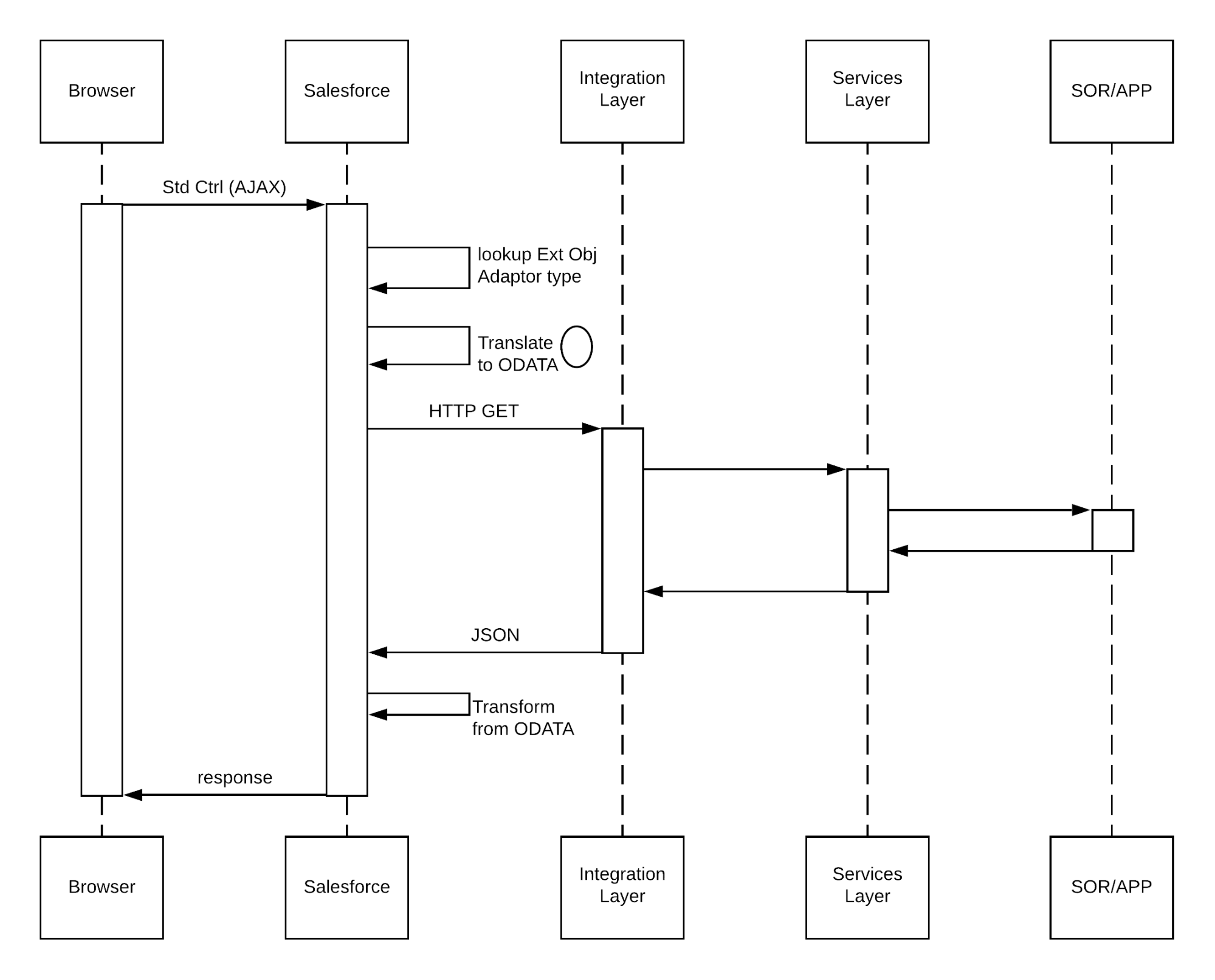
This diagram illustrates a synchronous remote process invocation using Apex calls.
Salesforce Calling Out to a Remote System
In this scenario:
- An action is initiated on the Lightning page (for example, a button click).
- The browser (via a client-side controller in the case of a Lightning component) performs an HTTP POST that in turn performs an action on the corresponding Apex controller.
- The controller invokes the actual call to the remote web service.
- The response from the remote system is returned to the Apex controller. The controller processes the response, updates data in Salesforce as required, and re-renders the page.
In cases where the subsequent state must be tracked, the remote system returns a unique identifier that’s stored in the Salesforce record.
Results
The application of the solutions related to this pattern allows for event-initiated remote process invocations in which Salesforce handles the processing.
Calling Mechanisms
The calling mechanism depends on the solution chosen to implement this pattern.
| Calling Mechanism | Description |
|---|---|
| Enhanced External service embedded in a flow or Lightning component or Apex controllers |
Used when the remote process is triggered as part of an end-to-end process involving the user interface, and the result must be displayed or updated in a Salesforce record. For example, the submission of a credit card payment to an external payment gateway and the payment results are immediately returned and displayed to the user. |
| Apex triggers | Used primarily for invocation of remote processes using Apex callouts from DML-initiated events. For more information about this calling mechanism, see pattern Remote Process Invocation—Fire and Forget. |
| Apex batch classes | Used for invocation of remote processes in batch. For more information about this calling mechanism, see pattern Remote Process Invocation—Fire and Forget. |
Error Handling and Recovery
It’s important to include an error handling and recovery strategy as part of the overall solution.
-
Error handling: When an error occurs (exceptions or error codes are returned to the caller), the caller manages error handling. For example, an error message displayed on the end user’s page or logged to a table requiring further action.
-
Recovery: Changes aren’t committed to Salesforce until the caller receives a successful response. For example, the order status isn’t updated in the database until a response that indicates success is received. If necessary, the caller can retry the operation.
Idempotent Design Considerations
Idempotent capabilities guarantee that repeated invocations are safe. If idempotency isn’t implemented, repeated invocations of the same message can have different results, potentially resulting in data integrity issues. Potential issues include the creation of duplicate records or duplicate processing of transactions.
It’s important to ensure that the remote procedure being called is idempotent. If the call is made by the user interface, handle idempotency at the integration layer especially if there is no guarantee that Salesforce will only invoke the call once.
The most typical method of building an idempotent receiver is for it to track duplicates based on unique message identifiers sent by the consumer. Apex web service or REST calls must be customized to send a unique message ID.
In addition, operations that create records in the remote system must check for duplicates before inserting. Check by passing a unique record ID from Salesforce. If the record exists in the remote system, update the record. In most systems, this operation is termed as an upsert operation.
Security Considerations
Any call to a remote system must maintain the confidentiality, integrity, and availability of the request. The following security considerations are specific to using Apex SOAP and HTTP calls in this pattern.
- One-way SSL is enabled by default, but two-way SSL is supported with both self-signed and CA-signed certificates to maintain authenticity of both the client and server.
- To streamline your Apex code and simplify the setup of authenticated callouts, specify a named credential in the callout endpoint.
- Consider the use of OAuth 2.0 as the authentication mechanism for integration to external systems.
- Where necessary, consider using one-way hashes or digital signatures using the Apex Crypto class methods to ensure request integrity.
- The remote system must be protected by implementing the appropriate firewall mechanisms. See Security Considerations.
- Salesforce currently doesn’t support WS-Security. While it does not natively generate these complex WS-Security headers or automatically enforce them from an incoming WSDL, you can manually construct and implement them by creating custom Apex classes to handle the SOAP headers and security tokens for incoming requests.
Sidebars
None.
Timeliness
Timeliness is of significant importance in this pattern. Usually:
- The request is typically invoked from the user interface, so the process must not keep the user waiting.
- Salesforce has a configurable timeout of up to 120 seconds for calls from Apex.
- Completion of the remote process is executed in a timely manner to conclude within the Salesforce timeout limit and within user expectations.
- External calls are subject to Apex synchronous transaction governor limits, so make sure to mitigate the risk of instantiating more than 50 transactions that run for more than five seconds each. In addition to ensuring the external endpoint is performant, options to mitigate the risk of a timeout include:
- Setting the timeout of the external callout to five seconds.
- Using a continuation in Lightning Components to handle long-running transactions
Data Volumes
This pattern is used primarily for small volume, real-time activities, due to the small timeout values and maximum size of the request or response for the Apex call solution. Don’t use this pattern in batch processing activities in which the data payload is contained in the message.
Endpoint Capability and Standards Support
The capability and standard support for the endpoint depends on the solution that you choose.
| Solution | Endpoint Considerations |
|---|---|
| Apex HTTP callouts | The endpoint must be able to receive HTTP calls. Salesforce must be able to access the endpoint over the public Internet. For private and secure communications, Salesforce also supports Salesforce Private Connect through the Hyperforce platform. See Salesforce Private Connect for more details. You can use Apex HTTP callouts to call REST services using the standard GET, POST, PUT, DELETE, and PATCH methods. Use Named Credentials to define the endpoint and the required authentication, and do not implement your own authentication mechanism. |
| Apex SOAP callouts | The endpoint must be able to receive HTTP calls. Salesforce must be able to access the endpoint over the public Internet. For private and secure communications, Salesforce also supports Salesforce Private Connect through the Hyperforce platform. See Salesforce Private Connect for more details. This solution requires that the remote system is compatible with the standards supported by Salesforce. The web service standards currently supported by Salesforce for Apex SOAP callouts are:
|
State Management
When integrating systems, keys are important for ongoing state tracking. There are two options.
- Salesforce stores the remote system’s primary or unique surrogate key for the remote record.
- The remote system stores the Salesforce unique record ID or some other unique surrogate key.
There are specific considerations for handling integration keys, depending on which system contains the master record, as shown in the following table.
| Master | System Description |
|---|---|
| Salesforce | The remote system stores either the Salesforce RecordId or some other unique surrogate key from the record. |
| Remote system | The call to the remote process returns the unique key from the application, and Salesforce stores that key value in a unique record field. |
Complex Integration Scenarios
In certain cases, the solution prescribed by this pattern can require the implementation of several complex integration scenarios. This is best served by using middleware or having Salesforce call a composite service. These scenarios include:
- Orchestration of business processes and rules involving complex flow logic
- Aggregation of calls and their results across calls to multiple systems
- Transformation of both inbound and outbound messages
- Maintaining transactional integrity across calls to multiple systems
Governor Limits
For information about Apex limits, see Execution Governors and Limits in the Apex Developer Guide.
Middleware Capabilities
The following table highlights the desirable properties of a middleware system that participates in this pattern.
| Property | Mandatory | Desirable | Not Required |
|---|---|---|---|
| Event handling | X | ||
| Protocol conversion | X | ||
| Translation and transformation | X | ||
| Queuing and buffering | X | ||
| Synchronous transport protocols | X | ||
| Asynchronous transport protocols | X | ||
| Mediation routing | X | ||
| Process choreography and service orchestration | X | ||
| Transactionality (encryption, signing, reliable delivery, transaction management) | X | ||
| Routing | X | ||
| Extract, transform, and load | X | ||
| Long polling | X | ||
| gRPC support (for Pub/Sub API) | X |
Example
A utility company uses Salesforce and has a separate system that contains customer billing information. As part of the ordering process, new billing accounts must be created in the billing system. Salesforce should reflect the billing account number within the order activation process. The company has an existing REST API that allows the creation of a billing account and returns the billing account number as a response.
This requirement can be accomplished with the following approach.
- Salesforce consumes the billing account HTTP API as an external service or Flow HTTP Callout. We should only use an Apex proxy class for SOAP service consumption if the billing system provides only SOAP based services and no HTTP APIs.
- Customer information is passed to the external HTTP API object.
- The External Service or HTTP Flow Callout returns the response of HTTP API which can be stored in Salesforce objects.
This example demonstrates that: - The customer state is tracked with an account number stored on the Salesforce account object.
- The caller subsequently processes the reply message.
Context
You use Salesforce to track leads, manage your pipeline, create opportunities, and capture order details that convert leads to customers. However, as a part of the order management processes, a billing account needs to be created in the billing system for the order.
When you implement this pattern, Salesforce calls the remote system to create the billing account, but doesn’t wait for the call’s successful completion. The remote system can optionally update Salesforce with the new billing account created in a separate transaction.
Problem
When an event occurs in Salesforce, how do you initiate a process in a remote system and pass the required information to that process without waiting for a response from the remote system?
Forces
Consider the following forces when applying solutions based on this pattern.
- Does the call to the remote system require Salesforce to wait for a response before continuing processing? Is the call to the remote system synchronous or asynchronous?
- If the call to the remote system is synchronous, does the response need to be processed by Salesforce as part of the same transaction as the call?
- Is the message size small?
- Is the integration based on the occurrence of a specific event, such as a button click in the Salesforce user interface, or DML-based events?
- Is guaranteed message delivery from Salesforce to the remote system a requirement?
- Is the remote system able to participate in a contract-first integration in which Salesforce specifies the contract? In some solution variants (for example, outbound messaging), Salesforce specifies a contract that the remote system endpoint implements.
- Does the endpoint or the Enterprise Service Bus (ESB) support long polling?
- Are declarative configuration methods preferred over custom Apex development? In this case, solutions such as platform events are preferred over Apex callouts.
Solution
The following table contains solutions to this integration problem.
| Solution | Fit | Comments |
|---|---|---|
| Flow-driven platform events | Best | Create flows declaratively to implement platform events. The recommended solution is when the remote process is invoked from an insert or update event. Platform events are the event messages (or notifications) that your apps send and receive to take further action. Platform events simplify the process of communicating changes and responding to them without writing complex logic. One or more subscribers can listen to the same event and carry out actions. For example, a software system can send events containing information about printer ink cartridges. Subscribers can subscribe to the events to monitor printer ink levels and place orders to replace cartridges with low ink levels. External apps can listen to event messages by using the Salesforce Pub/Sub API, which is based on gRPC and HTTP/2. Salesforce also supports Platform Event-Triggered Flows, which effectively allows creating a listener using the Flow Builder interface. This type of flow starts automatically when a specific platform event message is published to the Salesforce Event Bus. |
| Pub/Sub API | Best | The Pub/Sub API is the recommended way for external consumers to consume the events on the Event Bus. The gRPC-based Pub/Sub API:
|
| Change Data Capture | Best | Change Data Capture (CDC) publishes events for changes in Salesforce records corresponding to create, update, delete, and undelete operations. Enabling Change Data Capture (CDC) in Salesforce is a purely declarative process, requiring no Apex code. Notification messages are sent to the event bus to which clients can subscribe using Pub/Sub API or Apex triggers. Event-driven systems streamline the communication between distributed enterprise systems, increase scalability, and deliver real-time data. For example, if order information resides in both your ERP system and Salesforce, you can stream order change events from Salesforce to an integration app. The app then synchronizes the changes in the ERP system. |
| Event Relay | Best (with AWS integrations) | Salesforce Event Relay provides a serverless, low-code, real-time integration to stream Salesforce Platform Events and Change Data Capture (CDC) events directly to Amazon EventBridge. Salesforce Event Relays send these events from Salesforce to Amazon Web Services (AWS), and achieve end-to-end event flow by sending events back to Salesforce. With Event Relay, we can stream events to AWS natively without writing an integration app. |
| Omnistudio Integration Procedures | Good | Use Omnistudio Integration Procedures to declaratively automate data interactions between Salesforce and external third-party applications. Integration Procedures handle complex data transformations, API calls, and event-driven automation, and they can execute multiple actions in a single server call. Use Integration Procedures when no user interaction is required during the execution, and you want to:
|
| Customization-driven platform events | Good | Similar to Flow-driven platform events, but the events are created by Apex triggers or classes. You can publish and consume platform events by using Apex or an API. Platform events integrate with the Salesforce platform through Apex triggers. Triggers are the event consumers on the Salesforce platform that listen to event messages. When an external app uses the API or a native Salesforce app uses Apex to publish the event message, a trigger on that event is fired. Triggers run the actions in response to the event notifications. |
| Flow-driven outbound messaging | Suboptimal | This is a legacy way of integration and can be used when the remote process is invoked from an insert or update event. Salesforce provides this flow-driven outbound messaging capability to send SOAP messages to remote systems triggered by an insert or update operation in Salesforce. These messages are sent asynchronously and are independent of the Salesforce user interface. The outbound message is sent to a specific remote endpoint. The remote service must be able to participate in a contract-first integration where Salesforce provides the contract. On receipt of the message, if the remote service doesn’t respond with a positive acknowledgment, Salesforce retries sending the message, providing a form of guaranteed delivery. This is a legacy way of integration. All new solutions should use Flow with Pub/Sub API. |
| Custom Lightning component that initiates an Apex SOAP or HTTP asynchronous callout | Suboptimal | This solution is typically used in user interface-based scenarios, but does require customization. In addition, the solution must handle guaranteed delivery of the message in the code. Similar to the solution for the Remote Process Invocation—Request and Reply pattern solution that specifies using a Lightning component, together with an Apex callout using Named Credentials. The difference is that in this pattern, Salesforce doesn’t wait for the request to complete before handing off control to the user. After receiving the message, the remote system responds and indicates receipt of the message, then asynchronously processes the message. The remote system hands control back to Salesforce before it begins to process the message; therefore, Salesforce doesn’t have to wait for processing to complete. |
| Apex Triggers to make Apex SOAP or HTTP asynchronous callout | Suboptimal | You can use Apex triggers to perform automation based on record data changes. An Apex proxy class can be executed as the result of a DML operation by using an Apex trigger. However, all calls made from within the trigger context must be executed asynchronously. |
| Apex Triggers to make Apex SOAP or HTTP asynchronous callout | Suboptimal | Calls to a remote system can be performed from a batch job. This solution allows for batch remote process execution and for processing of the response from the remote system in Salesforce. However, there are limits to the number of calls for a given batch context. For more information, see the Salesforce Developer Limits and Allocations Quick Reference. |
Sketch
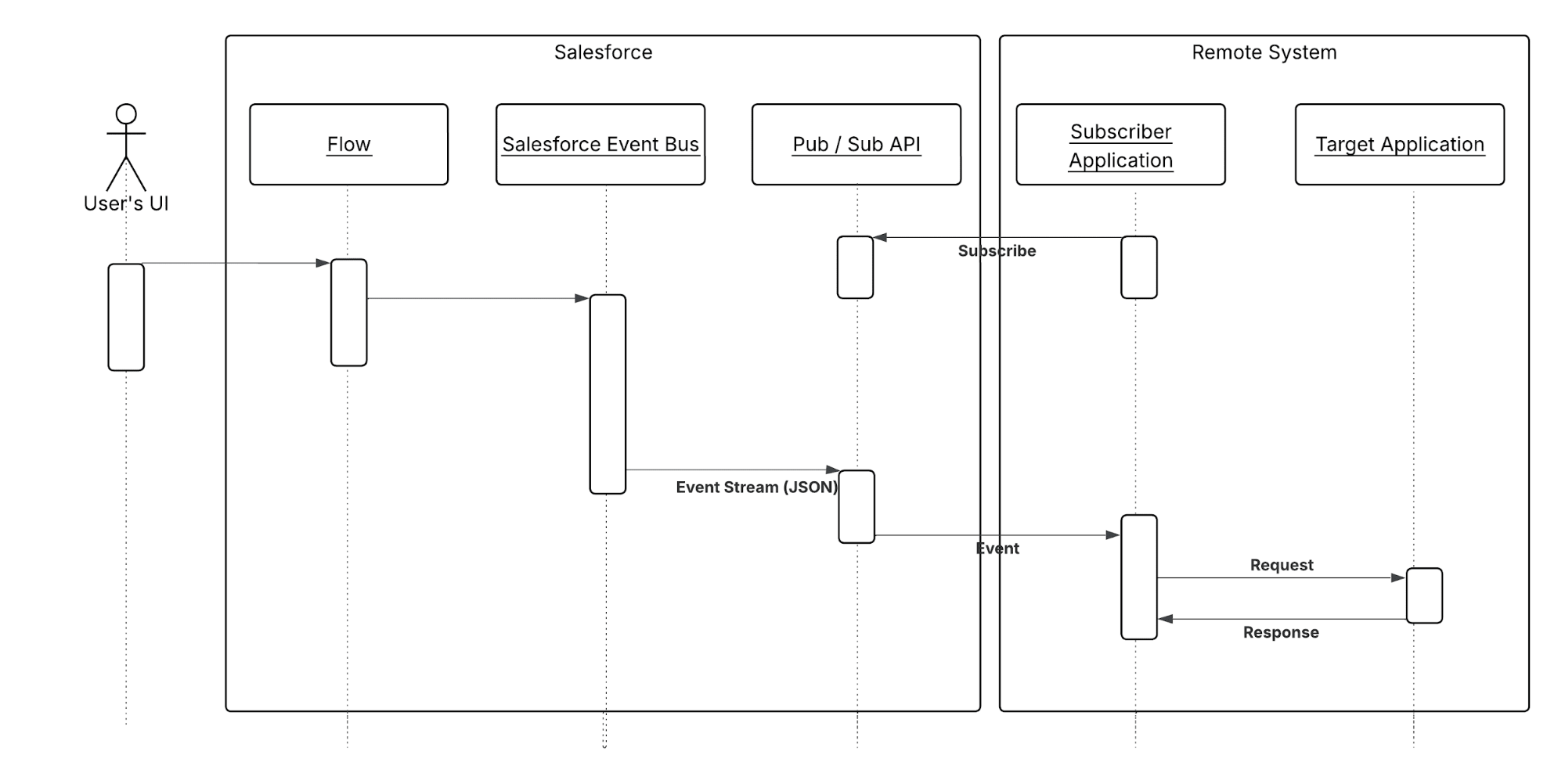
The following diagram illustrates a call from Salesforce to a remote system in which creating or updating operations on a record trigger the call.
In this scenario:
- A remote system subscribes to the platform event.
- An update or insert occurs on a given set of records in Salesforce.
- A Salesforce Flow triggers when a set of conditions is met.
- This flow creates a platform event.
- The remote listener receives the event message, and places the message on a local queue.
- The queuing application forwards the message to the remote application for processing.
In the case where the remote system must perform operations against Salesforce, you can implement an optional callback operation.
Results
The application of the solutions related to this pattern allows for:
- User interface–initiated remote process invocations in which the result of the transaction can be displayed to the end user
- DML event-initiated remote process invocations in which the result of the transaction can be processed by the calling process
Calling Mechanisms
The calling mechanism depends on the solution chosen to implement this pattern.
| Calling Mechanism | Description |
|---|---|
| Flow | Used by both the process-driven and customization-driven solutions. Events trigger the Salesforce process, which can then publish a platform event for subscription by a remote system. |
| Pub/Sub API | Pub/Sub API provides a single interface for publishing and subscribing to platform events, including real-time event monitoring events, and change data capture events. Based on gRPC and HTTP/2, Pub/Sub API efficiently publishes and delivers binary event messages in the Apache Avro format. |
| Change Data Capture | Salesforce Change Data Capture publishes change events, which represent changes to Salesforce records. Changes include creation of a new record, updates to an existing record, deletion of a record, and undeletion of a record. |
| Lightning component and Apex controllers | Used to invoke a remote process asynchronously using an Apex callout. |
| Apex triggers | Used for trigger-driven platform events and invocation of remote processes, using Apex callouts from DML-initiated events. |
| Apex batch classes | Used for invocation of remote processes in batch mode. |
Error Handling and Recovery
An error handling and recovery strategy must be considered as part of the overall solution. The best method depends on the solution you choose.
| Solution | Error Handling and Recovery Strategy |
|---|---|
| Flow |
|
| Apex callouts using Named Credentials |
|
| Change Data Capture (CDC) / Platform Events |
|
Idempotent Design Considerations
Platform events are only published to the bus once. There is no retry on the Salesforce side. It is up to the ESB to request that the events be replayed. In a replay, the platform event’s replay ID remains the same and the ESB can try duplicate messages based on the replay ID.
The idempotent design considerations in the Remote Process Invocation—Request and Reply pattern also apply to this pattern.
Security Considerations
Any call to a remote system must maintain the confidentiality, integrity, and availability of the request. Different security considerations apply, depending on the solution you choose.
| Solution | Security Considerations |
|---|---|
| Apex callouts using Named Credentials | A call to a remote system must maintain the confidentiality, integrity, and availability of the request. The following are security considerations specific to using Apex SOAP and HTTP calls in this pattern.
|
| Change Data Capture (CDC) / Platform Events | For platform events the subscribing external system must be able to authenticate to the Salesforce Streaming API. Platform events conform to the existing security model configured in the Salesforce org. To subscribe to an event, the user needs read access to the event entity. To publish an event, the user needs “create” permission on the event entity. |
Sidebars
None.
Timeliness
Timeliness is less of a factor with the fire-and-forget pattern. Control is handed back to the client either immediately or after positive acknowledgment of a successful hand-off to the remote system. For platform events, Salesforce sends the events to the event bus and doesn’t wait for a confirmation or acknowledgment from the subscriber. If the subscriber doesn’t pick up the message, the subscriber can request to replay the event using the event reply ID. High-volume event messages are stored for 72 hours (three days). To retrieve past event messages, use Pub/Sub APIs to subscribe to a channel.
Data Volumes
Data volume considerations depend on which solution you choose. For the limits of each solution, see the Salesforce Limits Quick Reference.
Endpoint Capability and Standards Support
The capability and standard support for the endpoint depends on the solution that you choose.
| Solution | Endpoint Considerations |
|---|---|
| Apex SOAP callouts | The endpoint must be able to process a web service call via HTTP. Salesforce must be able to access the endpoint over the public Internet. This solution requires that the remote system is compatible with the standards supported by Salesforce. At the time of writing, the web service standards supported by Salesforce for Apex SOAP callouts are:
|
| Apex HTTP callouts | The endpoint must be able to receive HTTP calls and be accessible over the public internet by Salesforce. Apex HTTP callouts can be used to call RESTful services using the standard GET, POST, PUT, and DELETE methods. |
| Change Data Capture (CDC) / Platform Events |
|
State Management
When integrating systems, unique record identifiers are important for ongoing state tracking. For example, if a record is created in the remote system, you have two options.
- Salesforce stores the remote system’s primary or unique surrogate key for the remote record.
- The remote system stores the Salesforce unique record ID or some other unique surrogate key.
The following table lists considerations for state management in this pattern.
| Master | System Description |
|---|---|
| Salesforce | The remote system must store either the Salesforce RecordId or some other unique surrogate key in the Salesforce record. |
| Remote system | Salesforce must store a reference to the unique identifier in the remote system. Because the process is asynchronous, storing this unique identifier can’t be part of the original transaction. Salesforce must provide a unique ID in the call to the remote process. The remote system must then call back to Salesforce to update the record in Salesforce with the remote system’s unique identifier, using the Salesforce unique ID. The callback implies specific state handling in the remote application to store the Salesforce unique identifier for that transaction to use for the callback when processing is complete, or the Salesforce unique identifier is stored on the remote system’s record. |
Complex Integration Scenarios
Each solution in this pattern has different considerations for complex integration scenarios such as transformation and process orchestration.
| Solution | Considerations |
|---|---|
| Apex callouts using Named Credentials | In certain cases, solutions prescribed by this pattern require implementing several complex integration scenarios best served using middleware or having Salesforce call a composite service. These scenarios include:
|
| Change Data Capture (CDC) / Platform Events | Given the static, declarative nature of events, no complex integration scenarios, such as aggregation, orchestration, or transformation can be performed in Salesforce. The remote system or middleware must handle these types of operations. |
| OmniStudio Integration Procedures | Integration Procedures (OmniStudio) provide server‑side, stateless orchestration to coordinate multiple back‑end services while performing complex, declarative data transformations. Integration Procedures chain steps like HTTP Actions, DataRaptor Extract/Transform/Load, Set Values, Loop/If, and Matrix lookups to normalize, enrich, aggregate, and map payloads between UI contracts and disparate APIs. They support robust runtime controls like conditional branching, pagination, timeouts, retries, partial‑failure handling, and continue‑on‑error, as well as performance optimizations like server‑side caching and response shaping. IPs can be invoked synchronously from OmniScripts, or headlessly via REST, enabling reusable, versioned “integration façades” that hide back‑end complexity from channels. |
Governor Limits
Due to the multitenant nature of the Salesforce platform, there are limits to outbound callouts. Limits depend on the type of outbound call and the timing of the call.
For limits and allocations that apply to platform events, see the Platforms Events Developer Guide.
Reliable Messaging
Reliable messaging attempts to resolve the issue of guaranteeing the delivery of a message to a remote system in which the individual components are unreliable. The method of ensuring receipt of a message by the remote system depends on the solution you choose.
In case of Salesforce Change Data Capture types of change events are provided to handle special situations, such as capturing changes not caught in the Salesforce application servers, or handling high loads of changes.
In some cases, Salesforce sends Gap events instead of change events to inform subscribers about errors, or if it’s not possible to generate change events. A gap event contains information about the change in the header, such as the change type and record ID. It doesn’t include details about the change, such as record fields. To capture changes more efficiently, Overflow events are generated for single transactions that exceed a threshold. For more information please see here.
| Solution | Reliable Messaging Considerations |
|---|---|
| Apex callouts using Named Credentials | Salesforce doesn’t provide explicit support for reliable messaging protocols (for example, WS-ReliableMessaging). We recommend that the remote endpoint receiving the Salesforce message implement a reliable messaging system, like JMS or MQ. This system ensures full end-to-end guaranteed delivery to the remote system that ultimately processes the message. However, this system doesn’t ensure guaranteed delivery from Salesforce to the remote endpoint that it calls. Guaranteed delivery must be handled through customizations to Salesforce. Specific techniques, such as processing a positive acknowledgment from the remote endpoint in addition to custom retry logic, must be implemented. |
| Change Data Capture (CDC) / Platform Events | Platform Events attempts to provide reliable messaging by temporarily persisting event messages in the event bus. Subscribers can catch up on missed event messages by replaying messages from the event bus using the Replay ID of event messages. The event bus is a distributed system and doesn’t have the same guarantees as a transactional database. As a result, Salesforce can’t provide a synchronous response for an event publish request. Events are queued and buffered, and Salesforce attempts to publish the events asynchronously. In rare cases, the event message might not be persisted in the distributed system during the initial or subsequent attempts. This means that the events aren’t delivered to subscribers, and they aren’t recoverable. |
Middleware Capabilities
The following table highlights the desirable properties of a middleware system that participates in this pattern.
| Property | Mandatory | Desirable | Not Required |
|---|---|---|---|
| Event handling | X | ||
| Protocol conversion | X | ||
| Translation and transformation | X | ||
| Queuing and buffering | X | ||
| Synchronous transport protocols | X | ||
| Asynchronous transport protocols | X | ||
| Mediation routing | X | ||
| Process choreography and service orchestration | X | ||
| Transactionality (encryption, signing, reliable delivery, transaction management) | X | ||
| Routing | X | ||
| Extract, transform, and load | X | ||
| Long polling | X (required for Streaming API) | ||
| gRPC support (for Pub/Sub API) | X |
Solution Variant: Platform Events Publishing Behavior and Transactions
When platform event messages are published immediately, event publishing doesn’t respect transaction boundaries of the publishing process. Event messages can be published before the transaction completes or even if a transaction fails. This behavior can lead to issues when a subscriber expects to find data that the publishing transaction commits. The data might not be present when the subscriber receives the event message. To solve this issue, set the platform event publish behavior to Publish After Commit in the event definition. The publish behaviors you can set in a platform event definition are:
- Publish After Commit to have the event message published only after a transaction commits successfully. Select this option if subscribers rely on data that the publishing transaction commits. For example, a process publishes an event message and creates a task record. A second process that is subscribed to the event is fired and expects to find the task record. Another reason for choosing this behavior is when you don’t want the event message to be published if the transaction fails.
- Publish Immediately to have the event message published when the publish call executes. Select this option if you want the event message to be published regardless of whether the transaction succeeds. Also choose this option if the publisher and subscribers are independent, and subscribers don’t rely on data committed by the publisher. For example, the immediate publishing behavior is suitable for an event used for logging purposes. With this option, a subscriber might receive the event message before data is committed by the publisher transaction.
Example
A telecommunications company wants to use Salesforce as a front end for creating accounts using the lead-to-opportunity process. An order is created in Salesforce when the opportunity is closed and won, but the back-end ERP system is the data master. The order must be saved to the Salesforce opportunity record, and the opportunity status changed to indicate that the order was created.
The following constraints apply.
- Only declarative development can be implemented.
- You don’t require immediate notification of the order number after the opportunity converts to an order.
- The organization has the capability to support gRPC and HTTP2 so that Salesforce Pub/Sub APIs can be used to subscribe to platform events.
This example is best implemented using Salesforce platform events, but does require that the ESB subscribes to the platform event.
On the Salesforce side:
- Create a Flow to initiate the platform event (for example, when the opportunity status changes to Close-Won).
- Create a new platform event which publishes the opportunity details.
On the remote system side:
- The integration tools (for example, ESB) subscribe to the Salesforce platform event using the Pub/Sub API.
- The ESB receives one or more notifications indicating that the opportunity is to be converted to an order.
- The ESB forwards the message to the back-end ERP system so that the order can be created.
- After the order is created in the ERP system, a separate thread calls back to Salesforce using the OAuth 2.0 with a connected app. The callback updates the opportunity with the order number and status. You can do this callback using documented pattern solutions, such as Salesforce platform events, Salesforce SOAP API, REST API, or an Apex web service.
This example demonstrates the following.
- Implementation of a remote process invoked asynchronously
- End-to-end guaranteed delivery
- Subsequent callback to Salesforce to update the state of the record
Context
You’re moving your CRM implementation to Salesforce and want to:
- Extract and transform accounts, contacts, and opportunities from the current CRM system and load the data into Salesforce (initial data import).
- Extract, transform, and load customer billing data into Salesforce from a remote system on a weekly basis (ongoing).
- Extract customer activity information from Salesforce and import it into an on-premises data warehouse on a weekly basis (ongoing).
Problem
How do you import data into Salesforce and export data out of Salesforce, taking into consideration that these imports and exports can interfere with end-user operations during business hours, and involve large amounts of data?
Forces
There are various forces to consider when applying solutions based on this pattern:
- Should the data be stored in Salesforce? If not, there are other integration options an architect can and should consider (mashups, for example).
- If the data should be stored in Salesforce, should the data be refreshed in response to an event in the remote system?
- Should the data be refreshed on a scheduled basis?
- Does the data support primary business processes?
- Are there analytics (reporting) requirements that are impacted by the availability of this data in Salesforce?
Solution
The following table contains various solutions to this integration problem.
| Solution | Fit | Data master | Comments |
|---|---|---|---|
| Replication via third-party ETL tool | Best | Remote system | Where an external system needs to send a large amount of data into Salesforce leverage a third-party ETL tool that allows you to run change data capture against source data. The tool reacts to changes in the source data set, transforms the data, and then calls Salesforce Bulk API to issue DML statements. This can also be implemented using the Salesforce REST APIs if the number of records is less. |
| Replication via third-party ETL tool | Good | Salesforce | Leverage a third-party ETL tool that allows you to run change data capture against ERP and Salesforce data sets. In this solution, Salesforce is the data source, and you can use time/status information on individual rows to query the data and filter the target result set. This can be implemented by using bulk API 2.0 or standard REST APIs (if the number of records is less). |
| Data 360 and Data Actions and Activations | Best | Data 360 | Move data between orgs using Data 360 actions and activations. After data is ingested from different orgs into Data 360, data actions and activations can sync the data to another org. This approach can be very useful for integrations with Marketing Cloud orgs. |
| Data 360, Data Graphs and Connect APIs | Best | Data 360 | Extract and move data using MuleSoft Anypoint. MuleSoft A nypoint can be used to extract data from Data 360 using Connect API and Data Graph API and move it to another Salesforce org. Without Data 360, MuleSoft Anypoint can also be used when data needs to be moved between orgs without being replicated in Data 360. |
| Composite Graph API | Best | Salesforce | The composite graph resource lets you submit composite graph operations. This resource is available in REST API version 50.0 and later. Composite Graph API can support up to 75 graphs in one payload and maximum 500 nodes in one graph. |
| Data Import Wizard and Data Loader | Fit | Salesforce / External System | Data Import Wizard and Data Loader can be used to import, export and migrate data. While Data Loader commands can also be scripted to automate the import and export of data, the command-line interface is for Windows only. Neither of these tools is a recommended base for a data integration strategy. They should, instead, complement your data stewardship and maintenance strategy. For more information, see the Data Loader documentation. |
| Remote call-in | Suboptimal | Remote system | It’s possible for a remote system to call into Salesforce by using one of the APIs and perform updates to data as they occur. However, this causes considerable on-going traffic between the two systems. Greater emphasis should be placed on error handling and locking. This pattern has the potential for causing continual updates, which has the potential to impact performance for end users. |
| Remote process invocation | Suboptimal | Salesforce | It’s possible for Salesforce to call into a remote system and perform updates to data as they occur. However, this causes considerable on-going traffic between the two systems. Greater emphasis should be placed on error handling and locking. This pattern has the potential for causing continual updates, which has the potential to impact performance for end users. |
Sketch
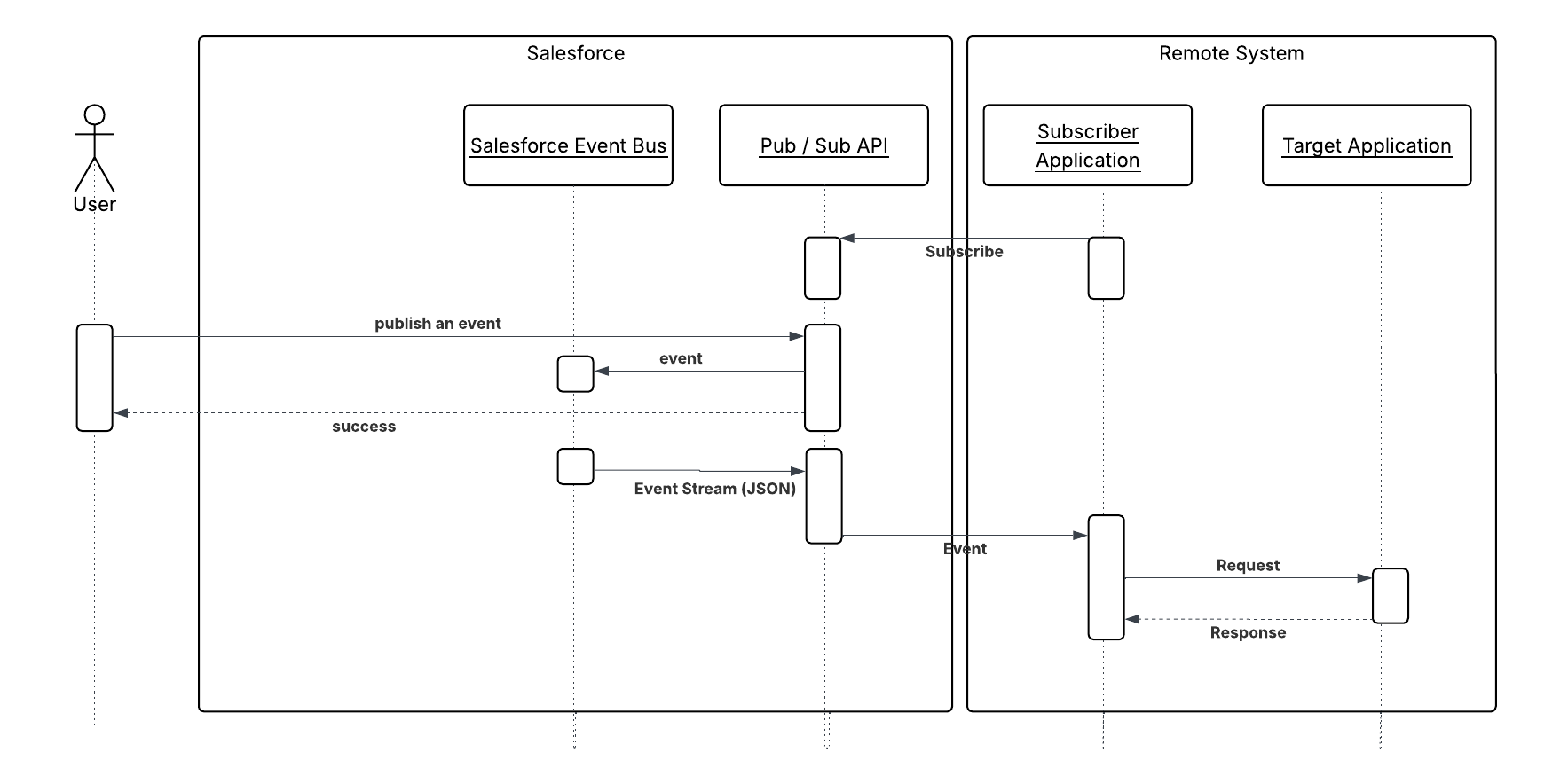
The following diagram illustrates the sequence of events in this pattern, where Salesforce is the data master.
The following diagram illustrates the subsequent synchronization of events in near real time, where Salesforce is the data master.
Results
You can integrate data that’s sourced externally with Salesforce under the following scenarios:
- The external system is the data master: Salesforce is a consumer of data provided by a single source system or multiple systems. In this scenario, it’s common to have a data warehouse or data mart that aggregates the data before the data is imported into Salesforce.
- Salesforce is the data master: Salesforce is the system of record for certain entities and Salesforce Change Data Capture client applications can be informed of changes to Salesforce data.
In a typical Salesforce integration scenario, the implementation team does one of the following:
- Implement change data capture on the source data set.
- Implement a set of supporting database structures, known as control tables, in an intermediate, on-premises database.
The ETL tool creates programs that will:
- Read a control table to determine the last run time of the job and extract any other control values needed.
- Use the above control values as filters and query the source data set.
- Apply predefined processing rules, including validation, enrichment, and so on.
- Use available connectors/transformation capabilities of the ETL tool to create the destination data set.
- Write the data set to Salesforce objects.
- If processing is successful, update the control values in the control table.
- If processing fails, update the control tables with values that enable a restart and exit.
Note: We recommend that you create the control tables and associated data structures in an environment that the ETL tool has access to even if access to Salesforce isn’t available. This provides adequate levels of resilience. Salesforce should be treated as a spoke in this process and the ETL infrastructure is the hub.
For an ETL tool to gain maximum benefit from data synchronization capabilities, consider the following:
- Chain and sequence the ETL jobs to provide a cohesive process.
- Use primary keys from both systems to match incoming data.
- Use specific API methods to extract only updated data.
- If importing child records in a master-detail or lookup relationship, group the imported data using its parent key at the source to avoid locking. For example, if you’re importing contact data, be sure to group the contact data by the parent account key so the maximum number of contacts for a single account can be loaded in one API call. Failure to group the imported data usually results in the first contact record being loaded and subsequent contact records for that account to fail in the context of the API call.
- Any post-import processing, such as triggers, should only process data selectively.
- If your scenario involves large data volumes, follow the best practices from this Trailhead module Best Practices for Deployments with Large Data Volumes
Error Handling and Recovery
An error handling and recovery strategy must be considered as part of the overall solution. The best method depends on the solution you choose.
| Error location | Error handling and recovery strategy |
|---|---|
| Read from Salesforce using Change Data Capture |
|
| Read from Salesforce using a 3rd party ETL system |
|
| Write to Salesforce |
|
| External master system | Errors should be handled in accordance with the best practices of the master system. |
Security Considerations
Any call to a remote system must maintain the confidentiality, integrity, and availability of the request. Different security considerations apply, depending on the solution you choose.
- Authenticated API access to the Salesforce API requires a Lightning Platform license with at least API-Only user permissions.
- We recommend that standard encryption be used to keep password access secure.
- Use the HTTPS protocol when making calls to the Salesforce APIs. You can also proxy traffic to the Salesforce APIs through an on-premises security solution, if necessary.
Sidebars
None.
Timeliness
Timeliness isn’t of significant importance in this pattern. However, care must be taken to design the interfaces so that all of the batch processes complete in a designated batch window.
As with all batch-oriented operations, we strongly recommend that you take care to insulate the source and target systems during batch processing windows. Loading batches during business hours might result in some contention, resulting in either a user’s update failing, or more significantly, a batch load (or partial batch load) failing.
For organizations that have global operations, it might not be feasible to run all batch processes at the same time because the system might continually be in use. Data segmentation techniques using record types and other filtering criteria can be used to avoid data contention in these cases.
State Management
You can implement state management by using surrogate keys between the two systems. If you need any type of transaction management across Salesforce entities, we recommend that you use the Remote Call-In pattern using Apex.
Standard optimistic record locking occurs on the platform, and any updates made using the API require the user, who is editing the record, to refresh the record and initiate their transaction. In the context of the Salesforce API, optimistic locking refers to a process where:
- Salesforce doesn’t maintain the state of a record being edited by a specific user.
- Upon reading, it records the time when the data was extracted.
- If the user updates the record and saves it, Salesforce checks to see if another user has updated the record in the interim.
- If the record has been updated, the system notifies the user that an update was made and the user should retrieve the latest version of the record before proceeding with their updates.
Middleware Capabilities
The most effective external technologies used to implement this pattern are traditional ETL tools like Informatica or MuleSoft. It’s important that the middleware tools chosen support the Salesforce Bulk API.
Middleware should be able to store the last successfully processed timestamp either internally or externally for watermarking. This last successfully processed timestamp should be used to consume the changes since the last successful execution.
The following table highlights the desirable properties of a middleware system that participates in this pattern.
| Property | Mandatory | Desirable | Not Required |
|---|---|---|---|
| Event handling | X | ||
| Protocol conversion | X | ||
| Translation and transformation | X | ||
| Queuing and buffering | X | ||
| Synchronous transport protocols | X | ||
| Asynchronous transport protocols | X | ||
| Mediation routing | X | ||
| Process choreography and service orchestration | X | ||
| Transactionality (encryption, signing, reliable delivery, transaction management) | X | ||
| Routing | X | ||
| Extract, transform, and load | X | ||
| Long polling | X (required for Salesforce Change Data Capture) | ||
| gRPC support (for Pub/Sub API) | X |
Example
A utility company uses a mainframe-based batch process that assigns prospects to individual sales reps and teams. This information needs to be imported into Salesforce on a nightly basis.
The customer has decided to implement change data capture on the source tables using a commercially available ETL tool. The solution works as follows:
- A cron-like scheduler executes a batch job that assigns prospects to users and teams.
- After the batch job runs and updates the data, the ETL tool recognizes these changes using change data capture. The ETL tool collates the changes from the data store.
- The ETL connector uses the Salesforce REST API to load the changes into Salesforce.
Context
You use Salesforce to track leads, manage your pipeline, create opportunities, and capture order details that convert leads to customers. The Salesforce system creates the orders internally and then pushes that data to the external billing system for provisioning and activation. Billing Orders are managed by an external (remote) system. That remote system needs to update the order status in Salesforce when the order or billing entity on the billing system status changes.
Problem
How does a remote system connect and authenticate with Salesforce to notify Salesforce about external events, create records, and update existing records?
Forces
There are various forces to consider when applying solutions based on this pattern:
- Is the purpose of the remote call to Salesforce to notify Salesforce of an event that occurred externally using an event-driven architecture? Or is the purpose to perform CRUD operations on specific records? If you use an event-driven architecture, the event producer (the remote process) is decoupled from the Salesforce event consumer.
- Does the call to Salesforce require the remote process to wait for a response before continuing processing? Remote calls to Salesforce are always synchronous request-reply, although the remote process can discard the response if it isn’t needed to simulate an asynchronous call.
- Does each transaction operate against a single Salesforce object or multiple, related objects?
- What is the format of the message (for example, SOAP or REST, or both over HTTP)?
- Is the message size relatively small or large?
- If the remote system is SOAP-capable, is the remote system able to participate in a contract-first approach, where Salesforce dictates the contract? This is required where our SOAP API is used, for which a predefined WSDL is supplied.
- Is transaction processing required?
- What is the extent to which you’re tolerant of customization in Salesforce?
Solution
This table contains various solutions to this integration problem.
| Solution | Fit | Comments |
|---|---|---|
| Composite API | Best | Salesforce provides a composite API which is a REST API and supports composite requests. This can be used by remote systems to:
Transaction/Commit Behavior—By default, composite API doesn’t allow for partial success if some records are marked with errors. This can be changed by marking “all or nothing” flag as false which will allow partial success. Error Handling: Proper error handling should examine the response body, not just HTTP status codes. A composite endpoint responds with 200 HTTP status code even if inside the response body it shows that one of the subrequests failed and the transaction had to roll back. |
| Composite Graph API | Best | The composite graph resource lets you submit composite graph operations. This resource is available in REST API version 50.0 and later. Composite Graph API can support up to 75 graphs in one payload and a maximum of 500 nodes in one graph. |
| REST API | Best | Accessibility—Salesforce provides a REST API that remote systems can use to:
The REST API respects object-level and field-level security configured in Salesforce based on the logged in user’s profile. REST exposes resources (entities/objects) as URIs and uses HTTP verbs to define CRUD operations on these resources. Unlike SOAP, REST API requires no predefined contract, utilizes XML and JSON for responses, and has loose typing. REST API is lightweight and provides a simple method for interacting with Salesforce. Its advantages include ease of integration and development, and it’s an excellent choice for use with mobile apps and web apps. Transaction/Commit Behavior—By default, each record is treated as a separate transaction and committed separately. Failure of one record change doesn’t cause rollback of other record changes. This behavior can be altered to an “all or nothing” behavior. Use the REST API composite resources to make a series of updates in one API call. Bulk Data—Any data operation that includes more than 2,000 records is a good candidate for Bulk API 2.0 to successfully prepare, execute, and manage an asynchronous workflow that uses the Bulk framework. |
| Bulk API 2.0 | Best for bulk operations | Bulk API 2.0 is Salesforce’s modern, streamlined API for handling large-scale data operations. The REST-based Bulk API 2.0 provides a programmatic option to asynchronously insert, upsert, query, or delete large datasets in your Salesforce org. It’s designed for efficiency when you need to load large amounts of data into Salesforce or perform bulk queries on your organization’s data. Bulk API 2.0 always processes batches in parallel and does not support serial mode. This means that:
|
| GraphQL API | Best | For Remote Call-In scenarios involving complex, multi-object reads with selective fields, GraphQL is a superior option to REST API. |
| Pub/Sub API | Best | The Pub/Sub API is the recommended way for external publishers to publish events on the Event Bus. Pub/Sub API is a gRPC-based API that allows external systems to publish platform events. The Pub/Sub API:
|
| Platform Events | Best | Platform events are defined the same way you define Salesforce objects. Platform events can be published using different mechanisms like REST APIs, Bulk API, and SOAP APIs. Publishing an event via REST API is the same as creating a Salesforce record. Endpoint Format: POST /services/data/vXX.X/sobjects/EventName__e/
Since Platform Events are SObjects, standard SOAP API operations are supported. |
| SOAP API | Suboptimal | Accessibility—Salesforce provides a SOAP API that remote systems can use to:
Generated WSDL—Salesforce provides two WSDLs for remote systems:
Transaction/Commit Behavior—By default, each API call allows for partial success if some records are marked with errors. This can be changed to an “all or nothing” behavior where all the results are rolled back if any error occurs. It’s not possible to span a transaction across multiple API calls. To overcome this limitation, it’s possible for a single API call to affect multiple objects. SOAP requires significant knowledge of the Salesforce object model, API mechanisms, and SOAP message handling. These additional factors make REST preferable over SOAP. |
| Apex web services | Suboptimal | Apex class methods can be exposed as web service methods to external applications. This method is an alternative to SOAP API, and is typically used only where the following additional requirements must be met.
Not applicable for platform events because transaction pre-insert logic at the consumer doesn’t apply in an event-driven architecture. To notify a Salesforce org that an event has occurred, use SOAP API, REST API, or Bulk API 2.0. SOAP requires significant knowledge of the Salesforce object model, API mechanisms, and SOAP message handling. These additional factors make REST preferable over SOAP. |
| Apex REST services | Suboptimal | An Apex class can be exposed as REST resources mapped to specific URIs with a defined HTTP verb (for example, POST or GET). You can use REST API composite resources to perform multiple updates in a single transaction. Unlike SOAP, there’s no need for the client to consume a service definition/contract (WSDL) and generate client stubs. The remote system requires only the ability to form an HTTP request and process the returned results (XML or JSON). Not applicable for platform events because transaction pre-insert logic at the consumer doesn’t apply in an event-driven architecture. To notify a Salesforce org that an event has occurred, use SOAP API, REST API, or Bulk API 2.0. |
Sketch
The following diagrams illustrate the sequence of events when you implement this pattern using either REST API for notifications from external events or SOAP API to query a Salesforce object. The sequence of events is the same when using the REST API.
Remote System Querying Salesforce Via REST API
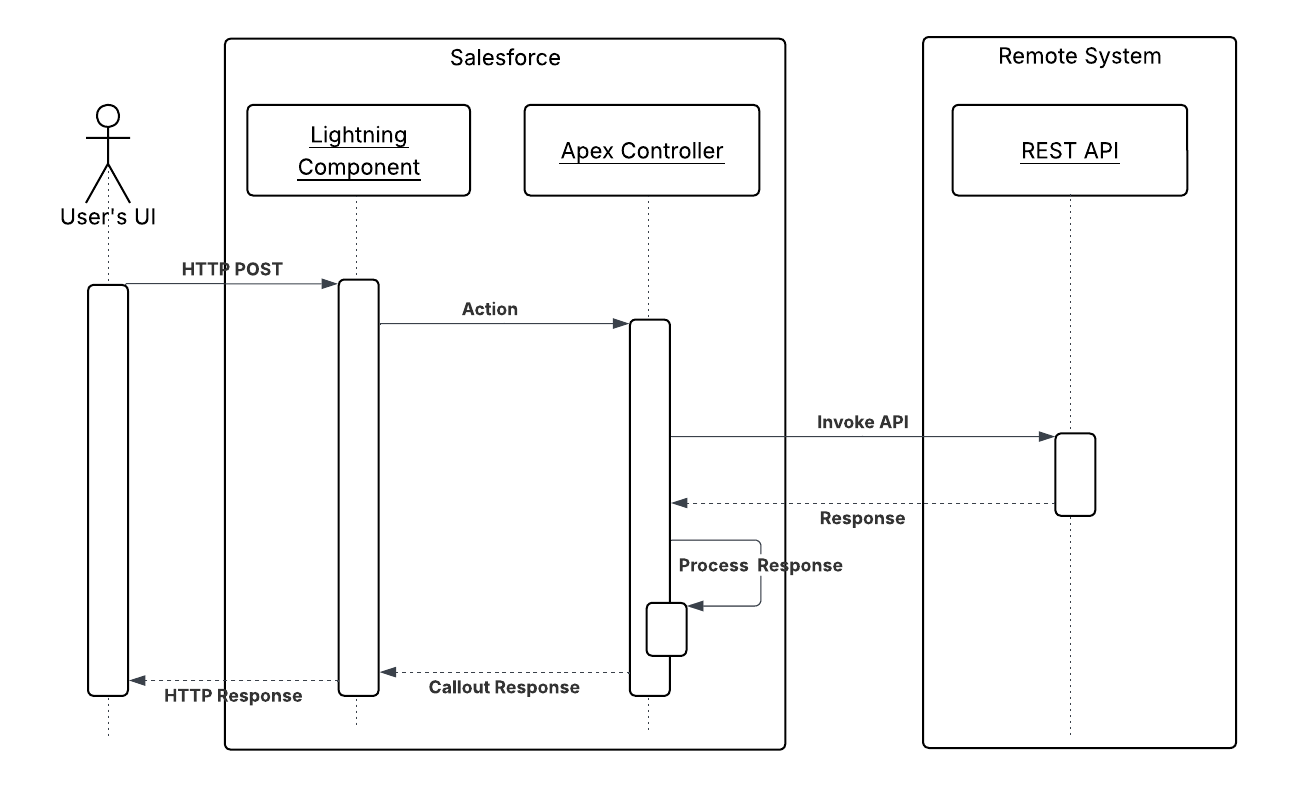
Remote System Notifying Salesforce with Events Via REST API
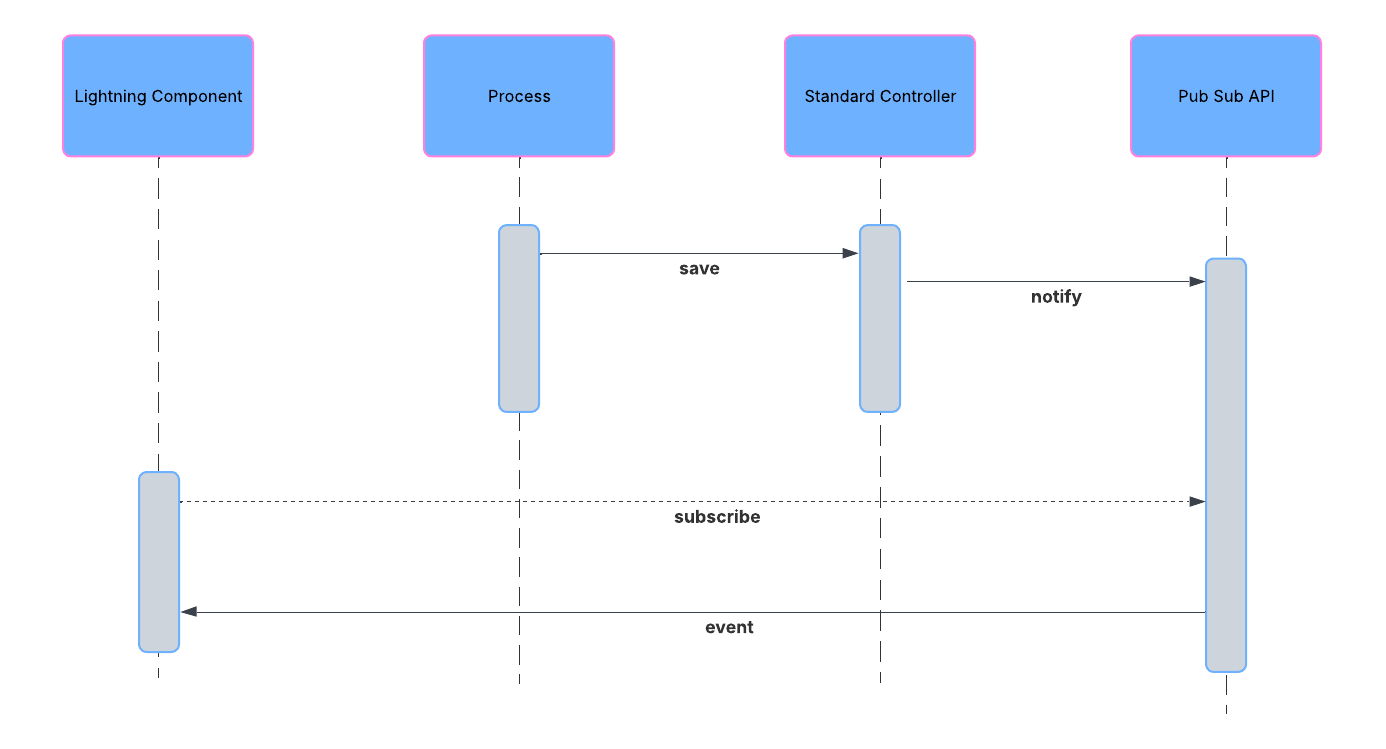
Results
In an event-driven architecture, the remote system calls into Salesforce using SOAP API, REST API, or Bulk API 2.0 to publish an event to the Salesforce event bus. Publishing an event notifies all subscribers. Event subscribers can be on the Salesforce Platform such as Flows, or Lightning Components, Apex triggers. Event subscribers can also be external to the Salesforce Platform such as Pub/Sub API subscribers.
When working directly with Salesforce objects, the solutions related to this pattern allow for:
- The remote system calls the Salesforce APIs to query the database and execute single-object operations (create, update, delete, and so on).
- The remote system to call the Salesforce REST API composite resources to perform a series of object operations.
- Remote system to call custom-built Salesforce APIs (services) that can support multi-object transactional operations and custom pre/post processing logic.
Calling Mechanisms
The calling mechanism depends on the solution chosen to implement this pattern.
| Calling mechanism | Description |
|---|---|
| SOAP API | The remote system uses the Salesforce Enterprise or Partner WSDL to generate client stubs that are in turn used to invoke the standard SOAP API. |
| REST API | The remote system has to authenticate before accessing any Apex REST service. The remote system should use OAuth 2.0 for authentication and authorization. The client must set the authorization HTTP header with the appropriate value like an OAuth access token. The remote system then generates REST invocations (HTTP requests) with the appropriate verbs and processes the results returned (JSON and XML data formats are supported). |
| Apex web service | The remote system consumes the custom Apex web service WSDL to generate client stubs that are in turn used to invoke the custom Apex web service. |
| Apex REST service | As per REST API, the resource URI and applicable verbs are defined using the @RestResource, @HttpGet, and @HttpPost annotations. |
| Bulk API 2.0 | Bulk API 2.0 is a REST-based API, so the same calling mechanisms as REST API apply. |
| REST API to invoke Flow | Use REST API to call a custom invocable actions endpoint to invoke an auto-launched flow. |
Error Handling and Recovery
An error handling and recovery strategy must be considered as part of the overall solution.
- Error handling — All the remote call-in methods, standard or custom APIs, require the remote system to handle any subsequent errors, such as timeouts and the management of retries. Middleware can be used to provide the logic for error handling and recovery.
- Recovery — Build a custom retry mechanism if quality-of-service requirements require it. In this case, it’s important to ensure idempotent design characteristics. Platform event enables subscribers to use the replay ID to fetch messages within a certain time period after those messages were published.
Idempotent Design Considerations
Idempotent capabilities guarantee that repeated invocations are safe and won’t have a negative effect. If idempotency isn’t implemented, then repeated invocations of the same message can have different results, potentially resulting in data integrity issues, for example, creation of duplicate records, duplicate processing of transactions, and so on.
The remote system must manage multiple (duplicate) calls, in the case of errors or timeouts, to avoid duplicate inserts and redundant updates (especially if downstream triggers and workflow rules fire). While it’s possible to manage some of these situations within Salesforce (particularly in the case of custom SOAP and REST services), we recommend that the remote system (or middleware) manages error handling and idempotent design.
Security Considerations
Different security considerations apply, depending on the pattern solution chosen. In all cases, the platform uses the logged-in user’s access rights (for example, profile settings, sharing rules, permission sets, and so on). Additionally, profile IP restrictions can be used to restrict access to the API for a specific IP address range.
| Solution | Security considerations |
|---|---|
| SOAP API | Salesforce supports Transport Layer Security (TLS 1.2 or greater) protocols. Ciphers must have a key length of at least 128 bits. |
| REST API | We recommend that the remote system establish an OAuth trust for authorization. REST calls can then be made on specific resources using HTTP verbs. We recommend that clients that call the REST API, then cache and reuse the OAuth token to maximize performance, rather than obtaining a new OAuth token for each call. |
| Apex web service | We recommend that the remote system establish an OAuth trust for authorization. |
| Apex REST service | We recommend that the remote system establish an OAuth trust for authorization. |
| Bulk API 2.0 | We recommend that the remote system establish an OAuth trust for authorization. |
Sidebars
None.
Timeliness
SOAP API and Apex web service API are synchronous. The following timeouts apply:
- Session timeout — The session times out if there’s no activity based on the Salesforce org’s session timeout setting.
- Query timeout — Each SOQL query has an individual timeout limit of 120 seconds.
Data Volumes
Data volume considerations depend on which solution and communication type you choose.
| Solution | Communication type | Limits |
|---|---|---|
| SOAP API or REST API | Synchronous |
|
| Bulk API 2.0 | Asynchronous | Bulk API 2.0 is optimized for importing and exporting large sets of data asynchronously. Any data operation that includes more than 2,000 records is a good candidate for Bulk API 2.0 to successfully prepare, execute, and manage an asynchronous workflow that uses the Bulk framework. Jobs with fewer than 2,000 records should involve “bulkified” synchronous calls in REST (for example, Composite) or SOAP. Bulk API 2.0 is synchronous when submitting the batch request and associated data. The actual processing of the data occurs asynchronously. For more information about API and batch processing limits, see Limits. |
Endpoint Capability and Standards Support
The capability and standard support for the endpoint depends on the solution that you choose.
| Solution | Endpoint considerations |
|---|---|
| SOAP API | The remote system must be capable of implementing a client that can call the Salesforce SOAP API, based on a message format predefined by Salesforce. The remote system (client) must participate in a contract-first implementation where the contract is supplied by Salesforce (for example, Enterprise or Partner WSDL). |
| REST API | The remote system must be capable of implementing a REST client that invokes Salesforce—defined REST services, and processes the XML or JSON results. |
| Apex web service | The remote system must be capable of implementing a client that can invoke SOAP messages of a predefined format, as defined by Salesforce. The remote system must participate in a code-first implementation, where the contract is supplied by Salesforce after the Apex web service is implemented. Each Apex web service has its own WSDL. |
| Apex REST service | The same endpoint considerations as REST API apply. |
State Management
When integrating systems, keys are important for on-going state tracking, for example, if a record gets created in the remote system, to support ongoing updates to that record. There are two options:
- Salesforce stores the remote system’s primary or unique surrogate key for the remote record.
- The remote system stores the Salesforce unique record ID or some other unique surrogate key. There are specific considerations for handling integration keys in this synchronous pattern.
| Master | System Description |
|---|---|
| Salesforce | In this scenario, the remote system stores either the Salesforce RecordId or some other unique surrogate key from the record. |
| Remote system | In this scenario, Salesforce stores a reference to the unique identifier in the remote system. Because the process is synchronous, the key can be provided as part of the same transaction using external ID fields. |
Complex Integration Scenarios
Each solution in this pattern has different considerations when handling complex integration scenarios such as transformation and process orchestration.
| Solution | Considerations |
|---|---|
| SOAP API or REST API | SOAP API and REST API provide for simple transactions on objects. Complex integration scenarios, such as aggregation, orchestration, and transformation, can’t be performed in Salesforce. These scenarios must be handled by the remote system or middleware, with middleware as the preferred method. |
| Apex web service or Apex REST service | Custom web services can provide for cross-object functionality, custom logic, and more complex transaction support. This solution should be used with care, and you should always consider the suitability of middleware for any transformation, orchestration, and error handling logic. |
Governor Limits
Due to the multitenant nature of the Salesforce platform, there are limits when using the APIs.
| Solution | Limits |
|---|---|
| SOAP API, REST API, and custom Apex APIs |
|
| Bulk API 2.0 | See Data Volumes sidebar for more information. |
| Platform Events |
|
Reliable Messaging
Reliable messaging attempts to resolve the issue of guaranteeing the delivery of a message to a remote system where the individual components themselves might be unreliable. The Salesforce SOAP API and REST API are synchronous and don’t provide explicit support for any reliable messaging protocols, per se (for example, WS-ReliableMessaging).
We recommend that the remote system implement a reliable messaging system to ensure that error and timeout scenarios are successfully managed. Publishing of platform events from external systems relies on Salesforce APIs, so the same considerations for SOAP API and REST API apply.
Middleware Capabilities
This table highlights the desirable properties of a middleware system that participates in this pattern:
| Property | Mandatory | Desirable | Not Required |
|---|---|---|---|
| Event handling | X | ||
| Protocol conversion | X | ||
| Translation and transformation | X | ||
| Queuing and buffering | X | ||
| Synchronous transport protocols | X | ||
| Asynchronous transport protocols | X | ||
| Mediation routing | X | ||
| Process choreography and service orchestration | X | ||
| Transactionality (encryption, signing, reliable delivery, transaction management) | X | ||
| Routing | X | ||
| Extract, transform, and load | X (for bulk/batches) | ||
| gRPC support (for Pub/Sub API) | X |
Example
A printing supplies and services company uses Salesforce as a front end to create and manage printer supplies and orders. Salesforce asset records representing printers are periodically updated with printing usage statistics (ink status, paper level) from the on-premises Printer Management System (PMS), which regularly monitors printers on client sites. Upon reaching a set threshold value (for example, low ink status or low/empty paper level of less than 30%), multiple apps/processes (variable) interested in the event are notified, email or Chatter alerts are sent, and an Order record is created. The PMS stores the Salesforce ID (Salesforce is the asset record master).
The following constraints apply:
- The PMS can participate in a contract-first integration, where Salesforce provides the contract and the PMS acts as a client (consumer) of the Salesforce service (defined via the Enterprise or Partner WSDL).
- There should be no custom development in Salesforce.
This example is best implemented using the Salesforce SOAP API or REST API to publish events, and declarative automation (Flow) in Salesforce. The primary reason to use platform events is the variable and non-finite number of subscribers; however, for simple updates to a finite list of records such as orders, then use SOAP or REST API to update the records.
In Salesforce:
- Define a platform event in Salesforce to contain the notification data coming from the PMS.
- Create a Flow that’s triggered by the printer event notification. The process updates the printer asset and creates an order (using an auto-launched Flow).
- Download the Enterprise or Partner WSDL and provide it to the remote system.
In the remote system:
- Create a client stub from the Enterprise or Partner WSDL.
- Authenticate to Salesforce (via OAuth web server or bearer token flow) using the integration user’s credentials.
- Upon printer status event, the PMS calls the API to create the printer status platform event (with printer usage statistics). The Salesforce event bus notifies Flow subscriber and all other subscribers.
When you use platform events, the event bus lets you replay events for 72 hours for high-volume platform events. Publishing those events using a middleware solution can help incorporate error handling on the publishing side. However, you can implement error handling on the subscribing side if you need higher reliability.
This example demonstrates the following:
- Implementation of a Salesforce synchronous API client (consumer).
- A callback to Salesforce to publish a platform event (aligned with previously covered request/reply platform event patterns).
Context
You use Salesforce to manage customer cases. A customer service rep is on the phone with a customer working on a case. The customer makes a payment, and the customer service rep needs to see a real-time update within the Salesforce application from the payment processing application, indicating that the customer has successfully paid the order’s outstanding amount.
Problem
When an event occurs in Salesforce, how can the user be notified in the Salesforce user interface without having to refresh their screen and potentially losing work?
Forces
There are various forces to consider when applying solutions based on this pattern:
- Does the data being acted on need to be stored in Salesforce?
- Can a custom user interface layer be built for viewing this data?
- Will the user have access for invoking the custom user interface?
Solution
The recommended solution to this integration problem is to use platform events which ensures near real time eventing in Salesforce. Platform Events provide a structured, flexible payload independent of any Salesforce object. They also ensure durable topics with a replay window of 72 hours. This window guarantees that events are available even if an offline consumer becomes available later. This solution is composed of the following components:
- Apex Trigger or Flows with a logic to publish a platform event on a topic
- A topic that allows you to publish an event from Apex Trigger or Flow
- Pub/Sub API (based on gRPC and HTTP/2) for efficient consumption of platform events
- A Lightning component
- A JavaScript library included as a static resource
Sketch
The following diagram illustrates how Pub/Sub API can be implemented to stream notifications to the Salesforce user interface. These notifications are triggered by record changes in Salesforce.
UI Update in Salesforce Triggered by a Data Change

Results
Benefits
The application of the solution related to this pattern has the following benefits:
- Eliminates the need for writing custom polling mechanisms
- Eliminates the need for a user-initiated feedback loop
Unsupported Requirements
The solution has the following limitations:
- Delivery of notifications isn’t guaranteed.
- Order of notifications isn’t guaranteed.
- Notifications aren’t generated from record changes made by Bulk API.
Security Considerations
Standard Salesforce org-level security is adhered to. It’s recommended that you use the HTTPS protocol to connect to the Streaming API. See Security Considerations
Sidebars
The optimal solution involves creating a custom user interface in Salesforce. It’s imperative that you account for an appropriate user interface container that can be used for rendering the custom user interface. For more details, see Pub/Sub API Developer Guide.
Example
A telecommunications company uses Salesforce to manage customer cases. The customer service managers want to be notified when a case is successfully closed by one of their customer service reps.
Implementing the solution prescribed by this pattern, the customer should:
- Create an Apex Trigger that sends a platform event when a case is saved with a Status of “Closed” and Resolution of “Successful.”
- Create a custom user interface available to customer service managers. This user interface subscribes to the Pub/Sub API to consume platform events.
- Implement logic in the custom user interface that shows alerts generated by that manager’s customer service reps.
Context
You use Salesforce to track leads, manage your pipeline, create opportunities, and capture order details that convert leads to customers. However, Salesforce isn’t the system that contains or processes orders. Orders are managed by an external (remote) system. But sales reps want to view and update real-time order information in Salesforce without having to learn or use the external system.
Problem
In Salesforce, how do you view, search, and modify data that’s stored outside of Salesforce, without moving the data from the external system into Salesforce?
Forces
There are various forces to consider when applying solutions based on this pattern:
- Do you want to build a declarative/point-and-click outbound integration or UI mashup in Salesforce?
- Do you have a large amount of data that you don’t want to copy into your Salesforce org?
- Do you need to access small amounts of remote system data at any one time?
- Do you need real-time access to the latest data?
- Do you store your data in the cloud or in a back-office system, but want to display or process that data in your Salesforce org?
- Do you have data residency concerns for storing certain types of data in Salesforce?
Solution
The following table contains various solutions to this integration problem.
| Solution | Fit | Comments |
|---|---|---|
| Salesforce Connect | Best | Use Salesforce Connect to access data from external sources, along with your Salesforce data. Pull data from systems such as SAP, Microsoft, Oracle, and other cloud based systems such as Snowflake in real time without making a copy of the data in Salesforce. Salesforce Connect maps data tables in external systems to external objects in your org. External objects are similar to custom objects, except that they map to data located outside your Salesforce org. Salesforce Connect uses a live connection to external data to always keep external objects up-to-date. Accessing an external object fetches the data from the external system in real time. Salesforce Connect allows you to:
|
| Data 360 and Zero Copy | Best | When a record is updated in external systems like ERP, the record updates can be synced to Data 360 either using available out of the box connectors or using APIs and pro-code tools like MuleSoft. Records can also be referenced in Data 360 using zero copy mechanism (available with some platforms). Once data is available in Data 360, different out of the box integration mechanisms can be used for syncing the data to other Salesforce orgs. Data can be accessed by reference using Data Cloud One. Data can be replicated too using activations and other APIs using out of the box connectors or with the help of pro-code tools like MuleSoft Anypoint platform. Note: data in Data 360 cannot be edited. If this is a requirement, use Salesforce Connect. |
| Data 360, Data Cloud One, and Salesforce | Best | Harmonize data from different sources with Data 360 and Data Cloud One. Through the Customer 360 Data Model, identity resolution, data federation, and other features, Data 360 consolidates data from Salesforce and other external systems into a unified view of your customer. With Data Cloud One, users in other Salesforce orgs can safely access data shared virtually from Data 360. Note: data in Data 360 cannot be edited. If this is a requirement, use Salesforce Connect. |
| Request and Reply | Suboptimal | Use Salesforce web service APIs to make ad-hoc data requests to access and update external system data. This solution includes the following approaches: Use Salesforce SOAP API. A custom page or button initiates an Apex REST/SOAP callout in a synchronous manner. In Salesforce, you can consume a WSDL and generate a resulting proxy Apex class. This class provides the necessary logic to call the remote service. A user-initiated action on a page then calls an Apex controller action that executes this proxy Apex class to perform the remote call. The pages require customization of the Salesforce app. Use Salesforce REST API. A custom page or button initiates an Apex HTTP callout (REST service) in a synchronous manner. In Salesforce, you can invoke HTTP services using standard GET, POST, PUT, and DELETE methods. For more information on this solution, see Remote Process Invocation—Request and Reply. |
Sketch
The following diagram illustrates how you can use Salesforce Connect to pull data from an external system using an OData adapter.
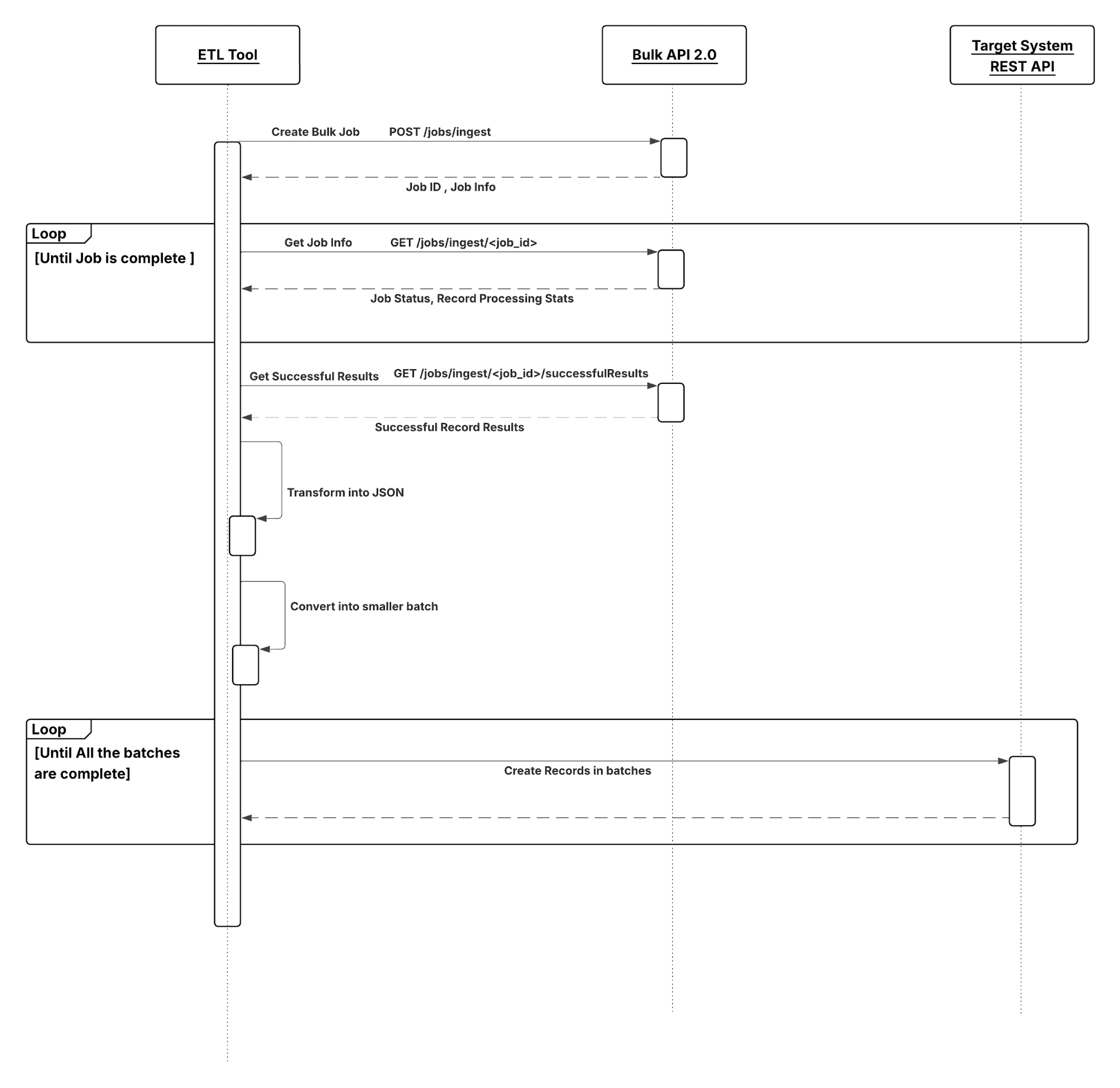
In this scenario:
- The browser performs an AJAX call that in turn performs an action on the corresponding external object adapter.
- The adapter translates the action into an OData request and makes an HTTP GET request to the remote system via the Integration and Services layers.
- The remote system returns a JSON response to Salesforce via the Integration and Services layers.
- The response is translated from OData into an external object and presented back to the browser.
Results
The application of the solutions related to this pattern allows for user-interface initiated invocations in which the result of the transaction can be displayed to the end user.
Calling Mechanisms
The calling mechanism depends on the solution chosen to implement this pattern.
| Calling Mechanism | Description |
|---|---|
| External Objects | Salesforce Connect maps Salesforce external objects to data tables in external systems. Instead of copying the data into your org, Salesforce Connect accesses the data on demand and in real time. Even though the data is stored outside your org, Salesforce Connect provides seamless integration with the Salesforce Platform. External objects are available to Salesforce tools, such as global search, lookup relationships, record feeds, and the Salesforce mobile app. External objects are also available to Apex, SOSL, SOQL queries, Salesforce APIs, and deployment via the Metadata API, change sets, and packages. |
| Lightning Components | Used when the remote process is triggered as part of an end-to-end process involving the user interface, and the result must be displayed or updated in a Salesforce record. For example, a process that submits credit card payments to an external payment gateway and immediately returns payment results that are displayed to the user. Integration triggered from user interface events usually requires the creation of custom Lightning components. |
Error Handling
It’s important to include error handling as part of the overall solution. When an error occurs (exceptions or error codes are returned to the caller), the caller manages the error handling. The Salesforce Connect Validator is a free tool to run some common queries and notice error types and failure causes.
Benefits
Some of the benefits of using a Salesforce Connect solution are:
- This solution doesn’t consume data storage in Salesforce.
- Users don’t have to worry about regularly synchronizing data between the external system and Salesforce.
- A declarative setup that can be achieved quickly with OData, or a cross-org adapter, or using minimal code with a custom Apex adapter.
- Users can access external data with much of the same functionality as custom objects in the form of external objects.
- Ability to do a federated search in the connected external system using global search.
- Ability to run reports that access external data from cloud and on-premises sources. Refer to reporting considerations below.
Salesforce Connect Considerations
The Salesforce Connect solution has the following considerations:
- External objects behave like custom objects, but some features aren’t available for external objects. For more information, see Salesforce Compatibility Considerations for Salesforce Connect.
- External objects can impact report performance. For more information, see Report Considerations for Salesforce Connect.
- For additional considerations for using Salesforce Connect adapters see Considerations for Salesforce Connect—All Adapters.
- If you’re considering using a cross-org adapter, see Considerations for Salesforce Connect—Cross-Org Adapter.
- If you’re considering using an OData adapter, see Considerations for Salesforce Connect—OData 2.0 and 4.0 Adapters.
- If you’re considering using a custom Apex adapter, see Considerations for Salesforce Connect—Custom Adapter.
Security Considerations
Solutions for this pattern should adhere to standard Salesforce org-level security. It’s recommended you use the HTTPS protocol to connect to any remote system. For more details, see Security Considerations
If you’re using an OData connector, make sure that you understand the special behaviors, limitations, and recommendations for Cross-Site Request Forgery (CSRF) on OData external data sources. For more information, see CSRF Considerations for Salesforce Connect — OData 2.0 and 4.0 Adapters.
Sidebars
None.
Timeliness
Timeliness is of significant importance in this pattern. Keep the following points in mind:
- The request is typically invoked from the user interface, so the process must not keep the user waiting.
- Depending on the availability of and the connection to the external system, it can take a long time to retrieve external data. Salesforce has a configurable 120-second maximum timeout value to wait for a response from the external system.
- Completion of the remote process should execute in a timely manner and complete within the Salesforce timeout limit and within user expectations.
Data Volumes
This pattern is used primarily for small volume, real-time activities, due to the small timeout values and maximum size of the request or response for the Apex call solution. Don’t use this pattern in batch processing activities in which the data payload is contained in the message.
Endpoint Capability and Standards Support
The capability and standard support for the endpoint depends on the solution that you choose.
| Solution | Endpoint Considerations |
|---|---|
| Salesforce Connect | OData APIs — Use the Open Data Protocol to access data that’s stored outside Salesforce. The external data must be exposed via OData producers. Other APIs — Use the Apex Connector Framework to develop your own custom adapter when the other available adapters aren’t suitable for your needs. A custom adapter can obtain data from any source. For example, some data can be retrieved from the internet via callouts, while other data can be manipulated or even generated programmatically. Connect to Salesforce — Uses the Salesforce Platform REST API to access data that’s stored in other Salesforce orgs. Connect via Middleware — The Salesforce Connect partner ecosystem has worked closely with Salesforce to make sure that their middleware gateways expose OData endpoints from their service so Salesforce can connect with them without writing additional code. |
| Request & Reply | Apex SOAP Callouts - The endpoint must be able to receive a web service call via HTTP. Apex HTTP Callouts - The endpoint must be able to receive HTTP calls. You can use Apex HTTP callouts to call RESTful services using the standard GET, POST, PUT, and DELETE methods |
State Management
When integrating systems, keys are important for on-going state tracking. For example, if a record gets created in the remote system, typically the record needs some sort of identifying key to support ongoing updates. There are two options for storing keys.
- Salesforce stores the primary or unique surrogate key for the remote record.
- The remote system stores the Salesforce unique record ID or some other unique surrogate key. There are specific considerations for handling integration keys in this synchronous pattern.
| Master System | Description |
|---|---|
| Salesforce | The remote system stores either the Salesforce record ID or some other unique surrogate key from the record. |
| Remote System | The call to the remote process returns the unique key from the application, and Salesforce stores that key value in a unique record field. |
Complex Integrations
In certain cases, the solution prescribed by this pattern can require the implementation of a complex integration scenario. These scenarios are often solved using middleware.
- Aggregation of calls and their results across calls to multiple systems
- Transformation of both inbound and outbound messages
- Maintaining transactional integrity across calls to multiple systems
- Other process orchestration activities between Salesforce and the external system
Governing Limits
Different limits apply for different adapters. For more details, see General Limits for Salesforce Connect.
Middleware Capabilities
The following table highlights the desirable properties of a middleware system that participates in this pattern.
| Property | Mandatory | Desirable | Not Required |
|---|---|---|---|
| Event handling | X | ||
| Protocol conversion | X | ||
| Translation and transformation | X | ||
| Queuing and buffering | X | ||
| Synchronous transport protocols | X | ||
| Asynchronous transport protocols | X | ||
| Mediation routing | X | ||
| Process choreography and service orchestration | X | ||
| Transactionality (encryption, signing, reliable delivery, transaction management) | X | ||
| Routing | X | ||
| Extract, transform, and load | X | ||
| Long polling | X | ||
| gRPC support (for Pub/Sub API) | X |
External Object Relationships
External objects support standard lookup relationships, which use the 18-character Salesforce record ID to associate related records. However, data that’s stored outside your Salesforce org often doesn’t contain those record IDs. Therefore, two special types of lookup relationships are available for external objects: external lookups and indirect lookups.
This table summarizes the types of relationships that are available to external objects.
| Relationship | Allowed Child Objects | Allowed Parent Objects | Parent Field for Matching Records |
|---|---|---|---|
| Lookup | Standard, Custom, External | Standard, Custom | The 18-character Salesforce record ID |
| External lookup | Standard, Custom, External | External | The External ID standard field |
| Indirect lookup | External | Standard, Custom | Select a custom field with the External ID and Unique attributes |
High Data Volume Considerations for Salesforce Connect: OData 2.0 and 4.0 Adapters
If your org hits rate limits when accessing external objects, consider selecting the High Data Volume option on the associated external data sources. Doing so bypasses most rate limits, but some special behaviors and limitations apply. For more information, see High Data Volume Considerations for Salesforce Connect.
Client-Driven and Server-Driven Paging for Salesforce Connect: OData 2.0 and 4.0 Adapters
It’s common for Salesforce Connect queries of external data to have a large result set that’s broken into smaller batches or pages. You decide whether to have the paging behavior controlled by the external system (server-driven) or by the OData 2.0 or 4.0 adapter for Salesforce Connect (client-driven). The Server Driven Pagination field on the external data source specifies whether to use client-driven or server-driven paging. If you enable server-driven paging on an external data source, Salesforce ignores the requested page sizes, including the default queryMore() batch size of 500 rows. The pages returned by the external system determine the batches, but each page can’t exceed 2,000 rows. However, the limits for the OData adapters for Salesforce Connect still apply.
Example
A manufacturing company uses Salesforce to manage customer cases. The customer service agents want to access the real-time order information from the back-office ERP system to get a 360 view of the customer without having to learn and manually run reports in ERP.
Implementing the solution prescribed by this pattern, you should:
- Configure your external data source with an OData endpoint. Your remote application may include native support for OData. For other applications, major integration vendors such as Dell Boomi, Informatica, Jitterbit, MuleSoft, and Progress Software have partnered with Salesforce on Salesforce Connect to build adapters.
- Point Salesforce Connect at the OData endpoint, either directly, or through a middleware solution.
- Sync your external database tables with external objects in Salesforce. When a user accesses a page with data from these external objects, Salesforce Connect makes real-time callouts to your back-end applications.
Developer Documentation
- Salesforce Help: Give Integration Users API Only Access
- Pub/Sub API Overview
- SOAP API Developer Guide
- REST API Developer Guide
- Streaming API Developer Guide
- Bulk API 2.0 and Bulk API Developer Guide
- Apex Developer Guide
- SOQL and SOSL Reference
- Salesforce Developer Limits and Allocations Quick Reference
- Platform Events Developer Guide
- Salesforce Connect (Help & Training)
- Apex Developer Guide: Salesforce Connect
- Understanding Salesforce Connect
- Platform Events Message Durability
- Named Credentials Developer Guide
- Apex Developer Guide: Using Named Credentials
- Named Credentials (Help & Training)
- Understanding Named Credentials
- Private Connect (Help & Training)
- Understanding Private Connect
Trailhead
- Large Data Volumes
- Platform Events Basics
- Change Data Capture Basics
- Quick Start: Salesforce Connect
Salesforce is moving toward faster and event-driven architectures. Migrating away from legacy integration tools is now required to stay secure and scalable. Many older tools use outdated protocols like SOAP or long-polling (CometD), which can’t keep up with the Pub/Sub API’s efficient gRPC-based delivery or the automation power of Flow Builder. To prepare, start by auditing your existing integrations to find hardcoded dependencies. This is especially important as Salesforce begins retiring features like Salesforce-to-Salesforce (fully retired by Spring ‘27) and phasing out legacy authentication methods. When planning your migration, use a “Flow-first” approach for internal business logic and a “Pub/Sub-first” approach for external data streams. This will give you a flexible, decoupled architecture ready for the data demands of today’s AI-powered platform.
The login() call in the Salesforce SOAP API is being retired. It is already unavailable in API v65.0 and above. New Salesforce orgs will have login() disabled by default, and existing orgs will need the new “Use Any API Auth” permission to continue using it. The hard deadline is Summer ‘27, when Salesforce will fully retire login() across all API versions (31.0 through 64.0).
| Product | Status | Suggested Alternative | Migration Strategy |
|---|---|---|---|
| Outbound Messaging | Legacy (Supported) | Flow + Platform Events | Replace with Flow-triggered Platform Events for better retry logic and modern authentication. |
| Process Builder | End of Support | Flow Builder | Use the “Migrate to Flow” tool to convert existing processes; refactor complex logic for performance. |
| Salesforce-to-Salesforce | Retiring Spring ‘27 | Salesforce Connect or Pub/Sub API | Transition to Salesforce Change data capture, Salesforce Connect or Pub/Sub API with MuleSoft |
| Streaming API | Legacy (Supported) | Pub/Sub API | Move to Pub/Sub API to leverage gRPC, which offers higher throughput and simplified subscription management. |
SOAP API login() | Legacy (Supported until June 2027) | OAuth 2.0 flows | Move to OAuth2.0 using External Client Apps. |
To be effective members of the enterprise portfolio, all applications must be created and integrated with relevant security mechanisms. Modern IT strategies employ a combination of on-premises and cloud-based services.
While integrating cloud-to-cloud services typically focuses on web services and associated authorization, connecting on-premises and cloud services often introduces increased complexity. This section describes security tools, techniques, and Salesforce-specific considerations.
Reverse Proxy Server
A reverse proxy is a server that sits in front of web servers and forwards client (e.g. web browser) requests to those web servers. Reverse proxies are typically implemented to help increase security, performance, and reliability.
It’s a type of proxy server that retrieves resources on behalf of a client from one or more servers. These resources are then returned to the client as though they originated from the proxy server itself. Unlike a forward proxy, which is an intermediary for its associated clients to contact any server, a reverse proxy is an intermediary for its associated servers to be contacted by any client.
In Salesforce implementations, such a service is typically provided via an external gateway product. For example, open source options such as Apache HTTP, lighttpd, and nginx can be used. Commercial products include IBM WebSeal and Computer Associates SiteMinder. These products can be easily configured to proxy and manage all outbound Salesforce requests on behalf of the internal requester.
Encryption
Some enterprises require selected transactions or data fields to be encrypted between a combination of on-premises and cloud-based applications. If your organization must adhere to additional compliance requirements, you can implement alternatives, including:
- On-premises commercial encryption gateway services, including Salesforce’s own, CipherCloud, IBM DataPower, Computer Associates. For each solution, the encryption engine or gateway is invoked at the transaction boundary by sending and receiving an encrypted payload or when encrypting or decrypting specific data fields before the HTTP(S) request executes.
- Cloud-based options, such as Salesforce Shield Platform Encryption. Shield Platform Encryption gives your data a whole new layer of security while preserving critical platform functionality. The data you select is encrypted at rest using an advanced key derivation system. You can protect your data more securely than ever before. Refer to the Salesforce online help for more information.
Specialized WS-* Protocol Support
To address the requirements of security protocols (such as WS-*), we recommend these alternatives.
- Security/XML gateway—Inject WS-Security credentials (MuleSoft, IBM WebSeal or Datapower, Layer7, TIBCO, and so on) into the transaction stream itself. This approach requires no changes to application-level web services or web service invocations from Salesforce. You can also reuse this approach across the Salesforce installation. However, it requires additional design, configuration, testing, and maintenance to manage the appropriate WS-Security injection into the existing security gateway approach.
- Transport-level encryption—Encrypt the communication channel using two-way SSL and IP restrictions. While this approach doesn’t directly implement the WS-* protocol by itself, it secures the communication channel between the on-premises applications and Salesforce without passing a username and password. It also doesn’t require changes to Salesforce-generated classes. However, some on-premises web services modifications might be required (at either the application itself or at the middleware/ESB layer).
- Salesforce custom development—Add WS-Security headers to the outbound SOAP request via the WSDL2Apex utility. This generates a Java-like Apex class from the WSDL file used to invoke the internal service. While this approach requires no changes to back-end web services or additional components in the DMZ, it does require:
- an increased build and test effort
- a relatively complex and manual process to hand-code the WS-Security attributes (including XML serialization within the Apex code)
- a higher long-term maintenance effort
Note: The last option isn’t recommended due to its complexity and the risk that such integrations need periodic reviews based on regular updates to Salesforce.
Other Security Considerations
- Named Credentials: Salesforce has revamped its authentication architecture by introducing a two-tier Named Credentials model that cleanly separates concerns between connectivity and identity. Use this whenever making callouts through Apex and avoid creating your own authentication protocol. This also ensures extensibility, and more security. External Credentials sit at the foundation of this model. They store the actual authentication details and support a rich set of protocols including OAuth 2.0 Client Credentials, JWT Bearer, and AWS Signature V4, while also defining how principals are mapped: either as a single Named Principal (shared across all users) or as Per-User Principals (where each user authenticates with their own identity). Named Credentials, in turn, act as the endpoint layer — they define the callout URL and reference an External Credential to handle the auth handshake, keeping endpoint configuration cleanly decoupled from credential management. To enable per-user authentication flows, administrators map Permission Sets to the appropriate External Credential principal, ensuring that only users with the right Permission Set assignment can invoke callouts under their own identity. This two-tier design not only simplifies secure callout configuration but also gives architects far greater flexibility and governance control over how integrations authenticate across Salesforce-connected systems. For more details, see the Named Credentials documentation.
- OAuth 2.0: OAuth 2.0 is an industry-standard authorization framework that allows a user to grant limited access to their protected resources to a third-party application without sharing their credentials (like passwords). Instead of a direct password exchange, the user approves an access token request, which the application then uses to access the user’s data from a resource server. This process separates the client application from the user’s identity and password, enhancing security by providing a temporary, scope-specific “key” for accessing resources. For more information, see the OAuth 2.0 documentation. For endpoints with strict OAuth 2.1 compliance, a third tier of the architecture is available (External Auth Identity Provider) to manage the interaction with the IDP in a 2.1-compliant manner.
- Private Connect: When you integrate your Salesforce org with applications hosted on third-party cloud services, it’s essential to be able to send and receive HTTP/s traffic securely. With Private Connect, increase security on your Amazon Web Services (AWS) integrations by setting up a fully managed network connection between your Salesforce org and your AWS Virtual Private Cloud (VPC). Then, route your cross-cloud traffic through the connection instead of over the public internet to reduce exposure to outsider security threats. Private Connect is available in partnership with AWS via a feature called AWS PrivateLink. Private Connect is bi-directional: you can initiate both inbound and outbound traffic. With inbound connections, you can send traffic into Salesforce using the standard APIs. And with outbound connections, you can send traffic out of Salesforce via features like Apex callouts, External Services, and External Objects. For more information, see the Private Connect documentation.
The Salesforce Event Bus with Platform Events, Change Data Capture (CDC), and Pub/Sub API enables enterprises to create event driven style architectures (EDAs).
An EDA decouples event message consumers (subscribers) from event message producers (publishers), allowing for greater scale and flexibility. Specific patterns are covered in this document as part of the existing pattern structure that compare and contrast related alternatives or options. However, getting a holistic understanding of the event driven architecture, and how patterns interplay, can help you select the right pattern for your needs.
Khalid Mohammed is a distinguished Architect leader within Salesforce’s Professional Services. Since joining Salesforce in 2015, he has leveraged his extensive expertise in Enterprise Application and Architecture, honed through numerous customer transformations before his tenure at Salesforce. Khalid heads the Delivery Architecture Board and is also acknowledged as a Certified Technical Architect leader.
Gulal Kumar is a Software Engineering Architect at Salesforce, with a focus on data and integration architecture. With over 21 years of experience in integration and APIs, modernization programs, security, and AIML initiatives, he brings a wealth of expertise. Gulal has been committed to advancing business transformation initiatives, enhancing security and resiliency, promoting architecture excellence, and leading AIML initiatives across various domains.
Sushant Verma is a Technical Architect at Salesforce, specialising in solution architecture and end-to-end delivery of Salesforce platforms. With deep expertise in platform governance, application development, integration, and DevOps, he has led numerous customer transformation programs across industries. Sushant is committed to driving delivery excellence and scalable architectural outcomes.