In large-scale Salesforce Field Service (SFS) environments, managing external contractor networks requires a delicate balance between platform security and scheduling performance. This guide compares two primary architectural patterns: the traditional territory-based pattern and the new account-based sharing pattern for governing external contractors’ access and management. In this paper, we review both in depth to help organizations choose the foundational structure that best supports their operational goals, and to understand the trade-offs of each option.
This pattern choice affects scheduling efficiency, resource utilization, and dispatcher productivity. By selecting the right approach, companies ensure a seamless experience for both internal staff and external partners while maintaining the long-term scalability of their solution.
Beyond immediate operational gains, this foundational choice determines an organization’s readiness for autonomous service. The account-based sharing pattern provides the unified data visibility required for Agentforce, and specifically the Scheduling Agent for Field Service, to perform holistic evaluation without being restricted by artificial data silos. Account-based sharing also enables Data Cloud to aggregate contractor performance metrics more effectively, allowing for seamless competitive benchmarking while maintaining the rigorous data isolation required in multi-vendor environments.
- Select your pattern based on competitive overlap. If external contractors compete with internal or other external resources on shared territories, account-based sharing is likely the architecturally correct choice. Territory-based sharing is appropriate only when contractors receive exclusive, non-overlapping service areas/jobs.
- Avoid territory sprawl. Creating dedicated contractor territories to achieve data isolation when not necessary introduces hierarchy bloat that degrades scheduling efficiency and performance, and significantly increases administrative overhead at scale. Account-based sharing eliminates this problem pattern.
- Build the foundation for AI-driven scheduling. The Scheduling Agent for Field Service and the Optimization engine will have better performance when they have full resource-pool visibility. Territory-based sharing siloed structure prevents this; Account-based sharing is the desired architectural foundation.
Over the past decade, contractor networks in field service have evolved from ad hoc extensions of internal teams to strategic, deliberately structured ecosystems across industries including telecommunications, utilities, home services and more. Many field operations now rely on contractors alongside full-time employees, requiring clear rules for access, visibility, and dispatch control.
As organizations scale on Salesforce Field Service, the way they design and manage these external resources—whether through territory-style pattern, account-centric sharing, or hybrids—directly shapes how securely and efficiently they can schedule work across a blended workforce.
This guide is intended for technical and strategic stakeholders responsible for the design, performance, and scalability of Salesforce Field Service implementations:
- Solution and Technical Architects: To evaluate the impact of different sharing patterns on scheduling and optimization efficiency.
- Field Service Operations Leaders: To understand the trade-offs between different contractor personas, such as Named Contractors, Contractor Companies, and Occasional Workers.
- Salesforce Administrators: To gain insight into how Service Territories and platform sharing tables are used to manage complex security requirements.
The contractor persona in scope directly determines the appropriate sharing architecture. Each category carries distinct implications for how record-level access is structured, how the Optimizer perceives resource availability, and how the solution scales:
- Named Contractor: An individual external resource who is treated similarly to an internal employee. A named contractor requires a dedicated user license. The sharing model mirrors internal technician access patterns, making this the lowest-complexity contractor persona to support.
- Contractor Company: A third-party entity that manages its own workforce. In SFS, contractor companies are represented as Capacity-Based Resources, where the parent organization schedules and assigns work to the company rather than a specific individual.
- Occasional Worker: A user who temporarily operates across multiple territories. The most architecturally complex persona. Transient, multi-territory relationships mean that territory-based sharing boundaries break down, so visibility is managed dynamically at the record level rather than through static geographic assignment.
These patterns are complex because the parent organization and the goals of the contractor are often technically at odds.
-
Divergent Goals: The parent organization primarily focuses on customer satisfaction and contractual work/agreement (for example, resource preferences, servicing quickly and timely, and managing how work and hours are distributed across contractors). Contractors, by contrast, typically focus on maximizing assigned work while minimizing travel time and operational cost.
-
Competition: Unlike internal employees, different contractor companies are often direct competitors. While the parent organization needs a holistic view of the region (transparency), the contractors require strict isolation from each other’s operations (isolation).
-
Brand Integrity: To the end customer, the worker represents your brand, which often requires the parent company to see real-time status updates. However, contractors often guard their internal operations in a closed system, or “black box.”
-
Visibility and Security: While a shared service territory typically implies universal visibility of all assigned resources, multi-contractor environments require a more nuanced security pattern. To maintain competitive integrity and data privacy, it’s essential to prevent contractors from accessing each other’s proprietary names, schedules, or resource information.
| Role | Requirement |
|---|---|
| The Organization | Requires visibility into all technicians, both external (including contractors) and internal, and wants the scheduling and optimization engine to consider them together for full regional optimization. |
| The Contractors | Operate as a closed system, or “black box” to protect proprietary operations and require strict isolation toward competitors operating in the same region, or toward the internal technicians of the organizations. |
| The Challenge | Designing a system that provides both efficiency and transparency for the organization while maintaining required visibility and access for partners. |
Contractor design within Salesforce Field Service spans three distinct operating models, each affecting resource visibility, dispatch ownership, and licensing:
- External Capacity Allocation
- Partner Self-Scheduling
- Internal-Led Dispatch
External Capacity Allocation (Off-Platform Capacity): The contractor manages their workforce externally and provides a defined capacity (for example, 10 available hours) rather than individual technician schedules. This capacity is treated as a bucket of hours or work items for scheduling purposes.
Partner Self-Scheduling: Contractor managers log into Salesforce via an Experience Site to schedule their own teams. They require strict isolation from other partners.
Internal-Led Dispatch: Internal dispatchers schedule contractor technicians directly. Contractors use the Field Service Mobile App for execution.
A full SFS license is required for the internal dispatcher. Contractor technicians in this model only require a Field Service Mobile license (or Community license with mobile access).
| Dimension | External Capacity Allocation | Partner Self-Scheduling | Internal-Led Dispatch |
|---|---|---|---|
| Resource Visibility | Capacity Only | Partner-Owned | Full Internal |
| Who Dispatches | Contractor (External) | Contractor (In Salesforce) | Internal Dispatcher |
| Salesforce Licenses | Minimal | Experience Cloud | Full SFS (Dispatcher); Community (Contractor Technician) |
| Pattern Name | Description |
|---|---|
| Territory-Based Sharing | Contractors are assigned to dedicated, isolated service territories. Record visibility is governed by territory membership. Each contractor company or group operates within a hard geographic boundary. |
| Account-Based Sharing | Contractors operate within the standard geographic territory structure alongside internal/other external resources. Record-level visibility is governed by sharing rules, enabling a unified resource pool. |
In this pattern, the Service Territory serves as the primary security boundary. Each Contractor Company is assigned to its own unique “Child” territory.
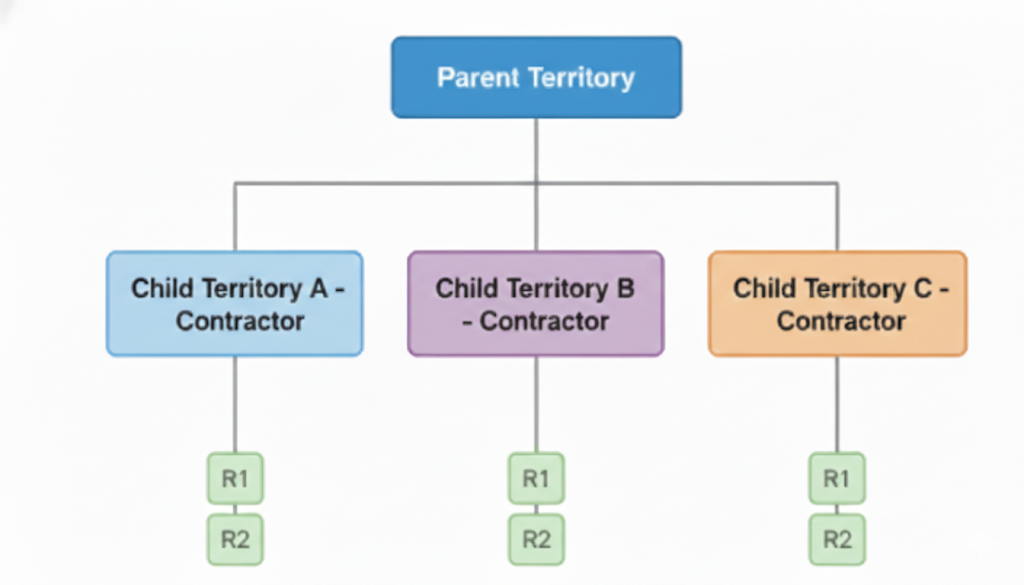
- Small-scale partner networks
- Partners with strictly non-overlapping geographical regions
- Situations where contractor work is fundamentally different from internal resource work, eliminating competition (for example, external contractors handle only “Type A installations”, while internal resources handle all other work types)
- Simplified configuration: Uses standard User Territory setup and automation.
- Clear data bucketing: Makes sure of easy data visibility and simplified security management through standard Service Territory objects.
- Optimization Efficiency: The engine cannot evaluate resources across territory boundaries, preventing optimal scheduling and efficient routing.
- Territory Sprawl: Creating a larger number of territories for a very low number of resources leads to scheduling overhead.
- Gantt Performance: Large hierarchies (1K+ territories) can cause significant performance bottlenecks as well as risks of hitting platform limits.
This guide introduces a new solution approach: Account-based sharing (implemented via Salesforce’s native criteria-based sharing rules, the same platform mechanism used to grant record access based on field values). Account-based sharing decouples visibility from geography. Territories remain large and continuous, while visibility is managed through the platform’s sharing tables based on an account relationship. In practical terms, criteria-based sharing rules evaluate a field on the record (such as ServiceResource.Company) and automatically share that record with the appropriate group. Criteria-based sharing is the engine that makes Account-based sharing work without custom code at the record level.
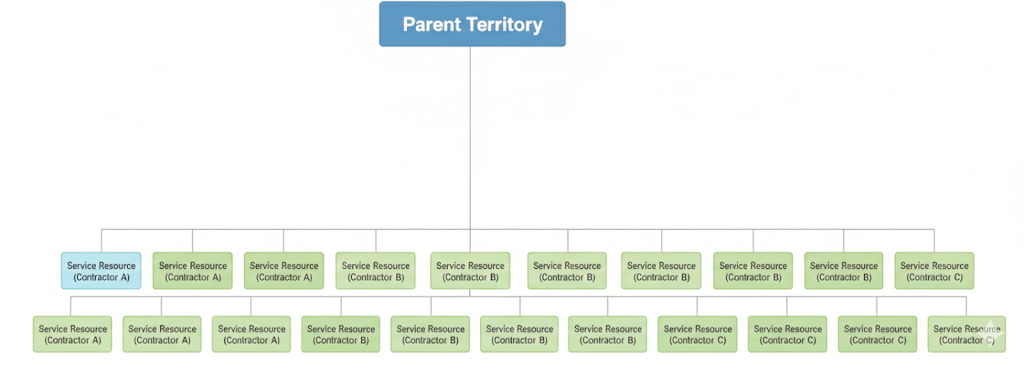
- Large-scale ecosystems where a significant proportion of the workforce consists of external resources
- Urban areas where multiple contractors cover the same zip codes
- Scenarios where both internal and external resources are capable of executing the same work (for example, “Type A installations”), but business rules dictate a specific logic for resource selection (for example, internal resource preference in certain scenarios)
- Maximum utilization and ROI: The engine evaluates the entire regional pool, finding the “best” resource for every job
- Scalability: Supports a large number of contractors/external resources without increasing territory counts
- Consolidated Management: Internal staff manage one view rather than hundreds of siloed folders (child territories)
- Development Effort: Requires custom automation (Flow or Apex) to manage the Sharing tables
- Membership Sharing: Requires explicit sharing of Service Territory Member (STM) records
The Scalability Impact
Organizations managing a large pool of contractor partners without a unified regional pool often face coverage gaps, where the closest technician is invisible to the scheduling logic because each partner is managed in a geographical and administrative silo. By moving to a unified pool (account-based sharing), organizations can reduce travel by more than 20% through holistic scheduling and accelerate time-to-serve by identifying the closest available technician across the entire resource pool.
For external workforce (External Capacity Allocation dimension), architects can use Capacity-Based Resources to represent the “summary” of a contractor’s workforce.
- Capacity: Use this when the contractor manages their own dispatching and routing. Your primary focus is on the total volume of work they can fulfill rather than the specific person performing it.
- Individual: Use this when you need granular visibility into a technician’s day. Individual-based resources allow you to manage their exact location, real-time availability, and specific job assignments as if they were internal staff.
Before designing your Field Service contractor pattern, use this decision tree to determine the appropriate sharing architecture.
Contractor Sharing Pattern Selection Decision Tree
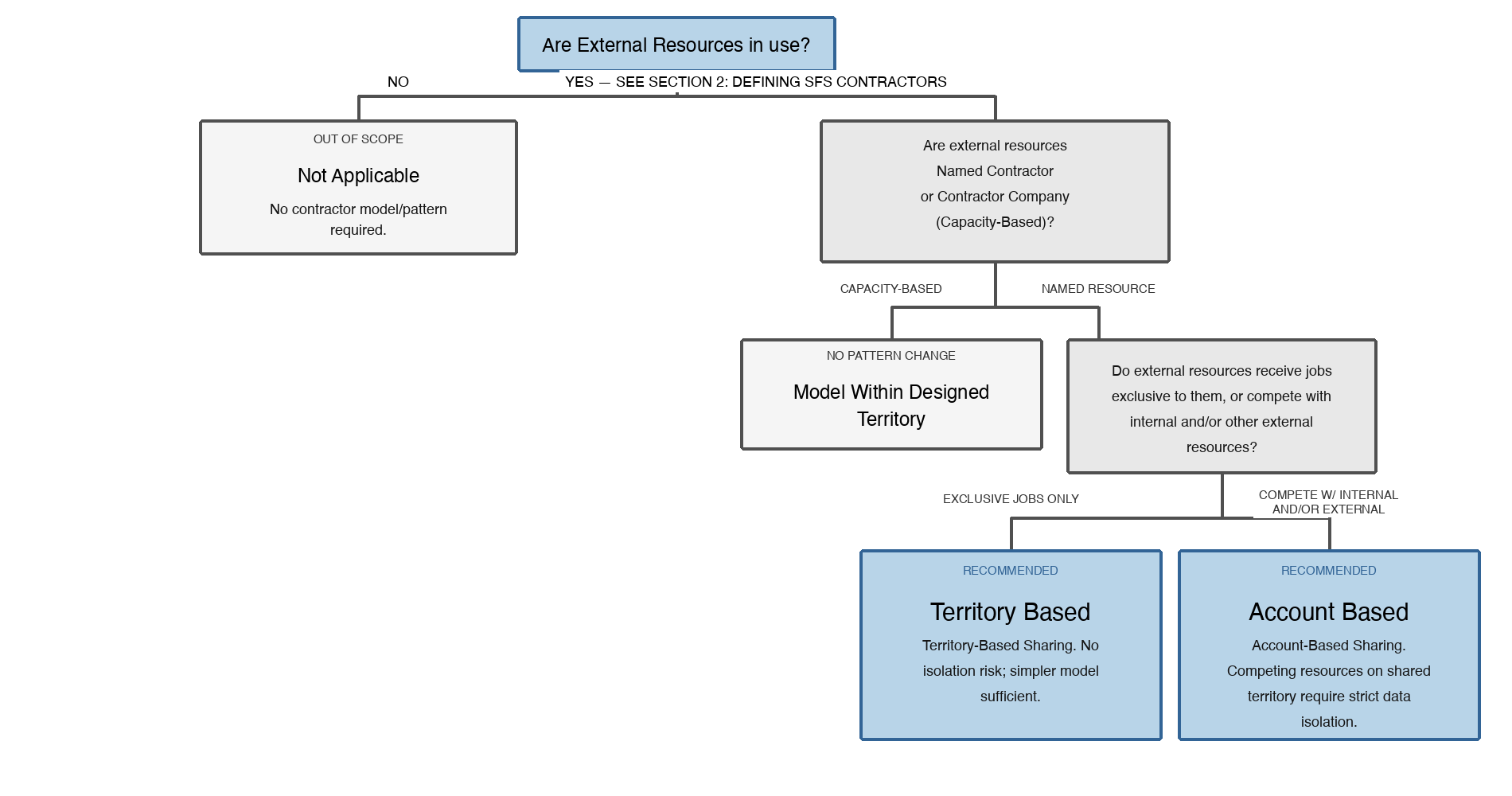
Decision tree for selecting a contractor sharing pattern in Salesforce Field Service. Starting from whether external resources are in use, the tree branches through resource type and job exclusivity to recommend either territory-based sharing or account-based sharing.
| Territory-Based Sharing | Account-Based Sharing |
|---|---|
| External resources with exclusive, non-competing job assignments | Named external resources competing with internal or other external resources |
| No overlap with other external partners in the same geographical area | Multiple partners operating within the same geographical area |
| Lower complexity; faster to implement and maintain | Higher complexity; additional steps required to implement and maintain record-level visibility |
The core of this pattern is an automation layer that converts the ServiceResource.AccountId or ServiceResource.Company (Contractor Company) relationship into platform sharing records.
To verify proper access for the dispatcher and the service resource in an Experience Site, access needs to be controlled via:
- Service Resource Sharing Rule: Grants access based on a criteria (account/company)
- Service Territory Sharing Rule: Grants access based on a criteria (territory name/ID)
When using account-based sharing, be sure to account for the Field Service Mobile experience and record visibility for assigned technicians.
- Assigned Resource Sharing: Standard SFS functionality automatically grants an assigned resource access to the Service Appointment and its parent Work Order. This setup gives the technician the necessary information to execute the job without requiring additional custom sharing rules for assigned work.
- Visibility Risks: While assigned work is handled natively, be cautious about unassigned or future appointments that lack an Account or Territory association. If Organization-Wide Defaults (OWDs) aren’t strictly managed, or if sharing sets are too broad, unassigned appointments could be visible to all users in a consolidated territory.
- Account-Territory Association: Make sure that all service appointments are explicitly linked to an account and territory. This linking allows clean filtering within the mobile app and verifies that data leakage does not occur for unassigned work sitting in the regional pool.
- Requirement: 10 different contractors provide fiber installation in London.
- Context: In the territory-based sharing approach, London would be split into 10 overlapping territories. Dispatchers would struggle to see nearby availability, leading to high travel times.
- Recommendation: Account-based sharing. Implement a unified “Greater London” service territory utilizing account-based sharing to maintain granular data security. Account-based sharing keeps Contractor A’s management siloed to their respective resources, while the SFS Optimizer maintains cross-functional visibility of all internal and external technicians. This complete scheduling approach facilitates a more efficient routing logic that can reduce travel by more than 20% through complete scheduling (directional estimate based on field observations across SFS customer deployments), creating immediate improvements in resource utilization and enhanced service responsiveness.
- Requirement: A vendor provides up to 40 “slots” for boiler repairs daily but manages their own technician dispatching.
- Context: Managing 40 individual resource records adds unnecessary overhead.
- Recommendation: Capacity-based resource linked to the vendor account. One resource record represents the vendor’s total daily capacity, keeping the Gantt clean and avoiding the need to manage individual contractor technician records.
- Requirement: A utility company onboards 50 small local contractors during storm season to handle surge repairs.
- Context: Creating and deleting 50 territories every season is a major administrative burden, and it negatively impacts the flexibility of the scheduling and optimization engine.
- Recommendation: Account-based sharing. Create a permanent “Overflow” Geographical Territory. When a contractor is onboarded, simply create their account and link their resources to it. The automation layer handles visibility instantly without requiring a territory hierarchy redesign.
- Requirement: For high-priority gas leaks, the closest technician must be dispatched regardless of which contractor they work for.
- Context: Territory-based sharing creates coverage gaps where the closest tech might be in a different territory, and therefore unreachable to the scheduling logic.
- Recommendation: Account-based sharing. By consolidating vendors into a single large territory, the engine performs a complete search based on travel across the entire multi-vendor pool, reducing response times for critical safety incidents.
- Requirement: A specialized HVAC partner has a 10-year exclusive legal right to service a remote area or rural county.
- Context: There are no other contractors operating in this geography, and the partner manages their own scheduling and dispatching entirely.
- Recommendation: Territory-based sharing. In this scenario, a dedicated Service Territory is the most efficient choice. Since there is no geographical overlap with other partners, the isolation provided by the territory boundary matches the legal and operational requirements perfectly without further sharing automation.
Account-based sharing separates visibility from geography by tying record-level access to a common account/company identifier shared between the dispatcher user and their Service Resource records. The platform’s native criteria-based sharing engine evaluates this field and automatically grants or revokes access without changing the territory hierarchy.
The three architectural components required are:
- A common identifier field on both User and Service Resource objects linking them to their contractor account.
- Public Groups aggregating all Dispatcher users per contractor company, so sharing rules apply uniformly.
- Criteria-based sharing rules that evaluate the identifier and grant the appropriate Public Group access to relevant records.
Rather than using territories as boundaries, use Public Groups to aggregate dispatchers who require the same visibility. Dispatchers see specific Territories, Work Orders, and Service Appointments via membership in territory-based Public Groups.
- Group Creation: Create a Public Group for each contractor company.
- Member Assignment: Add the relevant Partner Community Users (dispatchers) to their respective contractor Public Group.
Leverage criteria-based sharing rules to grant the Public Group’s access to specific records.
- Service Resource Sharing Criteria: Service resource sharing rules enforce per-contractor technician visibility by matching the company/account identifier on the Service Resource record to the corresponding contractor Public Group.
- Access level permits read/write to allow dispatchers to schedule and update assignments.
- Service Territory Sharing Criteria: Use the service territory sharing criteria to set up the logic for territory restricted access. Grant dispatchers access the broad geographical territories where they are authorized to work. Example:
- Criteria: ServiceTerritory.Name EQUALS “Atlanta”.
- Shared With: Relevant Contractor Public Groups (for example, Contractor A, Contractor B, Contractor C).
- Access Level: Read/Write
For detailed implementation guidance, refer to the official Salesforce documentation:
When correctly implemented, account-based sharing delivers:
- Unified Visibility: Dispatchers see all relevant resources across the full territory without manual territory reassignment.
- Dynamic Access: As contractor assignments change, sharing rules automatically adjust visibility without administrator intervention.
- Competitive Isolation: Each contractor only sees their own resources, maintaining data privacy.
- Scalable Architecture: New contractors can be onboarded by simply creating an account and public group, with sharing rules handling the rest automatically.
| KPI Category | Metric | Targeted Impact (Account-Based Sharing) |
|---|---|---|
| Operational Efficiency | Travel Time Reduction | By moving to a unified pool (account-based sharing), organizations reduce travel by more than 20% through complete scheduling (directional estimate based on field observations across SFS customer deployments) and accelerate time-to-serve by identifying the closest available technician across the entire resource pool. |
| Resource Productivity | Technician Utilization Rate | Better productivity by optimizing the true best resource and reducing travel |
| Customer Experience | Response Time / SLA Adherence | 25%+ improvement in response time (directional estimate based on field observations across SFS customer deployments) |
As field service organizations shift from reactive to proactive models, their choice of architectural pattern sets the “innovation ceiling” for long-term operational agility.
- Enabling AI and Machine Learning: Account-based sharing verifies the engine has visibility into the entire resource pool to find the best match rather than being restricted by data silos. Because it avoids inefficient territory silos, the Scheduling Agent for Field Service (AI-powered scheduling assistant within Salesforce) provides more logical travel patterns and technician assignments without being limited by isolated micro-territories. This approach maximizes full optimization, directly improving travel KPIs and technician readiness. Account-based sharing supports AI-driven scheduling by giving the engine visibility into the entire resource pool, allowing for “true best” matching rather than being restricted by artificial data silos.
- Architectural Scalability: Territory-based sharing often encounters a “performance wall” due to its reliance on isolated territories. As the contractor network grows, the scheduling engine’s effectiveness is neutralized by artificial boundaries that prevent it from reaching available capacity in adjacent territories. Furthermore, where territory-based sharing requires a new territory and manual adjustments for every partner, account-based sharing simplifies growth. Organizations onboard hundreds of contractor partners by simply creating an Account and associated Service Resource records, leaving the core geographic territory structure untouched and performant.
| Decision Driver | Territory-Based Isolation | Account-Based Sharing (Proposed) |
|---|---|---|
| Scheduling and Optimization Efficiency | Low (siloed resources) | High (aggregated pool) |
| Operational Performance | Low (siloed territories and resources covering the same geographical area) | High (maximizing utilization, travel time minimization, accelerating responsiveness/time-to-serve) |
| Territory Scalability | Poor (risk of “hierarchy sprawl”) | Excellent (static geography) |
| Complexity of Setup | Low (declarative/OOTB) | Medium (Flow/Apex required) |
| Partner Data Security | High (hard boundaries) | High (platform sharing rules) |
| Internal Management | High (dispatcher manually toggles between views) | Low (consolidated regional view) |
This guide has focused primarily on net-new implementations. However, many organizations are already running Territory-based sharing at scale and carry significant territory hierarchy debt. Migrating from territory-based sharing to account-based sharing in a live production environment introduces distinct architectural risks to assess before any transition work begins. This section addresses the three critical dimensions of an existing-system migration: evaluating the current state, determining transition strategy, and managing migration risks.
- Assessing Territory Sprawl: Before any migration planning, quantify the current territory hierarchy. The key diagnostic questions are: How many territories exist solely to enforce contractor isolation versus genuine geographic boundaries? What is the ratio of contractor-specific child territories to operational parent territories? Are any territories shared between internal and external resources, or have they been fully siloed? This audit distinguishes true geographic structure from accumulated isolation debt. Territories created exclusively for partner visibility control are strong candidates for elimination under account-based sharing. Territories that encode genuine operational geography (scheduling zones, SLA regions, regulatory boundaries) are preserved and aren’t conflated with access control.
- Hybrid Transition Viability: For organizations at scale, a full cutover from territory-based sharing to account-based sharing is rarely advisable; instead, a hybrid transition reduces risk by onboarding new contractors under account-based sharing while maintaining legacy territory-based sharing cohorts until their next renewal window. The hybrid approach is architecturally viable provided the account-based sharing automation is strictly scoped to the account/company identifier, allowing resources without that ID to remain on territory-based access without disruption. Treat the hybrid state as a temporary architecture—not a permanent operating model.
- Key Migration Risks: Existing-system migrations introduce three critical architectural risks that require proactive mitigation. First, sharing table rebuilds triggered by new criteria-based rules are resource-intensive; schedule cutovers during low-activity windows to prevent dispatcher visibility gaps caused by long-running recalculations. Second, in-flight work orders risk visibility loss during the transition; maintain parallel territory memberships or pre-populate sharing for active records until they are closed. Finally, tune optimization and scheduling policies as removing child territories shifts the resource pool. Test, take baseline runs, and capture metrics to confirm geographic boundaries remain effective and that efficiency gains are actually realized.
Given the scalability and optimization ROI, we recommend the account-based sharing approach for high-growth Field Service organizations that manage multiple competing contractors in overlapping geographic regions. While territory-based sharing offers a simpler, declarative setup, account-based sharing allows organizations to unlock the full potential of the Scheduling and Optimization engine. By decoupling visibility from geography, organizations can maintain a territory setup that scales with the business and delivers these outcomes:
- Operational Efficiency: Aggregating resources into a single pool allows the engine to find the true “best” technician for every job, reducing travel time and operational costs.
- Enhanced Service Levels: Comprehensive scheduling reduces service delays by identifying which contracted resource is most available/closest, accelerating time-to-serve and directly improving customer satisfaction.
- Dispatcher Productivity: Internal staff can manage a consolidated regional view rather than toggling between siloed “child” territories.
Territory-based sharing is best suited for highly siloed contractor operations with strictly non-overlapping geographic territories/areas.
Choosing an architectural pattern is the first step. Successful execution requires continuous alignment with Salesforce best practices and the platform capabilities.
Next Steps:
- Audit Your Landscape: Review your current territory hierarchy and external resource utilization. Identify any “contractor territories” created solely for partner isolation — if your hierarchy is cluttered with such silos, evaluate the benefits and effort of migrating to account-based sharing.
- Sandbox Validation: Prototype the account-based sharing pattern in a full or partial sandbox and test visibility end-to-end from all angles:
- Internal Users (admins, dispatchers, and internal technicians): Confirm appropriate access. Some internal users should have access across the board.
- The Contractor Manager User: Verify visibility is scoped strictly to their own workforce.
- Contractor’s technicians (the external resources): Confirm access is properly restricted to their assigned work only.
- Rigorous testing of organizational visibility is essential to prevent data leakage between competing partners.
- Performance Benchmarking and ROI evaluation: Leverage Optimization Hub and Field Service Intelligence Dashboards to get insights into travel time reduction, resource utilization, and response time improvements, providing the data needed to justify the architectural shift to stakeholders. This before-and-after analysis can also be repeated in production once the transition is underway.
- Pilot Phase: Once sandbox testing is complete, launch a phased pilot in one or two territories where internal and external resources geographically overlap, ideally, mirroring those tested in the sandbox. Validate sharing logic with a small, controlled user group before broader rollout is recommended before full deployment.
- Scalability of the Solution: Confirm that any custom automation (Flow or Apex) required to manage Sharing Tables and Service Territory Member (STM) records is engineered for long-term sustainability. The solution should utilize modular design patterns (for example, Trigger Frameworks) and ensure the logic is built to handle high-volume resource assignments seamlessly within platform governor limits.
All patterns in this guide require validation in a sandbox environment before production deployment. Implementation behavior may vary based on org configuration, data volume, and business rules.
Platform Documentation (Salesforce Official):
- Field Service Developer Guide: Core reference for Field Service data objects, APIs, and customization
- ServiceResource Object Reference: API documentation for the SR object
- ServiceTerritoryMember Object Reference: API documentation for the STM object
- Criteria-Based Sharing Rules: Official security guide for implementing the sharing rules underpinning account-based sharing
- Apex Triggers Developer Guide: Reference for the custom automation layer required by account-based sharing
- Apex Trigger Best Practices: Salesforce recommended patterns for scalable trigger development
Salesforce Help Articles
- Guidelines for Setting Up Field Service Contractors: Guidance for configuring contractor resources on the Salesforce Field Service
- Define Capacity-Based Resources: Official documentation for setting up capacity-based resources referenced in the article
- How Does the Field Service Optimization Engine Work? Field Service Optimization reference. Guidance for optimization runs, also relevant to account-based sharing advantages and ROI referenced in the article.
- Set Up Optimization Hub: Configuration guide for Optimization Hub referenced in the Next Steps section
- Experience Cloud Overview: Partner Community setup for account-based sharing (On-Platform Management)
Salesforce Trailhead/Learning
- Field Service Basics: Foundational module covering territories, resources, and operating hours
- Field Service Scheduling: Scheduling concepts that underpin the optimization discussion in this guide
- Field Service Optimization: Deep dive into optimization setup and scheduling policies
- Salesforce Security and Who Sees What: Sharing rules and data security fundamentals
- Customize Your Experience Cloud Site: Trailhead trail covering the Experience Cloud site setup behind a partner portal like the one referenced in the article
Industry and Strategic Context
- Salesforce State of Service Report, 7th Edition: The most recent edition, surveying 6,500 service professionals worldwide, with dedicated insights on Field Service, AI adoption, and technician productivity trends directly relevant to the ROI arguments in this paper.
- Agentforce for Field Service: Salesforce’s AI-powered field service platform, directly relevant to the AI and future-proofing discussion in Section 13. Account-based sharing unified resource pool is maximizing Agentforce’s scheduling intelligence.
- Gartner Market Guide for Field Service Management: The most current Gartner analysis of the FSM market landscape (Gartner subscription required).
Mor Epstein
Senior Success Architect, Salesforce Field Service
With an Industrial Engineering background from Georgia Tech and an MBA, Mor is a trusted advisor with a proven track record of unblocking and accelerating mission-critical Field Service implementations. Her global customer-facing experience, combined with hands-on, data-driven problem solving, positions her as a go-to resource for field service organizations worldwide. Mor excels at guiding customers through the Scheduling and Optimization journey, helping organizations unlock the full potential of intelligent scheduling to achieve measurable gains in efficiency and service delivery.
Lee Ephrati
Senior Success Architect, Salesforce Field Service
Lee is a highly experienced Technical Architect with over 10 years of Salesforce delivery and advisory experience, specializing in Field Service architectures and mobile solution design. Lee focuses on aligning complex organizational structures with the native SFS platform and mobile application to drive maximum operational ROI for global enterprises. With a customer-first mindset and comprehensive platform knowledge, Lee brings a consultative approach that consistently delivers lasting value for Salesforce customers worldwide.