Overview
Salesforce Data 360 transforms how enterprises connect, harmonize, and activate customer data at scale. Its true strength, however, lies in how securely that data is governed across its lifecycle. This security reference architecture provides a practical, end-to-end blueprint for protecting Data 360 environments. We achieve this through the core principles of least privilege, zero-trust design, and governance by default. At its foundation, security in Data 360 is a shared responsibility model. Salesforce secures the infrastructure, network, encryption services,the platform, compliance and application itself with global standards such as ISO 27001, SOC 2, and General Data Protection Regulation (GDPR). Salesforce administrators secure their org’s data within the platform by defining access, enforcing privacy, and managing integrations. This includes implementing strong identity and access management (IAM) that grants only necessary access, enforcing two-factor authentication (2FA), and adhering to the principle of least privilege and enterprise and regulatory mandates. Data 360 Governance connects these layers of responsibility, ensuring that security and compliance stay aligned. It ensures that roles, policies, permissions, and data handling rules are defined, and continuously enforced across the entire process, from ingestion to activation. Data lineage, metadata classification, and consent awareness are built into every object and process. This transforms governance from a manual oversight function into an operational control plane. Salesforce delivers a resilient, compliant foundation where enterprises retain complete authority over their data posture, privacy settings, and integration boundaries. Together, they create a security and governance fabric where every dataset, policy, and user action is traceable, consistent, and anchored in trust. Security in Data 360 extends beyond static controls. It’s embedded into every phase of the data lifecycle. From the moment data is ingested, it is encrypted, validated, and classified under enterprise policies. As it’s unified and enriched, metadata lineage and consent attributes are maintained to ensure accountability. When insights are activated for business or AI use, outbound flows are protected through encrypted channels, strong authentication and authorization, policy-aware governance, and consent enforcement, ensuring that data remains trusted, compliant, and secure from ingestion to activation.
Data 360 provides a secure-by-design foundation built on Hyperforce architecture with cloud-native capabilities.
Salesforce Data 360 is a cloud-native data platform built entirely on Salesforce’s Hyperforce architecture, which provides a secure, compliant, and scalable foundation for global operations.
- Hyperforce delivers security and compliance as built-in capabilities, not add-ons. It provides a common set of foundational controls that are deeply integrated across Salesforce’s platforms and applications, ensuring that every layer, from infrastructure to app experience, is designed with security, privacy, and compliance at its core.
- Data 360 inherits robust access controls, encryption, and regulatory compliance frameworks directly from the foundational controls of Hyperforce.
- This secure-by-default model minimizes vulnerabilities and simplifies the delivery of trusted, compliant data services.
- Data 360 runs within a dedicated functional domain hosted on top of Hyperforce, which is a unified cloud platform that ensures isolation, performance, and multi-tenant security.
- Data 360 uses a microservices architecture, with all services containerized and orchestrated via Kubernetes.
- Applying the principles of zero trust, the Istio service mesh manages secure inter-service communication and provides traffic management, observability, and policy enforcement.
- Data 360 services are provisioned and operate with Salesforce managed virtual private cloud (VPC), enabling segregation, efficient control and optimized internal networking.
- The architecture supports horizontal scalability, ensuring Data 360 can handle petabyte-scale data processing workloads.
- Data 360 exposes well-defined APIs for integration with Salesforce CRM applications and other data sources.
- It supports both first party (1P) and Hyperforce-based Salesforce CRM orgs, ensuring broad compatibility across environments.
- Data Cloud One enables customers to connect multiple Salesforce CRM orgs with a single Data 360 instance.
Security within Salesforce Data 360 operates under a shared responsibility model, a framework also used by leading cloud providers such as Amazon Web Services (AWS), Microsoft Azure, and Google Cloud.
This model defines a clear boundary: Salesforce is responsible for security of the cloud, and customers are responsible for security in the cloud. Understanding and operationalizing this distinction is essential for maintaining a resilient, compliant, and secure data ecosystem.
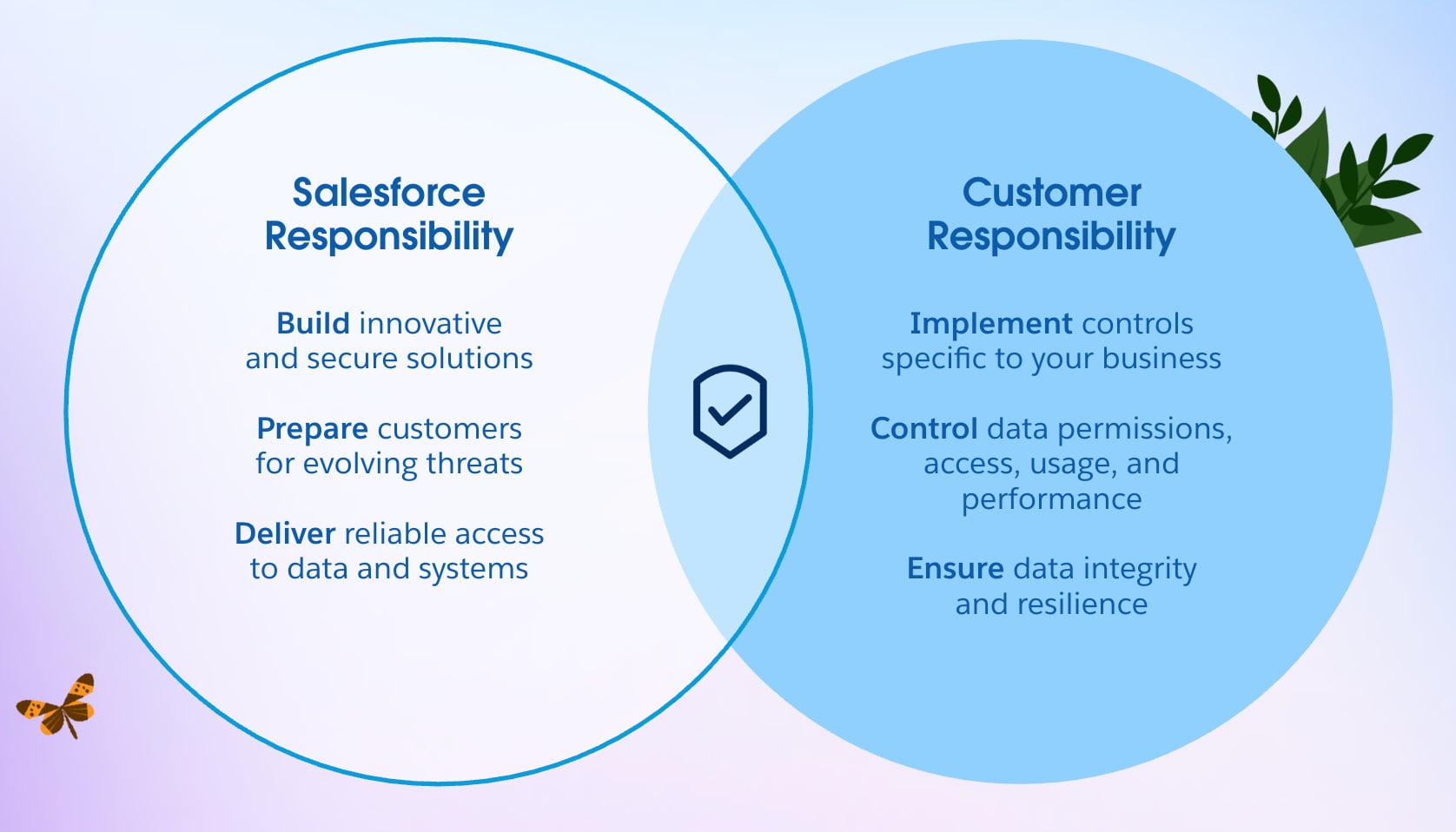
Salesforce is accountable for securing and maintaining the integrity of the Data 360 platform and its global infrastructure. This includes:
- Physical and Environmental Security: Hyperforce is hosted on AWS infrastructure and Amazon has the delegated responsibility for protection of their global data centers through access controls, surveillance, and environmental safeguards.
- Network and Perimeter Defense: Distributed Denial of Service (DDoS) mitigation, intrusion detection, and encryption for all traffic in transit (TLS 1.2 and higher) and at rest (AES-256).
- Platform Hardening and Patch Management: Continuous vulnerability management, patch deployment, and OS-level security baselining.
- Compliance and Certification: Continuous audits against standards such as SOC 1/2/3, ISO 27001, ISO 27017, ISO 27018, and readiness for frameworks such as GDPR .
These controls ensure that the Data 360 platform remains secure, reliable, and compliant, enabling customers to focus on business logic and data management rather than infrastructure defense.
Customers are responsible for securing their data, configurations, and operational processes within their Salesforce Data 360 orgs. Key areas of accountability include:
- Identity and Access Management (IAM): Define roles, enforce multi-factor authentication (MFA) and single sign-on (SSO), and apply the principle of least privilege.
- Data Governance: Classify sensitive data, apply masking where needed, and enforce object-, field-, and record-level access controls.
- Integration Security: Manage API access via OAuth 2.0, JSON Web Token JWT, and other authentication standards using named credentials and external credentials.
- Monitoring and Response: Use event monitoring and audit trails, and forward logs to a Security Information and Event Management (SIEM) system for advanced threat detection.
Salesforce provides the secure foundation, but customers determine their actual security posture through their configurations, controls, and vigilance.
Security is not just a technical construct, it’s an organizational discipline. Data protection in Salesforce Data 360 is achieved through collaboration between architecture, operations, and governance teams. Enterprises should:
- Continuously review and retire unused or over-privileged accounts.
- Automate enforcement using policies as code and CI/CD pipelines.
- Conduct tabletop exercises simulating incidents such as unauthorized data activation or exfiltration to strengthen response readiness.
Data 360’s effectiveness scales not by features alone, but by how responsibly customers operationalize them.
Salesforce Data 360 embraces a secure-by-default philosophy, which is a shift from reactive control to preventive design. Instead of starting open and tightening later, every new Data 360 organization now begins in a “Deny All” state, enforcing zero trust principles from the first deployment.
In older environments, customers inherited a permissive “Allow All” model for faster onboarding. While convenient, this created risk from accidental overexposure and misconfiguration. The new secure-by-default architecture inverts this approach:
- No user or system has implicit access.
- All permissions must be explicitly granted.
- Data access, integration, and governance controls are enforced from Day 0.
This enforces least privilege by design, drastically reducing the risk of accidental exposure or privilege escalation.
This model has both technical and behavioral implications:
- Teams must plan access models deliberately, aligning permissions with compliance and business boundaries.
- Governance becomes a built-in design requirement, not an afterthought.
- Ownership and accountability for data are defined from the start.
For legacy Data 360 organizations still operating under “Allow All,” admins must manually tighten configurations to align with the new baseline, a critical step in any security modernization or Data 360 maturity program.
By defaulting to zero access and requiring explicit policy definitions, Salesforce Data 360 establishes trust-by-design, a foundational evolution in enterprise data security. This approach ensures that:
- Unauthorized access and data leakage risks are minimized.
- Governance frameworks are enforced structurally, not optionally.
- Enterprises gain a more predictable, auditable, and resilient security posture across environments.
In essence, security is no longer a feature you add. It’s the foundation you start with.
Identity and Access Management (IAM) in Salesforce Data 360 is the first and most critical layer of defense. It governs who can access the platform and what actions they can perform once inside. A well-implemented IAM framework is the single strongest control an enterprise has to protect its customer data and ensure operational integrity.
Authentication establishes digital trust, confirming that every user, service, or external system accessing Salesforce Data 360 is legitimate.
Data 360 supports federated authentication with enterprise-grade identity providers (IdPs) such as Microsoft Entra ID (Azure AD), Okta, or Ping Identity using SAML 2.0, OpenID Connect(OIDC), or system for cross-domain identity management (SCIM) . This federation extends your corporate identity lifecycle directly into Salesforce. When an employee joins, transfers, or leaves the company, their access automatically adjusts, reducing orphaned accounts and improving compliance readiness.
With single sign-on (SSO), users authenticate once using their corporate credentials and gain secure access to Salesforce applications without separate passwords. This reduces credential fatigue and minimizes risks from password reuse or phishing.
The Identity Provider (IdP) becomes the single authority for authentication decisions, enforcing multi-factor authentication (MFA), conditional access, and risk-based controls. Authentication evolves from a single event to a continuous evaluation of trust, responsive to user behavior and context. Federated authentication provides:
- Centralized Policy Enforcement: Authentication standards are managed in one place across all Salesforce environments.
- End-to-End Traceability: Unified audit trails link every action back to a verified identity.
- Human-Centric Experience: A frictionless, secure login process allows teams to focus on insights — not credentials.
Once a user is verified, authorization defines what they can access, view, or modify. It sets the operational boundaries that protect sensitive data and enforce least privilege. Principle of Least Privilege (PoLP): Every user and system is granted only the permissions necessary for their job function, nothing more. This principle dramatically limits the potential damage from compromised credentials or misconfigurations. Role-Based Access Control (RBAC): Salesforce Data 360 uses permission sets and permission set groups to assign granular capabilities aligned with business roles. For example:
- A Data Engineer can manage ingestion pipelines and transformations with the help of Data 360 Architect permission set.
- A Marketing Analyst can query harmonized data but cannot alter models with the help of Data 360 Activation Manager permission set..
- An Activation Manager can execute outbound campaigns but cannot access source data with the help of Data 360 Activation Manager permission set
Access is centrally managed and auditable, ensuring accountability throughout the data lifecycle. When integrated with IdPs such as Entra ID, Okta, or Ping Identity, access policies extend seamlessly across the enterprise via SCIM provisioning and SAML/SSO federation.
Salesforce provides predefined permission sets that encapsulate best practices for segregation of duties and compliance with industry standards such as ISO 27001.
| Role | Primary Responsibility | Access Design Principle |
|---|---|---|
| System Administrator | Environment setup, provisioning, and configuration | No access to underlying datasets — ensures separation between system and data control |
| Data 360 Architect | Data ingestion, transformation, identity resolution, and modeling | Cannot perform data activation to maintain data exposure boundaries |
| Data 360 Activation Manager | Segment creation, channel management, and activation | View-only access to data models; no modification privileges |
| Data 360 User | Consumes analytics and insights | Read-only; zero modification privileges |
| Data 360 One User | Cross-org access via Companion Org | Governed by shared space permissions and scoped access policies |
This structural privilege separation ensures no single role controls the entire data lifecycle — aligning with segregation of duties (SoD) requirements in frameworks like ISO 27001 and SOC 2. Data 360 standard permission sets are automatically updated with each release as new features become available. A custom permission set, by contrast, would not be updated automatically, leading to potential security vulnerabilities or a loss of functionality if not meticulously maintained.
- Automatic Policy Evolution: Salesforce maintains and updates standard permission sets as part of its platform releases. When new features are introduced, permission sets are automatically aligned, reducing administrative overhead and eliminating configuration drift.
- Reduced Attack Surface: Granular access boundaries prevent data misuse or inadvertent privilege escalation.
- Audit and Compliance Readiness: Standardized roles simplify attestation, making it easier for enterprises to demonstrate access controls during audits or regulatory reviews.
- Scalable Governance: Administrators can map these roles directly to enterprise IAM systems such as Okta and Microsoft Entra ID using SCIM provisioning and SAML/SSO federation, ensuring a unified security posture across both Data 360 and the broader enterprise ecosystem.
- Adopt Standard Roles: Use Salesforce’s standard permission sets rather than cloning or customizing, to ensure automatic updates and consistent privilege models across releases
- Integrate with Enterprise IAM: Centralize access provisioning via SCIM or identity federation to maintain visibility and lifecycle control over all identities.
- Conduct Regular Access Reviews: Implement periodic attestation processes to detect privilege creep and ensure alignment with functional requirements.
- Apply Just-in-Time Access: For elevated functions, grant temporary permissions that expire automatically, aligning with zero-trust principles.
IAM is the control plane that connects human identity, system access, and data governance. Salesforce Data 360 gives enterprises the tools to enforce Zero Trust through federated authentication, granular authorization, and continuously evolving permission models. But its true effectiveness depends on how organizations operationalize these controls — aligning people, process, and technology around one goal: data trust without compromise.
In today’s enterprise data ecosystem, governance is no longer a constraint; it’s the key enabler of trusted intelligence. For architects, it defines the equilibrium between agility and control, between open access and assured compliance.
Salesforce Data 360 (Data 360) is designed with this principle at its core. Governance and trust aren’t added layers; they are built into the very fabric of its architecture. Every stage of the data lifecycle, from ingestion and harmonization to activation and AI-driven insights, operates under a unified governance control plane that defines how data is classified, secured, accessed, and used responsibly across the enterprise.
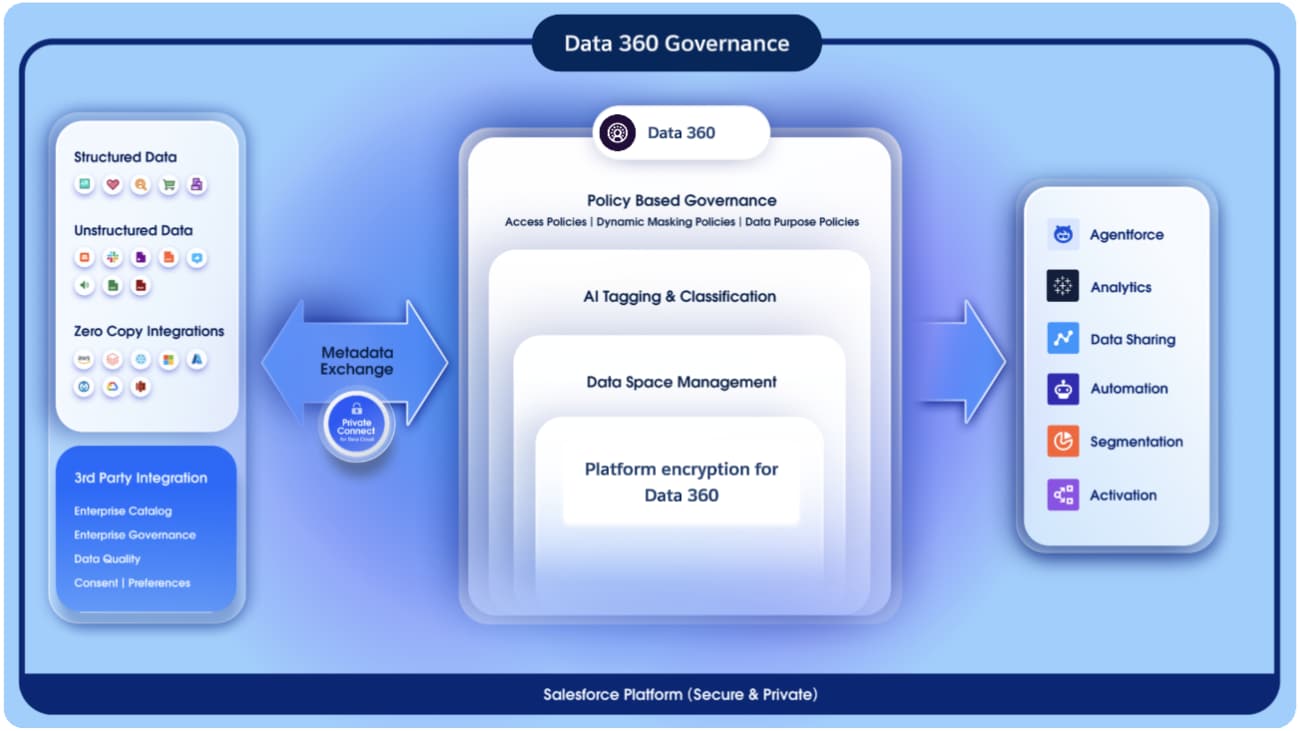
Data 360 is architected around a governance-first model, ensuring that every data interaction, from ingestion to insight activation, is policy-aware, auditable, and compliant. Governance functions as the central control plane, managing how data is discovered, classified, and protected across its lifecycle. This unified control plane ensures that:
- Data access is contextually authorized: only the right users, under the right policies, can act upon the right data.
- Governance is embedded into both the semantic and operational layers, ensuring consistency between how data is modeled and how it is protected.
- Zero Trust and Least Privilege principles are enforced: where identity, context, and policy are evaluated in real time before granting access.
Through this architecture, Salesforce Data 360 transforms governance from static permission management into a dynamic, policy-driven orchestration layer. One that continuously adapts to context, enforces compliance by design, and sustains trust at enterprise scale.
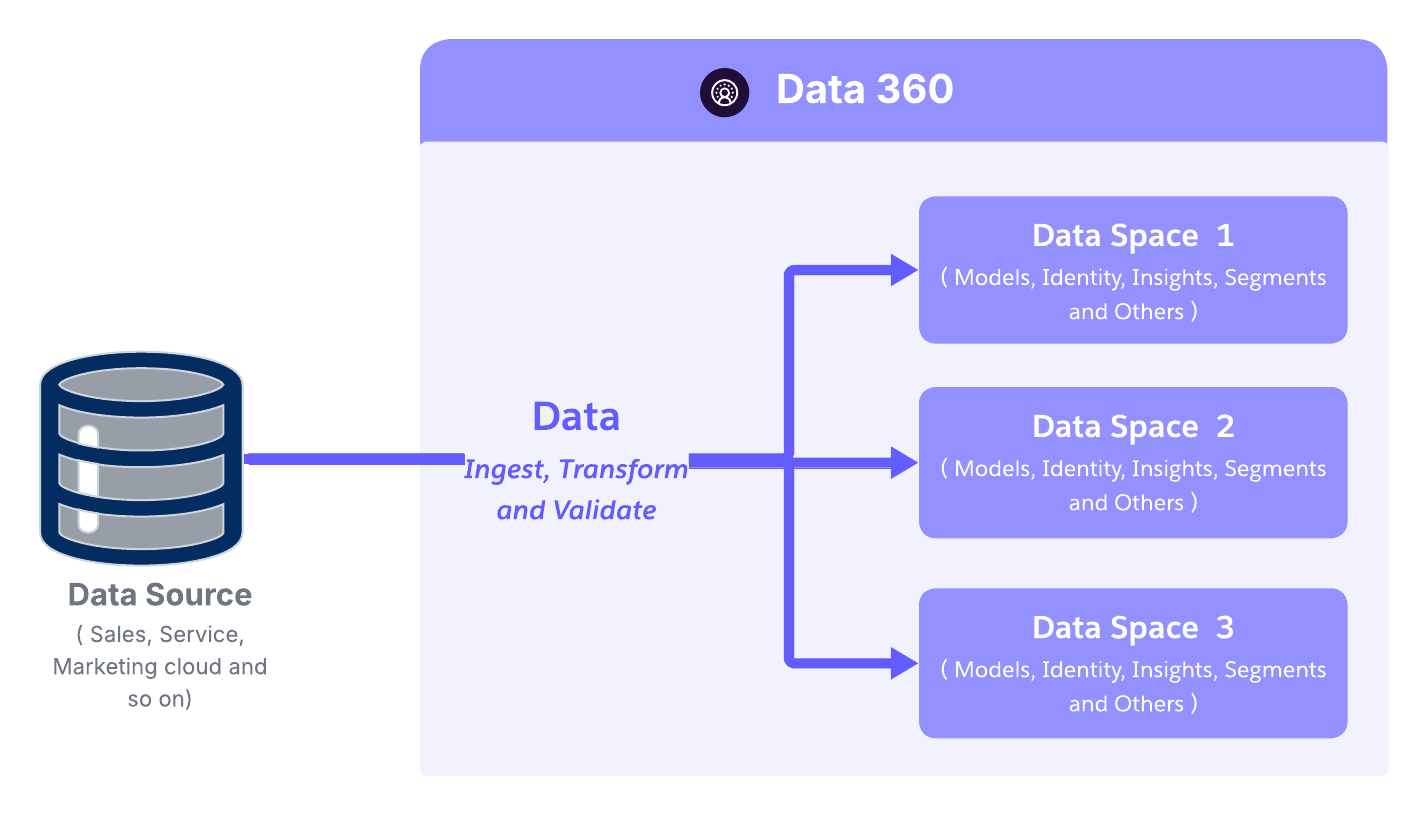
At the macro level, Data Spaces provide logical segregation and isolation of enterprise data domains, enabling organizations with multi-brand, multi-region, or multi-tenant operating models to manage data within a single unified platform. Data Spaces can be aligned to business domains (such as Sales, Marketing, or Customer Success) or to regulatory and geographic boundaries (such as EU, AMER, or APAC), allowing governance and access controls to mirror the organization’s operating and compliance structure without fragmenting the underlying data platform.
- Each data space acts as a virtual boundary, defining what data collections a user or team can see or interact with.
- Access within a data space is explicitly granted, ensuring no implicit permissions or cross-contamination of data visibility.
- This enables federated ownership: each business unit can govern its domain independently while maintaining centralized oversight and compliance.
By design, data spaces provide the first layer of governance, establishing structural clarity and accountability across the enterprise datasets.
In Salesforce Data 360, RBAC and ABAC serve distinct but complementary purposes, and they are applied at different layers of the platform. RBAC is used primarily for platform and capability access. It governs who can access Data 360 constructs and features such as Data Spaces, process creation, administrative capabilities, and tooling access. RBAC is implemented through permissions and permission sets, for example assigning users access to a Data Space with specific enabled features. ABAC is used for data access enforcement. ABAC policies are fully responsible for determining who can access which data objects and attributes, including Object-Level Security (OLS), field-level access, and row-level constraints. These decisions are made dynamically by evaluating the action, user attributes, and resource attributes at runtime. In ABAC, permissions remain part of the model, but the policy itself determines access, not the role alone. Policies evaluate context such as business unit, region, data sensitivity, purpose of use, or regulatory constraints to allow or deny access. For example:
- RBAC allows a user to access a Data 360 Data Space and analytics features.
- ABAC determines whether that same user can read a specific customer dataset, which rows they can see, and which attributes are masked or restricted.
This clear separation enables Data 360 to scale securely:
- RBAC provides controlled access to platform capabilities and workflows.
- ABAC delivers fine-grained, policy-driven data access aligned with compliance, residency, and data protection requirements.
Together, they enable governed data democratization without conflating platform permissions with data authorization logic. In essence, RBAC enforces access based on permission assignment, while ABAC evaluates permissions in context — combining action, user, and resource attributes to deliver adaptive, fine-grained access control across Salesforce Data 360
At the heart of Salesforce Data 360’s fine-grained access control is attribute-Based access control (ABAC, powered by the CEDAR policy language. Unlike static, role-based permissions, ABAC dynamically evaluates who is requesting access, what they’re trying to access, and under what conditions — ensuring every data interaction aligns with enterprise policies and trust boundaries.
Data 360’s ABAC engine evaluates access decisions based on a combination of three core attribute types:
- User attributes: department, location, clearance level
- Data attributes: classification, sensitivity (PII, PHI, Financial Data), data space
This flexible, policy-driven model allows enforcement to adapt automatically as user roles, data classifications, or operating conditions evolve, which is essential for large, distributed, and regulated enterprises.
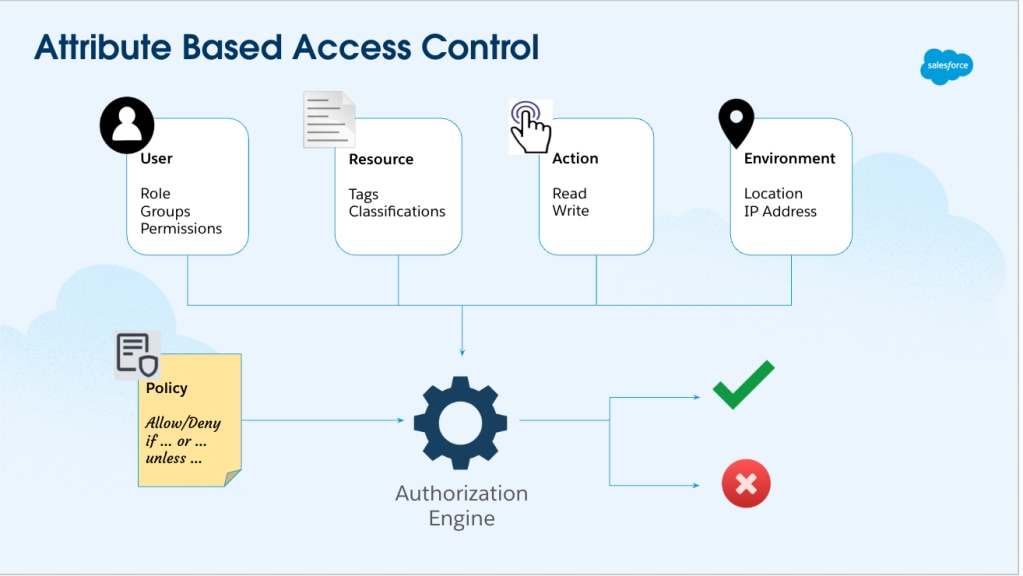
Salesforce Data 360 implements a standards-based Attribute-Based Access Control (ABAC) architecture aligned with industry best practices for policy-driven data governance. It is composed of three primary functional components:
- Policy Information Point (PIP) - Policies, Enriched Metadata and Classification:
- Houses policy definitions themselves, including data access, classification, masking, retention, and usage policies that govern enterprise data.
- Maintains enriched metadata such as tags, classifications, business context, and end-to-end lineage.
- Utilizes LLM- and ML-driven classification to automatically tag sensitive data (e.g., PII.Email, PII.Phone, PHI).
- Tag propagation ensures classifications flow automatically along data lineage (DLO → DLO → DMO).
- Preserving sensitivity and compliance across transformations.
- Policy Decision Point (PDP): The PDP is the decision engine that interprets CEDAR policies.
- Ingests contextual inputs from the PEP (user identity, request metadata) and reference attributes from the PIP.
- Evaluates policies deterministically to deliver consistent, explainable, and scalable access decisions.
- Supports both real-time and batch evaluations, ensuring performance and precision even in high-volume environments.
- Policy Enforcement Point (PEP): The PEP is where authorization decisions are enforced at runtime.
- Intercepts data access requests across all interaction channels such as APIs, UI queries, CRM enrichment, or GenAI Retrieval-Augmented Generation (RAG) pipelines.
- Applies PDP outcomes instantly, ensuring that every query and retrieval is compliant with enterprise access policies.
Together, the PIP–PDP–PEP triad forms a distributed governance fabric, enforcing consistent, policy-based control across all Data 360 services and access modes. Importantly, ABAC in Data 360 is configured, not built. Architects do not assemble custom control planes or enforcement logic. Instead, they populate and connect three native architectural components that operate together as a unified governance fabric. At a practical level, implementation follows a simple progression: classify the data, define the policies, and let the platform enforce them automatically. Once configured, access control becomes a system behavior rather than a manual or procedural process. This distributed governance fabric ensures consistent policy enforcement across all access channels, creating a unified trust boundary throughout Data 360.
Data 360’s ABAC framework supports layered access boundaries, ensuring that data is protected not only at the object level, but also within specific fields and records.
- Object-Level Security (OLS): The outermost boundary of access control.
Governs access to entire data structures such as data lake objects (DLOs) or data model objects (DMOs). Example: Granting access to the Customer object, but not to Transactions.
- Field-Level Security (FLS): Controls access to specific fields within an object.
Example: A marketing user can see customer names but is restricted from viewing credit card numbers or national identifiers.
- Record-Level Security (RLS) : The most granular control layer.
Determines which individual records within a dataset a user can view or modify. Example: A regional manager can access only customer data tied to their assigned region.
- Dynamic Data Masking (DDM) : Enables real time data protection. Complementing ABAC, DDM enforces policy-driven obfuscation of sensitive information without altering the underlying dataset. At query time, DDM automatically masks fields like PII or financial data based on user role, context, or compliance rules.
- Sensitive data stays protected across UI views, APIs, and AI workflows.
- Reduces data leakage risks by ensuring consistent masking across all consumption layers.
- Maintains auditability. Every masked query is logged and traceable within Data 360’s governance framework.
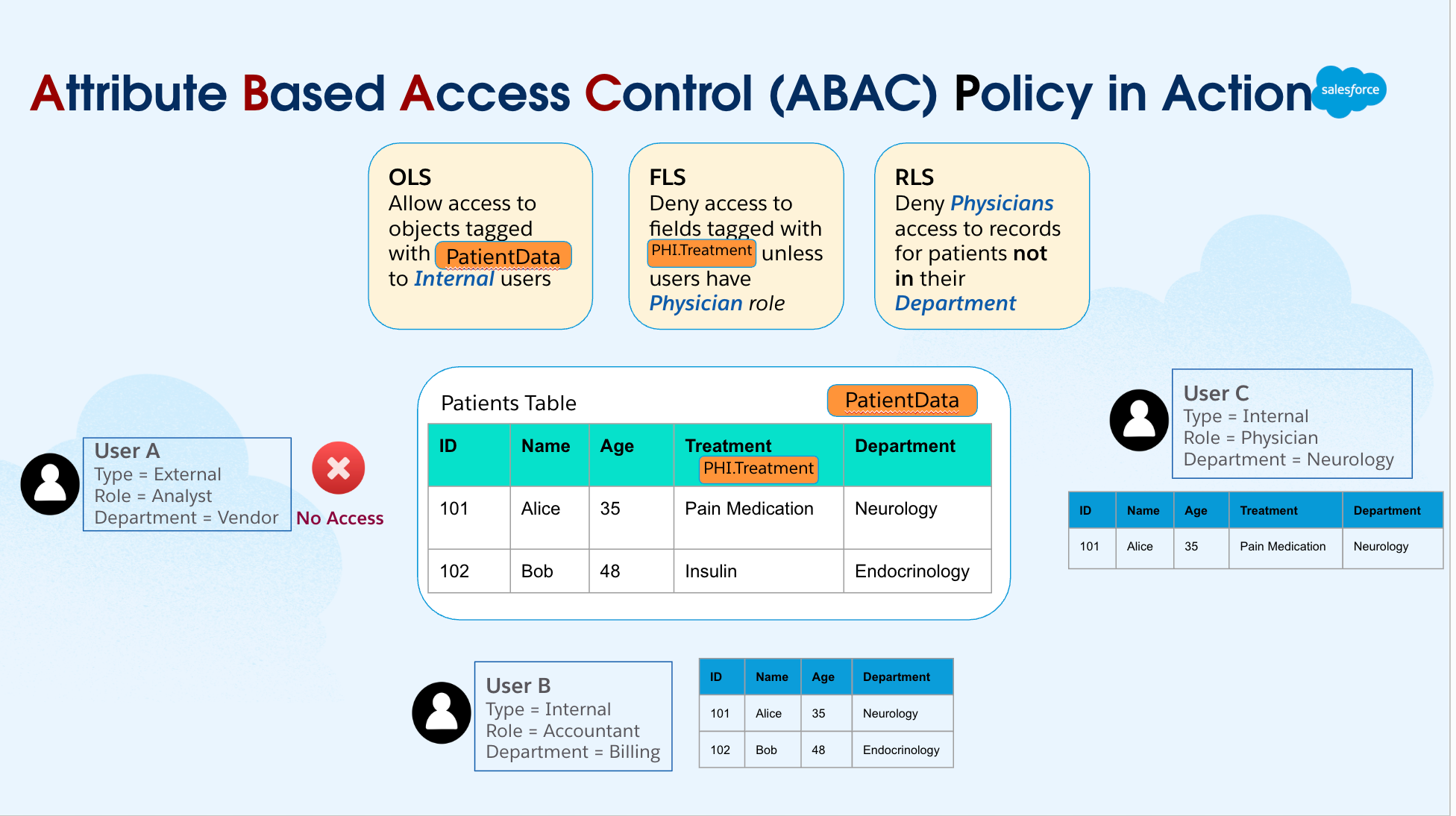
This architecture transforms access control from a static permission model into a dynamic, context-aware policy fabric. By combining RBAC’s structured simplicity with ABAC’s contextual depth, Salesforce Data 360 achieves:
- Consistent policy enforcement across ingestion, harmonization, and activation.
- Adaptive governance that evolves with data, roles, and compliance needs.
- Unified trust boundaries across the entire data lifecycle — from ingestion to AI activation.
Salesforce Data 360’s governance model is natively embedded within the Salesforce Platform, enabling unified security, compliance, and access control across both operational and analytical data. By inheriting Salesforce’s core identity and access management capabilities—such as identity federation, permission sets, Centralised policy authoring and platform encryption—Data 360 applies consistent trust policies across clouds without introducing parallel governance stacks. Rather than treating isolation, authorization, and lineage as separate concerns, the platform integrates them into a single execution-aware trust fabric that spans the entire data lifecycle. At a structural level, this governance fabric is formed by three complementary layers working in concert:
- Data Spaces, which establish clear logical boundaries for data isolation and regulatory segmentation
- Attribute-Based Access Control (ABAC), which enables fine-grained, context-aware authorization decisions based on identity, purpose, and data attributes
- Semantic lineage, which preserves business meaning, sensitivity, and traceability as data moves from ingestion to insight and activation
Together, they create a governance model where access decisions are explainable, enforcement is automatic, and compliance is continuous rather than retrospective. The result is a platform where governance is no longer a limiting factor or an afterthought. Instead, it becomes an enabling layer—allowing architects to design data products and AI-driven workflows with confidence that trust, privacy, and regulatory requirements are being enforced by the system itself. This compositional approach ensures that enterprise data remains not only usable, but responsibly actionable—supporting insight, activation, and automation at scale without compromising transparency, security, or control.
In the age of AI-driven enterprises, securing data is not a one-time event but a continuous process that safeguards information from the moment it enters the ecosystem until it is activated for business or AI use. Salesforce Data 360 embeds security and governance controls at every phase of the data lifecycle, ensuring that data integrity, confidentiality, and trust are preserved from ingestion to insight activation.
At the core of Salesforce Data 360’s protection model lies Platform Encryption for Data 360 — a transparent, high-performance encryption framework that secures data both at rest and in transit, without compromising usability or scalability.
Data persisted in the Data 360 Data Lake is automatically encrypted at the storage tier, ensuring that data remains unreadable even if physical or unauthorized access occurs. Key capabilities include:
- Transparent Data Lake Encryption: All data persisted in the Data Lake is encrypted at the storage tier using customer-managed keys (CMK). This ensures that even if unauthorized access to the physical storage occurs, the data remains unreadable and indecipherable.
- Customer-Managed Keys (CMK): Customers maintain full control over encryption keys — a crucial capability for regulated industries like financial services, healthcare, and government. CMK enables granular auditing, control, and proof of data sovereignty, directly aligning with regulatory mandates such as GDPR, HIPAA, and ISO 27001.
- External Key Management (EKM) : With External Key Management, a feature of Platform Encryption for Data 360, customers will be able to encrypt data in Data 360 by using keys stored in the customers’ AWS KMS accounts. This gives customers more flexibility while keeping their data in Data 360 secure and protected.
- Bring your own Key (BYOK): Building on CMK and EKM, Data 360 now allows customers to upload their own key material directly within Salesforce to encrypt data at rest and search indexes. This enhancement provides an additional layer of protection for PII, sensitive, confidential, and proprietary data—without requiring customers to create or manage keys in AWS KMS.
- Key Rotation and Lifecycle Management: Key rotation is handled gracefully. New data is encrypted with the new key while older data remains encrypted with its original key, avoiding downtime or performance degradation. This rotation mechanism strengthens compliance without operational disruption.
Every piece of data transmitted between Data 360 services, APIs, and connectors is protected using Transport Layer Security (TLS) 1.2 or higher, providing end-to-end encryption in motion. This ensures that:
- Data can’t be intercepted or altered during transfer.
- Communications between Salesforce services, trusted connectors, and customer endpoints remain private and verifiable.
- Security extends consistently across ingestion pipelines, harmonization processes, activation workflows, and external API integrations.
By combining customer-managed encryption at rest with continuous encryption in transit, Salesforce Data 360 creates a defense-in-depth architecture that protects customer data from both external attacks and internal infrastructure threats.
While encryption and access controls safeguard data within Salesforce Data 360, securing data movement across systems is equally critical. Modern enterprises operate in multi-cloud and hybrid environments, where sensitive data flows between Salesforce, analytics platforms, external APIs, and data lakes. To address this, Salesforce has engineered a secure integration framework centered around named credentials (NCs) and external credentials (ECs) — delivering a policy-driven, zero trust–aligned foundation for secure connectivity.
Salesforce has architectured a robust secure integration framework, centered around named credentials (NCs) and external credentials (ECs). Together, they abstract away credential complexity, enforce least-privilege access, and enable consistent authentication management across all integrations — without exposing secrets in code or configuration. This framework abstracts security complexities, enforces best practices, and establishes a policy-driven control plane for all external connections — aligning with Salesforce’s Zero Trust and security-by-design principles.
Named Credentials
Named credentials (NCs) are the cornerstone of Salesforce’s secure integration architecture. They provide a declarative, centralized mechanism to define external endpoints and their authentication parameters — eliminating the need to hard-code sensitive credentials such as usernames, passwords, or tokens in Apex code or configuration files. Instead, developers and administrators simply reference a named credential alias (for example, SnowflakeConnector_NC), and Salesforce automatically handles the underlying authentication and connection management. Architectural and Security Advantages:
- Simplified Maintenance: NCs consolidate external endpoint URLs and authentication parameters into a single managed record. Any updates — such as changing an endpoint or rotating credentials — require changes only to the NC record, avoiding redeployment of code or flows across environments.
- Enhanced Security: Credentials are securely stored in Salesforce’s encrypted secret store, preventing exposure in code repositories, configuration files, or logs. The authentication process itself is managed automatically at runtime, reducing human error and risk of leakage.
Compliance Adherence: The separation of credentials from business logic simplifies compliance with data protection regulations like GDPR, HIPAA, and PCI DSS. Auditors can easily verify that external data access adheres to enterprise security and governance policies.
- Bypasses Remote Site Settings: NCs eliminate the legacy requirement for remote site settings, streamlining configuration and deployment, particularly for large-scale or multi-environment enterprise implementations.
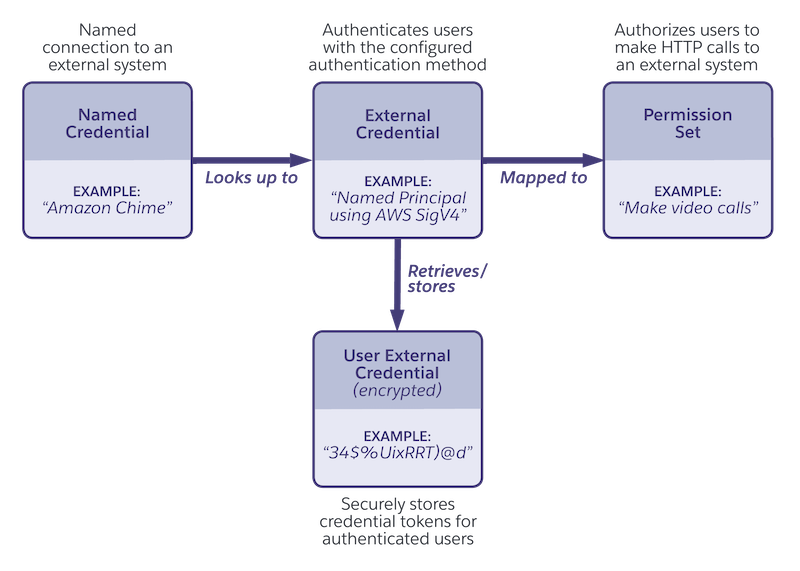
External credentials (ECs) define the authentication protocol and flow that Salesforce uses when connecting to an external service — effectively answering “how to authenticate.” A single EC can be reused across multiple NCs that share the same authentication type, promoting configuration reuse and consistent security enforcement. Supported Authentication Protocols:
- OAuth 2.0 (all variants supported)
- JWT (JSON Web Token)
- Basic Authentication
- AWS Signature v4
- Custom Authentication
- No Authentication (for open APIs or public endpoints)
External Credentials and Named Credentials are designed around clear separation of duties. An External Credential defines how to authenticate — specifying the authentication protocol, token type, and refresh behavior for connecting to external systems. A Named Credential, on the other hand, defines where to connect — the endpoint URL and which External Credential to use for that connection. This design ensures that authentication logic and endpoint configuration remain decoupled, enabling Salesforce to support diverse integration protocols securely while maintaining centralized and consistent credential management across the enterprise.
While Data 360’s user interface abstracts much of the underlying configuration, the Named Credential and External Credential framework is frequently utilized under the hood by its native connectors and data streams.This means that, even when administrators are simply “adding a data connection” through a guided UI, Data 360 is still applying this standardized security model behind the scenes. Architectural Implications:
- Unified Security Model: Every connector — whether to an external Database , AWS S3, or an enterprise API — benefits from the same encryption, authentication, and key management standards enforced by Named and External Credentials.
- Developer Abstraction: Developers and admins don’t need to manually handle authentication flows or credential rotation. Salesforce manages token lifecycle, expiry, and refresh automatically.
- Consistent Policy Enforcement: This framework ensures all connectors adhere to consistent authentication, audit, and logging policies — critical for large-scale, multi-source ingestion in regulated industries.
- Future-Proof Extensibility: As Salesforce enhances its authentication stack (e.g., to support new OAuth flows or FIDO2 standards), these improvements propagate automatically across all connectors without requiring refactoring or redeployment.
Salesforce Data 360 offers a large suite of out-of-the-box connectors that streamline data integration from various sources. This enables enterprises to consolidate and utilize their data efficiently. Salesforce provides multiple connector types including native Salesforce connectors, cloud storage connectors, database connectors, and application and API connectors. In addition to the connectors offered, zero ETL tools are also supported. Salesforce connectors enable seamless integration between Salesforce products, such as Sales Cloud, Service Cloud, and Marketing Cloud, with Data 360. Additionally, a range of connectors to cloud storage providers, including Amazon S3, Google Cloud Storage, and Azure Data Lake are offered. The prebuilt connectors for databases such as Snowflake, Redshift, and BigQuery allow enterprises to link their existing data warehouses with Data 360. Furthermore, Data 360 provides connectors for various third-party applications and APIs, such as Google ads, Facebook ads, and other marketing platforms. To enhance flexibility, Data 360 integrates with ETL tools such as MuleSoft and Informatica.
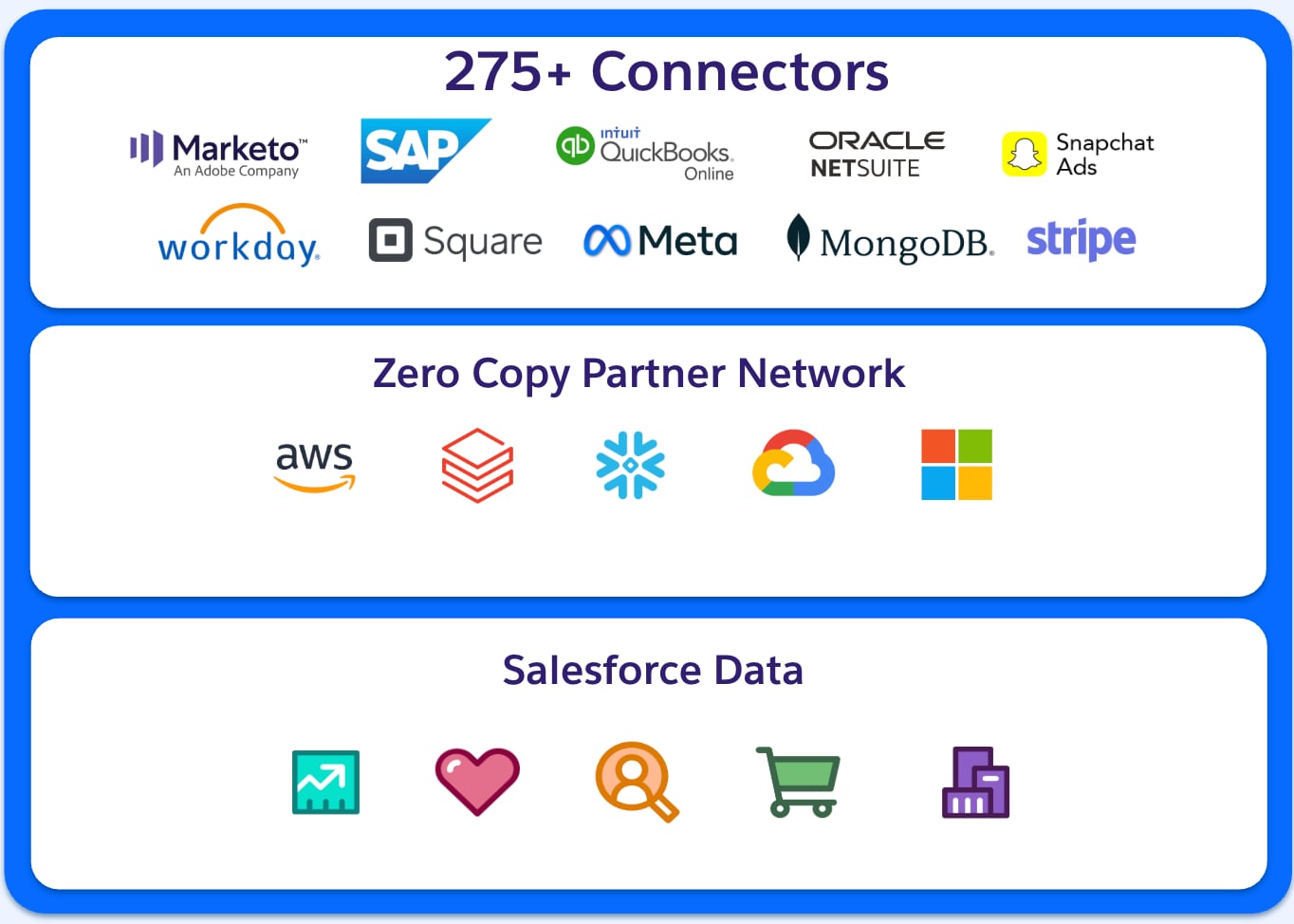
The security of data stored within the Salesforce Data 360 has been at the forefront of many Data 360 related conversations. As part of Salesforce’s commitment to a defense-in-depth security approach, equal importance is placed on securing how data is ingested into the Data 360 environment. Salesforce recognizes that businesses operate in diverse data ecosystems, often spanning multiple cloud platforms, storage solutions, and analytics tools. Our Data 360 Connectors serve as the bridge between these environments. The connector enables secure, scalable, and efficient data integration while maintaining Salesforce’s high security standards. These connectors facilitate seamless data flow without compromising integrity, or privacy. The three essential components of Data 360 connector security are:
- Authentication/Authorization Mapping: Secure access management is foundational to data security. Different cloud connectors employ varying authentication and authorization mechanisms to validate and control user access. Authentication ensures that users or systems are legitimate entities, while authorization defines the level of access granted. Salesforce ensures that, wherever possible, its connectors are leverage industry standards.
- Zero Copy (ZETL) Feature Interoperability: Data duplication presents security and operational challenges. This also comes with unnecessary storage costs, data inconsistencies, and increased risk exposure. Salesforce’s Zero Extract, Transform, and Load (ZETL) approach ensures that real-time data sharing across platforms can occur without requiring physical data replication. This means that data can remain within its original environment while still being accessible for processing, reporting, and analytics. Furthermore, this also significantly reduces the attack surface and enhances potential compliance with data residency laws.
- Data Federation Support: In today’s multi-cloud environments, organizations need comprehensive data access without unnecessary data movement. The Data 360 connector federated data model supports both file-based and query-based data federation, enabling enterprises to leverage external data sources in real time. Whether accessing structured databases, semi-structured logs, or unstructured files, Salesforce’s connectors ensure that data remains secure throughout its lifecycle.
Salesforce aims to provide its customers with the transparency needed to help navigate the complexities of data security and compliance, even with our integrations. Whether integrating with AWS S3, Google Cloud Storage, Snowflake, or other platforms, our Data 360 Connectors are designed to ensure trust, transparency, and control over critical business data.
Salesforce Data 360 Connector Security & Authentication Mapping
| Connector Type | Connection Type Support | Primary Authentication Types | Key Security Aspects & Notes |
|---|---|---|---|
| Salesforce CRM | N/A (Internal) | Session-based (Internal) | Uses Salesforce's robust internal identity & access management (IAM) model. All data is encrypted in transit and at rest within the Salesforce infrastructure. |
| Marketing Cloud Engagement | Public Internet Only | OAuth 2.0, Username/Password | Standard OAuth 2.0 protocols are used for secure authentication. Data is encrypted in transit (TLS) over public internet. |
| B2C Commerce | Public Internet Only | OAuth 2.0 | Standard OAuth 2.0. Relies on secure public internet protocols (TLS) for data transfer. |
| Web & Mobile App | Public Internet Only | API Keys, OAuth 2.0 | Data ingested via APIs (Ingestion API, Streaming API). Security managed through API key management and standard web protocols. |
| Amazon S3 | Private Connect & Public | IAM Roles, External Credentials | Supports AWS PrivateLink for secure, private connection. Public connection uses secure credentials. Data is encrypted in transit and at rest (customer-managed keys in S3 optional). |
| Snowflake | Private Connect & Public | OAuth 2.0, Private Key Auth, Username/Password | Supports VPC private connection (AWS PrivateLink). Public connection available with secure authentication methods. Data can be encrypted with customer keys within Snowflake. |
| Amazon Redshift | Private Connect & Public | Username/Password, IAM Authentication | Supports private connection (AWS PrivateLink). Public connection uses standard security best practices. |
| Microsoft Azure (Storage/SQL) | Public Internet Only | SAS Tokens, OAuth 2.0, Username/Password | Connections rely on secure SAS Tokens or OAuth for authentication. Data traverses the public internet via encrypted channels (TLS). |
| Google Cloud Storage (GCS) | Public Internet Only | OAuth 2.0, Service Accounts | Connections rely on secure OAuth 2.0. Data traverses the public internet via encrypted channels (TLS). |
| MuleSoft (API) | Public Internet Only | OAuth 2.0, API Key | Connects via APIs. Security is managed through standard API authentication and robust governance policies implemented via MuleSoft Anypoint Platform. |
The final stage of the data lifecycle — data activation — is where unified and enriched customer profiles within Salesforce Data 360 are securely distributed to external systems for downstream applications such as personalized marketing, analytics, or engagement orchestration. This phase represents the transition from insight to action — and therefore carries the highest responsibility for maintaining data integrity, privacy compliance, and trust.
Securing Outbound Data Transfers
Data 360 enforces secure outbound connectivity through governed, encrypted pathways. All activation targets — whether SFTP, Amazon S3, Microsoft Azure Blob, Google Cloud Storage, or ad networks — must be configured using secure connection definitions that authenticate through Salesforce’s Named Credential and External Credential framework, ensuring that no credentials or endpoints are exposed in plaintext. Architectural Security Controls:
- Encrypted Channels: All outbound data transfers occur over TLS-encrypted channels, ensuring confidentiality and integrity in transit.
- Credential Abstraction: Outbound endpoints use Named Credentials, leveraging Salesforce’s encrypted secret store and centralized management for all API keys and authentication tokens.
This prevents exposure of sensitive details in configuration files or flow definitions.
- Access Governance: Activation targets can be bound to specific Integration Users with scoped permissions, providing fine-grained access control and full auditability for outbound events.
- Network Security: For high-security environments, outbound connections can be restricted to Private Connect links, ensuring that data activation traffic remains within a private AWS or Azure network instead of traversing the public internet.
Data 360 Activation Flow
| Stage | Mechanism | Security / Governance Controls |
|---|---|---|
| Activation Configuration | Defined in Data 360 activation setup | Secured through Named Credentials & External Credentials |
| Data Preparation | Filtered and joined from DMOs | Consent & privacy metadata applied |
| Outbound Transfer | Encrypted via TLS / Private Connect | Policy enforcement and credential abstraction |
| External Delivery | SFTP / Cloud Storage / API | Access controlled and auditable delivery |
Security in Data 360 extends beyond technical controls to include policy-aware governance. At the moment of activation, Salesforce’s Data 360 Trust Layer automatically enforces customer consent and privacy policies, ensuring that only eligible data is shared with external destinations. Key Capabilities:
- Consent-Aware Data Flows: Data 360 evaluates consent flags such as “Do Not Share,” “Do Not Sell,” or “Email Opt-Out” before data is activated. Records that violate these consent conditions are automatically excluded from outbound datasets.
- Regulatory Alignment: These policy enforcements align with global privacy frameworks including GDPR, CCPA, and HIPAA, embedding compliance directly into the data activation process rather than relying on downstream enforcement.
- Automated Lineage and Audit: Each outbound activation event is logged with full data lineage metadata, including source DMO, consent status, and destination details. This enables audit-ready reporting for regulators or internal governance teams.
Salesforce Data 360 embeds security, governance, and privacy controls across the entire data lifecycle — from ingestion and storage to integration and activation — ensuring that customer data remains encrypted, policy-compliant, and trusted at every stage. By uniting Platform Encryption, Named & External Credentials, and consent-aware activation, Data 360 delivers an end-to-end Zero Trust architecture that safeguards data integrity, confidentiality, and compliance from source to business activation.
For many security-conscious enterprises, particularly in regulated industries and the public sector, internet-restricted data environments are a core component of their compliance and cybersecurity strategy. While such isolation minimizes external exposure, it also introduces integration challenges for Salesforce Data 360 and Agentforce, which require secure access to customer-managed data lakes. Most enterprise data lakes reside on hyperscaler platforms such as AWS, Microsoft Azure, or Google Cloud. Because Salesforce Data 360 operates on AWS infrastructure, connecting securely to customer environments hosted on other clouds requires a private, cross-cloud network path that bypasses the public internet.
Data 360 provides private, intra-cloud connectivity through AWS PrivateLink, enabling secure, direct access between Data 360 and customer-managed data sources, including services like Snowflake (hosted on AWS), Redshift, or S3, without exposing traffic to the public internet.
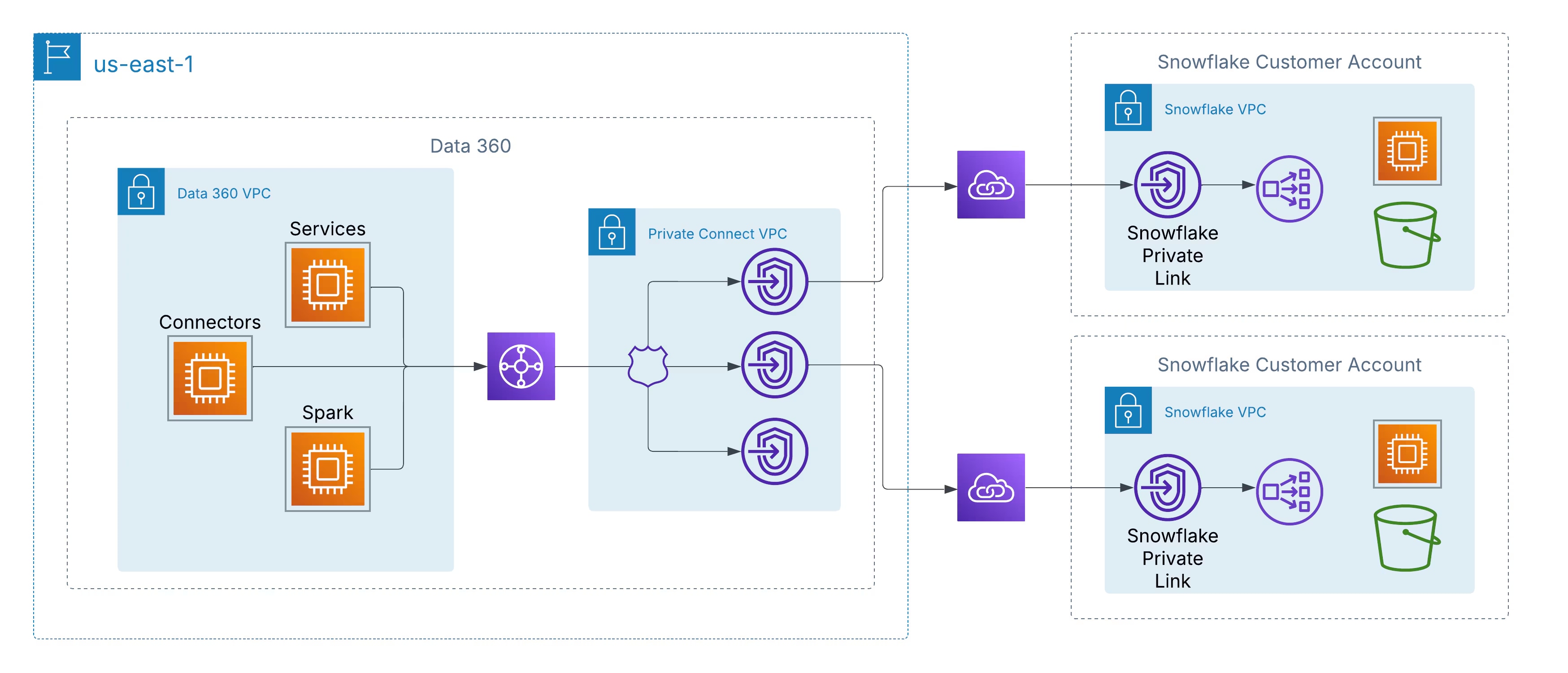 All communication stays within the AWS backbone, using private IP addressing and non-routable network paths, thereby eliminating the risk of data-in-transit interception and meeting stringent enterprise and regulatory security requirements.
This architecture ensures:
All communication stays within the AWS backbone, using private IP addressing and non-routable network paths, thereby eliminating the risk of data-in-transit interception and meeting stringent enterprise and regulatory security requirements.
This architecture ensures:
- Zero Internet Exposure: Data never leaves the AWS private network.
- Private IP Communication: Traffic remains isolated and unaddressable externally.
- Compliance Alignment: Satisfies security standards like ISO 27001, SOC 2, and FedRAMP.
To support customers operating in multi-cloud environments, Salesforce is extending the same security principles beyond AWS through Private Interconnect. This capability enables cross-cloud private connectivity between Data 360 and data lakes hosted in Azure or Google Cloud, maintaining the same guarantees of private routing, zero internet traversal, and encrypted backbone-only traffic. Two architectural deployment models are available:
- Customer-Managed Interconnect: Customers integrate their existing private network circuits, such as Azure ExpressRoute, Google Cloud Interconnect, or Equinix Fabric, directly with Data 360 VPCs.
- Salesforce-Managed Interconnect: Salesforce provisions and manages the cross-cloud link, exposing private service endpoints in the customer’s target cloud environment for a turnkey setup.
Salesforce Data 360, a powerful platform for unifying enterprise data, is built with robust, multi-layered security controls. For customers, managing API security is a critical part of a comprehensive data protection strategy, enabling them to control access, manage integrations, and monitor usage effectively. Here are the key capabilities and features available for customers to set up, control, and manage API security within Salesforce Data 360.
Customers can leverage several built-in Salesforce features to ensure secure API access to their Data 360 instances:
1. Robust Authentication and Authorization (OAuth 2.0)
Salesforce mandates strict authentication for its Data 360 APIs, with OAuth 2.0 being the standard and recommended protocol.
- Connected Apps: Customers create and configure Connected Apps to manage external application access. This is the primary mechanism for authenticating and granting access to the Data 360 Ingestion and Query APIs.
- OAuth Scopes: Admins can define specific OAuth scopes (for example, cdp_ingest_api, api) to request the minimum required permissions, adhering to the principle of least privilege.
- Multi-Factor Authentication (MFA): Salesforce Authenticator and other MFA solutions can be enforced, adding a vital layer of security and ensuring only verified users can access the system, including via API logins.
2. Granular Access Control and Permissions
Customers have fine-grained control over which users and applications can access data and what actions they can perform.
- API Access Control (Feature): Once enabled by Salesforce Support, this feature allows administrators to explicitly approve which Connected Apps can be used to access the APIs. All unapproved apps are automatically blocked, significantly reducing the risk of unauthorized data extraction.
- Permission Sets and Profiles: Admins manage API access by assigning the “API Enabled” permission via user profiles or dedicated permission sets. This ensures that users only have access relevant to their job functions.
- Role-Based Access Control (RBAC): Within Data 360, customers can create and manage role-based access control policies to define data access levels (object, field, and record level security), ensuring consistency and control across the platform.
- Dedicated Integration Users: Best practices recommend creating specific “API Only” users for integrations, limiting their permissions to only what is necessary for the API call, rather than using a system administrator account.
3. Network Security Controls
- IP Whitelisting/Login IP Ranges: Customers can restrict API access to a defined range of trusted IP addresses. Any login attempt from an unapproved IP range can be denied or challenged for verification.
- Private Connect: Built on AWS PrivateLink, this feature allows admins to manage sensitive data without exposing endpoints to the public internet, eliminating the risk of attacks on publicly visible endpoints.
- Encryption in Transit and at Rest: All data is encrypted in transit (using TLS) and at rest, protecting sensitive information from unauthorized access even if intercepted.
4. Monitoring, Auditing, and Governance
Visibility is key to security. Salesforce provides extensive tools for monitoring and auditing API activity.
- Event Monitoring: Provides near real-time tracking of various events, including API calls and login attempts. Customers can use this data for auditing and to create transaction security policies.
- Security Center: This feature offers a single, consolidated view of the security health, compliance, and governance metrics across all Salesforce orgs, simplifying monitoring and management.
- Field Audit Trail: Helps customers track login and field history, monitor setup changes, and address auditing and data retention compliance obligations.
- Data Governance Features: Includes data tagging and classification, policy enforcement, and dynamic data masking to ensure consistent governance policies are applied across all data touchpoints, including those accessed via APIs.
- Enable Core Controls: Start by enabling organization-wide defaults like MFA and IP restrictions.
- Request API Access Control: Log a case with Salesforce Support to enable the “API Access Control” feature in your org.
- Configure Connected Apps: Create specific Connected Apps for each integration, defining the required OAuth scopes and assigning them to authorized profiles/permission sets.
- Implement Least Privilege: Ensure all integration users have “API Only” permissions and minimal data access.
- Monitor and Audit: Regularly use Event Monitoring and Security Center to review API usage, detect anomalies, and perform vulnerability assessments.
- Enforce Best Practices: Always enforce TLS, securely store refresh tokens, rotate session IDs, and validate data inputs.
By leveraging these robust, customer-configurable features, businesses can maintain a secure and compliant environment for all API interactions within Salesforce Data 360.
Salesforce Data 360 is designed to meet global data residency and sovereignty requirements through its geographically distributed deployment model. The service is currently available across multiple regulated regions, including the United States, Canada, Brazil, Germany, India, Australia, and Japan. Data residency is determined by mapping each customer’s Core Org instance to the nearest corresponding Data 360 regional instance. For example, Core Orgs located in the United States or Canada are paired with a Data 360 instance within the U.S. region, while core orgs within the European Union are mapped to an instance hosted in Germany. Similarly, Core Orgs in India, Australia, New Zealand, or Singapore are associated with a Data 360 instance hosted in India. Salesforce’s Hyperforce infrastructure underpins this model, providing the foundation for geographic data control, security isolation, and regulatory compliance. Hyperforce ensures that customer data, including metadata, backups, and derived datasets, remains within defined regional boundaries. This architecture allows enterprises to meet local data residency and compliance mandates such as GDPR, FFIEC, HIPAA, and regional privacy laws across APAC and EMEA. Salesforce continues to expand the availability of Data 360 to additional Hyperforce regions to align with evolving global privacy standards, regional compliance requirements, and customer expectations for sovereign data control.
Salesforce Data 360 is engineered to help enterprises meet stringent global privacy and regulatory requirements such as GDPR and CCPA. The platform provides native capabilities to manage Data Subject Rights (DSRs), including data access, export, and deletion (“Right to be Forgotten”), ensuring compliant handling of personal data throughout its lifecycle. While the customer retains ultimate responsibility for compliance, Salesforce operates as a certified “service provider” under regulations like the CCPA, delivering the platform-level controls, security assurances, and contractual mechanisms that enable organizations to implement their compliance frameworks efficiently and at scale.
Trust is the cornerstone of Salesforce’s platform — and that trust is earned through independent validation. Salesforce maintains a broad portfolio of global security certifications and attestations that demonstrate its ongoing commitment to protecting customer data and upholding the highest standards of cloud security. These certifications are not just checkboxes — they represent rigorous, recurring audits that verify the strength and consistency of Salesforce’s security controls, processes, and infrastructure. Together, they form the backbone of Salesforce’s foundational trust model. Key Certifications and Attestations Include:
- ISO/IEC 27001: Validates Salesforce’s comprehensive information security management system.
- ISO/IEC 27017: Establishes best practices for cloud-specific security controls.
- ISO/IEC 27018: Focuses on safeguarding personally identifiable information (PII) in the cloud.
- SOC 1, SOC 2, and SOC 3: Independent reports confirming the design and operational effectiveness of Salesforce’s security and privacy controls.
- PCI DSS: Ensures the secure processing and storage of payment card information.
- FedRAMP High & DoD Impact Level 4: Certifies Salesforce Government Cloud for use by U.S. federal agencies managing sensitive workloads.
By maintaining this comprehensive set of certifications, Salesforce gives customers confidence that their data is managed within a platform that meets — and often exceeds — global compliance and security expectations.
In today’s fast-paced digital landscape, having a 360-degree view of your customer data is crucial, but equally important is having a 360-degree view of the platform managing that data. Salesforce Data 360 provides robust, built-in logging, monitoring, and observability features that empower customers to ensure data quality, security, and performance. These tools help you move from reactive problem-solving to proactive management, ensuring your Data 360 implementation runs smoothly and efficiently.
Security doesn’t end with prevention — it evolves with vigilance. In a constantly shifting threat landscape, Salesforce combines advanced platform monitoring capabilities with customer-managed review processes to ensure proactive, continuous protection. Salesforce provides powerful native tools for visibility and threat detection:
- Setup Audit Trail captures a full history of administrative changes, helping teams trace configuration or policy updates.
- Event Monitoring delivers deep insight into user behavior, API activity, and data access patterns. This telemetry can be seamlessly integrated with a Security Information and Event Management (SIEM) solution for centralized analysis and correlation.
Event Monitoring, part of the Salesforce Shield offering, is the central hub for tracking detailed user activity and system performance data in your Salesforce org, including Data 360-specific actions. It captures a wide array of “events” into log files and objects for your analysis.
- Event Log Files (ELFs): These provide granular details of user activity and system events, available for download after a short delay (hourly or daily). You can access up to 30 days of data via API or the Event Log File browser, with the option to export for longer-term storage.
- Real-Time Event Monitoring: For immediate insights, real-time events are streamed as platform events, allowing you to monitor and detect activity in near real-time. This is vital for security and performance, enabling you to take immediate action if needed.
- Data 360 Specific Events: Event Monitoring includes event types specific to Data 360 usage, such as Lightning Page View, Lightning Interaction, and Report Event related to Data 360 pages and data.
- Integration with External Tools: Salesforce facilitates seamless integration with popular third-party monitoring solutions like Splunk, Datadog, New Relic, and Sumo Logic. You can stream or export Event Monitoring data to these platforms for consolidated observability across your entire tech stack.
Understanding the performance of your Data 360 implementation is key to a great user experience.
- Lightning Usage App: This built-in app provides an aggregated view of performance metrics, such as page load times (Experienced Page Time or EPT) and browser performance, for Data 360 pages in Lightning Experience.
- Custom Reports and Dashboards: You can build custom reports and dashboards using Data 360 objects and Event Monitoring data, including using a free CRM Analytics templated app called Event Monitoring Plus. These visualizations help you spot trends and identify performance bottlenecks quickly.
But technology alone isn’t enough. True resilience requires a disciplined partnership between automated detection and human review. Automated alerts can surface real-time anomalies, but subtle or long-term threats, such as slow, unauthorized data exfiltration by a valid user, are often best identified through periodic audits and trend analysis. Salesforce provides the telemetry, audit logs, and integration hooks; customers bring the process rigor, operational cadence, and context-specific intelligence. Together, they form a defense-in-depth model — blending automation, analytics, and human oversight to detect, investigate, and respond to threats before they become incidents.
Salesforce Data 360 isn’t just about unifying your customer data; it’s about making that data intelligent and actionable. A core part of this value proposition is providing robust reporting, powerful dashboards, insightful metrics, and real-time notification features. These tools enable customers to monitor data health, track performance, and automate actions based on unified data, all within the familiar Salesforce environment.
Salesforce’s native reporting and dashboard capabilities extend seamlessly into Data 360, allowing you to visualize and analyze your unified data without leaving the platform.
You can create standard and custom reports on data stored in Data 360, including unified data from various sources and calculated insights.
- Standard & Custom Report Types: Data 360 introduces new report types specifically for Data 360 objects, such as Data Streams, Segments, Activations, Identity Resolution, and Calculated Insights. This allows you to query your unified data with standard Salesforce report builders.
- Granular Analysis: Reports support up to 10 row groupings, allowing for finer segmentation and detailed analysis of customer attributes and trends.
- Formulas and Summaries: You can leverage row-level and summary formulas to evaluate each record or group of records, helping you track detailed metrics and high-level aggregate summaries within a single report.
Dashboards provide a visual display of key metrics and trends across your Data 360 implementation.
- Unified View: Combine data from multiple Data 360 reports, or even mix Data 360 reports with standard CRM reports, in a single dashboard for a holistic view of your operations and customer insights.
- Customizable Widgets: Use various chart types (bar, line, pie, gauge, etc.) and tables to display report data effectively.
- Real-time Insights: Dashboards can be refreshed to provide up-to-date information, aiding in fast, data-driven decision-making.
Data 360 enables you to define and track key performance indicators (KPIs) that are relevant to your business goals. These can be generated through:
- Calculated Insights: Create powerful metrics using data processed in high-volume batches. For instance, calculate metrics like “Average Customer Lifetime Value” or “Total Active Contract Revenue” and use these as dimensions or measures in your reports and dashboards.
- Streaming Insights: Process data from streaming sources in near real-time to build time-series aggregations, such as website or mobile engagement data. These metrics can drive immediate orchestrations and data actions.
Salesforce offers powerful automation and notification features to ensure you’re aware of critical events or data changes within Data 360.
- Flow-Based Notifications: You can set up Process Flows to trigger actions and send notifications based on events in Data 360 objects like Data Streams, Segments, and Activations.
- Custom Alerts: Create custom notifications that trigger an email or appear in the Salesforce Notification Bell when specific conditions are met. For example, you can receive an alert if a data stream fails, an identity resolution rule encounters an error, or a key metric crosses a certain threshold.
- Event Notification Service (ENS): For developers, the API-first Event Notification Service allows external systems to receive notifications when certain events occur, enabling seamless integration and real-time reactions across your tech stack.
- Data Actions: Based on streaming insights, you can trigger data actions, which can be configured to send alerts, invoke platform events, or integrate with other SaaS applications via webhooks.
By leveraging these comprehensive capabilities, Salesforce Data 360 customers can effectively monitor their data ecosystem, visualize key metrics, and receive timely alerts to drive proactive engagement and operational excellence.
Adopting Salesforce Data 360 at enterprise scale requires more than technical enablement — it demands a deliberate, security-first architecture. The following strategic recommendations provide CTOs and enterprise architects with a roadmap to build trust, resilience, and compliance into every layer of their Data 360 deployment.
- Implement a “Secure-by-Design” Approach : Security should not be retrofitted — it should be foundational. Start with Salesforce’s default “Deny All” policy and explicitly grant access as needed. Define governance, policies, and access frameworks before ingesting or activating data. Building security from day one eliminates the risk of hidden exposures and simplifies long-term compliance.
- Enforce a Robust Identity and Access Management (IAM) Strategy : Centralize identity through federated SSO and enforce Multi-Factor Authentication (MFA) to mitigate credential compromise. Restrict access by Login IP Ranges and use Salesforce’s Identity Provider (IdP) capabilities to establish end-to-end accountability across users and integrations. A unified IAM layer reduces operational complexity and hardens your authentication surface.
- Apply the Principle of Least Privilege : Design roles for precision, not convenience. Use Salesforce’s standard permission sets as the foundation for separation of duties, ensuring users only access what’s necessary. Avoid over-customization of permissions — each deviation increases maintenance overhead and the risk of unintended access.
- Establish a Multi-Layered Data Governance Framework: Segregate data by business unit or brand using Data Spaces, and enforce Attribute-Based Access Control (ABAC) with Object-, Field-, and Record-Level Security (OLS, FLS, RLS). Use Dynamic Data Masking to protect sensitive information in real-time without hindering analytics or usability. This layered model ensures governance remains consistent as data scales across domains.
- Strategically Leverage Encryption and Secure Integrations : For sensitive workloads, deploy Platform Encryption with Customer-Managed Keys (CMK) to maintain sovereignty over your encryption lifecycle. Use Named Credentials and Private Connect to secure all system-to-system integrations — eliminating hard-coded secrets and ensuring all traffic remains private, compliant, and auditable.
- Build a Continuous Security Operations Program : Security does not end with configuration — it thrives on operational discipline. Complement automated monitoring with regular audit reviews of event logs and access trails. Establish a dedicated Security Operations (SecOps) function to identify anomalies, investigate threats, and validate compliance. The goal: detect early, respond fast, and continuously improve posture.
The journey to a secure and intelligent enterprise does not end with deployment — it evolves through discipline, design, and trust. Salesforce Data 360 provides the architectural foundation, but the true value emerges when organizations operationalize security, governance, and intelligence as one unified motion. Enterprises should approach Data 360 not as another data platform, but as a secure, composable trust layer that connects data, AI, and customer engagement under a single governance framework. By adopting a secure-by-design philosophy, enforcing least privilege at every layer, and extending private connectivity to all data flows, organizations transform compliance from a checkbox into a competitive advantage. The next step is continuous modernization — embedding audit automation, policy enforcement, and encryption lifecycle management into day-to-day operations. As enterprises evolve toward agentic, AI-driven architectures, the same principles that protect data today will form the backbone of AI governance tomorrow — ensuring that every model, agent, and decision is explainable, policy-aware, and compliant by design. Ultimately, trust becomes the new currency of digital transformation. With Salesforce Data 360, enterprises can confidently scale their data ecosystem — knowing that every byte, every connection, and every insight is secured, governed, and activated with integrity.
Krishna Chalamasandra is a seasoned cybersecurity expert with 25+ years of experience in Information Security technology and compliance. At Salesforce, he serves as a trusted advisor to customers and a key leader in the Security and Compliance Customer Trust function within the CISO organization. Previously, Krishna spent 10 years at Cisco, leading security architecture across IAM, network security, and PKI, and driving key certifications including ISO 27001, SOC 1–3, PCI, FedRAMP, and FIPS 140-2. He also spent over 8 years at Novell implementing infrastructure-level controls and supporting complex security reviews for global, regulated customers.
Yugandhar Bora is a Software Engineering Architect at Salesforce, specializing in data architecture within the Data & Intelligence Applications platform. He leads enterprise architecture review board (EARB) initiatives focused on data governance and unified data models, while contributing to automated platform provisioning solutions.