Overview
Modern Salesforce integrations must support far more than simple data exchange. They are expected to power real-time customer experiences, coordinate actions across multiple systems, and operate reliably at enterprise scale—all while meeting strict security and compliance requirements. Choosing the right integration approach is therefore a critical architectural decision, not an implementation detail. Consider a common enterprise scenario. A customer completes a purchase in a mobile app, triggering a real-time eligibility check for a personalized offer. At the same time, transaction data must be recorded in an ERP system, customer attributes updated in Salesforce, and analytics streamed to a data lake—without introducing latency, data duplication, or compliance risk. Scenarios like this are now typical in modern Salesforce environments, where Salesforce rarely operates in isolation and must integrate seamlessly with a broader ecosystem of applications and data platforms. This guide exists to help architects and developers design those integrations with clarity and confidence. Rather than focusing on point-to-point implementations, it presents a set of proven integration patterns that address recurring enterprise scenarios—such as process orchestration, data synchronization, and real-time data access. Each pattern emphasizes architectural intent, trade-offs, and execution models, enabling teams to make informed design decisions that scale and endure. Within this document, you’ll find:
- Integration patterns that represent common enterprise “archetypes” across process, data, and virtual access scenarios
- A pattern selection framework to help identify the right approach based on integration intent and execution timing
- Practical guidance on scalability, resiliency, governance, and security considerations
- Best practices drawn from real-world Salesforce and Data 360 implementations
The goal of this document is to provide a shared architectural language for integration, helping teams design solutions that balance performance, flexibility, and trust while aligning with enterprise data and governance strategies.
This document is for designers and architects who need to integrate data from other applications in their enterprise with Salesforce Data 360 (formerly Data Cloud). This content is a distillation of many successful implementations by Salesforce architects and partners. To become familiar with integration capabilities and options available for large-scale adoption of Data 360, read Pattern Summary and Pattern Selection Guide sections below . Architects and developers should consider these pattern details and best practices during the design and implementation phase of data interaction projects into Data 360. If implemented properly, these patterns enable you to get to production as fast as possible and have the most stable, scalable, and maintenance-free set of applications possible. Salesforce’s own consulting architects use these patterns as reference points during architectural reviews and actively maintain and improve them. As with all patterns, this content covers most integration scenarios, but not all. While Salesforce allows for user interface (UI) integration,-mashups, for example, such integration is outside the scope of this document.
Each integration pattern follows a consistent structure. This provides consistency in the information provided in each pattern and also makes it easier to compare patterns.
- Name: The pattern identifier that also indicates the type of integration contained in the pattern.
- Context: The overall integration scenario that the pattern addresses. Context provides information about what users are trying to accomplish and how the application behaves to support the requirements.
- Problem: Expressed as a question, this is the scenario that the pattern is designed to solve. Read this section to understand if the pattern is appropriate for your integration scenario.
- Forces: The constraints and circumstances that make the stated scenario difficult to solve.
- Solution: The recommended way to solve the integration scenario.
- Sketch: A UML sequence diagram that shows you how the solution addresses the scenario.
- Results: Explains the details of how to apply the solution to your integration scenario and how it resolves the forces associated with that scenario. This section also contains new challenges that can arise as a result of applying the pattern.
- Sidebars: Additional sections related to the pattern that contain key technical issues, variations of the pattern, pattern-specific concerns, and so on.
- Example: An Real world scenario that describes how the design pattern is used in a real-world Salesforce scenario. The example explains the integration goals and how to implement the pattern to achieve those goals.
Use this table as a table of contents for the integration patterns contained in this document.
| Pattern level1 | Pattern level2 | Pattern | Secenario |
|---|---|---|---|
| Data Ingestion Patterns--Data Inbound | Batch Ingestion Patterns | Bulk Data Ingestion from Cloud Storage | Data is ingested from an enterprise cloud storage source such as Amazon S3, Azure Blob, or Google Cloud Storage into Data 360 in the form of large batches of raw data (e.g., transactions or product logs). |
| Bulk Data Ingestion from Salesforce Clouds | Data 360 receives CRM data in bulk from multiple Salesforce orgs (e.g., Sales Cloud, Service Cloud) to build unified customer profiles. | ||
| Streaming and Real Time Ingestion Patterns | Event Driven Ingestion via Ingestion API--Streaming | Data 360 subscribes to streaming ingestion endpoints that receive continuous event payloads (e.g., purchase events, IoT telemetry) from enterprise systems for real-time profile updates. | |
| Real Time Web and Mobile Behavior Ingestion | Data 360 collects and processes real-time website and mobile app behavioral data through SDKs to enrich engagement metrics and personalization models. | ||
| Near Real Time CRM Synchronization via Streaming | Data 360 receives CRM data updates (e.g., contact, case, opportunity changes) in nearReal-Time via event streams to maintain a continuously synchronized Customer 360 view. | ||
| Event Stream Ingestion from Cloud Messaging Platforms--Kinesis and MSK | Data 360 consumes streaming data directly from cloud event platforms like AWS Kinesis or Kafka (MSK) to process high-frequency operational or IoT events. | ||
| Zero Copy Patterns--Inbound and Outbound | Inbound Zero Copy--External Platforms to Data 360 | Data 360 queries external datasets (e.g., Snowflake, BigQuery) on demand through Zero Copy Ingestion, without physically moving data into Salesforce. | |
| Outbound Zero Copy--Data 360 to External Platforms | External systems such as Databricks or Tableau access enriched segments and insights in Data 360 via Zero Copy Outbound connections without data replication. | ||
| Unified Multi Org Data Platform with Data Cloud One | Data Cloud One unifies multiple Salesforce orgs and external data sources under a shared metadata and semantic model, providing a consistent Customer 360 without data duplication. | ||
| Data Activation Patterns--Data Outbound | Batch Activation Patterns | Segment Activation to Marketing and Advertising Platforms | Data 360 activates curated customer segments directly into Marketing Cloud, Meta, Google Ads, or other ad platforms for personalized campaign delivery |
| Data Export to Cloud Storage | Data 360 exports unified or filtered datasets (e.g., consented customer records) as CSV or Parquet files to enterprise cloud storage for analytics or compliance archiving. | ||
| On Demand API Based Activation | Custom Application Integration via Connect API | External applications invoke the Data 360 Connect API inReal-Time to retrieve or trigger personalized actions (e.g., loyalty balance check or AI offer generation) based on current customer data.Custom-built web or mobile applications retrieve harmonized Data 360 insights securely via the Connect REST API to display within enterprise or partner UIs. | |
| Complete Customer Profile Retrieval via Data Graph API | A system retrieves a customer’s unified profile using the Data Graph API, returning a pre-joined, real-time JSON representation of the complete 360° view for decisioning or personalization. | ||
| Real Time Data Actions | Real Time Data Action Turning Customer Signals into Instant Action | Data 360 detects and processes a live event (e.g., consent update, purchase trigger) and immediately invokes a connected system or Salesforce Flow for downstream action.A customer activity signal (e.g., churn risk detected) in Data 360 triggers an instant real-time action — such as updating CRM, invoking Einstein scoring, or launching a retention journey. |
The integration patterns in this document are classified into three categories: data, process, and visual integrations.
Data integration patterns in Data 360 address the movement and synchronization of data across systems to ensure that both Data 360 and external platforms hold consistent, timely, and trustworthy information. These patterns typically handle large-scale, high-volume data flows and rely on governed pipelines that enforce schema consistency, lineage tracking, and mastering rules.
- Batch Ingestion Patterns represent the foundational layer of enterprise data onboarding. Bulk data ingestion from cloud storage services such as AWS S3, Azure Blob, or Google Cloud Storage allows large historical datasets to be loaded periodically into Data 360 for identity resolution, segmentation, and analytics. Similarly, bulk ingestion from Salesforce Clouds—such as Sales, Service, or Marketing Cloud—uses native connectors and Data Streams to bring CRM data into the unified data layer, ensuring harmonization and continuity across systems of engagement.
- Streaming and Real-Time Ingestion Patterns extend this by capturing high-velocity event data. Event-driven ingestion via the Ingestion API enables external systems to continuously stream customer activity into Data 360. Real-time web and mobile behavior ingestion captures clickstream and interaction data directly from digital touchpoints to drive immediate personalization. Near-real-time CRM synchronization through Streaming APIs ensures customer attributes and consent updates are reflected quickly across systems. Event stream ingestion from messaging platforms like Amazon Kinesis or Confluent MSK supports continuous high-throughput pipelines, aligning Data 360 with enterprise event architectures.
- Unified Multi-Org Data Platform with Data Cloud One further exemplifies data integration, providing a consolidated environment to unify data from multiple Salesforce orgs and external sources under a common governance and semantic layer. This enables organizations to achieve enterprise-wide data consistency, shared data models, and scalable analytics.
- In the activation phase, Batch Activation Patterns follow the same data integration principle. Segments curated in Data 360 are exported in scheduled jobs to downstream marketing and advertising platforms—such as Marketing Cloud, Meta Ads, or Google Ads—where they trigger campaign execution. Similarly, datasets can be exported to cloud storage targets to fuel external analytics and data science pipelines. Across all of these use cases, Data 360 acts as the source of truth for synchronized and curated customer data.
Process integration patterns in Data 360 involve triggering or orchestrating business processes across systems in nearReal-Time. These patterns allow Data 360 to actively participate in enterprise workflows, enabling contextual responses and dynamic data activation.
- On-demand API-Based activation enables real-time engagement scenarios. Through the Connect API, custom applications can query or activate customer profiles directly from Data 360 as part of operational processes—such as an agent console retrieving unified profile insights during a customer interaction. The Complete Customer Profile Retrieval via Data Graph API supports composite applications and microservices that rely on API-driven access to the full entity graph of a customer, allowing for dynamic experiences without pre-staged segments.
- Real-Time Data Actions push this integration approach further by enabling immediate responsiveness. When a customer signal—such as a purchase, form submission, or threshold event—is detected, Data 360 can trigger actions such as updating a CRM record, invoking an external webhook, or launching a personalized offer workflow. These patterns embody true process orchestration, bridging real-time customer intelligence with automated operational execution.
Virtual integration patterns in Data 360 enable live access to external or federated data sources without physically copying or duplicating data. These are critical for enterprises that require governed, up-to-date information at query time while minimizing data movement.
- Inbound Zero Copy Data Federation(External Platforms-to-Data 360) allows external systems—such as data warehouses or data lakes—to share datasets with Data 360 through secure, governed connections (e.g., Snowflake Secure Data Sharing). This ensures Data 360 can access and operate on external data virtually, preserving freshness and eliminating unnecessary replication.
- Outbound Zero Copy Data Sharing(Data 360-to-External Platforms) enables Data 360 to expose curated datasets for external consumption, such as AI modeling, business intelligence, or advanced analytics, through secure data federation and live query mechanisms.
Choosing the best integration strategy for your system isn’t trivial. There are many aspects to consider and many tools that can be used, with some tools being more appropriate than others for certain tasks. Each pattern addresses specific critical areas including the capabilities of each of the systems, volume of data, failure handling, and transactionality.
When selecting an integration pattern, start by answering two fundamental questions that shape the overall design and behavior of the integration. What are you integrating? — Process, Data, or Virtual access This dimension defines the primary purpose of the integration.
- Process integrations focus on orchestrating business workflows and coordinating actions across systems.
- Data integrations focus on synchronizing, enriching, or propagating data between systems.
- Virtual integrations focus on accessing external data inReal-Time without copying or persisting it in Salesforce or Data 360.
Understanding this intent helps determine the level of orchestration, data movement, and coupling required between systems.
- How does it need to execute? — Synchronous or Asynchronous method defines the execution model of the integration.
- Synchronous integrations are real-time and blocking, where the caller expects an immediate response—commonly used for user-driven or validation scenarios.
- Asynchronous integrations are non-blocking and decoupled, designed to handle scale, long-running processes, retries, and high data volumes.
Together, these two dimensions—integration intent and execution timing—provide a clear, consistent framework for selecting the right integration pattern while balancing user experience, scalability, and operational resilience. Note: An integration can require an external middleware or integration solution (for example, Enterprise Service Bus) depending on which aspects apply to your integration scenario.
This table lists the patterns and their key aspects to help you determine which pattern best fits your requirements when your integration is from Salesforce to another system
| Type | Timing | Outbound Considerations |
|---|---|---|
| Data Integration | Asynchronous | Segment Activation to Marketing and Advertising Platforms |
| Process/Data Integration | Synchronous | Custom Application Integration via Connect API Complete Customer Profile Retrieval via Data Graph API |
| Data Integration | Synchronous | Real Time Data Action Turning Customer Signals into Instant Action |
| Virtual Integration (Using Zero Copy) | Asynchronous | Outbound Zero Copy--Data 360 to External Platforms |
| Virtual Integration | Asynchronous | Unified Multi Org Data Platform with Data Cloud One |
This table lists the patterns and their key aspects to help you determine the pattern that best fits your requirements when your integration is from another system to Salesforce.
| Type | Timing | Inbound Considerations |
|---|---|---|
| Data Integration | Asynchronous | Bulk Data Ingestion from Cloud Storage Bulk Data Ingestion from Salesforce Clouds |
| Data Integration | Asynchronous | Event Stream Ingestion from Cloud Messaging Platforms--Kinesis and MSK Near Real Time CRM Synchronization via Streaming |
| Process Integration | Synchronous | Event Driven Ingestion via Ingestion API--Streaming Real Time Web and Mobile Behavior Ingestion |
| Virtual Integration | Asynchronous | Inbound Zero Copy--External Platforms to Data 360 |
This table lists some key terms related to middleware and their definitions with regards to these patterns.
| Term | Definition |
|---|---|
| Event Handling | Event handling refers to receiving, routing, and responding to identifiable occurrences from a source system or application. Middleware handles events by identifying the target endpoint, forwarding the event, and triggering the required business action (e.g., logging, retries, or activating downstream services). In Data 360 architectures, event handling is critical for real-time data ingestion, activation triggers, and publish/subscribe patterns. Events may originate from external systems (Kafka, AWS Kinesis) or Salesforce Platform Events and are routed by middleware or the Data 360 event bus for immediate processing. |
| Protocol Conversion | Protocol conversion allows communication between systems using different data transport standards. Middleware translates proprietary or legacy protocols (like AMQP, MQTT, FTP) into supported Data 360 protocols (REST, gRPC, or HTTPS). This ensures interoperability across heterogeneous systems. Since Data 360 doesn’t natively handle protocol conversion, middleware provides the adaptation layer, encapsulating or transforming messages into a format Data 360 APIs and connectors can interpret. |
| Translation and Transformation | Translation and transformation ensure interoperability by mapping one data format or schema to another. Middleware performs these transformations to align diverse data payloads (CSV, XML, JSON) with Data 360 data model objects (DMOs) and Unified Data Layer Objects (UDLOs). This includes cleansing, enriching, and applying semantic or ontology-based mapping before ingestion. While Salesforce offers transformation tools like Data Prep Recipes, complex transformations (especially for semantic harmonization) are best handled in middleware. |
| Queuing and Buffering | Queuing and buffering rely on asynchronous message passing to ensure resilient, decoupled communication. Middleware platforms (e.g., MuleSoft, Kafka, or Azure Event Hub) provide persistent queues that temporarily store data when Data 360 or downstream systems are busy or unreachable. This prevents data loss and supports near-real-time ingestion or activation retries. Data 360 supports streaming ingestion and flow-based outbound messaging, but durable queuing and guaranteed delivery are typically handled by middleware. |
| Synchronous Transport Protocols | Synchronous transport protocols involve blocking, real-time request/response operations. The sender waits for a reply before proceeding. In Data 360, these are used for on-demand API-based activations, real-time enrichment, or profile lookups, where responses are required immediately. Middleware ensures connection reliability and manages retries or fallback handling for synchronous Data 360 API calls. |
| Asynchronous Transport Protocols | Asynchronous transport protocols support non-blocking, decoupled communication where the sender continues processing without waiting for a response. Middleware handles asynchronous flows for batch activations, streaming ingestion, and event-driven activation. This allows high throughput and resilience — critical for event streaming and near-real-time data ingestion patterns in Data 360. |
| Mediation Routing | Mediation routing defines complex message flow between systems, ensuring that the right data or event reaches the correct consumer. Middleware acts as the mediator, handling routing logic based on rules, headers, content, or event type. In Data 360 integrations, mediation ensures events and profile updates from multiple systems are properly routed to Data Ingestion APIs, activation endpoints, or external consumers. This simplifies orchestration and supports multi-system data synchronization. |
| Process Choreography and Service Orchestration | Process choreography and orchestration coordinate multi-system processes. Choreography supports autonomous, asynchronous event-driven flows, where systems act based on shared rules without a central controller. Orchestration is a centrally managed flow that directs service execution. In Data 360 architectures, middleware manages orchestration for ingestion and activation across systems, while Salesforce workflows or Flows handle lightweight choreographies within the platform. Complex orchestration, requiring transaction coordination or state management, is recommended at the middleware layer. |
| Transactionality (Encryption, Signing, Reliable Delivery, Transaction Management) | Transactionality ensures atomic, consistent, isolated, and durable (ACID) operations across systems. Salesforce and Data 360 are transactional within their boundaries but don’t support distributed transactions across external systems. Middleware handles global transaction control, including encryption, message signing, rollback, compensation, and reliable delivery. For mission-critical data flows (e.g., financial or consent updates), middleware ensures end-to-end integrity and recovery across Data 360 and external systems. |
| Routing | Routing specifies the controlled flow of messages or data between components. It may be based on headers, content type, priority, or rules. Middleware handles routing logic for events and activations involving Data 360, such as directing enriched audience segments to different downstream systems (ad platforms, warehouses, CRM apps). Although routing can be implemented within Salesforce (Apex, Flows), middleware routing is preferred for scalability, flexibility, and governance. |
| Extract, Transform, and Load (ETL) | ETL involves extracting data from source systems, transforming it into a consistent schema, and loading it into a target (like Data 360). Middleware or ETL tools handle these operations before data ingestion. Data 360 can receive ETL outputs via APIs, connectors, or bulk ingestion pipelines, and also supports Change Data Capture (CDC) for near-real-time synchronization. Middleware ETL processes are essential for integrating legacy systems and ensuring data quality before unification in Data 360. |
| Long Polling | Long polling (Comet programming) is a method for maintaining open communication between systems for real-time updates. The client sends a request and the server holds it until an event occurs, then responds and reopens a new connection. Salesforce uses this in the Streaming API and CometD/Bayeux protocols for event-driven data synchronization. Middleware can subscribe to these events and forward them to Data 360 for real-time ingestion or activation triggers, ensuring minimal latency across enterprise systems. |
Data ingestion is the first and most critical step in Salesforce Data 360’s data lifecycle. It’s how raw information from multiple external systems—CRM, ERP, web, mobile, or third-party APIs—enters the platform and becomes part of a unified customer view. The right ingestion pattern depends on what the business needs:
- Data volume — how much data is moving at once
- Latency — how fresh the data must be
- Source system capabilities — how the system can connect and deliver data
Data 360 supports multiple ingestion modes to meet these needs: batch for high-volume loads, streaming for near real-time updates, event-based for transactional immediacy, and Zero Copy ingestion for instant access to external data without physically moving it. Together, these patterns ensure that every customer signal—whether it’s a purchase event, a clickstream log, or a loyalty update—flows into Data 360 efficiently, securely, and in the right time frame to power trusted analytics and AI-driven experiences.
Batch ingestion patterns are the backbone of large-scale data onboarding in Data 360. They are optimized for scenarios where data is processed in bulk—typically on a scheduled or periodic basis—rather than continuously. These patterns are best suited for:
- Historical data loads to initialize the platform with existing enterprise records
- Regular synchronization with systems of record such as ERPs, data warehouses, or proprietary databases
- Use cases where real-time freshness is not critical, but consistency, completeness, and auditability are
Batch ingestion offers predictable performance and operational simplicity, making it a trusted choice for enterprises managing terabytes of structured or semi-structured data. Data 360 provides a set of production-ready, generally available connectors that support batch ingestion natively. These connectors streamline integration setup, reduce custom ETL development, and ensure data quality and security across every import. The table below highlights the most common connectors used for enterprise-scale batch ingestion.
Context
This pattern is designed for enterprise scenarios that involve ingesting large volumes of structured data—such as CSV or Parquet files—and unstructured assets from centralized data lakes or scheduled file drops. Data sources commonly include cloud storage platforms like Amazon S3, Google Cloud Storage (GCS), and Microsoft Azure Blob Storage, where files are periodically delivered as part of upstream data pipelines or batch exports.
Problem
How can an organization establish a reliable, secure, and high-throughput process to ingest massive, file-based datasets from its primary cloud storage platform into Data 360 on a predictable, recurring schedule—without sacrificing governance, scalability, or performance?
Forces
Ingesting massive, file-based datasets into Data 360 is not a simple data transfer exercise — it’s an architectural challenge shaped by scale, governance, and platform constraints.
Data Volume and Scale : Data 360 ingestion connectors are optimized for reliability and governance, not arbitrary bulk throughput. For example, the Amazon S3 connector supports up to 100 million rows or 50 GB per object, whichever limit is reached first. For enterprises with historical datasets running into billions of records, this boundary becomes a key design constraint. A single-file, lift-and-shift approach quickly becomes infeasible, requiring intelligent data partitioning, chunking, and orchestration strategies to achieve scale without hitting connector limits.
Schema Definition and Maintenance : Data 360 requires explicit schema definitions for every ingestion pipeline to ensure semantic and structural integrity. In the case of S3 ingestion, a csv file must define column headers and a single representative data row. This file acts as the canonical contract between the source system i.e. cloud storage and Data 360. Any misalignment — in field names, data types, or encoding — can cause ingestion failures or silent data corruption. Maintaining this schema file in version control and enforcing validation through CI/CD or data governance workflows becomes a best practice for production environments.
Strict Naming Conventions : Data 360 enforces strict object and field naming rules to maintain consistency across the metadata graph.
- Object names must start with a letter and can only include letters, digits, or underscores.
- Field names must follow the same patterns.
Files that violate these conventions — for example, fields containing spaces, special characters, or unsupported symbols — will fail schema validation during ingestion. Enterprises must implement pre-ingestion data hygiene processes to sanitize and normalize incoming file structures.
Authentication and Security Posture : Each connection to external storage must comply with enterprise-grade security and compliance standards.
- Authentication is typically handled through AWS Access/Secret Keys or federated Identity Provider (IdP) authentication.
- IAM roles must be scoped to enforce least privilege, allowing only read access to the specified storage paths.
- For secure access, outbound IP addresses must be directly added to the source system’s allowlist.
These layered controls ensure that every file transfer operates within a zero-trust, auditable perimeter, balancing enterprise compliance with the flexibility required for large-scale ingestion.
Solution
This table contains solutions to this integration problem.
| Solution | Fit | Comments |
|---|---|---|
| Use Native Cloud Storage Connectors (Amazon S3, Google Cloud Storage, Azure Blob Storage) | Best | This is the recommended and most reliable pattern for large-scale, recurring file-based ingestion into Data 360\. Native connectors provide managed authentication, schema mapping, and secure data movement directly into Data 360’s Data Lake Objects (DLOs). Ideal for scheduled batch loads where latency is not critical (for example, scheduling hourly or daily). |
| Handling Large Datasets (Beyond Connector Limits) | Best with Preprocessing | Each connector enforces ingestion limits (for example, S3: 100M rows or 50 GB per object). For larger datasets, implement an ETL preprocessing step to partition data into smaller files/folders that fall under these thresholds. Then, configure multiple data streams to ingest each partition in parallel, and use the append node in a batch data transforms) within Data 360 to recombine the partitions into a unified dataset. |
| Security and Governance | Best | All connectors support secure authentication via cloud-native methods (IAM roles, service accounts, or access keys). For added control, restrict access to Data 360 IP ranges via the cloud provider’s allowlist. Data transfer occurs over encrypted channels, with files stored in a temporary, secure staging layer during ingestion. |
| When Not to Use | Suboptimal | This pattern is not optimal for:
|
Sketch
This diagram illustrates sequence of Steps to ingest the data from cloud storage into Data 360
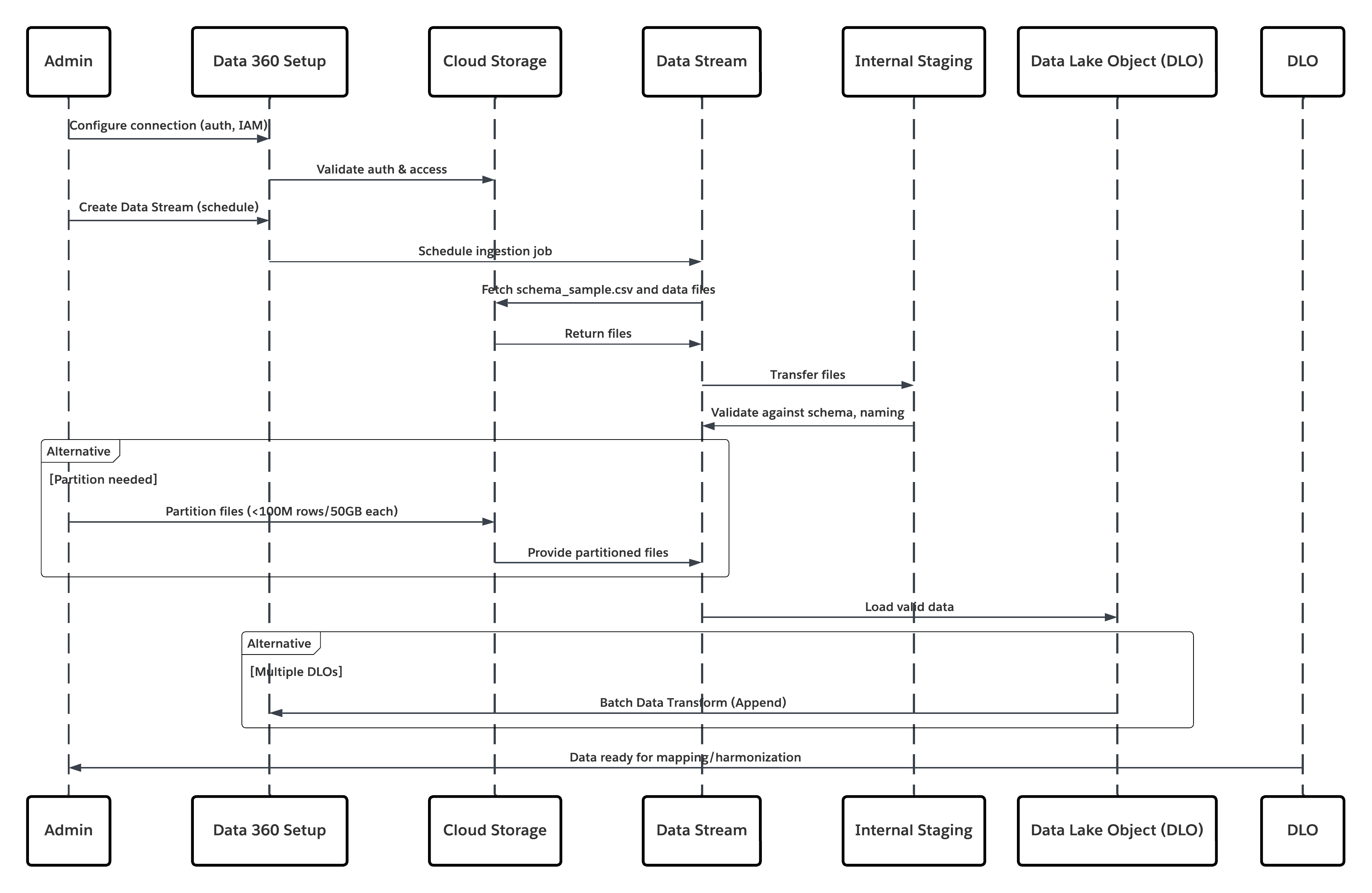
In this scenario:
- Admin configures a connection to cloud storage via the Data 360 Setup interface (specifying authentication, bucket details, IAM roles, and whitelisting).
- Data Cloud Setup interface authenticates with the Cloud Storage Platform, verifying credentials and access.
- Admin creates a data stream in Data 360, linking the data stream to the object/folder in Cloud Storage and defining the ingestion schedule.
- On schedule trigger, data stream requests source files (e.g., CSV, Parquet) from the Cloud Storage Platform.
- Cloud Storage Platform delivers files, including the required valid schema_sample.csv and other data files compliant with naming conventions.
- Data Stream transfers files to the Internal Staging Environment within Data 360.
- Data 360 Pipeline processes the files: Uses the schema definition from schema_sample.csv Validates structure, field names, and divides the load if above ingestion thresholds (100 million rows/50 GB per file). If large files are detected, a preprocessing partitioning step (notified to admin for next run) is carried out externally.
- Records are imported from staging into a data lake object (DLO).
- If required and data is partitioned, use the append node in a batch data transform to combine multiple DLOs.
- Data 360 logs success/failure, updates status for monitoring, and signals that data is ready for mapping, harmonization, and unification.
Results
The application of this pattern enables secure, scheduled, and large-scale ingestion of structured or unstructured files from enterprise cloud storage platforms into Data 360. The process is automated, scalable, and resilient — delivering raw data into data lake objects (DLOs) that serve as the foundation for harmonization and mapping to the Customer 360 Data Model.
Ingestion Mechanisms
The ingestion mechanism depends on the connector and scheduling strategy defined within Data 360.
| Ingestion Mechanism | Description |
|---|---|
| Native Cloud Storage Connector (Amazon S3, GCS, Azure) | Recommended for direct ingestion of files in CSV or Parquet format from the enterprise’s cloud data lake. These connectors support incremental and full refresh schedules. For example, a bank can configure a daily sync of customer transaction files from an S3 bucket to a DLO. |
| Partitioned File Strategy | For very large datasets (beyond 100 million rows or 50 GB per object), the data is partitioned into smaller logical sets (e.g., by month or region). Each partition is managed as a separate Data Stream and later recombined using a Batch Data Transform with an Append node. |
| Automated Scheduled Sync | Data 360 provides a declarative scheduler (hourly, daily, or custom cadence) that triggers ingestion jobs automatically, ensuring data freshness without manual intervention. |
Error Handling and Recovery
Error handling and recovery are critical to ensure reliability in high-volume ingestion operations.
- Error Detection: Each Data Stream run logs ingestion errors (e.g., schema mismatch, file corruption, or naming violations) in Data 360 Monitoring. Administrators can review and reprocess failed batches.
- Recovery Mechanism: Data 360 maintains checkpointing to ensure failed batches do not corrupt prior ingestions. Retries can be configured after correcting source issues (e.g., malformed CSVs).
- Schema Validation: The schema_sample.csv file defines data types and structure. Any change triggers validation to avoid silent schema drift across runs.
Idempotent Design Considerations
Ingestion is idempotent by design — reprocessing the same file does not result in duplicate records. Key strategies include:
- File Fingerprinting: Data 360 computes checksums to identify and skip previously processed files.
- Transactional Ingestion: Data is staged and only committed to the DLO upon successful processing of all records.
- Append vs. Replace: Depending on business logic, streams can append to or fully replace the target DLO; this ensures deterministic outcomes and prevents partial data overlap.
Security Considerations
Security is integral throughout the ingestion pipeline, from authentication to encryption and access control.
- Authentication & Authorization: Connectors use Salesforce’s Secure Integration Framework, leveraging Named Credentials and External Credentials for authentication without exposing secrets.
- Encryption: Data is encrypted in transit (TLS 1.2+) and at rest (AES-256).
- Network Controls: Source storage systems (e.g., S3 buckets) must allowlist Data 360 IPs.
- Compliance Alignment: Supports enterprise data protection frameworks such as GDPR, HIPAA, and FFIEC guidelines when paired with Customer-Managed Keys (CMK).
- Auditability: Every ingestion job and credential access is logged for traceability and compliance reporting.
Sidebars
Timeliness
Timeliness depends on the ingestion schedule and data volume.
- Large enterprise datasets (100M+ rows) may require partitioning for parallel ingestion.
- Typical ingestion latency ranges from minutes to a few hours, depending on file size and transformation complexity.
- For near-real-time ingestion, Data 360 Streaming or API-based connectors may complement the file-based model.
Data Volumes
- Best suited for high-volume, periodic batch ingestion.
- Each object processed through the S3 connector supports up to 100 million rows or 50 GB per file.
- For petabyte-scale systems, use data partitioning and multi-stream orchestration.
Endpoint Capability and Standards Support
The capability and standard support for the endpoint depends on the solution that you choose.
| Connector Type | Endpoint Requirements |
|---|---|
| Amazon S3 Connector | S3 bucket with appropriate IAM policy and schema\_sample.csv file defining the schema. |
| Google Cloud Storage Connector | Service account credentials and bucket access with uniform naming conventions. |
| Azure Storage Connector | Access key or SAS token–based authentication; blob or folder structure must follow Data 360 conventions. |
State Management
State is tracked through Data Streams and their last successful run timestamp.
- Data 360 automatically maintains sync states and offsets, ensuring only new or modified files are processed on subsequent runs.
- When integrating with external ETL tools, unique file identifiers (e.g., UUIDs or timestamps) are recommended to avoid duplication.
Complex Integration Scenarios
In advanced enterprise architectures, this pattern can integrate with:
- Middleware ETL Pipelines (e.g., Informatica, MuleSoft): to orchestrate pre-processing, validation, and file partitioning before handoff to Data 360.
- AI/ML Workflows: processed DLO data can be published via DMO to model training environments or RAG indexes through Data 360 Activation Targets.
- Transactional Systems: harmonized DMOs can trigger downstream updates in Salesforce CRM or external systems via Data Actions or Platform Events.
Example
A global financial institution stores customer and transaction data in an AWS S3 data lake, where partitioned Parquet files are generated nightly by region (such as US, EU, and APAC). The data architecture team configures multiple Data Streams in Data 360, each connected to a regional folder, with a shared schema_sample.csv ensuring consistent headers and data types across all partitions. Nightly ingestion schedules automatically load the data into DLOs, after which Batch Data Transforms append all regional partitions into a unified Customer_Transactions_DLO. This harmonized dataset is then mapped to the Customer 360 Data Model, enabling downstream analytics and AI activation. The approach delivers automated and reliable ingestion from the existing data lake, enforces strong authentication and encryption aligned with enterprise IT policies, and provides a scalable, modular foundation that supports future expansion and schema evolution.
Context
A primary and critical use case for Data 360 is unifying customer data across the Salesforce ecosystem. This pattern covers natively ingesting data from core Salesforce platforms — Sales Cloud and Service Cloud (collectively Salesforce CRM) and Marketing Cloud Engagement. Sources include standard and custom CRM objects (e.g., Account, Contact, Case, Opportunity) and Marketing Cloud Engagement data extensions that hold engagement events, email sends, and tracking data.
Problem
How can an organization efficiently and reliably ingest standard and custom CRM objects and Marketing Cloud Engagement data extensions into Data 360 so the data can be used to build unified customer profiles (identity resolution, Customer 360), while maintaining performance, governance, and minimal disruption to source systems?
Forces
Native connectors simplify the job, but several operational and architectural forces must be managed:
- Comprehensive Source Permissions: A dedicated connecting user (integration account) must have appropriate object- and field-level read permissions. Failure to assign required permission sets (for example, a pre-built Data 360 connector permission set) is a common cause of ingestion failure.
- Data Refresh Modes & Cost: Connectors support full and delta/incremental refresh modes. Full refreshes are heavier on performance and credits; delta extracts reduce load but depend on reliable change-tracking in the source system.
- Custom Schema & Field Mapping: CRM instances often include custom objects/fields. Accurate schema mapping and handling of custom fields (names, types) is required to avoid mapping errors or semantic drift.
- Starter Data Bundles vs. Custom Mapping: Starter Data Bundles accelerate onboarding by pre-selecting typical objects/fields, but heavily customized orgs will need bespoke stream definitions.
- Throughput & API Limits: Source org API limits and Marketing Cloud extract rates constrain how aggressively you can schedule refreshes.
- Data Hygiene & Naming Conventions: Source field names, null behavior, and data types must be normalized before ingestion to prevent downstream mapping issues.
- Security & Least Privilege: The connector relies on secure authentication and must respect least-privilege IAM patterns, auditability, and network controls.
Solution
This table contains solutions to this integration problem.
| Solution Area | Fit | Comments / Implementation Details |
|---|---|---|
| Solution Fit | Best | Use the native Salesforce CRM Connector and Marketing Cloud Engagement Connector in Data 360\. Start with Starter Data Bundles for standard use cases and accelerate onboarding. Use manual stream customization for bespoke or domain-specific data models. |
| Handling Highly Customized CRM Instances | Best with Mapping Workshop | Treat Starter Bundles as a baseline and conduct a mapping workshop to identify: Custom objects and relationships. Formula or computed fields. Managed package extensions. For heavy formula fields, compute values in a pre-stage ETL or inside Data 360 Transforms to minimize API load on source orgs. |
| When Not to Use | Suboptimal Scenarios | Avoid this pattern if: You need high-frequency or real-time event ingestion (instead, use Streaming Connectors, Platform Events, or Zero-Copy Federation). The source org has limited API capacity and cannot sustain scheduled extracts without throttling or queue delays. |
| Security & Governance | Mandatory Controls | Principle of Least Privilege - Use a dedicated integration user with minimal read access. Never use org-wide admins. Authentication — Use OAuth 2.0 and connected apps; rotate client secrets regularly and monitor refresh token usage. Audit & Traceability — Log all ingestion runs, schema changes, and connector events. Forward logs to SIEM or compliance systems for audit readiness. Data Classification — Apply PII/PHI tagging and Attribute-Based Access Control (ABAC) using CEDAR policies immediately post-ingestion to enforce masking, consent, and downstream compliance. |
Sketch
This diagram illustrates sequence of Steps to ingest the data from cloud storage into Data 360
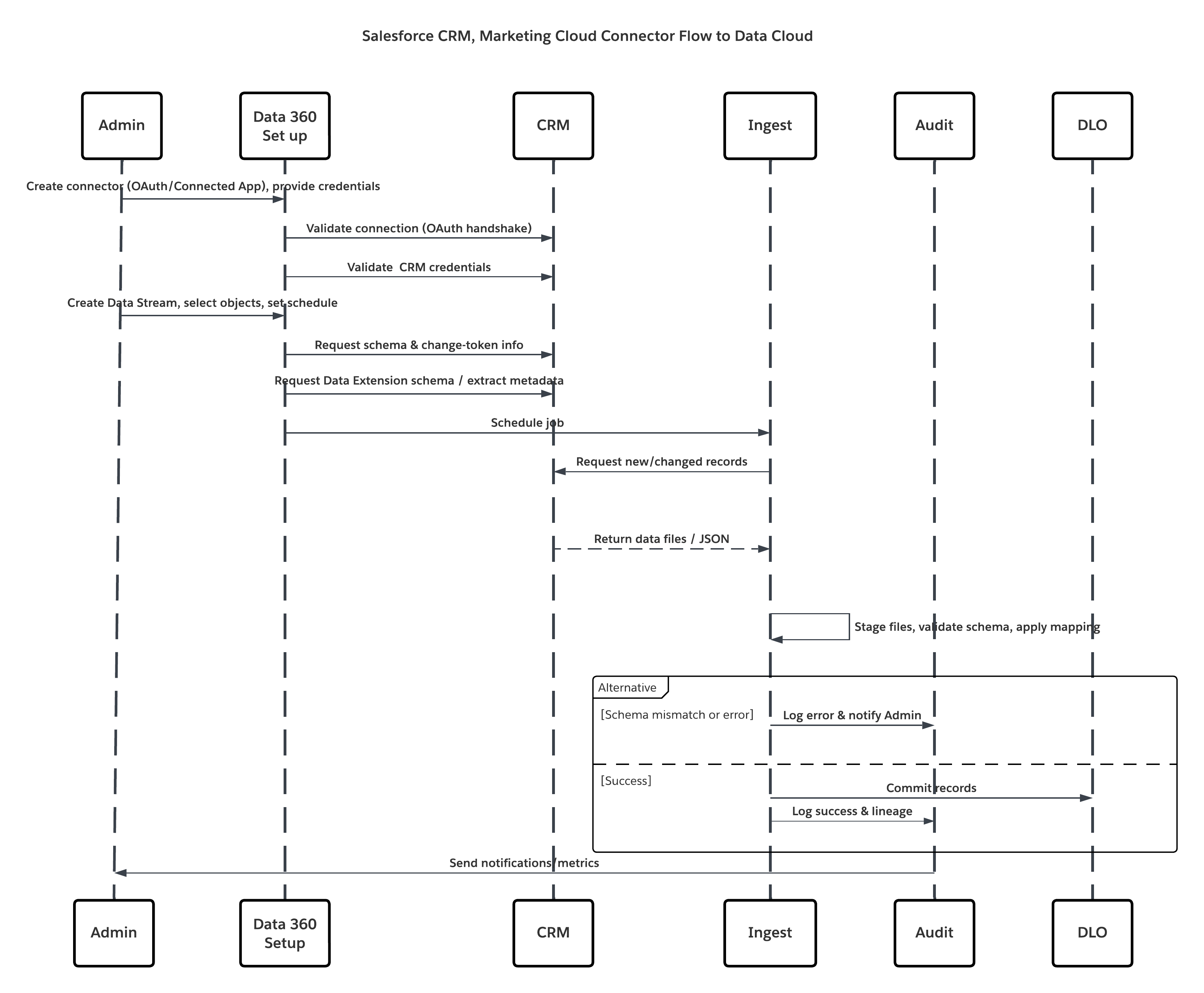
In this scenario:
- Admin provisions integration users and assigns connector permission sets in source org(s).
- Admin configures connectors in Data 360 Setup (connects to Salesforce CRM and Marketing Cloud via OAuth/connected app).
- Admin creates Data Streams selecting objects and Data Extensions, chooses full or delta refresh, and sets schedules.
- On scheduled run, Data 360 requests schema and delta tokens from the source(s).
- Source systems return records (delta or full payload). Marketing Cloud may deliver extracts; CRM may return JSON/Query results.
- Data 360 stages files in its internal secure staging area and validates against mapped schema.
- If validation fails, ingestion logs error, alerts admin, and halts commit. If validation succeeds, Data 360 commits records atomically to the target DLO.
- Monitoring & audit logs are updated with lineage, run duration, row counts, and credential usage. Alerts issued to admins if thresholds or errors triggered.
Results
Core customer relationship and marketing engagement data are ingested into Data 360 as Data Lake Objects (DLOs). This yields:
- Unified dataset containing profiles, cases, opportunities, and email/engagement metrics.
- Foundation for identity resolution and construction of Unified Individual Profiles.
- Operational readiness for downstream harmonization, enrichment, AI modeling, and activation while preserving governance and auditability.
Ingestion Mechanisms
The ingestion mechanism depends on the connector and scheduling strategy defined within Data 360.
| Mechanism | When to use |
|---|---|
| Salesforce CRM Connector (native) | Best for standard/custom CRM objects; supports full and delta refresh. |
| Marketing Cloud Engagement Connector (native) | Best for Data Extensions, sends, and tracking extracts; supports full/delta modes. |
| Starter Data Bundles | Accelerate onboarding for common Sales/Service/Marketing objects. |
| Custom Streams + Preprocessing | Use when complex transforms or heavy schema normalization is required. |
Error Handling and Recovery
Error handling and recovery are critical to ensure reliability in high-volume ingestion operations.
- Per-run Logs: Each Data Stream run provides success/failure details and row-level errors.
- Retries & Checkpointing: Failed runs can be retried after fixing source or schema issues; Data 360 uses staging and atomic commit semantics.
- Alerts: Configure alerts for schema drift, repeated failures, or delta-sequence gaps.
Idempotent Design Considerations
Ingestion is idempotent by design — reprocessing the same does not result in duplicate records. Key strategies include:
- Change Detection: Delta extracts rely on source system change indicators (LastModifiedDate / system change data capture). Verify the source provides reliable timestamps/flags.
- Deduplication: Use unique business keys (e.g., Contact.ExternalId) to dedupe or upsert into DLOs.
- Transactional Commit: Records are staged and only committed when batch processing completes successfully.
Security Considerations
Security is integral throughout the ingestion pipeline, from authentication to encryption and access control.
- Authentication & Authorization: Connectors use Salesforce’s Secure Integration Framework, leveraging Named Credentials and External Credentials for authentication without exposing secrets.
- Encryption: Data is encrypted in transit (TLS 1.2+) and at rest (AES-256).
- Network Controls: Source storage systems (e.g., S3 buckets) must allowlist Data 360 IPs.
- Compliance Alignment: Supports enterprise data protection frameworks such as GDPR, HIPAA, and FFIEC guidelines when paired with Customer-Managed Keys (CMK).
- Auditability: Every ingestion job and credential access is logged for traceability and compliance reporting
Sidebars
Timeliness
Timeliness depends on the ingestion schedule and data volume.
- Ideal cadence depends on business need — hourly for near-real-time marketing triggers, nightly for large reconciliations.
- Delta modes reduce load and cost; full refreshes are heavier and used for initial loads or major schema changes.
Data Volumes
- CRM connectors are optimized for transactional and mid-volume datasets (millions of records).
- For extremely large historical volumes, consider staged ETL to partition and load in stages.
Endpoint Capability and Standards Support
The capability and standard support for the endpoint depends on the solution that you choose.
| Connector | Endpoint Requirements |
|---|---|
| Salesforce CRM Connector | Source org must permit a Connected App, OAuth tokens, and a dedicated integration user with read permissions. |
| Marketing Cloud Connector | Marketing Cloud API credentials or installed package; Data Extensions must expose data via Extracts/API. |
State Management
- Connector State: Data Streams maintain last successful sync timestamps and delta offsets.
- Master Key Strategy: Prefer consistent business identifiers (external IDs) so downstream reconciliation and upserts are deterministic.
Complex Integration Scenarios
In advanced enterprise architectures, this pattern can integrate with:
- Hybrid Topologies: Combine CRM ingestion with streaming (Platform Events) for near-real-time updates.
- Middleware Orchestration: Use MuleSoft or ETL tools when complex orchestration, enrichment, or transformation pre-ingestion is required.
- Activation Feedback Loops: Harmonized DMOs can trigger downstream updates to source systems via Data Actions or platform APIs (careful with SoD controls).
Example
A multinational retailer consolidates Accounts, Contacts, Cases, Opportunities, and Marketing Cloud engagement metrics into Data 360 to create a unified customer view. The Starter Data Bundle initializes core Sales and Service objects, while the team extends the model with custom fields such as Loyalty_Membership__c and Customer_Tier__c to capture loyalty context. CRM Data Streams run hourly in delta mode, and Marketing Cloud Engagement syncs daily using delta extracts for engagement events. These datasets are processed through DLOs and identity resolution, resulting in a unified customer profile that combines CRM and engagement signals to power personalization and downstream AI models.
These patterns are built for scenarios where milliseconds matter — when customer interactions, transactions, or signals must trigger immediate insight or action. They go beyond traditional, scheduled batch ingestion to enable event-driven data flow, where information is processed the moment it’s generated. In the Salesforce Data 360 ecosystem, “real-time” isn’t a single mode — it’s a continuum of latency models. On one end lies near-real-time synchronization, where updates from systems of record (like CRM or ERP) are reflected in the Data 360 within seconds or minutes. On the other end is true real-time event capture, where client-side behavioral signals — such as clicks, purchases, or mobile interactions — are ingested and activated in milliseconds. For architects, the distinction is more than semantic. It defines how pipelines are designed, how APIs are invoked, and how downstream decisions are made. Selecting the right pattern — whether near-real-time sync or event-streaming ingestion — ensures the system meets the business’s operational latency targets while maintaining data integrity, scalability, and governance.
Context
This pattern enables any external system — such as a custom application, an Internet-of-Things (IoT) platform, a point-of-sale (POS) system, or a third-party service — to programmatically push event data into Data 360 in near-real-time as discrete events occur.
Problem
How can a developer reliably send single records or small asynchronous batches of events from an external application to Data 360 with low latency so the data is available quickly for processing, segmentation, and activation?
Forces
This pattern delivers low latency and better developer control but introduces several technical constraints and operational dependencies:
- Developer Dependency: Requires developer effort to implement authenticated REST API clients and error/retry logic — it is not a point-and-click connector.
- Strict Schema-on-Write: The Ingestion API enforces schema-on-write. A precise schema must be defined and uploaded to the connector configuration; all payloads must conform exactly or be rejected.
- Dual Interaction Modes: Same connector supports both streaming (JSON) for low-latency, record-by-record updates and bulk (CSV) for larger periodic syncs — architects must choose per use case.
- Authentication & Security: Calls must be authenticated via a Salesforce Connected App using OAuth 2.0 (e.g., JWT Bearer Flow for server-to-server). Token management, rotation, and least-privilege scopes are mandatory.
- Operational Visibility: Developers and platform teams must implement monitoring for response codes, retries, dead-letter queues, and schema drift alerts.
- Real-time Graph Requirement: For true instant activation (instant segmentation, real-time DMO mapping), the target Data Model Object (DMO) must be part of the real-time data graph; otherwise events traverse a slightly higher-latency pipeline.
Solution
This table contains solutions to this integration problem.
| Solution Area | Fit | Comments / Implementation Details |
|---|---|---|
| Solution Fit | Best for low-latency event capture | Use the Data 360 Ingestion API (streaming JSON) for pushing single events or micro-batches. Configure the Ingestion API connector with a strict OAS 3.0 schema (.yaml). Use bulk CSV ingest for larger, less frequent syncs. |
| Handling Schema Changes | Strict / Managed | Schema changes are breaking: update OAS .yaml, version the connector, and perform contract testing. Implement rolling schema migration if producers cannot change simultaneously. |
| When Not to Use | Suboptimal | Not ideal if preprocessing is needed ( ex:deduplication, guaranteed order etc.) , or for extremely large bulk loads (use native bulk connectors or batch ETL). If the source cannot produce schema-valid payloads or cannot authenticate securely, use alternative ingestion methods. |
| Security & Governance | Mandatory | Use OAuth 2.0 with least-privilege scopes, rotate keys, log token usage. Enforce TLS 1.2+, validate client IPs if required, and ensure payload PII tagging. All events must carry provenance metadata (source, timestamp, schema version, idempotency key). |
Sketch
This diagram illustrates sequence of Steps to ingest the data from Ingestion API into Data 360
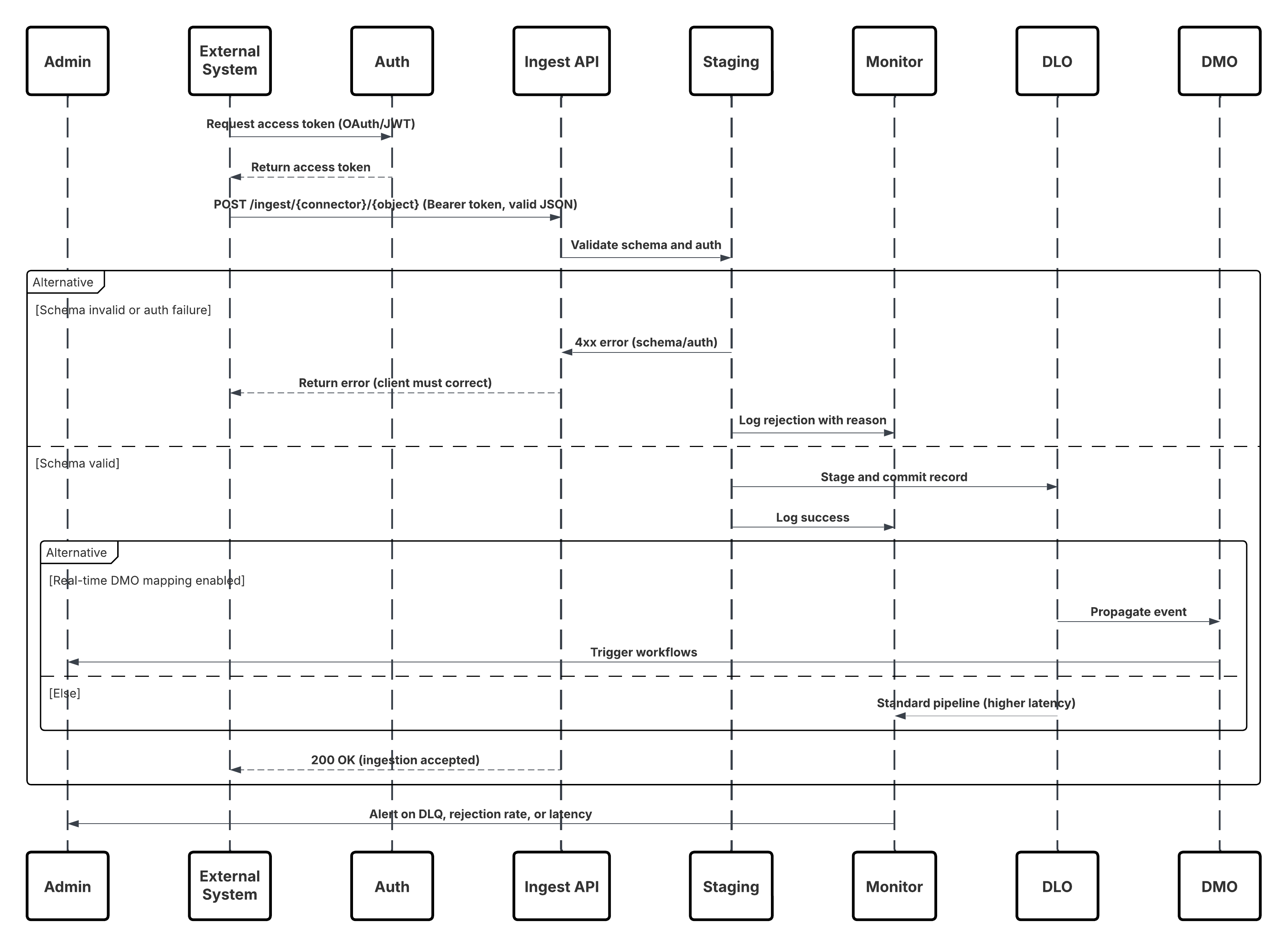
In this scenario:
- External System requests authentication via OAuth/JWT from Auth Server.
- Auth Server returns access token to External System.
- External System sends data ingestion POST request to Data 360 Ingestion API with authorization and JSON payload.
- Ingestion API validates request schema and authentication via Staging & Validation module.
- On schema/authentication failure:
- Error returned to External System.
- Rejection logged for monitoring and alerting.
- On successful validation:
- Records staged and committed into Data Lake Object (DLO).
- Success logged for monitoring.
- If enabled, data propagated to Real-Time Data Graph (DMO) triggering downstream workflows.
- Otherwise, data processed via standard batch or higher-latency pipeline.
- Ingestion API confirms success to External System.
- Monitoring components alert Admin on dead-letter queues, rejection rates, or latency issues.
Results
External event data is ingested into Data 360 DLOs with low latency. When the target DMO is part of the real-time graph, the data is available for instant segmentation, agent workflows, AI models, and operational activation. This enables rapid business responses to events originating from any connected system.
Ingestion Mechanisms
The ingestion mechanism depends on the connector and scheduling strategy defined within Data 360.
| Mechanism | When to use |
|---|---|
| Streaming JSON (Ingestion API) | Single events, micro-batches, behavioral events, clickstreams, IoT telemetry — when low latency is required. |
| Bulk CSV (Ingestion API bulk mode) | Larger, periodic uploads where latency requirements are relaxed. |
| Edge / Middleware | Use when you need validation, transformation, enrichment, or rate-limiting before pushing to the Ingestion API. |
Error Handling and Recovery
- Immediate (sync) errors: 4xx responses for schema/auth errors — client must fix payload or token and retry.
- Transient (async) failures: 5xx responses — client retries with exponential backoff and jitter.
- Dead-Letter Queue (DLQ): Persistent failures land in DLQ for manual inspection and replay.
- Monitoring: Track schema rejection rate, authentication failures, latency percentiles, and DLQ backlog. Alert on thresholds.
Idempotent Design Considerations
- Idempotency Key: Every event should include a unique idempotency key/message ID.
- Upsert Strategy: Use business keys (ExternalId) to avoid duplicates on replays.
- Dedup Window: Architect should define deduplication windows and retention for idempotency tracking.
Security Considerations
Security is integral throughout the ingestion pipeline, from authentication to encryption and access control.
- Authentication: OAuth 2.0 (JWT Bearer) recommended for server-to-server. Limit scopes to only ingestion.
- Encryption: TLS 1.2+ for transport; Data 360 enforces encryption at rest.
- Least Privilege: Connected App credentials have minimal rights; rotate secrets and instrument access logs.
- Payload Governance: Include consent/consumption flags in event metadata; apply ABAC/CEDAR policies immediately after ingestion.
- IP Controls / Private Connect: Where required, restrict access via allowlists or use Private Connect for private networking.
Sidebars
Timeliness
Timeliness depends on the ingestion schedule and data volume. Streaming JSON yields sub-second to second latency depending on processing and graph configuration. Bulk CSV is minutes to hours. Choose based on business SLAs.
Data Volumes
Individual event sizes should be small (< few KB). For high-throughput producers, consider batching at the producer or using a streaming buffer (Kafka/Kinesis) before calling the API.
State Management
- Schema Versioning: Maintain schema version in event metadata and use connector versioning when updating OAS contract.
- Connector Offsets: Data 360 handles commit semantics; producers should track idempotency keys and last successful sequence for safe replay.
Complex Integration Scenarios
In advanced enterprise architectures, this pattern can integrate with:
- Edge Validation Layer: Use middleware to translate heterogeneous producer formats to the required OAS contract, perform rate limiting, and pre-enrichment.
- Hybrid Architectures: Combine ingestion API for events and Connectors for bulk reconciliation.
- Agent Activation: Events mapped into real-time DMOs can trigger Agentforce workflows and Einstein models for automated decisioning.
Example
A retail chain streams point-of-sale (POS) purchase events into Data 360 inReal-Time to power immediate customer engagement. Each store runs a lightweight server component that collects transactions, enriches them with location and device metadata, and securely posts JSON events using JWT Bearer OAuth with idempotency keys to prevent duplicates. An admin defines the event structure by uploading an OAS schema for point ofsale and configuring the Ingestion API connector. Incoming events are ingested into the pos_sale DLO, mapped to the Sale DMO, and added to the real-time graph. As a result, high-value purchases are detected instantly, triggering VIP workflows in Agentforce and updating customer segmentation to drive real-time personalization.
Context
This pattern enables the capture of high-volume, granular user interaction data—such as page views, button clicks, product impressions, and video plays—from websites and mobile applications in trueReal-Time. It is foundational for delivering in-the-moment personalization, where every digital interaction can dynamically influence the user experience and drive engagement.
Problem
How can an enterprise capture and process a continuous stream of behavioral events from digital properties—spanning millions of user interactions per minute—and make that data immediately available in Data 360 to power real-time segmentation, personalization, and activation?
Forces
This use case introduces several design challenges that require a purpose-built, low-latency ingestion architecture:
- Extreme Throughput : High-traffic websites or mobile apps can emit millions of events per minute. The ingestion layer must scale horizontally to handle this volume without event loss or backpressure, ensuring consistent latency under peak loads.
- Client-Side Instrumentation : Unlike server-driven integrations, this pattern depends on client-side SDKs. A JavaScript beacon (Salesforce Interactions SDK) must be embedded in each page, or a native SDK integrated into mobile apps. This requires robust client deployment, versioning, and event schema governance.
- Low-Latency Event Processing : User actions—such as “add-to-cart” or “video play”—must reach Data 360 within seconds, enabling real-time activation and contextual responses (e.g., targeted offers, personalized recommendations).
- Data Harmonization & Identity Resolution : Captured events often include anonymous identifiers (cookies, device IDs, session tokens). To power Customer 360 use cases, these must be mapped to known profiles via Data 360’s identity resolution and harmonized to the Customer 360 Data Model.
Solution
The recommended approach is to use the Salesforce Marketing Cloud Personalization Connector — a native, fully managed streaming pipeline designed for high-throughput behavioral ingestion.
| Solution Area | Fit | Comments / Implementation Details |
|---|---|---|
| SDK-based Event Capture | Best | Deploy the Salesforce Interactions SDK (web) or native SDK (mobile). These lightweight libraries capture and serialize user interactions inReal-Time, attaching metadata (session ID, timestamp, context). |
| Event Streaming Pipeline | Best | Events are sent to Marketing Cloud Personalization’s event streaming service over secure HTTPS. This layer is horizontally scalable and optimized for low-latency transmission (<2s). |
| Data 360 Integration | Best | Data 360’s Personalization Connector subscribes to the streaming feed, ingesting each event into a Data Lake Object (DLO) in nearReal-Time. |
| Data Model Mapping | Best Practice | The ingested DLO is mapped to Customer 360 Data Model Objects (DMOs). This enables linking anonymous and known users through Identity Resolution. |
| Real-Time Graph Enablement | Optional / Recommended | Include mapped DMOs in the real-time graph for instant segmentation, triggering personalized actions via Einstein or Agentforce workflows. |
| When Not to use | Suboptimal | This pattern is not ideal when: The source data is web client and events (use the Ingestion API instead). The organization lacks control over web/mobile clients. Real-time behavior tracking is not required (use batch ingestion). |
| Handling the schema Changes | Managed Evolution | Event schemas evolve as new interactions are added. SDKs should version event definitions. Backward-compatible changes (adding optional fields) are safe; breaking changes require connector reconfiguration and contract testing. |
Sketch
This diagram illustrates sequence of Steps to ingest the data from Mobile and web channels into Data 360
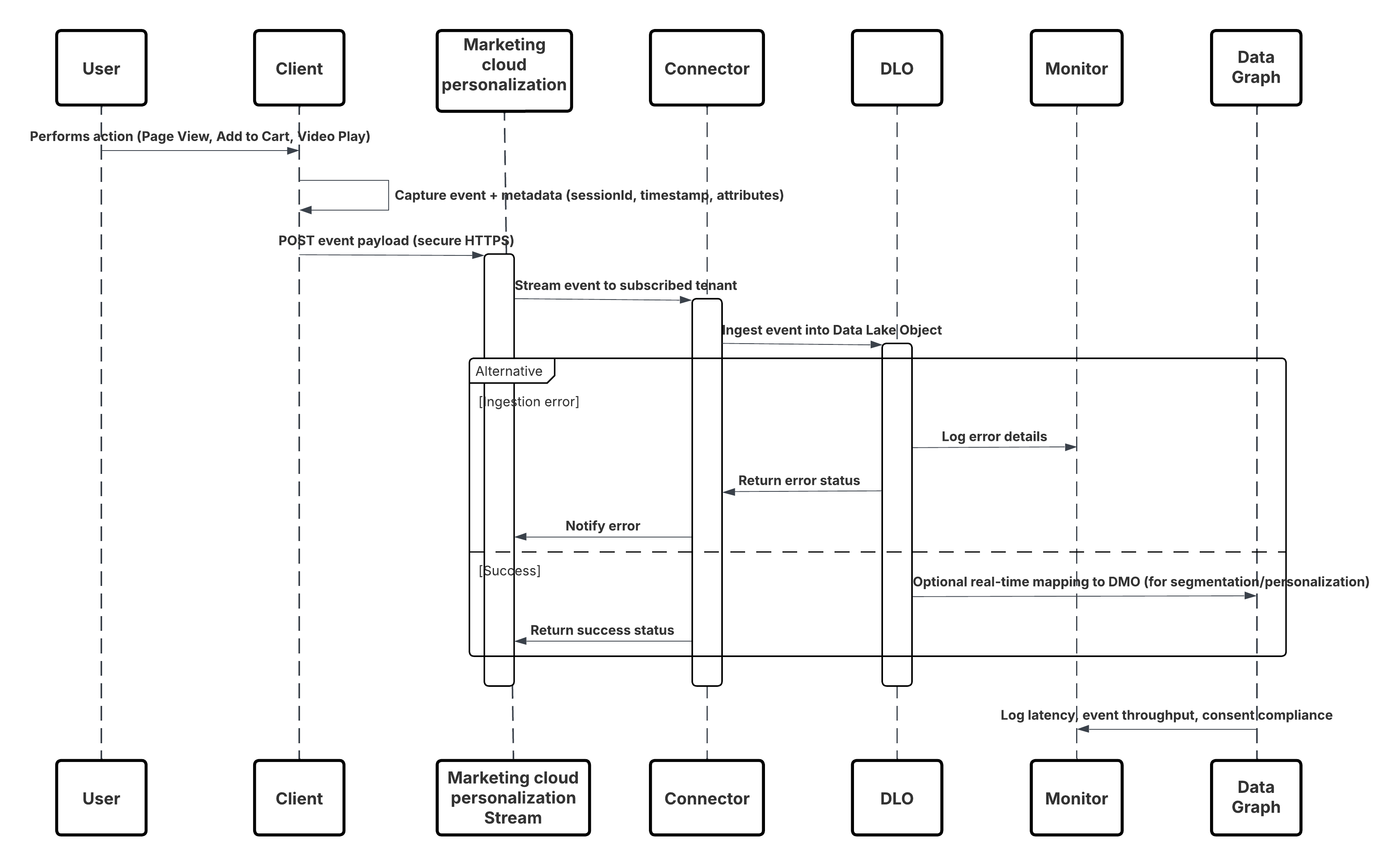
In this scenario:
- Deploy the SDK in web or mobile channels (user-interaction capture).
- Configure SDK with tenant ID, environment, and consent controls.
- Stream captured JSON events (metadata + attributes) to Marketing Cloud streaming endpoint.
- In Data 360 Setup, create & configure the Personalization Connector for the tenant.
- Ingest events into a DLO and map the DLO → DMO inside Data 360.
- Enable the DMO in the real-time graph for immediate activation.
- Monitor latency, schema conformance, consent flags, throughput, error rates.
- Deploy to production and continually monitor.
Results
A continuous, low-latency stream of behavioral events flows from digital channels into Data 360. Within seconds, each user action becomes available for real-time segmentation, predictive modeling, or triggered personalization, enabling truly adaptive customer experiences.
Ingestion Mechanisms
The ingestion mechanism depends on the connector and scheduling strategy defined within Data 360.
| Mechanism | When to Use |
|---|---|
| Interactions SDK (Web) | Real-time capture from web browsers and SPAs. |
| Mobile SDK | Real-time capture from native mobile applications. |
| Personalization Connector | Managed subscription between Marketing Cloud and Data 360\. |
| Real-Time Graph Mapping | Enables immediate activation in Segmentation, Einstein, and Journeys. |
Error Handling and Recovery
- Layered Fault Tolerance: Implement multi-tier validation and retry mechanisms — client SDKs handle transient failures with exponential backoff, while the ingestion layer uses durable queues and replayable pipelines to prevent data loss.
- Schema & Data Governance: Version and validate event schemas continuously; invalid or evolving events are routed to a Schema Rejection or Dead-Letter Queue for safe triage and replay.
- Idempotency & Deduplication: Use stable event identifiers and upsert semantics to guarantee exact-once processing even during retries or replays.
- Monitoring & Recovery Automation: Continuous monitoring of throughput, latency, and error rates triggers automated recovery workflows — ensuring low latency, reliable delivery, and consistent real-time personalization outcomes.
Idempotent Design Considerations
- Every event must carry a unique idempotency key or message ID so duplicate submissions can be deduplicated downstream.
- Use business keys (e.g., sessionID + eventTimestamp + userID) where appropriate to identify duplicates.
- Define a deduplication window (e.g., 24 hours) during which duplicate events are ignored or filtered.
- Use upsert strategies where appropriate (e.g., update counters or flags rather than insert duplicates).
Security Considerations
Security is integral throughout the ingestion pipeline, from authentication to encryption and access control.
- Transport encryption: TLS 1.2+ for all SDK → streaming service connections.
- Data encryption at rest in Data 360 and marketing stream.
- SDK respects user consent flags (GDPR/CCPA) and suppresses tracking if consent is denied.
- Authentication of SDK traffic: ensure only approved tenants/clients can stream events.
- Metadata: each event must include source ID, timestamp, schema version, session ID, idempotency key.
- Least-privilege access: SDK endpoints and connectors limited to event ingestion scope; rotate credentials regularly.
- Data classification: Annotate PII in event payloads, enforce policies immediately post-ingestion
Sidebars
Timeliness
- Timeliness depends on end-user activity and the event streaming configuration.
- Events captured via the Salesforce Interactions SDK and delivered through the Marketing Cloud Personalization Stream typically achieve sub-second to ~2-second latency before becoming available in the Data 360 Real-Time Graph.
- This enables near-instant segmentation, personalization, and activation within active user sessions.
Data Volumes
Individual behavioral events (e.g., click, view, add-to-cart) are lightweight — generally 1–5 KB per payload. For large-scale digital properties, expect thousands to millions of events per minute. To ensure throughput and resilience:
- Use the SDK’s built-in batching and retry mechanisms for high-traffic pages.
- Offload burst handling to the Marketing Cloud streaming buffer layer.
- Monitor ingestion throughput and error ratios using the connector metrics dashboard.
State Management
Each event includes metadata for state and version control:
- Schema Versioning: Embed schema version in every event; version the Personalization Connector when updating the schema.
- Replay Handling: Events that fail due to transient network issues are retried automatically by the SDK with exponential backoff.
- Idempotency Keys: Unique identifiers (sessionId + eventType + timestamp) ensure replayed events do not create duplicates in Data 360.
- Offset Management: Data 360 tracks successful commits; any unprocessed events are re-queued by the connector until successfully ingested.
Complex Integration Scenarios
This pattern integrates seamlessly into advanced enterprise architectures:
- Edge Enrichment Layer: Add middleware (e.g., reverse proxy or serverless function) to inject additional context — such as geo, device type, or campaign metadata — before events reach Marketing Cloud.
- Hybrid(Streaming + Batch): Use the Marketing Cloud connector for real-time streams and combine it with batch ETL jobs (e.g., order data) for downstream reconciliation.
- Agent Activation: Events mapped to real-time DMOs can trigger Einstein Personalization, Agentforce workflows, or AI-driven decisioning to adapt the digital experience in the moment.
- Multi-Tenant Governance: Use consent flags and tenant-aware metadata to enforce privacy and compliance in multi-brand or multi-region environments.
Example
A global e-commerce company delivers personalized product recommendations and dynamic content to shoppers while they are actively browsing www.retailx.com, a React-based single-page application. Using the Salesforce Interactions SDK on the client side, the site captures page views, product clicks, cart actions, and video interactions inReal-Time. These events flow through the Marketing Cloud Personalization event stream and the Personalization connector into Data 360 DLOs, where they are modeled into DMOs and incorporated into the real-time graph. This architecture makes behavioral signals instantly available for segmentation, Einstein-driven personalization, and Agentforce activation, enabling responsive, in-session customer experiences
Context
For many business-critical processes, keeping Data 360 perfectly aligned with the latest updates in core CRM systems is essential. Customer service, sales, and marketing teams depend on up-to-date information to drive decisions, trigger journeys, and activate automation. This pattern provides a mechanism to synchronize changes to key Salesforce CRM objects—such as Contact, Account, and Case—into Data 360 with minimal delay, without the inefficiency or latency of frequent batch polling.
Problem
How can Data 360 maintain a near-perfectly synchronized state with key Salesforce CRM objects, ensuring that downstream analytics, segmentation, and AI-driven activation always operate on the most current data available?
Forces
This pattern introduces several technical constraints and architectural considerations:
- Event-Driven Architecture : Synchronization must be reactive—driven by change events in the CRM source org rather than periodic batch jobs.
- Selective Object Support : Not all Salesforce standard and custom objects support real-time streaming. Architects must reference the supported object list during design to avoid gaps.
- Access and Permissions : Enabling streaming requires that the integration user in the source org be assigned the “Enable Permissions for CRM Streaming” system permission.
- Data Freshness vs. Processing Cost : While near-real-time sync improves responsiveness, excessive event throughput may require horizontal scaling and robust error recovery mechanisms.
- Security and Trust Layer Integration : All event data must comply with Salesforce’s Trust and Security frameworks—encrypted in transit, validated for schema compliance, and processed within the organization’s trust boundary.
Solution
The recommended approach is to use the Salesforce CRM Connector with Streaming (Change Data Capture) enabled. When creating a data stream for a supported CRM object (e.g., Contact), administrators can toggle the “Enable Streaming” option. Under the hood, Salesforce’s Change Data Capture (CDC) platform publishes a ChangeEvent message every time a record is created, updated, deleted, or undeleted in the source CRM org. The Data 360 CRM Connector subscribes to these CDC events and applies the corresponding changes to the mapped Data Lake Object (DLO) within Data 360 in near-real time. This ensures continuous synchronization between CRM and Data 360 with minimal manual intervention.
| Solution Area | Fit | Comments / Implementation Details |
|---|---|---|
| CDC-based Streaming Connector | Best | Native Salesforce mechanism; fully managed and integrated with platform event infrastructure. |
| Event Subscription & Delivery | Best | Connector subscribes to ChangeEvent channels (e.g., /data/ContactChangeEvent) via durable replay IDs. |
| Data Mapping & Schema Evolution | Best Practice | Map streamed payloads to the corresponding DLO; handle schema versioning in metadata to prevent ingestion breaks. |
| Replay & Fault Recovery | Recommended | Utilize replay IDs and idempotency keys to avoid duplication and recover from transient errors. |
| Hybrid Mode (Streaming + Batch) | Optional | For unsupported objects or initial bulk load, use batch ingestion in combination with CDC streaming. |
| When Not to Use | Suboptimal | This pattern may be suboptimal when: The source object is not CDC-enabled. The use case does not require real-time updates (batch is sufficient). Network egress from the source org is restricted or event limits are exceeded. |
Sketch
This diagram illustrates sequence of Steps to ingest the data from CRM into Data 360 in nearReal-Time
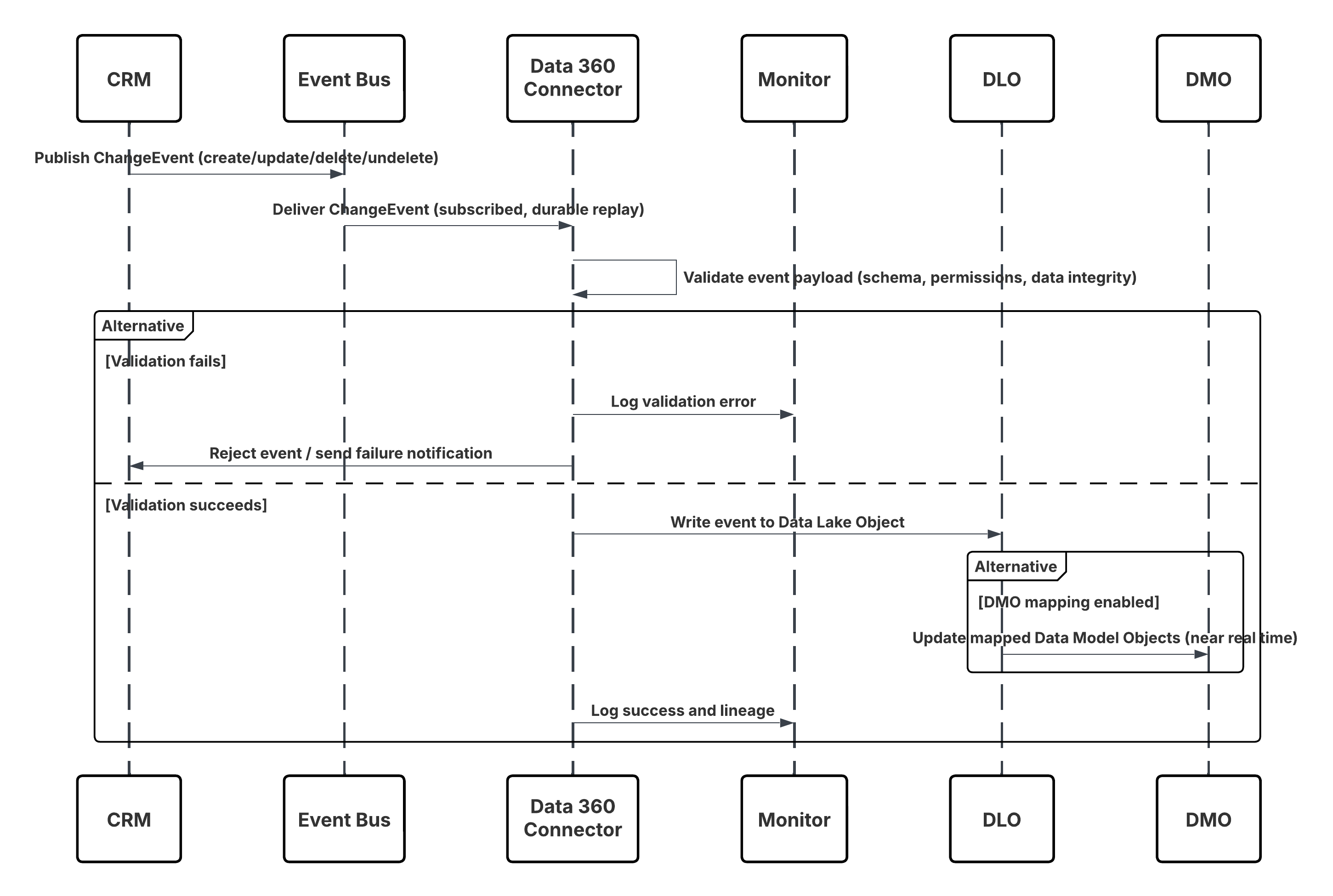
In this scenario:
- Change occurs in Salesforce CRM (create/update/delete/undelete).
- CDC publishes a ChangeEvent to the internal Salesforce Event Bus.
- Data 360 CRM Connector subscribes to the Event Bus using a durable replay cursor.
- Event payload is validated for schema, permissions, and data integrity.
- Data 360 writes the validated event into the mapped Data Lake Object (DLO).
- If enabled, mapped Data Model Objects (DMOs) are updated in nearReal-Time, powering segmentation and activation.
Results
Data 360 maintains a continuously synchronized mirror of key CRM data. This enables:
- Real-time triggers (e.g., Journey launches when a Case is created).
- Up-to-date segmentation (e.g., move customers to the “Gold” segment upon Account status change).
- More accurate analytics and personalization based on live CRM context.
Ingestion Mechanisms
The ingestion mechanism for this pattern is natively managed through the Salesforce CRM Connector with Change Data Capture (CDC) enabled. Data 360 acts as a subscriber to the CDC event stream, ensuring reliable, low-latency synchronization between the source CRM org and Data 360.
| Mechanism | When to Use |
|---|---|
| Streaming via CDC (Preferred) | For all supported Salesforce standard and custom objects where near-real-time synchronization is required. |
| Hybrid Mode (CDC + Batch) | For objects not yet CDC-enabled, or where initial historical load is required. |
| Replay Subscription Mode | For resynchronization after downtime or deployment. |
| Error Isolation Mode | For testing and validation environments. |
Error Handling and Recovery
- Automatic Fault Recovery: The CRM Connector automatically retries transient network or platform errors using exponential backoff and routes persistent failures to the Dead-Letter Queue (DLQ) for replay.
- Schema & Auth Resilience: Schema mismatches are quarantined in the Schema Rejection Queue for admin review, while authentication or permission errors trigger controlled retries and alerting through Data 360 Monitoring.
- Guaranteed Event Continuity: Durable ReplayIDs ensure no event loss during connector downtime; missed events are rehydrated through replay windows or batch re-sync jobs.
- Data Integrity & Ordering: Built-in idempotency (RecordID + SequenceNumber) prevents duplicates, and ChangeEventHeader.sequenceNumber preserves correct event ordering for every CRM record.
Idempotent Design Considerations
- Event Uniqueness: Each CDC event carries a ReplayID and ChangeEventHeader.entityName for deterministic deduplication.
- Upsert Strategy: Implement UPSERT logic based on record ID to ensure repeated events don’t create duplicates.
- Replay Handling: Use the connector’s replay cursor to resume from the last committed offset in case of transient failures.
- Schema Evolution: Maintain a schema version in event metadata and update DLO mappings when CRM schema changes.
Security Considerations
Security is integral throughout the ingestion pipeline, from authentication to encryption and access control.
- Encryption and Trust : All events are transmitted using TLS 1.2+ and stored encrypted at rest in Data 360.
- Access Control: Only authenticated connectors with appropriate integration permissions can subscribe to CDC channels.
- Schema Validation: Every event payload is validated against the DLO schema before ingestion.
- Consent Propagation: Consent and data classification metadata flow downstream with each event to preserve privacy and compliance (GDPR, CCPA).
- Operational Governance: Events are logged, audited, and monitored for replay, schema rejection, and throughput anomalies via the Data 360 Trust Layer.
Sidebars
Timeliness
- CDC events are processed in near-real time—typically within seconds of the change in CRM.
- Latency may vary based on event volume and connector throughput, but Data 360 guarantees sub-minute availability for supported objects.
Data Volumes
- Each event payload is lightweight (~1–5 KB).
- For high-change-rate objects like Case or Contact, ensure throughput limits align with Salesforce CDC event allocations.
State Management
Each event includes metadata for state and version control:
- Replay IDs: Used for sequential event recovery.
- Schema Versioning: Maintain version metadata to manage contract changes.
- Idempotency Keys: Deduplicate replays across retries.
- Offset Commit: Data 360 persists commit state after each successful batch of events.
Complex Integration Scenarios
This pattern integrates seamlessly into advanced enterprise architectures:
- Hybrid(Streaming + Batch): Use CDC for delta updates and bulk jobs for full refreshes.
- Cross-Org Streaming: Multiple source orgs can stream into the same Data 360 tenant, unified via DMO mappings.
- Agent Activation: Real-time object updates trigger Einstein or Agentforce automations.
- Event Routing: Middleware (e.g., MuleSoft or Event Relay) can enrich or route CDC messages before ingestion.
Example
A global bank wants to ensure that customer data changes in Salesforce Sales Cloud instantly reflect in Data 360.When a Contact’s address is updated in Sales Cloud, the Change Data Capture mechanism publishes a ContactChangeEvent.The Data 360 CRM Connector consumes this event, applies the update to the Customer DLO, and automatically updates all associated Customer 360 profiles. This triggers an Einstein Next Best Action to verify the new address—completing the feedback loop within seconds of the original CRM change.
Context
Modern digital enterprises rely on real-time event streaming platforms like Amazon Kinesis Data Streams and Amazon MSK (Managed Streaming for Apache Kafka) to capture continuous data flows from distributed applications, IoT devices, and transactional systems. Data 360 enables direct ingestion from these platforms through native, first-party connectors — eliminating the need for custom ETL or middleware-based solutions. This pattern is designed for high-throughput, low-latency data ingestion, powering near-real-time insights, personalization, and AI-driven activation.
Problem
How can an enterprise securely and efficiently connect Data 360 to AWS Kinesis or AWS MSK Kafka topics to continuously ingest structured event and profile data, ensuring schema compliance, scalability, and governance?
Forces
This pattern introduces multiple architectural and operational considerations:
- Native Connector Availability: Salesforce provides generally available native connectors for both Amazon Kinesis and Amazon MSK. These connectors offer first-party support and eliminate the need for custom API-based pipelines.
- Authentication & Security: Each connector requires AWS-level authentication.
- For Kinesis, this uses AWS Access Key and Secret Key, governed by IAM policies.
- For MSK, authentication can be configured via Access Key/Secret or OpenID Connect (OIDC).
- Schema Definition: Data 360 requires a schema to interpret the streaming payload.
For Kinesis, the schema file is uploaded during connection setup, defining event structure and field mappings.
- Configuration Source:
- Kinesis connector subscribes to a specific Kinesis Stream name.
- MSK connector subscribes to a Kafka Topic within the MSK cluster.
- Network Access: For secure environments, connectors can be configured with PrivateLink or VPC routing, ensuring no data traverses the public internet.
- Operational Governance: Streaming throughput, schema validation, and authentication events are monitored within the Data 360 Trust Layer, ensuring compliance and traceability.
Solution
The solution leverages the native Amazon Kinesis or Amazon MSK connectors within Data 360.
| Solution Area | Fit | Comments / Implementation Details |
|---|---|---|
| Kinesis Native Connector | Best | First-party integration with AWS Kinesis; supports continuous high-throughput ingestion. |
| MSK Native Connector | Best | Managed Kafka ingestion with OIDC and key-based authentication support. |
| Schema Mapping & Validation | Best Practice | Upload schema (.json/.avro) defining event structure; enforces consistency during ingestion. |
| IAM Configuration | Recommended | Assign least-privilege IAM role with read-only access to target Kinesis stream or MSK topic. |
| Private Network Routing | Optional | Configure PrivateLink/VPC endpoints for secure, internal routing. |
| Hybrid Pattern(Streaming + Batch) | Optional | Use streaming for deltas and batch ingestion for backfills or historical loads. |
| Error Isolation Mode | Recommended | Route schema rejects and transient errors to DLQ for replay |
Sketch
This diagram illustrates sequence of Steps to ingest the data from Event platforms like Kafka and Kinesis into Data 360 in nearReal-Time
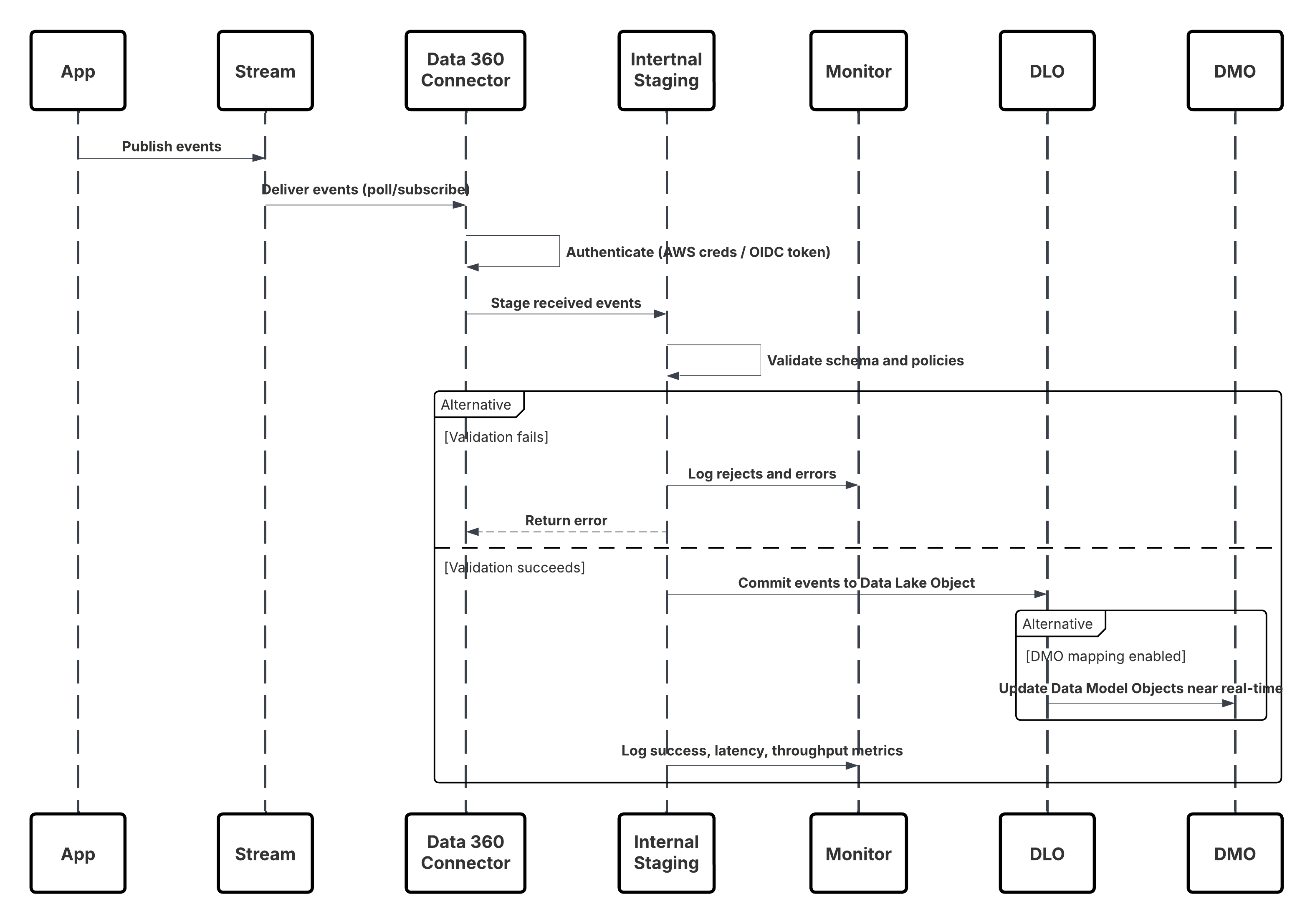
In this scenario:
- Applications or devices publish events to Kinesis Stream or MSK Topic.
- Data 360 Connector authenticates using AWS credentials or OIDC token.
- Connector continuously polls or subscribes to the stream.
- Events are staged, validated for schema and policy, then committed to Data Lake Object (DLO).
- If mapped, Data Model Objects (DMOs) are updated in near real-time for activation.
- Monitoring Layer tracks metrics, schema rejects, and latency.
Results
Continuous, low-latency ingestion of structured data directly from AWS Kinesis or MSK into Data 360. Data is immediately available for:
- Identity Resolution
- Real-time Segmentation
- Einstein AI Activation
- Agentforce-driven Triggers
Eliminates dependency on batch ETL, enabling stream-based architectures aligned with enterprise event-driven designs.
Ingestion Mechanisms
| Mechanism | When to Use |
|---|---|
| Kinesis Connector (Preferred) | For AWS-native streaming sources requiring continuous ingestion of high-volume, structured data. |
| MSK Connector | For organizations running event pipelines on Kafka-compatible platforms. |
| Hybrid(Streaming + Batch) | For incremental event ingestion combined with periodic bulk loads. |
Error Handling and Recovery
- Automatic Retries: Connectors retry transient network or platform errors with exponential backoff.
- Schema Rejections: Invalid payloads route to the schema rejection queue for administrator review.
- DLQ Replay: Persistent failures are captured in dead-letter queues for reprocessing.
- Idempotency Control: Event keys or sequence numbers ensure deduplication and ordered ingestion.
- Monitoring Integration: All failures, retries, and throughput metrics surface in Data 360 Monitoring dashboards.
Idempotent Design Considerations
- Event Uniqueness & Tracking: Each event is assigned a deterministic unique key (e.g., PartitionKey + SequenceNumber for Kinesis, or Topic + Partition + Offset for MSK) to ensure exact-once ingestion.
- Connector Checkpointing: Data 360 connectors persist the last processed offset or sequence number to resume ingestion safely after failures or restarts.
- Deduplication & UPSERT Logic: During DLO commits, duplicate events are detected and skipped; valid records are upserted using the unique key to maintain consistency.
- Replay & Recovery Control: Failed or delayed events are replayed from stored offsets through Dead-Letter and Replay Queues, ensuring reliable recovery without duplication.
Security Considerations
Security is integral throughout the ingestion pipeline, from authentication to encryption and access control.
- Authentication: Secure credential exchange using AWS IAM policies or OIDC.
- Encryption: Data encrypted in transit (TLS 1.2+) and at rest (AES-256) within Data 360.
- Access Control: Least-privilege roles enforced; connectors scoped to specific streams/topics.
- Governance: Lineage and classification metadata applied to every record for full traceability.
- Network Security: Optionally deploy within private subnets using AWS PrivateLink.
Sidebars
Timeliness
- Near-Real-Time Processing: CDC and streaming connectors process events within seconds of source changes, typically ensuring sub-minute data freshness.
- Deterministic Latency: End-to-end lag depends on source throughput, event batching, and network conditions, but Data 360 guarantees predictable SLA-driven latency for supported objects.
- Elastic Scaling: The ingestion pipeline auto-scales under high event volume, preserving timeliness even during peak data bursts.
- Operational Visibility: Monitoring dashboards expose event lag, commit timestamps, and replay status for latency assurance and troubleshooting.
Data Volumes
- Lightweight Payloads: Individual CDC or streaming events are compact (1–5 KB typical size), optimized for high-frequency updates.
- High-Change Objects: For volatile entities (e.g., Case, Contact, Order), architects must ensure CDC allocations and event throughput align with expected update rates.
- Parallel Streams: Data 360 supports multi-stream ingestion for horizontal scaling across large object volumes or multiple source orgs.
- Backpressure Handling: Built-in throttling mechanisms maintain ingestion stability under load without dropping events.
State Management
Each event includes metadata for state and version control:
- Replay & Offset Tracking: Every event carries Replay ID and sequence metadata, enabling ordered delivery and checkpoint-based recovery.
- Schema Versioning: Version tags within event headers ensure backward-compatible processing when source schemas evolve.
- Idempotency Keys: Each event includes a unique transaction or commit key, allowing Data 360 to deduplicate replays and retries safely.
- Atomic Commit: The ingestion pipeline only marks offsets as complete once downstream commits to DLOs succeed, ensuring consistency.
Complex Integration Scenarios
This pattern integrates seamlessly into advanced enterprise architectures:
- Hybrid Ingestion: Combine CDC for incremental deltas with bulk Data Streams for full refreshes, maintaining both freshness and completeness.
- Cross-Org Streaming: Multiple CRM or ERP orgs can publish to the same Data 360 tenant, unified through DMO mapping and ontology alignment.
- Event Enrichment: Middleware (e.g., MuleSoft, Event Relay) can enrich, filter, or route streaming data before it reaches Data 360.
- AI and Agent Activation: Real-time updates trigger downstream automation, such as Einstein predictions or Agentforce responses, within seconds of the originating event.
Example
A global retail enterprise uses AWS Kinesis to stream point-of-sale and web interaction data.Data 360’s Kinesis connector authenticates via IAM credentials and continuously ingests events into a Transaction DLO.Each record is schema-validated, enriched with metadata, and immediately propagated to the Customer DMO.Within seconds, Einstein AI models update customer segments and Agentforce triggers real-time next-best-offer recommendations — achieving a fully event-driven personalization loop.
Zero Copy is more than an integration method — it’s a foundational shift in how enterprise data moves, or rather, doesn’t move. Traditionally, data integration required copying large volumes of records through ETL pipelines, creating redundant data stores, synchronization delays, and governance challenges. Zero copy eliminates all of that. In this model, Data 360 connects directly to external data platforms like Snowflake and Databricks, securely reading and activating data in place — without ever moving or duplicating it. The result is a seamless bridge between your enterprise data lakehouse and the Salesforce ecosystem, delivering instant access, lower operational overhead, and stronger data governance.
Inbound zero copy capabilities allows Data 360 to query and harmonize external data at the source — such as customer profiles, transactions, or product data — stored in Snowflake or Databricks. Instead of ingesting files, Data 360 establishes a secure, metadata-aware connection that leverages existing schema definitions and security policies in the external warehouse.
- Direct Federation: Data 360 reads data in place through secure, optimized queries without replication.
- Unified Governance: Data remains under the source system’s security, access control, and compliance framework.
- Operational Efficiency: Eliminates ETL overhead and storage duplication, reducing cost and complexity.
- Real-Time Readiness: Enables on-demand harmonization — the moment data updates in Snowflake, it’s immediately available for activation in Data 360.
Context
Modern data-driven enterprises manage petabytes of customer, transaction, and telemetry data within cloud-scale data lakehouse platforms such as Snowflake and Databricks. These environments serve as the single source of truth for analytics, AI, and compliance. Data 360 introduces Zero CopyData Federation, allowing Data 360 to directly query and use external datasets in place — without copying, transforming, or storing redundant data. This pattern empowers organizations to extend the Customer 360 fabric into their existing data warehouse or lakehouse infrastructure — achieving real-time unification and activation with zero duplication, zero latency, and zero compromise on governance.
Problem
How can enterprises leverage rich datasets already curated in Snowflake, Databricks, or open lake formats like Apache Iceberg — for segmentation, identity resolution, and activation in Data 360 — without the cost, latency, and governance overhead of ETL pipelines or physical data movement?
Forces
This pattern introduces multiple architectural, security, and performance considerations:
Network & Security
- Data 360 must establish a secure, private connection to the external warehouse or lakehouse.
- Typically configured using Salesforce Private Connect or PrivateLink/VPC Peering, ensuring traffic never leaves the customer’s controlled network.
- External systems must allowlist Data 360 IPs and enforce TLS 1.2+ encryption.
Authentication & Access Control
- Supports Key Pair authentication, OAuth 2.0, or Identity Provider (IdP)-based trust delegation (Data 360 acting as a trusted client)
- Role-based access control (RBAC) in the external system enforces least privilege access for query execution.
Performance and Compute Dependency
- Query federation pushes down SQL execution into Snowflake or Databricks, leveraging their compute clusters.
- Performance and cost scale with external query load — segmentation latency and cost are tied to external compute configuration.
Evolving Standards: File Federation
- A next-generation model, File Federation, leverages open table formats such as Apache Iceberg or Delta Lake, enabling Data 360 to read directly from object storage (e.g., Amazon S3, Azure ADLS, Google Cloud Storage).
- By bypassing the source compute layer, File Federation drastically reduces latency and cost for read-heavy analytical workloads while maintaining schema integrity.
Governance and Compliance
- Data never leaves the source platform — compliance, encryption, and retention policies remain enforced at origin.
- All metadata, lineage, and consent attributes propagate into Data 360’s Trust Layer to ensure end-to-end traceability.
Solution
The recommended approach is to use native Zero Copy connectors for Snowflake, Databricks, or File Federation within Data 360.
| Solution Area | Fit | Comments / Implementation Details |
|---|---|---|
| Snowflake Zero Copy Connector | Best | First-party native integration; establishes live query federation via Snowflake’s Data Sharing or External Table APIs. |
| Databricks Zero Copy Connector | Best | Supports direct live access to tables/views in Delta Lake; pushdown queries execute in Databricks runtime. |
| File Federation (Apache Iceberg / Delta / Parquet) | Emerging Best Practice | Data 360 directly reads open table formats from object storage without external compute dependency. Ideal for massive datasets. |
| Private Network Configuration | Recommended | Use Salesforce Private Connect or VPC peering for secure network-level federation. |
| Authentication & Key Management | Best Practice | Implement secure key-based or OAuth-based authentication with periodic rotation and vault management. |
| Schema Registration | Required | Data 360 retrieves external schema and maps it to an External Data Lake Object (External DLO). |
| Governed Metadata | Recommended | All External DLOs inherit classification, consent, and lineage metadata for compliance visibility. |
Sketch
The following diagram illustrates how to set up a zero copy connection and create external DLOs in Data 360.
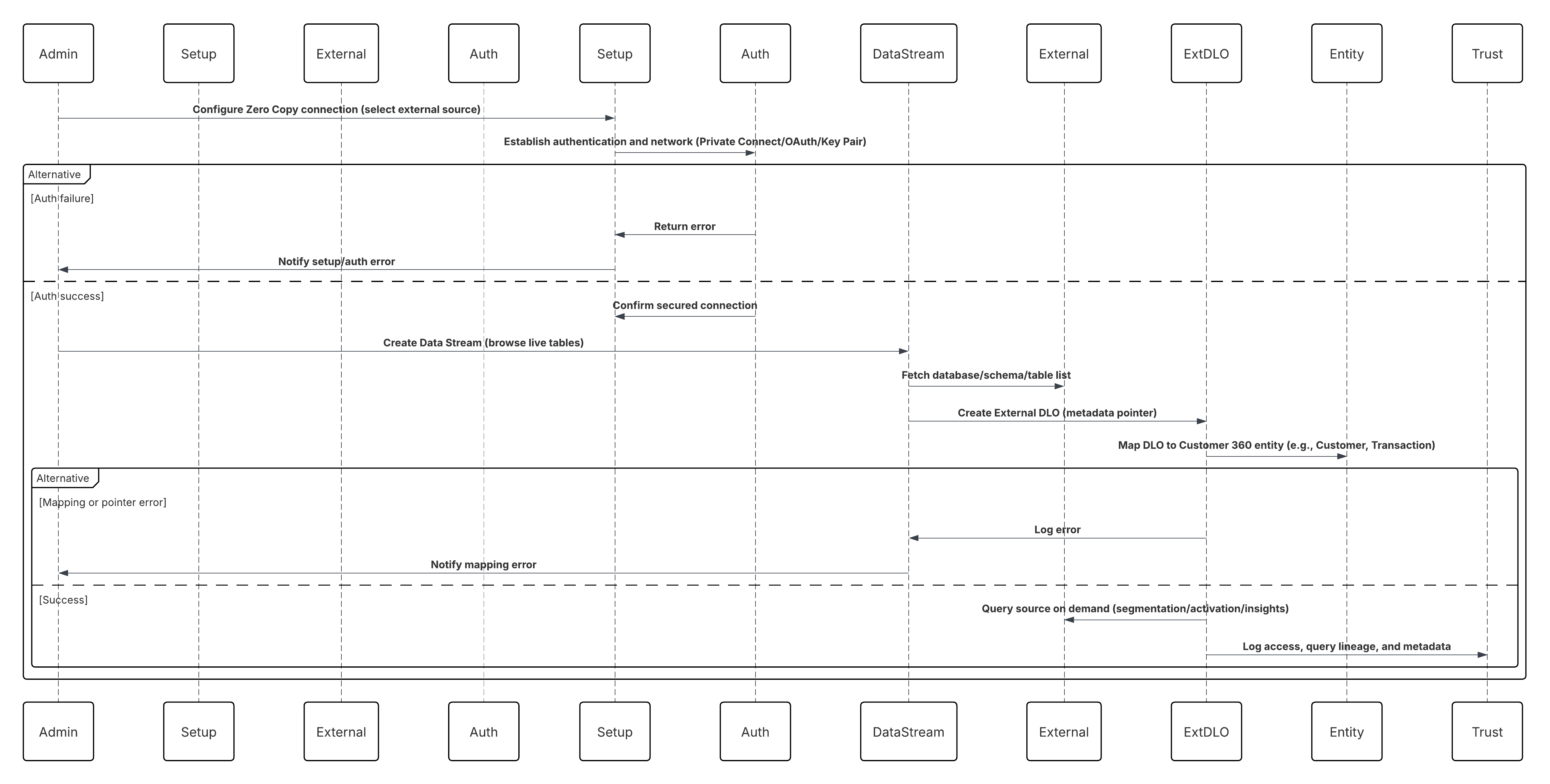
In this scenario:
- Administrator configures a Zero Copy connection in Data 360 Setup (Snowflake, Databricks, or File Federation).
- Secure authentication and network routing are established (Private Connect / OAuth / Key Pair).
- Admin creates a Data Stream selecting the external source — browsing live databases, schemas, and tables.
- Instead of copying data, Data 360 creates an External DLO (Data Lake Object) — a metadata pointer referencing the live table or Iceberg file.
- External DLOs are mapped to Customer 360 entities (e.g., Customer, Transaction, Product).
- Data 360 queries the source in place during segmentation, activation, or insight computation.
- All access, query lineage, and metadata are audited within the Data 360 Trust Layer.
Results
- External data remains in Snowflake, Databricks, or S3 — no ETL, no duplication, no additional storage.
- Data 360 gains real-time, read-time access to enterprise-scale data for identity resolution, calculated insights, and activation.
- Organizations maintain complete control under their existing governance, encryption, and compliance frameworks.
- This pattern enables a true Zero Copy architecture — combining the performance of local access with the governance of federated storage.
Calling Mechanisms
The calling mechanism depends on the solution chosen to implement this pattern.
| Mechanism | When to Use |
|---|---|
| Snowflake Federation (Preferred) | For live, high-performance query federation with governed enterprise data warehouses. |
| Databricks Federation | For unified analytics and lakehouse environments with Delta or Parquet-backed datasets. |
| File Federation (Apache Iceberg / Delta Lake) | For large-scale datasets in object storage where compute detachment and cost optimization are key. |
| Hybrid Mode (Zero Copy + Ingestion) | When historical data needs one-time ingestion but live data is accessed via Zero Copy. |
Error Handling and Recovery
- Automatic Retry & Query Backoff: Transient connectivity or query timeouts automatically retried using exponential backoff.
- Schema Mismatch Isolation: Changes in source schema (e.g., new columns) are logged to the Schema Rejection Queue; administrators can remap or refresh schema metadata.
- Authentication Failover: If credentials expire, Data 360 retries connection using stored refresh tokens or key rotation policies.
- Compute Availability Detection: If Snowflake or Databricks cluster is paused, Data 360 suspends federation jobs and retries when compute resumes.
- Monitoring Integration: All connection health, query latency, and lineage metadata visible in Data 360 Monitoring dashboards.
Idempotent Design Considerations
- Query Determinism: Federated queries use consistent snapshot semantics to ensure stable, repeatable reads during segmentation or activation.
- External DLO Versioning: Each federated query includes schema and timestamp metadata for lineage tracking.
- Offset-less Access: Since Zero Copy is read-only, it doesn’t rely on event offsets — consistency is enforced via the external system’s ACID guarantees (Snowflake/Delta Lake).
- Schema Drift Management: Maintain versioned schema mappings in Data 360; refresh External DLO metadata on source evolution.
Security Considerations
Security is integral throughout the federation model — ensuring no compromise in trust or compliance.
- Encryption: All data exchanges use TLS 1.2+; external warehouses encrypt at rest using AES-256.
- Access Control: External tables are accessed through least-privilege roles with read-only permissions.
- Network Isolation: Private Connect or VPC routes prevent any exposure to public endpoints.
- Governed Data Flow: Lineage, consent, and classification metadata flow into the Data 360 Trust Layer for policy enforcement.
- Auditability: Every federated query and schema access event is logged for compliance traceability (GDPR, CCPA, HIPAA).
Sidebars
Timeliness
- Queries execute live against the external warehouse or storage, ensuring real-time visibility of the latest data state.
- Segmentation or activation runs reflect up-to-the-second changes in Snowflake, Databricks, or S3-backed Iceberg tables.
- Query latency depends on the performance tier of the source system — typically seconds to tens of seconds per query.
- Ideal for analytical and AI workloads demanding “fresh, not copied” data access.
Data Volumes
- Supports petabyte-scale datasets natively stored in Snowflake or Databricks without replication.
- Data 360 only retrieves results — not raw datasets — minimizing network and compute costs.
- File Federation optimizes large analytical scans through partition pruning and columnar pushdown.
- Scales linearly with warehouse compute capacity and Data 360’s federated query orchestration layer.
State Management
- External DLOs persist connection, schema, and version metadata in Data 360.
- Schema evolution is managed automatically through metadata refresh cycles.
- Query lineage includes timestamps, user identity, and execution metrics for traceability.
- No stateful ingestion or offsets are maintained — consistency is inherited from the external source’s ACID guarantees.
Complex Integration Scenarios
- Hybrid Mode: Combine Zero Copy (for live federation) with ingestion (for historical datasets).
- Cross-Warehouse Access: Data 360 can federate from multiple Snowflake or Databricks tenants within one organization.
- AI/BI Interoperability: External systems (e.g., SageMaker, Tableau, Power BI) can query Data 360’s enriched profiles back via reverse Zero Copy.
- File Federation Extension: Enterprises adopting open lake formats (Iceberg/Delta) can unify structured and unstructured data under one federated model.
Example
A global financial enterprise stores all transactional and interaction data in Snowflake, while maintaining customer attributes and marketing events in Data 360. Using Zero Copy Data Federation, Data 360 connects securely to Snowflake via Private Connect.When a segmentation job runs, for example, e.g., “Customers with >$10K spend in the last 30 days, Data 360 pushes down the query into Snowflake, retrieves aggregated results, and activates those profiles instantly in Journey Builder. No replication or ETL needed. This example uses real-time, federated intelligence that is unified across the enterprise data ecosystem.
Outbound zero copy extends the same principle in reverse. Instead of exporting or copying datasets from Data 360, external systems like Snowflake can query Data 360 directly, treating it as a federated source of enriched customer intelligence.
- Reverse Federation: External analytics or AI platforms can access Data 360’s unified profile data without extracting it.
- Data Activation at Source: Business teams can leverage insights where the data already resides — whether for AI modeling, reporting, or customer personalization.
- Latency-Free Interoperability: No batch exports or sync jobs; insights flow instantly between platforms.
- Consistent Semantics: Because both systems share the same ontology and schema mappings, context and meaning are preserved across ecosystems.
Zero copy redefines the role of Data 360 from a data repository to a semantic activation layer. It enables organizations to keep data exactly where it belongs — in governed, high-performance warehouses — while still unlocking its full value inside Salesforce’s trust boundary. This pattern aligns with modern data mesh and AI-native architectures: data stays decentralized, but intelligence becomes unified. Architects can now build activation pipelines that are faster, leaner, and more compliant — no copying required.
Context
Modern enterprises increasingly operate in multi-platform data ecosystems, where Salesforce Data 360 powers unified customer profiles and activation, while enterprise data warehouses like Snowflake or Databricks serve as analytical backbones for data science, machine learning, and BI workloads. Salesforce Data 360’s Zero Copy Outbound Sharing capability bridges these environments seamlessly — allowing governed, secure, and real-time access to harmonized Data 360 data directly within Snowflake or Databricks, without replication or ETL. This enables analysts and data scientists to query, visualize, and model on the same live, trusted data powering marketing, sales, and service activation.
Problem
How can an enterprise securely and efficiently expose Data 360’s unified customer profiles and calculated metrics (e.g., Lifetime Value, Churn Risk) to external analytical systems — without copying data, breaking governance, or introducing latency through traditional reverse ETL pipelines?
Forces
This pattern introduces multiple architectural, governance, and operational considerations:
- Governed Security: Access to Data 360 data must be controlled, granular, and auditable. Zero Copy sharing uses explicit object-level access, ensuring only approved Data Model Objects (DMOs) and Calculated Insight Objects (CIOs) are available to designated consumers.
- Explicit Object Selection: Administrators curate shareable data through a Data Share, explicitly selecting which objects to expose. This maintains governance and minimizes risk exposure.
- Bi-Lateral Configuration: Both Data 360 and the external warehouse require setup. Data 360 defines the Data Share Target (Snowflake/Databricks), while the receiving system must accept and instantiate the share.
- Query Federation Model: Once accepted, the external platform queries live, governed Data 360 data via federated views, eliminating extract jobs or manual refresh cycles.
- Open Standards Evolution: Emerging approaches like File Federation leverage open table formats (e.g., Apache Iceberg) to enable read-only access at the storage layer — improving scalability, performance, and interoperability across multi-cloud architectures.
Solution
The solution leverages Salesforce Data 360’s native Zero Copy Sharing with data platforms like Snowflake or Databricks.
| Solution Area | Fit | Comments / Implementation Details |
|---|---|---|
| Data Share Creation | Best | Administrator creates a Data Share within Data 360, adding selected DMOs and CIOs (e.g., Unified Individual, Customer Health Score). |
| Target Configuration | Best | Create a Data Share Target specifying Snowflake or Databricks account identifiers and authentication parameters. |
| Share Publishing | Best Practice | Link the Data Share to the Data Share Target to publish securely. |
| Warehouse Acceptance | Required | The external administrator accepts the share, materializing shared objects as read-only views/tables in the warehouse. |
| Granular Access Control | Recommended | Apply object- and role-based permissions within Data 360; align with warehouse-level role-based access control. |
| Federated Query Access | Best | Analysts query live shared data via standard SQL; joins with native warehouse data for downstream analytics and ML. |
| File Federation Option | Optional | For large datasets, leverage Apache Iceberg–based federation for direct S3 or Delta Lake reads without compute dependency. |
Sketch
The following diagram illustrates a call from the Salesforce Data 360 to an external Data Platform.
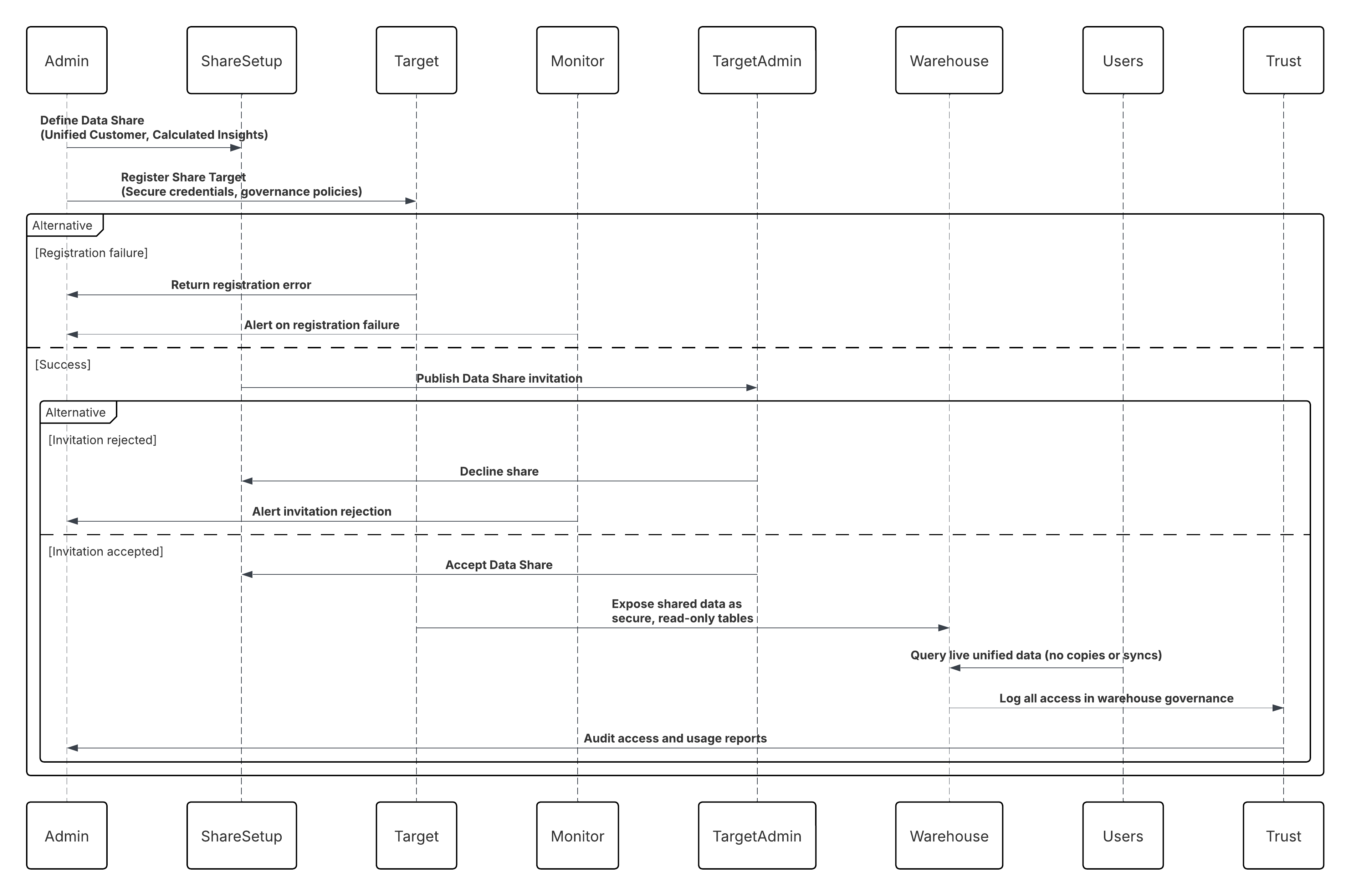
In this scenario:
- Data 360 Administrator defines a Data Share including Unified Customer and Calculated Insight objects.
- A Data Share Target (Snowflake or Databricks account) is registered with secure credentials and governance policies.
- Data 360 publishes the share; Snowflake/Databricks administrators accept it.
- Shared data appears as secure, read-only tables within the warehouse.
- Analysts, BI tools, or ML pipelines query the live, unified customer data without copying or syncing.
- All access is audited within the Data 360 Trust Layer and warehouse governance logs.
Results
- External warehouses gain real-time, queryable access to harmonized Data 360 data.
- Eliminates Reverse ETL pipelines, reducing operational burden and latency.
- Enables AI/ML training, predictive modeling, and advanced BI directly on unified data.
- Maintains zero duplication, strong governance, and secure-by-design access control.
- Completes the bi-directional Zero Copy loop, where inbound federation and outbound sharing coexist under a single governance model.
Calling Mechanisms
The calling mechanism depends on the solution chosen to implement this pattern.
| Mechanism | When to Use |
|---|---|
| Snowflake Secure Data Share (Preferred) | Use when your enterprise warehouse is Snowflake and you need live, governed access to harmonized Data 360 datasets without data movement or duplication. Ideal for analytics, AI, and compliance-driven workloads requiring zero-latency sharing and native lineage enforcement. |
| Databricks Delta Share | Use when downstream consumers operate in Databricks or Delta Lake environments and require real-time, read-only access to unified or activated datasets via the open Delta Sharing protocol. |
| External Table Share (Apache Iceberg / Parquet) | Use when maintaining open-format architectures in object storage (S3, ADLS, or GCS) and needing interoperable, low-cost sharing across analytical engines such as Athena, BigQuery, or Snowflake-on-Iceberg. |
| Data Share API (Programmatic Access) | Use when custom apps or middleware (e.g., MuleSoft) must discover, subscribe, or consume shared datasets securely via APIs, with event-based refresh notifications and fine-grained access control. |
| Hybrid Share (Zero Copy + Outbound Share) | Use when implementing bidirectional exchange patterns — leveraging Zero Copy for inbound data and Outbound Data Share for publishing insights, ensuring semantic and governance consistency across enterprise data planes. |
Error Handling and Recovery
- Connection Retries: Automated retries for transient connection or authentication failures between Data 360 and warehouse.
- Share Validation: Invalid or unauthorized share configurations are quarantined in an Admin Review Queue.
- Sync Health Monitoring: Data 360 surfaces live share status, query latency, and access logs via Monitoring dashboards.
- Access Revocation: Administrators can revoke shares instantly, disabling access at both ends without residual data copies.
- Governed Audit Trail: All configuration and access changes are logged for compliance verification.
Idempotent Design Considerations
- Consistent Share Identification: Each Data Share and Data Share Target pair has a unique identifier, ensuring exact governance and access traceability.
- Immutable Views: Shared data objects are read-only; consumers cannot mutate state, ensuring deterministic results and compliance.
- Atomic Share Lifecycle: Share publishing, revocation, and updates are atomic operations — either fully completed or rolled back.
- Replay Consistency: When Data 360 data refreshes, warehouse-side queries always return the latest consistent snapshot, eliminating stale reads.
Security Considerations
Security underpins every aspect of Zero Copy Sharing:
- Authentication: Mutual trust established using OAuth 2.0, private key exchange, or identity federation (OIDC).
- Encryption: Data encrypted in transit (TLS 1.2+) and at rest (AES-256).
- Access Control: Object-level permissions enforce least-privilege access; governed by the Data 360 Trust Layer.
- Network Security: Data exchanges occur through private network links such as Salesforce Private Connect or Secure Data Exchange APIs.
- Governance Metadata: Every shared object carries lineage, classification, and consent attributes for full traceability and regulatory compliance.
Sidebars
Timeliness
- Real-Time Availability: Shared data reflects the most current state of Data 360 without replication delays.
- Query Freshness: Changes in DMOs or CIOs propagate instantly to shared warehouse views.
- Performance Elasticity: Query pushdown adapts dynamically to warehouse compute resources.
- Monitoring: Live dashboards expose shared latency and query performance metrics for operational assurance.
Data Volumes
- Scalable Sharing: Supports granular object-level or full-domain data sharing depending on analytical needs.
- Optimized Query Performance: Snowflake/Databricks cache shared data intelligently to minimize latency.
- Storage Efficiency: Zero duplication eliminates redundant storage costs.
- File Federation Option: For petabyte-scale datasets, direct Iceberg-based sharing bypasses computation and accelerates access.
State Management
- Schema Evolution: Version-controlled schemas ensure compatibility when the Data 360 model evolves.
- Access State Tracking: Active/inactive share states maintained within Data 360 for lifecycle governance.
- Metadata Synchronization: Updates to shared object definitions automatically reflect in downstream warehouse catalogs.
- Immutable State Guarantee: Warehouse views always represent a consistent, point-in-time state of Data 360 data.
Complex Integration Scenarios
- Hybrid Mode: Combine Zero Copy (for live federation) with ingestion (for historical datasets).
- Cross-Warehouse Access: Data 360 can federate from multiple Snowflake or Databricks tenants within one organization.
- AI/BI Interoperability: External systems (e.g., SageMaker, Tableau, Power BI) can query Data 360’s enriched profiles back via reverse Zero Copy.
- File Federation Extension: Enterprises adopting open lake formats (Iceberg/Delta) can unify structured and unstructured data under one federated model.
Example
Cross-cloud analytics enables organizations to combine governed Salesforce Data 360 data with native datasets in platforms like Snowflake and Databricks to deliver a complete, 360-degree analytical view. Through multi-tenant access, different business units can securely consume curated and policy-controlled data slices via separate shares without duplicating data. Data scientists can then perform federated AI and machine learning by training models directly on unified customer profiles within Snowflake ML or Databricks MLflow environments. Throughout this process, built-in lineage, governance, and auditing capabilities ensure that all data access and usage remain compliant with enterprise policies and regulatory requirements such as GDPR and HIPAA.
Data Cloud One enables organizations with multiple Salesforce orgs (for example, due to business units, regions, product lines or acquisitions) to share a single, central Data 360 instance. This org acts as the “home org,” while other orgs, called “companion orgs,” can access and act on that unified data — with minimal effort, no custom code, and full governance controls.
Context
Enterprises often run more than one Salesforce org (for example, one for sales, one for service, one for marketing, or distinct regions). Each org may have its own data, configuration, and processes. Prior to Data Cloud One, each org either required its own Data 360 setup or complex custom code to share data across orgs. Data Cloud One simplifies this by allowing a single “home” org with Data 360 and multiple “companion” orgs that connect via low-code configuration and metadata sharing.
Problem
How can a business enable consistent use of the unified Customer 360 data—ingested, harmonised and managed by the home org’s Data 360—across all its Salesforce orgs (so that sales, marketing, service, etc., all use the same underlying data), while avoiding duplication of effort, custom coding, separate Data 360 instances per org, and governance gaps?
Forces
This pattern introduces multiple architectural, security, and performance considerations:
- Multi-Org Complexity: Each business unit’s org may have different data, custom objects, security, and processes—maintaining consistent unified views is hard.
- Duplication & Cost: Running a separate Data 360 instance per org means extra setup, extra governance, extra licensing, and risk of data silos.
- Governance & Data Sharing Controls: You need to decide which data each companion org can see and act on — you cannot simply share “everything” without governance risk.
- Speed of Setup: Marketing, sales or service teams cannot wait weeks for custom code to make cross-org data available—they need click-config solutions.
- Data Residency, Regional Considerations: If home and companion orgs are in different regions, there may be legal or regulatory constraints about where data is stored or how it’s shared.
Solution
The following table contains various solutions to this integration problem.
| Solution Area | Fit | Comments / Implementation Details |
|---|---|---|
| Home Org Provisioning | Best | Designate one Salesforce org as the Home Org where Data 360 is provisioned; this becomes the central data repository and governance hub. |
| Companion Org Connection | Best | Configure Companion Connections from the Home Org to one or more Companion Orgs via the Data Cloud One app — no custom code required. |
| Data Space Definition | Best Practice | Define Data Spaces within the Home Org to logically segment data (e.g., Retail, Service, Marketing) and isolate access boundaries. |
| Data Space Sharing | Best | Explicitly share selected Data Spaces from the Home Org to Companion Orgs, ensuring governed, role-based visibility of unified data. |
| Access Configuration | Required | In Companion Orgs, enable the Data Cloud One app and assign user permissions for profile, insight, and segment access. |
| Governance & Policy Control | Recommended | Centralize all ingestion, identity resolution, and trust configurations in the Home Org, maintaining end-to-end governance. |
| Multi-Org Synchronization | Best | Data changes and calculated insights in the Home Org are reflected inReal-Time across Companion Orgs through managed sync pipelines. |
| Hybrid Deployment Option | Optional | For large enterprises, multiple Companion Orgs can connect to a single Home Org while maintaining local context and compliance boundaries. |
Sketch
The following diagram illustrates the sequence of events in this pattern, where Salesforce is the data master.
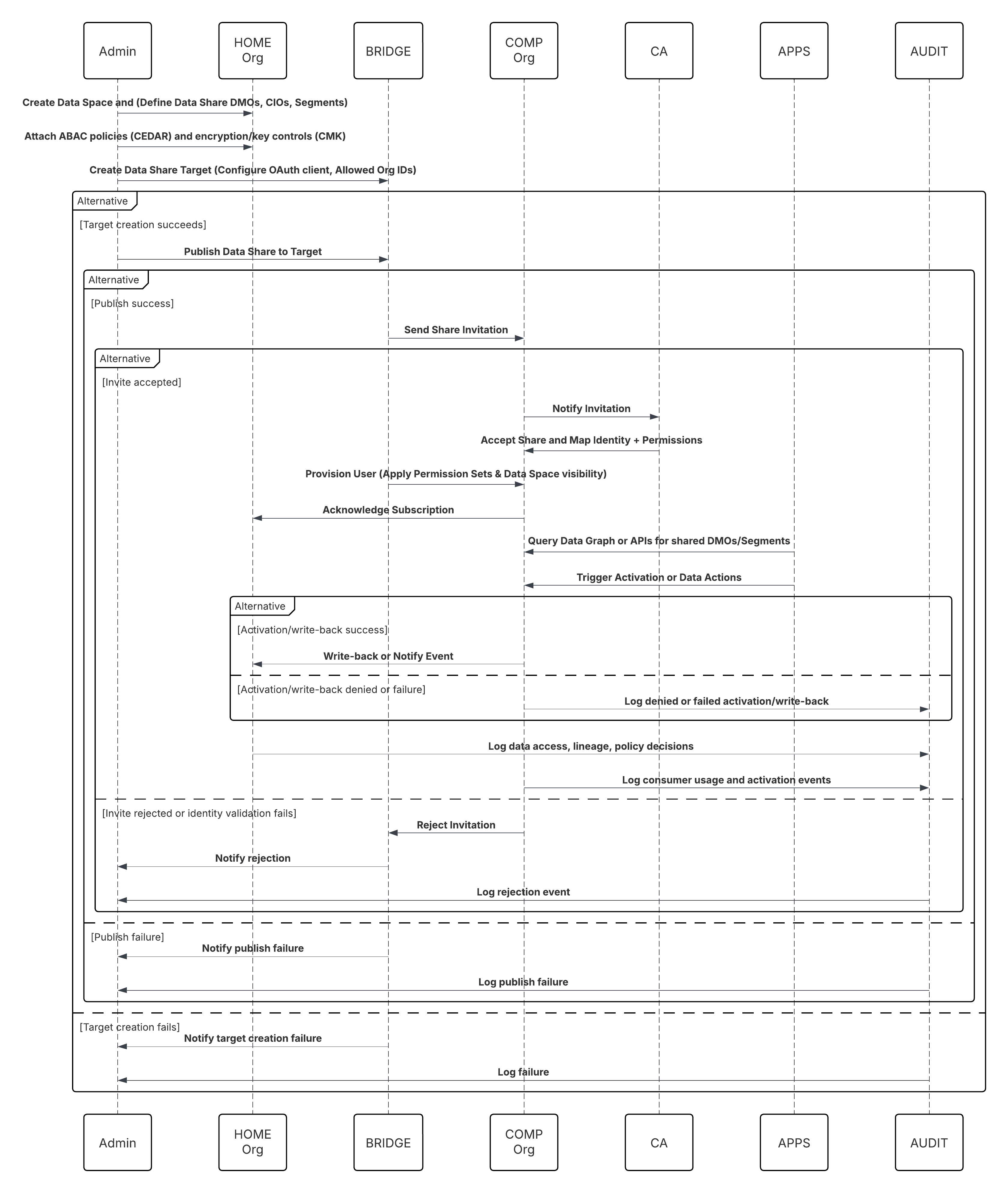
In this scenario:
- Home Admin: create Data Space and define Data Share (select DMOs/CIOs, segments).
- Home Admin: create Data Share Target for Companion Org(s) and configure trust (OAuth client, allowed org IDs).
- Home Admin: publish Data Share to target; attach ABAC policies (CEDAR) and encryption/key controls (CMK if needed).
- Companion Org Admin: receives invite, validates identity mapping, and accepts share.
- Companion Org: Data Cloud One Bridge provisions a Data Cloud One user and applies Permission Sets & Data Space visibility.
- Companion Org Apps (Flows / Einstein / Apex): Query a data graph or call Data Cloud One APIs to read shared DMOs or segments.
- Activation: Companion org triggers activation or writes back via data actions (if permitted).
Results
- A single source of truth for customer data (Customer 360) across all connected orgs — no redundant Data 360 instances.
- A faster time to value. companion orgs can access unified data and Data 360-powered features in minutes, not weeks of custom coding.
- Controlled data sharing. Only authorised data spaces are shared, preserving security and governance while enabling business agility.
- Business functions (sales, service, marketing) operate on the same unified data foundation, enabling consistent metrics, activation, and insights across the enterprise.
Calling Mechanisms
The calling mechanism depends on the solution chosen to implement this pattern.
| Mechanism | When to Use |
|---|---|
| Data Cloud One Native Share (Preferred) | Use when multiple Salesforce Orgs (Sales, Service, or Industry Clouds) need real-time access to unified customer data directly from Data 360\. This eliminates replication and enables zero-latency access to Golden Records, segments, and calculated insights. |
| Org-to-Org Share via Data Cloud One Bridge | Use when multiple business units or subsidiaries operate in separate Salesforce Orgs but need shared access to common customer data and segments from a central Data 360 instance. Ideal for multi-org enterprises maintaining independent operational systems. |
| Einstein 1 Platform Query APIs | Use when Salesforce apps, Flow, or Einstein Copilot must query or activate Data 360 data programmatically. Enables real-time retrieval of unified profiles, metrics, or activation results into other Salesforce applications without batch exports. |
| Activation to Salesforce Channels | Use when Data 360 data (segments, insights, or attributes) must be activated to Marketing Cloud, Service Cloud, or Commerce Cloud for personalization, campaign execution, or agent assist experiences. |
| Data Graph Access (Semantic Query Layer) | Use when you need semantic-level access to the unified data model via the Salesforce Data Graph — supporting Copilot, AI workflows, and cross-cloud analytics inReal-Time, without manual joins or transformations. |
Error Handling and Recovery
- Cross-Org Sync Resilience: Data Cloud One automatically retries failed synchronization jobs between Home and Companion Orgs using exponential backoff for transient network or platform errors.
- Partial Batch Isolation: Failed record batches are quarantined in a Retry Queue within the Home Org until reconciliation succeeds, preventing data divergence.
- Schema Rejection Governance: Schema or mapping mismatches are routed to the Schema Rejection Queue for administrator review and correction.
- Replay & Resume Continuity: Each synchronization job maintains offset checkpoints so replication can resume from the last successful commit without duplication.
- Integrated Monitoring: All failures, retries, and recovery metrics are captured in the Trust Layer Monitoring Dashboard for visibility and SLA assurance.
Idempotent Design Considerations
- Deterministic Idempotency Keys: Every synchronization event carries a unique key (Org ID + Record ID + Version Number) to guarantee exact-once processing.
- Replay Safety: Duplicate or replayed events are filtered at commit time, ensuring consistent downstream DMO and CIO updates.
- Atomic Commit Semantics: Companion Orgs mark data as committed only after successful downstream writes, preserving cross-org transactional integrity.
- Conflict Resolution: Multi-source updates follow last-write-wins or policy-driven merge logic, maintaining lineage and consistency.
- Checkpoint Persistence: Synchronization jobs persist last-processed offsets and state within the Trust Layer for safe recovery and replay.
Security Considerations
- Strong Authentication: Connections between Home and Companion Orgs use mutual OAuth 2.0 with auto-rotated tokens managed via Connected Apps.
- Granular Authorization: Companion Orgs can only access specific Data Spaces, DMOs, or CIOs explicitly shared through governed Data Share Policies.
- Encryption Everywhere: Data is encrypted in transit (TLS 1.2+) and at rest (AES-256) across both Home and Companion Orgs.
- Least-Privilege Principle: Integration users are scoped to only the required objects; no administrative or system-level permissions are propagated.
- Audit & Compliance Visibility: All sync events, schema changes, credential updates, and access grants are logged in the Data 360 Trust Layer for full traceability.
- Private Network Isolation: Optional Salesforce Private Connect or Private Link ensures data replication occurs over secure, internal channels only.
Sidebars
Timeliness
- Synchronization between Home and Companion Orgs occurs in near-real time, typically within seconds of a data change in the source org.
- Zero Copy architecture ensures shared data is instantly queryable across all participating orgs — no replication or batch delays.
- Activation and segmentation jobs automatically reflect the latest updates from any connected org, maintaining operational freshness.
- End-to-end latency is deterministic and governed by Data Cloud One’s orchestration pipeline, ensuring consistent cross-org timeliness even under load.
Data Volumes
- Designed for multi-tenant, hyperscale data synchronization across regions and business units — capable of managing billions of records per org.
- Data is referenced, not duplicated, reducing storage footprint while maintaining global queryability.
- Streaming deltas and metadata compaction optimize bandwidth and commit overhead for high-change-rate objects (e.g., Contact, Order).
- Scales horizontally across multiple Companion Orgs with adaptive load balancing and orchestration through the Trust Layer.
State Management
- Every synchronized dataset maintains metadata lineage, version, and org ownership context to ensure end-to-end traceability.
- Checkpoint persistence captures last-synced offsets between orgs, allowing recovery without duplication.
- Schema versioning and semantic alignment across orgs are automatically governed by the Trust Layers.
- No manual state resets are required — synchronization state is maintained through the Data Cloud One Orchestration Service.
Complex Integration Scenarios
- Cross-Org Federation: Enables seamless query and activation across multiple Data 360 tenants or regions under a unified governance model.
- Hybrid Synchronization: Combines near-real-time replication for transactional updates with scheduled sync for bulk or archival data.
- Multi-Region Governance: Supports geographically distributed data sharing while respecting residency, consent, and compliance boundaries.
- AI and Automation Activation: Synchronized data instantly powers Einstein AI, Agentforce, or custom ML models across orgs — enabling real-time, cross-org intelligence.
Example
A global retail organization has three Salesforce orgs: one for Consumer Retail, one for Premium Brands, and one for International Markets. They provision Data 360 in the Consumer Retail org (making it the home org). With Data Cloud One, they set up companion connections to the Premium Brands and International Markets orgs. They share only appropriate data spaces (e.g., “Customer 360 – Retail Profiles” and “Customer 360 – Premium Profiles”) with each companion org. In the Premium Brands org, marketing teams can view unified customer profiles, build segments based on calculated insights (e.g., premium customer lifetime value), and trigger marketing automations — all powered by the home org’s Data 360 instance, with no custom coding or data duplication.
Data activation is where the value of Salesforce Data 360 truly comes to life. It’s the process of taking the unified, enriched, and governed data that lives inside the platform and making it work across the business. In practice, this means securely delivering curated segments, calculated insights, and contextual attributes from Data 360 into the systems that engage customers — whether that’s marketing automation, service consoles, sales enablement, analytics, or AI models. From a technical perspective, activation patterns define how this data moves: which channels are triggered, what transformations or mappings occur, and how policies are enforced along the way. These patterns aren’t just about exporting data — they’re about orchestrating real-time, policy-aware data flows that drive measurable business outcomes. Each activation route turns the Customer 360 into a live operational asset — powering personalization, predictive decisioning, and continuous learning across every touchpoint.
Batch activation remains the most widely used and operationally proven method for exporting data from Data 360. It operates on a scheduled cadence — publishing predefined audience segments or attribute sets to downstream platforms at regular intervals. This pattern is ideally suited for marketing and engagement workflows that rely on consistent, high-volume audience delivery rather than instantaneous updates. Typical use cases include powering email journeys, direct mail campaigns, or audience uploads to digital advertising networks. Each activation run extracts the qualified segment from Data 360’s unified profile graph, applies governance and consent policies, and securely transmits the output to the target system. Architecturally, batch activation provides a predictable, auditable, and cost-efficient approach to data distribution — balancing operational simplicity with enterprise-grade reliability. It’s the backbone of large-scale campaign execution, where the right data, delivered on time and under control, drives measurable business impact.
Context
Modern marketers operate across multiple engagement channels—email, advertising, mobile, and web—each demanding precise, timely, and personalized customer audiences. Data 360 serves as the unified foundation for these audiences, combining customer data from every system into rich, actionable segments. Batch activation is the most common activation pattern used to export those segments from Data 360 to downstream marketing or advertising platforms. Typical destinations include Marketing Cloud Engagement, Google Ads, Meta Custom Audiences, or LinkedIn Ads, where campaigns can be executed directly against these curated audiences.
Problem
How can a marketing team take a precisely defined audience—built using unified and enriched data in Data 360—and make it available in external marketing or advertising systems for activation? For example, consider the segment: “High-value customers who haven’t purchased in the last 90 days but have recently engaged on the website.” Marketers need to ensure that this audience is transferred accurately, enriched with relevant attributes (e.g., loyalty tier, region, or predicted CLV), and refreshed at regular intervals to maintain campaign relevance and effectiveness.
Forces
Several technical and operational factors shape the Batch Activation pattern:
- Identity Mapping: Accurate audience delivery requires mapping Data 360’s Unified Individual ID to the corresponding identifier in the destination system—such as a Subscriber Key in Marketing Cloud or a hashed email for digital ad platforms. This ensures precise matching and eliminates targeting errors.
- Attribute Selection & Enrichment: Marketers must go beyond IDs and include additional profile data—such as first name, loyalty status, CLV, or other personalized attributes—to enable downstream personalization and analytics.
- Target Platform Configuration: Each destination must be registered in Data 360 as an Activation Target, including connection details, authentication, and data field mappings. This one-time setup defines secure connectivity and governs which systems can receive activated data.
- Governance and Compliance: Data activation must adhere to consent metadata, privacy policies (e.g., GDPR or CCPA), and marketing permissions stored in the unified profile. Consent-aware activation ensures data is used only for authorized purposes.
- Scheduling and Performance: Activations are often scheduled daily or hourly to keep downstream audiences current. The system must efficiently handle large volumes and incremental refreshes without duplication or data loss.
Solution
The batch activation process in Data 360 follows a guided workflow that minimizes technical friction for marketers while preserving governance and scalability:
| Solution Area | Fit | Comments / Implementation Details |
|---|---|---|
| Segment Creation | Best | A marketer or analyst builds a segment in the visual segmentation canvas by applying filters across any data model object (DMO) or Calculated Insight Object (CIO). This defines the target audience for activation. |
| Activation Setup | Best | The user creates an activation and selects the segment they’ve just built as the source. This defines which audience Data 360 will export to downstream systems. |
| Activation Target Selection | Best Practice | The marketer selects a pre-configured activation target (e.g., Marketing Cloud, Google Ads, LinkedIn Ads). Each target is registered in Data 360 with authentication credentials and field mappings. |
| Payload Definition | Required | The marketer defines the payload by choosing contact identifiers (e.g., email, mobile, hashed ID) and selecting additional profile attributes (e.g., first name, loyalty tier, or CLV) for enrichment in the destination system. |
| Scheduling and Frequency | Recommended | Activations can be scheduled to run once or on a recurring basis (e.g., daily or weekly). Scheduling ensures downstream audiences remain synchronized and current. |
| Execution and Export | Best | When the activation job runs, Data 360 queries the segment, collects the selected attributes, applies consent filters, and exports the data to the target platform. For Marketing Cloud, this typically results in the creation or update of a Shared Data Extension. |
| Governance & Compliance | Required | The Trust Layer enforces schema validation, consent metadata, and policy controls to ensure compliance with data protection and marketing regulations (e.g., GDPR, CCPA). |
| Monitoring & Auditability | Best Practice | Every activation run is tracked with success/failure metrics, execution logs, and lineage visibility in the Trust Layer Monitoring Dashboard, enabling operational transparency and SLA assurance. |
Sketch
Here is the summary of the steps:
- Build Segment: A marketer or analyst creates a segment using a visual segmentation tool, combining filters across any unified data objects.
- Create Activation: They select the segment as a source and choose a pre-configured destination (such as Marketing Cloud or Google Ads).
- Define Payload: The contact identifier and other profile attributes are chosen for audience export and reporting.
- Schedule Delivery: The activation is scheduled to run once or on a recurring basis, keeping the audience in the destination up to date.
- Execution: On trigger, Data 360 queries the segment, builds the payload, applies filters for consent, and pushes the result to the destination system.

Results
- Targeted, enriched audience segments from Data 360 are made available directly in downstream marketing and advertising platforms.
- Audiences are automatically refreshed and synchronized with the latest unified customer data, maintaining real-time campaign relevance.
- Marketers can use these activated audiences as entry sources for Marketing Cloud Journeys, email campaigns, or custom audiences in digital ad platforms such as Google Ads, Meta, or LinkedIn Ads.
- Every activation run maintains end-to-end lineage, ensuring compliance, traceability, and consistency between Data 360 and external systems.
- Business users can deliver highly personalized, data-driven experiences powered by a complete and trusted Customer 360 view.
Calling Mechanisms
The calling mechanism depends on the destination platform and activation target configuration.
| Mechanism | When to Use |
|---|---|
| Marketing Cloud Engagement Activation (Preferred) | Use when executing email or cross-channel journeys that require dynamic segments, personalized attributes, and real-time updates in Marketing Cloud. Data 360 exports directly into Shared Data Extensions for campaign activation. |
| Ad Platform Activation (Google Ads, LinkedIn Ads, Meta Ads) | Use when activating Data 360 segments as custom audiences in advertising platforms for retargeting or lookalike modeling. Supports hashed identifiers and consent-aware delivery. |
| CRM Activation (Sales or Service Cloud) | Use when sharing enriched customer data, insights, or propensity scores to CRM users for personalized sales engagement or service interactions. Data is made available as enriched records or insights via Data Actions or Unified Profile Components. |
| External Activation via MuleSoft or API | Use when activation needs to reach non-Salesforce systems such as loyalty, eCommerce, or third-party data warehouses. MuleSoft or the Data 360 Activation API ensures secure, policy-governed delivery with event-based refresh options. |
| Hybrid Activation (Batch + Event-Triggered) | Use when combining scheduled batch activations with event-based triggers — enabling “always-on” personalization for time-sensitive campaigns such as abandoned cart or churn risk alerts. |
Error Handling and Recovery
- Job-Level Fault Isolation: Each activation run executes as a distinct, traceable job in the Data 360 Orchestration Layer. Failed runs are automatically quarantined without impacting other activations or segment definitions.
- Partial Batch Recovery: If certain records fail to export (e.g., due to identifier mismatches or API rate limits), the system retries them using incremental delta queues with exponential backoff and parallel recovery.
- Schema Validation Errors: When outbound payload attributes no longer match the target schema (e.g., a deleted attribute or renamed field), the job routes affected records to the Schema Rejection Queue for administrator review.
- Replay and Resume Support: Each activation job maintains a checkpoint token—capturing the last successful batch. Upon recovery, processing resumes from the checkpoint, ensuring no duplication or data loss.
- Comprehensive Monitoring: All activation events, retries, and delivery metrics are logged in Trust Layer Monitoring, enabling SLA tracking, root-cause analysis, and automated alerting via Event Monitoring APIs.
Idempotent Design Considerations
- Deterministic Activation Keys: Every activation run uses a composite idempotency key—combining Segment ID, Activation ID, and Target System ID—to guarantee exact-once delivery.
- Replay Detection: Data 360 Activation Service inspects incoming payloads against prior job hashes to detect and suppress replays.
- Atomic Export Commits: Payloads are committed to the target system only after successful write confirmation, preventing partial updates or double counting.
- Consistent Identity Resolution: Since activations depend on unified IDs (e.g., Unified Individual), replays or retries always target the same golden record, maintaining semantic consistency.
- Activation State Persistence: The orchestration layer persists activation state metadata—timestamps, status codes, and sequence tokens—for deterministic reprocessing if needed.
Security Considerations
- Strong Authentication: Each activation target (e.g., Marketing Cloud, Ads, or CRM) uses OAuth 2.0 with token rotation and tenant-specific scoping to prevent unauthorized data export.
- Attribute-Level Governance: Only approved attributes from the Unified Profile are eligible for activation, enforced by Data Share Policies and Activation Templates.
- Encryption in Transit and at Rest: All payloads are encrypted using TLS 1.2+ during transfer and AES-256 at rest within both Data 360 and the target platform.
- Consent and Policy Enforcement: Activation jobs respect Consent Objects and Data Policies stored in Data 360’s Trust Layer. Records without valid consent metadata are automatically excluded from export.
- Audit and Compliance Logging: Each activation run captures who initiated it, what data was sent, and to which destination—enabling full regulatory audit trails (GDPR, CCPA) within the Trust Layer Dashboard.
- Least Privilege Access: Integration users for each target are restricted to activation-specific scopes—no administrative privileges or write access to unrelated systems.
Sidebars
Timeliness
- Designed for scheduled or near-real-time batch exports (minutes-to-hours latency).
- Supports time-windowed refreshes aligned with campaign calendars.
- Activation jobs can be sequenced with data readiness markers to ensure data freshness.
- Best suited for non-interactive activation scenarios where data accuracy outweighs immediacy.
Data Volumes
- Handles large-scale datasets (millions of records per run).
- Scales horizontally through segment partitioning and parallel export channels.
- Employs chunk-based batching to avoid timeouts and optimize throughput.
- Ideal for enterprise-grade data pipelines where data completeness is critical.
State Management
- Maintains activation state objects recording job IDs, timestamps, and sequence tokens.
- Uses checkpointing for restartability and fault recovery.
- Versioned segment definitions ensure reproducibility across activation cycles.
- Enables lineage traceability between source segment, DMO attributes, and target payloads.
Complex Integration Scenarios
- Integrates seamlessly with Salesforce CRM, Marketing Cloud, and external systems through prebuilt connectors.
- Supports multi-target activations, distributing data simultaneously to different destinations (e.g., CRM + Ads).
- Can trigger composite workflows — e.g., batch export followed by downstream API call or AI scoring.
- Handles schema evolution gracefully through the Data Model Governance Layer.
Example
A global retail brand wants to re-engage inactive customers from the past 90 days. Using Data 360, the data architect defines a “Dormant Shoppers” segment enriched with purchase history, loyalty tier, and consent metadata. The Batch Activation Job runs nightly, pushing this segment to Marketing Cloud Engagement to trigger a personalized “We Miss You” email campaign and to Ad Studio for retargeting. The job leverages idempotent delivery, ensuring no duplication across retries, and all events are logged in the Trust Layer for audit compliance.
Context
Enterprises often require a governed mechanism to export unified or segmented data from Salesforce Data 360 into a standard file format (e.g., CSV or Parquet) for archival, compliance, or downstream integration. This pattern enables Data 360-to-cloud storage export—allowing trusted customer data to flow securely into enterprise data lakes or analytics pipelines hosted on Amazon S3, Azure Blob, or Google Cloud Storage (GCS). Typical use cases include:
- Periodic archival of consented customer datasets for regulatory retention.
- Exporting curated segments for non-Salesforce analytical workloads (e.g., Tableau, Databricks, or Power BI).
- Enabling external machine learning models that require structured CSV or Parquet files as input.
Problem
How can an organization export a curated segment or dataset from Data 360 into a cloud storage bucket (e.g., Amazon S3)—in a governed, secure, and automated manner—while maintaining schema integrity and compliance controls? For example, a compliance team may need to: “Extract all active customers in the EU region with valid consent and export the data weekly to an S3 location for external audit and reporting.” This requires a repeatable and policy-aware export pipeline that ensures the correct file format, access permissions, and delivery schedule—without manual intervention or ungoverned data movement.
Forces
Multiple operational and architectural factors govern this export pattern:
- Authentication & Authorization: Exports must respect the cloud provider’s IAM model (e.g., AWS IAM Roles or Azure Service Principals) to ensure only authorized systems can write to the target bucket.
- Schema Alignment: The outbound schema must match the target system’s expected structure and format (CSV, Parquet, or JSON).
- Data Privacy & Consent: Exported datasets must filter out any records lacking valid consent metadata.
- Scheduling & Freshness: Many exports are periodic (daily, weekly, or monthly) and must align with enterprise data refresh cycles.
- Governance & Monitoring: Every export must be auditable with full lineage visibility, ensuring compliance with data retention and regulatory mandates (e.g., GDPR, CCPA).
Solution
The File Export Activation pattern reuses the same secure cloud storage connectors employed for ingestion but configured for data egress. Administrators first register the cloud storage platform (e.g., Amazon S3, Azure Blob Storage, or GCS) as an Activation Target in Data 360. Then, users configure and execute an Activation Workflow to export the desired segment into the designated file storage path.
| Solution Area | Fit | Comments / Implementation Details |
|---|---|---|
| Segment Selection | Best | Analysts select an existing Segment or Query definition within Data 360\. The segment determines which records and attributes are exported. |
| Activation Setup | Best | Users create a new Activation, choosing the Segment as the source and the Cloud Storage Target (e.g., S3) as the destination. |
| Activation Target Configuration | Required | Administrators preconfigure the target with credentials, IAM roles, and output path. Supported formats include CSV, Parquet, and JSON. |
| Payload Definition | Best Practice | Define the export schema by selecting the required attributes (e.g., ID, Name, Email, Region, Consent Flag). The system enforces attribute-level governance. |
| Scheduling & Frequency | Recommended | Exports can be scheduled to run on a defined cadence (daily, weekly, monthly) or triggered manually as needed. |
| Execution & Delivery | Best | On execution, Data 360 queries the segment, compiles the export file, encrypts it, and writes it to the configured bucket/folder using the cloud provider’s API. |
| Governance & Compliance | Required | Data 360’s Trust Layer ensures all exports adhere to consent policies, schema validation, and compliance filters. |
| Monitoring & Auditability | Best Practice | Each export is tracked in the Trust Layer Monitoring Dashboard with status, execution logs, and lineage metadata. |
Sketch
Here is the summary of the steps.
- Select Segment: An analyst or data steward chooses the unified segment to export.
- Create Activation: They create a new Activation job and select the registered Cloud Storage target.
- Define Payload: Specify export schema, attribute list, and file format (e.g., CSV).
- Schedule Export: Choose a one-time or recurring schedule.
- Execute Job: Data 360 generates and securely delivers the file to the designated bucket path.
- Monitor & Verify: Results and logs are reviewed in the Trust Layer for validation and compliance.

Results
- Targeted, enriched audience segments from Data 360 are made available directly in downstream marketing and advertising platforms.
- Audiences are automatically refreshed and synchronized with the latest unified customer data, maintaining real-time campaign relevance.
- Marketers can use these activated audiences as entry sources for Marketing Cloud Journeys, email campaigns, or custom audiences in digital ad platforms such as Google Ads, Meta, or LinkedIn Ads.
- Every activation run maintains end-to-end lineage, ensuring compliance, traceability, and consistency between Data 360 and external systems.
- Business users can deliver highly personalized, data-driven experiences powered by a complete and trusted Customer 360 view.
Calling Mechanisms
The calling mechanism depends on the target cloud storage platform and activation configuration.
| Mechanism | When to Use |
|---|---|
| Amazon S3 Activation | Use when your enterprise data lake is hosted on AWS. Data 360 writes directly to an S3 bucket using IAM roles or temporary credentials, ensuring secure and scalable export. |
| Azure Blob Storage Activation | Use when your organization operates on Microsoft Azure. Data 360 uses SAS tokens or service principals to write encrypted files to Blob containers. |
| Google Cloud Storage (GCS) Activation | Use when your data science or analytics workloads run on GCP. Data 360 uses OAuth credentials to export files to GCS buckets in CSV or Parquet format. |
| SFTP or External File Gateway | Use when regulatory or legacy systems require secure file delivery via SFTP endpoints or enterprise-managed file transfer platforms. |
| Hybrid Export (File + API) | Use when a downstream application needs both file-based export for analytics and an API trigger for workflow orchestration (e.g., MuleSoft flow). |
Error Handling and Recovery
- Job-Level Isolation: Each export executes as a discrete job. Failed jobs are quarantined and retried independently.
- Partial File Retry: If certain batches fail to upload (e.g., due to network interruptions), the system retries those chunks using exponential backoff.
- Schema Mismatch Handling: Any schema drift or field mismatch routes records to the Schema Rejection Queue for review.
- Checkpoint & Resume: Export jobs maintain checkpoint metadata, enabling resumption from the last successful write without duplication.
- Integrated Monitoring: Failures and retries are logged in the Trust Layer Dashboard for visibility and SLA compliance.
Idempotent Design Considerations
- Deterministic Export Keys: Each export job includes a unique ID composed of Segment ID + Target ID + Timestamp.
- Replay Safety: Duplicate job executions are detected using job hashes and skipped to prevent redundant exports.
- Atomic Write Guarantee: Data 360 commits files to the target bucket only after full completion and checksum validation.
- Consistent Schema Versioning: Export definitions are version-controlled to ensure schema consistency across runs.
- Checkpoint Persistence: Export jobs persist state for deterministic recovery and reprocessing if needed
Security Considerations
- Strong Authentication: Cloud connectors use OAuth 2.0, IAM roles, or service principals for authenticated writes.
- Encryption Everywhere: Data is encrypted both in transit (TLS 1.2+) and at rest (AES-256).
- Consent-Aware Export: Only records with valid consent are exported, enforced by Trust Layer policies.
- Least Privilege Principle: Export users and service accounts are restricted to their designated storage paths.
- Comprehensive Audit Logging: Every export records metadata including initiator, schema, destination, and timestamps for compliance reporting.
Sidebars
Timeliness
- Designed for immediate, event-driven activation with sub-second latency.
- Ideal for scenarios requiring instant personalization, recommendation, or decisioning.
- Operates in streaming mode — triggers are fired as soon as qualifying data changes occur in Data 360.
- Ensures continuous responsiveness without waiting for batch schedules or segment recomputation.
Data Volumes
- Handles large-scale datasets (millions of records per run).
- Scales horizontally through segment partitioning and parallel export channels.
- Employs chunk-based batching to avoid timeouts and optimize throughput.
- Ideal for enterprise-grade data pipelines where data completeness is critical.
State Management
- Each event action maintains its own event token and replay ID for idempotent processing.
- Supports checkpoint persistence to resume from the last committed event in case of transient failure.
- Includes built-in deduplication logic and replay windows to ensure exact-once activation semantics.
- Action results (success/failure) are logged inReal-Time and surfaced through the Trust Layer observability dashboard.
Complex Integration Scenarios
- Integrates directly with Salesforce Flows, Einstein 1 Platform Events, or external webhooks for instantaneous response chains.
- Can trigger downstream automations — e.g., instant CRM record updates, AI scoring, or Marketing Cloud message sends.
- Supports composable orchestration: event triggers can call Data 360 Actions, Apex invocations, or external APIs.
- Designed for agentic and adaptive enterprise patterns where context-aware responses must occur instantly.
Example
A global retail enterprise needs to deliver a weekly export of its “Active Loyalty Members” segment for analysis in Databricks. The Data 360 administrator configures Amazon S3 as an activation target and schedules a weekly CSV export to the s3://enterprise-analytics/loyalty/weekly_exports/ path. The export job runs every Sunday, generating a consent-filtered file with 2M+ records. All events, schema definitions, and lineage are recorded in the Trust Layer Dashboard, ensuring transparency, auditability, and compliance.
On-Demand API-Based Activation is a real-time, event-driven approach to making Data 360 insights actionable the moment they are needed — without waiting for batch jobs or scheduled exports. Instead of publishing prebuilt segments on a fixed cadence, this pattern enables external systems, Salesforce apps, or AI agents to call Data 360 APIs directly to fetch or activate specific audience slices, customer attributes, or insights on demand. This pattern is designed for interactive, trigger-based experiences — such as when a user logs into a portal, an agent opens a customer record, or an AI Copilot initiates a next-best-action query. Rather than relying on precomputed exports, the system dynamically queries or activates the most current, governed data from Data 360 inReal-Time. The key advantage is immediacy and precision:
- Every API call accesses the most up-to-date customer intelligence within Data 360’s unified, consent-aware profile graph.
- Activations are idempotent and auditable, aligning with enterprise trust and compliance requirements.
- Integrations can be triggered directly from Salesforce Flows, Apex, or external systems via Einstein 1 Platform APIs, Connect APIs, or Activation APIs.
This approach supports use cases where latency and personalization matter most — for example:
- Triggering a personalized product offer during a service call.
- Generating dynamic campaign audiences based on live behavioral events.
- Feeding real-time decisions into AI or ML models that operate at the moment of engagement.
Context
Enterprises often need to surface harmonized, real-time Data 360 insights within custom-built applications — such as internal web portals, mobile apps, or partner-facing web experiences. This pattern enables developers to build secure, UI-centric solutions that consume and display unified customer data alongside Salesforce CRM and other contextual systems, all through governed and API-based access. Typical use cases include:
- Embedding Data 360 insights into internal employee dashboards or mobile apps.
- Creating partner or dealer portals with customer and transaction visibility.
- Integrating Data 360 data into third-party web applications or experience layers.
- Displaying real-time, personalized recommendations powered by Data 360 and Einstein 1.
Problem
How can a developer build a custom, UI-focused application that securely accesses and displays harmonized Data 360 data, often alongside other Salesforce data sources — without duplicating or exporting sensitive information? For example, an enterprise may need to build a customer portal that shows unified customer profiles, interactions, and calculated insights from Data 360. This requires a single, secure, and performant API layer that can power the front-end experience, handle authentication, and ensure governance — while abstracting away the complexity of Data 360’s internal data model.
Forces
Multiple architectural and operational considerations influence this pattern:
- UI-Centric Access : The primary goal is to surface data within custom front-end experiences (web or mobile), not to perform batch extraction or backend syncs.
- Secure Gateway : The chosen API must serve as a secure and scalable entry point for authenticated applications and users, enforcing enterprise-grade access controls.
- Unified Data Context : Applications should be able to combine Data 360 data (e.g., unified profiles, calculated insights) with CRM, ERP, or custom object data seamlessly.
- Developer Simplicity : APIs should return presentation-ready payloads that minimize backend processing or schema mapping in the client layer.
- Governance and Observability : All access should flow through trusted, auditable channels with clear lineage, authentication, and policy enforcement.
Solution
The solution is to use the Salesforce Connect REST API as the primary integration gateway for building custom, data-driven applications on top of Data 360. The Connect API provides RESTful access to Salesforce data — including Data 360’s harmonized profiles, segments, and calculated insights — in response formats optimized for UI consumption (JSON-based, lightweight, and mobile-friendly). Developers authenticate through a Connected App, obtain OAuth 2.0 tokens, and call Connect API resources such as /query, /chatter, or /data to surface unified data directly in their application interfaces. Behind the scenes, Connect API serves as the transport foundation for other APIs — such as the Query API, Data Graph API, and Einstein 1 Platform APIs — allowing developers to combine multiple data sources under one unified access pattern.
| Solution Area | Fit | Comments / Implementation Details |
|---|---|---|
| Authentication & App Registration | Required | Create a Connected App in Salesforce for OAuth 2.0-based authentication. Configure scopes for Data 360 API access. |
| Data Access (Profiles, Segments, Insights) | Best | Use Connect API endpoints (/services/data/vXX.X/connect) to query harmonized Data 360 data, unified profiles, and calculated insights. |
| UI Integration | Best | Front-end apps (React, Angular, iOS, Android) call the Connect API to render Data 360 data in dashboards, portals, or mobile interfaces. |
| Data Graph Querying | Recommended | Combine Connect API with the Data Graph API for semantic-level queries that simplify complex joins and relationships. |
| Real-Time Refresh | Optional | Use Connect API with WebSocket or streaming extensions for live data updates. |
| Security & Governance | Required | Enforce data visibility using OAuth scopes, Data 360 policies, and the Trust Layer audit framework. |
Sketch
Here is the summary of the steps.
- Register Connected App — Define OAuth scopes and API permissions for external app authentication.
- Obtain Access Token — The external app performs OAuth 2.0 authentication to receive a token for Data 360 access.
- Invoke Connect API — The app makes REST API calls to retrieve unified profile, segment, or insight data.
- Render Data in UI — Responses are parsed and presented to users in a branded portal or mobile interface.
- Handle Errors & Refresh Tokens — Apps implement retry logic and automatic token refresh for session continuity.
- Monitor & Audit Access — All API calls are logged in the Trust Layer for visibility and compliance.
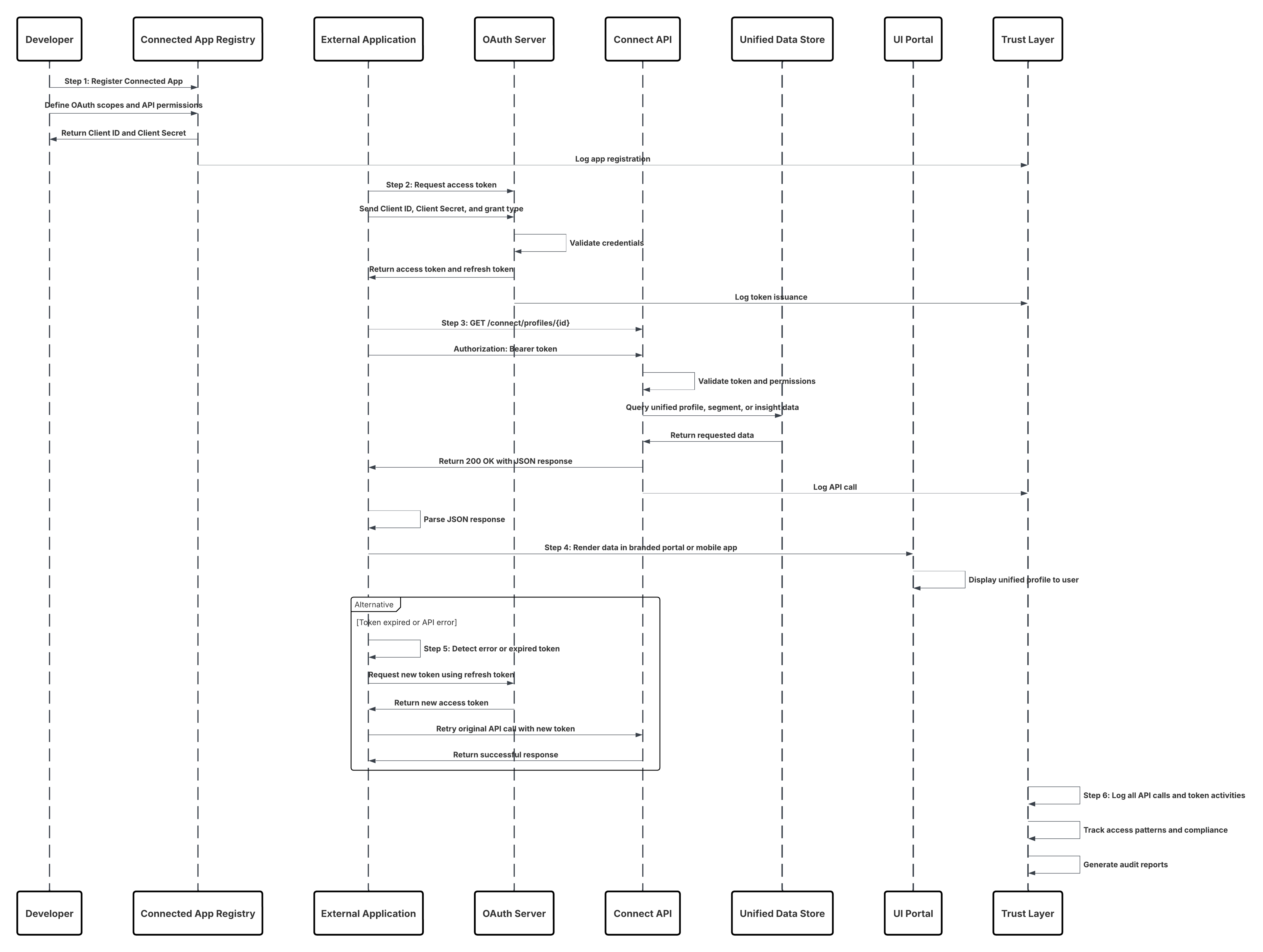
Results
Developers can create secure, custom-branded applications that are tightly integrated with Data 360. These apps can:
- Surface harmonized customer profiles and insights inReal-Time.
- Display Data 360 data alongside CRM or custom objects through unified APIs.
- Leverage consistent authentication, authorization, and audit controls via the Trust Layer.
- Provide business users or partners with seamless, governed access to trusted customer intelligence across experiences.
Calling Mechanisms
The calling mechanism depends on the target cloud storage platform and activation configuration.
| Mechanism | When to Use |
|---|---|
| Connect REST API (Preferred) | Use when building web, mobile, or third-party apps that require real-time access to Data 360 data in a UI-friendly JSON format. |
| Data Graph API | Use when the app needs to perform semantic-level queries across multiple objects (e.g., Customer → Transactions → Campaigns). |
| Query API | Use when executing SOQL-like queries to retrieve harmonized datasets with high precision. |
| Einstein 1 Platform APIs | Use when integrating AI-driven insights or Copilot-generated recommendations within custom UIs. |
| MuleSoft or Apex Gateway Wrappers | Use when additional orchestration, caching, or policy enforcement is required between the app and the Connect API. |
Error Handling and Recovery
- Request Throttling: Automatically backs off and retries API calls under rate limits.
- Schema Drift Protection:Uses GraphQL schema versioning or REST metadata discovery to adapt to schema changes.
- Token Expiration Management – Applications refresh OAuth tokens automatically to avoid session interruptions.
- API Fault Isolation – Failed API calls are logged and retried without impacting concurrent sessions.
- Trust Layer Observability – API success/failure rates and access logs are visible in the Trust Layer dashboard.
Idempotent Design Considerations
- Deterministic Request IDs: Each API request includes a correlation ID for replay-safe processing.
- Cache Validation Headers: ETag and Last-Modified headers prevent redundant data fetches.
- Atomic Read Operations: Connect API ensures each response reflects a consistent snapshot of unified data.
- Replay Protection – Duplicate API calls are filtered using request signatures and timestamps.
Security Considerations
- OAuth 2.0 Authentication: All API calls use secure, short-lived OAuth access tokens via Connected Apps.
- Least Privilege Access: API scopes are restricted to necessary objects and fields only.
- Encryption Everywhere: TLS 1.2+ in transit; AES-256 encryption at rest for cached or stored responses.
- Consent-Aware Data Access: Data 360 ensures all retrieved records adhere to consent and governance policies.
- Comprehensive Audit Logging: Every API interaction is recorded with user, app, and timestamp metadata in the Trust Layer.
Sidebars
Timeliness
- Designed for low-latency, real-time API access.
- Ideal for interactive applications that require immediate data rendering.
- Supports near-instant query response times via cached and indexed Data 360 sources.
- No dependency on batch schedules or asynchronous activation cycles.
Data Volumes
- Optimized for interactive use cases fetching small-to-medium datasets (e.g., profiles, insights, or recent transactions).
- Handles paginated results gracefully through cursor-based pagination.
- Not intended for high-volume bulk exports — use Batch or File Export patterns for large datasets.
State Management
- Applications maintain a lightweight session state with OAuth tokens and local cache.
- Connect API supports conditional requests and partial refresh for efficiency.
- API responses include version markers for schema consistency across releases.
Complex Integration Scenarios
- Combine Connect API with Data Graph API for semantic queries across multiple domains.
- Integrate with Einstein 1 Copilot or AI APIs for predictive, conversational experiences.
- Use alongside Experience Cloud or Lightning Web Components for hybrid UI development.
- Extend via MuleSoft to orchestrate data enrichment or external system lookups inReal-Time.
Example
A multinational insurance company builds a customer self-service portal allowing policyholders to view their unified profiles, recent claims, and personalized offers. The front-end, eact-based app, authenticates via OAuth 2.0 and retrieves data using the Connect REST API and Data Graph API. All data is displayed inReal-Time, consent-aware, and governed through the Data 360 trust layer. Developers monitor API calls and audit trails directly within Salesforce, ensuring full compliance and observability.
Context
Enterprises increasingly require instantaneous access to a complete customer profile for real-time decisioning systems — such as service consoles, recommendation engines, or personalization platforms.This pattern enables applications to retrieve pre-calculated, unified views of a customer’s data in nearReal-Time using Data 360’s Data Graph API, providing sub-second response times for interactive experiences. Typical use cases include:
- Displaying a 360-degree customer view within a Customer Service or Sales Console.
- Powering AI-based “Next Best Action” or “Next Best Offer” recommendations.
- Delivering hyper-personalized web or mobile experiences at page-load time.
- Supporting in-session decisioning in agent or self-service environments.
Problem
How can an application retrieve a complete, pre-calculated, unified customer view instantly, rather than executing slow, multi-object queries at runtime? For instance, a web personalization engine must load the full customer context (demographics, preferences, transactions, and calculated insights) within milliseconds to select a personalized offer. Traditional relational queries may require multiple joins and result in unacceptable latency. This demands an API that delivers denormalized, ready-to-use profile data, retrievable via a single key lookup — combining speed, completeness, and governance.
Forces
Multiple operational and performance factors influence this pattern:
- Speed: Response time must be nearReal-Time. The API must return a complete profile within milliseconds to support synchronous interactions.
- Completeness: The response must include all relevant attributes, relationships, and calculated insights — ideally in a single payload.
- Lookup Efficiency: Profiles should be retrievable via identifiers such as customerId, contactKey, or email, eliminating multi-step queries.
- Data Freshness vs. Latency: Some use cases prefer pre-calculated (cached) data for speed; others need live data, accepting higher latency.
- Governance and Security: Access must remain governed through Salesforce Trust Layer policies, ensuring compliance with data visibility and consent rules.
Solution
The solution is to use the Salesforce Data Graph API to retrieve pre-calculated, denormalized customer views stored as Data Graph records. A Data Graph is a materialized semantic view that combines multiple Data Model Objects (DMOs) — such as Individual, Transaction, and ProductInterest — into a single read-only record, often represented as a JSON blob. Developers can use REST endpoints such as: GET /api/v1/dataGraph/{dataGraphEntityName}/{id} to retrieve a complete record by its unique identifier. For dynamic scenarios, the API supports a live=true parameter that bypasses the materialized cache, executing a real-time query across Data 360, trading minimal latency for the freshest data. This allows developers to select between instantaneous (cached) and up-to-the-moment (live) profile retrievals depending on business need.
| Solution Area | Fit | Comments / Implementation Details |
|---|---|---|
| Data Graph Definition | Required | Architects define a Data Graph that combines multiple DMOs into a single semantic entity (e.g., UnifiedCustomerProfile). |
| Profile Lookup Retrieval | Best | Applications call GET /api/v1/dataGraph/{entity}/{id} to retrieve full, denormalized profiles by unique ID or key. |
| Live Parameter Usage | Optional | Append ?live=true to force fresh computation rather than cached retrieval; suitable for high-value decisions. |
| Authentication | Required | Use OAuth 2.0 via Connected Apps to authenticate API calls securely. |
| Response Parsing | Best Practice | Applications parse the JSON response directly into their UI or decisioning engine; no further joins required. |
| Caching Strategy | Recommended | Implement short-term local caching (e.g., in-memory or CDN) for repeated profile lookups. |
| Monitoring & Observability | Required | Use Trust Layer dashboards to monitor query performance, response times, and policy adherence. |
Sketch
Here is the summary of the implementation flow:
- Define Data Graph — Data architects create a Data Graph that models a unified customer view across multiple DMOs.
- Register Connected App — Developers configure OAuth credentials for secure API access.
- Invoke Data Graph API — The application issues a GET request with the Data Graph name and record ID.
- Process Response — The API returns a complete JSON representation of the customer profile.
- Render or Act — The consuming app (UI or engine) uses the unified data for personalization, recommendations, or service actions.
- Monitor and Tune — Performance metrics and access logs are reviewed through the Trust Layer observability console.
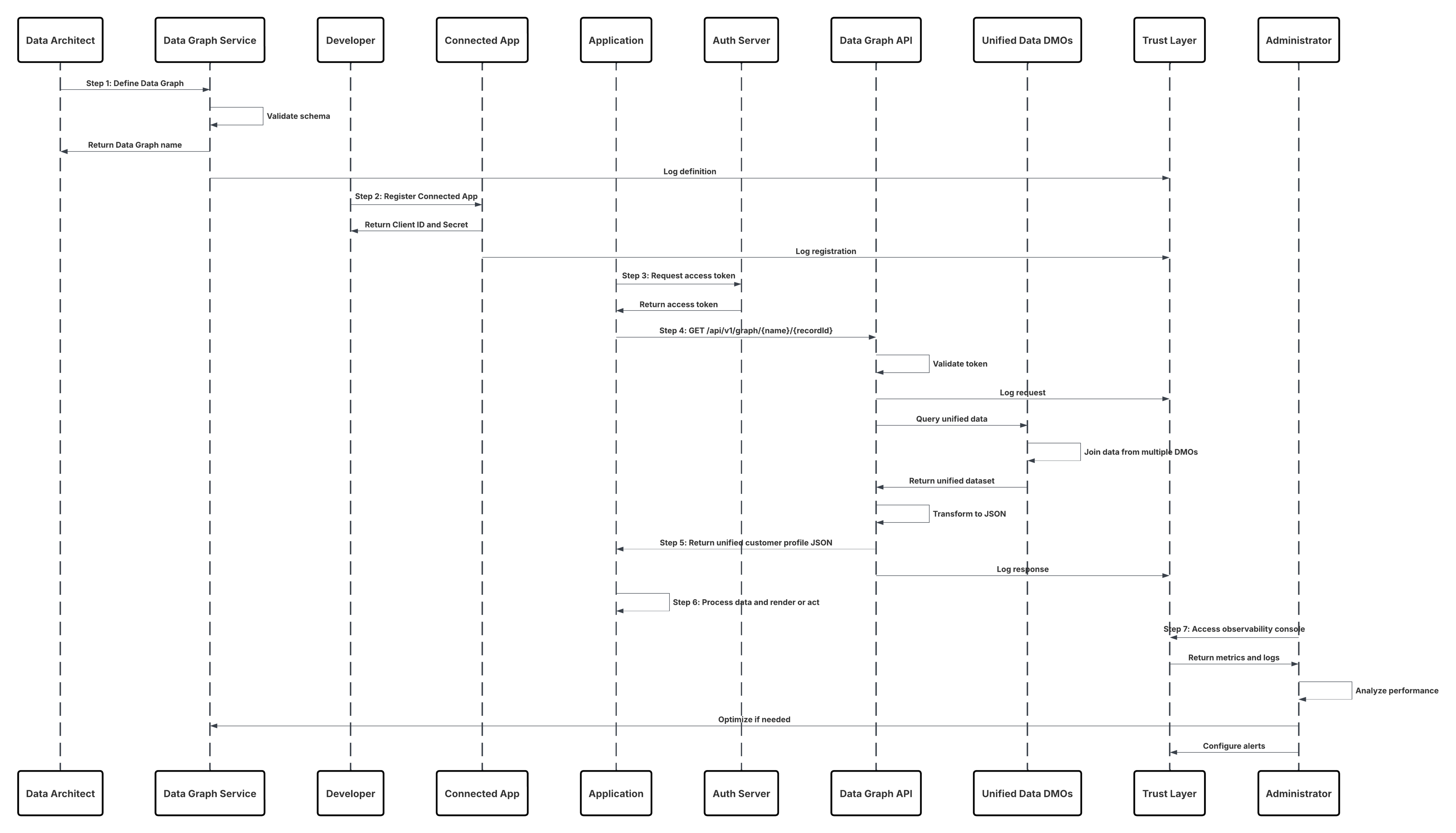
Results
Applications can now retrieve a complete, pre-joined customer profile instantly, powering real-time interactions such as personalization, service, and decision automation. This pattern ensures:
- Sub-second response times for in-the-moment decisioning.
- Consistent, governed data retrieval aligned with the Data 360 semantic model.
- Simplified application logic — no joins, no schema reconciliation.
- Traceable and compliant access via the Trust Layer for audit and observability.
Calling Mechanisms
The calling mechanism depends on the target cloud storage platform and activation configuration.
| Mechanism | When to Use |
|---|---|
| Data Graph API (Preferred) | Use for retrieving complete, pre-materialized profiles instantly by ID or key. |
| Data Graph API with live=true | Use for high-value use cases (e.g., fraud detection, live offers) where the most current data is needed, accepting slightly higher latency. |
| Connect API (Fallback) | Use for composite app scenarios combining Data Graph retrievals with other Salesforce data. |
| Query API | Use when constructing ad hoc queries or analytical reads rather than instant profile retrieval. |
| MuleSoft API Proxy | Use when routing Data Graph calls through enterprise gateways or when additional orchestration/policy enforcement is required. |
Error Handling and Recovery
- Graceful Fallbacks – If live queries fail or exceed timeout thresholds, automatically revert to cached Data Graph retrievals.
- Timeout Management – Implement retry and circuit-breaker logic for API calls under high load.
- Invalid ID Handling – Return standard 404 Not Found responses for nonexistent profile keys; handle gracefully in UI.
- Schema Version Validation – Validate Data Graph version metadata to prevent mismatches when schema evolves.
- Observability Integration – Log all errors, retries, and latencies within Trust Layer dashboards for SLA monitoring.
Idempotent Design Considerations
- Deterministic Keys – Each profile retrieval uses a stable ID (e.g., IndividualId) ensuring predictable, replay-safe queries.
- Cache Consistency – Use ETag or Last-Modified headers for conditional retrievals and cache validation.
- Atomic Retrieval – Each API response represents a consistent snapshot of the materialized Data Graph record.
- Replay Protection – Ensure client applications detect duplicate retrievals via correlation IDs and timestamps.
Security Considerations
- Strong Authentication – OAuth 2.0 via Connected Apps enforces secure, token-based access.
- Consent-Aware Retrieval – Only consented attributes are returned; consent filters are applied by the Trust Layer automatically.
- Field-Level Governance – Access to attributes is controlled via Data 360’s metadata and policy definitions.
- Encryption in Transit and at Rest – All responses are encrypted with TLS 1.2+ and AES-256.
- Audit and Traceability – Every profile retrieval event is logged with identifiers, timestamps, and policy context.
Sidebars
Timeliness
- Designed for instantaneous retrieval.
- Supports live queries for up-to-date data with slightly higher latency (sub-second).
- Optimized for synchronous decisioning and interactive applications.
- Eliminates the need for pre-batch activation or segment recomputation.
Data Volumes
- Ideal for single-record lookups or small sets (tens to hundreds) per request.
- Not optimized for large-scale bulk retrieval; use Batch or Query APIs for high-volume reads.
- Employs horizontally scalable caching and pre-materialization for speed.
State Management
- Maintains lightweight, stateless access; each request is independent.
- Supports caching headers for replay-safe retrieval.
- Applications can maintain local cache or short-term session storage to reduce repeat lookups.
Complex Integration Scenarios
- Integrates seamlessly with Einstein 1, Connect API, and MuleSoft for composite data experiences.
- Can power agentic systems (e.g., Copilot or AI reasoning engines) that require instant, contextual awareness.
- Combined with Data Actions for real-time triggers upon retrieval or state change.
- Enables personalization at scale without compromising performance or governance.
Example
A global e-commerce platform uses Data 360’s Data Graph API to retrieve unified customer profiles in real time for its recommendation engine. When a user logs in, the application invokes the Data Graph endpoint to fetch the UnifiedCustomerProfile for that customer, returning demographic attributes, behavioral signals, and calculated insights as a single JSON payload. The personalization engine consumes this response within milliseconds to determine and display the “Next Best Offer” during the active session. All requests are governed and logged through the Trust Layer, ensuring full visibility, policy enforcement, and compliance across the interaction.
Real-time data actions enable instant activation of customer data the moment it changes in Data 360. Instead of waiting for scheduled batch exports, these actions push updates, insights, or triggers directly to Salesforce or external systems in milliseconds. When a customer’s status, consent, or engagement metric is updated in Data 360, that signal can immediately power personalized offers, trigger Service Cloud automations, or update loyalty tiers — ensuring that every customer experience reflects the most current, unified truth. This pattern is ideal for high-impact, latency-sensitive use cases such as personalized web experiences, fraud detection alerts, next-best-action recommendations, or real-time CRM updates. It closes the gap between data insight and business action, turning unified data into in-the-moment intelligence.
Context
Modern digital experiences and operational workflows require immediate, contextual actions the moment an event occurs — for example, updating a customer record during a checkout, adjusting inventory when a return is scanned, or delivering a personalized promotion the instant a user abandons a cart. Real-time data actions let systems invoke, enrich, and act on unified Data 360 profiles and calculated insights with sub-second to second latency, enabling interactive personalization, operational automation, and instant decisioning.
Problem
How can applications, UI interaction flows, or middleware call into Data 360 at runtime to read, compute, or update a single unified profile or to trigger an action (e.g., send an offer, update CRM, start a workflow) with low latency, strong consistency, and governance controls — without waiting for scheduled batch jobs or heavyweight pipelines?
Forces
Several technical, operational and governance forces shape this pattern:
- Low Latency Requirement: Calls must complete in sub-second to a few-seconds range to preserve a good UX or to meet operational SLAs.
- Deterministic Identity Resolution: Requests must resolve to the correct Unified Individual profile (golden record) reliably and quickly.
- Fine-Grained Authorization: Real-time calls must enforce attribute-level policies and consent checks at request time.
- Payload Minimalism: Real-time payloads should be small and focused (single profile or small attribute set) to reduce latency and cost.
- Developer Experience: APIs must be developer friendly (REST/gRPC/GraphQL), with clear schemas and stable contracts for production use.
- Auditability & Traceability: Every real-time action must be logged with lineage, user identity, and policy decisions for compliance.
Solution
The recommended solution is to use Data 360’s Real-time Data Actions interface (APIs + SDKs) combined with edge caching and minimal compute transforms where necessary. Integrations invoke a data actions endpoint to read or write profile attributes, compute insights, or initiate orchestrations. Real-time policy checks (CEDAR) and dynamic masking are applied at the Policy Enforcement Point before any payload is returned or action executed.
| Solution Area | Fit | Comments / Implementation Details |
|---|---|---|
| Realtime Data Action | Best | Expose endpoint for single-record read/write and action triggers. Authenticate via OAuth/JWT. |
| Identity Resolution | Required | Resolve incoming identifiers (email, externalId, cookie) to Unified Individual ID in-line. Use a deterministic resolver with cache. |
| Policy Enforcement (CEDAR) | Best Practice | Evaluate consent, ABAC, and masking policies at request time; deny or mask fields per policy decisions. |
| Edge/Cache Layer | Recommended | Use short-TTL caches for profile fragments and computed insights to reduce latency; invalidate on change events. |
| Lightweight Transforms | Recommended | Apply simple enrichments or calculated fields in the action path; heavy transforms should be precomputed. |
| Action Orchestration | Best | Support synchronous single-step actions (e.g., return offer token) and asynchronous orchestrations (queue \+ webhook) for complex flows. |
| Observability & Tracing | Required | Log request/response, policy decisions, and lineage to the Trust Layer/ SIEM for audit and debugging. |
| Rate Limiting & Throttling | Required | Enforce client quotas and graceful degradation strategies for high-traffic moments. |
Sketch
Here is the summary of the steps.
- Client (UI / middleware / POS) sends authenticated Data Action requests with identifiers and action type.
- API Gateway validates token, rate limits, and forwards to Data 360 Action Service.
- Action Service resolves identifier → Unified Individual ID (fast path cache; fallback to Graph lookup).
- Policy Enforcement (PDP) evaluates CEDAR policies using attributes from PIP and request context.
- If allowed, Action Service reads any required profile attributes/insights and performs light transforms.
- Action Service returns response synchronously (e.g., offer token, updated attribute) or queues async orchestration and returns acknowledgement.
- All events, decisions, and payloads are logged to Trust Layer and optionally forwarded to SIEM.
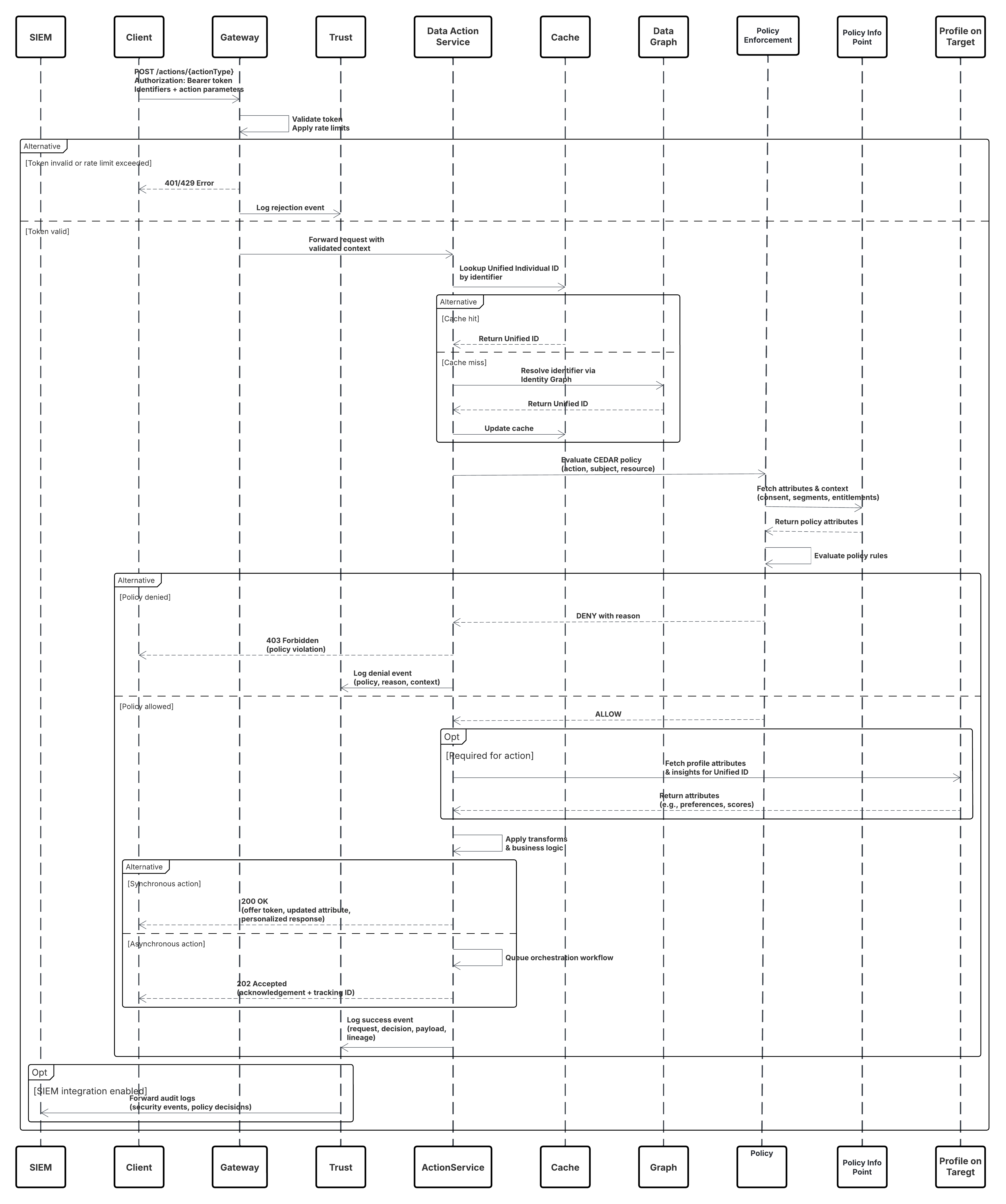
Results
- Applications receive immediate, policy-governed access to unified profile reads/writes and action triggers with sub-second to second latency.
- Real-time personalization, decisioning, and operational workflows (e.g., offers, agent assist, inventory updates) are enabled without batch delays.
- All actions are auditable, consent-aware, and enforce attribute-level masking to maintain privacy and compliance.
Calling Mechanisms
The calling mechanism depends on the destination platform and activation target configuration.
| Mechanism | When to Use |
|---|---|
| RESTful Data Actions API | Preferred for web/mobile apps and middleware needing synchronous profile reads or action responses. |
| gRPC / Binary RPC | Use for ultra-low latency enterprise services or internal microservices with persistent connections. |
| GraphQL Single-Record Queries | Use when clients need flexible field selection and want to minimize payloads. |
| Event-Triggered Webhooks | Use for async workflows where action triggers downstream processes (e.g., start a journey). |
| Platform Events / PubSub | Use for fan-out scenarios where multiple systems must react to a single action event. |
| Edge SDK (client libs) | Use for low-latency clients that cache profile fragments and call the Data Actions API only when needed. |
Error Handling and Recovery
- Synchronous Errors: Return structured error codes with human-readable messages and idempotency tokens.
- Transient Retry: Clients should retry idempotent requests with exponential backoff on 429/5xx responses.
- Policy Deny Handling: Denials return clear reason codes; sensitive data is never returned on policy failure.
- Async Orchestration Failures: Orchestration jobs move to DLQ and are replayable; a job status API allows clients to poll or receive callbacks.
- Fallback Strategies: If identity resolution fails, return a deterministic error and optionally a suggested remediation (e.g., require externalId).
Idempotent Design Considerations
- Idempotency Key: Clients supply an idempotency key (UUID + client namespace) for mutating actions.
- Deterministic Keys: Use composite keys (UnifiedIndividualId + ActionType + TimestampWindow) to detect duplicates.
- Safe Retries: Design actions to be side-effect tolerant or to perform upserts instead of blind inserts.
- Replay Protection: Persist processed idempotency keys and TTL them after business window to avoid replays.
- Statelessness: Keep synchronous actions stateless where possible; persist minimal state for async workflows.
Security Considerations
- Authentication: OAuth 2.0 (JWT Bearer or mTLS for service accounts); short-lived tokens and refresh rotation.
- Authorization: Policy Decision Point enforces Attribute-Based Access Control (CEDAR) and consent checks per request.
- Transport & Storage Encryption: TLS 1.2+ in transit; AES-256 at rest for any cached fragments or audit logs.
- Least Privilege: API clients scoped to minimal permissions; roles separated for read vs write vs orchestration.
- Data Minimization: Return only requested and consented attributes; apply dynamic masking for PII/PHI.
- Network Controls: Optionally require calls from private networks (Private Connect, IP allowlists) for high-risk actions.
- Audit & Monitoring: Log request metadata, policy decisions, requester identity, and response hashes to Trust Layer and SIEM.
Sidebars
Timeliness
- Designed for mean latencies in the sub-second to low-single-second range for synchronous actions.
- Edge caches (short TTL) and precomputed insights reduce round trips.
- Async pathways provide near-instant acknowledgement with background processing for heavy tasks.
Data Volumes
- Optimized for single-record or small-batch interactions (1–100 records).
- Not intended for bulk exports—use batch activation for large volumes.
- High throughput uses pooling/connection reuse and parallel orchestration queues.
State Management
- Stateless request model for synchronous calls; minimal action state persisted for grants/transactions.
- Cache invalidation driven by change events—ensure TTLs and invalidation signals keep caches fresh.
- Orchestration jobs maintain durable state (jobId, status, retries) stored in the Trust Layer.
Complex Integration Scenarios
- Agent Assist: Real-time profile lookup + calculated propensity returned to service console in sub-second for agents.
- POS / Edge Devices: Local SDK + occasional Data Action for validating promotions or loyalty status.
- Hybrid Flows: Sync Data Action for decision + async orchestration to update downstream systems and trigger campaigns.
- Third-party Middleware: MuleSoft or API gateways can mediate authentication, enrich context, and enforce extra policy checks.
Example
A retail mobile app determines whether to display a personalized instant coupon when a shopper taps Checkout by invoking the offer-eligibility data action with the shopper’s email and cart context. The request is validated by the API Gateway and forwarded to the Data Action Service, which resolves the email to a unified individual ID using a cache hit, verifies marketing consent through the PDP, and evaluates eligibility based on customer lifetime value and recent purchase recency. If the shopper qualifies, the service returns a signed coupon token and logs the decision. When coupon issuance requires inventory reservation, an asynchronous orchestration is triggered to reserve inventory and notify CRM systems. The app displays the coupon immediately, while downstream updates are completed in the background and the Trust Layer captures a complete audit trail for governance and compliance.
- Connectors & Integration
- Web & Mobile SDK
- Sub-Second Real-Time Ingestion
- Bring Your Own Lake (Zero Copy Query)
- Bring Your Own Lake (Zero Copy File)
- Data Graphs
- Activation: MC Engagement
- Activation: MC Personalization
- Activation: B2C Commerce
- Data Share (Zero Copy)
- Activation: File Storage
- Data Actions
- Real-Time Sub-Second Data Actions
- External Activation Platform