Enterprise data architectures rarely live in one system. Salesforce manages customer engagement, pipeline, and service interactions. Analytical platforms like Snowflake house historical transactions, financial records, usage data, and operational metrics. Traditionally, bridging these two worlds meant building and maintaining ETL pipelines: scheduled jobs that extract data from the source, transform it, and load copies into Salesforce. As a result of these pipelines, the data arrives delayed, governance policies multiply across systems, and pipelines demand ongoing operational care.
Salesforce Data Virtualization offers a different model. Instead of moving data into Salesforce, it enables Salesforce to query data directly at its source, at runtime, with no replication. Users see live external data through standard Salesforce interfaces. The data never leaves its authoritative home. This document explains how the pattern works, when to use it, and how to get started, using Snowflake as a concrete worked example.
Salesforce Data Virtualization is an integration architecture pattern that enables Salesforce to query data directly from external systems at runtime, without copying or replicating that data into Salesforce storage. Instead of moving data in, the platform sends the query out.
As a result, Salesforce users interact with external data through familiar Salesforce interfaces (like page layouts, related lists, reports, or flows) while the data remains in its authoritative source system. Governance, access control, and data residency stay where they belong.
This pattern is built on a single architectural principle: data remains at the source. Computation moves to the data.
Most enterprise Salesforce deployments integrate with external data platforms (like data warehouses, operational databases, or analytical stores) through replication pipelines. Pipelines extract, transform, and load data into Salesforce on a schedule. This approach works, but replication introduces structural trade-offs:
- Replicated data is always delayed. Pipelines introduce lag and stale data drives poor decisions.
- Every copy of data expands compliance scope. Sensitive data (like personally identifiable information, financial records, or health data) in multiple systems requires maintaining multiple governance policies.
- Pipelines require ongoing operational investment, monitoring, failure handling, schema drift management, and reprocessing logic.
Data Virtualization addresses these trade-offs directly. It removes the pipeline entirely for read-heavy use cases, keeps data in its authoritative location, and gives Salesforce users a real-time, governed view of external data without the replication overhead.
External Objects are the primary mechanism through which Data Virtualization surfaces external data inside Salesforce. They behave like standard Salesforce objects: queryable via SOQL, visible in page layouts and related lists, and accessible through standard Salesforce APIs. The key difference is that no data is stored in Salesforce. The External Object is a schema projection: a definition of what the external data looks like, not a copy of the data itself.
When a user loads a page or runs a report that references an External Object, Salesforce executes a live query against the external system and returns only the result set for that interaction.
When Salesforce executes a SOQL query against an External Object, it translates filters (WHERE clauses), sort orders (ORDER BY), and limits (LIMIT) into the equivalent SQL and sends them to the external system. The external system executes the query on its own compute engine and returns only the filtered result set. Work happens where the data lives, and only the answer travels back to Salesforce.
Data Virtualization enforces two independent security layers simultaneously. The external system applies its own access controls at query execution time, including row-level security, column masking, and role-based access. Salesforce applies its own security model on top: profiles, permission sets, field-level security, and sharing rules. Both layers are active on every query. Neither replaces the other.
Architects frequently describe Data Virtualization as a “zero-copy” pattern. Zero-copy means no persistent replication into Salesforce storage. There is no ETL pipeline writing records into Salesforce objects. There is no scheduled sync creating a local copy. The External Object holds no rows.
Zero-copy does not mean zero data transmission. Every time a user queries an External Object, a result set travels from the external system to Salesforce over the network. For large result sets or high query frequency, data egress costs and network latency are real factors for architects to design for. This is not a limitation to hide: it is a design constraint to account for.
Consider these architectural differences if your use case requires high volumes, frequent access, or low latency.
Snowflake is one of the most common external systems connected to Salesforce via Data Virtualization. It serves as a concrete example of how the pattern works from end to end.
In this configuration, Salesforce connects to Snowflake using Salesforce Connect with the SQL Adapter for Snowflake. Snowflake tables and views are surfaced as External Objects in Salesforce. When a user queries an External Object, Salesforce translates the SOQL into SQL and submits it to the Snowflake Statements API via an authenticated HTTPS callout. Snowflake executes the query on its virtual warehouse, applies its own row-level security and column masking, and returns only the result set. No data is written to Salesforce storage at any point.
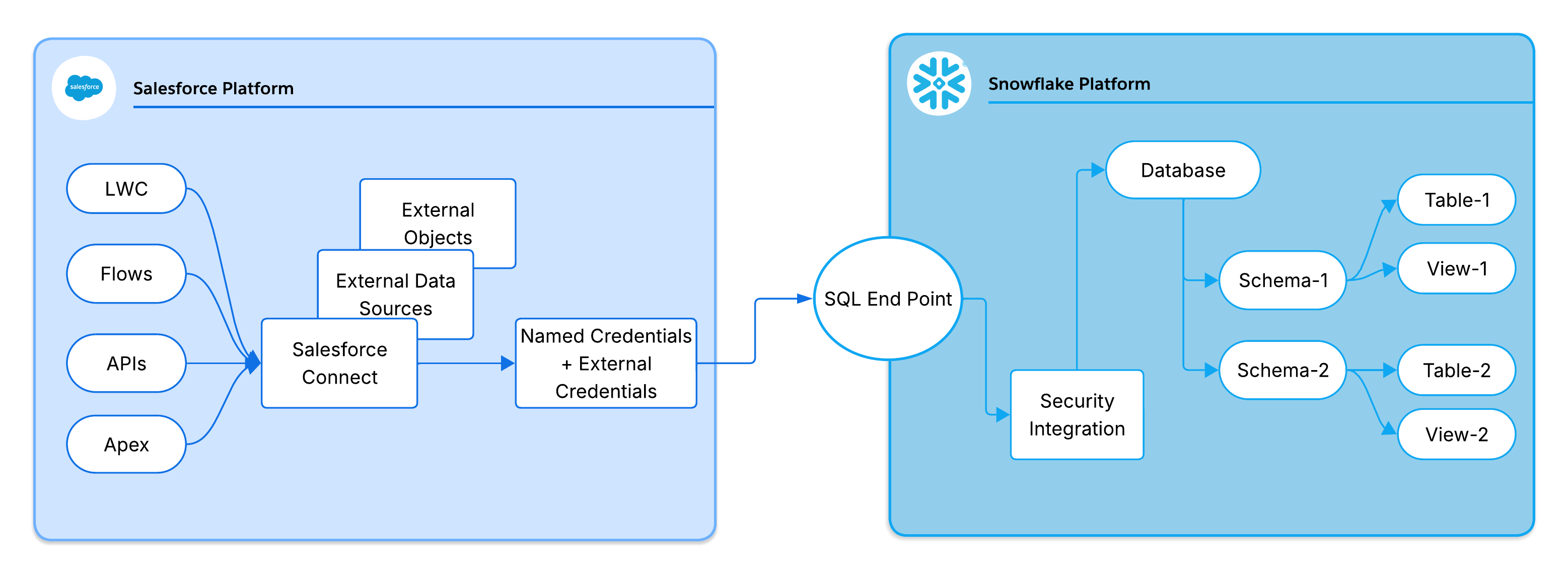
Salesforce Connect uses a delegated OAuth 2.0 model to authenticate with Snowflake. The key components are:
- Auth Provider: Manages the OAuth handshake with Snowflake. Handles token requests and maps the returned token to the Salesforce credential.
- External Credential: Holds the OAuth access and refresh tokens securely in the Salesforce encrypted credential store and injects them into outbound callouts.
- Named Credential: Defines the Snowflake endpoint URL and references the External Credential.
- Snowflake Security Integration: Registers Salesforce as a trusted OAuth client in Snowflake. Defines the allowed redirect URI, OAuth flows, and token TTL.
These components form a dependency chain: External Data Source references the Named Credential, which references the External Credential, which references the Auth Provider. Understanding this chain is essential when troubleshooting connectivity or access failures.
Salesforce supports two identity delegation models when authenticating with Snowflake:
- Named Principal: One shared service account authenticates all Salesforce users against Snowflake. This is simpler to configure, but doesn’t have per-user auditability or fine-grained Snowflake access control.
- Per-User Principal: Each Salesforce user authenticates with their own OAuth token. This enables Snowflake row-level security and full per-user audit trails, with a trade-off of higher token management overhead (per-user OAuth flows, refresh, revocation).
Decision guidance: Use Per-User Principal for regulated data or Personally Identifiable Information (PII). Use Named Principal when Salesforce sharing rules provide sufficient access control and simplicity is the priority.
These Salesforce governor limits directly shape solution design when using External Objects with Snowflake:
- Callout limit: 100 per Apex transaction. Pages or flows with multiple External Object queries can reach this limit quickly.
- Callout timeout: 120 seconds maximum. Long-running Snowflake queries cause a runtime exception.
- SOQL row limit: 50,000 rows. Paginate large result sets.
- Async constraints: Batch Apex and most async contexts restrict callouts. Keep External Object access within synchronous transaction boundaries. For asynchronous use cases that query External Objects, consider Continuation callouts for user-initiated async interactions, or architect the flow to perform external data access in a synchronous transaction and hand off results asynchronously.
Design guidance: Don’t query External Objects inside loops. Push WHERE clause filters to Snowflake to reduce result size and callout frequency.
Every query that Salesforce sends to Snowflake is logged in Snowflake Query History with full execution metadata: latency, rows scanned, warehouse used, and the executing identity. This history provides end-to-end auditability from Salesforce user action to Snowflake execution and is the primary diagnostic tool for performance tuning and access validation.
Data Virtualization is well-suited to use cases where real-time access, governance, and reduced replication overhead outweigh the constraints of a federated, query-time access model.
Use it when:
- Read-heavy analytical access is the primary requirement. If users need to query and display external data in Salesforce UIs, reports, or flows without writing back, Data Virtualization eliminates pipeline overhead for read-only scenarios.
- Data freshness is critical. Where stale replicated data creates business risk (such as out-of-date financial balances, inventory levels, or compliance status), the federated model guarantees that every query reflects live data.
- Governance and data residency requirements are strict. When regulatory or contractual constraints prohibit copying sensitive data into Salesforce, virtualization keeps data in its authoritative location while making it accessible within Salesforce. Only one system holds the data.
- Dual-layer access control is required. When both the external system’s native access controls and the Salesforce security model apply simultaneously, the federated model enforces both without data duplication.
- The external system is already the authoritative system of record. If the data is already clean, governed, and queryable in the source system, virtualizing it avoids redundant transformation, storage cost, and divergence risk.
Avoid it when:
- Low-latency writes are required. External Objects are read-only. Write-back use cases require a different integration pattern.
- Complex multi-object joins are needed. SOQL across multiple External Objects doesn’t support joins. Pre-materialize joined data as a single view in the source system.
- Salesforce AI or Agentforce features require native data. Currently, Einstein and Agentforce features (including grounding for Einstein Copilot, predictive scoring, and Agentforce actions) operate on native Salesforce objects. These features don’t support External Objects as a grounding or activation data source. If AI activation is in scope for this data, Salesforce Data 360 is the recommended complementary solution.
- High-frequency, high-volume access patterns. External Objects are designed for on-demand access. Workloads that fire hundreds of queries per minute exhaust governor limits and degrade performance.
The following use cases illustrate how Salesforce Data Virtualization applies across common enterprise scenarios. Each example uses Snowflake as the external system, but the underlying pattern applies to any SQL-compatible data source supported by Salesforce Connect.
Challenge: Support teams needed unified reports combining Salesforce Case data with ticket volume, resolution time, and escalation metrics stored in Snowflake. Building and maintaining a replication pipeline for this data introduced lag and added operational overhead for a read-only reporting use case.
Solution: The team exposed Snowflake views containing ticket metrics as External Objects in Salesforce. The team configured Salesforce Reports to join native Case objects with the external ticket data.
Result:
- Reports always reflect live Snowflake data. No pipeline lag.
- Governance of sensitive support metrics remains in Snowflake.
- No ETL pipeline to build, monitor, or maintain.
Challenge: A finance team maintained authoritative credit limit and balance data in Snowflake. Replicating these values into Salesforce via reverse ETL introduced replication lag, causing sales reps to commit to deals based on stale credit information. The compliance team also flagged the risk of holding sensitive financial data in Salesforce storage.
Solution: The team virtualized the Snowflake finance view as an External Object and surfaced it on the Account page layout. Sales reps now see live credit status as part of their standard Account view in Salesforce.
Result:
- Real-time credit data on every Account page. No lag.
- Reverse ETL pipeline eliminated for financial data.
- Sensitive financial data never copied into Salesforce storage. Compliance scope stays in Snowflake.
Challenge: During a merger, the acquiring company needed to give Salesforce users visibility into operational data from 6 high-volume Snowflake datasets covering transactions, billing, and usage. Replicating terabytes of data into Salesforce was not viable on the merger timeline, and building custom ETL pipelines for each dataset would have required significant engineering investment.
Solution: The team configured External Objects for all 6 Snowflake datasets using Salesforce Connect with a least-privilege integration role. No custom code required. Queries execute directly in Snowflake, and all activity is logged in Snowflake Query History for compliance reporting.
Result:
- Fully declarative configuration. No custom code or pipelines required.
- Data freshness guaranteed. Every query reflects live Snowflake data at execution time.
- Full audit trail in Snowflake Query History for regulatory and compliance reporting.
Data Virtualization introduces a distinct operational profile. Design for these failure scenarios:
- OAuth token expiry: Tokens have a finite time to live (TTL). Expired tokens cause callout failures. Monitor for 401 Unauthorized responses and implement refresh logic.
- Warehouse cold-start (Snowflake-specific): Auto-suspended warehouses add 5–30 seconds on the first query. For user-facing use cases with latency requirements, pre-warm with a scheduled lightweight query during business hours.
- Role mismatch: A misconfigured role in the external system can return zero rows silently rather than an error. Validate role-to-object privileges in the external system independently of Salesforce.
- Result set overflow: Oversized payloads exceed API limits. Always apply LIMIT clauses and expose filtered views rather than raw tables.
- External system outage: No fallback or cache exists. Wrap callouts in try/catch and surface informative error states in the UI. For mission-critical data, consider a tiered approach: virtualize for real-time access, and maintain a lightweight replicated fallback for the most critical fields to guarantee availability during source system outages.
Salesforce Data Virtualization aligns with the following pillars of the Salesforce Well-Architected Framework.
- Trust: The delegated OAuth 2.0 model and least-privilege role guidance align with Trust. Dual-layer access control (source system + Salesforce) enforces defense in depth.
- Reliability (fault tolerance): The failure modes section addresses reliability directly: token expiry, cold-start, role misconfiguration, result set overflow, and outage handling each represent a distinct failure class with a documented resolution path.
- Reliability (scalability): Query pushdown, warehouse sizing guidance, and callout limit awareness optimize execution efficiency within Salesforce governor constraints, a reliability concern for solutions operating at scale.
- Operational Excellence: Snowflake Query History as the primary observability tool supports operational excellence: architects make a deliberate, traceable choice to use platform-native tooling for end-to-end auditability and performance diagnostics rather than building custom logging infrastructure.
This section gives architects and designers a structured starting point for building the Data Virtualization pattern in a sandbox environment. It’s not a complete implementation guide — treat it as a validated sequence of decisions and configuration steps to orient your first proof of concept.
Confirm the following before starting any configuration work:
- License entitlement: Salesforce Connect isn’t included in all Salesforce editions. The SQL Adapter for Snowflake requires a separate add-on license beyond base Salesforce Connect entitlement. Verify both in your org before proceeding.
- Sandbox first: Complete all phases in a sandbox environment before promoting your configuration to production.
- Snowflake access: Confirm that you have permission to create a Security Integration in Snowflake and access to the target database, schema, and objects.
- Adapter version: Confirm that the SQL Adapter for Snowflake is available in your org edition and that your Snowflake account URL doesn’t contain underscores (replace with hyphens if it does. This is a Salesforce platform constraint for callout hostname resolution).
Setting up Data Virtualization with an external SQL system like Snowflake is a declarative, configuration-driven process – no custom code required. The setup follows three sequential phases: establishing identity and trust, configuring the data surface, and exposing data to end users.
This phase establishes a secure, delegated OAuth 2.0 trust chain between Salesforce and the external system. Complete this phase before starting any data surface configuration.
- Create an Auth Provider in Salesforce. Use the OpenID Connect type. Use placeholder values at this stage — return to complete it after retrieving values from the external system. After you save, Salesforce generates a Callback URL. Retain this value.
- Register Salesforce as an OAuth client in the external system. In Snowflake, this means creating a Security Integration (OAuth, Confidential Client type). Provide the Salesforce Callback URL as the redirect URI. Retrieve the Client ID, Client Secret, Authorization URL, and Token URL from the integration after creation.
- Complete the Auth Provider configuration. Return to the Salesforce Auth Provider and populate it with the values retrieved from the external system: Consumer Key, Consumer Secret, Authorization URL, and Token URL.
- Create the External Credential. Set Protocol to OAuth 2.0, link it to the Auth Provider, and add a Principal (Named or Per-User, based on your identity model decision). This object manages the OAuth token lifecycle.
- Create the Named Credential. Set the endpoint to the external system’s API URL (e.g.,
https://<account>.snowflakecomputing.com/api/v2/statements/) and link it to the External Credential. - Grant profile access to the External Credential. Without this step, users can’t invoke federated queries even if all other configuration is correct.
- Initiate the OAuth flow to complete authentication. Trigger the OAuth handshake from Salesforce. The platform redirects to the external system login, validates credentials, and stores the resulting tokens securely in the External Credential. This step binds user context to a valid token. All federated queries fail until this step is complete.
This phase connects Salesforce to the external data schema and creates the External Object definitions that users and the platform query.
- Create the External Data Source. Select the appropriate adapter (e.g., SQL Adapter for Snowflake), point it to the target database and schema, and link it to the Named Credential you created in Phase 1.
- Validate the connection. Use the built-in validation on the External Data Source. A successful result confirms the OAuth trust chain is complete and the external system is reachable.
- Sync metadata. Initiate a metadata sync from the External Data Source. Salesforce introspects the target schema and generates External Object definitions, mapping external columns to Salesforce field types.
- Select and expose the required tables or views. Choose which external tables or views to surface as External Objects. As a best practice, expose curated views rather than raw tables. Views allow pre-filtering of columns, row-level restrictions, and tighter control over what the Salesforce layer can access.
This phase makes External Objects visible and usable to end users within the Salesforce Lightning experience.
- Create tabs for External Objects. Tabs make External Objects directly navigable within Lightning Apps.
- Add External Objects to page layouts. Surface relevant external data alongside native Salesforce records (for example, add a Snowflake finance view to the Account page layout).
- Add to related lists. Include External Objects in related lists to give users a unified view of native and external data in context.
- Validate end-to-end query federation. Load a page or run a query that references an External Object. Then inspect the external system’s query history (for example, Snowflake Query History) to confirm that the query executed at the source. Verify that the correct role, warehouse, and identity ran the query.
After all three phases are complete, Salesforce users can interact with live external data through standard Salesforce interfaces, with no awareness that the data originates outside Salesforce.
Salesforce Data Virtualization replaces replication-based integration with query-time federation. Data stays in its authoritative source; Salesforce users interact with it through standard platform interfaces. There is no pipeline to build, no copy to govern, and no lag to manage.
This pattern is the right choice when read-heavy access, real-time data freshness, strict governance, and dual-layer access control are the primary drivers. It is the wrong choice when writes are required, when AI or automation features depend on native Salesforce objects, or when access patterns are too high-frequency for governor limits to accommodate.
Snowflake illustrates the pattern well: a governed, query-time federated connection established declaratively with no custom code, observable end-to-end through Snowflake Query History, and enforceable through both the Snowflake native access controls and the full Salesforce security model.
Before committing to this architecture, validate license entitlement, assess governor limit exposure against your expected access patterns, and confirm OAuth readiness in a sandbox environment. The pattern rewards thoughtful upfront design: get the identity model, credential chain, and view strategy right, and the operational footprint is minimal.
Yugandhar Bora is a Software Engineering Architect at Salesforce, specializing in data architecture within the Data & Intelligence Applications platform. He leads Enterprise Architecture Review Board (EARB) initiatives focused on data governance and unified data models, while contributing to automated platform provisioning solutions.