Most enterprise integration pipelines between Salesforce and external analytics platforms rely on custom code. They work until something breaks. Schema drift, API exhaustion, and hard-delete gaps require constant engineering intervention. As companies push toward agile, citizen-developer-enabled architectures, this model becomes a bottleneck: analytics teams wait on engineering sprints to add a Salesforce field to a downstream schema, failed nightly loads delay Monday morning reporting, and simple configuration changes require code reviews and deployments.
CRM Analytics, the Salesforce native analytics and business intelligence platform, solves this problem by enabling companies to explore data, build interactive dashboards, and uncover AI-driven insights without leaving the Salesforce ecosystem. Central to this capability is a declarative, low-code data synchronization feature built natively into the platform: CRM Analytics SyncOut and CRM Analytics SyncIn.
CRM Analytics SyncOut moves Salesforce records into external data stores on a configured schedule, using Change Data Capture (CDC) for incremental loads and built-in hard-delete tracking to flag permanently removed records. CRM Analytics SyncIn brings external data back into Salesforce, mapping columns to object fields and upserting records using Bulk API 2.0. Both are configured entirely through Salesforce Setup. No pipelines, no staging scripts, no custom monitoring. Administrators configure a sync job in a single Setup session; the platform handles execution, retry, error logging, and schema mapping automatically.
This guide explains the pattern, when to use it, how to implement it with Snowflake as a worked example, and the architectural considerations that determine whether it fits a given integration problem.
Licensing note: CRM Analytics SyncIn and SyncOut are not available on base Salesforce editions without a CRM Analytics license add-on. Confirm license entitlements before designing a synchronization architecture that depends on these capabilities.
Data integration is one of the highest-friction surfaces in enterprise architecture. A custom ETL pipeline from Salesforce to an analytics platform typically requires a Connected App for authentication, a scheduled job for SOQL extraction, a transformation layer to reconcile field types, a staging area for bulk load, and a monitoring layer to catch failures. Each component of custom code represents a failure point.
The cost of this friction compounds over time. Schema drift in Salesforce (a renamed field, a new picklist value, a changed API name) breaks the pipeline silently. API exhaustion during peak usage stalls the extract. Hard-deleted records never appear in the target table, leaving stale data that downstream analytics treat as live. The engineering team becomes the bottleneck for routine data operations.
CRM Analytics SyncIn and SyncOut change the operating model. Configuration replaces code. The platform takes responsibility for execution, error handling, schema mapping, and observability. Administrators can define, modify, and monitor sync jobs without raising a development ticket.
The result of this new operating model is reduced time from integration design to operational sync, lower engineering overhead, and an integration model that scales within platform constraints rather than requiring custom code maintenance.
SyncIn and SyncOut are the two directional modes of CRM Analytics data synchronization. SyncOut moves Salesforce records to an external platform. SyncIn brings external records into Salesforce. Both operate on a declarative configuration model with no custom code required.
Declarative configuration means all sync behavior is defined through point-and-click UI in Salesforce Setup. Source object, target table, field mappings, sync schedule, sync mode, and filters are all set through configuration metadata. The platform derives the execution plan from that metadata and manages it end to end.
Full sync vs. incremental sync controls what data moves on each run. A full sync queries all records that match the filter criteria on every execution. An incremental sync uses CDC to query only records that have changed since the last run. Incremental sync is the recommended mode for high-volume objects, as it reduces API consumption and sync duration significantly.
Change Data Capture (CDC) is a Salesforce platform capability that records field-level changes to objects as event streams. SyncOut uses CDC to detect creates, updates, and deletes without performing full table scans. CDC must be enabled per object in Salesforce Setup before it can be referenced by a sync configuration.
Hard-delete tracking solves one of the most persistent problems in Salesforce-to-external ETL. When a record is hard deleted in Salesforce, it disappears from standard SOQL queries. Without explicit tracking, the external platform never learns the record was removed. SyncOut’s hard-delete tracking, when enabled, flags deleted records in the target table with DEL_FLAG = 'Y', giving downstream systems a reliable signal to filter stale data.
Sync frequency is configurable from 15 minutes to weekly. The choice is a trade-off between data freshness, API consumption, and Snowflake warehouse compute cost. 15-minute syncs approach near-real-time for operational dashboards; daily syncs are appropriate for batch reporting workloads.
Governor limits constrain sync job design: The Salesforce API request limit (15,000 calls per 24 hours on Unlimited Edition), the Bulk API 2.0 batch size of 10,000 records, and the SOQL query row limit of 50,000 per transaction all inform how to size and schedule sync jobs. The platform handles chunking and pagination automatically, but architects must account for limited headroom across all sync jobs running in the org.
Snowflake is a primary target and source for data synchronization with Salesforce CRM Analytics. It serves as a concrete example of how batch and incremental data movement works end to end.
This section provides an overview of implementing CRM Analytics SyncOut and SyncIn using Snowflake as the external analytics platform. It covers each method, the shared authentication models, security frameworks, key platform considerations, and observability practices.
In this SyncOut configuration, Salesforce uses CRM Analytics SyncOut to push records to Snowflake. The platform extracts data via SOQL, handles type conversions automatically, and loads it into Snowflake tables on a configured schedule (ranging from 15 minutes to weekly). Refer to current Salesforce and Snowflake documentation for specific loading semantics.
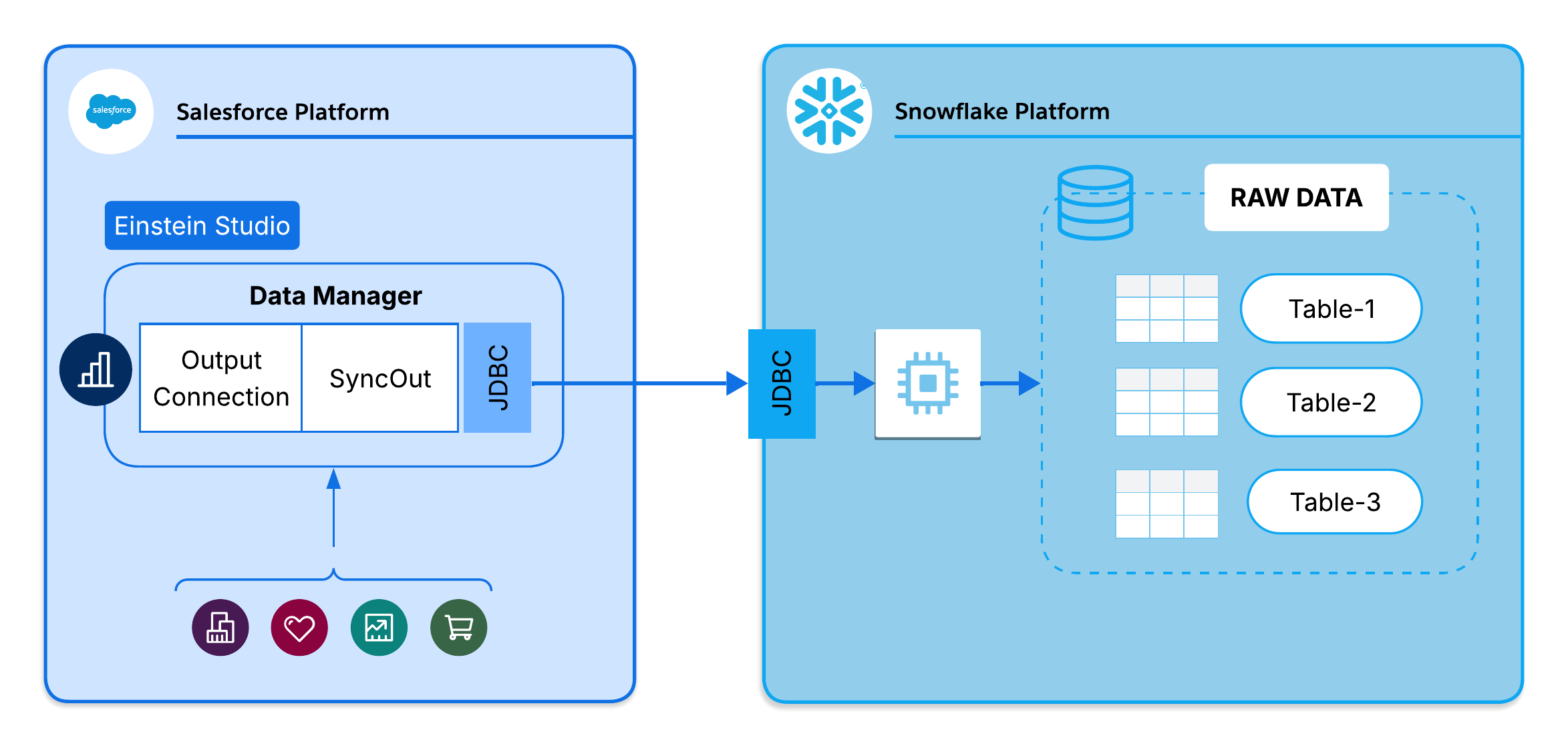
In this SyncIn configuration, Salesforce uses CRM Analytics SyncIn to pull data back into Salesforce. The platform queries Snowflake via the Statements API and upserts results into Salesforce using Bulk API 2.0. Large result sets are automatically paginated to stay within API limits. The sync runs on a configured schedule, ranging from 15 minutes to weekly.
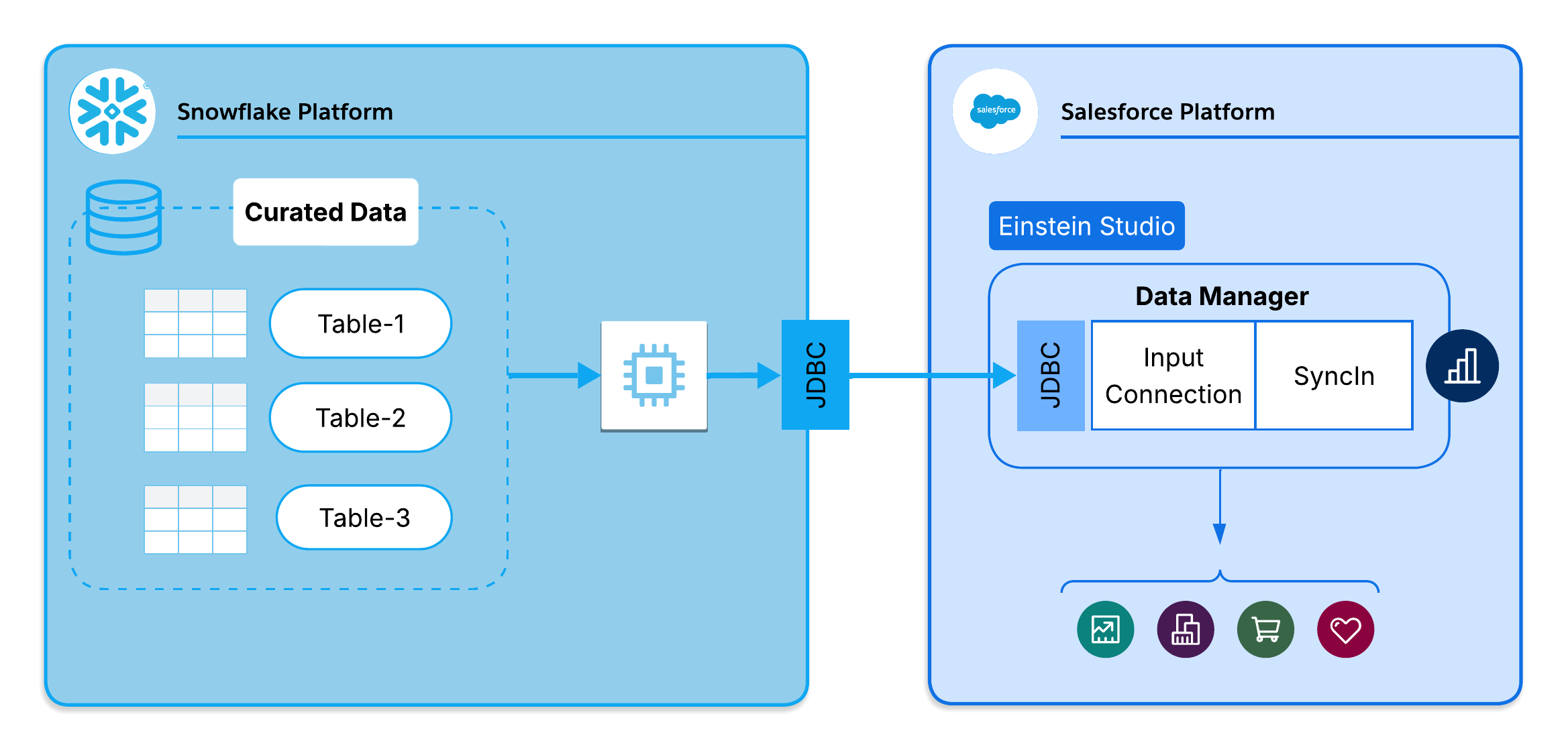
Salesforce synchronization supports multiple authentication methods to connect securely with Snowflake. The two primary approaches for enterprise integrations are Key-Pair (Private Key) and delegated OAuth 2.0.
Method 1: Key-Pair (Private Key) Authentication: Key-pair authentication is the recommended approach for automated, system-to-system data movement such as CRM Analytics SyncIn and SyncOut. Authentication relies on JSON Web Tokens (JWT) rather than passwords or refreshable tokens, making it well-suited for unattended, scheduled jobs that don’t require token refresh.
- Salesforce Certificate: Generate a private key and store it securely in Salesforce Certificate and Key Management.
- External/Named Credential: Configured to use a JWT exchange. Salesforce uses the stored private key to sign outbound connection requests.
- Snowflake user public key: The matching public key is assigned directly to the dedicated Snowflake service account (e.g., ALTER USER CRM_ANALYTICS_SYNC_USER SET RSA_PUBLIC_KEY = ’…’). Snowflake then uses this key to verify the incoming JWT signature. No Security Integration is required for this method.
Method 2: Delegated OAuth 2.0 Authentication: Alternatively, Salesforce can use an OAuth handshake to authenticate. The key components are:
- Auth Provider: Manages the OAuth handshake with Snowflake, using the client credentials retrieved from the Snowflake Security Integration.
- External Credential: Holds the OAuth tokens securely within Salesforce and injects them into the sync callouts automatically.
- Named Credential: Defines the Snowflake endpoint URL (e.g., https://<account>.snowflakecomputing.com) and references the External Credential.
- Snowflake Security Integration: Registers Salesforce as a trusted OAuth client in Snowflake (OAUTH_CLIENT = CUSTOM). Defines the allowed redirect URI and enables refresh tokens.
Configuration dependency: Regardless of the chosen method, these components form a dependency chain connecting the sync configuration to the endpoint. Granting the relevant Salesforce profiles access to the Named Credential is required; without this access, sync jobs fail due to authentication errors regardless of all other configurations.
Background synchronization relies on a single integration identity.
- Dedicated Service Account: Create a dedicated Snowflake service account with a least-privilege role scoped only to the databases, schemas, and tables required for the sync.
- Granular Permissions: For SyncOut, this role requires INSERT, UPDATE, and SELECT on target tables. Never use high-privilege roles such as ACCOUNTADMIN, SECURITYADMIN, or SYSADMIN.
- Governor limits and chunking: During SyncOut extraction, large result sets are automatically chunked to respect Salesforce SOQL governor limits. SyncIn fetches large result sets from the Snowflake Statements API via automatic pagination to manage data volumes efficiently.
- Change Data Capture (CDC): Incremental SyncOut relies on the Salesforce CDC event stream to identify records created, updated, or deleted. If hard-delete tracking is enabled, deleted Salesforce records are not dropped but flagged with
DEL_FLAG = 'Y'in Snowflake. - Upsert constraints: SyncIn relies on Bulk API 2.0 to load data back into Salesforce. This requires a designated External ID field to be configured on the target Salesforce object to act as the upsert key.
- Design guidance: Always sync from curated Snowflake views rather than raw tables. Views allow for the pre-filtering of rows, column selection, and the application of business logic, reducing data volume, sync duration, and Snowflake warehouse compute costs in proportion to the pre-filtering applied.
Every synchronization run generates comprehensive audit trails to validate data movement. The Sync Job Monitor dashboard provides real-time status, processed record counts, execution durations, and detailed error logs for both SyncIn and SyncOut. On the Snowflake side, every query submitted by Salesforce is logged in Snowflake Query History, providing full visibility into execution latency, rows scanned, and warehouse compute usage. Additionally, architects define dedicated Snowflake audit tables to capture sync run metadata — timestamp, record counts, and errors; these are not generated automatically by the platform. For end-to-end validation, compare record counts across both platforms: verify active records in Snowflake (WHERE DEL_FLAG = 'N') for SyncOut runs, and compare Salesforce target object counts directly against the original Snowflake source view for SyncIn runs.
Use CRM Analytics SyncIn and SyncOut when:
- Bidirectional synchronization is a requirement: Data flows both into Salesforce via SyncIn and out to an external platform via SyncOut.
- Hard-delete tracking is critical: SyncOut’s built-in flagging solves a historically complex ETL problem without custom reconciliation logic.
- CDC-based incremental sync is viable: For high-volume Salesforce objects, CDC reduces API consumption and sync duration significantly versus full scans.
- Scheduled batch sync meets latency requirements: The minimum sync frequency is 15 minutes, suitable for operational dashboards and near-real-time analytics reporting.
- Low operational overhead is a priority: Built-in dashboards provide full sync visibility without custom logging or alerting infrastructure, and the declarative Setup UI allows administrators to define, modify, and monitor sync jobs without raising a development ticket.
Do not use this pattern if:
- Complex transformations are required: Multi-table joins, JSON parsing, or handle advanced business logic in Snowflake views or a dedicated transformation layer before or after sync.
- Sub-15-minute latency is required: For real-time use cases, use Platform Events or Streaming APIs.
- Very high-volume streaming workloads are in scope: Objects with millions of transactions per hour are better served by dedicated streaming pipelines (Kafka, Platform Events).
- Custom error handling logic is needed: The platform provides standard retry and error logging. Complex retry patterns or custom alerting require Apex or external orchestration.
- Multi-org or cross-cloud sync: CRM Analytics SyncIn and SyncOut operate within a single Salesforce org. MuleSoft or a custom integration layer is required for multi-org scenarios.
A team ran complex ETL pipelines to upload Snowflake analytics data into CRM Analytics datasets. The pipelines were slow, fragile, and required constant engineering maintenance.
CRM Analytics SyncIn was configured to sync curated Snowflake aggregated views directly into Salesforce custom objects. The team reconfigured CRM Analytics dashboards to read from those objects instead of CRM Analytics datasets. The result: two ETL pipelines eliminated, sync duration reduced from four hours to 30 minutes, and administrators able to modify sync configurations without raising an engineering ticket.
A data team needed to track hard-deleted Salesforce records in their Snowflake operational data store. Traditional approaches required split jobs and complex ID reconciliation logic that took hours to run and was brittle across schema changes.
The team configured CRM Analytics SyncOut with CDC and hard-delete tracking enabled. Deleted records are now automatically flagged with DEL_FLAG = ‘Y’ in the Snowflake consumption table. Downstream analytics queries apply WHERE DEL_FLAG = ‘N’ to see only active records. Reconciliation logic was eliminated entirely, and sync duration dropped from eight hours to 15-minute incremental runs.
During an acquisition, the acquiring company synced six high-volume Salesforce objects into Snowflake for cross-org reporting and regulatory compliance within a fixed timeline.
The team configured CRM Analytics SyncOut for all six objects with CDC-based incremental syncs. Audit metadata tables tracked schema changes and record counts across the integration period. They did not write any custom code. Data freshness improved from daily to 15-minute intervals, and the audit metadata tables provided the traceability required for compliance reporting.
Sync jobs share the org’s API budget. An org running many high-frequency sync jobs against large objects risks exhausting the 15,000 API calls per 24-hour limit. Inventory all sync jobs, estimate API consumption per run, and stagger schedules to distribute load. For objects with low-to-moderate change rates, CDC-based incremental mode can significantly reduce per-run API consumption compared to full sync.
SyncIn and SyncOut execute queries and data loads against a Snowflake warehouse, consuming compute credits. For simple SELECT queries, an X-Small or Small warehouse is typically sufficient. For large SyncOut loads, Medium or Large may be required. Configure auto-suspend (5 minutes of inactivity) and auto-resume on the warehouse. Use a dedicated warehouse for production sync jobs to isolate costs and prevent contention with user queries.
If a Salesforce field is renamed, removed, or changes API name, the corresponding SyncOut field mapping fails silently or logs errors. Establish a change management process that includes reviewing active sync configurations as part of any Salesforce metadata change. The Snowflake audit tables provide a change history that helps to identify when a drift event occurred.
Hard-delete tracking in SyncOut requires CDC to be enabled on the Salesforce object. If CDC isn’t enabled, the “Track Hard Deletes” option has no effect. Validate CDC enablement as part of the sync configuration checklist, particularly during initial setup or after org migrations.
The most common failure class is credential expiry or permission loss. Named Credentials must remain valid and the Snowflake service account must retain its warehouse usage grants and table permissions. For OAuth-based setups, token refresh failures can silently stall sync jobs. Monitor the Sync Job Monitor dashboard for authentication error patterns and configure Chatter or email notifications for job failures.
SyncIn uses a Salesforce External ID field as the upsert key. If the source Snowflake view contains duplicate values on the key field, the upsert fails for affected records. Enforce uniqueness on the key field in the Snowflake view layer before it reaches the sync configuration.
When sync jobs fail, the platform logs detailed error messages per record in the Sync Job Monitor. Common failure scenarios and their resolutions:
- Authentication failure: verify Named Credential status and Snowflake account expiry. Re-authenticate OAuth if token refresh has failed.
- Field mapping error: check type compatibility between Snowflake columns and Salesforce fields. Review field-level security for the running user.
- Governor limit exceeded: reduce sync frequency or move to incremental CDC mode to spread API consumption.
- Snowflake warehouse suspended: configure auto-resume on the warehouse or trigger a manual resume before the next scheduled sync.
- Hard-delete tracking not working: confirm CDC is enabled on the object and the “Track Hard Deletes” flag is set in the sync configuration.
CRM Analytics data synchronization aligns with multiple pillars of the Salesforce Well-Architected Framework.
- Reliability (fault tolerance): The platform manages execution, retry logic, and partial failure handling automatically. Failed records are logged individually in the Sync Job Monitor. Implement record count reconciliation after failures to confirm consistency, supplement with failure notifications, and monitor the Sync Job Monitor for recurring error patterns. CDC-based incremental sync reduces the blast radius of a failed run by limiting the data window in scope.
- Trust: The credential model (Named Credentials, External Credentials, Auth Provider) enforces encrypted storage, automatic token refresh, and centralised management. Least-privilege access on the Snowflake side limits the blast radius of a compromised credential. Field-level security is enforced during sync; users cannot sync fields they are not authorized to access.
- Resource and Cost Optimization: Incremental CDC mode is the primary lever for performance optimization. It reduces API consumption, sync duration, and Snowflake compute cost compared to full sync. Snowflake view pre-filtering further reduces data volume in transit. Warehouse auto-suspend prevents idle compute spend.
- Operational Excellence: The declarative configuration model means sync jobs are defined in metadata, not code. This makes them auditable, reproducible, and manageable without engineering involvement. Built-in monitoring dashboards provide full observability without custom logging infrastructure.
- Reliability (scalability): The platform handles chunking, pagination, and Bulk API batching automatically. For objects with very high record volumes, incremental CDC mode and off-peak scheduling are the primary architectural levers for maintaining throughput within governor limit constraints.
This checklist covers the minimum steps to set up and validate a sync configuration.
Pre-configuration checklist:
- Enable Change Data Capture on all Salesforce objects intended for SyncOut incremental mode (Setup → Change Data Capture).
- Create a dedicated Snowflake service account with a least-privilege role; grant only required table and warehouse permissions.
- Create a Snowflake Security Integration if using OAuth authentication.
- Identify the External ID field on each Salesforce object that SyncIn will use as the upsert key; confirm uniqueness in the source data.
Connectivity:
- Create Auth Provider in Salesforce (Setup → Auth. Providers).
- Create External Credential and link to Auth Provider (Setup → Named Credentials → External Credentials).
- Create Named Credential and link to External Credential (Setup → Named Credentials).
- Grant Named Credential access to relevant Salesforce profiles.
SyncOut configuration:
- Create Snowflake Connection (Setup → Analytics Studio → Data Manager → Connections → Snowflake Connections).
- Create SyncOut Configuration: source object, target table, sync mode, field mappings, CDC, hard-delete tracking, schedule.
- Start with daily sync; validate that data quality and performance before increasing frequency.
SyncIn configuration:
- Create External Data Source (Setup → Analytics Studio → Data Manager → Connections → Snowflake Connections).
- Create SyncIn Configuration: source view, target object, External ID field, field mappings, schedule.
- Sync from Snowflake views, not raw tables.
Validation:
- Review Sync Job Monitor after first execution (Setup → Analytics Studio → Data Manager → Sync Job Monitor).
- Query Snowflake audit table to confirm sync metadata was written.
- Validate hard-delete flagging by confirming DEL_FLAG column is present and populated.
- Compare record counts between source and target.
- Configure failure notifications via Chatter or email.
Use this pattern when scheduled batch synchronization meets latency requirements, bidirectional data flow is necessary, and reducing engineering dependency on integration operations is a priority.
The Snowflake worked example in this guide illustrates the full lifecycle: connectivity setup, configuration, execution flow, and validation. The same principles apply to any supported external data platform.
When sub-15-minute latency, complex transformations, or multi-org scenarios are in scope, evaluate Platform Events, Streaming APIs, or MuleSoft as complementary or alternative approaches.
Yugandhar Bora is a Software Engineering Architect at Salesforce, specializing in data architecture within the Data & Intelligence Applications platform. He leads Enterprise Architecture Review Board (EARB) initiatives focused on data governance and unified data models, while contributing to automated platform provisioning solutions.