Overview
This document outlines the current options for deploying applications to CloudHub 2.0 to meet high availability and disaster recovery requirements. It uses the US region as an example and can be applied to other regions.
CloudHub 2.0 is a fully managed, cloud-native integration platform that eliminates infrastructure overhead by automating the deployment, scaling, and management of MuleSoft APIs and integrations in the cloud. It’s MuleSoft’s modern cloud deployment platform, running on Amazon AWS infrastructure.
In most cases, the default High Availability (HA) and Disaster Recovery (DR) provided by CloudHub 2.0 is sufficient. CloudHub 2.0 provides HA and DR at a regional level (for more details refer to CloudHub 2.0 Outage Scenarios). The CloudHub 2.0 Key Considerations section provides more details about CloudHub-2.0-supported HA and DR.
Conditions that mandate a design beyond CloudHub 2.0’s default availability include:
- An application needs to ensure no data loss in a disaster scenario (for example, a region of Amazon going down).
- An application depends on the Object Store and needs to ensure continuity if the deployment region goes down.
- Backend systems are configured for equivalent availability. CloudHub 2.0 can sometimes provide reliability through queues or similar mechanisms, but whether the integration is real-time or asynchronous, backend systems must support a comparable level of HA and DR.
- When an AWS region-level outage affects backend systems, their recovery is assumed to run in parallel with CloudHub 2.0 recovery.
- Private space setup is complete in multiple regions.
The design options in this guide focus on solutions for application availability in CloudHub 2.0 when an entire AWS Availability Zone or region becomes unavailable.
This guide does not address these recovery scenarios, though it does note implications where relevant:
- Recovery of backend systems, applications, databases, network components, and data centers that are managed and provisioned outside Anypoint CloudHub, whether on-premises or in the cloud.
- Recovery of VPN links between CloudHub 2.0 and the customer’s private data center (for example, IPsec tunnels and VPN gateways). Some DR options in this guide may partially address these scenarios.
- Changes to MuleSoft egress IPs during disaster recovery when IP allowlisting is used for integrations. Some DR options in this guide may partially address these scenarios.
- External messaging systems used in customer solutions, whether provided by MuleSoft (such as Anypoint MQ) or other vendors (such as AWS MSK or Heroku Kafka).
When evaluating CloudHub 2.0 for disaster recovery requirements, think about these key considerations.
CloudHub 2.0 Dependency on AWS Regional Availability
- CloudHub 2.0 runs on AWS; its availability is tied to AWS regions.
- Deployments and application availability are organized by region. These regions correspond to AWS regions.
If an entire AWS region fails, applications in that region are unavailable and are not automatically replicated elsewhere.
Application High Availability (HA) and Replica Management
- CloudHub 2.0 automatically redeploys applications within the same region when hardware fails, but an application with a single replica can experience downtime.
- Applications with multiple replicas are deployed across separate availability zones by default, providing HA across zones.
- If the availability zone for a single-replica application fails, the application is automatically brought up in another availability zone within the same region.
US East Region Specific Impact
- In the event of a US East region outage:
- The CloudHub 2.0 management UI and deployment REST services are unavailable, and new applications cannot be deployed.
- Applications in other regions remain unaffected under most failure scenarios. These applications continue to operate normally; however, monitoring and management capabilities via the control plane will be unavailable during the outage.
- Core CloudHub 2.0 modules (such as application settings) are maintained in US East, so settings cannot be edited during the outage.
Monitoring and Alerting
- Configure alerting for availability zone or region-level failures via status.mulesoft.com.
- Use a separate health-check and alerting mechanism outside CloudHub 2.0 so teams are notified if replicas fail or applications stop responding.
Data Persistence (Object Store V2)
- Object Store V2 is tied to the region where the application is first deployed.
- If you move the application to another region, Object Store V2 stays in the original region to avoid data loss.
- If the region where Object Store V2 is deployed fails, the object store is unavailable.
Ingress Controllers and Private Spaces
- CloudHub 2.0’s ingress controllers are highly available at the region level.
- In a shared space, if one region fails, an ingress controller in another region remains available but can serve only applications deployed in that region.
- In a private space, if a region fails, ingress controllers in other regions are unavailable unless they were set up there in advance.
- Private space setup is regional; if a region fails, the private space is unavailable unless another region has been set up.
CloudHub 2.0 provides resilience across multiple levels: replica, availability zone, and region. This section describes Salesforce responsibilities and customer options for each outage scenario.
| Component Status | Salesforce Responsibility |
|---|---|
| Replica Down | Action: CloudHub 2.0 automatically restarts the replica in a different availability zone if there is something wrong with the current availability zone. But the application will be offline until the new replica is fully started. Condition: Default configuration. Time Taken: Approximately 2-15 minutes depending on application complexity, and replica size. |
| Availability Zone Down | Action: Same as the replica down. Condition: Default configuration. Time Taken: Same as the replica down. Notification: Same as the replica down. |
| Region Down | Action: No automatic recovery. A failover design must be in place. |
| Component Status | Customer Responsibility |
|---|---|
| Replica Down | Notification: Perform periodic health checks using a heartbeat mechanism built into the APIs. Mitigation: Deploy the application to multiple replicas in the same region. Test / Simulation: Raise a Ticket with MuleSoft Support and they will support a failover test to check if a new replica spins up in a different AZ in 1 to 15 minutes. |
| Availability Zone Down | Notification: Same as the replica down. Mitigation: Deploy the application to multiple replicas in the same region or in different regions. Test / Simulation: The AZ Down scenario is difficult to simulate. It requires involvement of MuleSoft Engineering to support possible test scenarios. |
| Region Down | Notification: Same as the replica down. Also check status updates at https://status.aws.amazon.com. Mitigation: Same as AZ Down. Disaster Recovery contingency plan: 2 private spaces with the same configuration in different regions. Test / Simulation: Same as AZ Down. |
| Component Status | Salesforce Responsibility |
|---|---|
| VPN Gateway Down | Replica Status: Running but not able to connect to any resources hosted on premises and reachable through the VPN tunnel. Action: No automatic recovery. A failover design must be in place. |
| Ingress Controller (Shared Space) Down | Replica Status: The Ingress controller is a clustered setup with multiple instances, similar to application replicas. If an application replica fails, a new one is created and started automatically. If one ingress controller instance fails, applications remain available through the other instance. If the entire Ingress controller is down, the region is considered down. |
| Ingress Controller (Private Space) Down | Replica Status: Same as Ingress Controller in shared space down. |
| Component Status | Customer Responsibility |
|---|---|
| VPN Gateway Down | Notification: Perform periodic health checks using a heartbeat mechanism built into the APIs. Mitigation: CloudHub 2.0 VPN gateways support high availability through a dual-tunnel architecture with automatic failover between tunnels; a customer must configure this pattern. Test / Simulation: The VPN Gateway Down scenario is difficult to simulate. Requires involvement of MuleSoft Engineering to support possible test scenarios. |
| Ingress Controller (Shared Space) Down | Notification: Same as VPN Gateway Down. Mitigation: Same as Region Down. Migrate applications to a standby or active space in another region. Test / Simulation: Same as VPN Gateway Down. |
| Ingress Controller (Private Space) Down | Notification: Same as VPN Gateway Down. Mitigation: Same as Region Down. Migrate applications to a standby or active private space in another region, in coordination with AWS Route 53 (or equivalent) configuration. Test / Simulation: Same as VPN Gateway Down. |
Overview Platform Services Down Scenario – Object Store
| In-Memory Object Store | Persistent Object Store v2 | |
|---|---|---|
| Location of Data | Local to the application only. | In the same region where the MuleSoft application was first deployed. |
| Shared Across Replicas? | No | Yes |
| Object Store Recovery in Applications | Data is lost; all in-memory data is lost on app restart, new deployment, or replica failure. | Data is not lost. unless the app is deleted. |
| Object Store Recovery within Region | Data is lost (same as above). | Data is not lost (same as above). |
| Regional Recovery | Same as above. | Data is unavailable. Even with an active-active DR configuration, Object Store is available only in the original deployment region. |
| Mitigation | Externalize data for regional recovery. | Data remains available while the original deployment region is available. For cross-region HA or DR, externalize data outside the object store. |
High Availability (HA) is the measure of a system’s ability to remain accessible in the event of a system component failure. Generally, HA is implemented by building in multiple levels of fault tolerance and/or load balancing capabilities into a system. It is typically an Active-Active configuration and results in limited or no impact to Business Services.
Disaster Recovery (DR) is the process by which a system is restored to a previous acceptable state after a disaster scenario, either natural (like flooding, tornadoes, earthquakes, or fires) or man-made (like power failures, server failures, or misconfigurations). DR is typically an Active-Passive configuration and results in some impact to Business Services.
If Regional High Availability or Regional Disaster Recovery is desired to reduce business impacts in the event of an AWS regional failure, consider these points when designing your solution in MuleSoft CloudHub 2.0:
- CloudHub 2.0 replicas and related capabilities—private spaces, ingress controllers, and Anypoint MQ destinations—are region-specific.
- If an entire AWS region fails, all replicas and associated services in that region become unavailable.
- When a region recovers, configurations are restored; you must restart applications.
- If the US East region fails, Anypoint Platform services (for example, Access Management and Runtime Manager) are also unavailable.
- MuleSoft provides an SLA of 99.95% availability for Platform Services, including CloudHub 2.0 replicas in an active-active configuration within a region; refer to the latest MuleSoft cloud offering SLA for current details.
- CloudHub 2.0 does not support multi-region HA or DR out of the box; availability is provided only within a single region.
These design guidelines apply regardless of which setup you choose.
Multi-Region Private Spaces Setup
All options described in the following sections require applications to be deployed in separate regions. That is possible only if private space setup is completed in advance, before a disaster. Because private space setup is regional, a DR strategy requires at least two private spaces—one per region—and a mechanism to switch traffic to the appropriate VPN endpoint.
Highly Available Private Space Setup Within a Region
CloudHub 2.0 does not provide automatic failover when a private space within a region fails. A workaround is an active-passive setup across multiple environments, which requires:
- Configuring multiple VPN gateways on the private space.
- Establishing separate environments in the CloudHub 2.0 region, each with its own private space.
- Designating one of these environments as passive (where applications are not initially deployed but are brought up if the primary private space fails).
If a high availability setup without VPN Gateway being a single point of failure is a hard requirement, deploying to two regions is the best option. A VPN Gateway failure in this scenario could be resolved by failing the affected region over to the alternative region where the private space is already configured.
Zero Message Loss
To achieve zero message loss when an entire region fails, an application must prevent data loss and address these points:
- Use external messaging to achieve message reliability.
- Ensure that Object Store is not used for in-flight transactional data that is transactional in nature. If the deployment region where the MuleSoft application was first deployed goes down, the Object Store will be unavailable.
- Wrap all Object Store access in a separate flow or section that continues to function—for both exception handling and behavior—when Object Store read or write operations fail.
Note. In most cases, DR requirements do not need to ensure a zero message loss in case of a disaster and need to ensure data loss is less than a given period’s worth of data (for example, 1 hour).
Keep Integration Stateless
As a general design principle, it is always important to ensure the integrations are stateless in nature. This means that no transactional information is shared between various client invocations or executions (in case of scheduled services). If some data has to be maintained by the middleware due to a system limitation, it should be persisted in an external store, such as a database or a messaging queue and not within the MuleSoft infrastructure or memory. It is critical to note that as we scale, especially in the cloud, the state and resources used by each replica should be independent of other replicas. This model ensures better performance, scalability, and reliability.
Networking and Traffic Management
- Vanity domains are required for regional availability; they act as a global DNS for all ingress controllers across regions.
- A global load balancer routes traffic between the primary and DR region private spaces. Customers provide this component; use AWS Route 53 or a global CDN with routing policies to route traffic across regions.
- Configure Ingress controllers in both primary and DR regions with a custom vanity domain.
- Plan and maintain firewall rules and VPN tunneling so that on-premises applications are reachable from both the primary and DR region private spaces.
- TLS certificate maintenance must cover private spaces in both primary and DR regions for seamless recovery.
Application Deployment and Configuration
- Application names must be unique across regions. For example, a CI/CD pipeline can append the region name (or a region code) to application names before deployment to maintain uniqueness across primary and DR regions.
- Configure the CI/CD pipeline to deploy applications to both the primary and DR regions so that all applications are available in both regions.
Infrastructure and Capacity
Performance is best when all infrastructure aspects have identical primary and DR region capacity. Performance degrades when these infrastructure aspects are not identical.
Data Persistence and Storage
- Persistence storage must be synchronized periodically between the two regions. Customers are responsible for storage replication; MuleSoft does not provide it. A single shared store between VPCs in the primary and DR regions is possible, but the shared storage must be highly available or it becomes a single point of failure for both regions.
- Object Store V2 is regional and is available only in the region where the Mule application was first deployed. If the application is moved to another region, Object Store V2 remains in the original region to avoid data loss. Use other persistent storage for multi-region DR strategies.
Testing and Operational Procedures
Adopt a formal DR test strategy and run periodic DR drills. For active-active DR, use a canary deployment strategy to validate both regions.
Performance and Service Level Agreements (SLAs)
Some performance degradation may occur because the DR region may be farther from end users or backend systems than the primary region. Define and communicate a DR SLA to stakeholders.
Recovery Mode Behavior (Contextual Note)
In active-active mode, failover from the primary region to the DR region’s private space is fast: the global load balancer detects that the primary is unhealthy and routes traffic to the healthy (DR) region. In active-passive mode, you must deploy the application to the DR region private space when a disaster occurs.
There are 3 options to achieve a higher DR level availability:
An active-active setup is based on active workers distributed across regions, using an External Load Balancer to route traffic between the two instances.
Warm Standby Configuration
An active-passive setup would be based on an active worker in one region and a passive worker in another region. The Passive Region would be started when needed.
Some elements of the passive region must remain active for failover or be set up beforehand, including private spaces, VPNs and transit gateway attachments.
As above, replicas and Ingress controllers are provisioned in a second region via a fully automated DevOps process upon failover. Some elements of the passive region need to remain active for failover, including private spaces, VPNs and Transit Gateway Attachments.
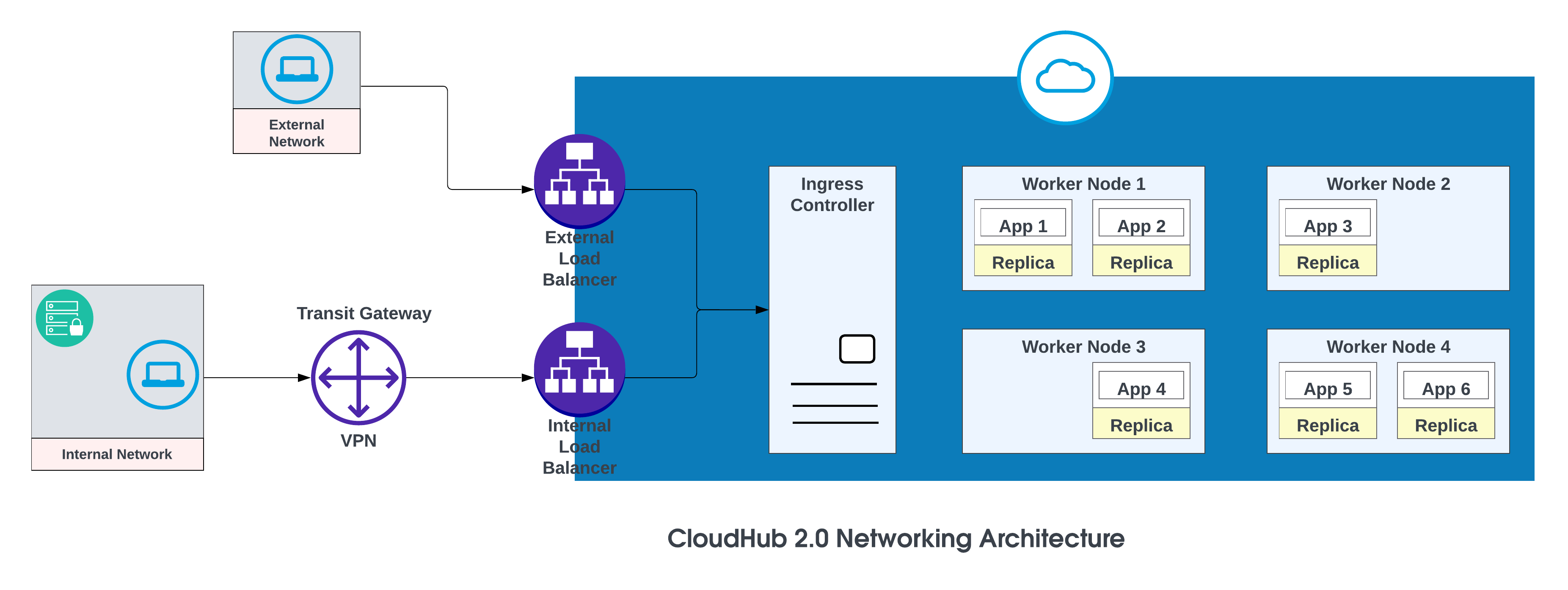
The basic components of the CloudHub 2.0 networking architecture are:
- An HTTP load balancer
- Mule replica DNS records
- Private spaces
- Regional services
For more details, see CloudHub 2.0 Networking Architecture.
Vanity Domains
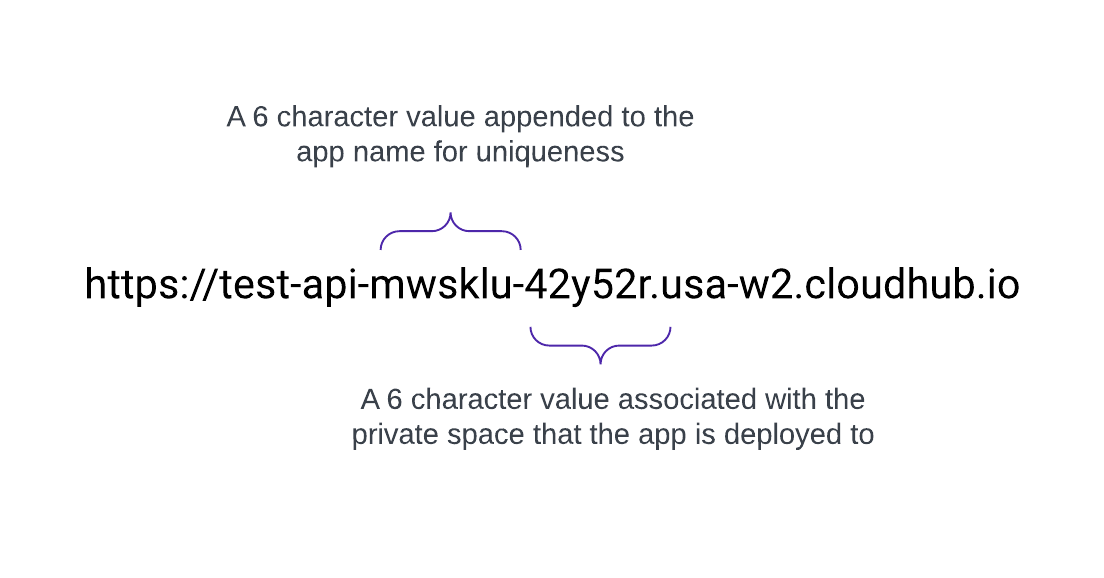
When a Private Space is created, it receives a DNS target name in the format: <space-id>.<region>.cloudhub.io . On deployment of an app named test-api in that Private Space, its endpoint will follow this format:
CloudHub 2.0 also supports custom, or vanity, domains by configuring them within a Private Space using TLS contexts and DNS records. To create a TLS context in Runtime Manager for a Private Space, upload the public certificate and private key, then add a custom endpoint in your application’s settings to use that domain. Create a DNS record (such as a CNAME) that points your vanity domain to your private space’s default hostname.
For example, an application named test-api deployed in us-west-2 with default DNS 42y52r.usa-w2.cloudhub.io has an API endpoint of:
https://test-api-mwsklu-42y52r.usa-w2.cloudhub.io
This URL does not use a vanity or custom domain. To use acme.com so that API URLs appear as https://test-api.acme.com, follow these steps.
- Create TLS Context in Runtime Manager with public and private keys.
- Add a vanity domain in the application’s settings to use that domain.
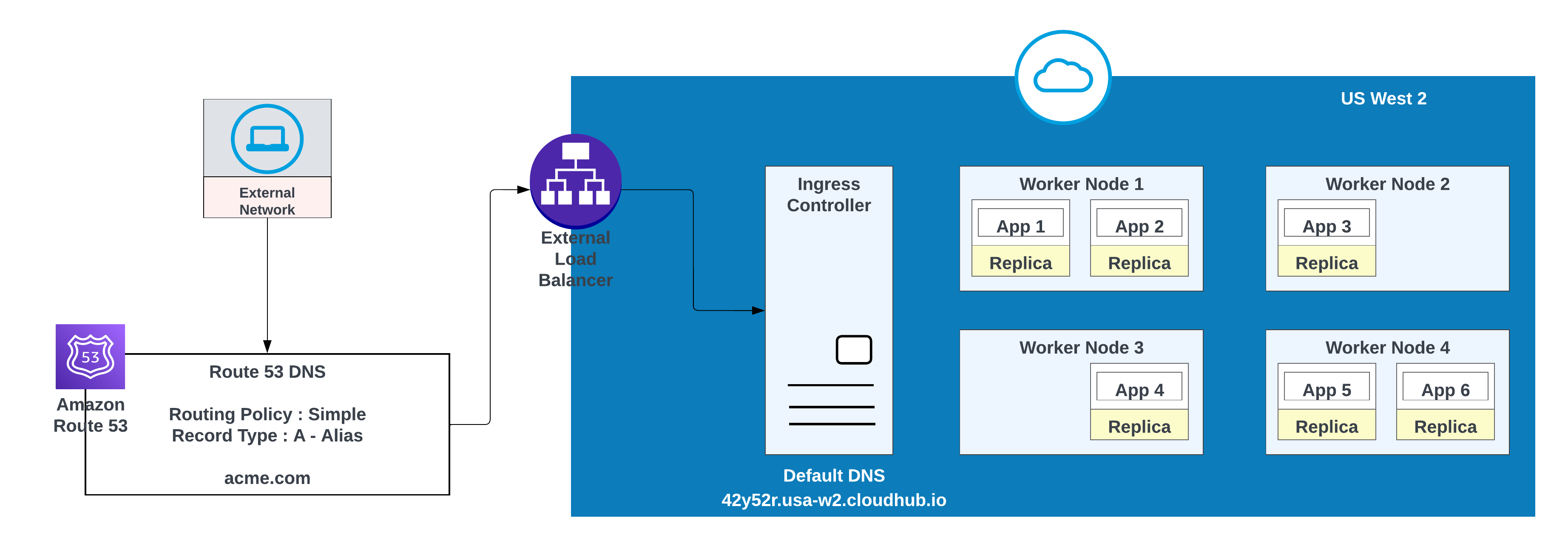
- Create a DNS record in AWS Route 53 and configure a simple routing policy (for example, CNAME) so that the vanity domain resolves to the private space’s default hostname.
For custom domains, you can use AWS Route 53 or any other global CDN services with routing policies. In the diagram below, AWS Route 53 is used with “simple” routing policy. When a consumer from a public (external) network requests acme.com, AWS Route 53 routes the request to the MuleSoft private space ingress controller.
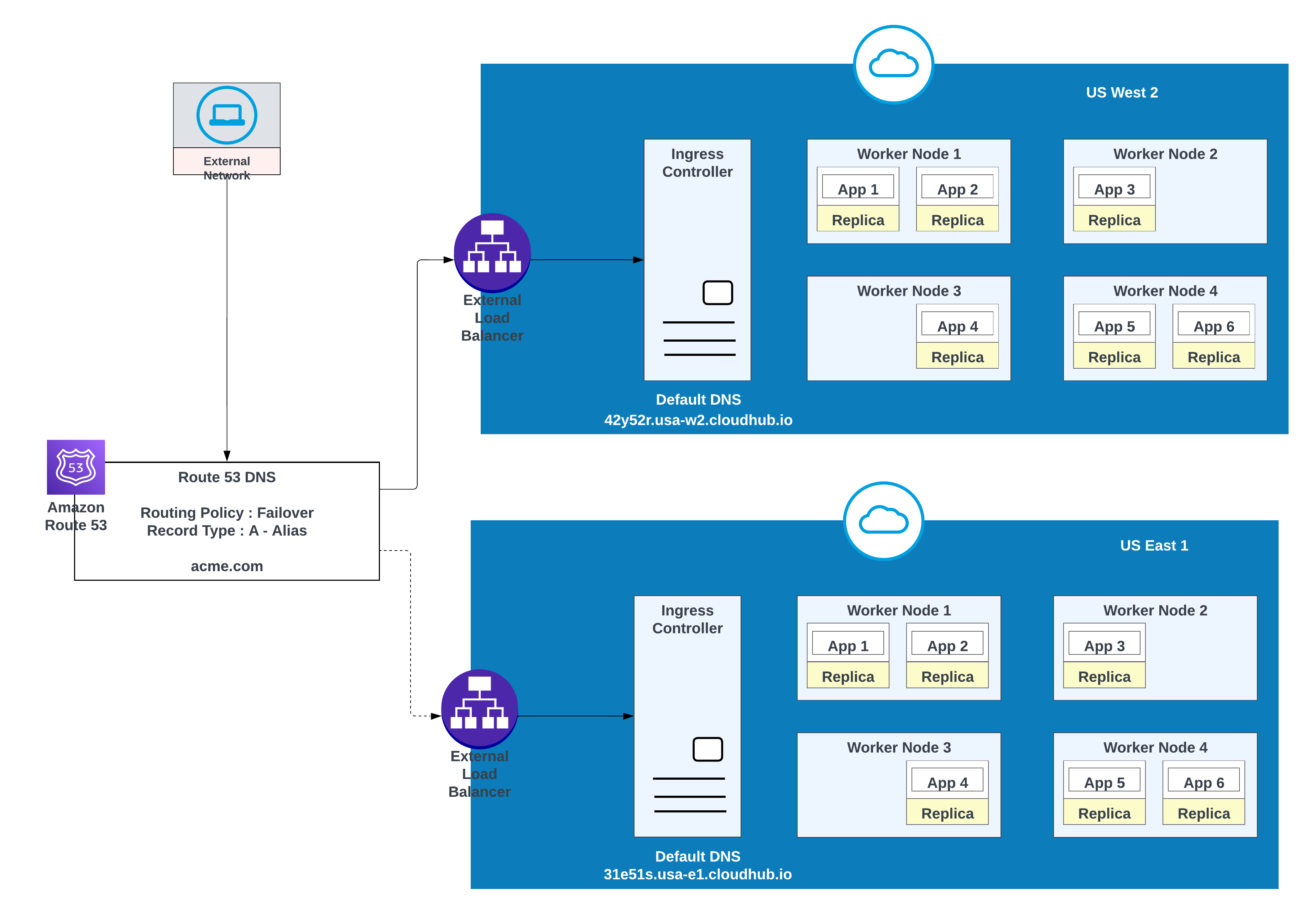
Use this option when applications require failover: deploy one instance in the primary region (for example, us-west-2) and another in a secondary region (for example, us-east-1).
Use an existing environment in the secondary region when possible; creating a new environment requires additional effort.
Example of Apps Deployed in one region (US West 2) with a failover to another region ( US East 1)
| Record Name | Value/Route Traffic To | Routing Policy | Health Check ID |
|---|---|---|---|
| acme.com | 42y52r.usa-w2.cloudhub.io | Failover | 31s3wseq121 |
| acme.com | 31e51s.usa-e1.cloudhub.io | Failover | 43e131s131sq |
In this configuration, AWS Route 53 routes traffic to the ingress controllers for the private spaces in US West 2 and US East 1. A failover routing policy is configured with a health check.
For lower latency along with high availability, use the deployment strategy described in the diagram. With this strategy, apps can be deployed in two regions (us-west-2 and us-east-1 in this example).
Use the latency routing policy in AWS Route 53 to route requests to the region that offers the lowest latency while retaining high availability. “latency” routing policy in AWS Route 53 to route the request for lower latency still having high availability.
Apps Deployed in both region (US West 2 and US East 1) for lower latency and high availability
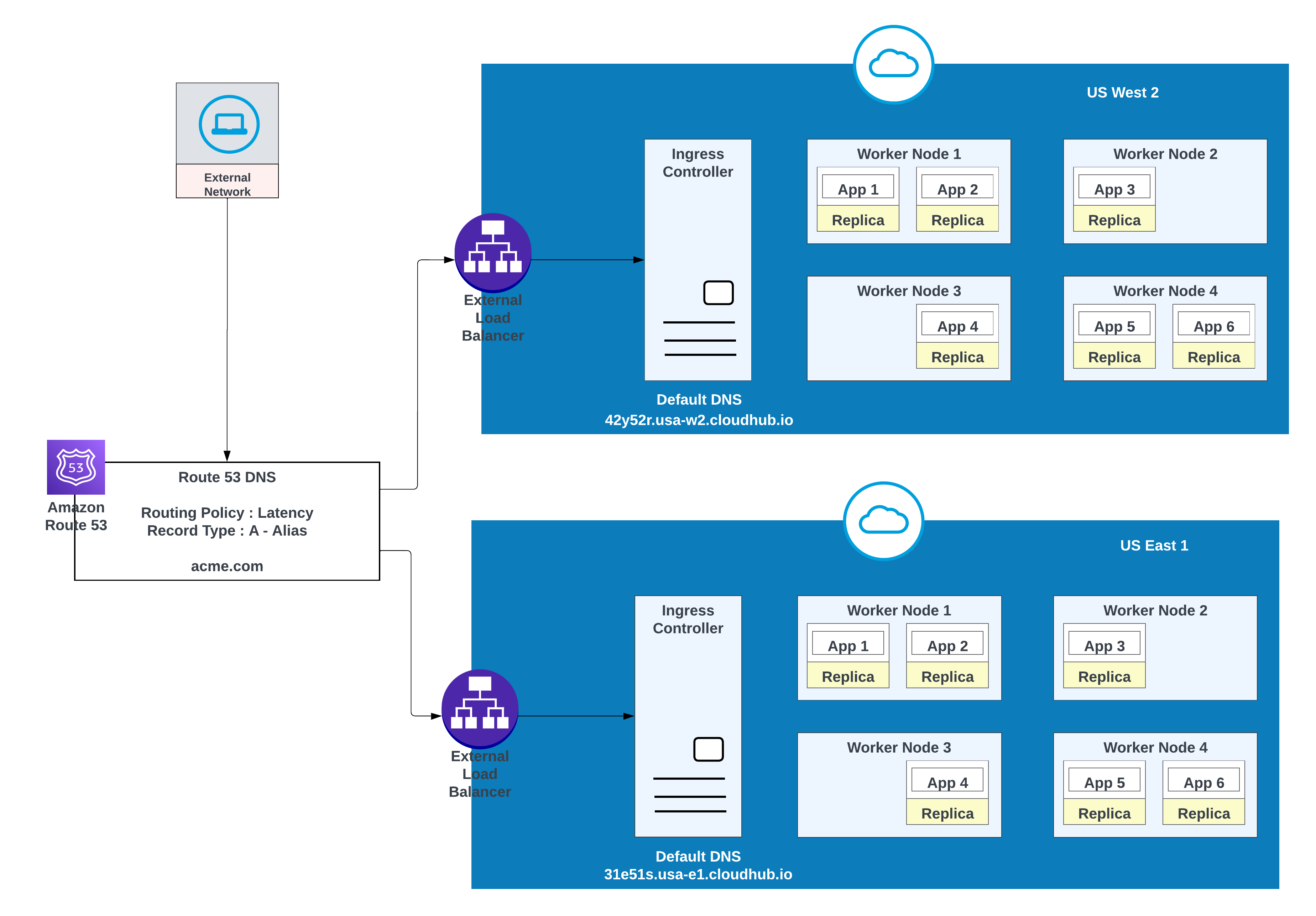
| Record Name | Value/ Route Traffic To | Routing Policy | Health Check ID |
|---|---|---|---|
| acme.com | 42y52r.usa-w2.cloudhub.io | Latency | 31s3wseq121 |
| acme.com | 31e51s.usa-e1.cloudhub.io | Latency | 43e131s131sq |
MuleSoft CloudHub 2.0 provides a robust foundation for intra-region resilience, primarily leveraging automated replica redundancy and intelligent load balancing. Within a single cloud region, deploying applications with multiple replicas ensures that if one instance fails, others can immediately take over the workload. The integrated load balancer efficiently distributes incoming traffic across these healthy replicas, minimizing downtime and ensuring continuous service availability under normal operating conditions.
However, relying exclusively on this single-region architecture, even one with high redundancy, presents a significant risk of a widespread, catastrophic regional outage. History has shown that even the most highly reliable and technologically advanced cloud providers are susceptible to disruptive incidents that can affect an entire geographical region. These single points of failure, though rare, can arise from various events, including:
- Large-scale infrastructure incidents
- Major power failures
- Widespread network interruptions
Therefore, to achieve true high availability (HA) and disaster recovery (DR), an architecture must be designed to transcend the limitations of a single-region model. The recommended strategy is deployment across multiple, geographically distinct regions. This inter-region resilience ensures that if an entire cloud region becomes unavailable due to an unexpected disaster, traffic can be seamlessly failed over to an application instance running in a separate, unaffected region, guaranteeing minimal service disruption and achieving maximum uptime goals.
CloudHub 2.0 Networking Architecture
Configuring Cross-Region Failover for Standard Queues
Object Store V2 Deployment Regions
Your Object Store Deployment Region
Gulal Kumar is a Software Engineering Architect at Salesforce, with a focus on data and integration architecture. With over 20 years of experience in integration and APIs, modernization programs, security, and AIML initiatives, he brings a wealth of expertise. Gulal has been committed to advancing business transformation initiatives, enhancing security and resiliency, promoting architecture excellence, and leading AIML initiatives across various domains.
Ajay Nagaraju is an Enterprise Architect and Senior Director at MuleSoft with over 28 years of experience in enterprise architecture, system integration, and large-scale digital transformation. He has led architecture and delivery for complex, multi-million-dollar programs across Fortune 100 and Fortune 500 organizations, with deep expertise in API-led connectivity, SOA, cloud technologies, and enterprise integration patterns. Ajay has partnered closely with executive leadership to modernize business processes, data platforms, and integration ecosystems and is passionate about building scalable architectures, mentoring teams, and driving measurable business outcomes through technology.