Guide Overview
Asynchronous processing increases scalability by allowing higher limits per context. Asynchronous requests execute in their own threads behind the scenes, so users can continue to do work on the client side as the asynchronous tasks execute in the background.
The Salesforce Lightning Platform offers a variety of asynchronous technologies that can be used to solve a given use case. Each technology has benefits and limits that you will need to consider when selecting an approach for each use case.
When choosing a technology for implementation, three important considerations to keep in mind are:
- Asynchronous processing isn’t the best approach for every problem. It can be tempting to think of any process that doesn’t directly require user interaction as a good candidate for asynchronous processing, but there are some drawbacks. First, asynchronous processes have no SLA, which means that there’s no guarantee that an asynchronous process will complete within a set amount of time. Second, there’s no guarantee of consistent response latency. If an asynchronous process completes within a certain amount of time, a subsequent process can take a different amount of time to complete. Therefore, even if a user isn’t directly waiting for a response, asynchronous processing might not be right for your scenario if you have subsequent processes that depend on a response, or if you’re concerned that excessive response times might cause your data to become out of sync with the data in an external system.
- There are different ways to process asynchronous requests on the Salesforce Platform, so make sure that you choose the best approach. Technologies that support asynchronous processing on the Salesforce Platform work differently “under the hood,” and some were designed for very specific use cases.
- If a technology is asynchronous on the client side, it doesn’t necessarily mean that all of the end-to-end processing is performed in parallel. Depending on the choices that you make, the client’s messages can sometimes still get serialized on the server side.
If you use the wrong technologies or the wrong combinations of technologies for a job, unintended consequences that cancel out the benefits of asynchronous processing can occur. This guide provides explanations and recommendations, as well as potential drawbacks and anti-patterns for various asynchronous use cases, along with the rationale for those recommendations. It also provides insight into how various asynchronous implementation techniques operate and are regulated on the Salesforce Platform.
If you are making a decision about what technology to use, there is a focused Asynchronous Processing Decision Guide that gives a quick mapping of typical use cases to the best-fit technology.
This document does not cover technologies in other ecosystems such as MuleSoft, Informatica, Commerce Cloud, Tableau, and Marketing Cloud.
Note that this guide focuses exclusively on asynchronous processing within the Salesforce Lightning Platform. If you are looking for information about asynchronous integration patterns, check out Event-Driven Architecture.
- Before using asynchronous processing, make sure that your use cases fit the pattern. Asynchronous patterns have no SLA, are subject to multiple governor mechanisms, can have capacity limits defined based on licensing, and can cause processing delays due to the finite nature of the resources allocated to asynchronous infrastructure within the Salesforce Platform. Take these limitations into serious consideration when using asynchronous processing in scenarios where a user requires a response from the system before they can continue with their work.
- Asynchronous processing with Salesforce isn’t a solution for boundless scaling needs. The Salesforce Platform doesn’t scale infinitely, and asynchronous patterns are still subject to limitations. Asynchronous processing uses threads, which contain the contextual information that a CPU needs to execute a stream of instructions. Threads can run in parallel. The number of available threads in any CPU is limited, so the platform has mechanisms in place to ensure that its available threads are used as efficiently as possible. The platform’s flow control mechanism prevents orgs from consuming too many threads and negatively affecting other orgs. The platform’s fair usage algorithm controls the number of threads that an org has available for each particular message type.
- Know when transactions are truly asynchronous. Some architecture patterns behave asynchronously end-to-end. However, other processes behave asynchronously on the client- or browser-side, but serialize server-side requests, which are then subject to synchronous governor limits.
- To build large-scale outbound integrations from the Salesforce Platform, use platform events and robust middleware instead of callouts via asynchronous Apex. Because there are a finite number of asynchronous threads available in the platform, outbound integrations via asynchronous Apex have limited scalability. If your org has outbound integrations that involve high volumes of messages, exceed the number of available threads, and have long processing times, then using asynchronous Apex will inevitably introduce delays.
- Make sure to incorporate monitoring when using asynchronous processing. With monitoring, you can detect issues as early as possible and correct them before major performance incidents occur.
- Account for events that can cause extreme loads. When you design asynchronous processes, make sure that they can predictably manage workload spikes and lulls. Consider how your implementation handles unexpected events, such as power outages, and design safeguards that mitigate data loss or loss of functionality.
When you select an approach for server-side asynchronous processing, first evaluate your organization’s requirements and available resources. Your goal is to select an approach that minimizes implementation and maintenance costs while still ensuring scalability and minimizing your likelihood of limit violations. This goal is dependent on the technical considerations outlined in the next sections, as well as the makeup of your team. For example, consider whether you have Apex developers on your team who can maintain your pro-code solution. Otherwise, a declarative approach can make more sense. Also, keep in mind that different sets of limits can apply to different tools.
Consider the use case of an asynchronous ordering process in Salesforce. When an order is saved, it triggers a message to an external warehouse management system with special instructions for how to pack and ship an item. The user who places the order doesn’t need an immediate response from the warehouse management system, so the request can be sent asynchronously. The asynchronous processing allows the user to continue their work without delays.
Considerations for your architecture:
- How many concurrent processes are needed?
- How will the concurrent process interact with each other?
- How many SOQL queries will execute within each process?
- How many DML operations will execute within each process?
- How long will each process run?
- How sensitive are processes to specific timing?
The Salesforce Platform’s multitenant architecture isolates and concurrently supports the varying requirements of many tenants (orgs). All asynchronous Apex methods covered in this guide are executed within the same asynchronous infrastructure in the Salesforce Platform. They use a message queuing framework that is governed by two primary enforcement mechanisms: flow control and fair usage.
The flow control and fair usage mechanisms prevent a single tenant from using too many server resources and not leaving enough resources for the remaining tenants. Although it’s helpful to understand how these mechanisms work, your key takeaway should be that following asynchronous processing best practices, such as the ones outlined in the next sections, significantly reduces your likelihood of running into issues with them.
The platform’s flow control mechanism prevents one org from flooding a given message type, which consumes too many threads and negatively affects other orgs. Before the framework adds new entries to the queue associated with a message type, it checks the first several thousand existing entries in the queue. If the majority of existing entries are associated with that same org and that org already also has entries in worker threads, then the newly added entries are moved to the back of the queue. This process is called re-enqueuing. Re-enqueuing typically happens to Batch Apex and Bulk API processes because they often insert large numbers of entries into their queues at the same time.
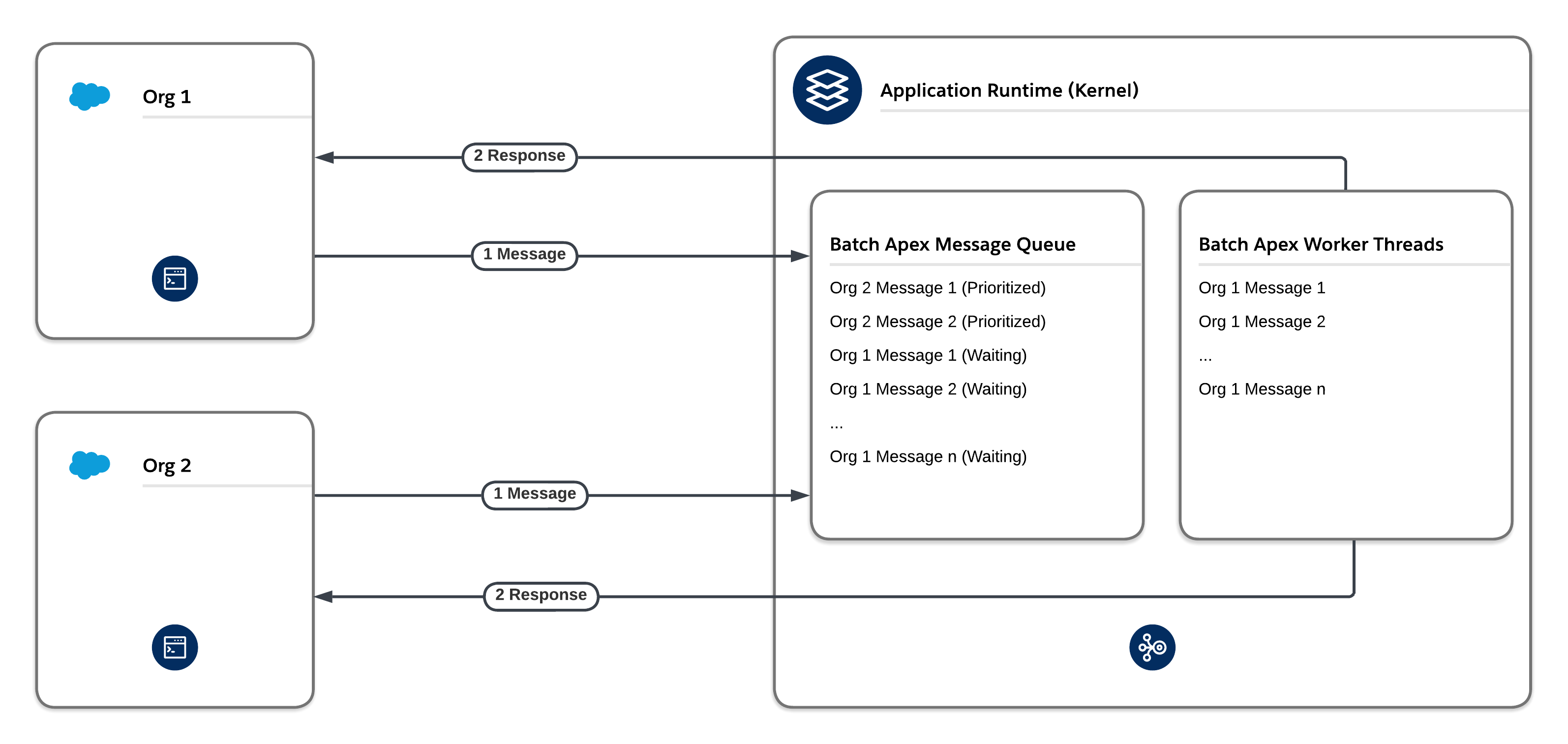
The platform’s fair usage mechanism implements a tier-based system. The system ensures that each org on the Salesforce Platform gets a fair share of processing time for a given message type, including Future, Queueable, and Batch message types. If one org dominates a given message type during the same time that other orgs are waiting to perform work on the same message type, the fair usage algorithm reduces the number of threads that the org has available for that particular message type.
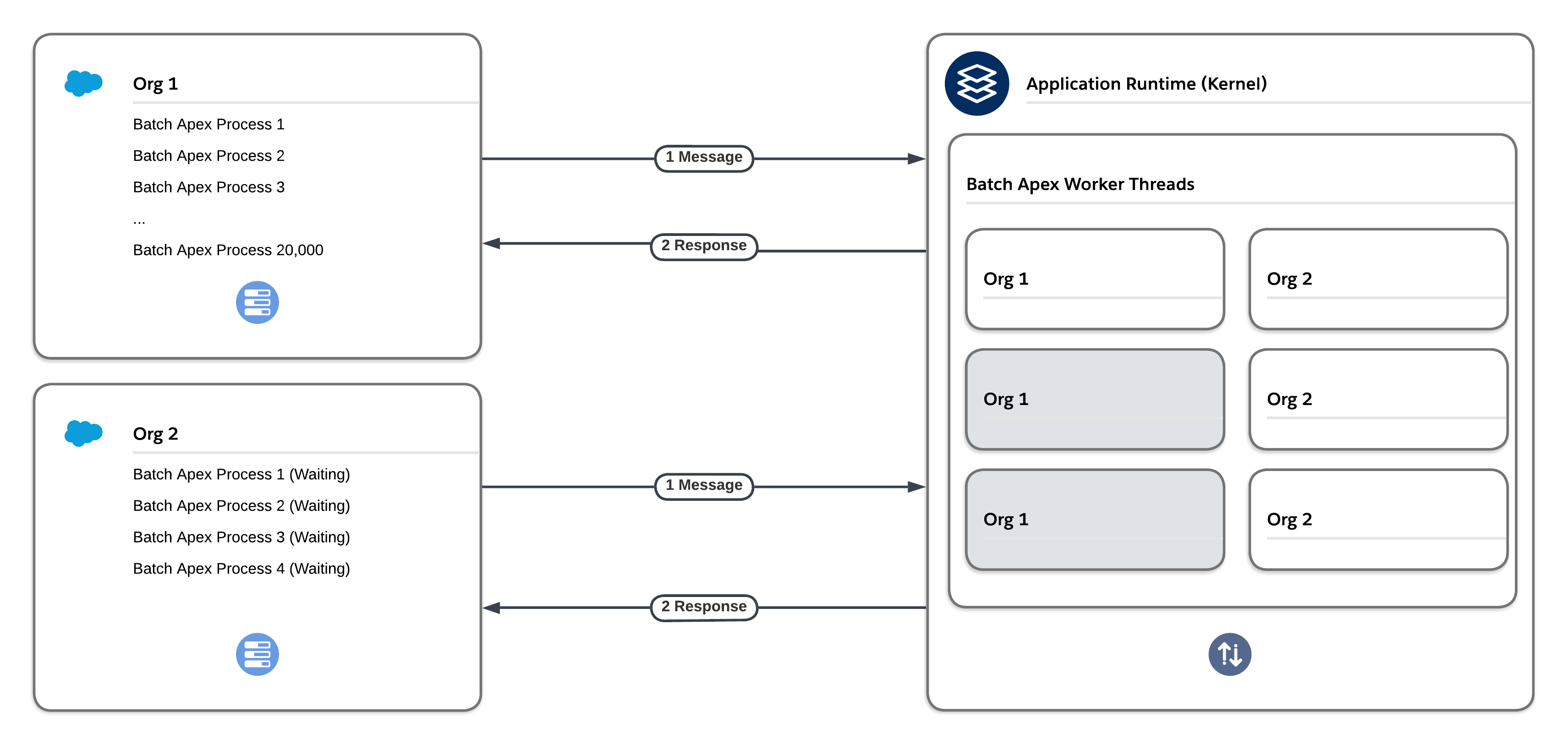
A benefit of using asynchronous Apex methods is that some governor limits, such as SOQL query limits and heap size limits, are higher. However, don’t rely too heavily on these methods. Due to the finite resources allocated to asynchronous infrastructure, heavy usage of Future, Queueable, and Batch Apex can cause processing delays that stem from limitations based on fair usage and flow control.
Outbound callouts that use asynchronous Apex count against the asynchronous Apex limit. The daily limit is currently 250,000 or 200 times the number of applicable user licenses, whichever is greater. This limit can be an issue for high-volume use cases. If you exceed the limit, your asynchronous Apex jobs and their associated outbound callouts will fail.
Additionally, because the platform has a finite number of asynchronous threads available, outbound integrations via asynchronous Apex have limited scalability. Any high-volume outbound integrations that exceed the number of available threads can have long processing times and lead to delays.
For high-volume use cases, consider these alternative approaches. API calls with these approaches count towards the daily API request limit, which is significantly higher than the daily asynchronous Apex limit. Thus, these approaches are more scalable. Note, however, that there are still physical limitations on the number of concurrent requests that any CPU can process.
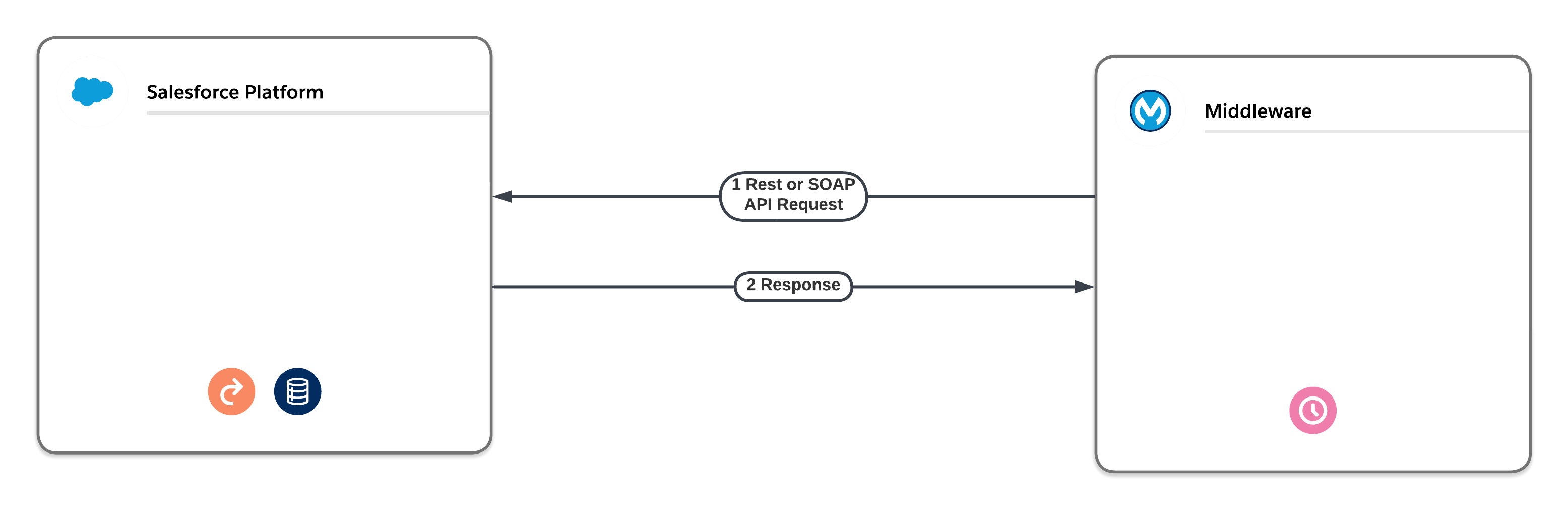
- Middleware Scheduled Pull. Avoid delays associated with high-volume outbound integration jobs by using middleware to pull the data on a scheduled basis instead of pushing it via asynchronous Apex. Middleware, such as the MuleSoft Anypoint Platform, can use native SOAP API or REST API in a synchronous fashion so that few, if any, delays are introduced. Middleware can also use the native Bulk API for large data volumes.
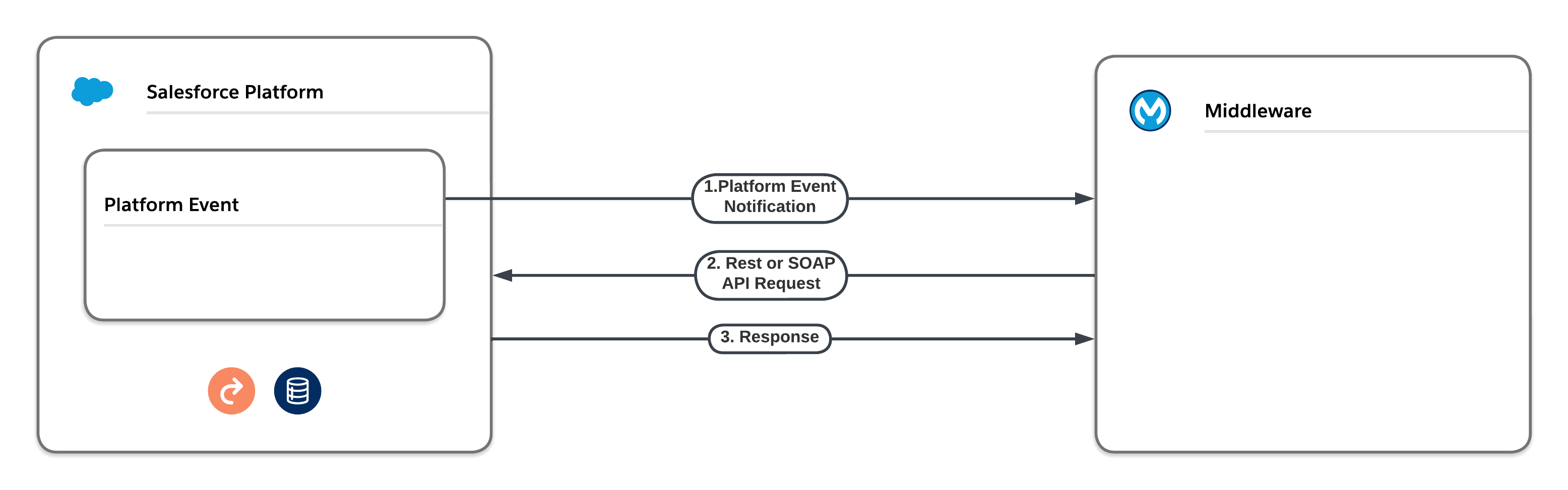
- Middleware Pull via Platform Event Notification. Instead of enqueuing Future, Queueable, or Batch asynchronous Apex to perform outbound integrations, you can use platform events. The platform event can either deliver the outbound information itself or instruct a middleware tool to pull the required information via a native API and deliver it to its final destination. Neither of these approaches are subject to the delays that asynchronous Apex is subject to. However, platform event limits still apply.
| Product / Approach | Use Cases | Skills Required | Asynchronous with Respect to Client | Asynchronous with Respect to Server | Type of Platform Limits Enforced |
|---|---|---|---|---|---|
| Apex Future Methods | We recommend that you use Queueable Apex instead of Apex future methods. Queueables have the same use cases as future methods but offer additional benefits. | Pro-code | Yes | Yes | Asynchronous |
| Queueable Apex | We prefer this approach over future methods. Use for processes that involve long-running database operations or external web service callouts. Queueable Apex offers additional benefits over future methods, including job IDs, support for non-primitive types, and job chaining. | Pro-code | Yes | Yes | Asynchronous |
| Scheduled Apex | Execute Apex at a scheduled time defined by a cron expression. Although the act of scheduling Apex via the cron expression is an asynchronous process, the underlying code executes synchronously when the job starts. | Pro-code | Yes | Yes | Synchronous |
| Apex Continuation Callouts | Callouts from Apex methods running in a synchronous transaction context. | Pro-code | Yes | Yes | Synchronous |
With Queueable Apex, you can run Apex processes that involve extensive database operations or external web service callouts asynchronously. To use Queueable Apex, implement the Queueable interface, and then add a job to the Apex job queue. This approach ensures that the asynchronous Apex job runs in the background in its own isolated thread and doesn’t delay the execution of your main Apex logic. Each queued job runs when system resources become available.
Queueable Apex represents the evolution of asynchronous Apex. It offers features that aren’t available to Apex future methods, including:
- Job IDs: When you submit a job by invoking the System.enqueueJob method, the method returns the ID of the new job. You can use this ID to identify your job. To monitor its progress, view the Apex Jobs page in Salesforce Setup, or query the AsyncApexJob object.
- Support for non-primitive types: Queueable classes can contain member variables of non-primitive data types, such as sObjects or custom Apex types.
- Support for job chaining: You can chain Queueable jobs together by starting a second job from a running job. This technique can help you address scenarios involving process dependencies.
- Maximum depth control: You can configure Queueable jobs with a maximum stack depth to ensure that chains of jobs don’t end up with unexpected recursion.
- Deduplication signatures: Queueable jobs provide an optional signature to detect and remove duplicate jobs.
- Configurable delay: You can define a delay of up to 10 minutes before the Queueable job will execute.
- Transaction finalizers: You can attach a post-action sequence to a Queueable job and take relevant actions based on its result. For example, a transaction finalizer can re-enqueue a Queueable job that failed due to an unhandled exception up to five times.
Salesforce uses a queue-based framework to handle asynchronous processes. This queue is used to balance request workloads across orgs. To ensure that your org uses this queue as efficiently as possible:
- Avoid enqueueing future or Queueable methods directly from actions generated by large volumes of end-user activity or integration API calls. This approach can quickly exhaust daily asynchronous Apex limits, resulting in serious business impacts.
- Avoid enqueueing more than one asynchronous action per synchronous action. When multiple asynchronous methods are enqueued from a single synchronous action, the asynchronous activities often execute at the same time and contribute to row lock contention and/or row lock timeout errors.
- Avoid adding large numbers of future or Queueable methods to the asynchronous queue.
- Ensure that future and Queueable methods execute as quickly as possible. The longer a future method takes to execute, the more likely requests behind it in the queue will be delayed. To ensure fast execution of batch jobs, minimize web service callout times, tune queries used in your future methods, and optimize any other object automations including Process Builder processes, workflow rules, flows, and Apex triggers.
- Test your asynchronous methods at scale. Use an environment that generates the maximum number of methods that you expect to handle. This testing helps determine whether you’ll encounter issues with performance or limits in your production environment. Also consider the impact on cumulative daily limits.
- Use Batch Apex instead of future or Queueable methods to process large numbers of records. Batch Apex can handle complex, long-running processes that execute against thousands of records and can be scheduled to run during off hours when more resources are available.
Use scheduled Apex to execute at a specified time and at a repeated frequency as defined by a cron expression. Although the act of scheduling Apex via the cron expression is an asynchronous process, the underlying code executes synchronously when the job starts. Scheduled Apex is ideal for daily or weekly maintenance tasks.
- You can only have 100 scheduled Apex Jobs at one time. To avoid this limitation, consider using a schedule-triggered flow that invokes Apex code instead of using scheduled Apex.
- Use extreme care if you’re planning to schedule a class from a trigger. You must be able to guarantee that the trigger won’t add more scheduled classes than the limit. In particular, consider API bulk updates, import wizards, mass record changes through the user interface, and all cases where more than one record can be updated at a time.
- For one-off tasks that need to be scheduled up to 10 minutes in the future, use a delayed Queueable job. This approach does not count toward the 100 scheduled job limit.
- Scheduled Apex is executed in a synchronous context with synchronous limits.
- Consider how long the scheduled job will execute for. A long-running job may overlap with the start of the next scheduled job.
- Salesforce schedules the class for execution at the specified time. Actual execution can be delayed based on service availability. Jobs scheduled to run during service maintenance downtime will be scheduled to run after the service comes back up.
- Use System.scheduleBatch for scheduling batch jobs rather than having a scheduled job with the sole purpose of enqueuing a batch job.
Historically, synchronous callouts made from an Apex method running in a synchronous Apex transaction context, such as a Visualforce controller or a Lightning component controller, were subject to the Apex concurrency limit regarding long-running requests. As of Winter ’19, synchronous callouts are no longer counted as long-running. Although Apex continuations were initially created as a solution to synchronous callouts that resulted in long-running requests, they also provide some additional benefits.
- A single synchronous action can perform up to three continuation actions. The previous continuation must complete prior to a new continuation action being performed.
- Each continuation action can perform up to a maximum of three callouts, which execute in parallel.
- When all of the callouts performed by a continuation action are complete, the platform invokes the continuation callback method to handle the results.
Although continuations execute asynchronously with respect to the originating synchronous action, there are key differences between Apex Continuations and other asynchronous Apex techniques such as future methods, Queueable, or Batch. Key differences are:
- Continuations aren’t queued in any way.
- Continuations don’t contribute to the daily asynchronous Apex execution limit.
- Continuations switch thread context on the application server from a heavyweight Apex platform thread to a lightweight thread that only performs callouts. For the purposes of executing callouts that may run up to 120 seconds, continuations offer significant application server memory savings.
- Originally, continuations could only be executed from a Visualforce JavaScript remoting call. However, in Summer ‘19, continuations were officially added to the Lightning Component framework, which eliminated the need for Visualforce.
Platform events are the Salesforce Platform’s implementation of a purely event-driven architecture. You can find more details about the components associated with this type of architecture in the Architect’s Guide to Event-Driven Architecture.
Platform events and platform event triggers/flows are often great alternatives to running asynchronous Apex. They’re also a great way to invoke off-platform processing. For example, you can use a combination of Amazon Web Services (AWS) event relays and platform events to invoke serverless compute functionality in AWS Lambda. Work that’s performed relatively quickly and without any callouts (which aren’t possible from a platform event trigger or flow) is a great candidate for a platform event/trigger or event/flow combination.
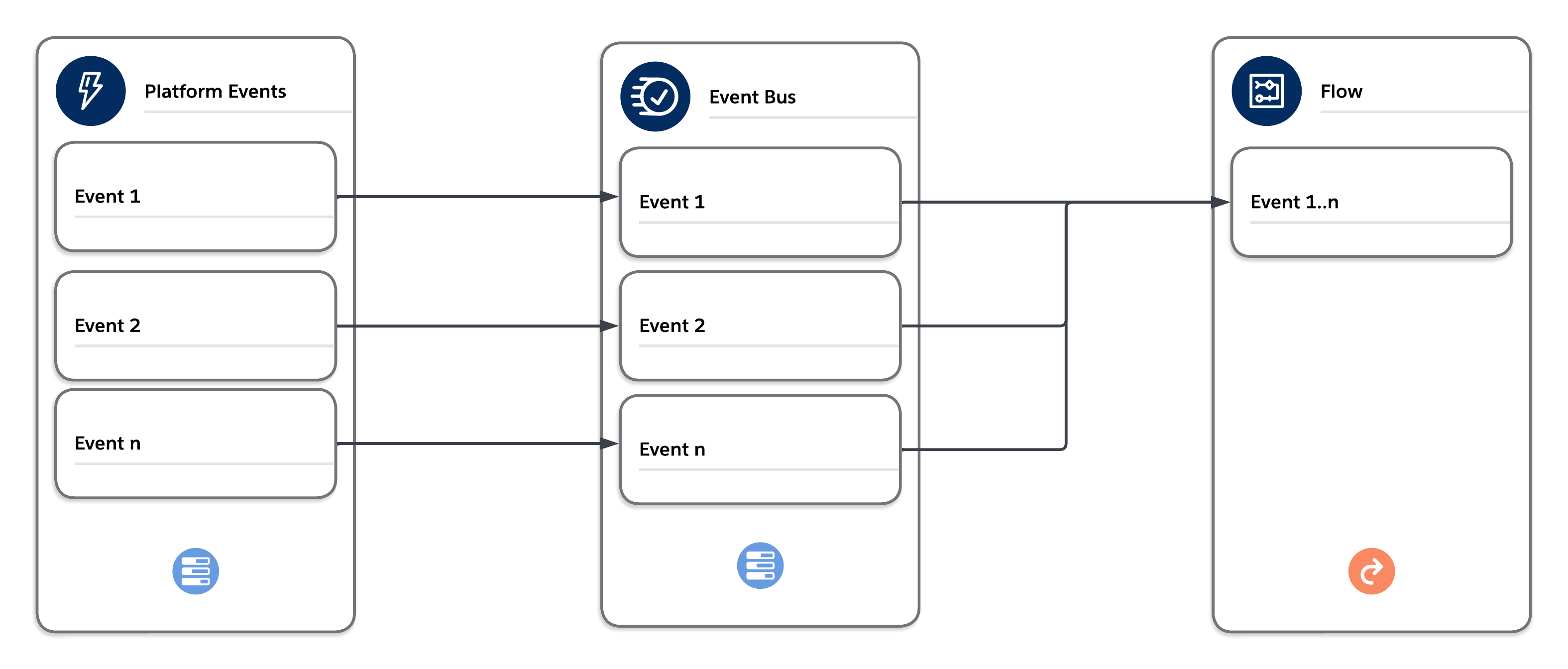
The events published to the bus via publish after commit are delivered in order and can be bulk processed by the trigger or flow in a separate synchronous context. The context is synchronous and enforces all synchronous governor limits. Choose the platform event trigger/flow batch size carefully to avoid hitting limits.
| Product / Approach | Use Cases | Skills Required | Asynchronous with Respect to Client | Asynchronous with Respect to Server | Type of Platform Limits Enforced |
|---|---|---|---|---|---|
| Platform Event Triggers | Loosely couple Salesforce with external systems and communicate between asynchronous platform components. | Low-code + Pro-code | Yes | Yes | Synchronous |
- As events are published on the event bus, they are available for consumers. In the case of event triggers (Apex or flow), these events are dispatched to available synchronous threads on the app tier (one thread per event trigger/flow). Note that this process doesn’t have an SLA.
- When publish operations are added to the queue, the result of the queueing process is stored in the Database.SaveResult object. These entries only indicate whether or not the queueing operation was successful. To get the final result of an event published through the event bus, implement an Apex publish callback. With this additional information, you can make decisions about further actions, such as attempting to republish failed events.
- While platform events aren’t subject to the same limits as asynchronous Apex, they do have their own sets of governor limits. If you run into issues with limits, you can enable enhanced event usage metrics to determine whether specific events are using up more of your allocations than you intended. If you need greater throughput on event triggers, consider using parallel subscriptions to process events simultaneously instead of in a single stream. With parallel subscriptions, you can scale Apex platform event triggers to handle high volumes of events. Parallel subscriptions are available for custom high-volume platform events but not for standard events or change events.
- Platform events have two options for publish behavior:
- Publish Immediately: Events are published immediately during the transaction, before the final database commit. Events that are published this way are not guaranteed to be published in order.
- Publish After Commit: Events are published at the time that the database transaction is successfully committed. Events that are published this way are guaranteed to be published in order.
It’s helpful to use Publish Immediately for use cases such as logging, where you want to publish the logging event regardless of whether the transaction succeeds and commits, or fails and rolls back. It’s possible to immediately publish a platform event that’s consumed by a platform event trigger. The platform event trigger then competes for a database row lock with the transaction that published it. Review all designs thoroughly prior to immediately publishing platform events to ensure that you avoid this scenario.
Asynchronous flows provide low-code alternatives to asynchronous Apex. As with other forms of asynchronous processing, they execute in the background when resources are available. Asynchronous flows also have no SLAs and can have unpredictable wait times.
| Product / Approach | Use Cases | Skills Required | Asynchronous with Respect to Client | Asynchronous with Respect to Server | Type of Platform Limits Enforced |
|---|---|---|---|---|---|
| Scheduled Path (After Commit Flows) | Execute at dynamically scheduled times after triggering events. | Low-code | Yes | Yes | Asynchronous |
| Asynchronous Path (Record-Triggered Flows) | Execute an operation that you want to run on its own time and to avoid mixed DML errors. | Low-code | Yes | Yes | Asynchronous |
Scheduled Paths are cron trigger-based to execute at a specific time. They execute when records are created, updated or deleted and give you granular control over when to run the automation relative to the record change. (Example: send an email to a user one hour before a task is due.) Unlike Apex future methods, which are limited to a maximum of 50 methods enqueued in a synchronous transaction, scheduled flow actions don’t currently have a max enqueue limit per transaction. There is, however, a batch size configuration within the definition of the scheduled path that allows for some control over how many records are handled by the scheduled path flow execution.
Asynchronous Paths can be added to record-triggered flows. They run in the background and don’t delay the execution of the transaction that originally triggered the flow. You can use an asynchronous path to execute a long-running operation or any operation that you want to run on its own time. Asynchronous paths can help avoid mixed DML errors that occur when you need to update a value on a related record that’s not part of the record that triggered the flow.
Note: Outbound messaging is a legacy feature and platform events (described in the previous section) are a more modern approach and offer greater flexibility. Platform Events are Salesforce’s recommended pattern for event-driven integration.
Outbound messages provide a means of asynchronous outbound communication via SOAP API. When configured in Salesforce, the outbound message definition produces a SOAP WSDL that can be consumed by an external web service provider. Outbound messages can be triggered from workflow rules, Process Builder processes, or Lightning after-save flow triggers. An outbound SOAP message can contain up to 100 notifications. Each notification contains the object ID and a reference to the associated sObject data. If the information in the underlying object changes after the notification is queued but before it is sent, only the latest data is delivered and not the intermediate changes.
| Product / Approach | Use Cases | Skills Required | Asynchronous with Respect to Client | Asynchronous with Respect to Server | Type of Platform Limits Enforced |
|---|---|---|---|---|---|
| Outbound Messages | Share data with third-party systems in near real time via the SOAP protocol | Low-code | N/A | Yes | N/A |
When an outbound message listener (the web service you configured with the generated WSDL) receives a message, it uses the included session ID information to call the Lightning Platform API to update the record in Salesforce that triggered the outbound message.
- Outbound messages aren’t handled via the queue-based asynchronous infrastructure in Salesforce that runs activities such as future methods, Queueable Apex, Batch Apex, Bulk API, and so on. Instead, records are stored locally in the OutboundMessage object. Messages are dispatched and retried via a local scheduled background process.
- Messages aren’t sent synchronously when the outbound message action is executed by the initiating automation (for example, an after-save flow trigger). Instead, they remain in the OutboundMessage object until sent successfully or until they’re dropped after 24 hours of unsuccessful delivery.
- To avoid an infinite loop of outbound messages, ensure that the user who updates the objects does not have the Send Outbound Messages permission.
| Product / Approach | Use Cases | Skills Required | Asynchronous with Respect to Client | Asynchronous with Respect to Server | Type of Platform Limits Enforced |
|---|---|---|---|---|---|
| Email-to-Case | Automatically create cases and populate case fields based on values in incoming emails. | Low-code | Yes | Yes* | Synchronous |
| * Email-to-Case is handled as both sync and async, but with synchronous Apex limits | |||||
Email-to-Case normally works in a synchronous manner. There’s a limit of four synchronous threads to handle inbound Email-to-Case requests. The synchronous form of the handler maintains a connection to the inbound Salesforce mail server (MTA) that receives the email. However, there are reasons why Email-to-Case can be handled asynchronously:
- Email-to-Case is subject to thread limits, specifically 10 total handler threads per app server: four threads for synchronous processing and six threads for asynchronous processing.
- If a synchronous email handler exceeds 15 seconds of execution time, then that particular email service address is marked as asynchronous for a period of 30 minutes. Subsequent handler requests for that service address result in a message that’s enqueued for MessageTypeName = MAILCATCHER_EMAIL_TO_CASE, along with a reference to the email content.
- If a synchronous thread is already in use for a particular org and service address, then additional requests for that service address are queued asynchronously.
- If a synchronously handled email encounters an error, such as a row lock timeout, then the request is saved and queued asynchronously.
- If no synchronous handler threads are available, then the request is queued asynchronously.
- There is a deduplication option when you configure Email-to-Case, but it doesn’t deduplicate attachments until after the email is processed. This deduplication saves space in the database, but it doesn’t reduce email processing times. You can, however, improve performance by implementing a custom Apex Email-to-Case handler for message processing. This implementation doesn’t affect any governor limits, but it gives the handler access to the email message and all of its attachments before anything is committed to the database. This access allows you to compute checksums for all the included attachments and discard any that you decide are unnecessary, including duplicates, well-known signature pictures, or unwanted file types.
- Committing email attachments to Salesforce Files is responsible for the majority of email processing time. As reply-responses to or from the contact increase and the email chain gets larger, the processing time for each email also grows larger. If the email option “Reply with new content only” isn’t selected, then email chains will grow with each reply. Therefore, we recommend that you use an Apex Email-to-Case handler with logic that implements attachment deduplication at the time of processing.
- Despite the invocation of Apex triggers as part of the handling, Email-to-Case handlers are exempt from the concurrent Apex limit.
To process large volumes of records asynchronously, consider using one of these approaches.
| Product / Approach | Use Cases | Skills Required | Asynchronous with Respect to Client | Asynchronous with Respect to Server | Type of Platform Limits Enforced |
|---|---|---|---|---|---|
| Batch Apex | Complex, long-running processes that involve thousands of records | Pro-code | Yes | Yes | Asynchronous |
| Schedule-Triggered Flows | Perform actions on a batch of records in the background at a specified time and at a repeated frequency via a flow. | Low-code | Yes | Yes | Synchronous |
| Bulk API | Insert, update, upsert, query, or delete many records asynchronously. | Pro-code | Yes | Yes | Asynchronous |
You can use Batch Apex to build complex, long-running processes that involve thousands of records. Batch Apex operates by dividing up your record set and processing it in manageable chunks. As an example, you can build an archiving solution that runs on a nightly basis and adds records older than a certain date to an archive. Or you can build a data cleansing operation that looks at all Accounts and Opportunities on a nightly basis and performs any necessary updates based on a set of predefined criteria.
- Batch Apex is best at processing large amounts of data because asynchronous Apex has higher limits than synchronous Apex. Batch Apex also performs more efficiently when it processes more items per batch because it uses bulk operations that incur less overhead from queue management. Therefore, to avoid triggering the flow control mechanism via queue flooding and avoid exhausting the daily asynchronous Apex limit, don’t create batches with small scope sizes or that have fast processing times.
- Avoid enqueueing batch jobs directly from actions generated by large volumes of end-user activity or integration API calls. This approach can quickly exhaust the flex queue. If you plan to invoke a batch job from a trigger, then you must guarantee that the trigger doesn’t add more batch jobs than the limit.
- Batch Apex is limited to a maximum of five simultaneous threads, which limits its throughput much more than future methods or Queueable Apex.
- Batch jobs involving large volumes of data should ideally be scheduled to run during off-peak hours in order to free up resources for processes that require real-time or near real-time responses.
- When you call System.scheduleBatch, the platform schedules your job for execution at the time that you specify. Actual execution occurs on or after that time, depending on service availability.
- The scheduler runs in system context. All classes are executed, regardless of whether or not the user who scheduled the execution has permission to execute the class.
- All scheduled Apex limits apply for batch jobs scheduled using System.scheduleBatch. After the batch job is queued (with a status of Holding or Queued), all batch job limits apply, and the job no longer counts toward scheduled Apex limits.
- For a batch job with a recurring schedule, consider the correct behavior if the previous job is still executing when the new job starts running.
- Batch jobs enqueued from synchronous Apex transactions use the flex queue. The flex queue is limited to a maximum of 100 items at any point. If a transaction attempts to add more entries, then the platform generates errors and doesn’t submit the batch job.
- Callouts and other non-transactional operations from batch jobs must follow idempotent design considerations. Batch jobs queued before a Salesforce service maintenance downtime remain in the queue. After service downtime ends and system resources are available, the queued batch jobs are executed. If a batch job is running when downtime occurs, the batch execution is rolled back and restarted after the service is restored. Because execute methods can therefore run multiple times, any non-transactional operations, such as callouts, can be retried.
- Consider configuring the batch job to raise BatchApexErrorEvent events to handle error and exception scenarios.
A schedule-triggered flow is a flow scheduled to execute at a specified time and at a repeated frequency (daily, weekly, or once) to perform actions on a batch of records. (Example: update a field in all cases with a status of “Open” at 2 a.m. every night.) Scheduled Flows are executed via the cron trigger mechanism and are bulk processed.
- A schedule-triggered flow executes 200 records per invocation, but will be executed with multiple concurrent threads if more than 200 records are present.
- Schedule-triggered flows are executed in a synchronous context with synchronous limits.
- There is no way currently to control the number of records processed per scheduled flow invocation. If the execution is for more than 200 records, there is a real danger of Concurrent Apex errors.
Bulk API is based on REST principles and is optimized for working with large sets of data. You can use it to insert, update, upsert, query, or delete many records asynchronously and process the results later. The Salesforce Platform processes the request in the background. In contrast, SOAP API and REST API use synchronous requests and are optimized for real-time client applications that update a few records at a time. You can use both of these APIs for processing many records, but when the data sets contain hundreds of thousands of records, they are less practical. Bulk API’s asynchronous framework is designed to make it simple and efficient to process data from a few thousand to millions of records.
The easiest way to use Bulk API is to enable it for processing records in Data Loader using CSV files. With Data Loader, you don’t have to write your own client app. Sometimes, though, unique requirements necessitate writing a custom app.
There are two Bulk APIs available within the Salesforce Platform.
- Bulk API 2.0 is the newer API. It provides a streamlined and easier-to-use workflow, and is the focus for enhancements.
- The original Bulk API is still fully supported, but is no longer being enhanced. We recommend that you use Bulk API 2.0 where possible.
For more information on API limits, see Bulk API Limits and Bulk API 2.0 Limits.
Refer to this guide when building or considering asynchronous processing on the Salesforce Platform. It’s always a good idea to understand the full scope of options available to you, and how they may fit with your specific use case. Be sure to thoroughly assess your current landscape before making changes to any of your existing architectures, especially if your current solution is working well.