Agents reason over goals, infer parameters from context, and select actions dynamically. As a result, every integration an agent touches must handle ambiguity, support safe repetition, and fail in ways the agent can recover autonomously.
Agentic systems invalidate several assumptions that traditional integration design takes for granted. Inputs won’t always be well-formed. A single user action may spawn a chain of agents across organizational boundaries, each of which needs delegated authority to act.
This document maps the architectural shifts that follow from that reality: the new design principles, the agentic patterns, and how the Salesforce platform delivers them.
Each pattern in this document follows the same structure:
Name: The pattern identifier that indicates the type of integration contained in the pattern.
Context: The overall integration scenario that the pattern addresses. Context provides information about what users are trying to accomplish and how the application behaves to their needs.
Problem: The challenge (expressed as a question) that the pattern is designed to solve. When reviewing the patterns, read this section to quickly understand if the pattern applies to your integration scenario.
Forces: The constraints and circumstances that can make the problem difficult to solve.
Salesforce Pattern Application: The recommended way to apply the pattern to the scenario.
Sketch: A Unified Modeling Language (UML) sequence diagram that shows how the pattern application addresses the scenario.
Results: How the pattern resolves the forces associated with the scenario. This section also contains new challenges that can arise as a result of applying the pattern.
Design Considerations: Platform-agnostic guidance for applying the solution correctly, followed by Salesforce-specific implementation notes. These considerations cover action design principles and platform-specific configuration requirements.
Error Handling and Recovery: Guidance for managing failures during pattern application. This parameter covers four areas:
- How actions communicate failure to the agent through structured, actionable error responses that provide sufficient context for downstream decision-making
- How the agent determines whether to retry, self-correct, or halt execution
- How compensation actions address partial outcomes and mismatched cross-platform state
- Idempotency requirements for retired write operations
Security Considerations: Security requirements for applying the pattern safely. These considerations cover credential management, least-privilege scoping of integration users and connected apps, audit logging of agent-invoked actions, and input validation requirements for parameters that originate from user-provided or LLM-inferred content, among others.
Example: An end-to-end scenario that describes how the design pattern is used in a real-world Salesforce scenario. The example explains the goals and how to apply the pattern to achieve those goals.
The following table lists the implementation patterns covered.
List of Patterns
| Pattern | What it Does |
|---|---|
| Sequential Action Invocation | An agent invokes a series of actions where each step depends on the verified result of the previous one. The agent maintains context across the chain like identifiers, status codes, intermediate data and uses it to decide whether the next step can proceed. |
| Parallel Action Invocation | When a set of actions are independent of each other, the agent invokes them concurrently rather than in sequence. Total workflow time is bound by the slowest call rather than the sum of all calls. |
| Asynchronous Action Invocation | An agent dispatches an operation to a downstream system via a platform event, message queue, or background job without waiting for the outcome. The agent’s obligation ends at confirmed invocation; the downstream system takes ownership of execution independently of the agent session. |
| On-Demand Agent Invocation | An external application or AI orchestrator calls an agent programmatically, supplies context, and waits for a structured response. The agent acts as an intelligent backend service that the caller initiates, the agent reasons and acts, and the result is consumed by the caller. |
| Autonomous Event-Driven Agent Execution | A data condition like cart abandonment, payment failure, usage drop autonomously fires an agent without any human initiating the interaction. There is no caller waiting for a response; the agent receives the event payload as grounding context and executes a response workflow entirely on its own. |
| Knowledge Grounding from Enterprise Content | Before generating a response, the agent retrieves relevant documents from an enterprise knowledge store and injects them into its context window. The LLM supplies the reasoning; the retrieval layer supplies the facts. |
| Verified Customer Context Injection | Verified, structured attributes from a unified customer profile are pre-populated as action inputs before the agent invokes an action. The agent receives facts like segment, tier, churn risk, and lifetime value rather than inferring them. |
| Cross-System Tool Integration | An agent connects to external systems outside the Salesforce platform through a uniform tool interface based on the Model Context Protocol (MCP) standard. Each external system exposes its capabilities as described, callable tools; the agent discovers and invokes them without needing to know each system’s native API or schema. |
| Business Capabilities as Callable Tools | Enterprise business capabilities like business entities, processes, and insights are exposed as MCP tools that any external agent on any framework can discover and invoke. |
| Cross-Agent Delegation | A calling agent decomposes a complex request and delegates domain-specific sub-tasks to specialized peer agents on different platforms or vendor systems using the Agent-to-Agent (A2A) protocol. The calling agent manages the task lifecycle and aggregates results from the remote agents. |
| Agents as Callable Services | An internal Agentforce agent publishes its domain capabilities as a governed, discoverable A2A endpoint so external orchestrators or peer agents can delegate tasks to it. The agent manages the incoming task lifecycle and returns structured results to the remote caller. |
The patterns in this document are classified into three categories. This categorization helps architects quickly identify which patterns are relevant to the integration challenge they are solving whether they are designing what an agent calls, what triggers an agent, or how an agent is grounded with knowledge before it acts. Rather than reading every pattern, you can navigate directly to the category that matches your design concern.
Action Invocation:
These patterns cover how an agent calls out to external systems to retrieve data or execute operations as part of its reasoning cycle. These are outbound patterns where the agent is the initiator. They address sequencing (when steps depend on each other), parallelism (when they don’t), idempotency, and partial failure handling. Use these patterns when designing the tools an agent will invoke to get work done.
Agent Invocation:
These patterns address how external systems or events bring an agent into action. These are inbound patterns where external systems trigger these agents. The trigger may be a human-facing application making a programmatic call and waiting for a response, or an autonomous data condition that triggers the agent. Use these patterns when designing how and when an agent is triggered.
Grounding with Enterprise Data:
The patterns in this category cover how agents are grounded with accurate, current, organization-specific knowledge before it reasons or acts.
Choosing the right strategy isn’t trivial. Each pattern targets a specific concern: system capabilities, data volume, failure handling, and transactionality.
The selection matrix tables list the patterns and their key aspects to help you determine which pattern best fits your integration requirements. The patterns are categorized using these dimensions.
| Aspect | Description |
|---|---|
| Type | Specifies the category of integration: Action Invocation, Agent Invocation, or Grounding with Enterprise Data Action Invocation: These outbound integrations range from simple single-step tool calls to complex multi-step sequences and parallel fan-outs, and require careful consideration of ordering constraints, idempotency, and partial failure handling across heterogeneous backends. Agent Invocation: Agent invocations are the ways external systems or events bring an agent into action. These inbound integrations span from synchronous programmatic calls made by human-facing applications that await a structured response, to fully autonomous event-driven executions where a data condition triggers the agent without any human initiating or waiting on the interaction. Grounding with Enterprise Data: Grounding integrations are the ways an agent is supplied with accurate, current, organization-specific knowledge before it reasons or acts. These integrations range from retrieving unstructured documents from enterprise content stores to injecting verified structured attributes from unified customer profiles, ensuring the agent operates on facts rather than hallucinated inference. |
| Timing | Specifies the style of integration based on timing: Synchronous or Asynchronous Synchronous vs. Asynchronous in this document refers to how the agent itself is triggered, or how it invokes the actions. It doesn’t cover what happens internally. But in general, a user waits during the time the agent is invoking actions and processing results. The agent won’t address the next user message until it has finished the current turn. Synchronous: Blocking and real time requests are request/response operations. The result is returned to the caller immediately via this operation. Asynchronous: Nonblocking, queue, or message-based requests are invoked by a one-way operation which are near-realtime. The results and any faults are returned by invoking other one-way operations. The caller therefore makes the request and continues without waiting for a response. |
This table lists the patterns and their key aspects to help you determine which pattern best fits your requirements when your integration is from Salesforce to another system.
| Type | Timing | Key Pattern to Consider |
|---|---|---|
| Action Invocation | Synchronous | Sequential Action Invocation Parallel Action Invocation Cross-System Tool Integration Cross-Agent Delegation |
| Action Invocation | Asynchronous | Asynchronous Action Invocation |
| Agent Invocation | Synchronous | On-Demand Agent Invocation Agents as Callable Services |
| Agent Invocation | Asynchronous | Autonomous Event-Driven Agent Execution |
| Grounding with Enterprise Data | Synchronous | Knowledge Grounding from Enterprise Content Verified Customer Context Injection |
Each section of patterns describes how to build them. Each pattern is a repeatable solution to a specific integration problem in agentic architectures. It covers when to use the pattern, what forces shape the decision, and how the Salesforce platform delivers it.
Context
Many business workflows are inherently sequential – each step requires a verified result from the previous one before it can proceed. For example, a refund can’t be initiated until eligibility is confirmed, a billing account can’t be created until the order record exists, and a compliance check can’t be logged until the check has passed.
In traditional automation, these dependencies are encoded as hardcoded flow logic. In an agentic system, the agent evaluates the result of each action and determines whether the preconditions for the next step have been met.
This pattern describes the foundational outbound integration model. Here, a single agent operates within one domain and invokes a sequence, where each action’s output gates the invocation of the next action in the chain. The orchestrating agent maintains transactional context across the chain, accumulating identifiers, status codes, and data returned by each step. It uses this context to drive subsequent decisions.
This pattern is the agentic counterpart to Remote Process Invocation – Request and Reply from the Integration Patterns guide which describes a single synchronous callout. The agentic pattern extends the pattern to an agent-driven chain of dependent calls within a single reasoning cycle.
Problem
When an agent executes a multi-step workflow that spans the host system and one or more remote systems, four challenges must be addressed:
- Sequencing - Actions must be invoked in the correct order, with each step gated on the successful completion of the previous one.
- Data Propagation - Response data from each step must be passed as input to the next.
- Failure Isolation - Failures at any point in the chain must not produce partial or inconsistent state across systems.
- Completion Verification - The agent must confirm that all steps have completed successfully before reporting a result.
Forces
When applying this pattern, answer the following questions:
-
Does each action in the chain depend on data returned by the preceding action, or are the dependencies only on success or failure status?
Data dependencies require the agent to carry identifiers and attributes across steps.
-
Are all remote endpoints capable of responding within the agent’s reasoning cycle timeout?
A slow external system at any step in the chain blocks the entire sequence.
-
Does the chain require complete end-to-end success, or is partial completion acceptable?
-
If full end-to-end success is required, define a compensation strategy for steps that need to be rolled back when a downstream failure occurs.
-
Can any of the write operations in the chain be retried safely?
All write actions must be idempotent; the agent’s reasoning loop may invoke the same action more than once due to Large Language Model (LLM) retries or ambiguous confirmations.
-
Is the chain invoked by a user interaction (conversational, low concurrency) or by an automated trigger (potentially high concurrency)?
This determines whether synchronous blocking is acceptable or whether an async pattern is required.
Salesforce Pattern Application
| Solution | Fit | Comments |
|---|---|---|
| Apex Actions | Best for external callouts and complex logic | A step requires an HTTP callout to a remote system, custom data transformation, or error handling logic that exceeds Flow’s declarative capabilities. Apex actions expose the full platform for integration while remaining callable by the agent via the @InvocableMethod annotation. |
| Flow Actions (Autolaunched) | Best for business rule steps and lightweight CRM operations | A step applies declarative business logic, queries or updates CRM records, or orchestrates a process that does not require custom code. Autolaunched Flows are natively callable from Agentforce subagents and return typed output variables the agent uses to determine the next step. |
| External Services (OpenAPI Import) | Best for typed, discoverable external API integration | An external system exposes an OpenAPI specification. External Services generates strongly-typed Apex stubs that are directly callable as agent actions, eliminating manual schema mapping and making the external API’s operations visible to the agent as named capabilities. Each operation in the imported spec becomes a named, callable action. The agent selects actions based on their generated semantic labels. Register generated actions in the Agentforce Topic Center so the agent can discover them at reasoning time. Note: if the externally hosted service is RESTful, but OpenAPI spec is not available or viable, use Named Credentials in Apex or Flows to make the HTTP callout directly. Apex code is needed to parse the results. |
| MuleSoft connected actions | Best for complex middleware fan-out or legacy system integration | Use when the remote system requires protocol translation, data transformation, or orchestration across multiple backend systems before returning a response. The agent makes a single callout to MuleSoft, and MuleSoft handles the downstream complexity and returns a unified response. |
Sketch
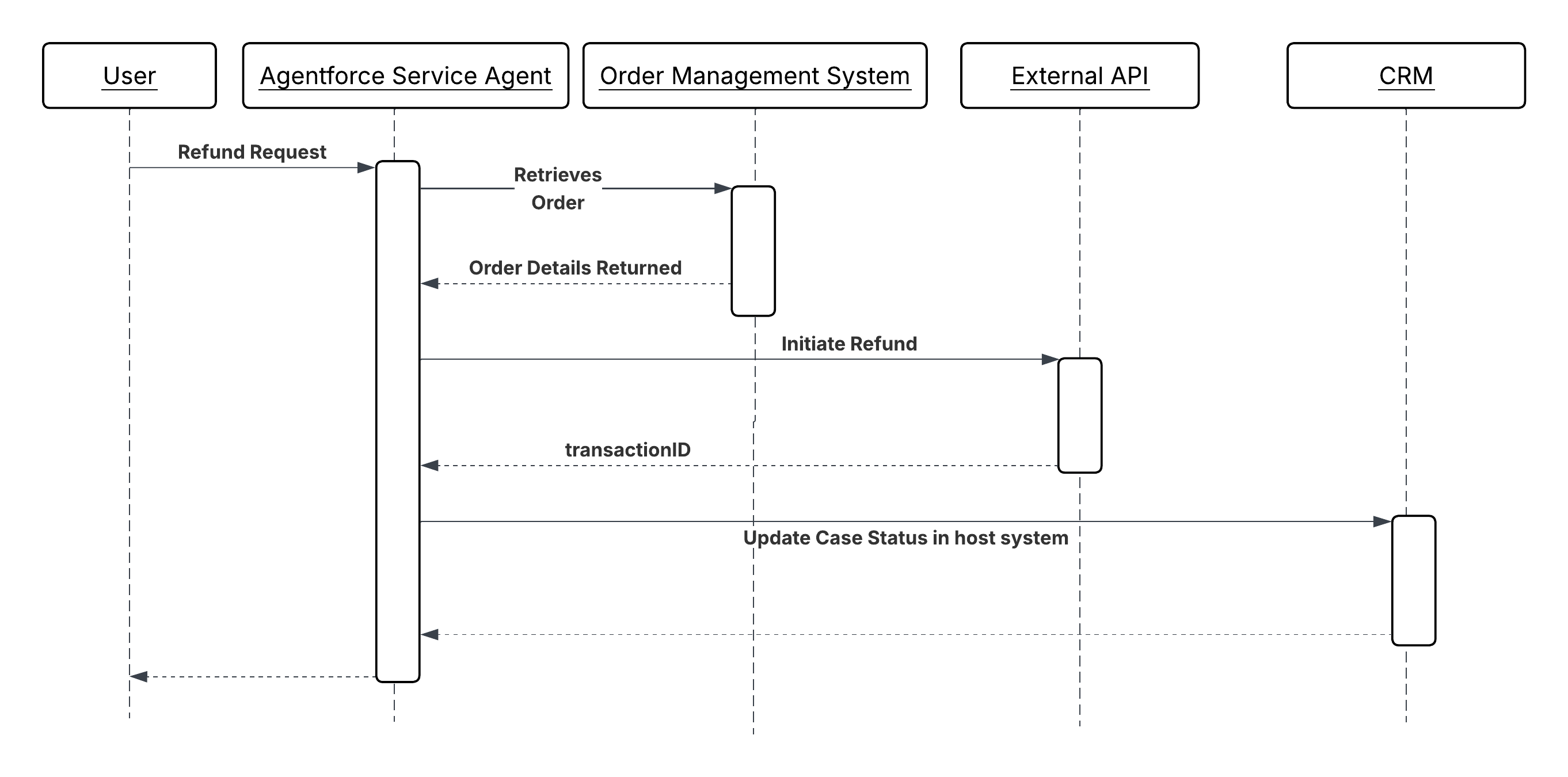
Sequence Diagram for Sequential Action Invocation
Results
The agent executes a cross-system workflow as a coherent, supervised sequence and not a fire-and-forget script. Each step’s result is evaluated before the next step is invoked, so the agent detects failures at the earliest possible point instead of discovering partial completion after the fact.
The host system (Salesforce CRM) is updated only after the remote operation has confirmed the status (success or failure). Identifiers and state returned by external systems, like billing account numbers, transaction IDs, confirmation codes are propagated through the chain and persisted, creating a complete, traceable record of the workflow outcome.
The agent is responsible for reasoning over results and sequencing decisions. Each action is responsible only for its own operation and for returning a structured result. Neither layer encodes the other’s logic.
Design Considerations
Platform-agnostic Guidance
- Make sure that each action in the chain carries a semantic description written in intent-based language and not as a technical method signature. The agent selects actions based on these descriptions. A description that reads “calls the billing API” is less useful than one that reads “creates a billing account in the billing system and returns the new account identifier.”
- Make all write operations in the chain idempotent. The agent’s reasoning loop may retry an action if it receives an ambiguous response. The action must produce the same outcome on repeated invocation.
- Validate all LLM inferred input parameters defensively at the action boundary. Never assume that parameters passed by the agent are well formed, within range, or of the expected type.
- Design each action for a single responsibility. An action that creates a billing account and sends a confirmation email in the same call is harder to retry, harder to test, and harder for the agent to reason over than two discrete actions.
Salesforce Implementation Notes
- For Apex Actions, annotate with @InvocableMethod(label=’…’ description=’…’). The “description” is read by the agent to determine when to invoke the action. Declare all input and output variables with @InvocableVariable using descriptive “label” and “description” fields. Return structured result objects with explicit success/failure indicators and human-readable error messages.
- For Flow Actions, use Autolaunched Flows exclusively; screen flows aren’t supported in autonomous agent contexts. Keep each flow atomic; one action, one responsibility. Configure fault paths on every external callout element to catch integration errors and return actionable error messages to the agent instead of letting uncaught exceptions terminate the session.
- For External Services, import the target system’s OpenAPI specification and register the generated actions in the Agentforce Topic. Wrap the generated stubs in Named Credentials to avoid hardcoding endpoints or credentials in the action definition.
- For all external callouts, set explicit callout timeouts. A callout that hangs without a timeout will block the agent’s reasoning cycle until the session limit is reached. Return a graceful failure with a descriptive error message when the timeout is exceeded. All external callouts have a configurable timeout of up to 120 seconds. They’re also subject to Apex synchronous transaction governor limits, so make sure to mitigate the risk of instantiating more than 50 transactions that run for more than five seconds each.
Error Handling and Recovery
- The agent gates each step on the explicit success of the step’s predecessor. Actions must return a structured result that includes a clear success or failure indicator. The agent can’t reliably infer failure from a missing or null response alone.
- When an action fails, the agent uses the error message returned by the action to determine its next move: prompt the user for corrected input, attempt a self-healing retry with adjusted parameters, or halt the chain and log the failure for human review. Therefore, error messages must be specific and actionable: “Invalid date range: endDate cannot precede startDate” is usable; 400 status code alone is not.
- For chains where partial completion creates inconsistent state (for example, the billing account was created but the CRM record was not updated), the agent invokes a compensation action to roll back or flag the partial state before surfacing the failure. Design compensation paths as named actions alongside the forward path.
- If a write action potentially succeeded, but returned an ambiguous response (network timeout, no acknowledgment), the retry must use the same idempotency key or external reference ID as the original call. Never issue an unchecked retry on a non-idempotent write.
Security Considerations
- Wrap all external callouts in named credentials. Never hardcode endpoints or credentials in Apex code or Flow configurations. These must be managed through the platform’s secure credential store and rotated without code changes.
- Apply the least-privilege principle to the integration user or connected app used by each action. An action that only reads order data shouldn’t hold write permissions on the billing system. Scope credentials to the minimum operations the action requires.
- Log the invocation of each action in the chain with its session ID, input parameters (sanitized of sensitive values), and outcome. If the result is disputed, this audit trail is the primary mechanism for reconstructing why the agent executed a given sequence of actions.
- Sanitize all input parameters that originate from user-provided text before passing them to external systems. User input passed through the agent into an external API callout is a potential injection vector. Validate type, format, and range at the action boundary before the callout is made.
Example
A customer service agent handling a refund request executes a four-step sequential chain:
GetOrderDetails(Apex Action) retrieves the order record from the Order Management System using the order ID provided by the user. It returns order status, line items, purchase date, and payment method. The agent evaluates whether the order is in a refundable state before proceeding.ValidateRefundEligibility(Autolaunched Flow) applies the business rules for refund eligibility, including return window, product category restrictions, and prior refund history. It returns an “eligible” boolean and, if ineligible, a plain-language reason the agent can surface to the user.InitiateRefund(Apex Action) calls the external payment gateway API with the order ID and refund amount. Returns a “refundTransactionId” on success. This action is idempotent. If called a second time with the same order ID, it returns the existing transaction ID rather than creating a duplicate refund.UpdateCaseStatus(Autolaunched Flow) updates the CRM case record with the refund transaction ID, sets the case status to “Resolved Refund Issued,” and creates a follow-up task for the account owner. This step executes only after “InitiateRefund” has returned a confirmed transaction ID.
If InitiateRefund times out or returns an error, the agent halts the chain, does not invoke UpdateCaseStatus, and surfaces an actionable message to the user. The case remains open and unresolved, preserving accurate state in the CRM.
Context
Sequential action chains are efficient when execution steps are dependent on each other. One step gates the next. But many workflows contain a set of steps that have no interdependencies. For example, steps that include retrieving product inventory, fetching customer entitlements, and checking a shipping estimate can all happen simultaneously, as no step’s input requires the output of another. Executing these steps sequentially wastes time proportional to the number of steps.
In a parallel invocation pattern, the agent identifies that a set of actions are independent and invokes them concurrently rather than in sequence. The overall workflow time is bound by the slowest individual action rather than the sum of all action times. Once all results are returned, the agent aggregates them into a single coherent response or uses them together as inputs to the next stage of reasoning.
The key architectural challenge isn’t the parallel invocation itself. It’s managing fan-out within platform concurrency constraints and ensuring that the aggregation step handles partial failures gracefully, without discarding the results that did succeed.
Problem
How does an agent efficiently orchestrate the simultaneous execution of multiple, independent capabilities and aggregate the individual results into a single, cohesive response for the user or subsequent steps?
Forces
When applying this pattern, answer the following questions:
- What are the considerations for actions regarding thread safety and sharing of mutable state?
- How will the solution manage and avoid hitting Salesforce governor limits for parallel Apex callouts within a single transaction?
- Is there a need to use asynchronous patterns (like Queueable Apex or Platform Events) to avoid governor limits?
- Is synchronous aggregation of the results required before the agent can proceed?
Salesforce Pattern Application
| Solution | Fit | Comments |
|---|---|---|
| Middleware Approach | Best for high fan outs (>5 endpoints) and cross-platform aggregation | You need a middleware layer. The agent makes one callout to the middleware. Then, the middleware fans that out to 10 systems in parallel, aggregates the data, and sends a single response back to the agent. This is preferred when the agent must call many heterogeneous external systems. The middleware absorbs fan-out complexity and returns a single aggregated response. |
| Queueable Apex | Best for Salesforce internal parallelism | You need to fire multiple queueable jobs. While Salesforce manages the queue, if you have enough “slots” in your concurrency limit, these can execute at the same time. Use when parallel operations are within the Salesforce org and concurrency slots are available. This isn’t suitable when immediate aggregated response is required. |
| Platform Events | Best for fire-forget or eventual consistency | Results don’t need to be aggregated synchronously. Each event triggers an isolated transaction, maximizing throughput but requiring downstream reconciliation. Use this mechanism when eventual consistency is acceptable and throughput is more important than response latency. |
Sketch
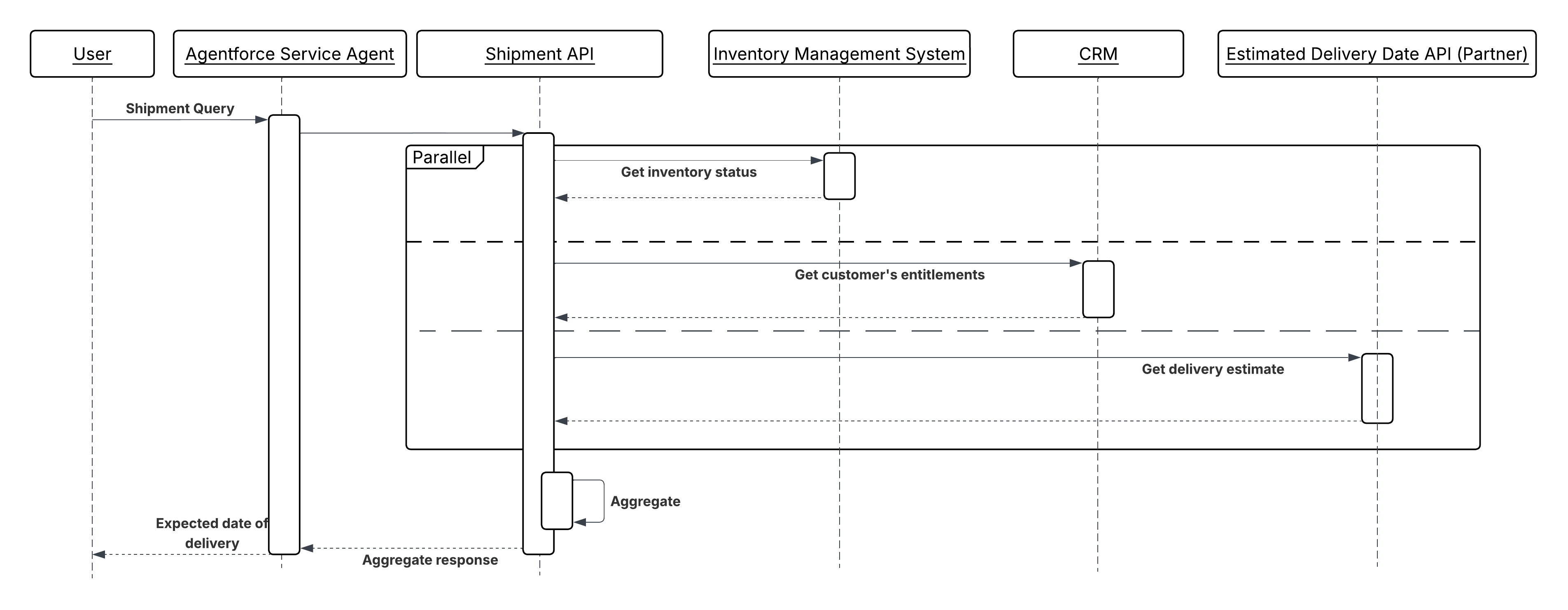
Sequence Diagram for Parallel Action Invocation
Results
When independent actions are executed in parallel, the end-to-end workflow time is bound by the slowest individual action rather than the sum of all actions. For a workflow with three independent callouts averaging 300 ms each, parallel execution completes in ~300 ms; sequential execution takes ~900 ms. At scale, this difference compounds across every agent session running concurrently.
Design Considerations
Platform-agnostic Guidance
- Confirm independence before parallelizing. Actions are safe to run in parallel only if neither action reads the state written by the other, and neither action’s failure should cancel the other. If a dependency exists, even a soft one, use sequential chaining instead.
- Design the aggregation step explicitly. Define in advance what a complete result set looks like, what a partial result set means for downstream reasoning, and whether the agent should wait for all results or proceed once a threshold (for example, five out of seven total calls) has returned.
- All parallel write operations must be idempotent. Each operation runs in isolation without a shared transaction boundary, so retrying any individual branch cannot duplicate side effects.
Salesforce Implementation Notes
- For Queueable Apex: Submit all jobs within a single transaction to maximize the chance of concurrent execution. Be aware that available concurrency slots are shared across the org; design with the assumption that slots may not always be available and build a fallback to sequential execution when they’re not.
- For Platform Events: Write each operation’s result to a dedicated staging record (keyed by a shared correlation ID) rather than updating the target record directly. A final aggregation Flow or Apex trigger reads all staging records once the expected count is reached, then applies the consolidated update atomically.
- For Middleware Fan-Out: Set an explicit timeout on the single callout that’s longer than the expected worst-case response time of the slowest backend, but still within the Salesforce callout timeout limit. The middleware returns partial results with a clear indication of which backends failed, rather than timing out the entire response.
Error Handling and Recovery
- Treat partial success as a first-class outcome. If three or four parallel operations succeed, the agent uses the three successful results and handles the failure explicitly surfacing it to the user, logging it for retry, or invoking a compensating action rather than discarding all results or proceeding as if the failure didn’t occur.
- For Queueable and Platform Event patterns, use a correlation ID (generated at the point of fan-out) to link all parallel branches back to the originating agent session. This ID is required to reassemble results and to trace failures back to their source in logs.
- If a parallel branch fails and the operation is safe to retry, re-queue only the failed branch using the original correlation ID and idempotency key. Don’t re-invoke all branches.
- Define a timeout threshold for the aggregation step. If not all results arrive within the threshold, proceed with available results and flag the incomplete set instead of waiting indefinitely.
Security Considerations
- Each parallel execution context, whether a queueable job, a platform event trigger, or a middleware callout, must apply the same access controls as a sequential callout. Parallelism does not relax data access rules. Each branch must operate under the same least-privilege credential as it would if invoked alone.
- For middleware fan-out, the middleware layer doesn’t cache or log response payloads from individual backends beyond the aggregation window. Each backend’s response may contain sensitive data that shouldn’t persist outside the scope of the immediate operation.
- Ensure that the staging records used for platform event aggregation are not readable by the agent’s end user. These records may contain intermediate, partially-formed data that is not yet fit for consumption.
Example
A service agent answers a complex fulfillment question: “Can you ship this order to me by Friday?” The answer requires data from all the independent systems simultaneously, as explained below:
- The agent identifies three independent data needs: the current inventory level, the customer’s active entitlements, and the carrier’s estimated delivery window for the customer’s location.
- Three actions are invoked in parallel:
GetInventoryStatus(from the external inventory system via middleware),GetCustomerEntitlements(from Salesforce CRM), andGetDeliveryEstimate(from the carrier API via middleware). - Each action returns independently. The agent waits until all three responses are received (or the aggregation timeout is reached).
- With all three results available, the agent reasons over the combined data, assessing whether inventory is sufficient, the customer’s entitlement covers express shipping, and the carrier confirms Friday delivery is feasible for the customer’s postcode.
- The agent returns a single, grounded answer to the user, drawn from three systems, in the time it took the slowest of the three calls to respond.
Context
Some agent-initiated operations do not produce a result the agent needs to continue its current reasoning cycle. Sending a notification, triggering a downstream batch process, publishing an event to a message queue, or submitting a long-running job are all operations where the agent’s obligation ends at dispatch; the downstream system takes ownership and completes the work independently.
In traditional automation, these are modeled as fire-and-forget callouts or platform event publishes. In an agentic system, the agent decides during reasoning that the operation is non-blocking, dispatches it, records confirmation of dispatch, and continues or concludes the turn without waiting for the downstream outcome.
This pattern is the agentic counterpart to Remote Process Invocation – Fire and Forget from the Integration Patterns guide. The agentic pattern extends it by making the dispatch decision part of the agent’s reasoning, and by ensuring the dispatch is traceable even though no response is returned to the agent.
Problem
When an agent needs to initiate a downstream operation that runs beyond the agent’s session or reasoning cycle, three challenges must be addressed:
- Non-blocking Invocation: The agent must fire the operation and confirm delivery without holding the reasoning cycle open waiting for a result.
- Delivery Confirmation: The agent must distinguish between a successful dispatch (the message was accepted) and a successful outcome (the downstream process completed). It can only assert the former.
- Traceability: Because the agent receives no result, the operation must be observable through logs, event records, or platform monitoring independent of the agent session.
Forces
When applying this pattern, answer the following questions:
-
Does the agent need the result of this operation to complete its current turn? If yes, this is not the right pattern. Use Sequential Action Invocation instead.
-
Is the downstream system capable of receiving and reliably processing the dispatched message or event without a synchronous acknowledgment? The target system must be durable. It must not lose the message if it is temporarily unavailable.
-
Is the operation idempotent or does duplicate dispatch need to be guarded? Network-level retries and agent reasoning retries can cause the same dispatch to be attempted more than once. If the downstream operation is not idempotent, the action must carry a deduplication key.
-
Does the user or a downstream process need to know when the operation completes? The agent can only confirm dispatch. If completion status is required, design a separate notification or follow-up mechanism. A Platform Event, a case update, or a callback - which is outside this reasoning cycle.
Salesforce Pattern Application
| Solution | Fit | Comments |
|---|---|---|
| Pub/Sub API | Best for high-throughput or external event streaming | The agent invokes an Apex action that publishes an event to the Salesforce Pub/Sub API over gRPC. The action returns a PublishResult replayId to the agent as confirmation of dispatch. Use when the downstream consumers are external systems subscribing via the Pub/Sub API rather than Salesforce-native Flow or Apex triggers, or when high-throughput event streaming is required. |
| Platform Events (Apex Action) | Best for intra-Salesforce async dispatch | The agent invokes an Apex action that publishes a Platform Event. The event is delivered to all subscribers asynchronously. The action returns a publish confirmation to the agent; it does not return a processing outcome. Used when the downstream consumer is within the Salesforce platform. The agent invokes an Apex action that calls EventBus.publish(). The action returns a SaveResult confirming acceptance. |
| Apex Queueable / Batch (Apex Action) | Best for long-running background processing | The agent invokes an Apex action that enqueues a Queueable or Batch job. The job runs outside the agent’s transaction. The action returns a job ID the agent can surface to the user as a reference. Used when the downstream work is a long-running Salesforce operation data processing, multi-object updates, or external callouts that exceed synchronous limits. System.enqueueJob() returns a job ID the agent records as a reference. |
| MuleSoft Async Flow | Best for external message queue dispatch | The agent invokes a MuleSoft-exposed action that places a message on an external queue (Kafka, JMS, SQS). MuleSoft handles protocol translation and delivery acknowledgment. The agent receives confirmation that the message was accepted by MuleSoft, not that it was processed downstream. |
| External REST Endpoint (Apex Action) | Best for external system event submission | The target system exposes an endpoint that accepts a submission and returns an acknowledgment ID immediately, completing processing asynchronously. The agent receives the acknowledgment ID and records it. |
Sketch
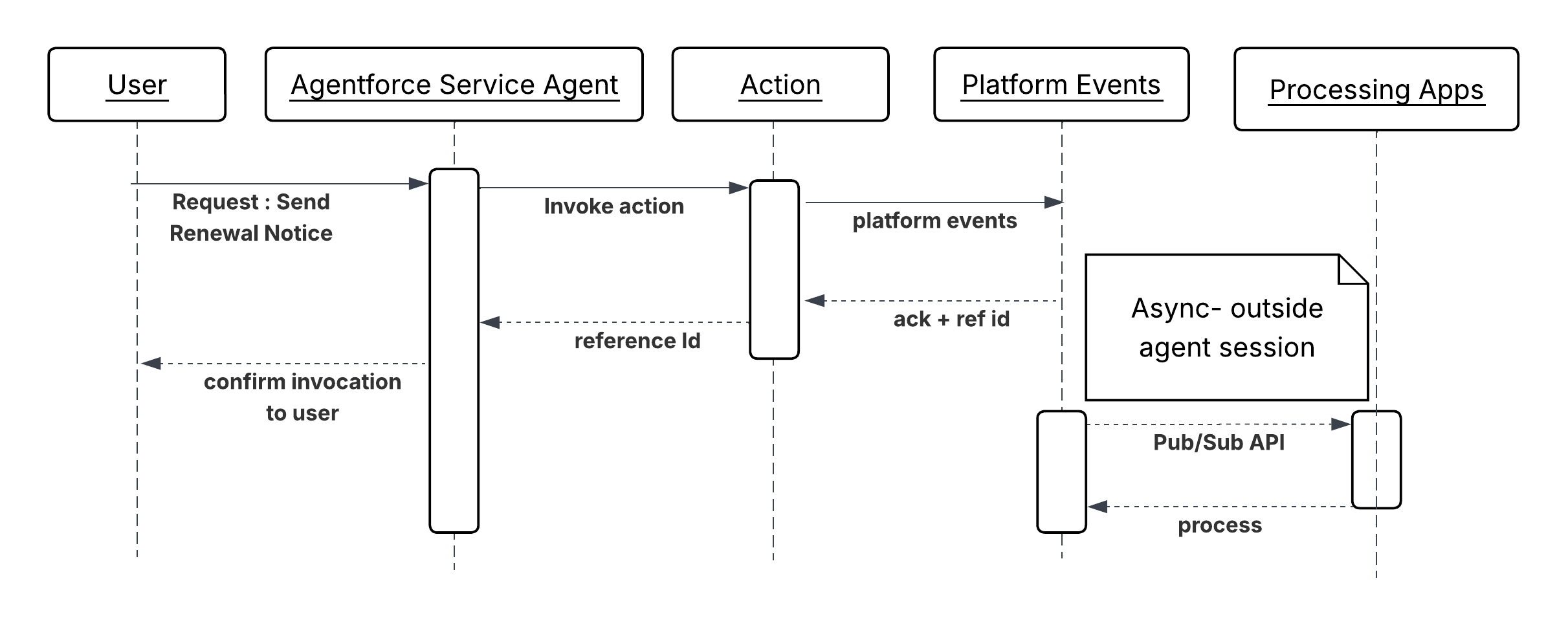
Sequence Diagram for Asynchronous Action Invocation
Results
The agent invokes a downstream operation without blocking its reasoning cycle on the outcome. The turn completes with confirmation that the operation was accepted, not that it completed. The downstream system takes full ownership of execution. The dispatched operation is traceable through platform event subscribers, job IDs, or external queue acknowledgment IDs that are recorded in the CRM at dispatch time. If the downstream operation fails, that failure is surfaced through the downstream system’s own monitoring, not through the agent session that initiated it.
Design Considerations
Platform-agnostic Guidance
- Write action descriptions in intent-based language. For example, “Submits a renewal notification to the messaging queue and returns a dispatch reference ID” is more useful to the agent than “calls the notification endpoint.”
- Never describe a dispatch action as “sends and confirms delivery of.” The agent can only confirm acceptance. Downstream delivery and processing are outside the agent’s observability.
Salesforce Implementation Notes
- Return a reference ID from every invocation action for example a Platform Event
ReplayId, a Queueable job ID, a Pub/Sub APIPublishResultreplayId, or an external acknowledgment token. Record it in a CRM record at invocation time. This is the only audit trail the agent session will produce. - For Pub/Sub API, the agent invokes an Apex action that makes a gRPC callout to the Pub/Sub API ‘/Publish’ endpoint. The action must handle the schema registration step - events must be serialized in Avro format against the registered schema. Return the
PublishResult ‘replayId’to the agent as the dispatch reference. - For Platform Events, call
EventBus.publish()inside the Apex action and check the SaveResult for errors before returning a success indicator to the agent. Do not assume publish success; validate it. - For Queueable Jobs, implement the Queueable interface and call System.enqueueJob() from within the action. Return the resulting AsyncApexJob ID to the agent.
- For external async endpoints, the target endpoint must return an acknowledgment immediately (HTTP 202 Accepted) with a reference ID. If the endpoint blocks until processing is complete, it’s synchronous and this pattern does not apply.
Error Handling and Recovery
- An invocation action must distinguish between dispatch failure (the message was not accepted) and processing failure (the message was accepted but the downstream operation failed later). The agent can only handle the former.
- If invocation fails, the action must return a structured failure with a clear reason. The agent can retry the dispatch, escalate to a human, or log a failed dispatch record, but it cannot recover a downstream processing failure within the same session.
- For operations where downstream failure must eventually be surfaced, design a separate feedback loop like a Platform Event published by the downstream process, a scheduled flow that checks job status, or a follow-up case which are outside the agent session.
Security Considerations
- Wrap all external async callouts in named credentials. The invocation action doesn’t embed endpoint URLs or credentials in code.
- Validate and sanitize all parameters passed to the invocation action before they are embedded in the event payload or message body. User-supplied text passed into an async message is a potential injection vector in the downstream consumer.
- Log every dispatch with session ID, reference ID, and sanitized payload at the time of dispatch. Because no response returns to the agent, this log is the primary mechanism for reconstructing what the agent initiated.
- Apply least-privilege to the integration user or connected app. A dispatch action that publishes to a notification queue should not hold credentials that permit reads or writes on unrelated systems.
Example
A renewal management agent handling a contract approaching expiration determines that the customer qualifies for an auto-renewal notification. The agent does not need confirmation that the email was delivered before concluding the turn.
CheckRenewalEligibility(Autolaunched Flow) evaluates contract terms, customer tier, and opt-out status. Returns an “eligible” boolean and the preferred notification channel.DispatchRenewalNotification(Apex Action) publishes aRenewalNotification\_\_ePlatform Event containing the contract ID, customer ID, notification channel, and a generated idempotency key. Returns a ReplayId confirming the event was accepted by the platform.UpdateContractRecord(Autolaunched Flow) writes theReplayIdand dispatch timestamp to the Contract record and sets a “Notification Dispatched” status flag.
Context
External applications like customer portals, mobile apps, third-party SaaS platforms, and partner systems, need to invoke agents programmatically to handle service requests, initiate workflows, or surface AI-driven responses within their own interfaces. The agent acts as an intelligent backend service. The external system provides context, the agent reasons and acts, and the caller consumes the response.
Increasingly, the caller is itself an AI agent or orchestrator rather than a human-facing application. In these AI-to-AI patterns, an orchestrating agent delegates a reasoning step, CRM lookup, or action to Agentforce as a discrete tool call. We need to expose a Model Context Protocol (MCP) server to support this pattern.
Problem
When an external system or AI agent needs to leverage an Agentforce agent’s capabilities on demand, how does it authenticate, create an agent session, pass the necessary conversational and contextual data, and reliably receive the agent’s structured response to drive its own downstream logic?
Forces
When applying this pattern, answer the following questions:
- Is the external caller expecting a synchronous, low-latency response, or is an asynchronous callback acceptable?
- How is the caller’s identity established and propagated into the agent’s execution context for data access and personalization?
- What’s the expected volume of concurrent API-triggered sessions, and how does that interact with Salesforce API rate and concurrency limits?
- Does the external system need to maintain session continuity across multiple turns (multi-turn conversation), or is each request stateless?
- How should the agent’s response be structured so that the calling system can parse and act on it programmatically?
- Is the caller a human-facing application requiring direct REST integration, or an AI agent or orchestrator that can invoke Agentforce as a tool via a standard protocol, such as MCP?
Salesforce Pattern Application
| Solution | Fit | Comments |
|---|---|---|
| Agentforce Agent API - Single-Turn (Synchronous) | Best for stateless, request-response integrations | The calling system requires an immediate, structured response and the agent’s reasoning is expected to complete within the caller’s timeout tolerance. The calling system manages the full session lifecycle phases - creation, turns, and termination. The external system authenticates, creates a session with context variables, sends a single message, receives the agent’s response, and closes the session. This Agentforce API is the primary REST interface through which external systems create sessions, exchange messages, and close sessions programmatically. The entire exchange completes within one HTTP request-response cycle. Responses include the agent’s natural-language output and any structured output variables produced by actions the agent invoked during reasoning. |
| Agentforce Agent API - Multi-Turn (Session Continuity) | Best for conversational integrations requiring state across turns | The external interface is conversational (for example, a chat widget or voice interface) and the interaction requires multiple exchanges to reach a resolution. The external system creates a session once and reuses the session ID across multiple message exchanges. The agent retains conversational context between turns like prior questions, retrieved data, decisions made without the caller re-supplying it. |
| Asynchronous with Polling or Webhook Callback | Best for high-latency reasoning workflows or time-sensitive UIs | The agent processing time is non-trivial and holding an open HTTP connection would degrade the caller’s user experience or trigger upstream timeouts. The external system submits the request and immediately receives an acknowledgment with a job or session ID. It then polls a status endpoint or registers a webhook to receive the agent’s response when reasoning is complete. Currently, this pattern can be implemented with a wrapper API hosted on a middleware like MuleSoft. External consumer invokes this Wrapper API and registers the webhook endpoint. Wrapper API sends the acknowledgement back to the external system after invoking Agentforce agent. This wrapper API also maintains the Agentforce agent session, and returns the response back to the external system using the registered webhook endpoint once the agent responds. |
| Agentforce via MCP (AIforce) | Best for AI-to-AI invocation where the caller is an MCP-compatible client | The calling MCP client invokes Agentforce as a tool through the out-of-the-box MCP server provided by AIforce. Session lifecycle is managed transparently by the MCP server, and the calling agent interacts through standard tool-call without building a custom REST integration. Use this solution when the caller is an MCP client that needs to delegate reasoning, CRM context retrieval, or action execution to Agentforce as a discrete step in a broader agentic workflow. |
Sketch
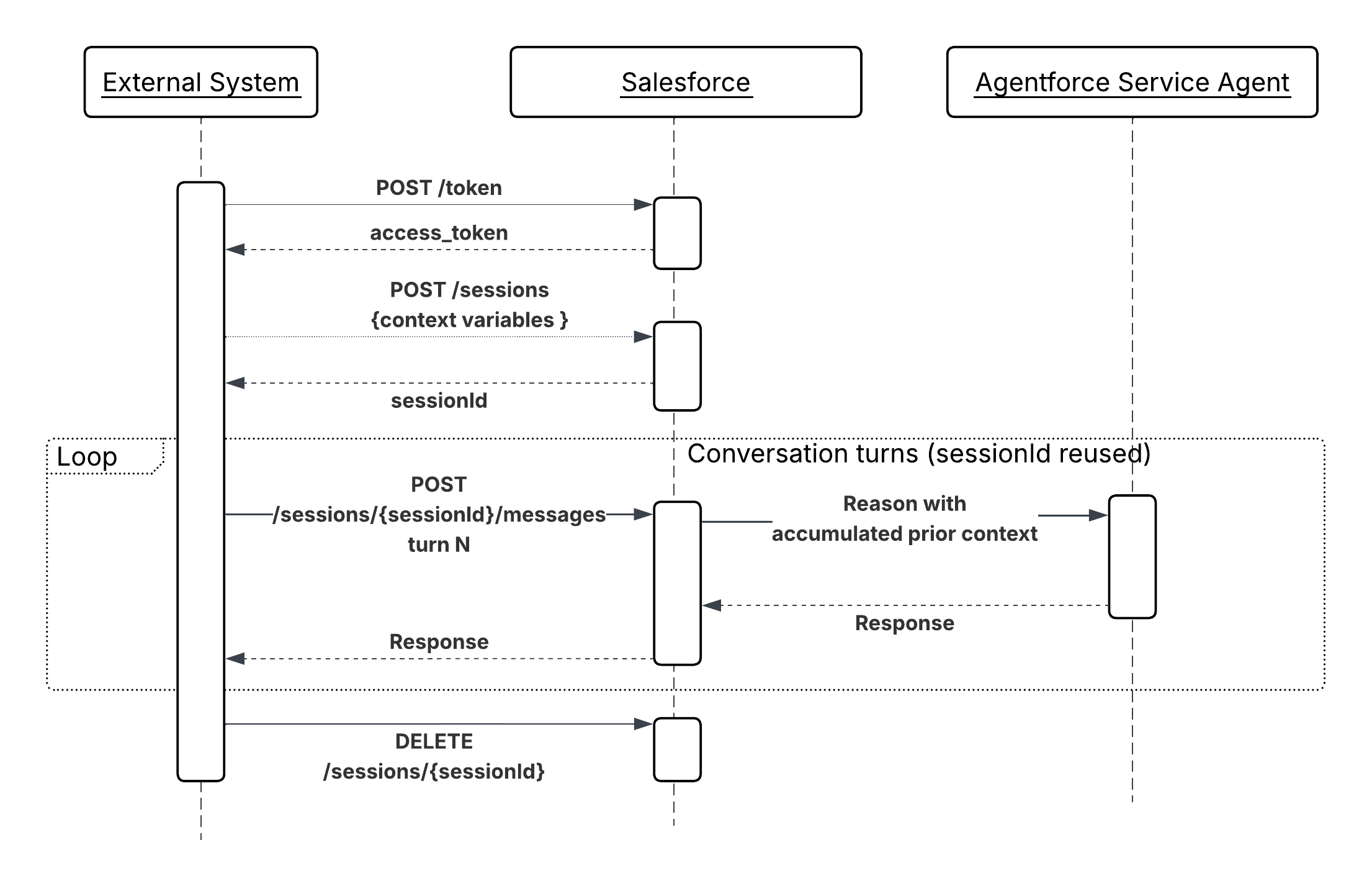
Sequence Diagram for On-Demand Agent Invocation
Results
This pattern exposes Agentforce as a callable AI service. External systems gain access to the agent’s reasoning, tools, and CRM context without replicating that logic. The caller remains responsible for session lifecycle management and rendering the response. The agent remains responsible for all reasoning, tool selection, and response synthesis.
When the caller is an AI agent or orchestrator, the Agentforce via MCP mechanism (available out of the box via AIforce) removes the need for a custom REST integration entirely. The MCP server handles session lifecycle on behalf of the calling agent, enabling Agentforce to participate as a first-class tool in multi-agent workflows with no additional plumbing.
Design Considerations
Platform-agnostic Guidance
- Avoid making the external API call synchronous and blocking in time-sensitive UI flows. Adopt a polling or webhook callback pattern where agent response times are non-trivial, to decouple the user experience from the agent’s processing time.
- Select the calling mechanism based on the nature of the caller, not availability. Human-facing applications and system integrations should use the Agent API directly. Tools that support MCPs should use the Agentforce MCP server. Mixing mechanisms for the same caller type adds unnecessary complexity without architectural benefit.
Salesforce Implementation Notes
- Inject session context in the session creation POST request, not in the first user message. When the external system creates the session, it has an opportunity to pass structured context variables (account ID, entitlement data, prior interaction summary) directly as named session parameters. These variables are available to the agent before it processes a single turn, so it begins reasoning from a grounded state without issuing lookup calls to establish who the customer is or what they’re entitled to. Passing the same data inside the message body instead forces the agent to parse unstructured text to extract facts it could have received as typed variables - increasing latency, introducing extraction errors, and consuming reasoning steps that add no business value.
- Design agent responses to be structured and machine-parsable. Use output variable conventions and prompt instructions that guide the agent to return JSON-friendly or clearly delimited responses when the caller is a system instead of a human.
- Manage session lifecycle explicitly. Terminate sessions promptly after use
DELETE /einstein/ai-agent/v1/sessions/{sessionId}to free concurrency slots and avoid stale context persisting across unrelated interactions. - Account for Salesforce concurrent session limits. For high-throughput scenarios, implement a session pool or a queuing layer in the calling system to prevent request rejection during peak load.
- When invoking Agentforce via MCP, pass context as tool input parameters rather than as session variables. The MCP server manages the session lifecycle transparently, so the calling agent cannot set named session parameters directly at creation time. Ensure all required context (record IDs, user identity, entitlement data) is included in the tool call payload so the agent begins reasoning from a grounded state.
- Treat the MCP server’s transparent session management as a convenience, not a concurrency bypass. Each tool invocation still consumes a Salesforce agent session slot. High-frequency orchestrators calling Agentforce via MCP at scale must account for the same concurrent session limits that apply to direct Agent API callers.
Error Handling and Recovery
- The Agent API returns standard HTTP error codes. The calling system must handle “429 Too Many Requests” (rate limit) with exponential backoff and “503 Service Unavailable” with retry logic.
- When the agent itself encounters an unresolvable tool failure, it returns a graceful natural-language error in the response body. The calling system detects these sentinel responses (for example, checking for an “error” status field in the response) and routes accordingly either by retrying with additional context, presenting a fallback experience, or escalating to a human.
- When invoking via MCP, errors surface at two distinct layers: MCP transport errors (malformed tool calls, server unavailability) and Agentforce reasoning failures (tool execution errors, unresolvable actions). The orchestrating agent must handle both layers independently. MCP transport errors should trigger retries at the protocol level; Agentforce reasoning failures returned in the tool response should be handled by the orchestrator’s own fallback or escalation logic.
Security Considerations
- Use the narrowest possible OAuth scopes for the external client app. An integration that only needs to invoke an agent shouldn’t hold scopes for data access beyond what the agent itself requires.
- Validate and sanitize all inputs from the external system before injecting them as session variables. External inputs are an attack surface for prompt injection. For example, a malicious caller can craft a “customerQuery” field designed to override agent instructions.
- Apply IP allowlisting on the external client app to restrict which external systems can authenticate and call the Agent API.
- Log all inbound API-triggered sessions with caller identity, session ID, and request/response metadata for audit and security purposes.
- When Agentforce is invoked via MCP, the MCP server authenticates to Salesforce on behalf of the calling user. Make sure the MCP server’s connected app credentials are scoped to the minimum required permissions, and that the end user’s identity (using MCP tools like Claude) - identity is propagated into the session context explicitly via tool input parameters.
Example
A financial services portal triggers an Agentforce agent to handle a mortgage inquiry.
- The portal authenticates using the Client Credentials OAuth flow and obtains a bearer token.
- It calls “POST /einstein/ai-agent/v1/sessions” with session variables: “{ “accountId”: “001xx…”, “productType”: “mortgage”, “loanAmount”: 450000 }”.
- The user submits their question: “What documents do I need to complete my application?”
- The portal calls “POST /einstein/ai-agent/v1/sessions/{sessionId}/messages” with the user’s text.
- The Agentforce agent invokes a “GetDocumentChecklist” Flow action, retrieves the loan-type-specific requirements, and returns a structured list.
- The portal renders the agent’s response inline and closes the session on user exit.
Context
Not all agentic workflows originate from a human request. Business-critical signals like a sudden drop in product usage metrics, a high-value cart abandonment, or a payment failure crossing a risk threshold, occur frequently in operational data. When these signals require intelligent, multi-step responses, waiting for a human to notice and act introduces latency that compounds into real business cost.
This pattern describes how real-time events serve as autonomous entry points for agents. The agent is invoked by a data condition rather than a user, reasons over the event context, and executes a response workflow all without human initiation.
Problem
When a real-time business event occurs in Data 360 or the Salesforce platform, how can that event autonomously instantiate an agent session, supply the event payload as grounding context, and drive a non-conversational action workflow to completion without a human initiating or guiding the interaction?
Forces
When applying this pattern, answer the following questions:
- Is a response required immediately at the moment the event fires, or is near-real-time processing (seconds to minutes) acceptable?
- Does the event payload contain sufficient context to ground the agent, or does the agent need to perform additional lookups before it can reason effectively?
- What’s the expected event volume and frequency? High-throughput event streams require rate management to avoid exhausting agent concurrency limits.
- Can the same event fire more than once for the same business entity (at-least-once delivery)? If so, actions must be idempotent.
- Is there a human escalation path if the agent can’t resolve the event autonomously?
- How should failed event processing be surfaced? With a dead-letter queue, an alert, or case creation?
Salesforce Pattern Application
| Solution | Fit | Comments |
|---|---|---|
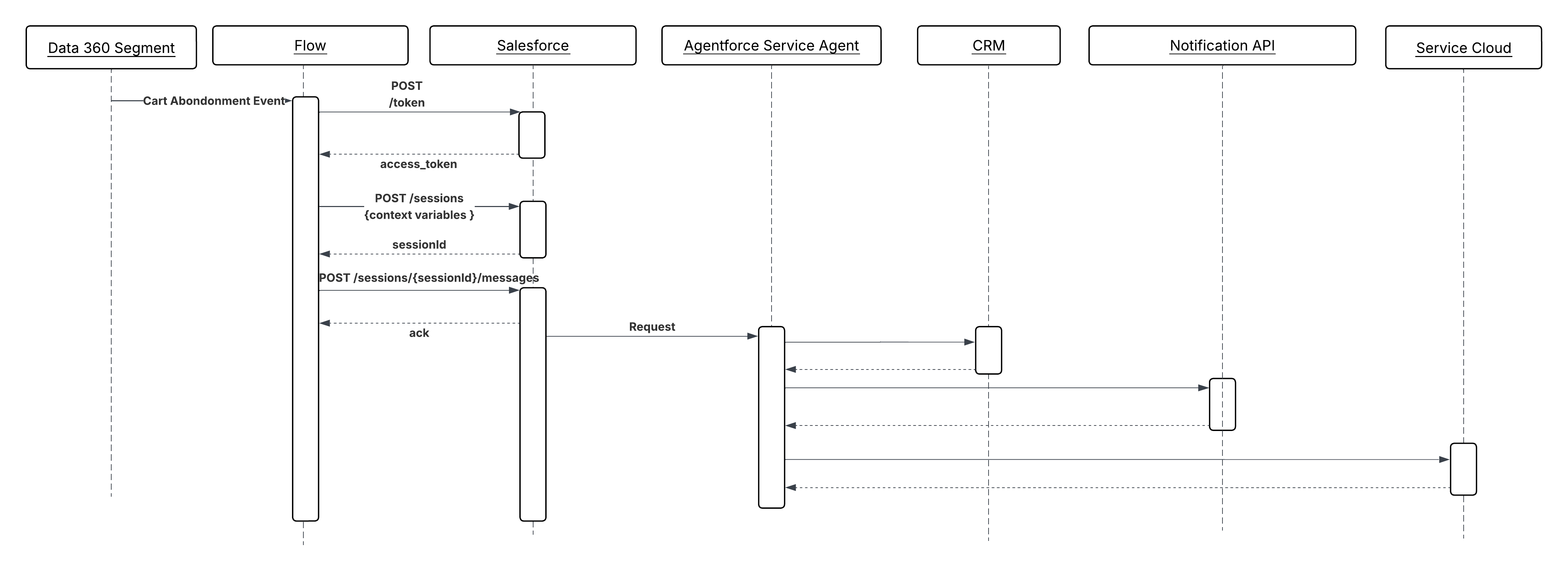
| Data 360-Triggered Flows | Best for behavioral and metric-based signals | This is best fit when the trigger condition is defined as a Data 360 segment membership change or metric threshold. Data 360 detects the business condition (for example, cart abandonment, usage drop) and fires a triggered flow. The flow maps event payload attributes to agent session variables and creates the Agentforce session. |
| Platform Events + Autolaunched Flow or Apex | Best for platform-internal and cross-system events | Use this solution when the event source is within the Salesforce platform or when a middleware layer publishes the event after detecting the condition in an external system. A platform event published by any Salesforce process or external system triggers an Apex trigger or Autolaunched Flow, which constructs the agent session with the event payload as context. |
Sketch
Sequence Diagram for Event-Driven Agent Execution
Results
Agents become reactive participants in real-time business operations, not passive responders to human requests. Event-triggered agents can execute recovery, triage, and escalation workflows at the speed of data instead of the speed of human attention.
The triggering system (Data 360 or platform events) remains responsible for event detection and payload formation. The agent remains responsible for reasoning over that payload and selecting the correct action chain. No conversational turn is required; the event payload is the complete input.
Design Considerations
Platform-agnostic Guidance
- Design all actions for non-conversational invocation. There is no user turn; the agent must reach a resolution from the initial grounding context alone. Actions should return structured, deterministic outputs rather than prompting for clarification.
- Make sure the event payload carries sufficient grounding context before the agent session is created. A lean payload that forces the agent to make multiple lookup calls before it can reason increases latency and concurrency consumption.
- Make all write operations triggered by event-driven agents idempotent. Event delivery systems typically provide at-least-once guarantees. Duplicate event processing cannot produce duplicate side effects.
Salesforce Implementation Notes
- In Data 360 Triggered Flows, map event payload attributes (for example, “accountId”, “eventType”, “metricValue”, “productIds”) directly to named session variables at session creation time. This grounds the agent from the first reasoning step without requiring a retrieval action.
- For platform event triggers, use an Autolaunched Flow rather than a screen flow. Screen flows are not supported in autonomous, non-conversational contexts.
- Set an explicit session timeout on event-triggered sessions. Unlike conversational sessions, there’s no user to extend the interaction; a session that stalls on a failed action shouldn’t hold a concurrency slot indefinitely.
- Use flow fault paths to handle agent session creation failures. If the session can’t be created, the fault path should publish a compensating event or create a case for human follow-up rather than silently dropping the event.
Error Handling and Recovery
- Events that fail to trigger an agent session successfully due to concurrency limits, session creation errors, or payload validation failures should be routed to a fault path that creates a case, fires an alert, or publishes the event to a dead-letter queue for reprocessing.
- Agent failures mid-execution (for example, time-out of a required action) should be logged with the originating event ID. Since the triggering is asynchronous and there is no waiting caller, the error surface is entirely observability based: logs, dashboards, and alert thresholds.
- Implement a retry ceiling. If an event reliably causes agent failure, unbounded retries will exhaust concurrency limits. After a configurable maximum number of attempts, route the event to a human review queue with full context attached.
- Track the event ID through the full agent session lifecycle. This tracking enables correlation between the originating data signal and all downstream actions for audit and debugging.
Security Considerations
- Validate and sanitize all event payload attributes before injecting them as agent session variables. Event payloads from Data 360 or external publishers are an attack surface for prompt injection. For example, a crafted payload field can be designed to override agent instructions.
- Run event-triggered agent sessions under a dedicated, least-privilege integration user rather than a high-privilege admin identity. The agent only holds the permissions required to execute its defined action set.
- Log all event-triggered sessions with the originating event ID, event type, and the session variables injected at creation. This audit trail is required to reconstruct why the agent took a given action if the outcome is disputed.
Example
A retail company uses Data 360 to track real-time cart behavior. When a cart with a value above a defined threshold is abandoned:
- Data 360 detects the abandonment signal and fires a triggered Flow with the event payload: “customerId”, “cartValue”, “productIds”, and “abandonmentTimestamp”.
- The Flow maps these attributes to Agentforce session variables and creates a new agent session. No user interaction is required.
- The agent evaluates the customer’s purchase history, current entitlements, and cart composition using its available retrieval actions.
- The agent invokes a
SelectRecoveryOfferaction, which applies the appropriate discount tier based on customer segment, andSendProactiveNotificationaction to deliver the offer via the customer’s preferred channel. - The agent invokes
CreateFollowUpTaskto log the interaction in the CRM for the account owner’s visibility. - The session closes automatically after the action chain completes. The originating event ID is preserved in the session log for traceability.
Context
LLMs are trained on public data. They have no knowledge of your organization’s products, policies, case history, or contracts unless that information is explicitly supplied at reasoning time. Without grounding, an agent asked about a customer’s service entitlement or the terms of a specific contract will either hallucinate an answer or admit it doesn’t know. Neither outcome is acceptable in an enterprise context.
Retrieval-Augmented Generation (RAG) solves this by retrieving relevant documents from an enterprise knowledge store and injecting them into the agent’s context window before it generates a response. The agent reasons over retrieved content like a knowledge article, a past case resolution, a product specification as if it had been given that information directly. The LLM supplies the reasoning; the retrieval layer supplies the facts.
For example, a service agent handling a complex warranty claim does not need to have warranty policy terms embedded in its instructions. Instead, when the customer describes their issue, the agent performs a semantic search or hybrid search (keyword search + semantic search) against a vector index of warranty documentation, retrieves the applicable terms, and uses them to determine eligibility and next steps. The answer is grounded in the current, authoritative policy document, not the model’s training data.
Problem
An agent needs to answer a question or make a decision that depends on proprietary organizational knowledge like policies, contracts, product documentation, or historical case data that wasn’t part of the LLM’s training data. How does the agent retrieve the most relevant content at reasoning time, ensure that retrieved content is current and authoritative, and inject it into context with sufficient precision to avoid noise?
Forces
When applying this pattern, answer the following questions
- Is the knowledge content static and infrequently updated (for example, product manuals), or does it change continuously (for example, case resolutions, inventory descriptions)? Update frequency determines the ingestion pipeline design.
- How large is the content? A small knowledge base can be retrieved exhaustively; a large one requires chunking, embedding, and semantic indexing to return only the most relevant passages.
- Does the query benefit from a single focused retrieval, or would combining results from multiple knowledge sources (for example, documentation and past cases simultaneously) produce a better-grounded answer? The latter requires ensemble retrieval.
- Is there a need to filter retrieved content by metadata before semantic ranking, for example, restricting results to documents relevant to the customer’s product tier or geography?
- How sensitive is the knowledge content? Retrieved content is injected into the LLM context window and influences the agent’s response; content that shouldn’t be surfaced to certain users must be governed at the retrieval layer, not assumed to be filtered by the LLM.
Salesforce Pattern Application
| Solution | Fit | Comments |
|---|---|---|
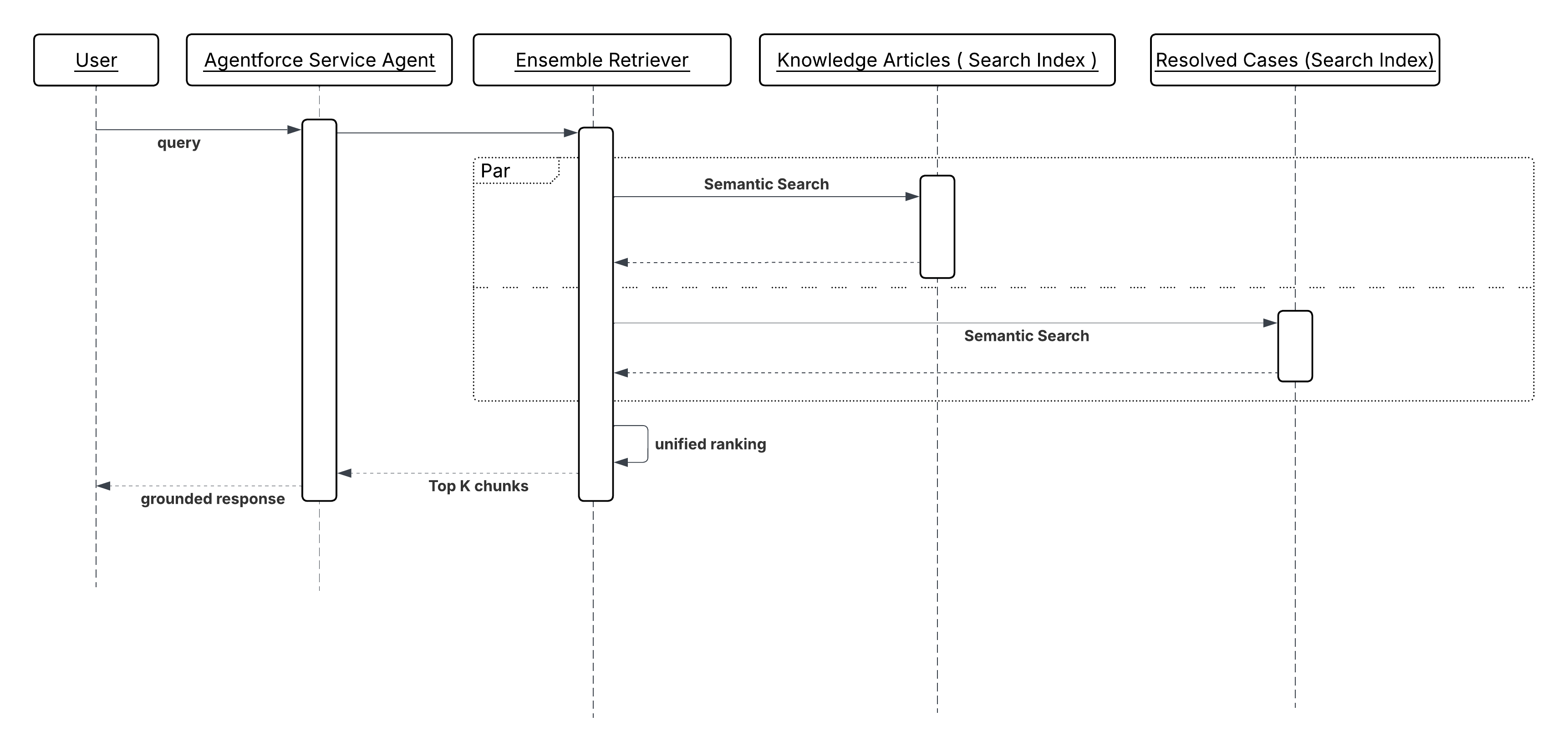
| Retrieval-Augmented Generation (RAG) with Data 360 | Best for enterprise use cases | The agent performs a semantic search against Data 360 vector indexes before generating a response. The retrieved content like knowledge articles, past cases, product documentation is injected into the LLM context as grounding. This can be called using Retriever actions, Flow, or custom Apex. Note that Data 360 supports an integrated pipeline from raw content to agent-ready context, not just a vector store:
All these features are offered in both turnkey fashion with full configurability. We have two types of retrievers for Data360: Individual Retriever: A configured Salesforce Retriever Action performs a semantic search against a single defined Search Index and returns the most relevant content chunks. Results are injected directly into the LLM prompt as grounding context. Use Individual Retriever Action when the query is best served by a single focused knowledge source. Ensemble Retriever: An Ensemble Retriever Action combines the results of multiple individual retrievers for example, a product documentation index and a resolved-cases index. Ensemble retrievers don’t combine relevance scores from individual retrievers since those scores aren’t comparable across heterogeneous indexes. Instead, all retrieved chunks are passed through a cross-encoder reranker model that independently scores each (query, chunk) pair, producing a unified ranking. This is architecturally significant: it means the quality of cross-source ranking improves with the reranker model, not with manual score calibration. After reranking them, it makes the unified result available to LLM prompts as grounding context. Use Ensemble Retriever Action when a more complete answer requires evidence from more than one knowledge domain. |
| RAG with third-party Vector Databases | Suitable when working within existing infrastructure constraints | This approach integrates third-party vector stores which might already exist in your infrastructure to index proprietary data embeddings, leveraging them for real-time semantic search and content retrieval. This can be implemented using Flow, or custom Apex. |
Sketch
Sequence Diagram for Knowledge Grounding from Enterprise Content
Results
The agent’s responses are anchored to the organization’s current, authoritative knowledge rather than the LLM’s training data. Hallucination risk on factual questions like policy terms, product specifications, entitlement details is reduced because the model is reasoning over retrieved evidence, not generating from memory.
The knowledge content remains independently maintainable. Updating a policy document or adding a new case resolution to the index takes effect immediately for all subsequent agent interactions, without retraining or redeploying the model.
Retrieval also provides an implicit audit trail. Because the agent’s answer is derived from specific retrieved documents, the source content can be logged alongside the response, making it possible to trace why the agent gave a particular answer.
Design Considerations
Platform-agnostic Guidance
- Chunk and embed knowledge content at the right granularity. Chunks that are too large dilute relevance. Chunks that are too small lose the surrounding context the LLM needs to reason correctly. For most enterprise document types, paragraph-level chunking with overlapping context windows produces the best retrieval quality.
- Treat retrieval precision as a first-class design concern. Injecting low-relevance content into the agent’s context window isn’t neutral. It introduces noise that degrades response quality. Tune retrieval thresholds and top-k limits to balance recall against precision for each knowledge domain.
- Ingestion latency is an operational SLA. If a policy document is updated but the vector index hasn’t been refreshed, the agent retrieves and acts on stale information. Define acceptable staleness tolerance for each type of content, and design ingestion pipelines accordingly.
Salesforce Implementation Notes
- Populate Data 360 vector indexes via the appropriate ingestion pipeline for the content update frequency. Use batch ingestion for static documents, and streaming or Change Data Capture (CDC) for records that change continuously.
- For Ensemble Retrievers, configure the relevance ranking weights per source. A resolved-cases index may need a recency bias; a policy documentation index may not. Tune weights based on the query types the agent is expected to handle.
- Use metadata filters in custom Apex or flow retrievers to scope retrieval before semantic search executes. Filtering by product line, region, or document type before ranking reduces noise and improves the precision of what is injected into context.
- Don’t inject the full retrieved document into the LLM context. Pass only the relevant chunks or excerpts. Large context injections consume token budget, increase latency, and reduce the proportion of the context window available for the agent’s reasoning.
Error Handling and Recovery
- If retrieval returns no results, return an explicit “no results found” status instead of proceeding ungrounded. The agent can then broaden the query, ask the user for clarification, or escalate to a human.
- Each returned chunk from the retrievers contains a relevance score. Depending on the use case, a certain threshold confidence/relevance value should be configured above which the agent should treat the retrieval as confident otherwise it should fall back to clarification or escalation.
- If the vector index or retrieval service is temporarily unavailable, the retriever action or Apex callout should return a structured error with a descriptive reason. Log the failure with the session ID and query so that retrieval gaps can be identified and the index or service can be monitored for availability.
- For time-sensitive knowledge domains, implement a freshness check as part of the retrieval response. If the most recent matching document was last updated beyond a defined staleness threshold, flag this to the agent so it can qualify its response or prompt for verification.
Security Considerations
- Retrieval must respect the data access permissions of the user on whose behalf the agent is acting. An agent session running in the context of a customer-facing interaction must not retrieve internal operational documents, pricing strategy notes, or records the end user would not otherwise have access to. Apply field-level and record-level security at the retrieval layer. Don’t rely on the LLM to withhold sensitive retrieved content.
- Retrieved content is injected into the LLM context window and may influence or appear in the agent’s response. Treat every document in the retrieval content as potentially visible to the end user and govern content membership accordingly.
- Log all retrieval queries and the document identifiers of retrieved chunks alongside the session ID. This audit trail enables reconstruction of the evidence the agent used when responding, which may be required for compliance, dispute resolution, or explainability obligations.
Example
A financial services agent handles a customer query about early redemption penalties on a fixed-term savings product:
- The customer asks: “What penalty would I incur if I withdraw my funds six months early?”
- The agent invokes an Individual Retriever Action configured against a vector index of product terms and conditions documents.
- The retriever performs a semantic search using the query context, like product type and customer account, and the specific question and returns the three most relevant document chunks - the early redemption clause, the penalty calculation table, and the exceptions applicable to hardship cases.
- The retrieved chunks are injected into the agent’s context window alongside the customer’s question.
- The agent reasons over the retrieved terms, identifies the applicable penalty rate for the customer’s product tier and redemption timeline, and returns a precise, policy-grounded answer, citing the effective date of the terms it used.
- The document identifiers of the retrieved chunks are logged with the session record for auditability.
Context
LLMs are probabilistic by nature. When asked to reason about a specific customer, they infer, estimate, or hallucinate facts they weren’t explicitly given. An agent invoking a pricing action without knowing that the customer is a high-value enterprise account on a preferred tier may apply the wrong discount logic. An agent escalating a support case without knowing the customer’s churn risk score may deprioritize an account that is days away from churning.
Verified Customer Context Injection addresses this by pre-populating action input parameters with verified, structured attributes from the unified profile before the agent invokes an action. The agent doesn’t infer the customer’s segment, lifetime value, or customer satisfaction (CSAT) trend. It receives those facts as grounding inputs and reasons over them. This pattern reduces hallucination risk on customer-specific decisions and eliminates redundant lookup calls during the reasoning cycle.
For example, before a pricing agent invokes a “GenerateQuote” action, the subagent configuration automatically injects the customer’s segment, tier, and lifetime value from their unified profile. The action receives verified facts rather than LLM-inferred approximations, and the quote is anchored to the customer’s actual commercial relationship.
This is not an alternative to the “Knowledge Grounding from Enterprise Content” pattern. A well-designed agent may use both: “Knowledge Grounding from Enterprise Content” provides document-based knowledge, while “Verified Customer Context Injection” establishes customer identity.
Problem
How do you make sure that an agent has accurate, customer-specific facts like segment, tier, lifetime value, churn risk, or other profile attributes before it takes an action, rather than guessing those facts on its own?
Forces
When applying this patter, answer the following questions:
- Which action input parameters represent customer-specific facts that, if inferred rather than sourced, would produce incorrect or inconsistent outcomes?
- Are the required profile attributes available as standard Data 360 unified profile fields, or do they require calculated insights derived from raw behavioral and transactional data?
- How frequently do the relevant profile attributes change? Attributes like churn risk score or CSAT trend require a freshness guarantee; stale profile data leads to the same incorrect outcomes as hallucinated data.
- Should profile attributes be injected at session creation time (constant for the session’s duration) or fetched fresh at the point of action invocation (to reflect state changes mid-session)?
- Does the agent need to reason over the profile attributes directly, or are they consumed only by the action and opaque to the agent’s reasoning loop?
Salesforce Pattern Application
| Solution | Fit | Comments |
|---|---|---|
| Subagent Configuration - Profile Attribute Mapping | Best for static session-level grounding | Best fit when the profile attributes are stable within a single interaction. Map Data 360 unified profile attributes (for example, “customerSegment”, “tier”, “lifetimeValue”) directly to action input parameters in the Agentforce subagents configuration. Attributes are resolved at session creation and held constant for the session’s duration. |
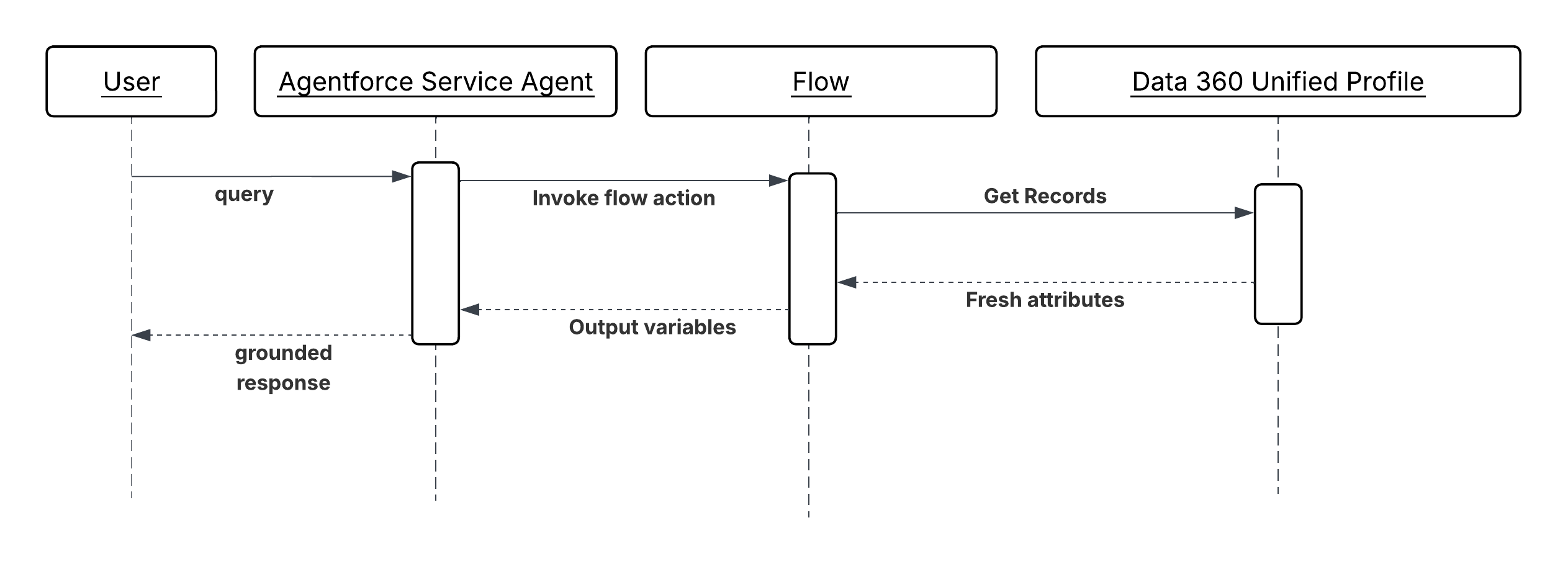
| Data 360 Connected Flows | Best for dynamic or mid-session refresh | Use when profile attributes change frequently or when the action requires the most current state. Use a Data 360-connected flow as an action step to surface the latest profile state at the point of invocation.The flow queries the unified profile, applies any necessary transformation, and returns the attributes as output variables consumed by the next action in the chain. |
| Calculated Insights as Action Inputs | Best for complex derived metrics | Use when Agents need to reason over computed business metrics (churn risk score, CSAT trends, product adoption index) rather than interpreting raw data. Defined in Data 360 as derived metrics computed over behavioral, transactional, and engagement data. Calculated Insights are surfaced as queryable profile attributes and can be mapped to action inputs via topic configuration or a connected flow. |
Sketch
Sequence Diagram for Verified Customer Context Injection
Results
Actions receive verified, structured customer facts rather than LLM-inferred approximations. The agent’s reasoning is anchored to the customer’s actual profile state, reducing hallucination risk on decisions where factual accuracy determines outcome quality like pricing, entitlement checks, escalation routing, retention offers.
Profile grounding also reduces reasoning latency. When the agent doesn’t need to issue lookup calls to establish basic customer context, the reasoning cycle is shorter and concurrency is consumed for fewer turns.
The Data 360 unified profile remains the authoritative source of customer facts. The subagent configuration or connected flow is the integration seam. The agent is responsible for reasoning over those facts and selecting actions, not for sourcing the facts themselves.
Design Considerations
Platform-agnostic Guidance
- Identify all action inputs that carry hallucination risk—where LLM inference could produce a wrong outcome instead of a verified value. Inputs with hallucination risk are candidates for profile grounding. Not every input requires grounding; over-injecting profile data adds noise to the agent’s context window.
- Treat profile freshness as a design decision, not an afterthought. Define the acceptable staleness tolerance for each grounded attribute and choose the injection mechanism accordingly: session-level mapping for stable attributes, flow-based refresh for volatile ones.
- Calculated Insights should encode business logic, not raw metrics. An agent reasoning over a “churnRiskScore” of 0.87 is more effective than an agent reasoning over 14 raw behavioral signals. Compute the interpretation in Data 360; pass the result to the agent.
Salesforce Implementation Notes
- Profile grounding is only as trustworthy as the unification behind it. For example, the value of the Unified Profile depends entirely on the quality of identity resolution upstream. If a customer has fragmented identities across source systems that haven’t been unified, the profile attributes the agent receives will be incomplete or they represent only a partial view (for example, Lifetime Value computed with data from one channel but not another).
- For Data 360 connected Flows, use the Get Records element with a filter on the current session’s “recordId” or “accountId” to retrieve only the relevant profile record. Return only the attributes required by the downstream action; don’t return the full profile object.
- Calculated Insights must be kept current via Data 360 ingestion pipelines. Set up streaming or near-real-time refresh for insights used in time-sensitive decisions (for example, churn risk in a retention workflow). Batch-refreshed insights are acceptable for slower-moving attributes (for example, annual contract value tier).
- Validate that mapped profile attributes are non-null before action invocation. A null “customerTier“ passed to a pricing action is as harmful as a hallucinated value. Use flow decision elements to detect missing profile data and route to a fallback that either retrieves a default or prompts for clarification.
- In the subagent configuration, map profile attributes to action input parameters using descriptive, semantically clear variable names (for example, “customerTier”, “lifetimeValueUSD”, “churnRiskScore”). The LLM reads these names when selecting and composing actions; ambiguous names degrade selection accuracy.
Error Handling and Recovery
- If a required profile attribute is null or unavailable at the time of action invocation, the agent shouldn’t proceed with a potentially incorrect default. The action should return a structured error indicating the missing attribute, and the agent should either prompt the user for clarification or escalate to a human if operating non-conversationally.
- If a Data 360-connected flow fails to retrieve profile data (for example, due to a Data 360 service interruption), the flow’s fault path should return a structured error to the agent with the specific failure reason. The agent can then decide whether to retry, proceed with a degraded experience, or surface the failure to the user.
- Log all profile attribute values injected at session creation or action invocation alongside the session ID. This ensures that any disputed agent decision can be reconstructed with the exact customer facts the agent was given at the time.
Security Considerations
- Profile attributes injected into agent context are subject to the same data access controls as any CRM record. Make sure that the integration user or connected app used to resolve profile attributes holds only the field-level permissions required for the attributes being surfaced and not broader profile read access.
- Calculated Insights that encode sensitive derived metrics (for example, predicted health score, financial risk tier) should be treated as sensitive fields and governed by the same access controls as the underlying data. Surfacing a high churn risk score to an agent operating in a customer-facing context requires careful consideration of what the agent may communicate.
- Don’t surface profile attributes that are not required by the action. Each additional attribute in the agent’s context window is an additional data element that could be reproduced in the agent’s response. Apply a minimum-necessary principle to profile grounding.
- Audit all sessions in which Calculated Insights or sensitive profile attributes were injected as inputs. These sessions represent decisions made on the basis of derived customer intelligence and may be subject to explainability or regulatory requirements in certain industries.
Example
A telecommunications company uses Agentforce to handle retention conversations with customers who have initiated a cancellation request.
- When a cancellation case is opened, the agent session is created with the customer’s “accountId” as context.
- The subagent configuration maps three Data 360 Unified Profile attributes to session variables at creation time: “customerTier” (Enterprise), “lifetimeValueUSD” (42,000), and “contractRenewalDate” (60 days).
- A Calculated Insight like “churnRiskScore” (0.91, computed from usage decline, support ticket frequency, and NPS trend) is mapped as an additional session variable via a Data 360-connected flow invoked as the first action step.
- The agent, now grounded in verified customer facts, invokes a “SelectRetentionOffer” action. Because the inputs include “customerTier = Enterprise”, “lifetimeValueUSD = 42000”, and “churnRiskScore = 0.91”, the action returns the maximum-tier retention offer rather than a standard one.
- The agent invokes “PresentOffer” to deliver the offer in the conversation and “LogRetentionAttempt” to record the interaction in the CRM with all grounded attributes preserved for auditability.
Context
Enterprise data is fragmented. An agent that can only act on what lives inside the Salesforce platform is limited to a fraction of the information it needs to reason effectively. Answering a service question may require reading a customer’s open ticket in Service Cloud. Preparing a proposal may require retrieving a file from Google Drive. Analyzing product usage may require querying a data warehouse. Each of these systems has its own APIs, its own authentication model, and its own data schema and the cost of writing tailored integration code for each one is what has historically made agent-to-system connectivity expensive and fragile.
MCP is an open standard that addresses this directly. It defines a uniform interface through which an agent can discover and invoke tools exposed by any MCP-compliant server, regardless of the underlying system. Each MCP Server acts as an adapter: it wraps a target system’s native interfaces in a standardized, tool-centric interface that the agent can query, invoke, and compose without knowing anything about the system’s specific protocols or schemas.
From the agent’s perspective, connecting to Slack, a Structured Query Language (SQL) database, and a document management system looks identical, three MCP Servers, each exposing a set of described, callable tools. The agent selects and sequences them based on their semantic descriptions and the goal it’s trying to achieve.
Problem
When an agent needs to retrieve information or trigger actions across multiple external systems- each with different APIs, authentication, and schemas - how can it discover, invoke, and compose their capabilities without tailored integration code per system or tight coupling to any system’s implementation?
Forces
When applying this pattern, answer the following questions:
- Does the agent need to reach systems outside the Salesforce platform like document stores, collaboration tools, databases, third-party SaaS, whose APIs are not natively represented as Agentforce actions?
- Is dynamic tool discovery required, where the agent identifies the right integration endpoint at reasoning time based on the current request, rather than having integrations hardcoded in its configuration?
- Does the integration landscape change frequently; new systems added, existing ones updated, and other changes may demand such that a tailored-per-system approach would create unsustainable maintenance overhead?
- Is there a need to decouple the agent’s reasoning layer from the implementation details of downstream systems, so that a change in a target system’s API does not require changes to the agent’s instructions or subagent configuration?
- Are the target systems owned by different teams or vendors, each responsible for exposing their own capabilities, making a provider-side MCP Server model more practical than a consumer-side integration per agent?
Salesforce Pattern Application
| Solution | Fit | Comments |
|---|---|---|
| Salesforce MCP Servers | Best for Salesforce-ecosystem targets | Use when the target system is within the Salesforce ecosystem and a first-party MCP Server is available. AIforce provides MCP Servers for its own platform capabilities, exposing CRM data, flows, and platform actions as MCP-compliant tools. Reduces implementation effort to configuration rather than development. Note: Currently, Salesforce MCP servers support only end-user credentials for authentication and authorization. |
| Custom MuleSoft MCP Servers | Best when no first-party MCP Server exists | Use for legacy systems, proprietary internal applications, or third-party SaaS platforms predate the MCP standard. When a target system doesn’t provide its own MCP Server, a MuleSoft integration layer can be wrapped in a custom MCP Server that exposes the system’s capabilities as tools. It can be also used with Salesforce APIs if MCPs are required for agents to be consumed with system user credentials only. MuleSoft handles protocol translation, authentication, and data transformation; the MCP layer makes the result discoverable by agents. |
| Third-Party MCP Servers | Best for commodity systems with active MCP ecosystems | A vendor-maintained MCP server exists for your platform (GitHub, Google Workspace) and meets security and maintenance requirements. An increasing number of enterprise platforms like GitHub, Google Workspace, and others publish their own MCP Servers. Where a production-ready, vendor-maintained server exists, prefer it over building a custom one. Evaluate for security posture and maintenance commitment before adopting. |
Sketch
Sequence Diagram for Verified Customer Context Injection
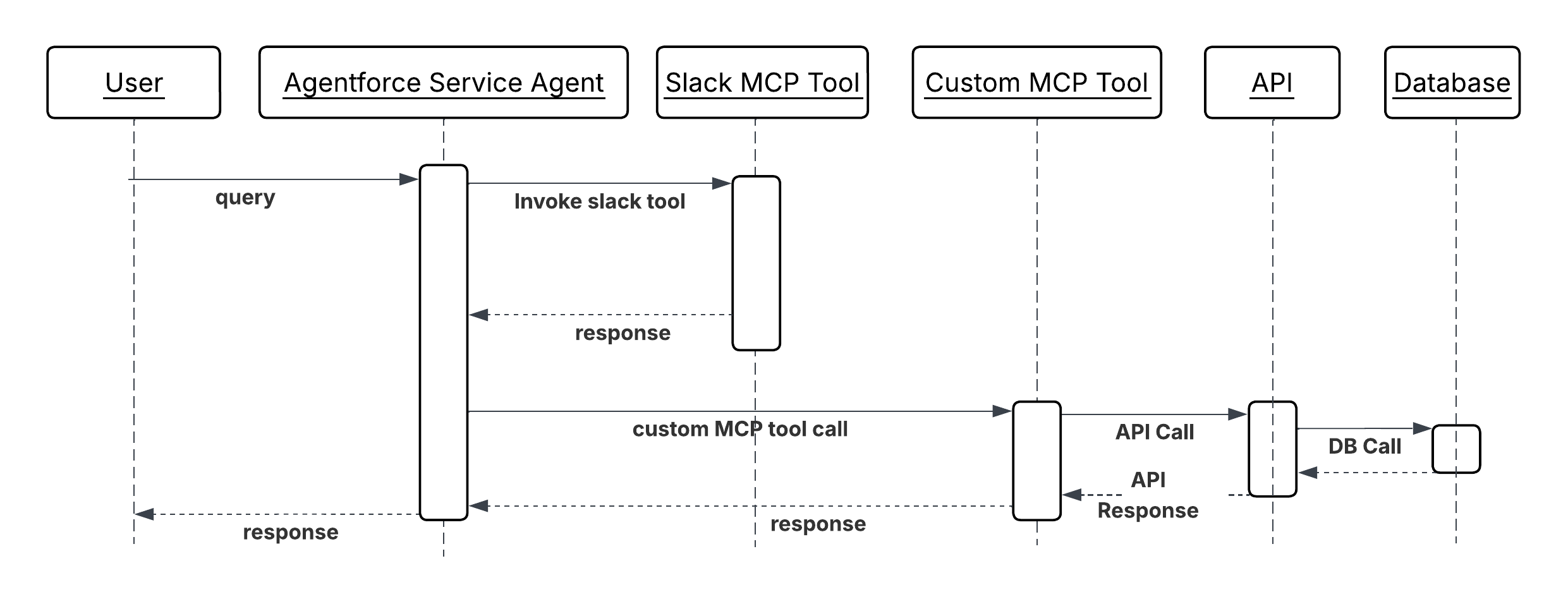
Results
The agent’s reachable surface area expands without growing its integration complexity. Adding a new external system means deploying or configuring an MCP Server for it and not writing tailored Apex callouts or flow integrations per agent. The agent’s reasoning layer remains unchanged; it discovers and invokes the new tools based on their semantic descriptions alone.
The MCP standard also creates a clean separation of ownership: the team responsible for a system exposes its capabilities as an MCP Server; the agent team consumes those capabilities without needing to understand the system’s internals. This boundary reduces coordination overhead as the number of integrated systems grows.
Tool composability is a direct outcome. Because all tools share the same invocation interface, the agent can chain tools from different systems, retrieve a file from Google Drive, extract data from it, and write the result to a CRM record as naturally as chaining actions within one system.
Design Considerations
Platform-agnostic Guidance
- Tool descriptions are the agent’s only basis for deciding whether and how to invoke a tool. Write descriptions in clear, intent-based language that states what the tool does, when it applies, and what it returns. A description that says “queries the CRM database” is less useful than “retrieves the account’s open cases, ordered by priority, for a given account ID.” Poor descriptions produce poor tool selection.
- Scope each MCP tool to a single, atomic capability. A tool that retrieves a document and also writes a summary back to the source system is harder for the agent to reason about, harder to retry on failure, and harder to secure than two discrete tools. One tool, one responsibility.
- Design tools so that outputs are composable inputs. The result of a retrieval tool should be structured in a way that maps naturally to the input parameters of the action tools that typically follow it, reducing the transformation work the agent must perform between steps.
- Remote-host MCP Servers. Local binary installations create deployment and versioning complexity that grows with the number of agent environments. A remote-hosted server can be updated independently of the agents that consume it.
Salesforce Implementation Notes
- If you want consistent MCP authentication, rate limit, payload validations across all outbound MCP calls, use AI Gateway like MuleSoft Omni Gateway supporting MCP servers and configure it before exposing any MCP Server to agents.
- Use OAuth 2.0 credentials for all credentials required by MCP Server connections. Credentials must not appear in tool parameters, action configurations, or Apex code.
- Some MCP tools may need end-user credentials for taking some actions depending on the business use case (like fund transfer). To propagate end user identity tokens, use OAuth 2.0 On Behalf Of Credentials Injection policy which is currently supported with MuleSoft Omni Gateway.
- For custom MuleSoft MCP Servers: define the MCP tool schema in MuleSoft’s API specification and register the server’s endpoint in the Agentforce tool catalog. Test tool descriptions against representative agent queries to verify that the agent selects the right tool for the right task before deploying to production.
Error Handling and Recovery
- When an MCP tool call returns an error, the agent inspects the machine-readable error code to determine the appropriate recovery action: requesting missing parameters from the user, retrying with corrected input, or escalating to a human. It never silently consumes errors or continues reasoning as though the tool call succeeded.
- The agent implements retry logic for transient failures directly.
- Log every MCP tool invocation from the client side with the tool name, sanitized input parameters, and the outcome. This client-side trace combined with server-side logs is the primary mechanism for diagnosing why an agent took a particular action path when a workflow doesn’t produce the expected result.
Security Considerations
- All outbound MCP server connections pass through the gateway. The gateway enforces authentication verification, rate limiting to prevent tool abuse, and payload inspection to detect prompt injection attempts in tool parameters. Direct, unmediated connections from agents to MCP Servers bypass these controls and aren’t permitted.
- Scope each agent’s MCP server connections to only the servers whose tools that agent actually requires. An agent configured with access to all available MCP servers has a larger attack surface than one connected only to the tools its defined tasks demand.
- Validate and sanitize tool input parameters before passing them to the tool, particularly when parameter values derive from user-provided text or LLM-generated content. Don’t pass unvalidated LLM output directly as tool parameters; an attacker who can influence the agent’s reasoning can use that path to inject malicious values into downstream system calls.
- Treat the agent’s list of connected MCP Servers and their tool inventories as sensitive configuration. An attacker who knows which tools an agent has available and what parameters they accept has a map for crafting prompt injection payloads designed to abuse those tools.
Example
A sales agent prepares a comprehensive account briefing before a high-value customer call:
- The agent receives the request: “Prepare a briefing on Acme Corp ahead of tomorrow’s renewal discussion.”
- The agent queries the MCP tool catalog and identifies three relevant tools across two MCP Servers:
GetRecentEmails,GetOpenOpportunities, andGetSupportTicketSummary. - The agent invokes all three tools in parallel. Each MCP Server translates the call to its target system’s native API, retrieves the relevant data, and returns a structured result.
- The agent receives the three results. Recent email threads, the open renewal opportunity with deal size and stage, and a summary of open support tickets by priority, and synthesises them into a structured account briefing.
- The agent invokes
CreateAccountNoteto save the briefing to the account record and returns a summary to the requesting user. - All four MCP tool invocations are logged by the gateway with tool names, server identities, and outcomes for the session audit record.
Context
The outbound MCP pattern describes an Agentforce agent consuming tools from external MCP Servers. The inbound pattern inverts this. Salesforce platform capabilities like CRM records, flows, Apex logic, and Data 360 insights are exposed as MCP tools that external agents, running on any LLM framework, can discover and invoke.
This pattern matters because enterprise AI deployments are rarely single-vendor. A partner’s agent built on a different framework may need to look up a customer’s account status in Salesforce. An internal data science team running a Python-based agent may need to trigger a Salesforce flow to kick off an approval process. Without a standardized exposure mechanism, each external consumer requires a tailored integration. Exposing Salesforce capabilities as an MCP Server gives every MCP-compatible agent a uniform, discoverable interface to the platform’s tools regardless of how the calling agent is built.
For example, a partner’s procurement agent, built on a third-party framework, needs to verify a supplier’s contract status in Salesforce before approving a purchase order. Rather than building a direct REST integration, it invokes a GetContractStatus tool on the Salesforce MCP Server. The tool enforces the same access controls as any native Salesforce operation; the calling agent only sees the result.
Problem
When an external agent built on a different framework, owned by a partner, or otherwise running outside the Salesforce platform needs to invoke Salesforce capabilities as part of its own workflow, how can those capabilities be exposed in a standardized, discoverable, and securely governed way that does not require a tailored integration per external consumer?
Forces
When applying this pattern, answer the following questions:
- Are the external agents that need to consume Salesforce capabilities built on frameworks that support the MCP standard? If not, a REST API or a webhook approach may be more appropriate than MCP.
- Which Salesforce capabilities need to be exposed - read-only data retrieval, write operations, flow invocations, or a combination? The scope of exposure directly determines the security surface area that must be governed.
- How should the identity of the external calling agent be verified, and what Salesforce permissions should its invocations run under? Agent-to-platform calls must not inherit broader permissions than the specific operation requires.
- Is the Salesforce MCP Server intended for internal consumers (other teams’ agents within the same organization) or external consumers (partner and customer agents)? The trust model and authentication requirements differ significantly between these audiences.
- How will the set of exposed tools evolve over time? New Salesforce capabilities added to the MCP Server become immediately discoverable by all connected agents; unintended tool exposure must be governed through a deliberate publication process.
Salesforce Pattern Application
| Solution | Fit | Comments |
|---|---|---|
| Salesforce as MCP Server (Native) | Best for exposing first-party Salesforce capabilities | Use when the tools to be exposed map directly to existing Salesforce platform operations and the calling agents are MCP-compatible. AIforce’s native MCP server capability allows platform operations like record queries, flow invocations, and Apex actions to be declared as MCP tools and exposed to any MCP compatible external agent. Access is governed by the Salesforce permission model. Note that these AIforce MCP servers can be accessed only with end-user credentials currently. |
| MuleSoft as MCP Server Facade | Best when transformation or multi-system aggregation is required | Use when the calling agent needs a capability that requires data from more than one Salesforce object, transformation before delivery, or composition with data from other systems. The MCP interface remains clean and simple; the complexity is absorbed by MuleSoft. A MuleSoft MCP layer sits in front of Salesforce and exposes the aggregated result of multiple platform operations as a single MCP tool. This solution can be also used by agents where the end-user identity can’t be propagated for Salesforce authentication and authorization. For example, if Agentforce Agents need MCP servers with system credentials, we will have to rely on custom MCP servers like one built with and hosted on MuleSoft. |
Sketch
Sequence Diagram for Business Capabilities as Callable Tool
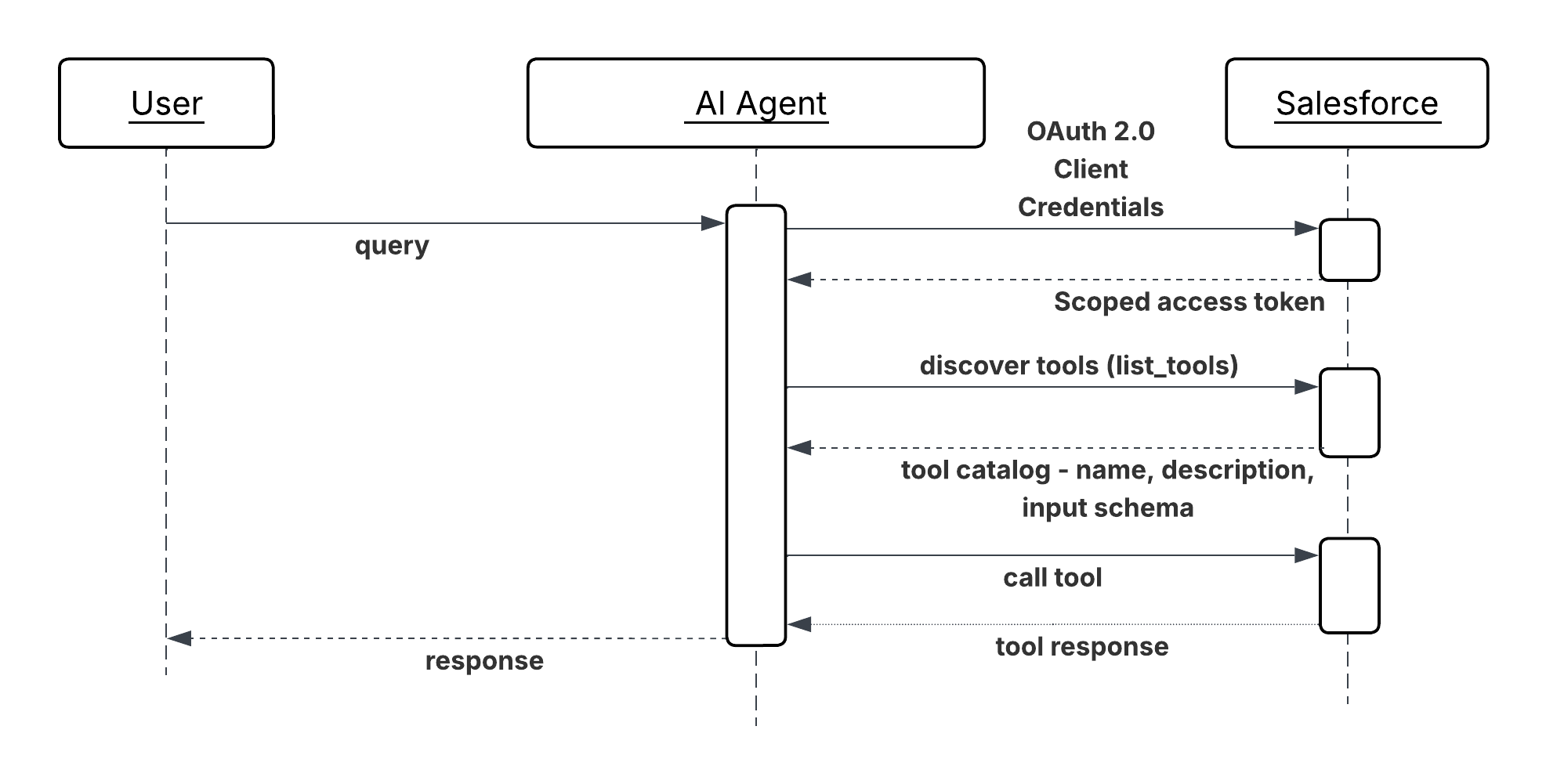
Results
Salesforce becomes a first-class participant in multi-vendor agent ecosystems. External agents can discover and consume platform capabilities without requiring a custom REST integration per consumer or per use case. The number of consumers can grow without proportional growth in integration maintenance overhead.
With AIforce, the Salesforce permission model governs every inbound tool invocation. External MCP clients don’t bypass existing data access controls; they operate within them. This means the security posture of exposing capabilities via MCP is equivalent to exposing them via any other authenticated API surface.
Tool discoverability is a compound benefit. As new Salesforce capabilities are added to the MCP Server’s tool catalog, they become immediately available to all connected external agents without requiring those agents to update their configurations.
Design Considerations
Platform-agnostic Guidance
- Publish only what external agents need. Every tool added to the MCP Server’s catalog expands the attack surface and the governance burden. Audit the tool inventory deliberately. Define which capabilities are approved for external consumption, and treat unapproved exposure as a configuration gap, not a default.
- Write tool descriptions for external consumers. An external agent’s operator has no knowledge of your internal data model or naming conventions. Keep descriptions self-contained: what the tool does, what each parameter means, what the result represents, and any constraints or prerequisites the caller must satisfy.
- Version tools explicitly when their input or output schemas change. An external agent that depends on a tool’s current schema will break silently if the schema changes without notice. Treat breaking changes to an MCP tool’s interface with the same discipline as a breaking change to a public REST API.
Salesforce Implementation Notes
- Run every inbound Salesforce Out-of-the-Box (OOTB) MCP (AIforce) tool invocation under an end user whose permissions are scoped to only the operations the exposed tools require. Don’t run inbound agent calls under a high-privilege admin identity.
- To apply authentication, rate limiting, schema validation, and personally identifiable information (PII) detection consistently across all MCP tools, use AI Gateway like MuleSoft Omni Gateway.
- For MuleSoft MCP Facades, define the MCP tool schema in MuleSoft independently of the underlying Salesforce API schema. The MCP interface should reflect the calling agent’s conceptual need and not the shape of the Salesforce object that backs it. This decoupling allows the Salesforce implementation to evolve without breaking the external tool contract.
Error Handling and Recovery
- Tool invocation failures must return structured MCP error responses with a machine-readable code and a plain-language description. The calling external agent has no visibility into the Salesforce platform’s internals like error messages must be self-contained and actionable without requiring knowledge of Salesforce-specific error codes or object models.
- Rate limit errors and authentication failures must be returned promptly with enough information for the external agent’s operator to diagnose and remediate which rate limit was hit, or which credential was rejected without exposing internal configuration details.
- Log all inbound MCP tool invocations at the Omni Gateway with the calling agent’s identity, the tool invoked, the input parameters (sanitized of sensitive values), and the outcome. This log is the primary evidence trail for diagnosing failures reported by external consumers and for auditing what external agents have accessed.
Security Considerations
- Every inbound MCP connection must authenticate before any tool is reachable. Don’t permit unauthenticated discovery of the tool catalog; the list of exposed capabilities is itself sensitive information.
- Apply tool-level authorization in addition to connection-level authentication. A registered external agent should only be able to invoke the specific tools it has been explicitly granted access to, not the full catalog. Enforce this at the gateway, not at the application layer.
- Validate and sanitize all inbound tool parameters before passing them to Salesforce platform operations. Parameters from external agents are an untrusted input surface–a maliciously crafted parameter could attempt to override query filters, inject Salesforce Object Query Language (SOQL) fragments, or influence flow variables. Validate type, format, and range at the MCP Server or facade boundary.
- Conduct a periodic access review of registered external consumers. Revoke credentials for agents that are no longer active or whose access scope has changed. A dormant but valid credential for a decommissioned partner integration is an unnecessary standing risk.
- Guard against violating platform limits by rate limiting inbound MCP messages in the gateway. Curtail the traffic of non-critical agents when under load using SLA based tiering policies.
Example
A procurement agent operated by a logistics partner needs to verify a supplier’s contract and credit status before approving a high-value purchase order:
- The partner’s agent authenticates to the gateway using its registered OAuth 2.0 client credentials and receives a scoped access token.
- The agent queries the Salesforce MCP Server’s tool catalog and identifies two relevant tools:
GetSupplierContractStatusandGetAccountCreditSummary. - The agent invokes
GetSupplierContractStatuswith the supplier’s identifier. The MCP Server translates this to a Salesforce record query, applies the integration user’s field-level security, and returns the contract’s current status, expiry date, and any flagged compliance holds. - The agent invokes
GetAccountCreditSummary, which routes through the MuleSoft MCP Facade. The facade aggregates the supplier’s outstanding invoice balance and payment history from two Salesforce objects and returns a single composite credit summary. - With both results, the partner’s agent determines that the contract is active and the credit position is within acceptable limits, and approves the purchase order in its own system.
- Both tool invocations are logged by the gateway with the partner agent’s identity, the tools invoked, and the outcomes creating an auditable record of what external access was granted and what data was returned.
Context
Enterprise systems now rely on collaborative agent swarms or networks, where complex requests are decomposed and delegated to specialized agents across different domains or vendor platforms. These agents, each with its own role, capabilities, and tools, need a standardized, secure communication method to coordinate toward shared goals without requiring human intervention at every step.
Problem
How can a calling AI agent dynamically discover, securely interact with, and delegate complex or domain-specific tasks to a remote peer agent which may be built on a different framework or operated by a different vendor and receive structured results to complete a larger enterprise workflow?
Forces
When applying this pattern, answer the following questions:
- How do agents, developed using diverse frameworks or operating across siloed application estates, interoperate?
- How can agents collaborate and delegate tasks without exposing their internal logic, memory, or proprietary tools?
- How do agents support complex, long-running tasks while providing real-time state updates, streaming, and push notifications?
- How do agents enforce enterprise-grade security (authentication, authorization) and policy adherence for cross-agent communication?
- How do agents handle structured task workflows (initiation, progression, completion) that go beyond simple API calls?
Salesforce Pattern Application
The A2A Protocol is an open standard that enables agents to discover, delegate to, and collaborate with other agents as peers. It provides a common language for agents to securely exchange information and coordinate actions across different platforms and vendors. A2A focuses on peer-to-peer communication, complementing MCP, which focuses on connecting agents to tools and APIs.
| Solution | Fit | Comments |
|---|---|---|
| Single-Org Multi-Agent Orchestration (SOMA) | Best when all domain agents live in one org and no cross-vendor routing is required | A superagent (orchestrator) decomposes requests and routes to up to ~7 connected subagents using LLM-based routing (Atlas Reasoning Engine reads subagent descriptions) or deterministic routing (Agent Script). This is the default recommended pattern before reaching for A2A. Supported combinations: Agentforce Service Agent→Agentforce Service Agent Agentforce Employee Agent→ Agentforce Employee Agent Agentforce Employee Agent→Agentforce Service Agent Only the orchestrator can escalate to a human; subagents cannot. |
| Orchestrator-Led Multi-Agent Delegation | Best for complex workflows requiring multiple specialised agents | Use when the workflow spans multiple domains for example, sourcing, verification, and approval each owned by a different agent. An orchestrator agent decomposes the top-level request and delegates sub-tasks to two or more peer agents in sequence or in parallel. Each peer agent executes its specialised domain function and returns an artifact; the orchestrator aggregates results and drives the next step. |
Sketch
The architecture involves a calling agent initiating communication, facilitated by an agent catalog/registry for discovery:
Sequence Diagram for Cross Agent Delegation
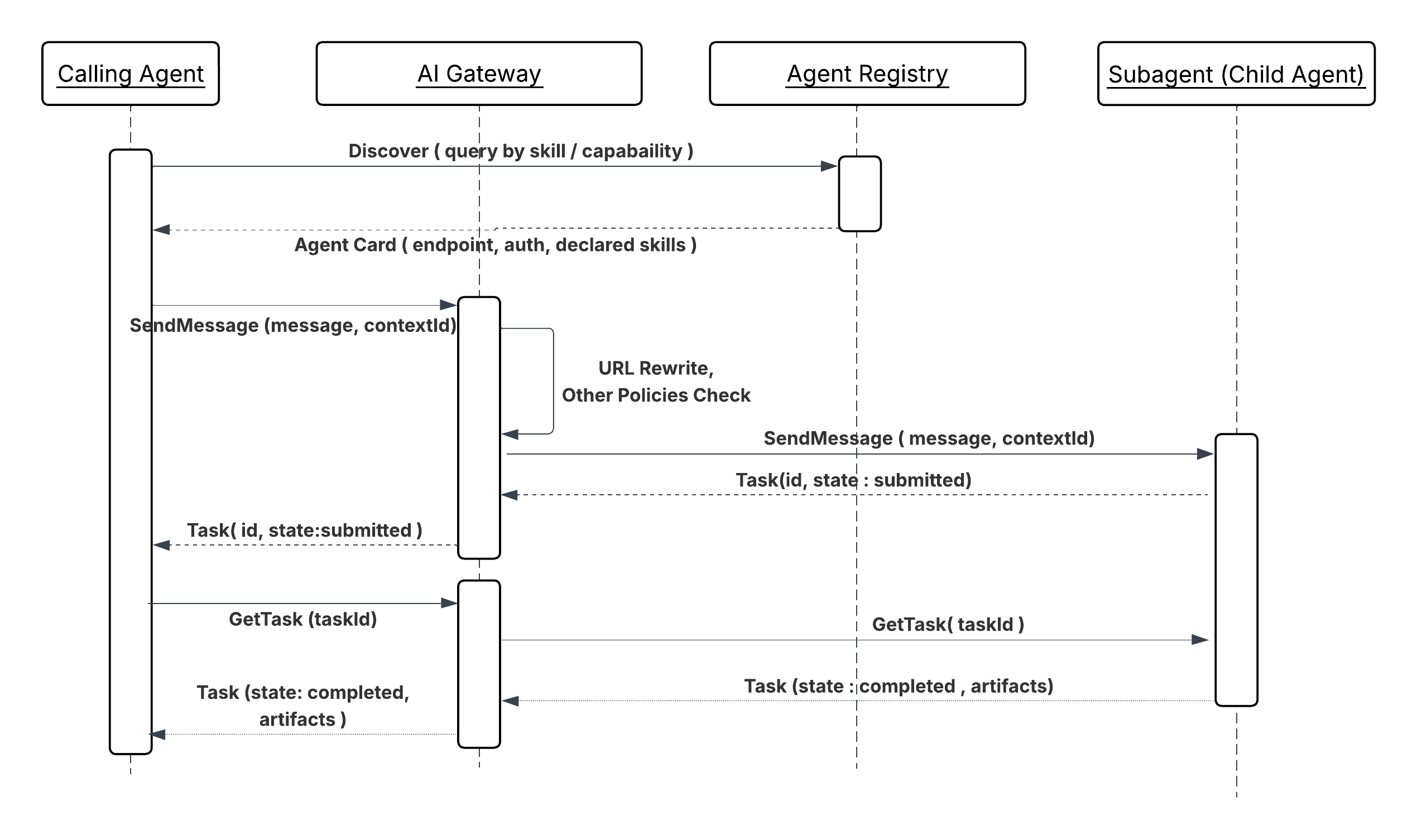
The peer agent processes the request using its domain-specific logic, memory, and tools, then returns structured results to the calling agent.
Results
A2A delegation separates domain ownership from workflow orchestration. The calling agent doesn’t need to know how the peer agent is built, what platform it runs on, or what tools it uses internally; it delegates a task and receives a structured artifact. This boundary means that a specialist agent (background verification, financial risk scoring, logistics routing) can be developed, deployed, and improved independently of the workflows that invoke it.
The protocol’s task lifecycle model (submitted, working, completed, failed) supports
long-running operations natively. The calling agent can register for state updates rather
than holding a blocking connection, which means A2A tasks can span minutes or hours
without requiring the orchestrating agent to remain active throughout.
Design Considerations
Platform-agnostic Guidance
- In complex scenarios, an agent broker can act as an intelligent routing service or “smart switchboard” to coordinate task delegation across specialized agents and manage multi-step processes.
- Since A2A supports long-running tasks, the communication must be oriented toward task completion, defining a lifecycle for the task object and providing real-time state updates and notifications.
- The protocol is designed to support various content types, including text, files, structured data, audio, and video streaming.
- The relationships and dependencies between agents and their capabilities are declaratively defined in a configuration file (for example, “agent-network.yaml”) and published to the agent registry.
Salesforce Implementation Notes
- For effective SOMA orchestration, keep connected subagents below 7 to preserve routing quality.
- Currently, only the single delegation layer is supported (superagent → subagent); deeper chains push latency to an “untenable rate”. Currently, subagents cannot delegate to other connected subagents.
- Human handoff is supported only at orchestrator level; subagents cannot escalate.
- Within SOMA, use Agent Script when LLM-based routing produces misrouting on ambiguous inputs for deterministic routing. Agent Script enables curated shared context between agents.
Error Handling and Recovery
The A2A protocol defines comprehensive error codes to facilitate robust debugging and error management.
- Recovery Logic: Agents should incorporate retry policies (retries), failover logic to alternative capable agents, and explicit timeouts.
- Task State Tracking: The task management workflow ensures that agents can stay in sync with the latest status of a task, facilitating recovery in case of interruption.
- Observability: Logging interaction details, like latency, success rates, and error frequencies, is critical for monitoring quality and troubleshooting.
Security Considerations
- Enterprise-Grade Authentication: A2A is designed to align with enterprise-grade authentication and authorization standards, such as OAuth 2.0 and JWT, often managed by external platforms like Okta.
- Gateway to protect A2A: A gateway (for example, MuleSoft Omni Gateway) is essential to enforce policies on all A2A communications, acting as both an ingress and egress gateway to protect agents and control outbound traffic to external agents and services.
- Policy Enforcement: Agent Card Rewrite, Schema Validation, Spike Control, PII Detector, and other policies should be applied for A2A server and data protection.
Example
Candidate Sourcing Workflow
A hiring manager tasks their central orchestrator agent to find candidates matching a job listing and skill set.
- Discovery: The orchestrator agent queries the agent registry and discovers a specialized recruiting agent and a background check agent (both peer agents).
- Delegation (A2A): The orchestrator agent sends a structured task request (A2A message) to the recruiting agent to source candidates.
- Peer Processing: The recruiting agent executes its own workflow (for example, calling an external LinkedIn tool via MCP).
- Artifact Return (A2A): The recruiting agent returns a list of suggested candidates (the artifact).
- Sequential Delegation: The orchestrator agent then delegates another task (A2A) to the background check agent for the top candidate. This agent performs the check and returns the result, completing the overall task.
Context
Complex enterprise workflows often require specialized agents hosted on external platforms or partner systems to initiate tasks, delegate queries, or provide updates to internal agents (for example, those on the Salesforce platform). This pattern addresses how an internal Agentforce agent securely and reliably receives and processes requests from a remote, peer agent to execute a domain-specific capability.
Problem
How can an internal specialized AI agent (for example, a background check agent on Agentforce) securely expose its domain-specific functionality to external peer agents, process an incoming, structured A2A request, and manage the task lifecycle (including real-time status updates) to return structured artifacts to the remote calling agent?
Forces
When applying this pattern, answer the following questions:
- How do you securely expose internal agent capabilities to external agents without compromising internal logic or tools?
- How do you enforce enterprise-grade security policies to verify the calling agent’s identity and delegated authority before processing requests?
- How do you handle long-running inbound tasks while providing structured, asynchronous state updates?
- How do you ensure seamless interaction with agents built on diverse, external frameworks?
Salesforce Pattern Application
The A2A Protocol provides the open standard for secure, peer-to-peer delegation and collaboration. The internal agent acts as the peer agent, advertising its capabilities through an Agent Catalog/Registry and using A2A over secure channels (HTTPS/SSE) to receive and respond to structured requests.
| Solution | Fit | Comments |
|---|---|---|
| Agentforce Connected Subagent (SOMA) | Best when the calling agent is another Agentforce agent in the same org | Use when both agents live in the same Salesforce org and the caller is an Agentforce orchestrator. The agent is connected as a subagent via Agentforce Builder and exposed to the orchestrator through its description and declared actions. The orchestrator routes tasks using LLM-based routing (Atlas Reasoning Engine) or deterministic routing (Agent Script). No A2A protocol, gateway, or external registration is required. Supported combinations: Agentforce Service Agent→Agentforce Service Agent Agentforce Employee Agent→ Agentforce Employee Agent Agentforce Employee Agent→Agentforce Service Agent Only the orchestrator can escalate to a human; subagents cannot. |
| Agent Broker Routing (Inbound) | Best when the organization hosts multiple Agentforce agents with complementary capabilities and the calling agent can not or should not select a specific target | Use when the calling agent is external to Salesforce or another Salesforce Org and should not need to know which specific internal agent (Agentforce or other vendor agents) handles its request. A MuleSoft agent broker sits between the MuleSoft Omni Gateway and the pool of internal Agentforce agents. It receives the inbound A2A task, evaluates the declared capabilities of available internal agents against the task’s requirements, and routes the request to the best-fit agent. The broker also handles failover if the primary target agent is unavailable or returns a failure, the broker redirects to an equivalent agent without surfacing the retry to the external caller; the external caller is never aware of internal routing decisions or retries. |
Sketch
Sequence Diagram for Agents as Callable Services
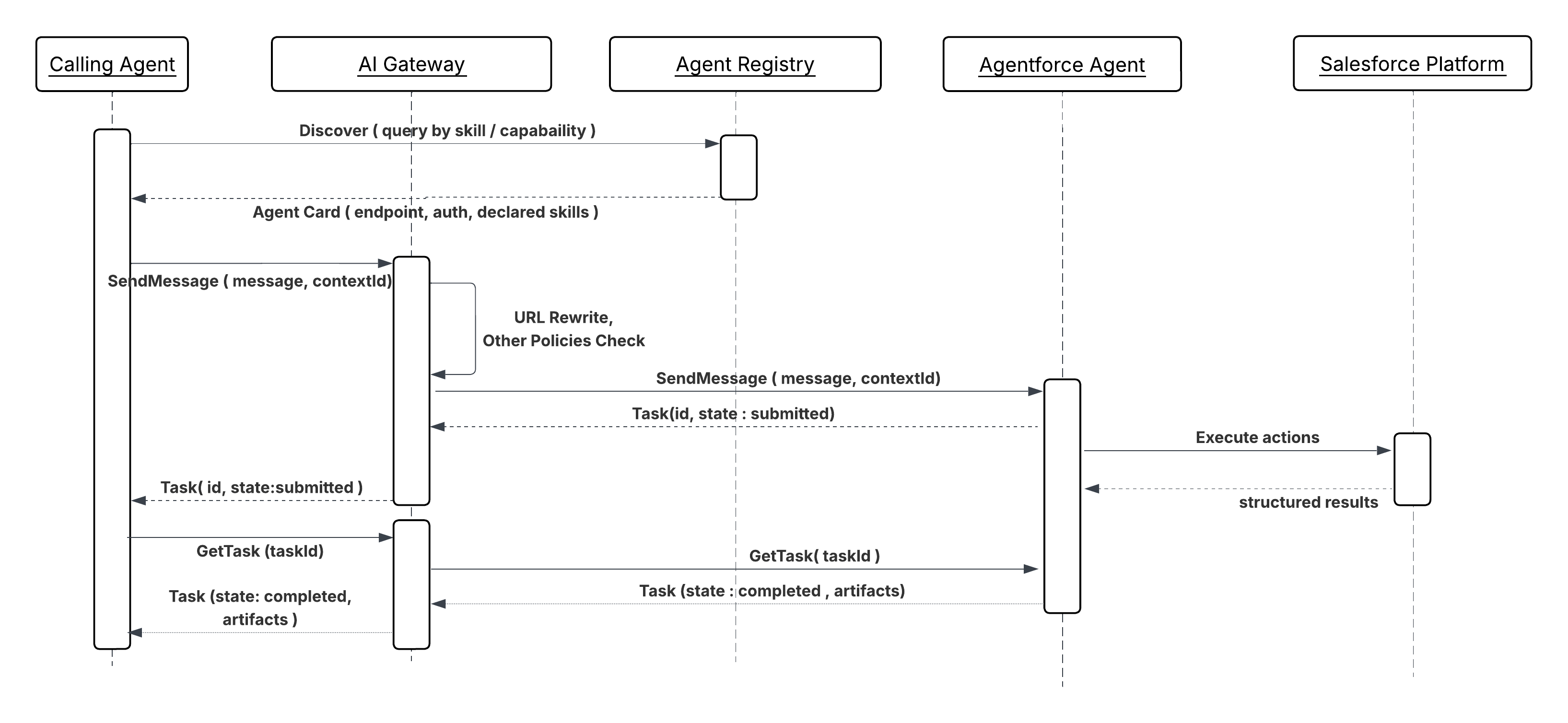
Results
This pattern exposes internal agents as specialized services within a multi-agent network. External agents can securely delegate tasks to internal capabilities while the organization maintains control, auditability, and policy enforcement.
Design Considerations
Platform-agnostic Guidance
- A gateway (for example, MuleSoft Omni Gateway) must be positioned as an ingress point to enforce policies, including rate limiting, authentication, and payload validation, on all incoming A2A requests.
- Internal agents must manage the state of the task object from external initiation to completion, ensuring the remote calling agent receives consistent, verifiable status updates.
- Make sure the agent’s published capabilities in the agent card are clear, intent-based, and include necessary security scopes for delegation.
Error Handling and Recovery
- Structured Error Codes: Upon failure, the internal agent must return A2A-compliant structured error messages to the calling agent to enable remote retry logic or alternative failover mechanisms.
- Idempotency: The agent must verify that any side effects triggered by a retried A2A request from an external agent (due to network interruption or recovery) are idempotent.
Security Considerations
- Inbound Policy Enforcement: The gateway must enforce policies for allowlisting/blocklisting external agents and validating JWT/OAuth 2.0 tokens to verify the identity and delegated authority of the calling agent.
- Input Sanitization: Validate and sanitize all incoming request payloads to mitigate potential prompt injection or malicious data attacks.
- Identity Propagation: Securely map the external agent’s identity and its delegated authority to internal security contexts (for example, Salesforce user profiles) before executing actions against internal systems.
Example
External System Inquiry
- Request: A Recruitment Agent on a partner system sends an A2A task request to an internal Employee Verification Agent (peer agent) on Agentforce to confirm the employment status of a new candidate.
- Processing: The Employee Verification Agent receives the request via the gateway, verifies the partner agent’s credentials, executes its internal workflow (for example, calling an internal HR system), and formats the response.
- Response: The Peer Agent returns a structured A2A artifact (for example, employment start date and job title) to the remote Recruitment Agent, which then proceeds with its external workflow.
-
Gateway for protection of MCPs, A2As, and APIs
A gateway is required as the single enforcement point for all agent-to-system and system-to-agent traffic.
-
Secured Connections: A gateway ensures only authenticated and authorized agents interact with MCP, A2A, and API endpoints by restricting access.
-
Enforced SLAs: A gateway can enforce rate limits, helping organizations meet performance requirements and preventing MCP and A2A server overload.
-
Simplified Governance: A gateway offers centralized visibility and control over all server interactions, simplifying agent activity management and monitoring.
-
Data Consistency and Protection: Policies, like schema validation, enforce data consistency, and PII detection can protect sensitive information.
MueleSoft Omni Gateway
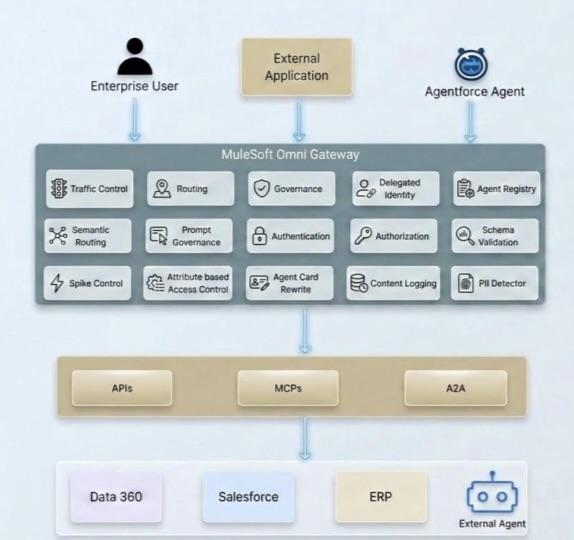
- Identity Propagation Chain
As enterprises embrace the agentic paradigm, a new security challenge emerges: How does end-user identity flow through a network of autonomous AI agents? In traditional API architectures, a user authenticates once and the application calls backend services on the user’s behalf. The identity chain is short, well-understood, and typically managed within a single trust domain.
Agentic architectures, however, feature much longer chains where a single request fans out across various agents, services, and MCP servers, each potentially crossing service boundaries, trust domains, and even organizational borders. Without a deliberate strategy for identity propagation, enterprises face a choice between security and functionality–a dilemma no architect needs to address.
MuleSoft addresses the complexities of identity propagation with its Trusted Agent Identity feature. This solution utilizes a policy-based, gateway-managed strategy to ensure end-user identity is maintained across various interaction types including A2A protocols, MCP tool calls, and REST API requests. By centralizing identity management at the Omni Gateway layer through outbound authentication policies, enterprises can secure their entire agent network without modifying backend services or agents. For more details, see Trusted Agent Identity for the Agentic Enterprise.
- RAG security in Data 360
Data 360 supports attribute-based access control (ABAC) at the object, field, and row levels via Data Governance Policy settings. This is the primary way to control what data is visible to whom, including within RAG search indexes. For structured data, user access conditions are implemented using user attributes and permission sets. For unstructured data, metadata filtering (pre-filters on search indexes) can restrict what gets retrieved.
Communication with the LLM goes through the Einstein Trust Layer, which masks confidential/PII information before it reaches the model protecting data privacy not just during search but also before generation.
To protect against RAG poisoning, ensure strict data governance and validation rules are applied before data becomes available for vector search. The Einstein Trust Layer can also enforce prompt masking/toxicity checks. You can apply strict Permission Sets on the Agent User profile.
- New Named Credential Model Salesforce has revamped its authentication architecture by introducing a two-tier Named Credentials model that cleanly separates concerns between connectivity and identity. Use this whenever making callouts through Apex and avoid creating your own authentication protocol. This model also provides extensibility and enhanced security. External Credentials sit at the foundation of this model. They store the actual authentication details and support a rich set of protocols including OAuth 2.0 Client Credentials, JWT Bearer, and AWS Signature V4, while also defining how principals are mapped: either as a single Named Principal (shared across all users) or as Per-User Principals (where each user authenticates with their own identity). Named Credentials, in turn, act as the endpoint layer. They define the callout URL and reference an External Credential to handle the authentication handshake, keeping endpoint configuration cleanly decoupled from credential management. To enable per-user authentication flows, administrators map Permission Sets to the appropriate External Credential principal, so that only users with the right Permission Set assignment can invoke callouts under their own identity. This two-tier design not only simplifies secure callout configuration but also gives architects far greater flexibility and governance control over how integrations authenticate across Salesforce-connected systems. For more details, see the Named Credentials documentation.
This section maps the architecture’s data handling patterns to the compliance obligations most commonly encountered in regulated enterprise deployments.
Access control: The least-privilege integration user model described throughout the integration patterns (scoped Named Credentials, per-agent OAuth 2.0 scopes, gateway allowlists) maps directly to logical access controls. Maintain evidence that each agent’s credential scope is reviewed and approved.
Audit logging: Per-pattern audit logging requirements (session ID, tool invocations, input parameters sanitized of sensitive values, outcomes) satisfy the monitoring and logging controls. Make sure logs are tamper-evident, retained for the required period, and accessible to the security team without requiring access to production systems.
Change management: MCP tool schema changes and A2A agent card updates that affect consumers constitute interface changes and should be subject to change management controls. Version tools explicitly (mentioned in MCP inbound pattern) and treat breaking changes as configuration events that require approval.
Availability: Agent concurrency limits, retry ceilings on event-triggered patterns, and dead-letter routing for failed events constitute availability controls. Document the expected throughput envelope and failure behavior for each deployed pattern as part of the availability evidence package.
Note: This list doesn’t represent a complete guide for ensuring the compliance of your agentic solutions. All applicable regulatory requirements must be met.
- Get Started with Agent API
- Enable Trusted Agents with Data 360
- MuleSoft Omni Gateway Overview
- OAuth 2.0 On-Behalf-Of Credential Injection Policy
- Trusted Agent Identity for the Agentic Enterprise
Gulal Kumar is a Software Engineering Architect at Salesforce with over 20 years of experience. His expertise spans AI, integration, APIs, and enterprise architecture, with a focus on driving business transformation through secure, resilient, and innovative AI solutions. Connect with him on LinkedIn.